
Bitdefender Review 2026: Excellent Protection, Real Trade-Offs
Bitdefender Total Security is an easy paid recommendation for people who want strong malware protection and useful Windows security tools. It isn't an automatic upgrade for every Microsoft Defender user: the VPN is tightly capped, renewal needs attention, and current performance results are good rather than class-leading.
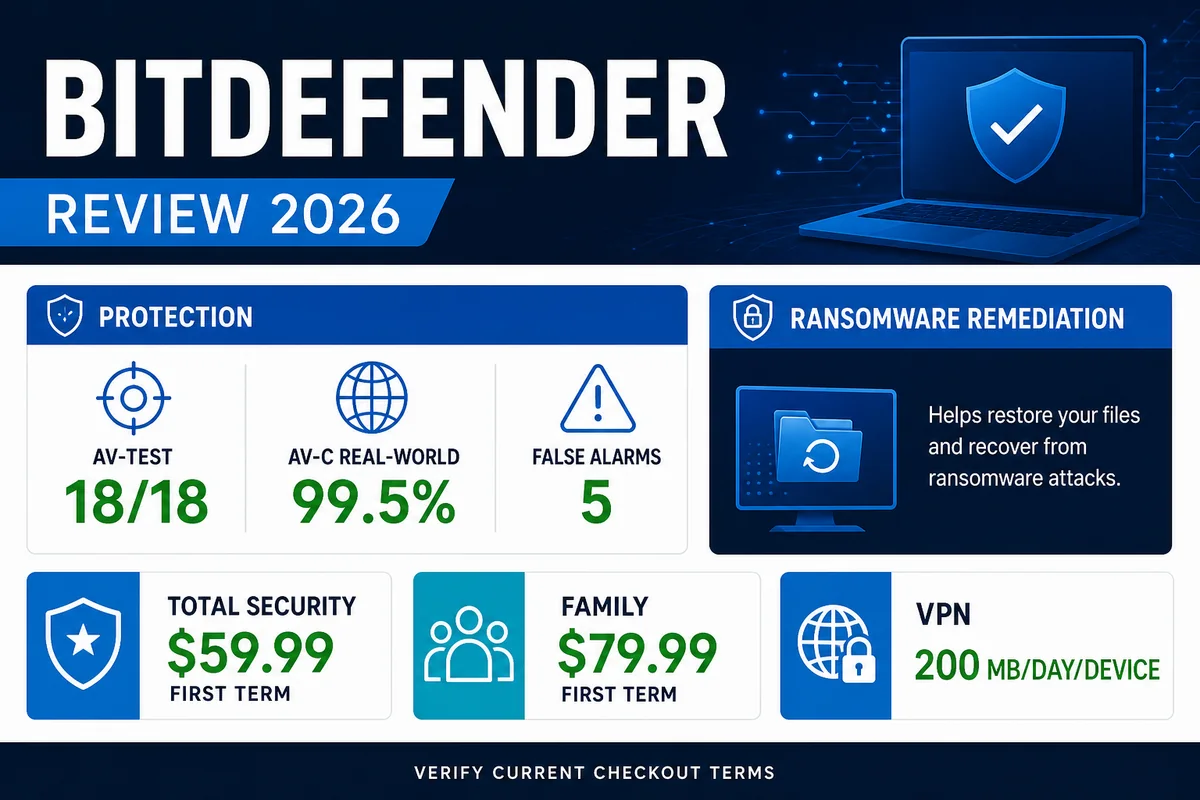
Our verdict: Bitdefender Total Security is worth considering if you want a paid cross-platform suite with excellent current protection evidence, phishing and ransomware defenses, a firewall, Safepay and a password manager. Skip or trial it carefully if Microsoft Defender already meets your needs, you need an unlimited VPN, or your PC is sensitive to background security software. Our current editorial rating is 9.0/10; that's one editorial review, not a reader aggregate.
Need a different Bitdefender task? The complete Bitdefender guide hub routes plans, Free versus paid, setup, VPN, troubleshooting, performance, billing and removal without mixing their steps.
- Strong results across several current independent tests
- Useful Windows defenses beyond basic file scanning
- Five-device Individual and 25-device Family choices
- Password Manager included with Total Security
- 30-day refund policy for eligible direct purchases and renewals
- Total Security VPN is limited to 200 MB/day/device
- Renewal can move from a promotional price to the standard price
- Performance isn't the lightest in every current test
- Features differ materially across Windows, Mac, Android and iOS
- Recent users report friction finding renewal controls
Bitdefender Total Security at a glance
Bitdefender sells several consumer plans, but Total Security is the sensible reference point for this review. It covers Windows, macOS, Android and iOS, includes the vendor's core security tools, adds Password Manager and gives each device 200 MB of Standard VPN traffic per day. The Individual option covers one account and five devices; the Family option expands that to five accounts and 25 devices and adds parental controls.
The protection case is strong. Bitdefender Total Security 27.0 earned 18/18 in the current AV-TEST May–June 2026 Windows 11 home-user test. It also blocked 398 of 400 cases in AV-Comparatives’ February–May 2026 Real-World Protection Test. Those results don't make the product flawless: two cases compromised the test system and it produced five false alarms in that real-world cycle.
The buying decision comes down to the extras and the friction. Total Security supplies more defense layers and cross-platform management than the built-in Windows option, but an informed buyer should compare the first-term price with the future standard price, decide whether 200 MB of daily VPN traffic is useful, and test impact on the actual PC before the refund period closes.
Choose and compare
Start with plans, first-term pricing and renewal, check Free versus paid, or compare the six best-fit alternatives.
Install and configure
Use the safe setup guide for Central, Windows, Mac and mobile permissions, then test whether the Bitdefender VPN fits the plan and devices.
Fix a problem
Route service, update, scan, website and connectivity faults through functional troubleshooting. Diagnose sustained CPU, RAM or disk use separately.
Cancel or remove
Stop renewal or request a refund through the correct seller, then follow the supported complete-removal sequence if the product is leaving the device.
Bitdefender lab test results in 2026
No single percentage tells you whether an antivirus is “the best.” AV-TEST exposes protection, performance and usability under one protocol. AV-Comparatives runs separate real-world, malware-protection and performance tests. The product build, test dates, compromised cases and false alarms belong beside the headline score.
| Independent test | Period / build | Bitdefender result | What it means |
|---|---|---|---|
| AV-TEST Windows 11 | May–June 2026 Total Security 27.0 | 6/6 protection 6/6 performance 6/6 usability | 18/18 and Top Product under AV-TEST's current default-setting protocol. |
| AV-C Real-World Protection | February–May 2026 400 cases | 99.5% protected 2 compromised 5 false alarms | Excellent live-web protection with a small but visible error cost; Advanced+. |
| AV-C Malware Protection | March 2026 10,030 samples | 97.6% offline detection 99.94% online protection 4 false alarms | Cloud connectivity improved the final protection outcome; Advanced+. |
| AV-C Performance | April 2026 Low-end Windows 11 PC | Total impact: 9.6 AV-C 85 / Procyon 95.4 | Good overall, but several rivals were lighter in this cycle. This isn't a protection score. |
Why the results look different
AV-TEST's 6/6 protection rating and AV-Comparatives' 99.5% real-world rate aren't a contradiction. They use different sample sets, time windows and scoring systems. The malware-protection test also separates detection from protection: a product can miss a file at first and still prevent it from harming the system through later behavior, reputation or cloud checks. That's why we preserve the lab's own labels instead of averaging incompatible numbers into a made-up “protection percentage.”
False positives still matter
Five false alarms across the real-world cycle isn't disastrous, but it's part of the product's usability cost. Developers, gamers and people running specialist business software should test their actual workflow. A protection tool that repeatedly interrupts safe work can train a user to ignore the next warning, so a near-perfect block rate doesn't erase alert quality.

Bitdefender pricing and plan choice
The US consumer plan page displayed the following first-term prices when rechecked on July 29, 2026. They're a dated snapshot, not a promise: tax, country, device choice, retail promotions and renewal pricing can change the amount.
| Plan | Individual first term | Family first term | Key difference |
|---|---|---|---|
| Total Security | $59.99/year | $79.99/year | Password Manager; Standard VPN limited to 200 MB/day/device. |
| Premium Security | $79.99/year | $99.99/year | Adds unlimited VPN; stronger fit if VPN use is part of the purchase. |
| Ultimate Security | $89.99/year | $119.99/year | Adds identity and scam-protection services whose availability can vary by market. |
| Ultimate Security Plus | $119.99/year | $179.99/year | Highest bundle; verify that every identity feature works in your region before paying. |
Total Security is the value choice when antivirus and security tools are the objective and 200 MB of daily VPN traffic is only an emergency allowance. It's the wrong plan if you expect to stream, work remotely or route ordinary browsing through Bitdefender VPN. Compare every current plan and renewal route, then read the standalone VPN review before paying for Premium Security solely because “unlimited” appears higher in the table.
For a household, the Family version's five accounts and 25 devices are more useful than forcing everyone through one login. It also includes parental controls. A single user with a laptop, desktop and phone can usually stay with the five-device Individual tier.

Features that materially improve security
Layered malware and ransomware defense
On Windows, Bitdefender combines real-time file protection with Advanced Threat Defense for suspicious process behavior, Network Threat Prevention, web-attack prevention, anti-phishing, ransomware remediation and a Rescue Environment for threats that are difficult to remove while Windows is running. The current lab results are the evidence that these layers work as a system; the feature count alone isn't proof.
Safepay, firewall and sensitive-device controls
Safepay opens banking and payment sites in an isolated browser designed to reduce interference from the normal desktop. The suite also includes a firewall, Wi-Fi Advisor, microphone and webcam controls and a file shredder. Safepay is one of the clearer reasons to pay if a user wants a dedicated banking environment. The file shredder is less important on modern encrypted SSDs than the marketing list suggests, and none of these tools replaces full-disk encryption or a tested backup.
Password Manager and breach alerts
Total Security now includes Bitdefender Password Manager and data-breach detection. Inclusion removes one old bundle weakness, but existing 1Password, Bitwarden or Apple/Google password-manager users don't gain much from migrating solely for bundle neatness. A password manager is only useful when unique passwords, multifactor authentication and recovery details are actually configured.
Autopilot, profiles and cleanup utilities
Autopilot recommends settings, while game, movie and work profiles adjust notifications and background behavior. Photon is Bitdefender's adaptation layer for system performance. OneClick Optimizer and other cleanup tools are conveniences, not reasons to select an antivirus. Treat a registry or cleanup claim cautiously and keep the security decision centered on protection, false alarms, performance and support.
Windows, Mac, Android and iOS aren't the same product
“Covers four platforms” doesn't mean every device receives the Windows feature set. Windows is the fullest version, with the firewall, behavior monitoring, vulnerability tools, ransomware layers and Safepay. macOS operates under Apple's security model and has a narrower set of controls. Android can perform on-demand and on-install app scanning and add web/scam defenses.
iOS security apps can't scan the whole iPhone filesystem like a Windows antivirus. Bitdefender's iOS value comes from web protection, scam/calendar checks, account-privacy alerts and related network defenses. A buyer who wants one dashboard for a mixed household can still benefit, but shouldn't describe iPhone coverage as a full malware scan.
Best platform fit
Windows 11 receives the deepest feature set and the strongest directly applicable 2026 public lab evidence cited in this review.
Check before buying
Confirm each required feature on the platform-specific page. Parental controls, identity services and VPN details can also depend on plan and market.

Performance: fast enough for most PCs, not always invisible
Current evidence supports a balanced verdict, not a “zero impact” slogan. Bitdefender received 6/6 for performance in AV-TEST’s May–June 2026 cycle. In AV-Comparatives’ separate April benchmark on a low-end Windows 11 machine, its total impact score was 9.6. That was respectable but behind lighter results from McAfee, Kaspersky, ESET, Trend Micro, Norton, Avast and AVG in that specific test.
PCWorld's April 2026 review likewise found strong protection but warned that the suite could have noticeable impact on some systems. Current community reports split: one February r/BitDefender user reported high CPU/RAM and gaming lag, while another user in the same discussion showed minimal idle impact on a much higher-spec desktop. That disagreement is exactly why an average benchmark can't predict one PC.
Install only one full real-time antivirus, let the first update and initial scan finish, then test cold boot, browser launch, large file copies, game launch, development builds and the VPN or backup software you already use. Check Task Manager after idle and during updates. If the machine remains sluggish after the initial scan, follow the bdservicehost CPU, memory and disk decision path and collect support evidence rather than disabling core protection until the numbers look better.
Auto-renewal, refunds and support
Bitdefender says it emails renewal details 45 days before billing. For a direct purchase made with the same email as the Bitdefender Central account, the expected path is My Subscriptions → My Payments → View Details → Manage your subscription and renewal options. The official auto-renewal guide also documents a Verifone route, which matters when the payment processor rather than Central holds the renewal setting.
Don't assume that adding a cheaper retail activation code automatically cancels an existing recurring subscription. Check every active order and payment source. The official renewal page says prices can change and a first-term discount may not carry forward. That commercial model is common in consumer security software, but the buyer still deserves to see it before checkout.
The official refund policy provides a 30-day money-back guarantee for an eligible initial direct purchase or automatic renewal. Purchases from Amazon, Newegg or another retailer follow that seller's refund process. Save the order email and test promptly; a refund window is useful only if the user knows where the order was placed.
Bitdefender advertises 24/7 expert assistance. For a performance or renewal problem, include the product build, operating system, order channel, Central email and exact reproduction steps. Use the cancellation and refund guide to separate stopping the next charge, requesting money back and uninstalling the app.
What current Bitdefender users are reporting
The most consistent 2026 complaint isn't malware detection. It's the gap between a discounted first year or cheap retail code and the standard auto-renewal price. In a March 2026 r/BitDefender discussion, a Bitdefender representative confirmed that an initial promotion can apply only to the first year and that auto-renewal is processed at the standard price. A July 2026 thread shows both sides of the management experience: some users could cancel in Central, while a long-time customer with a third-party key needed the Verifone route.
Performance reports are mixed rather than uniformly negative. The February 2026 CPU/RAM discussion includes a complaint about gaming lag and a counterexample from a faster system. Current Bitdefender Expert Community posts also include individual reports of high memory use or slower boot. These reports identify compatibility questions worth testing; they can't establish how often an issue occurs.
Positive sentiment tends to center on strong protection and cheap legitimate retail codes. That may improve first-year value, but a retail bargain doesn't change the need to verify seller, region, device count, activation timing, refund route and any separate existing auto-renewal.
Who should choose Bitdefender—and who shouldn't
Choose Total Security if…
- You want stronger third-party protection evidence than a vague brand reputation.
- You need a Windows firewall, Safepay, webcam/mic controls and password manager in one subscription.
- You protect up to five personal devices or need a 25-device household plan.
- You'll test performance and renewal settings during the first 30 days.
Keep looking if…
- Updated Microsoft Defender already meets your needs and you don't need bundle features.
- You expect unlimited VPN traffic from Total Security.
- Your priority is the lightest result on an older or highly specialized PC.
- You dislike promotional first terms and active renewal management.
Bitdefender is especially persuasive for a mixed-device household that wants one security dashboard and real Windows extras. It's less persuasive for a careful single-PC Windows 11 user who already has a password manager and VPN. That user may pay mainly for a protection upgrade whose practical value depends on browsing habits, account security and willingness to manage another subscription.
Bitdefender vs Microsoft Defender, Norton, ESET and Avast
| Alternative | Choose it instead when… | Trade-off to check |
|---|---|---|
| Microsoft Defender | You want competent built-in Windows protection with no separate antivirus bill. | Fewer cross-platform bundle features and a different support experience. |
| Norton 360 | Cloud backup, unlimited VPN in the chosen plan or family/identity bundle matters more. | Renewal pricing, upsells and exact regional features. |
| ESET | You value a lighter current performance result and granular controls. | Fewer all-in-one extras for some households. |
| Avast Free | You need a capable free third-party option and accept upgrade prompts. | Advertising, privacy history and which features require payment. |
Start with the reason-first Bitdefender alternatives guide, then use a direct comparison for the final two: Bitdefender vs Norton, ESET vs Bitdefender, Microsoft Defender vs Bitdefender, Bitdefender vs McAfee, Bitdefender vs Avast or Bitdefender vs Malwarebytes. Read the evidence dates on the comparison, not only its headline year.
Use the 30-day window as a real compatibility test
- Record the transaction. Save the first-term price, standard/renewal language, device count, seller and order email.
- Remove the old third-party suite. Don't benchmark two real-time antivirus products fighting over the same files.
- Finish the initial update and scan. Early CPU, disk and memory use can be higher while the baseline is built.
- Test your actual workload. Reboot, browse, copy large files, start games, compile code, join calls and use the VPN/backup tools you rely on.
- Check false alarms. Restore only files you independently know are safe; report repeat detections rather than globally excluding a working folder.
- Verify every platform. Confirm that the Mac, Android or iOS feature you expected actually exists in the chosen plan.
- Review Central. Confirm all devices, payment entries and auto-renewal state. Set a reminder before the 45-day notice if you plan to compare renewal offers.
- Decide before day 30. If performance, alerts, VPN limits or subscription handling fail the test, use the correct direct-vendor or retailer refund route.
For a clean baseline, follow the installation and setup sequence. If the trial fails, cancel billing separately and use the supported uninstall guide; deleting the app doesn't request a refund.

Frequently asked questions about Bitdefender
Is Bitdefender good in 2026?
Yes. Bitdefender Total Security 27.0 earned 18/18 in AV-TEST's May–June 2026 Windows 11 test and 99.5% protection with five false alarms in AV-Comparatives' February–May real-world cycle. It remains a strong paid choice, though no product blocks every threat in every test.
Is Bitdefender Total Security worth paying for?
It's worth the first-term price for users who need its Windows security layers, Safepay, firewall, password manager and multi-device management. It's less compelling if Microsoft Defender already meets your needs or if you already pay for a password manager and VPN. Compare the renewal price, not only the promotion.
Does Bitdefender Total Security include an unlimited VPN?
No. Total Security includes Standard VPN traffic limited to 200 MB per day per device. Bitdefender's current Premium and Ultimate plans include unlimited VPN. Heavy VPN users should compare the higher plan with keeping a separate VPN.
Does Bitdefender slow down a PC?
Current lab results are good, but impact varies. Bitdefender received 6/6 performance from AV-TEST, while its 9.6 total-impact result in AV-Comparatives' April 2026 test wasn't the cycle's lightest. Test boot, apps, games, file copies and updates on the actual PC during the refund window.
Is Bitdefender better than Microsoft Defender?
Bitdefender provides stronger bundle features and excellent current third-party lab evidence, but Microsoft Defender is a credible built-in option on an updated Windows 11 PC and costs no separate subscription. Bitdefender makes more sense when its extra layers, cross-platform management or support solve a real need.
How many devices does Bitdefender Total Security cover?
The current Individual version covers one account and five devices. The Family version covers five accounts and 25 devices and adds parental controls. Confirm the count and supported operating systems at checkout because regional offers can change.
Can I turn off Bitdefender auto-renewal?
Yes. Bitdefender documents management through Bitdefender Central under My Subscriptions and My Payments, or through Verifone for applicable orders. Check the exact order and payment source; adding a retail code doesn't necessarily cancel another recurring subscription.
Does Bitdefender offer a money-back guarantee?
Bitdefender states a 30-day money-back guarantee for eligible initial direct purchases and automatic renewals. A purchase from Amazon, Newegg or another retailer follows that seller's refund process, so keep the receipt and test the product promptly.
Final verdict: strong protection, conditional value
Bitdefender earns its place near the top of a 2026 paid-antivirus shortlist. The case is built on current independent results rather than a recycled award badge: 18/18 from AV-TEST, 99.5% protection in AV-Comparatives' real-world cycle and 99.94% online protection in its malware test. Total Security also gives Windows users meaningful extras—behavior monitoring, ransomware layers, Safepay, a firewall, webcam/mic controls and Password Manager.
The caveats are concrete. Two real-world test cases still compromised the system. The product generated false alarms. Its current AV-Comparatives performance result wasn't the lightest. Total Security's VPN is an emergency-size 200 MB/day/device, and promotional pricing can turn into a standard-price renewal. None is a reason to reject Bitdefender outright; together they're a reason to buy with eyes open.
Bottom line: choose Bitdefender Total Security when you want a well-evidenced paid security suite and will actively check compatibility and renewal. Keep Microsoft Defender or compare ESET when simplicity, cost or lighter impact matters more. Choose a higher Bitdefender plan only when unlimited VPN or regional identity features justify the difference—not because the checkout page made the biggest bundle look safer.
Continue your antivirus research
Compare the full shortlist in our best antivirus software guide, browse the product review directory, or read how we separate lab evidence, vendor claims and community signals.