
Email Security in 2026: Twelve Ways to Protect Your Inbox
Your inbox isn't just another account. It resets passwords for banking, shopping, cloud storage and social media, stores invoices and identity documents, and can impersonate you to every saved contact. The strongest practical setup combines a passkey or phishing-resistant MFA, a unique account password, safe link and attachment handling, reviewed recovery settings and—if you own the sending domain—correct SPF, DKIM and DMARC.
Quick answer: protect the email account first with a unique generated password plus a passkey or hardware security key. Review active sessions, recovery methods, connected apps and forwarding rules. When a message creates urgency, don't use its link, phone number, QR code or attachment; open the known app or type the real site yourself and verify a payment or credential request through a second channel. Domain owners should authenticate every legitimate sender with SPF and DKIM, monitor DMARC reports, then move deliberately from p=none to enforcement.
- Unique password, passkey and offline recovery codes
- Provider phishing/spam filtering and fast user reporting
- Known-site navigation instead of message links
- Separate verification for payments and sensitive data
- Session, forwarding, OAuth and recovery-factor review
- Good spelling, a familiar logo or a display name
- A padlock/HTTPS connection to the linked site
- SPF, DKIM or DMARC passing for a lookalike domain
- An attachment scanning clean once
- A reply inside a previously legitimate conversation
Why email security matters more than the inbox itself
Email is commonly the recovery root for the rest of a person's digital life. Someone who controls it can request password-reset links, hide the resulting alerts, read one-time codes, search for tax or identity documents and send convincing replies from a real address. A mailbox takeover can therefore become bank fraud, cloud-account loss, identity theft or business email compromise without malware ever landing on the computer.
The current damage isn't hypothetical. The FBI's 2025 Internet Crime Report, released in 2026, says reported cyber-enabled losses approached $21 billion and lists business email compromise behind investment fraud among the largest loss categories. A May 2026 FBI notice put 2025 BEC losses at approximately $3 billion. Complaint data undercounts incidents that are never reported, but it establishes the financial stakes without recycling a vague “90% of attacks” statistic.
Email is no longer the only social-engineering channel. Verizon's 2026 DBIR found median successful click rates in mobile-oriented simulations such as text and voice were 40% higher than via email. That changes the defensive habit: an email that tells you to “call support,” scan a QR code or continue in Teams/WhatsApp is still one attack chain. Moving off the inbox doesn't make the request authentic.
Generative text also weakens the old “bad grammar equals phishing” shortcut. Spelling mistakes remain a clue, but polished language, local context and a copied signature are cheap. The reliable questions are who controls the actual domain, where the action leads, whether the request fits normal behavior and whether it survives verification through a channel the sender didn't provide.
What email security includes—and which layer stops what
| Layer | Main job | Useful controls | Doesn't prove |
|---|---|---|---|
| Account identity | Stop mailbox takeover | Passkey/security key, unique password, session and recovery review | That every received message is honest |
| Provider filtering | Block spam, known malware, malicious links and impersonation patterns | Reputation, attachment detonation, URL rewriting, user reports | That anything reaching the inbox is safe |
| Domain authentication | Let receivers evaluate authorized use of a sending domain | SPF, DKIM, DMARC and reports | The identity of a human or truth of the content |
| Transport/content encryption | Limit who can read messages in transit or end to end | TLS, S/MIME, OpenPGP/PGP-MIME | That an encrypted sender is trustworthy |
| Endpoint and browser | Reduce malicious file/script execution | Updates, browser isolation, antivirus, protected document views | That credential entry on a fake site is safe |
| Process and people | Stop fraudulent actions after a believable message arrives | Call-back verification, payment approval, reporting and rehearsed recovery | That technology will catch every pretext |
“Email security software” can mean a consumer mail provider's built-in filter, a business secure email gateway, an API-based cloud scanner, endpoint antivirus or an encryption product. Those categories overlap but aren't interchangeable. A gateway can quarantine a malicious attachment; it can't repair a reused mailbox password. A passkey can stop credential phishing; it can't tell an accounts-payable employee whether a real vendor's payment change is fraudulent.

Twelve email security protections to apply now
1. Give the mailbox a unique password
Generate and store a long random password in a password manager. The email password must never be reused because breach stuffing against an inbox opens the recovery path to other accounts. Our password manager comparison covers free, family and local-vault choices.
2. Add a phishing-resistant sign-in
Prefer a passkey or FIDO2 hardware security key. Register a backup key or another strong recovery method before removing weaker factors. An authenticator app is a reasonable fallback; SMS is better than password-only but remains vulnerable to social engineering and number takeover.
3. Protect the recovery path
Review recovery email, phone, trusted devices and one-time codes. A forgotten address or old phone number can bypass a strong daily sign-in. Store recovery codes offline, not solely as a message inside the mailbox they unlock.
4. Review sessions and connected apps
Remove unknown devices, app passwords, delegated mailboxes and OAuth applications. A password change may not revoke every session or third-party grant. Recheck after any security alert and quarterly for a high-value account.
5. Inspect forwarding and inbox rules
Attackers create rules to forward messages, hide security alerts, mark mail as read or delete replies. Review global forwarding, filters, rules, delegates, automatic replies and POP/IMAP access—not only the password.
6. Navigate independently
For a bank, payroll, Microsoft, Google or delivery alert, open the known app, a saved bookmark or a manually typed address. Don't use the message's button, QR code, phone number or “unsubscribe” link to investigate the message itself.
7. Verify requests on a second channel
Call the known number already on file or start a fresh message to a saved contact. Never verify a payment change by replying to the same thread: a compromised mailbox can send and answer both sides.
8. Preview before opening
Use the mail provider's safe preview where possible. Don't enable macros or lower security settings to make a document display. Password-protected archives deserve extra care because they can limit automated inspection.
9. Report instead of silently deleting
Use the provider's Report phishing or Report spam control so reputation systems can learn and administrators can search for related messages. Preserve headers and the original message when security or law enforcement needs evidence.
10. Keep every reading device current
Update the operating system, browser, mail client, PDF reader and office suite. Remove unsupported plug-ins and legacy mail apps that require app passwords or old authentication. Endpoint protection is the last layer when a file reaches the device.
11. Separate identities by risk
Use a private recovery address that isn't published for shopping, newsletters or public contact. Businesses should separate daily user, finance approval, support, automation and administrator identities. Aliases reduce exposure but aren't authentication factors.
12. Back up what can't be recreated
Export critical messages and attachments according to the provider's supported method and keep a protected, tested copy. Retention and archive aren't the same as backup, and syncing an attacker-deleted mailbox can propagate the deletion.
How to inspect a suspicious email without trusting one clue
Start with the full sender address, not the display name. Look for a subtly different domain, unexpected subdomain, free-mail address used for a company role or Reply-To that changes the destination. A message from [email protected] is controlled by example-security.com, not example.com. Unicode lookalikes and mobile truncation make visual checking useful but imperfect.
Then inspect the request. Urgency, secrecy, gift cards, cryptocurrency, changed payment details, password resets, document-share invitations and “unusual sign-in” alerts are common pretexts because they push action before verification. A familiar thread isn't proof: attackers can compromise a participant and reply with a malicious invoice or new bank account inside the real conversation.
Hover over a desktop link without clicking or long-press cautiously where the mobile client shows a preview. Read the registrable domain and destination path. HTTPS means the connection to that site is encrypted; phishing sites receive valid TLS certificates too. A URL reputation service can help, but uploading a confidential one-time document link to a public scanner can expose the link or token. Prefer the organization's internal security team for sensitive URLs.
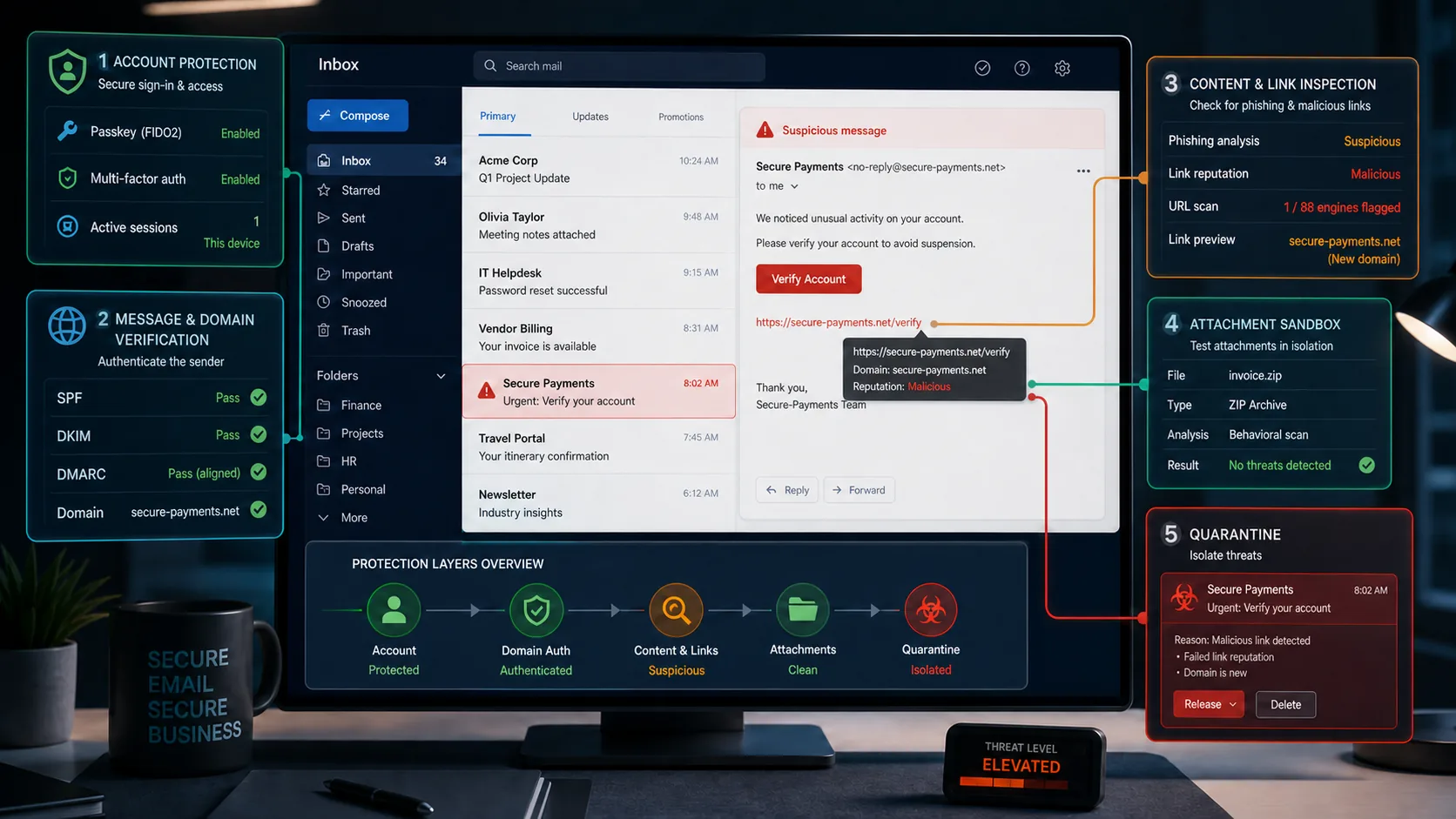
Authentication results in the raw headers add evidence for technical users. A DMARC pass means an SPF or DKIM identity aligned with the visible From domain under the evaluated policy. It doesn't mean the domain resembles the brand it claims to be, that the display name is honest or that the content was reviewed. That's why our feature image deliberately shows a lookalike secure-payments.net passing authentication for itself while link inspection still flags it.

Links, QR codes and attachments: a practical handling policy
| Message content | Common risk | Safer response | Never rely on |
|---|---|---|---|
| Login or account button | Credential phishing / session-token theft | Open the known app or bookmark; use a passkey | Logo, HTTPS or a familiar page design |
| QR code | Hides the destination and moves inspection to a phone | Don't scan from unsolicited mail; navigate independently | The printed domain or “secure” badge beside it |
| Office/PDF document | Exploit, malicious link, fake invoice or macro prompt | Verify sender/request; use safe preview; keep software updated | A familiar extension or antivirus scanning clean |
| ZIP/ISO/password archive | Conceals executable/script content from filtering | Confirm through a second channel; ask for an approved sharing method | A password supplied in the same email |
| Changed payment details | Business email compromise / conversation hijack | Call the previously known number; require dual approval | A reply inside the existing thread |
| Unsubscribe link | Confirms a live address or leads to a malicious site | Use provider spam controls for unsolicited mail; unsubscribe only from known senders | The legal-looking footer |
No extension is intrinsically safe. A PDF can contain a phishing link; an HTML file can build a fake sign-in form; a calendar invitation can carry a malicious URL; a cloud-share notification can point to a real hosting service containing hostile content. The decision starts with whether the sender and business purpose were independently verified, not with whether the icon looks like a document.
Antivirus remains useful after an attachment reaches the device, especially for known malware and behavior. It can't validate a new bank account number or prevent a user from typing credentials into a convincing allowed website. See our current Windows security comparison and secure browser guide for the endpoint layer.
Passkeys, MFA and recovery: secure the account without locking yourself out
Google's current account-security guidance recommends Security Checkup, passkeys and stronger second steps such as security keys. Passkeys use public-key credentials bound to the real service, so a fake site can't receive the secret the way it can receive a typed password or one-time code. They're phishing-resistant, not consequence-free: anyone who can unlock a trusted device may be able to use the passkey, and recovery still needs planning.
For a high-impact mailbox, register at least two independent strong methods where the provider allows it: for example, a device-bound passkey and a hardware key stored separately. Keep offline recovery codes in a protected physical or encrypted location. Don't use the protected mailbox itself as the only recovery address, and don't leave an ex-employee's phone or a discarded number as a fallback.
Authenticator codes are preferable to password-only access but can be phished in real time. Push prompts can be abused through fatigue. SMS adds risk from SIM swaps and carrier social engineering. These are reasons to prefer stronger factors, not reasons to disable MFA. If passkeys are unavailable, a unique password plus authenticator app and careful recovery review is still a substantial improvement.
Check app passwords and “Sign in with Google/Microsoft” grants. Legacy mail clients sometimes use a special password that bypasses the normal interactive challenge. OAuth applications can retain mailbox access without knowing the current account password. Remove anything unrecognized or no longer used and reauthorize only through the provider's official screen.
Email encryption: transport TLS isn't end-to-end secrecy
Most large providers encrypt the connection between your device and their service with HTTPS/TLS and negotiate TLS between mail servers when supported. That protects against passive interception on those links, but the providers generally process plaintext to deliver, filter, search and sync mail. A lock icon doesn't mean only sender and recipient can read the message.
End-to-end message protection uses standards such as S/MIME or OpenPGP/PGP-MIME so content is encrypted and/or signed with keys tied to the participants. The IETF's current RFC 9787, published in August 2025, explains both approaches and the hard operational parts: certificate/key discovery, key validation, encryption to the sender for access to sent mail, key rotation and recovery.
Encryption is appropriate for organizations with a defined confidentiality need and managed keys, but it doesn't neutralize phishing. An attacker with a valid encrypted identity can send a malicious request; a compromised endpoint can read content after decryption; and a recipient without the correct key may receive an unusable message. Don't bolt PGP onto a household and call it secure without testing backup, revocation and every device.
For ordinary users, a reputable provider, strong account authentication and safe document-sharing service may reduce more real risk than manually managed email keys. For regulated or legal workflows, obtain organizational guidance on retention, e-discovery, escrow and recipient identity before selecting S/MIME, OpenPGP or a secure portal.
SPF, DKIM and DMARC in 2026: what domain owners must configure
This section is for anyone sending mail from a domain they control. A Gmail or Outlook consumer doesn't add SPF to a laptop; the domain owner or mail administrator publishes authentication data and configures every sending platform.
SPF publishes which infrastructure may use a domain in the SMTP envelope. DKIM adds a cryptographic signature associated with a signing domain. DMARC connects an authenticated SPF or DKIM identity to the domain visible in the From header through alignment, publishes a handling policy and requests reports.
The standards changed during this audit cycle. RFC 9989, published in May 2026, is now the current DMARC specification and obsoletes RFC 7489 and RFC 9091. It recommends using both SPF and DKIM underneath DMARC and clarifies that DMARC addresses unauthorized use of an Author Domain. It explicitly doesn't authenticate display names, people or message content.
| Control | What it answers | Safe deployment order | Frequent mistake |
|---|---|---|---|
| SPF | Is this SMTP sender authorized for the envelope domain? | Inventory every mail service; publish one accurate record; remove retired senders | Assuming SPF alone authenticates the visible From address or survives every forwarding path |
| DKIM | Does a valid signature match the published signing-domain key? | Enable signing on every service; rotate selectors/keys; monitor failures | Signing with a domain that doesn't align or leaving a forgotten service unsigned |
| DMARC | Does aligned SPF or DKIM pass, and what policy/reporting does the domain publish? | Start reports at p=none; fix legitimate sources; stage quarantine/reject; monitor | Publishing p=reject before discovering payroll, CRM, support and marketing senders |
| TLS | Was the server-to-server transport encrypted? | Require modern TLS where the provider supports policy/reporting | Calling transport encryption sender authentication or end-to-end encryption |
Google's current sender guidelines recommend SPF, DKIM and DMARC for domains, while its bulk-sender requirements enforce authentication, alignment, TLS, DNS and spam-rate conditions. Treat those as delivery requirements plus anti-spoofing controls—not a guarantee that the content is benign.
Don't copy a generic DNS record without inventorying every real sender: Google Workspace or Microsoft 365, the website form, CRM, ticketing system, payroll, invoicing, transactional service and marketing platform. Start DMARC reporting, identify aligned legitimate traffic, repair it, then increase policy. Reports contain operational data and need secure storage and analysis; a managed service can be worthwhile for a domain with many senders.

Which email security solution fits a person or small business?
For an individual: start with a maintained major provider, passkey support, security-event visibility, useful spam/phishing reporting and account recovery you can operate. Gmail, Outlook.com, iCloud Mail and privacy-focused providers make different trade-offs, but switching providers doesn't compensate for a reused password or unsafe recovery phone.
For a family: use separate accounts, not one shared mailbox password. Create explicit shared addresses or aliases for household bills, keep private recovery addresses separate and document who can recover what. A family password manager can share account credentials or emergency records without exposing every person's private vault.
For a small business: use a managed business mail tenant rather than consumer accounts for company identity. Require phishing-resistant MFA, block legacy authentication, separate administrator accounts, preserve audit logs, control forwarding/OAuth apps and configure domain authentication. Finance needs a payment-change verification process that doesn't depend on replying to email.
For a regulated or frequently targeted organization: evaluate a secure email gateway or API-based cloud email security product, sandboxing, data-loss prevention, impersonation protection, encrypted portals, retention and incident-search capability. Run a proof of concept against the organization's real mail flow; another filter can create false positives and operational blind spots as well as catch threats.
A home firewall isn't an email filter, though it remains part of endpoint defense. The rebuilt firewall software guide explains why application/network rules can't determine whether a legitimate HTTPS invoice contains fraudulent bank details.
What to do if an email account is hacked
- Use a known-clean device and the official recovery page. Type the provider address yourself. If the device may be infected, update and scan it before entering the new credential.
- Regain control and change the unique password. Follow the provider's account-recovery process, then generate a password used nowhere else. Don't follow a “security” link from the suspicious email.
- Sign out sessions and remove unknown devices. Use the provider's global sign-out where available, then revoke unfamiliar passkeys, security keys, authenticator methods, app passwords and trusted devices.
- Repair recovery and delegated access. Restore the correct recovery email/phone, remove unknown delegates and connected accounts, and inspect third-party OAuth applications with mail permissions.
- Delete malicious forwarding, filters and rules. Check automatic forwarding, inbox filters, hidden/deleted mail, POP/IMAP access, automatic replies and aliases. A password change alone doesn't remove these persistence paths.
- Inspect what the attacker did. Review recent security activity, Sent, Trash, Archive and sign-in logs. Search for password-reset, verification, invoice and bank messages that reveal which other accounts were targeted.
- Protect downstream accounts and people. Reset high-impact accounts from their official sites, beginning with banking, password manager, phone carrier and cloud storage. Warn contacts not to trust recent links, payment requests or emergencies sent from you.
- Report fraud and preserve evidence. Contact the financial institution immediately for a fraudulent transfer, report business email compromise to FBI IC3 in the US, and keep headers, times, addresses and transaction details for the provider and authorities.
The FTC recovery guide specifically tells users to sign out devices, enable 2FA, correct recovery information, inspect forwarding rules and notify contacts. Microsoft similarly tells compromised Outlook users to review connected accounts, forwarding and automatic replies; its global sign-out can take up to 24 hours.
If an attacker changed the password, don't pay a “recovery expert” found in replies or direct messages. Use only the provider's official recovery and support paths. For a work account, notify the administrator immediately; the team may need to search organization-wide, revoke tokens and preserve logs before they expire.

Small-business email security controls that deserve policy
A business should decide in advance who can approve a new payee, payroll change, gift-card purchase or data release. Require a call to a previously recorded number and a second approver for high-risk changes. “The CEO emailed me” isn't an approval control, even when the message truly came from the CEO's compromised account.
Separate daily use from administration. An administrator shouldn't browse ordinary mail all day with the account that can change domain-wide rules. Limit external forwarding, review mailbox delegation, require modern authentication and keep audit logs long enough to investigate. Remove departing users' sessions and app grants, not only their password.
Train with reporting, not shame. Users need a visible button and a response path for uncertain messages. Measure how quickly a report reaches the security owner, whether similar mail can be found and removed, and whether finance follows call-back procedure. Click-rate theater can encourage hiding mistakes instead of early reporting.
Back up or archive according to business recovery and legal requirements. Microsoft 365 or Google Workspace retention isn't automatically an independent backup; deletion, compromise and policy can affect synchronized or retained data differently. Test a restore and document ownership before an incident.
Email security FAQ
What is email security?
Email security is the combination of account authentication, provider filtering, domain authentication, transport/content encryption, endpoint protection and human verification used to protect mailboxes, messages, domains and business actions. No single antivirus, gateway or encryption product covers all of those layers.
What is the most important way to secure an email account?
Use a unique generated password plus a phishing-resistant passkey or hardware security key, then secure recovery methods and review active sessions, connected apps and forwarding rules. The inbox often resets other accounts, so a reused password or weak fallback can undo otherwise strong security.
Does DMARC mean an email is safe?
No. DMARC evaluates aligned domain authentication and the domain owner's published policy. A criminal can register a lookalike domain and make SPF, DKIM and DMARC pass for that domain. DMARC doesn't authenticate a human, display name or message content and doesn't replace phishing inspection.
What is the difference between SPF, DKIM and DMARC?
SPF authorizes sending infrastructure for an SMTP envelope domain. DKIM validates a cryptographic signature associated with a signing domain. DMARC checks whether a passing SPF or DKIM domain aligns with the visible From domain, publishes policy and provides reporting. Domain owners should deploy all three deliberately.
Are passkeys better than email passwords and SMS codes?
Passkeys are phishing-resistant because the private key isn't typed into a fake site and the credential is bound to the real service. Protect the device lock and register a backup strong method. Where passkeys are unavailable, a unique password plus authenticator-app MFA is still much safer than password-only access.
Is an email safe if an antivirus scan finds nothing?
No. A scan may miss a new file, and many email attacks contain no malware: they steal credentials on a website, redirect a payment or persuade the recipient to disclose data. Verify the sender and request independently even when the attachment or link reputation is clean.
Does HTTPS make a link in an email trustworthy?
No. HTTPS encrypts the connection to the destination and confirms control of that domain; phishing sites routinely use valid certificates. Read the actual domain and navigate to the known service independently instead of using a message link to resolve an account alert.
What should I check after recovering a hacked inbox?
Sign out sessions, remove unknown devices and factors, correct recovery details, revoke app passwords/OAuth grants, inspect forwarding and inbox rules, review Sent/Trash/security logs, reset downstream accounts and warn contacts. A password change alone can leave forwarding or delegated access behind.
Final email security checklist
Start with the account that can reset everything else. Give the mailbox a unique password, add a passkey or security key, store recovery codes outside it, and review sessions, recovery methods, connected apps and forwarding rules. Those actions prevent and expose account takeover more reliably than buying a generic “email protection” label.
For every urgent message, move verification outside the message: open the known app, type the known site or call the number already on file. Treat attachments, QR codes, “unsubscribe” buttons and existing threads as untrusted until the request survives that check. Report suspicious mail so other copies can be found.
If you own a domain, the technical baseline is now the 2026 DMARC specification: configure every real sender for SPF and DKIM, collect DMARC reports, fix alignment and move to enforcement without breaking legitimate mail. Authentication reduces spoofing of your domain; it can't certify a lookalike domain or honest content. The strongest program combines the protocol, the account and the human process.