
Is Avast Secure Browser Good in 2026? Safe, but Read the Privacy Fine Print
Avast Secure Browser is a capable Chromium browser with unusually strong anti-phishing results, a useful tracker blocker and one genuinely differentiated Windows feature: Bank Mode. It isn't a magic privacy switch. The desktop VPN is paid, Bank Mode needs Avast Antivirus, strict blocking can break sites, and Avast's documented telemetry plus the Jumpshot enforcement history still matter when the product is sold on trust.
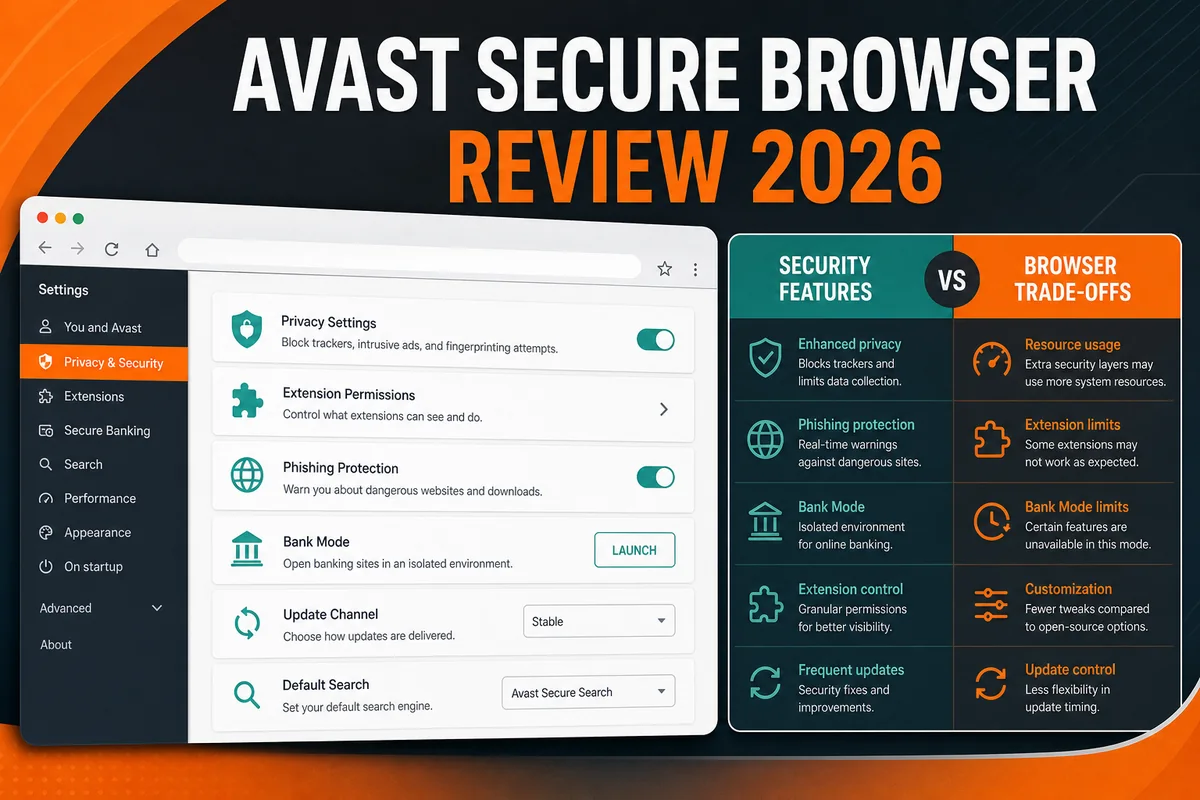
Quick verdict: Avast Secure Browser is good if you want Chrome-like compatibility with stronger default phishing, ad and tracker defenses—or if Bank Mode solves a specific Windows banking risk. We rate it 7.2/10. The current protection evidence is real: in AV-Comparatives' January 2026 browser test it blocked 94% of 250 live phishing URLs with no false alarms, then 89% in the March test. The privacy promise is more qualified. Avast's own policy documents URL processing for Web Shield, long-lived usage telemetry, identifiers, analytics partners and advertising relationships. That doesn't make the browser spyware, but it does make “private” a setting-by-setting claim rather than a reason to stop reading.
Need a different Avast task? The complete Avast guide hub routes review, plans, Free versus Premium, setup, troubleshooting, privacy, features, billing and removal without mixing their steps.
- Strong current anti-phishing results for a browser
- Chromium familiarity and Chrome extension compatibility
- Privacy Guard combines ad, tracker and fingerprinting controls
- Bank Mode creates a separate Windows desktop for sensitive sessions
- Clear Security & Privacy Center and automatic browser updates
- Free desktop browser doesn't hide your IP address
- Bank Mode isn't standalone and requires Avast Antivirus
- Current product policy discloses extensive telemetry and partner relationships
- Avast's Jumpshot history is directly relevant to a privacy-branded product
- Several protections are useful but not unique to Avast
Avast Secure Browser verdict at a glance
| What it's | A proprietary Avast browser built on Chromium, with Avast security, privacy and commercial features layered on top |
|---|---|
| Desktop platforms | Windows 10/11 and macOS; Windows 7/8/8.1 stopped receiving current builds in March 2026 |
| Mobile platforms | Android and iOS apps; mobile feature and VPN rules differ from desktop |
| Free desktop protection | Web Shield, Privacy Guard, anti-tracking/fingerprinting controls, Extension Guard, private mode, Hack Check and related browser tools |
| Desktop VPN | Not in the free tier; Avast Secure Browser PRO is needed to hide the desktop browser's IP address |
| Bank Mode | Windows only in practice and available only while Avast Antivirus is installed and running |
| Current PRO price observed | $39.99 for the first year covering five devices; $49.99 renewal price shown on the US page, checked July 23, 2026 |
| Independent browser test | 94% phishing block rate in January 2026 and 89% in March 2026, both with zero false alarms in AV-Comparatives tests |
| Privacy caveat | Local browser data is largely described as device-only, but Avast also documents URL processing, usage events, identifiers, analytics and advertising partners |
| Editorial rating | 7.2/10—strong security features, qualified privacy recommendation |
The browser is no longer called Aspen, and it isn't simply an extension that decorates Chrome. It's a separate Chromium-based application. That foundation gives it a familiar interface, website compatibility and access to Chrome-style extensions. Avast adds its own protection, privacy, sync, deal and product-promotion layers around the Chromium core.
“Secure” and “private” aren't synonyms. Security asks whether the browser resists phishing, malicious downloads, hostile extensions and exploitation. Privacy asks who receives browsing-related data, how long it's retained, which partners are involved and what defaults you accept. Avast performs better on the first question than many reviews admit; the second requires more qualification than Avast's landing page provides.
Current platforms, support and update status
Avast's current Secure Browser page offers the product for Windows, macOS, Android and iOS. The desktop product policy separately states that Secure Browser for Desktop is offered for Windows PCs and macOS. On supported desktop systems, the browser is designed to update automatically; the manual check lives under Menu → Help and About Avast Secure Browser → About Avast Secure Browser.
The restored article's Windows 7/8 advice is now unsafe. Avast's February 2026 end-of-support notice says new installation on Windows 7 and Windows 8/8.1 ended in March 2026. Existing copies remain on browser version 109 from January 2023 and receive no further browser updates. A security browser frozen at an old Chromium generation isn't a security upgrade; move the computer to a supported operating system.
Avast's FAQ currently lists Windows 10 and 11, Android 9 or later, and modern macOS releases, while noting that macOS Catalina stopped at browser version 116. Requirements pages can lag operating-system releases, so verify the live support page before installing on an older Mac. No browser label compensates for an unsupported OS underneath it.
Anti-phishing is the strongest evidence in Avast's favor
Most secure-browser reviews repeat Avast's old 2022 marketing result. We checked the current primary evidence instead. In AV-Comparatives' January 2026 anti-phishing comparison, Avast Secure Browser blocked 94% of 250 valid phishing URLs and produced no false alarms across 250 legitimate sites. Chrome blocked 72%, Edge 70%, Firefox 75% and Opera 74% in the same run.
The March 2026 follow-up is useful because it prevents us from turning one score into a permanent property. Avast Secure Browser blocked 89% with zero false alarms; Chrome scored 77%, Edge 78%, Firefox 76% and Opera 74%. Avast still led those mainstream browsers, but its result moved by five points between fresh URL sets.
| Browser | January 2026 | March 2026 | False alarms |
|---|---|---|---|
| Avast Secure Browser | 94% | 89% | 0 in both tests |
| Norton Secure Browser | 94% | 89% | 0 in both tests |
| Google Chrome | 72% | 77% | 0 in both tests |
| Microsoft Edge | 70% | 78% | 0 in both tests |
| Mozilla Firefox | 75% | 76% | 0 in both tests |
| Opera | 74% | 74% | 0 in both tests |
These are strong browser-level results, not proof that Avast blocks every malicious page. AV-Comparatives' methodology tests recognition of active phishing pages shortly after discovery. It doesn't measure privacy, exploit resistance, malicious extensions, scam calls, credential reuse or whether a victim ignores a warning. Keep the browser updated and use a password manager with unique logins and multi-factor authentication.

Which Avast Secure Browser features are genuinely useful?
The clearest feature inventory isn't the sales page but Avast's Secure Browser FAQ and product privacy policy. Together they describe Web Shield, Scam Protection, Privacy Guard, Extension Guard, Webcam Guard, Hack Check, sync, private and screen-sharing modes, a password-manager selector, VPN functions and commercial widgets such as coupons and weather.
Web Shield and Scam Protection
Web Shield checks dangerous sites and downloads. Avast says desktop HTTPS scanning is performed locally during the connection, while a subset of URLs and referrers is processed in Avast's back end for protection. Scam Protection can analyze URLs, page content and visual brand-impersonation signals.
Privacy Guard
This combines ad blocking, tracker filtering and anti-fingerprinting behavior. Basic and Balanced modes leave some advertising; Strict blocks far more and attempts fingerprint protection, but Avast warns it can break or block sites. Strict Blocking PRO also targets search ads and personalization.
Extension Guard
It aims to prevent untrusted or malicious browser extensions from being installed. That's useful because Chromium compatibility also means access to a huge extension ecosystem with uneven quality. It's still your job to keep the extension list short and review permissions.
Webcam Guard
This manages site access to the camera. It doesn't prove that every application on the computer is benign, and it isn't a reason to dismiss physical webcam covers for high-risk use. Browser permission controls and operating-system camera permissions both matter.
Hack Check and password managers
Hack Check looks for an email address in known breach data. The browser can use a selected password manager and Chromium-style saved credentials; don't describe this as a free premium Avast password vault unless that exact product is installed and active.
Sync and screen sharing
Avast says sync data is end-to-end encrypted so it can't read the synced content without the key. Screen Sharing Mode hides bookmarks, suggestions and extensions from an audience. Neither protects data you voluntarily expose inside the page being shared.
Anti-fingerprinting also needs realistic language. Avast's own mobile policy says fingerprinting can't be prevented outright; the feature alters the browser fingerprint so third parties should have more difficulty re-identifying it. The desktop policy similarly says Privacy Guard helps disguise the fingerprint. “Makes you anonymous” would be a false claim.
Likewise, forcing HTTPS can secure transport only when the destination supports it and you're on the intended site. Encryption doesn't make a phishing page trustworthy, stop a malicious extension, hide your IP from the site or prevent the site itself from collecting data.

Avast Secure Browser Free versus PRO: the VPN boundary
The free desktop browser does not hide your IP address. Avast says this explicitly in its current FAQ. Secure Browser PRO adds the desktop browser VPN, more than 30 locations, unlimited bandwidth and stronger automatic ad/tracker blocking. Avast SecureLine VPN remains a separate subscription with additional protocols, locations and whole-device controls.
| Capability | Free desktop | PRO desktop | Mobile nuance |
|---|---|---|---|
| Ad and tracker blocking | Privacy Guard modes | Includes stricter PRO blocking controls | Built-in blocking is also offered in mobile apps |
| Anti-phishing / dangerous-site defense | Yes | Yes | Web Shield is available on mobile |
| Hide IP with browser VPN | No on desktop | Yes | Free mobile app can connect browser traffic to an automatically chosen location; PRO unlocks location choice and broader controls |
| Device-wide VPN | No | Platform-dependent PRO feature | Documented as PRO on mobile |
| Five-device subscription | Not applicable | Windows, macOS, Android and iOS | One PRO subscription can cover up to five supported devices |
On July 23, 2026, the US Secure Browser PRO page showed $39.99 for the first year on five devices, a $49.99 renewal price and a 30-day money-back guarantee. Prices, taxes and promotions vary by country. The renewal figure—not the discounted first-year number—is the useful comparison against a full VPN subscription or a free browser with separate privacy tools.
Don't run Secure Browser PRO's VPN and Avast SecureLine VPN at the same time. Avast itself says only one is needed. Stacking consumer VPN apps can create routing, DNS and kill-switch conflicts without making traffic “twice encrypted” in a useful way.

Bank Mode is useful, but it isn't a free standalone browser feature
Bank Mode is Avast Secure Browser's clearest differentiator on Windows. It launches a separate virtual desktop intended to isolate banking and shopping from a potentially hijacked ordinary desktop. Avast says it helps resist keyloggers and network-based eavesdropping. That's more meaningful than changing the color of an incognito window.
The dependency is often buried: Avast's support FAQ says Bank Mode is available only when Avast Antivirus is installed and running on the Windows device. You don't get the full feature merely by installing Secure Browser on a Mac, phone or Windows PC protected only by another antivirus. Avast's public product page says Bank Mode is also available with Avast Free Antivirus and Avast Premium Security, so a paid antivirus tier isn't necessarily required.
If you already use a current antivirus and a mainstream updated browser, switching your entire browsing life to Avast solely for Bank Mode may be excessive. An alternative is to keep a separate, extension-light browser profile for finance, use the bank's saved URL, block third-party extensions and rely on strong account controls. Bank Mode adds more isolation, but it also adds the Avast Antivirus dependency and its background services.

Is Avast Secure Browser private? Read the product policy, not the slogan
Avast's current product policy says ordinary desktop browsing history, form data, permissions, cookies, add-on data, downloads and stored passwords are processed locally by default and aren't sent to Avast's environment. If sync is enabled, the selected browser data is processed in encrypted form to make it available across devices.
The same policy documents server-side processing that matters to a privacy decision:
- a subset of URLs and referrers for Web Shield, retained for service provision for 36 months;
- events and product usage for functionality, interaction analysis, design and product improvement, with some purposes listed up to 60 months;
- online identifiers, device information, approximate city/country, installed extensions, Avast product/license status and installed/default browser information;
- Google Analytics and Mixpanel as third-party analytics tools;
- search-engine relationships and advertising partners, plus shopping-cart information when the Coupons feature is used.
This doesn't support the claim “Avast records every page you visit today.” It does support a narrower conclusion: Secure Browser isn't a telemetry-free browser, and some privacy-sensitive processing is enabled to provide protection, messaging, analytics, personalization or commerce. Review the Coupons and weather widgets, default search, product-improvement controls, sync choice, extensions and VPN state instead of assuming the word “secure” chose for you.
The Jumpshot history can't be omitted
In June 2024, the US Federal Trade Commission finalized its Avast order. The FTC alleged that Avast and its subsidiaries collected browsing information through browser extensions and antivirus software, stored it indefinitely and sold detailed, re-identifiable data through Jumpshot without adequate notice or consent. The order bans selling, disclosing or licensing browsing data from Avast products for advertising, requires deletion of transferred data and derived models, consumer notice, affirmative consent for certain other data sales and a comprehensive privacy program. Avast also agreed to pay $16.5 million.
The affected period ended in January 2020; Avast shut Jumpshot down. It would be inaccurate to present the old conduct as proof that the current browser still sells browsing histories. It would be equally misleading to market a current Avast privacy product without disclosing the enforcement history. Our detailed timeline is in our Avast data-collection investigation.
Trust is a personal threshold. If current phishing protection and Bank Mode outweigh the disclosed telemetry for you, Avast can be a rational choice. If the vendor's past conduct or present analytics/advertising relationships are disqualifying, choose a browser whose governance and data model better match that priority.
Performance, compatibility and the update question
Because Avast Secure Browser is Chromium-based, normal page rendering and extension compatibility feel close to Chrome, Edge, Brave and other Chromium browsers. That's an advantage for websites built around Chrome behavior. It also means performance depends heavily on open tabs, extensions, ad-blocking mode, background pages, the underlying Chromium build and the sites you use.
We found no current reproducible cross-browser benchmark from Avast that would justify “faster than Chrome” as a universal fact. Blocking ads and trackers can reduce downloaded requests on ad-heavy pages; a VPN can add latency; strict blocking can break pages; and an extension-heavy profile can erase any baseline advantage. Treat speed claims as workload-dependent.
Updates matter more than a small benchmark difference. Avast says the browser updates automatically and provides a manual About page. Check that screen after installation and after a long period offline. If a supported machine stops updating, don't keep using the browser for banking while troubleshooting. Export essential bookmarks, use a current supported browser and fix or reinstall Avast from the official source.
Chromium compatibility isn't automatic equivalence with Chrome's release timing. A vendor fork must integrate and ship upstream security fixes. We didn't find a simple public Avast release ledger that maps every Secure Browser build to its Chromium base, so the honest check is the installed version/update screen—not an assumption based on the interface.
How to set up Avast Secure Browser without handing it every default
A security-focused browser deserves a deliberate setup. The goal is to test the protection you need without importing passwords, history, cookies and default-browser status before you decide to keep it.
- Download from Avast only. Use the official Secure Browser page or the platform's official app store. Avoid third-party “latest version” mirrors and bundled installers.
- Decline automatic migration at first. Don't make Avast the default browser or import saved passwords, cookies and history during a trial. Start with bookmarks only—or a clean profile.
- Force an update check. Open Menu → Help and About Avast Secure Browser → About Avast Secure Browser. Relaunch if an update is installed.
- Review the Security & Privacy Center. Confirm Web Shield and Extension Guard, choose Balanced Privacy Guard first, then try Strict only on sites you can troubleshoot.
- Audit commercial and telemetry-facing features. Decide whether you want Coupons, weather, product-improvement data, personalized search, promotional messages and other optional integrations.
- Choose sync and passwords consciously. Use one trusted password manager, protect its account with MFA and enable Avast sync only if you need cross-device data. Don't create duplicate password stores accidentally.
- Test Bank Mode correctly. On Windows, verify Avast Antivirus is running, open Bank Mode from the Security & Privacy Center and use a trusted bank bookmark. Don't confuse the ordinary private window with Bank Mode.
- Keep an exit path. After a week, review site breakage, prompts, memory use, default-browser changes and whether you actually use the unique features. Export new bookmarks before uninstalling if the trade-offs aren't worth it.
Avast Secure Browser versus Chrome, Edge, Brave and Firefox
| Browser | Best reason to choose it | Main trade-off for this decision |
|---|---|---|
| Avast Secure Browser | Strong current phishing filtering, centralized protection controls and Windows Bank Mode | Privacy trust/history, Avast telemetry and ads/commerce relationships; desktop VPN is paid |
| Google Chrome | Maximum compatibility, fast security update pipeline and deep Google-account integration | Google ecosystem data model and fewer aggressive privacy defaults |
| Microsoft Edge | Windows integration, enterprise controls and strong Chromium compatibility | Microsoft services/promotions and no Avast-style isolated Bank Mode |
| Brave | Strong tracker/ad blocking by default without an antivirus dependency | Brave-specific rewards, search and commercial features can feel busy; no equivalent Bank Mode |
| Firefox | Independent Gecko engine, broad privacy controls and an alternative to Chromium concentration | Some Chrome-first sites/extensions work better in Chromium; hardening choices take care |
There's no universally “most secure browser” without a threat model. A user who clicks many deceptive links may benefit more from Avast's current phishing performance. A user minimizing vendor telemetry may prefer Firefox or Brave. A Windows user who needs a hardened banking session may value Bank Mode. A managed business may need Chrome or Edge policy support more than any consumer privacy panel.
For a broader decision that includes Tor Browser, DuckDuckGo and other options, see our secure browser comparison. If your real question is whether Avast's antivirus should remain installed to support Bank Mode, use our separate Avast Antivirus review.
What user reports add—and what they can't prove
Community discussions consistently split into two issues. People who deliberately installed the browser often like the familiar Chromium interface, ad blocking and Bank Mode. Other users object to finding Secure Browser installed, promoted or set as default alongside Avast software. A 2023 r/avast report about an unexpected install/default change echoes older complaints, while privacy-focused threads continue to cite Jumpshot when discussing trust.
Those posts are directional evidence about onboarding friction and reputation, not a controlled measurement of what every current installer does. Installation flows, regions and bundles change. Read each checkbox, choose Custom where offered, and verify the default browser after any Avast product update. We don't convert anonymous posts into a fake satisfaction score.
Reports that the browser “uses too much RAM” need the same caution. Chromium browsers run multiple processes for tabs, extensions, rendering and isolation. Compare the same sites and extensions in a clean profile; otherwise a process count or one Task Manager screenshot isn't a browser benchmark.
Who should use Avast Secure Browser?
Good fit: phishing-prone browsing
You want stronger browser-level phishing filtering than the mainstream browsers delivered in current 2026 AV-Comparatives test sets, while accepting that no filter is perfect.
Good fit: Bank Mode on Windows
You already use Avast Antivirus and want a separate desktop for banking or shopping. This is the product's clearest feature advantage.
Good fit: Chrome user wanting stronger defaults
You need Chromium compatibility but don't want to assemble an ad blocker, tracker controls, breach checks and extension safeguards from scratch.
Poor fit: telemetry-minimizing privacy user
Avast's documented usage analytics, identifiers, partner relationships and enforcement history conflict with your primary goal. Consider Firefox, Brave or another carefully evaluated option.
Poor fit: free desktop VPN shopper
The desktop free tier doesn't hide your IP. PRO is a separate annual subscription; compare its renewal price and feature depth with dedicated VPN services.
Poor fit: unsupported Windows
Windows 7/8 copies stopped at version 109. Don't use a frozen security browser as a substitute for upgrading the operating system.
Avast Secure Browser FAQ
Is Avast Secure Browser safe to use in 2026?
Yes, on a supported operating system with automatic updates working. Its current anti-phishing results are strong: AV-Comparatives measured 94% blocking in January 2026 and 89% in March, with no false alarms in either test. It's still a browser—not a replacement for OS updates, account security or antivirus when malware is already on the device.
Is Avast Secure Browser private?
It blocks many ads, trackers and fingerprinting attempts, and Avast says ordinary desktop browsing data stays local by default. The product policy also documents back-end URL processing for Web Shield, usage events, identifiers, analytics tools and advertising/commerce partners. It's privacy-enhancing in some web-facing behaviors, not telemetry-free.
Does Avast Secure Browser have a free VPN?
Not on desktop. Avast's current FAQ says the free desktop browser doesn't hide your IP; Secure Browser PRO adds the built-in desktop VPN. The free mobile app has a more limited browser VPN that automatically chooses a location, while PRO unlocks location selection and device-wide options.
Does Bank Mode work without Avast Antivirus?
No. Avast says Bank Mode is available only when Avast Antivirus is installed and running on a Windows device. Avast Free Antivirus can provide the dependency; you don't necessarily need Premium Security. Bank Mode isn't the same as an ordinary private/incognito window.
Is Avast Secure Browser better than Chrome?
It delivered stronger phishing blocking than Chrome in the January and March 2026 AV-Comparatives browser tests and includes more privacy controls by default. Chrome has a direct Google update pipeline, broad enterprise support and simpler Google integration. The better choice depends on phishing exposure, privacy trust and ecosystem needs.
Does Avast Secure Browser still sell browsing data?
The FTC's finalized 2024 order bans Avast from selling, disclosing or licensing browsing data from Avast products for advertising. The enforcement case concerned conduct from 2014 to January 2020 through Jumpshot, which Avast shut down. Current policies still disclose telemetry and protection-related processing, but that isn't evidence that the old Jumpshot sale continues.
Does Avast Secure Browser work on Windows 7 or 8?
An old installed copy may still launch, but Avast ended new installation and current updates for Windows 7 and 8/8.1 in March 2026. Those systems remain on browser version 109 from January 2023. Don't use that frozen build for sensitive browsing.
How do I stop Avast Secure Browser becoming the default?
During installation or import, leave the default-browser option unchecked. In Windows or macOS settings, choose your preferred default browser again if it changed. Review Avast product updates carefully and use Custom installation options where available; export bookmarks before uninstalling Secure Browser.
Final verdict: good security, qualified privacy
Avast Secure Browser deserves more credit for security than the phrase “reskinned Chrome” allows. Its browser-level phishing defense performed well in two current 2026 test sets, Privacy Guard is convenient, Extension Guard is sensible and Bank Mode offers meaningful extra isolation for Windows users who already run Avast Antivirus.
It also deserves more scrutiny than the phrase “private browser” invites. The free desktop product doesn't include the IP-hiding VPN, Bank Mode depends on another Avast program, strict blocking has compatibility costs, and Avast's own policy describes a substantial telemetry and partner surface. The finalized FTC case makes disclosure and control especially important.
Our 7.2/10 is therefore a split verdict: recommended for users who value strong phishing protection and Bank Mode enough to accept the Avast ecosystem; not our first pick for people whose main objective is minimizing vendor data processing. Install it deliberately, test it with a clean profile, review every privacy and commercial toggle, and keep another supported browser available while you decide.