How Antivirus Software Actually Works in 2026

The short version
Modern antivirus is not one detector. It is a pipeline of signals: signature matches, static heuristics, cloud reputation, sandbox or detonation analysis where needed, behavioral monitoring, and machine-learning classifiers. Different vendors order and combine those signals differently, but the idea is the same: each signal covers what the previous one may miss.
When you double-click a file in 2026, the file is checked by several mechanisms — sometimes within a few hundred milliseconds, sometimes within a few seconds — before Windows allows it to run as a normal user-mode process.
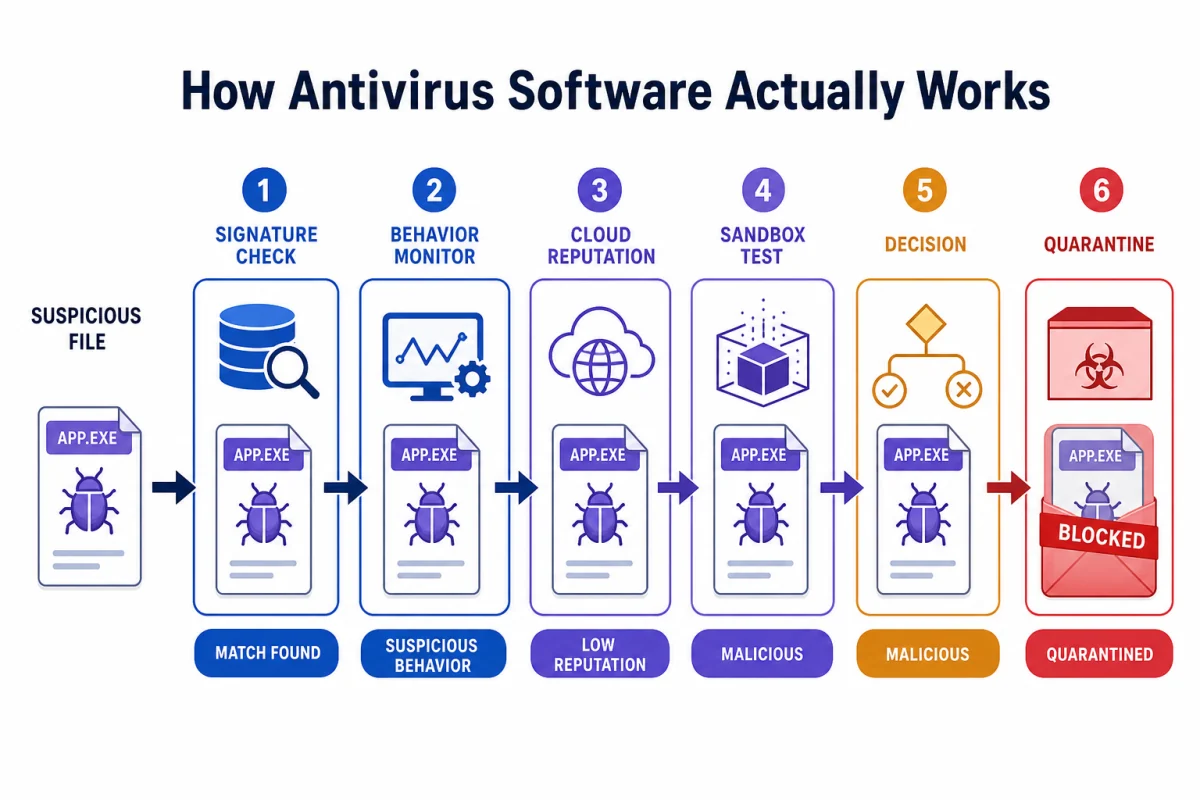
The major signals, in roughly the order a consumer product may evaluate them: signature matching (is this exact file already known to be malicious?), heuristic analysis (does the code look malicious?), cloud lookup (has anyone else in the world seen this file?), sandboxing or detonation (what does it do when we run it in a controlled environment?), behavioral monitoring (now that it is running for real, is it acting malicious?), and machine-learning scoring (how do all those signals add up?).
That stack is bolted onto Windows itself through three system-level integrations: the file-system minifilter driver, the Early Launch Anti-Malware driver, and the Antimalware Scan Interface. We walk through all of it below, then show what actually happens, step by step, when you double-click a malicious file.
Layer 1: Signature matching — the old workhorse
Signature matching is the original antivirus technique and is still doing serious work in 2026.
A signature, in modern usage, is one of three things. A cryptographic hash (MD5, SHA-1, SHA-256) of a complete malicious file — fast and exact, but breaks the moment one byte changes. A fuzzy hash (ssdeep, TLSH, imphash) that captures the structural fingerprint of a file in a way that survives small mutations. A YARA rule — a small pattern-matching script that looks for specific byte sequences or string combinations characteristic of a malware family.
The signature database is what gets updated daily — often hourly — and it is what stops working properly when the cloud connection and update channel to the vendor are severed. Large vendors track enormous collections of hashes, generic rules, family signatures, fuzzy indicators, reputation records, and behavioral indicators, but exact counts vary depending on what each vendor calls a “record.”
Why it still matters when modern malware is polymorphic: most malware in the wild is not actually polymorphic in interesting ways. The bulk of consumer infections in 2026 are commodity threats — info-stealers, banking trojans, scam-ware bundles — distributed by affiliate networks that recompile only when they need to. A fresh signature catches each new variant for the hours or days before the operator rebuilds. Signatures are the cheap-and-fast first line. They still handle a large share of commodity detections by volume, even though they are weak against the most sophisticated and fastest-changing threats.
The cost: near-zero CPU. Near-zero false positives. The trade-off is that signatures cannot see anything they have not been told about.
Layer 2: Heuristic analysis — looking at the code
Heuristic analysis breaks into two modes that get confused with each other in most explainer articles.
Passive (static) heuristics read the file without running it. The engine disassembles the binary, looks at the PE (Portable Executable) header structure on Windows, inspects the import table, walks the code sections, and looks for tells. A packed-and-encrypted executable with a tiny visible code section, an import table missing standard Windows libraries, and a jump to a decryption stub is a heuristic positive even if the inside is unknown. Suspicious string content (URLs to known bad domains, hardcoded IP addresses, mention of credit-card field names) bumps the heuristic score further.
Active (emulation) heuristics go a step further. The engine spins up a tiny emulated CPU in memory, runs the file's instructions for a few hundred or thousand cycles inside the emulator, and watches what they do. The emulator never lets the code touch the real machine. If the emulated execution unpacks itself in memory, writes shellcode to a region, and tries to call CreateRemoteThread — classic injection pattern — the file is flagged before the real OS ever lets it run normally.
ESET, Kaspersky, Bitdefender, and Microsoft all use combinations of static heuristics, emulation, cloud intelligence, and behavioral rules, but they weight those layers differently. ESET has long marketed advanced heuristics and emulation as a core strength. Microsoft Defender tends to pair local heuristics with cloud-delivered protection, SmartScreen reputation, attack-surface rules, and behavior monitoring.
Cost: higher than a plain signature lookup, because the engine has to inspect structure and sometimes emulate execution. False positives are also higher than pure signatures because legitimate packers, installers, and unusual internal tools can resemble malware patterns. Heuristics are still essential because they catch many new variants that signatures have not seen yet.
Layer 3: Cloud lookup — collective intelligence
When the local engines have not made up their mind, the AV asks the cloud.
The local agent computes the file's hash and sends it to the vendor's threat-intelligence backend (Bitdefender Global Protective Network, Microsoft Defender cloud protection, Kaspersky Security Network where available, Norton's Symantec Web Services, and so on). The cloud replies with one of three answers: clean (we have seen this many times globally and it is benign), malicious (we have seen this and other instances flagged as bad), or unknown (we have not seen this file before — and that itself is a signal).
The “unknown” answer is often the most useful. A file that no one in the vendor's global telemetry has ever seen, that is now appearing on your machine, is unusual. If a fresh unknown executable is seen on a single endpoint, that is suspicious. If it appears on a thousand endpoints in the same fifteen-minute window, that is a campaign in progress. Vendors detect targeted campaigns this way far faster than they can ship a signature.
The cloud layer is also where reputation services live. Microsoft SmartScreen maintains URL and file reputation indexes derived from large-scale telemetry. Norton Insight and Bitdefender Reputation work in the same broad category. A file with a fresh digital signature, no install base, and a brand-new domain in the binary is treated very differently from a file signed by Microsoft and present on millions of machines.
In stronger implementations, the cloud verdict is not just a hash lookup. It can combine reputation, metadata, machine-learning classifiers, telemetry, automated sample analysis, and previous behavioral signals before returning a block or allow decision.
Cost: a network round-trip — typically felt mostly when you launch an unknown installer for the first time. After the first lookup, the verdict is cached locally for a period of time.
Layer 4: Sandboxing — make it run in a fake world
If cloud reputation is unknown and heuristics are suspicious but not conclusive, the next step is to run the file in isolation.
A sandbox is a controlled, throwaway environment — sometimes a real hypervisor-backed VM, sometimes a lightweight emulation environment — that pretends to be a normal Windows desktop. The file is detonated inside it. The sandbox watches system calls, file writes, network connection attempts, registry edits, and spawned processes. If the file in the sandbox tries to enumerate files for encryption (ransomware behavior), tries to dump LSASS for credentials (credential-theft behavior), or tries to phone home to a known command-and-control server, the verdict is malicious and the file never executes on your real system.
Bitdefender and Kaspersky expose sandbox-style analysis more explicitly in their product language. Microsoft Defender uses cloud-delivered protection, automatic sample submission, Block at First Sight, detonation-based machine learning, and other backend analysis techniques rather than presenting the consumer product as a simple “sandbox” button.
Modern malware fights back against sandboxing in two ways. It checks whether it is running on a virtual machine (looking for VMware artifacts, weird CPU model strings, lack of recently-used files, no human input) and refuses to execute its payload if it suspects a sandbox. And it stalls — sleeping for ten minutes before doing anything malicious, on the bet that the sandbox will time out and pass it as clean. The best sandboxes counter with realistic-environment emulation (fake browsing history, fake recent documents, accelerated time) and behavioral fingerprinting of stall patterns.
Cost: a few seconds of latency. Only applied to files the earlier layers flagged as suspicious — never to every file you open, because the user experience would be unusable.
Layer 5: Behavioral monitoring — watching the running process
The sandbox decides whether to let a file run. The behavioral monitor watches what happens once it is running for real.
This is the layer that catches things that look fine on disk and only show their teeth at runtime — fileless malware, LOLBin attacks, malicious scripts, supply-chain trojans hidden inside a legitimate-signed binary. Behavioral monitoring keeps a live model of every process tree on your machine. It tracks parent-child relationships, command-line arguments, loaded DLLs, network connections, file accesses, and registry edits. When the running process tree starts behaving like a known attack pattern, the monitor steps in.
A few concrete examples. Word opens, spawns PowerShell with a base64-encoded argument, which then connects to a remote IP, writes a file to AppData, and registers a scheduled task — that chain is a textbook macro-malware kill chain, and the behavioral monitor can block it at the first hop. A program iterates through Documents, Pictures, and Desktop opening every file in read-write mode and writing back encrypted versions — that is ransomware mid-execution. The monitor can halt the process, block further writes, quarantine related files, and — depending on the product — trigger remediation, protected-folder blocking, or rollback-style recovery.
The important distinction: Microsoft Controlled Folder Access is primarily a protected-folder blocking layer. It blocks unauthorized changes to protected folders; it is not a general ransomware rollback engine. Sophos CryptoGuard and Bitdefender Ransomware Remediation are closer to rollback/remediation-style ransomware features.
The flagship implementations: Microsoft Defender for Endpoint, Bitdefender Advanced Threat Defense, Kaspersky System Watcher, Norton SONAR, ESET HIPS, Sophos Intercept X (with CryptoGuard for ransomware protection). All of these run continuously in the background. All of them carry a small but real CPU and memory cost.
Cost: small under normal load, larger under heavy multi-process workloads such as compiling code, running games with anti-cheat hooks, or processing large media projects. Most products have a “gaming mode” or performance mode that suspends low-priority checks during full-screen play.
Layer 6: Machine-learning scoring — the weighted verdict
The sixth layer is the one every vendor markets as “AI” and the one most consumers least understand.
Modern AVs feed signals from the previous layers into machine-learning systems trained on very large sets of known-good and known-bad files. But ML does not simply sit at the end as one final classifier. It appears in several places: static file scoring, cloud reputation, behavioral analysis, detonation analysis, and final verdict weighting.
For each file, the inputs may look something like this: signature match score, heuristic confidence, cloud reputation, sandbox behavior summary, behavioral runtime risk score, and many static features extracted from the file itself (PE structure metrics, entropy of code sections, suspicious imports, certificate age, prevalence, and other reputation signals).
The model or scoring system emits a probability: how likely is this file to be malicious? The AV uses that probability, in combination with configured thresholds and policy rules, to decide whether to block, quarantine, allow, warn, or send the file to deeper analysis. Different vendors tune those thresholds differently. Some products lean aggressive. Some lean conservative. Some push more decisions to the cloud.
The honest framing for the “AI antivirus” marketing wave: ML scoring is real and useful. It is not magic. It is not a replacement for the signature, cloud, sandbox, or behavioral layers. The vendors that ship without ML are now legacy products. The vendors that ship ML only (a small handful of next-gen startups in the early 2020s) ended up adding older layers back as they ran into false-positive and adversarial-evasion problems in the field.
Where the antivirus plugs into Windows
None of the above matters if the AV cannot see what is happening on your machine. Three Windows-specific integrations make all of it possible. Most explainer articles skip these.
The file-system minifilter driver
This is the kernel-level driver that sits in the file-system I/O path. It can inspect, allow, delay, or block file operations when files are opened, read, written, renamed, or executed. This is what makes “real-time protection” feel real-time.
In practice, antivirus products do not scan every file with maximum depth every time. They cache known-good verdicts, skip or fast-path trusted signed binaries, apply different scan depth depending on file type, path, signature, prevalence, and execution risk, and escalate only when the file looks risky.
This is also why running two real-time antivirus products is a bad idea. Two engines can both install file-system filters, scan the same temporary files, quarantine each other's activity, and compete for the same I/O path. Windows usually resolves this by putting Microsoft Defender into passive mode when a third-party AV registers correctly.
Early Launch Anti-Malware (ELAM)
Windows boots its drivers in a specific order. ELAM-signed antimalware drivers get to load before other non-Microsoft boot-start drivers. That means the AV can evaluate boot drivers early, before a rootkit could load first and hide from later inspection.
ELAM is one of the more under-appreciated features in Windows security. It exists because of a class of rootkit attacks from the late 2000s that loaded as a boot driver and made themselves invisible to AVs loaded later.
ELAM is not part of every normal app launch. If malware tries to install or persist as a boot-start driver, ELAM becomes relevant during the next boot. It is not a step that every user-mode executable passes through when you double-click it.
Antimalware Scan Interface (AMSI)
AMSI is a Windows API that lets an application hand suspicious content to the installed antimalware provider right before that content is executed. PowerShell, Windows Script Host, Office VBA macros, and other instrumented script hosts can pass deobfuscated content to the AV through AMSI.
AMSI is what stops many obfuscated PowerShell scripts that decode themselves at runtime. The script host hands the about-to-execute decoded string to the AV through AMSI, the AV scans it, and either approves or blocks it.
AMSI does not scan “everything.” It scans content when a host application integrates with AMSI and passes the content to the antimalware provider. That is why instrumented script hosts matter so much.
Mark of the Web (MOTW)
Not a driver but a metadata flag. When you download a file from the internet, Windows tags it with a “Zone Identifier” alternate data stream. The AV, Office, and SmartScreen can check that flag and treat MOTW-tagged files more aggressively — for example, Word will refuse to enable macros from a MOTW-tagged document. Attackers spend significant effort on bypasses (ISO files, container archives, certain LNK tricks) precisely because MOTW is effective.
What happens when you double-click a malicious file
Here is the full pipeline for the case where you have downloaded an unknown executable and just hit Enter on it.
- Pre-execution: minifilter intercept. Windows asks the kernel to open the file for execution. The AV's minifilter driver can see the request before the file is allowed to continue as a normal process. The handler pauses execution and runs through the scan layers appropriate for that file.
- MOTW check. Is this file tagged as downloaded from the internet? If yes, escalate scrutiny.
- Signature lookup. Compute the file hash and compare it against the local signature database, generic family rules, and cached reputation. If known-bad, block, quarantine, notify, done.
- Static heuristic scan. Inspect the PE header, imports, entropy, packer signals, suspicious strings, and code structure. If heuristic confidence is above the block threshold, quarantine. If suspicious but not conclusive, continue.
- Cloud reputation lookup. Send the hash and selected metadata to the vendor's cloud where policy allows. Known good → allow. Known bad → block. Unknown → continue.
- Active heuristic or cloud analysis. If still ambiguous after the cloud lookup, the file may be uploaded to vendor backend analysis or detonation where policy and product tier allow. Alternatively, the local engine may run emulator cycles to see if the file self-decrypts into a known-bad payload.
- Permission to execute. If no layer has flagged the file by this point, the minifilter releases the I/O and Windows maps the file into memory. The file is now executing.
- AMSI checks. If the running process invokes PowerShell, runs a macro, loads .NET reflection, or executes any AMSI-instrumented script content, the host can feed decoded payloads to the AV in real time.
- Behavioral monitoring. The process now has a live tracker on it. Parent-child process relationships, command-line arguments, network connections, file writes, and registry edits feed the behavioral score. If the score crosses the threshold mid-execution, the AV can kill the process tree, quarantine files, block further writes, or trigger remediation.
- Periodic re-scan. Even after the file has been allowed and is running, the AV may re-evaluate it as new cloud telemetry comes in. A file that was unknown at execution time and is now globally flagged as malicious thirty minutes later can be killed retroactively.
Steps 1 through 7 typically complete quickly for a known-clean file. For an unknown file with an active cloud-analysis round-trip, the visible latency can stretch to a few seconds. Steps 8 through 10 run for the lifetime of the process.
ELAM is deliberately not in that list. It matters for boot-start driver evaluation and rootkit-style persistence, not for every ordinary executable you double-click.
What modern threats break — and which layer catches them
The threat landscape moved away from “user downloads .exe, .exe is malicious” years ago. Most consumer infections in 2026 do not look like that anymore. Here is how the layered model handles the categories that dominate the current threat reports.
Phishing → credential theft. Caught at the cloud and browser-reputation layer (SmartScreen, Bitdefender Web Protection, Norton Safe Web), not by the file engine. The AV browser extension or browser-level protection blocks the page before you enter credentials. This is where much of the modern AV value lives.
Macro-laden Office documents. AMSI catches the deobfuscated macro at execution. MOTW prevents auto-enablement of macros from internet-downloaded documents in current Microsoft 365 builds. That forced many macro attacks toward archive/container tricks, ISO/LNK-style bypass attempts, and social engineering around unblocking files.
Living-off-the-land attacks (LOLBins). No malicious file. Attacker uses legitimate signed Windows binaries (PowerShell, certutil, mshta, wmic, regsvr32) for malicious purposes. The signature and heuristic layers may find nothing — the files are all signed by Microsoft. The behavioral monitor catches the command-line patterns. Microsoft Defender Attack Surface Reduction rules can block many common LOLBin-adjacent attack paths depending on which ASR rules are enabled.
Fileless / in-memory malware. Payload lives in process memory, never on disk. Behavioral monitoring catches it. Some vendors do periodic memory scans of running processes for known malicious patterns.
Supply-chain / signed-by-trusted-vendor malware. The malicious file is signed by a real, legitimate code-signing certificate (stolen or compromised), so the signature, cloud reputation, and heuristic layers may all give it a pass. Sandboxing and behavioral monitoring are the only layers that catch it. This is one of the hardest categories in 2026 and one of the places where consumer AVs are most likely to fail.
Ransomware. Caught at the behavioral layer by the mass-file-modification pattern. Ransomware-specific features vary by product. Defender Controlled Folder Access blocks unauthorized writes to protected folders. Bitdefender, Sophos, and some paid suites add their own remediation or rollback-style workflows.
Cryptocurrency miners. Caught at the heuristic or behavioral layer (high sustained CPU plus connections to known mining pools). Most vendors classify these as PUA (Potentially Unwanted Applications), which is a separate detection class from malware proper.
The pattern across the list: the front-line layers (signatures, heuristics) catch the commodity threats by volume. The deeper layers (behavioral, sandbox, ML, cloud reputation) catch the modern threats that matter. Consumer products that ship strong on the back half — Bitdefender, Microsoft Defender, Kaspersky where legally available, Norton, ESET — are the ones that hold up under real-world testing in 2026.
EDR vs traditional antivirus — the line that matters in 2026
You will see the term “EDR” (Endpoint Detection and Response) thrown around increasingly often. The difference between consumer AV and EDR is worth understanding because it changes the conversation about what protection actually means.
Consumer antivirus is built to block. The product makes a decision — clean or malicious — and acts on it locally. The user sees a quarantine notification or sees nothing because the threat was silently dropped at the kernel level.
EDR is built to investigate. It logs everything — every process, every network connection, every file write, every API call — to a central console for hours or days, regardless of whether anything was flagged. When a security team gets an alert from the same detection pipeline running locally, they can pull the full telemetry trail for that endpoint, see exactly what the malicious process did, see what it touched, see if anything spread, and orchestrate containment across the fleet.
The consumer products that have started to look most like EDR are Microsoft Defender for Endpoint (formerly Microsoft Defender ATP), Bitdefender GravityZone, Sophos Intercept X, and ESET PROTECT. Pure consumer products — Bitdefender Total Security, Norton 360, Avast One — are not EDR. They are excellent block-and-quarantine products with no central telemetry console.
For most home users, EDR is overkill — you do not have a security team to investigate alerts and you do not have a fleet to contain spread across. The block-and-quarantine model is the right tool. For small businesses with regulated data, EDR is increasingly the table-stakes answer.
What Antivirus Does Not Do
Antivirus reduces risk. It does not remove risk.
Antivirus does not make phishing impossible. It does not replace backups. It does not secure weak passwords. It does not patch vulnerable software. It does not make a compromised browser session safe. It does not turn a risky download habit into a good one. It does not protect a business if nobody reviews alerts, updates endpoints, or responds when something is quarantined.
The best products are part of a stack: operating-system updates, browser updates, MFA, password managers, backups, DNS or web filtering where useful, least-privilege accounts, and a habit of not typing credentials into random links. Antivirus is the layer that catches many failures in that stack. It is not the whole stack.
The takeaway
Modern antivirus is not a black box and not a single technique. It is a defense-in-depth pipeline with multiple signals, hooked into Windows at system-level integration points, doing its work in milliseconds for known files and seconds for unknown ones. Each layer was added to cover what the previous layer could not see. Each layer carries a cost. Each layer has bypasses, and the next layer exists to catch what the bypass left behind.
When someone asks whether “antivirus still works” in 2026, the honest answer is: it works much better than it did in 2010, and the engine layers are only part of why. The cloud, the sandbox, the behavioral monitor, the Windows hooks, reputation systems, and policy controls are doing much of the modern heavy lifting. Vendors that lead in those areas — Bitdefender, Microsoft Defender, Kaspersky where legally available, Norton, ESET — are the ones we recommend.
The next time you see a “we use AI” marketing claim, you now know what is actually under the hood. ML scoring is one layer inside a larger pipeline. It helps. It does not replace the first five layers, and it does not matter at all if the operating-system hooks never let the AV see the attack.
FAQ
What is the difference between signature-based and heuristic detection?
Signature detection compares a file against a database of fingerprints of known malware. It is fast, near-zero false positive, but blind to anything not yet in the database. Heuristic detection analyzes the structure and code of a file looking for patterns associated with malicious behavior — packed executables, suspicious API call sequences, code injection routines — without needing a fingerprint match. Heuristics catch new variants and previously unseen malware but generate more false positives. Modern antivirus uses both, plus cloud, sandbox, behavioral, and ML layers.
How does antivirus detect zero-day threats?
Zero-day threats are caught by the upper layers of the detection pipeline. Heuristic analysis flags suspicious code structure. Sandboxing or detonation executes the file in isolation and observes what it tries to do. Behavioral monitoring watches the live process for malicious actions such as mass file encryption, registry persistence, credential theft, and suspicious child-process chains. Cloud lookup compares the file to global telemetry. ML scoring weighs those signals together.
Why does antivirus slow down my computer?
Each detection layer has a real-time cost. The Windows minifilter driver can intercept file operations. Real-time scanning checks freshly written or executed files. Behavioral monitoring keeps a process tree in memory and inspects command lines, API patterns, network connections, and file writes. Cloud lookup waits on network round-trips for unknown hashes. Most modern AVs are aggressive about caching trusted-file hashes and fast-pathing known-good signed binaries to keep overhead low.
What is sandboxing in antivirus?
Sandboxing is a layer that runs a suspicious file in an isolated environment that the file cannot safely affect, and observes what it actually does. If the file in the sandbox tries to encrypt files, modify persistence settings, contact a command-and-control server, or escalate privileges, the AV can block it on the real system before it executes there. The cost is latency — detonation takes a few seconds, which is why it is only applied to files that earlier layers flagged as suspicious.
Can antivirus detect fileless malware?
Yes, but not with the older signature layer alone. Fileless malware lives entirely in memory or runs through legitimate system tools such as PowerShell, WMIC, mshta, or certutil. It does not write a traditional malicious file to disk for the signature scanner to find. The behavioral monitor catches it by watching command-line patterns, AMSI inspects instrumented script content at runtime, and ML scoring weighs unusual parent-child process trees.
Why do I need real-time protection if I run scans?
On-demand scans look at files only when you run them. By the time a malicious file has been on your machine for three days before the weekly scan runs, ransomware may already have encrypted your documents. Real-time protection inserts itself into the operating system so that file writes, file reads, and process launches can be inspected at the moment they happen. On-demand scans are useful for catching old infections you missed, not for stopping new ones at launch time.
Is AI-based antivirus better than traditional?
AI and machine learning are one layer of modern antivirus, not a replacement for the rest. ML models are trained on known-good and known-bad files and score new files by similarity to malicious patterns. The strength is catching novel variants the signature layer would miss. The weakness is false positives on legitimate but unusual software and adversarial samples deliberately crafted to fool the model. The best 2026 products use ML scoring alongside signature, heuristic, cloud, sandbox, and behavioral signals.
Why should I not run two antivirus programs at once?
Two real-time antivirus products can both install file-system filters, scan the same temporary files, quarantine each other’s activity, and compete for the same I/O path. Modern Windows usually puts Microsoft Defender into passive mode when a third-party AV registers correctly. Use one real-time antivirus and, if needed, one on-demand second-opinion scanner.
Does antivirus still work without the cloud?
Yes, but with reduced protection against new threats. Local signatures, generic rules, heuristics, and behavior monitoring still work, but cloud reputation, rapid verdicts, automated sample analysis, and the latest threat intelligence are weaker or unavailable. That is why frozen or disconnected antivirus installations decay over time.
Read next
- Free vs Paid Antivirus in 2026
- Microsoft Defender Review — How the Built-In Engine Holds Up
- Bitdefender Total Security Review
- Best Antivirus for Windows 10 / 11
- Should I Run Two Antivirus Programs at Once?
Sourced from: Microsoft documentation on Antimalware Scan Interface (AMSI), Early Launch Anti-Malware (ELAM), file-system minifilter drivers, Mark of the Web, SmartScreen, Controlled Folder Access, and Defender for Endpoint architecture; Bitdefender OEM Antimalware Engine Tech Brief; ESET KB127 heuristics documentation; Kaspersky Resource Center heuristic and System Watcher documentation; AV-TEST Performance Test methodology 2025; AV-Comparatives Real-World Protection Test methodology 2025; MITRE ATT&CK framework category definitions for living-off-the-land binaries.