
Best Browser Security Tools in 2026: A Safer Stack
The safest browser setup isn't six overlapping extensions. It's a small stack with distinct jobs: built-in browser reputation, one content blocker, a reputable password manager, and—when your risk justifies it—a hardened payment session or second-opinion security extension.
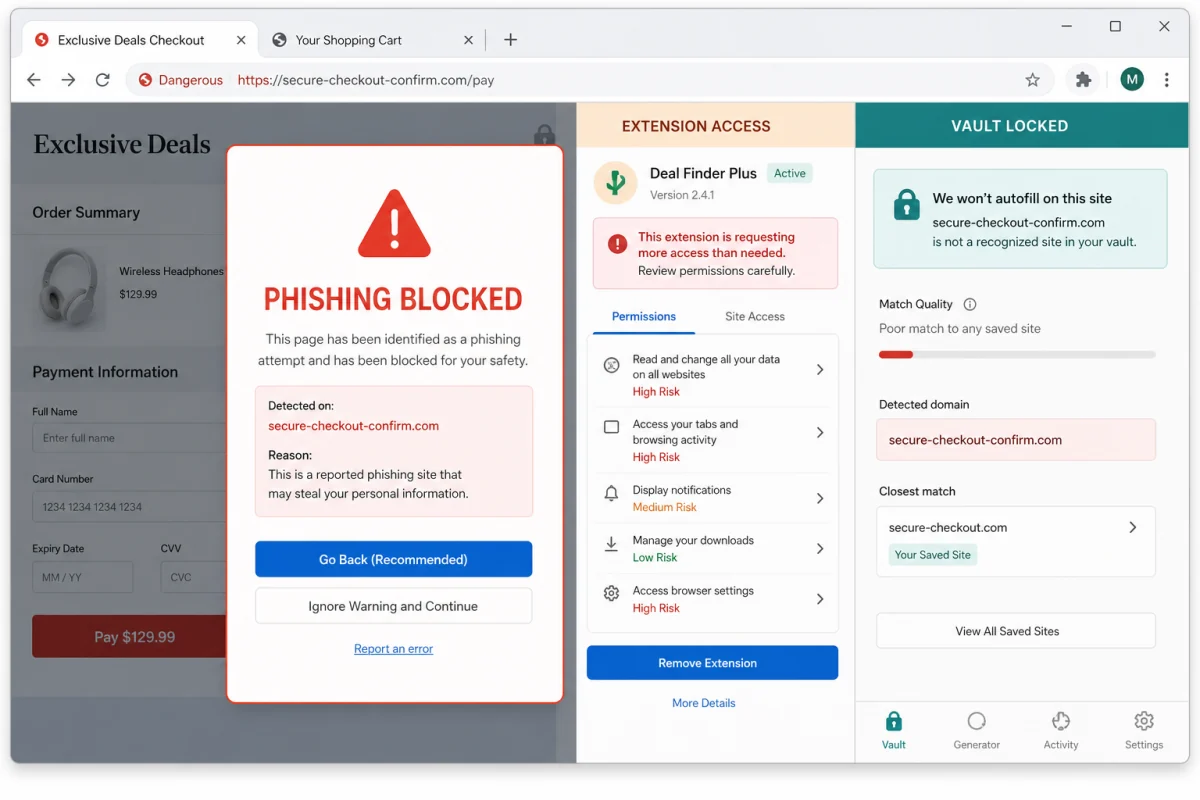
Quick answer: start with the protections already in Chrome, Edge, Firefox, Safari or Brave; add uBlock Origin Lite on Chrome or full uBlock Origin on Firefox; use Bitwarden or 1Password for unique, domain-matched logins; and add Malwarebytes Browser Guard only if you want a second reputation and scam layer. Bitdefender Safepay or ESET Banking & Payment Protection makes sense for people who want sensitive payments separated from their normal extension profile.
Browser security now includes the extensions themselves
The browser handles email, banking, shopping, cloud documents and password resets, so it's both the front door and the key ring. Attackers exploit that concentration through phishing pages, malicious advertising, fake updates, clipboard manipulation, credential-stealing downloads and extensions that gain more access after an ownership or code change.
An extension-store listing isn't a lifetime certificate. Research continues to document extensions that pass review and later exfiltrate data or load remote behaviour. The useful response isn't panic or a longer list of blockers. It's minimising privileged add-ons and assigning one tool to each necessary layer.
Navigation layer
Safe Browsing, SmartScreen and vendor URL feeds try to stop a known or suspicious destination before it loads.
Page layer
A content blocker reduces advertising, tracking and third-party frames that expand the attack surface.
Credential layer
A password manager generates unique logins and refuses to autofill them on a lookalike domain.
Our six browser-security picks
Bitdefender — best hardened payment option
Bitdefender combines two distinct tools. TrafficLight is a free browser add-on that checks pages for malware and phishing. Safepay is a separate browser environment for banking and payment sessions. Its advantage is separation: ordinary extensions from your daily browser aren't part of the sensitive session.
Safepay isn't a magic tunnel that makes an already compromised computer clean, and its exact availability depends on the paid Bitdefender plan and platform. We rank it first for people who value payment-session isolation, not because TrafficLight should be stacked with every other URL extension. Read our Bitdefender review.
Norton Safe Web — best for existing Norton subscribers
Safe Web adds Norton's URL reputation to supported browsers and fits naturally when Norton 360 is already the primary suite. It helps block phishing and malicious destinations; it doesn't inspect whether every other extension is trustworthy or isolate a bank session. Install it where the plan documentation requires it, then avoid adding two more reputation extensions to chase marginal overlap.
Best fit: an existing Norton customer who wants the product's web layer active in every browser they actually use.
ESET Banking & Payment Protection — best focused banking mode
ESET's protected browsing mode is designed around sensitive logins and payments, supported by anti-phishing and endpoint behaviour monitoring. Product names and the browsers it integrates with vary by platform and ESET tier, so check the current system-requirements page rather than assuming a feature matrix applies to every device.
Best fit: users outside a browser-only workflow who want endpoint security and a deliberate protected session. Read our ESET review.
Malwarebytes Browser Guard — best free second opinion
Malwarebytes says Browser Guard blocks malicious sites, phishing, scams, ads, trackers and credit-card skimmers across major browsers. Its permission documentation explains why it requests broad page access: it must see navigation and page content to block those categories. That same power is why you should install it only from the official store listing and keep the extension list short.
Best fit: someone who sees scam redirects or tech-support locks and wants an additional feed beside their primary antivirus. It isn't a replacement for real-time endpoint protection.
uBlock Origin Lite / uBlock Origin — best content layer
Chrome's extension platform makes uBlock Origin Lite the normal Manifest V3 option. Firefox users can still choose the full uBlock Origin. The Lite edition uses a different declarative filtering model; it shouldn't be marketed as identical to the full version. Both reduce nuisance and third-party content, but neither is an antivirus or an identity-recovery service.
Best fit: almost everyone who wants fewer ads and third-party requests without turning the browser into an extension laboratory. Install from the developer's official listing and don't confuse similarly named clones.
Bitwarden or 1Password — best credential layer
A dedicated manager creates a different password for every site and matches autofill to the saved domain. That means a convincing lookalike page shouldn't receive the real password automatically. Bitwarden is the strong free-value choice; 1Password offers a polished family and team workflow. Use passkeys or a hardware security key for high-value accounts when supported.
Best fit: everyone still reusing passwords or letting the browser hold the only copy of critical credentials.
Browser security tools compared
| Tool | Layer | Cost | Best use | What it doesn't do |
|---|---|---|---|---|
| Bitdefender Safepay + TrafficLight | Isolated session + URL filtering | Safepay paid; TrafficLight free | Banking away from the normal extension profile | Doesn't clean an already compromised OS by itself |
| Norton Safe Web | URL reputation | Included with eligible suite | Activating Norton's browser layer | No extension inventory or banking isolation |
| ESET protected browsing | Sensitive-session protection | Paid, tier-dependent | Banking and payment logins | Not a universal browser extension |
| Malwarebytes Browser Guard | Scam, URL and content blocking | Free core extension | Second-opinion protection | Not full endpoint antivirus |
| uBlock Origin Lite / Origin | Content filtering | Free, open source | Reducing ads and third-party content | No malware remediation or account recovery |
| Bitwarden / 1Password | Credential isolation | Free / paid | Unique passwords and domain-match autofill | Can't judge whether every page is safe |
Build a stack without creating conflicts
Free, sensible default
- Keep Chrome Safe Browsing, Edge SmartScreen, Firefox protection or Safari warnings enabled.
- Add uBlock Origin Lite on Chrome or uBlock Origin on Firefox.
- Use Bitwarden with unique passwords and passkeys where available.
- Keep the operating system and browser auto-updated.
Higher-risk payment setup
- Use one reputable real-time antivirus.
- Add its documented browser component if required.
- Open banking in Safepay or the suite's protected mode.
- Keep a separate password-manager and hardware-key recovery plan.
Adding Browser Guard can make sense when its scam and URL intelligence solves a real problem. Adding three content blockers and three URL checkers usually creates broken pages, permission sprawl and an impossible troubleshooting path. One clear owner per layer is safer.
Audit the extensions already installed
- Open
chrome://extensions. In Edge useedge://extensions; Firefox usesabout:addons. - Remove what you don't recognise or use. Google's extension management guide confirms that you can remove an add-on and restrict whether it can read and change data on one site or all sites.
- Review all-sites access. A password manager or blocker may need it; a calculator or wallpaper extension probably doesn't.
- Check publisher and update history. A changed name, owner or new permission request deserves a pause before re-enabling.
- Inspect browser policy on a personal machine. Unknown forced-install policies are a warning. On work or school devices, contact the administrator before changing policy.
- Review Google account sessions and app access. Removing the extension doesn't revoke a stolen session or OAuth grant.
If you find a suspicious extension, follow the full malicious Chrome extension removal guide. The response includes account containment because clicking “Remove” can't pull back cookies or tokens already copied.
What browser tools can't cover
- A safe-browsing warning can lag a newly created phishing domain.
- A password manager can't protect a session cookie stolen by malware already running on the device.
- A hardened browser can't make a fraudulent bank transfer legitimate.
- An extension can become a risk after an ownership or permission change.
- Privacy blocking and malware blocking overlap, but they aren't the same test.
For credential-stealing malware, combine this stack with the best infostealer protection guide. For Chromebooks, use the platform-specific advice in our Chromebook security guide.
Frequently asked questions
Do I need a browser security extension if I have antivirus?
Sometimes. Some suites require a separate browser component, while others filter traffic at the device layer. Add an extension only when it provides a documented layer you don't already have.
Is Malwarebytes Browser Guard an antivirus?
No. It's a browser extension for malicious sites, scams and unwanted content. Malwarebytes itself says Browser Guard is an additional layer, not a replacement for real-time endpoint protection.
Should Chrome users install uBlock Origin or uBlock Origin Lite?
Chrome users should use the official uBlock Origin Lite listing built for Manifest V3. Firefox users can use the full uBlock Origin. The two editions use different filtering models.
Does Bitdefender Safepay run my normal Chrome extensions?
Safepay is designed as a separate protected browser environment, so ordinary extensions from the daily browser profile aren't part of that banking session. Check current Bitdefender platform and plan support.
Can I trust every extension in the Chrome Web Store?
No. Store review lowers risk but doesn't guarantee future code, ownership or permissions. Install the minimum set, use official publisher links and review new permission requests.
Will two ad blockers make the browser safer?
Usually not. Overlapping blockers can break pages and make it unclear which tool caused a problem. Use one reputable content blocker with a maintained filter set.
What should I do after removing a malicious extension?
Review active sessions and OAuth access, change exposed passwords from a clean device, run malware scans and check browser policy. Removal alone doesn't invalidate data the extension already stole.
Verdict
The best browser-security stack is deliberately small. Built-in reputation, one content blocker and a password manager cover the widest set of everyday failures. Add Browser Guard for a useful second opinion or a protected banking mode for sensitive payments—but keep extensions few enough that you can still account for every permission.