
Best Antivirus Against Infostealers in 2026
Infostealers target passwords, browser cookies, crypto wallets and developer secrets in one quick collection run. Bitdefender is our balanced first choice, but prevention is only half the answer: a useful recommendation must also explain session revocation, credential rotation and when to rebuild the device.
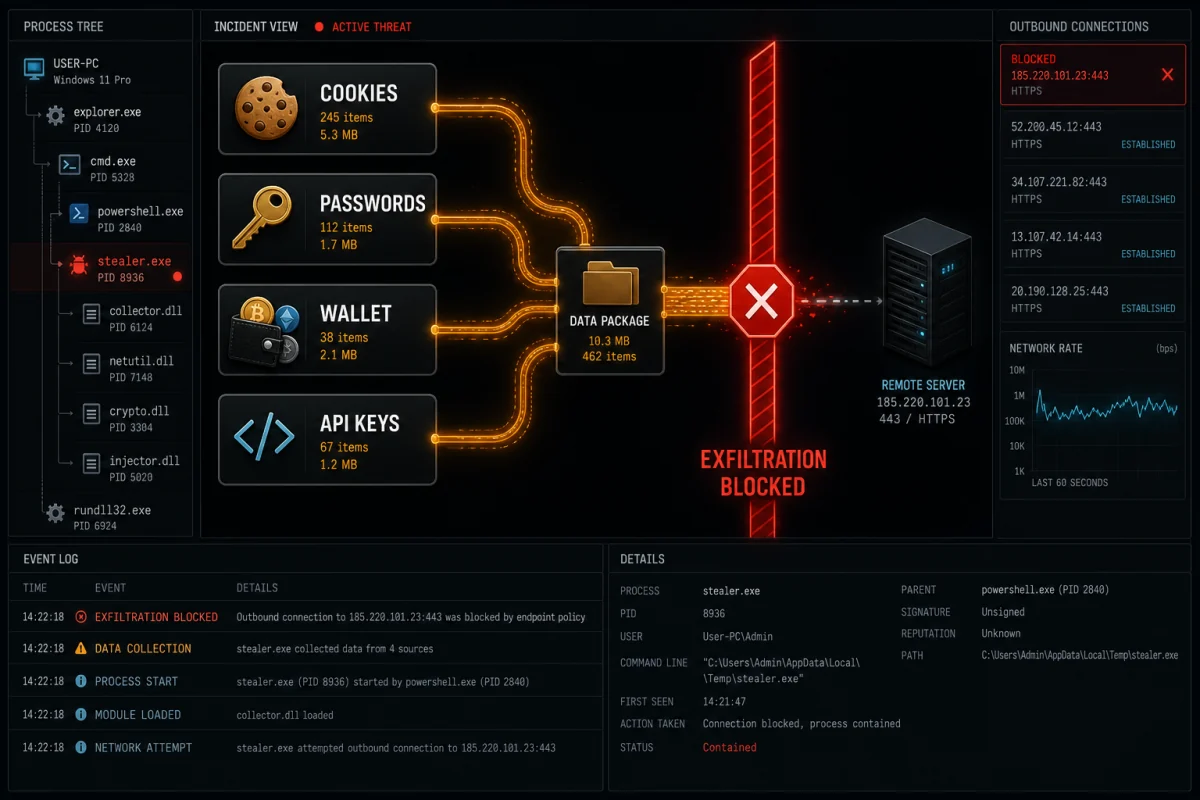
Quick answer: Bitdefender Total Security is our best all-round pick because it combines anti-phishing, web filtering and behaviour monitoring with a protected payment browser. ESET is a strong lower-friction alternative, Norton adds a useful identity-aftermath layer, Malwarebytes is valuable for a second-opinion cleanup, and Microsoft Defender is a credible free Windows baseline. No public lab currently ranks consumer products in an “infostealer detection” category, so we judge the layers that interrupt the attack—not an invented score.
Stop the lure, the loader or the loot
An infostealer is spyware built to collect valuable data quickly and send it to an attacker. The ESET glossary identifies login and bank details as core targets; current campaigns also collect browser session cookies, autofill, wallets, files and developer credentials. Microsoft's February 2026 campaign analysis documents that broader target set across Windows and macOS, including fake applications and copy-paste command lures.
1. Lure
Malvertising, fake AI tools, cracks, game cheats, urgent email attachments and “paste this command” fixes bring the user to the payload.
2. Loader
A signed-looking installer, script or dependency starts the stealer, sometimes after delaying or waiting for a click to evade automated analysis.
3. Loot
The malware packages passwords, cookies, wallets, tokens and files, then sends them to an operator or resale market.
Session cookies are the part many antivirus roundups miss. A cookie can represent an already authenticated session, so an attacker may replay it without asking for the password or the same MFA challenge. MFA remains essential, especially phishing-resistant passkeys or FIDO2 keys, but it doesn't make a compromised endpoint safe.
Best antivirus against infostealers
Bitdefender Total Security — best all-round default
Bitdefender covers the three stages cleanly: web and anti-phishing filters at the lure, Advanced Threat Defense behaviour monitoring at execution, and Safepay for sensitive sessions. Those are general protections; we don't present them as a guarantee against every named stealer family.
Plan differences matter. Password-manager availability and identity services vary, while Windows receives deeper endpoint features than iOS. Buy for the platforms you actually use, then keep high-value credentials in a dedicated vault rather than assuming a suite can protect secrets stored in every browser file.
Best for: households wanting one balanced prevention suite across multiple platforms.
ESET HOME Security Premium — best focused endpoint option
ESET combines anti-phishing, behaviour monitoring and protected banking features with a comparatively restrained interface. Its value is at the loader stage, where process behaviour and exploit layers matter, and at the credential stage through protected browsing and eligible password-manager features.
Best for: people who want a strong endpoint engine without buying a large identity bundle. Verify macOS and mobile feature differences on the current ESET review.
Norton 360 — best aftermath and identity layer
Norton adds Safe Web and behavioural protection before execution, then dark-web and identity monitoring on eligible plans after exposure. Monitoring can warn when selected data appears in sources Norton watches; it can't prove that a private stealer log was never sold. The password manager and VPN help reduce ordinary credential and network risk, but neither neutralises malware already executing as the user.
Best for: users who value recovery support and identity features beside endpoint protection. Read our Norton review.
Malwarebytes Premium — best second-opinion cleanup
Malwarebytes Browser Guard helps at the malicious-ad and phishing stage; the desktop product is useful for detecting and removing unwanted software and commodity malware. We prefer it as a second-opinion or cleanup path when a different antivirus is primary, especially after suspicious downloads or redirects.
Best for: investigation and remediation. Pair it with a dedicated password manager and a clear session-revocation plan because cleanup alone can't invalidate stolen credentials.
Microsoft Defender — best free Windows baseline
On supported Windows 11, Defender combines real-time and cloud-delivered protection with SmartScreen reputation. It's a rational default for careful users and appears in current independent Windows testing. The consumer stack doesn't replace a password manager, multi-device identity service or professional incident response.
Best for: disciplined Windows users who keep cloud protection, Tamper Protection, Firewall and reputation controls healthy. Follow our Defender sufficiency checklist.
Kaspersky Premium — capable non-US option
Kaspersky's anti-phishing, behavioural protection, Safe Money and password features fit the attack model. It isn't an option for US persons because US Commerce restrictions ended sales and updates there. Outside the US, evaluate it normally against local availability, trust policy and the current plan.
Best for: non-US buyers who specifically prefer its protection stack and have confirmed ongoing regional support.
Infostealer protection compared
| Product | Lure defence | Loader defence | Credential / aftermath layer | Best fit |
|---|---|---|---|---|
| Bitdefender | Web and anti-phishing | Behaviour monitoring | Safepay; password tools by plan | Balanced multi-device prevention |
| ESET | Anti-phishing | Endpoint and behavioural controls | Protected banking; password tools by tier | Focused endpoint protection |
| Norton | Safe Web | Behaviour and intrusion layers | Identity and dark-web features by plan | Aftermath support |
| Malwarebytes | Browser Guard | Detection and remediation | Limited native credential layer | Second-opinion cleanup |
| Microsoft Defender | SmartScreen | Real-time and cloud protection | Bring your own vault and recovery | Free Windows baseline |
| Kaspersky | Anti-phishing | Behaviour monitoring | Safe Money and password features | Supported non-US markets |
The most useful purchase question is “which failure does this change?” A better URL filter helps someone hit by malvertising. Application control helps a developer asked to run an unknown repository. Identity restoration helps a household that can't confidently work through dozens of compromised accounts. A generic “100% protection” badge answers none of those.
Hardening matters more than changing brands every month
- Stop running unknown code on the everyday profile. Cracks, cheats, fake AI downloads and recruiter-supplied scripts are recurring stealer routes.
- Use a dedicated password manager. Unique credentials stop one stolen password from opening every account. Lock the vault when not needed.
- Prefer passkeys or FIDO2 security keys. They resist phishing better than codes, though the endpoint still has to be clean.
- Keep important recovery codes offline. A text file beside the browser profile is easy loot.
- Separate work, crypto and casual browsing. A disposable virtual machine or isolated device is appropriate for untrusted coding tests and high-risk files.
- Patch the browser, OS and security product. A strong engine with stale intelligence isn't the tested configuration.
Microsoft's March 2026 reporting on fake developer interviews documents attackers seeking API tokens, cloud credentials, signing keys, wallets and password-manager artefacts. For high-risk developer work, isolation and short-lived credentials may reduce damage more than swapping one mainstream antivirus for another.
If an infostealer ran, use this recovery order
- Disconnect the suspected device. Stop using it for email, banking, work admin or crypto.
- Secure primary email first. Change the password, revoke all sessions, remove unknown recovery methods, app passwords, forwarding rules and OAuth grants.
- Revoke sessions before ordinary password rotation. A password change doesn't always invalidate every active token.
- Rotate accounts by impact. Identity provider, password manager, banking, work, cloud, social and shopping come before low-value forums.
- Reset MFA and trusted devices. Remove unknown authenticators and add phishing-resistant methods where available.
- Treat exposed wallet seeds and long-lived API keys as compromised. Move assets or rotate secrets using the provider's correct procedure.
- Scan offline and get a second opinion. Microsoft Defender Offline or a reputable rescue environment can inspect before normal Windows fully loads.
- Rebuild when trust is gone. If a stealer executed with broad access, a clean OS installation is safer than declaring victory after one clean scan.
After the device is trusted again, inspect mail rules, cloud access logs, connected apps, recovery details and financial activity. A clean result from a public breach lookup doesn't prove that private stealer data was never sold.
How we evaluate antivirus for this threat
No public lab isolates infostealers as a consumer ranking category. We therefore examine the current AV-TEST Windows cycle and AV-Comparatives Malware Protection Test as general engine evidence, then map documented product features to the lure, loader and loot stages. The March 2026 AV-Comparatives test executed 10,000 recent samples on updated Windows 11, but it wasn't an infostealer-only test. Performance scores aren't protection scores, and dark-web monitoring isn't prevention.
We also test the recommendation against the worst case: if prevention misses, does the page explain what to revoke and in what order? For a plain-language explanation of the malware itself, read what an infostealer is. For the browser layer, see the best browser security tools.
Frequently asked questions
Does MFA stop an infostealer?
MFA helps, especially phishing-resistant passkeys and FIDO2 keys, but a stealer can copy an already authenticated session cookie. After infection, revoke sessions as well as changing passwords and resetting trusted devices.
Is there an independent infostealer antivirus test?
Not a public consumer leaderboard we can verify. Independent labs test broader malware, web and advanced-threat scenarios, so we use those as general evidence and don't turn them into an infostealer-specific score.
Can Microsoft Defender block infostealers?
It can detect and block many malware and suspicious behaviours on an updated Windows system, but no product guarantees every new sample. Defender also doesn't replace a dedicated password vault or incident-recovery process.
Do infostealers affect Macs?
Yes. Current campaigns target macOS through fake applications, cracked software and commands that users are persuaded to run. Gatekeeper and XProtect help, but user-authorised execution and stolen credentials remain risks.
Is storing passwords in the browser unsafe?
Browser stores are common stealer targets because they sit beside cookies and autofill data. A dedicated manager with a separate vault and strong master password reduces concentration, but malware on the endpoint can still attack an unlocked vault.
Should I change passwords before scanning?
Use a different clean device to revoke sessions and change critical passwords first. Don't enter new credentials on the suspected computer until it has been cleaned or rebuilt.
Can a clean antivirus scan prove my accounts are safe?
No. A scan reports what it can find on the device at that moment; it can't recall copied cookies, passwords or wallet seeds. Complete the account and secret-rotation work even after malware removal.
Verdict
Bitdefender is the best balanced starting point, ESET is a strong endpoint-focused alternative, and Norton offers the most useful identity-aftermath package. Defender remains a credible free baseline. The winning setup is the one that blocks risky execution, keeps high-value secrets out of the browser profile and has a rehearsed recovery order for the day a scanner misses.