
What Is an Infostealer? How It Steals Your Logins
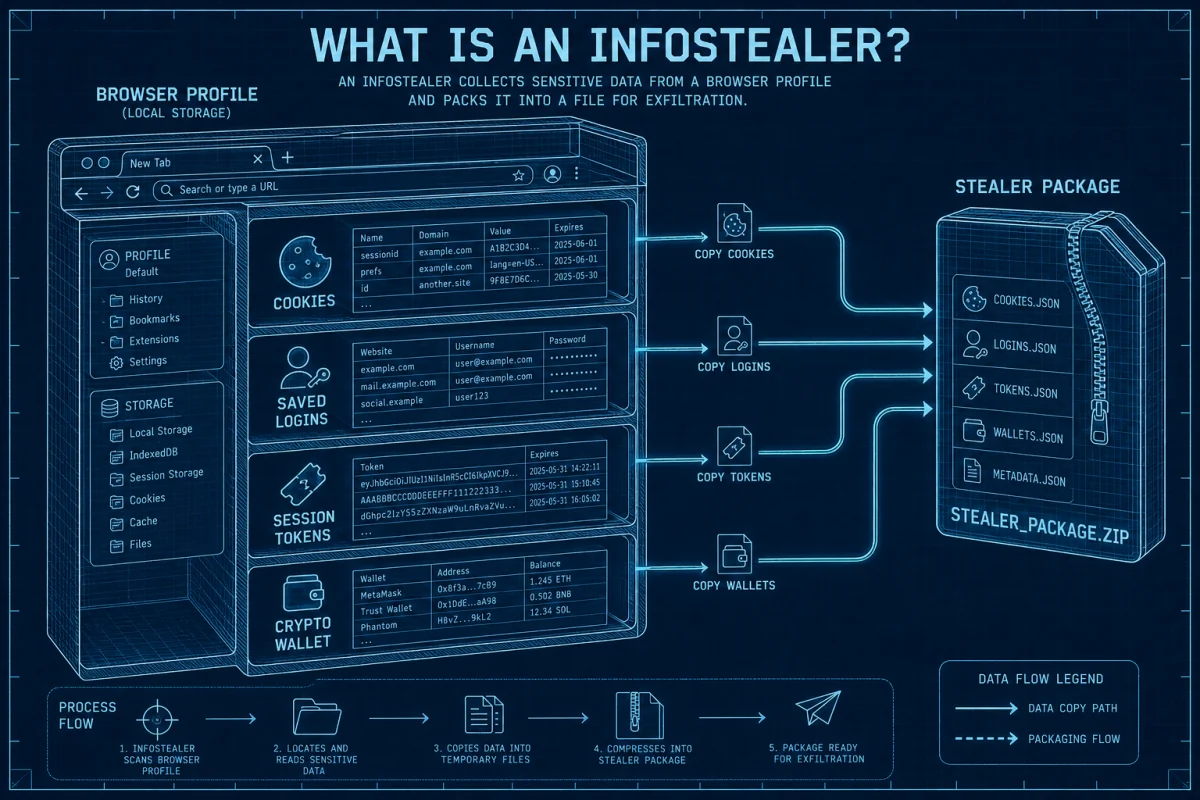
An infostealer is malware that collects valuable data—passwords, browser cookies, autofill, wallet material, files and developer secrets—and sends it to an attacker. It can finish that job before the victim sees a symptom, which is why account containment matters as much as malware removal.
Quick answer: if you ran a suspicious installer, command, crack, cheat or job-test repository, stop using that device for logins. From a different clean device, secure the primary email, revoke active sessions, rotate critical passwords and secrets, reset MFA, then clean or rebuild the computer. A scan can remove malware; it can't recall data already stolen.
An infostealer is built for collection and resale
Infostealers are a form of spyware whose main job is to gather sensitive data from an endpoint and exfiltrate it. Some run once and disappear; others add persistence or act as a loader for more malware. The operator may use the data directly or sell a “log” containing the victim's device details and captured accounts.
The ESET definition highlights login and bank details. Modern targets go further because the browser has become a concentrated store of identity. Malwarebytes' June 2026 phishing and infostealer analysis describes theft of passwords, cookies, autofill, wallets and files, with several potential buyers for one infected machine.
An infostealer isn't the same as a keylogger, though it may include keylogging. It can read data that already exists on disk or in browser processes without waiting for the victim to type it again.
What an infostealer can take
| Target | Why it's valuable | Required response |
|---|---|---|
| Saved passwords and autofill | Direct account access and identity data | Change passwords from a clean device; replace reused credentials |
| Session cookies and tokens | May replay an already authenticated session | Revoke all sessions and connected apps |
| Email and recovery data | Lets the attacker reset other accounts | Secure primary email first; inspect rules and recovery methods |
| Crypto wallets and seed phrases | Can permit irreversible asset theft | Treat exposed seed material as compromised and migrate correctly |
| API keys, SSH keys and cloud tokens | Opens source, infrastructure and customer data | Revoke and rotate secrets; review access logs |
| Files, screenshots and system profile | Supports fraud, extortion and resale targeting | Assess sensitivity; monitor affected identity and services |
Why MFA isn't a complete answer
MFA protects the authentication event. A session cookie exists after that event and tells the service that the browser is already signed in. If malware copies a usable token, the attacker may replay the session without entering the password or the same second factor. Services can limit this with short sessions, risk checks and device-bound credentials, but users should still revoke sessions after endpoint compromise.
Phishing-resistant passkeys and hardware security keys remain stronger than SMS or approval prompts. They reduce credential phishing and some account takeover paths; they don't grant immunity to malware executing on the same endpoint.

How infostealers reach normal users
Fake software and malvertising
A sponsored result or copied site offers a browser, PDF tool, AI app or update. The download is a loader or stealer.
Cracks, cheats and mods
The lure asks the user to disable antivirus or run an unsigned archive—exactly the access the malware needs.
ClickFix and pasted commands
A fake CAPTCHA or error message tells the victim to paste a command into Run, PowerShell or Terminal.
Job interviews and repositories
A supposed recruiter asks a developer to install dependencies or run a project that contains malicious code.
Email and messaging attachments
Urgent PDFs, archives, installers and links initiate a multi-stage chain.
Malicious extensions
An add-on or compromised publisher reads page data, cookies or account sessions directly in the browser.
Microsoft's March 2026 fake developer interview report documents malware seeking cloud credentials, signing keys, wallets, password stores and configuration files on both Windows and macOS. It recommends isolated, non-persistent environments for untrusted coding assessments.

Signs are useful, but no symptom is required
- Unexpected login alerts, unfamiliar devices or new active sessions
- Password-reset or MFA messages you didn't initiate
- Unknown email forwarding rules, recovery methods or OAuth applications
- Browser passwords or crypto assets used without an obvious phishing event
- Security tools disabled, exclusions added or suspicious scheduled tasks
- A console or installer flashing briefly after a fake update, CAPTCHA or job task
Many stealers are designed to finish quietly. No slowdown, pop-up or detection doesn't prove the machine is clean. The strongest evidence is often the risky execution event plus account telemetry. If you deliberately ran an unknown file after disabling protection, respond to that fact instead of waiting for a symptom.
Infostealer recovery: contain accounts before normal reuse
- Take the device offline. Preserve it if a business incident team needs evidence; otherwise stop sensitive use.
- Use a separate clean device. Secure the primary email and identity-provider account first.
- Revoke every session. Use “sign out all devices,” remove connected apps and delete unknown app passwords or recovery methods.
- Change credentials by impact. Password manager, banking, work admin, cloud, crypto and social accounts come before low-value sites.
- Reset MFA and trusted devices. Add passkeys or security keys after the account is under control.
- Rotate non-password secrets. API tokens, SSH keys, signing certificates, wallet material and backup codes need their own procedures.
- Scan outside normal startup. Use Defender Offline or a reputable rescue environment, followed by a second-opinion scan.
- Reinstall when confidence is low. A clean installation from trusted media restores more confidence than repeated scans after broad compromise.
- Inspect the aftermath. Review mail rules, cloud logs, financial transactions, ads accounts and developer platforms for misuse.
Recovery isn't complete merely because a product says “threat removed.” Stolen sessions and secrets live outside the machine. The process ends when those paths are revoked or replaced and the endpoint is trusted again.

Practical prevention
- Download software from a known vendor route, not an advertisement or reposted installer.
- Never disable security to run a crack, cheat or unknown “fix.”
- Use a maintained real-time antivirus and keep cloud protection enabled.
- Keep unique passwords in a dedicated manager and lock the vault when idle.
- Use passkeys or FIDO2 keys for primary email, cloud and financial accounts.
- Run untrusted job tasks in a disposable VM with no production credentials.
- Keep recoverable backups that aren't permanently writable from the everyday account.
Our infostealer antivirus comparison maps products to the lure, loader and loot stages. For extension-specific containment, follow the malicious Chrome extension guide.
Frequently asked questions
What is an infostealer?
An infostealer is malware designed to collect and exfiltrate sensitive data such as passwords, session cookies, wallets, files and authentication or developer secrets.
Can an infostealer bypass two-factor authentication?
It may steal and replay a session created after MFA, so the attacker doesn't need to repeat the same login challenge. Revoke sessions and reset trusted devices after infection.
How do I know whether I have an infostealer?
Unexpected sessions, resets, forwarding rules or security changes are clues, but stealers can run without visible symptoms. Treat known execution of a suspicious file or command as a serious signal.
Can an infostealer steal from a password manager?
Malware may target an unlocked vault, browser extension, clipboard, memory or exported files. A dedicated manager still reduces password reuse and browser-store exposure, but the endpoint must remain trusted.
Does deleting the malware secure my accounts?
No. Removal stops future collection from that device; it doesn't revoke cookies, passwords, wallet seeds or API keys already copied. Complete account and secret rotation.
Should I reinstall Windows after an infostealer?
If the malware executed with broad access or trust can't be restored, a clean reinstall from trusted media is the safer choice. Business users should follow incident-response and evidence-preservation requirements.
Do infostealers target macOS?
Yes. Fake apps, cracked software, pasted Terminal commands and malicious developer tasks target Macs as well as Windows PCs.
Bottom line
Infostealers turn the browser and developer workstation into an exportable identity package. Prevention should stop suspicious execution and reduce stored secrets. Recovery must revoke the identity outside the device. If you remember one order, use this: clean device, primary email, sessions, passwords, MFA, other secrets, then the affected computer.