
Best Antivirus for Chromebook in 2026
A Chromebook can't catch a Windows virus, and anyone claiming otherwise is selling something. What it can catch: phishing, malicious extensions, rogue Android apps and scam texts. Here is the honest map and the five apps that help.
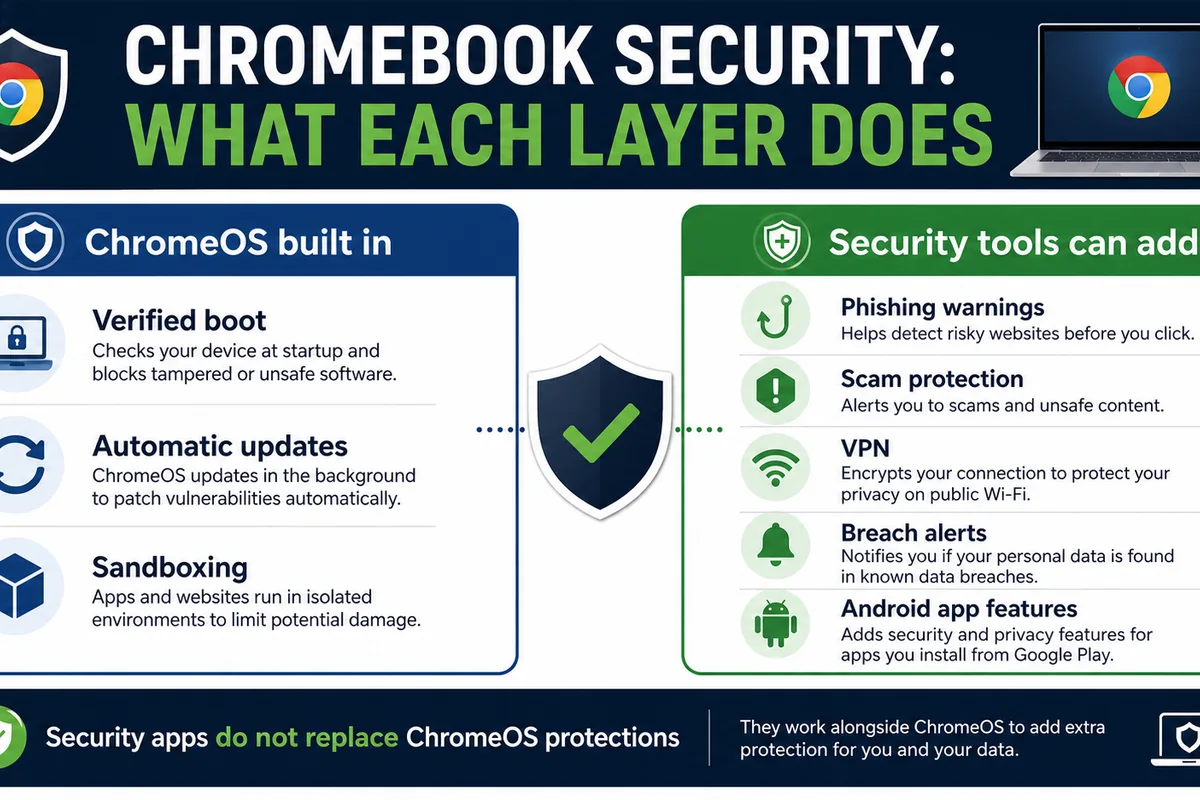
Quick answer: A Chromebook can't catch a classic Windows virus — ChromeOS runs every app in a sandbox, verifies itself on boot, and patches in the background. What it can't stop is the human-facing stuff: phishing pages, a malicious Chrome extension, a sketchy Android app, or a scam text. If your Chromebook runs Android apps, banks, shops, or is used by a kid or an older relative, a light security app plus safe-browsing protection is worth it. Our top pick for most people is Bitdefender Mobile Security; Norton 360 if you want a VPN and scam protection bundled in; Avast if you want something genuinely free.
Do Chromebooks Need Antivirus in 2026?
Short version: not in the way a Windows laptop does, and anyone who tells you a Chromebook is crawling with viruses is selling something.
ChromeOS was built tight. Every web page and every app runs in its own sandbox, walled off from the rest of the system. The OS checks its own code every time the machine boots (Google calls it Verified Boot), so a tampered system file gets caught and repaired automatically. Updates land in the background and apply on restart — there's no "I'll patch it next month" gap that attackers love on other platforms. And there's no traditional .exe install flow, so the classic "double-click the infected attachment" route mostly doesn't exist. (Google lays out these protections on its own ChromeOS security page.)
That's a genuinely strong baseline. It's why Google's own support forum is full of staff saying you don't need to install antivirus on a Chromebook, and for the narrow definition of "antivirus" — software that scans files for known malware signatures — they're right.
But "I can't get a virus" and "I'm safe" are two different sentences. The threats that actually hit Chromebook users in 2026 don't care about the sandbox:
- A phishing page asking for your Google password works exactly the same in Chrome on a Chromebook as it does anywhere else.
- A malicious browser extension runs inside Chrome, with permission to read what you type and see every page you visit.
- A bad Android app from outside the Play Store can quietly harvest data.
- A scam text or a fake "your account is locked" email lands in the same inbox.
None of those is a "virus." All of them are real. So the honest answer is: you don't need a traditional antivirus scanner, but most people benefit from the other things a modern security app does — safe browsing, link checking, scam detection, a VPN on public Wi-Fi, and a second opinion on the Android apps and extensions you install.
The threats ChromeOS stops — and the ones it doesn't
This is the part most "best antivirus for Chromebook" lists skip. Here's the honest map of what the built-in security actually covers, and where it leaves you exposed:
| Threat | Does the ChromeOS sandbox stop it? | What actually protects you |
|---|---|---|
| Traditional Windows/Mac malware (.exe, .dmg) | Yes — it can't even run | Nothing extra needed |
| System tampering / rootkits | Yes — Verified Boot repairs it | Built-in |
| Malicious browser extension | No — it runs inside Chrome with granted permissions | Extension vetting, a security extension, periodic permission audits |
| Phishing / fake login pages | Partly — Safe Browsing flags known ones | Safe-browsing + scam protection, plus your own habits |
| Malicious Android app (sideloaded / off-Store) | Partly — Play Protect scans Store apps | An Android security app, avoiding sideloading |
| Scam texts, calls, fake "support" pages | No | Scam-detection tools, skepticism |
| Data snooping on public Wi-Fi | No | A VPN |
| Trackers / data-harvesting sites | No | Tracker blocking, a privacy-minded browser setup |
| Out-of-support device (past AUE) | No — updates have stopped | Replace the device (see below) |
The pattern is clear: ChromeOS is excellent at stopping code from doing damage, and does nothing about people being tricked. Extensions and Android apps sit in the awkward middle — Google scans them, but bad ones still slip through. Browser extensions are the big one. In December 2025, Koi Security researchers documented a seven-year operation they nicknamed "ShadyPanda" that pushed malware to roughly 4.3 million Chrome and Edge users through extensions (reported by The Register). A February 2026 investigation found 287 Chrome extensions quietly leaking browsing data; a separate batch of 153 extensions, installed by an estimated 27 million people, was caught sending browsing history to remote servers. Every one of those ran happily on a Chromebook, sandbox and all.

What Antivirus for Chromebook Actually Means
Here's the thing nobody says out loud: you can't install a normal antivirus on a Chromebook. There's no Bitdefender.exe, no Norton setup wizard, no traditional desktop scanner that runs on ChromeOS. If a site is telling you to "download and install" antivirus on your Chromebook, it doesn't understand the platform.
What you can actually run breaks down into three buckets, and a good Chromebook security setup usually mixes two or three of them:
- Android apps (from the Google Play Store). Most consumer Chromebooks support Android apps — though school or enterprise devices may have the Play Store disabled by policy, so check yours first. Where Android apps run, the "antivirus" you install is the vendor's Android app — Bitdefender Mobile Security, Norton 360, Avast, and so on. These do app scanning, web/link protection, anti-theft, and sometimes a VPN. This is why the lab scores that matter for a Chromebook are the Android test results, not the Windows ones — a point we come back to below.
- Chrome browser extensions. Tools like Malwarebytes Browser Guard or a vendor's Safe-Web extension live in Chrome and block phishing pages, malicious sites, and trackers before they load. Since most of what you do on a Chromebook is the browser, this layer punches above its weight.
- A VPN. Not antivirus, but the single most useful add-on if you use your Chromebook on café, school, or airport Wi-Fi. Several of the suites below bundle one.
So when we rank "the best antivirus for Chromebook," we're really ranking the best security app for ChromeOS — judged on its Android protection, its browser/web shield, how light it is, and what extras (VPN, scam detection, parental controls) it brings.

Best Antivirus for Chromebook in 2026: Top Picks
A note on how we read the lab data: because Chromebook protection runs through the vendors' Android apps, we anchor on the AV-TEST Android test (March 2026 cycle) rather than Windows scores. In that round, nine apps earned a perfect 6/6 for protection. We weight that, plus how light the app is, what it adds beyond scanning, and whether it's genuinely useful on ChromeOS specifically — not just ported and forgotten.
1. Bitdefender — best overall for most Chromebooks
Bitdefender Mobile Security scored a perfect 6/6 protection and 6/6 usability in AV-TEST's March 2026 Android test, which is the bar you want. On a Chromebook it does the two things that matter: it scans Android apps you install, and its Web Protection layer blocks phishing and malicious pages in Chrome. It's also light — it leans on Bitdefender's cloud for the heavy lifting, so it doesn't tax a budget Chromebook's modest chip.
The catch worth flagging: Bitdefender's Android app is a paid product (there's a trial, but no permanent free tier the way Avast has), and its Scamio scam-checker is an on-demand tool you paste a suspicious message into — not an always-on monitor. For a single dependable security app on a Chromebook, though, it's the one we'd put on a relative's machine without a second thought.
Read our full Bitdefender review. Official app: Bitdefender Mobile Security.
2. Norton 360 — best if you want a VPN and scam protection bundled
Norton 360 also posted a clean 6/6 protection in the March 2026 AV-TEST Android round. What makes it a strong Chromebook pick isn't the scanner, it's the bundle: a VPN on supported plans (genuinely useful on public Wi-Fi), Safe Web link-checking, and App Advisor, which flags privacy-greedy or misbehaving Android apps before you install them — exactly the second opinion ChromeOS doesn't give you.
Norton has also been pushing AI Scam Protection, which analyzes texts and messages for scam patterns. It's a real feature and a good fit for the phishing-heavy threat model Chromebooks actually face — though availability varies by plan and region, so treat it as a bonus rather than a guarantee on every tier. If you want one subscription that covers protection, privacy, and scams across your Chromebook and your phone, Norton is the convenient answer.
Read our full Norton review. Official app: Norton 360.
3. Avast — best free option
If you want to spend nothing, Avast is the pick. Its Android app earned 6/6 protection in the March 2026 AV-TEST Android test, and the free tier is genuinely usable — app scanning plus a Web Shield that blocks unsafe sites and links. On a Chromebook used for browsing, email, and the occasional Android app, the free version covers the realistic threats without asking for your card.
Two honest caveats. First, the free app is ad-supported and will nudge you toward the paid tier. Second, Avast and AVG share the same engine (AVG Free also scored 6/6), so picking between them is mostly a matter of which interface you prefer. Avast's parent company has a rough history on data handling that's worth knowing about, though the practice that drew fire was shut down; for a free Chromebook layer, it remains the most capable no-cost option.
Read our full Avast review. Official app: Avast Mobile Security.
4. McAfee — best for scams, families, and Android app protection
McAfee Mobile Security earned a perfect 6/6 protection in the March 2026 AV-TEST Android round, so it's fully lab-backed — but the reason it stands out here is scams. McAfee says its Scam Detector can analyze suspicious texts, emails, links, QR codes, social messages, and AI-generated/deepfake content — the exact threats a Chromebook's sandbox does nothing about — and lets you upload a suspect message to check it. (The feature was a 2026 Webby Awards finalist and honoree for its AI scam detection, though it's the lab score and feature set we'd weigh, not the award.) It also includes an unlimited VPN on supported plans, identity monitoring, and a password manager.
That makes McAfee the strongest fit for the people who get targeted most: families, students, and anyone who shops or banks on their Chromebook. It pairs naturally with the scam-detection thinking in our best antivirus for scam protection guide. Like the others at this tier it's a paid subscription with the usual renewal upsell, but for an all-in-one that takes scams seriously, it's an easy recommendation.
Read our full McAfee review. Official app: McAfee Mobile Security.
5. Malwarebytes Browser Guard — best free browser protection layer
Malwarebytes wasn't in the March 2026 AV-TEST Android round, so we're not going to quote a lab score it didn't earn. We include it for one specific, genuinely useful thing on a Chromebook: Browser Guard, its free Chrome extension. Its Chrome Web Store listing puts it plainly — it blocks malicious sites, phishing scams, ads, and trackers. Given that malicious extensions and scam pages are among the most real Chromebook threats, and that the browser is where you live, that's a smart, free layer. Its on-demand Android scanner is a fine secondary check too.
Think of Malwarebytes less as your one antivirus app and more as the browser-hardening piece you add on top of safe habits. It pairs well with any of the picks above.
See how Malwarebytes stacks up in our comparisons.
Also worth a look: ESET
ESET Mobile Security is a reasonable family pick if you're already in its ecosystem — it's light and includes parental and anti-theft tools. But it wasn't in the March 2026 AV-TEST Android round, so it shouldn't outrank the lab-tested options above for pure protection. If you specifically want ESET's controls for a child's device, it's a fine choice; otherwise, one of the five picks is the safer bet.
Chromebook Antivirus Apps Compared
| App | AV-TEST Android (Mar 2026) | Free tier | Web/phishing protection | VPN included | Scam detection | Best for |
|---|---|---|---|---|---|---|
| Bitdefender | 6/6 protection | Trial only | Yes | Paid tiers | On-demand (Scamio) | Most people |
| Norton 360 | 6/6 protection | No | Yes (Safe Web) | Yes, on supported plans | AI Scam Protection (varies by plan) | All-in-one + VPN |
| Avast | 6/6 protection | Yes | Yes (Web Shield) | Paid tiers | Limited | Free protection |
| McAfee | 6/6 protection | Trial only | Yes (WebAdvisor) | Yes, on supported plans | Scam Detector (text/email/QR/social) | Scams, families |
| Malwarebytes | Not in this round | Yes (Browser Guard) | Yes (extension) | No | Via Browser Guard | Browser/extension layer |
| ESET (also) | Not in this round | Trial only | Yes | No | Limited | Family / school devices |
| Google Play Protect (built in) | 5.5/6 protection | Built in | Basic | No | No | Baseline everyone has |
That last row matters. Every Chromebook with the Play Store already has Google Play Protect scanning installed Android apps, and it scored 5.5/6 in the same March 2026 test. It's a good baseline — but not a full Chromebook security suite: no VPN, no browser-extension audit, no scam assistant. The apps above add exactly those layers Play Protect doesn't touch.
Free vs paid: what you actually give up
For a lot of Chromebook users, free is genuinely enough. If you browse, use Google's apps, install the odd Android app from the Play Store, and you're a confident, scam-savvy adult, then Google Play Protect plus Avast's free app plus the Malwarebytes Browser Guard extension covers the realistic threats at zero cost.
You step up to paid when you want:
- A VPN for regular public-Wi-Fi use (Norton and McAfee include one on supported plans).
- Always-on scam and identity protection rather than on-demand checks (McAfee's Scam Detector is the standout here).
- Parental controls for a child's device (ESET).
- One subscription across all your devices — the same plan covering your Chromebook, your phone, and the family's laptops is where paid suites earn their keep.
What you don't need to pay for is "more virus scanning." On a Chromebook, the scanner is the least important part. Pay for the VPN, the scam protection, or the cross-device convenience — not the antivirus engine itself.
What antivirus can't fix on a Chromebook
Two honest limits, because pretending a security app is a force field helps no one.
Out-of-support Chromebooks (AUE). Every Chromebook has an Auto Update Expiration date. After it, the device keeps working but stops receiving ChromeOS and browser security updates from Google — including bug fixes and security patches. The good news: since September 2023, Google has moved Chromebooks toward 10 years of automatic updates on supported models, but the exact AUE date still depends on the device platform, and the clock starts at the platform's release date, not the day you bought it — so a "new" Chromebook on a years-old platform can have a shorter runway than you'd expect. The hard part no app changes: once a Chromebook is past AUE, no Android security app can replace missing ChromeOS and browser security updates. For banking, shopping, password management, or school/work accounts, replacing the device is the safer move. (You can check your model's AUE date in Settings → About ChromeOS → Additional details, or on Google's support site.)
Scams. The biggest real risk to most Chromebook users isn't malware at all — it's being talked into handing over a password, a code, or money. A security app can flag a known phishing URL or a scam-pattern text, and that helps. But a convincing fake "your Google account is suspended" email or a deepfake video call lands on the human, not the machine. This is exactly why scam protection has become the feature to watch in 2026, and why we built a separate guide to it — see our best antivirus for scam protection hub and our explainer on deepfake scams.

Power users: Linux, Crostini, and sideloaded apps
One more group: if you've turned on the Linux development environment (Crostini) or you sideload Android APKs from outside the Play Store, you've stepped outside the simple consumer-ChromeOS model — even though Linux still runs in a container. That container can run real Linux software, and real Linux malware. Sideloaded APKs skip Google Play Protect's vetting entirely.
ChromeOS still isolates the Linux container reasonably well, but the "I can't get infected" guarantee weakens the moment you enable these. If you're a developer or tinkerer doing this, that's fine — just go in knowing your threat model now looks more like a regular Linux machine's, keep what you install to trusted sources, and don't sideload random APKs onto the same Chromebook a family member uses for banking.
How we evaluate Chromebook security apps
We don't run a fake test lab. Here's what actually goes into these picks:
- Independent lab data, the right kind. Because Chromebook protection runs through Android apps, we weight the AV-TEST Android results (March 2026 cycle) over Windows scores. Where an app wasn't in the latest round, we say so rather than quote an old or unrelated number.
- Real ChromeOS fit. Does the app do something useful on a Chromebook — web protection, app scanning, a VPN — or is it a phone app that technically installs? We weight tools that match the platform's actual threats (extensions, phishing, scams) over generic feature lists.
- Footprint. Chromebooks are often budget machines. A security app that drags down a 4GB device fails the brief no matter how good its detection is.
- Honesty on price and free tiers. We flag what's genuinely free, what's trial-only, and where the value of paying actually is (VPN, scams, parental controls — not the scanner).
- No category claims nobody can verify. There's no independent lab that ranks "best Chromebook antivirus" specifically, so we don't pretend one anointed a winner. We tell you what the Android labs measured and what we'd put on our own machines.
The verdict
A Chromebook is one of the safer computers you can buy, and you should ignore anyone trying to scare you into thinking otherwise. You do not need a traditional antivirus scanner. What you may want — depending on how you use it — is a light security app that adds the layers ChromeOS leaves open: web and phishing protection, a check on the Android apps and extensions you install, a VPN for public Wi-Fi, and scam detection.
For most people, Bitdefender Mobile Security is the cleanest single choice — top Android lab scores, light, good web protection. Norton 360 is the better buy if you want a VPN and scam tools bundled into one subscription, and McAfee is the pick if scams are your main worry or you're setting up a family's devices. If you'd rather pay nothing, Avast's free app plus the Malwarebytes Browser Guard extension and the Google Play Protect you already have will cover the realistic threats. Spend your money on the VPN and scam protection, not the virus scanner — on a Chromebook, that's where the actual risk lives.

Frequently asked questions
Can Chromebooks get viruses?
Not traditional ones. ChromeOS sandboxes apps, verifies itself on boot, and auto-updates, so classic Windows/Mac viruses can't run. You can still hit phishing pages, malicious browser extensions, bad Android apps, and scams — none of which is technically a "virus," all of which are real.
Can I install Windows antivirus on a Chromebook?
No. There's no .exe to run on ChromeOS. "Antivirus for a Chromebook" means the vendor's Android app from the Play Store (Bitdefender, Norton, Avast, McAfee) or a Chrome extension like Malwarebytes Browser Guard — not a desktop installer.
Is Google Play Protect enough on a Chromebook?
It's a solid baseline — it scans your installed Android apps and scored 5.5/6 in AV-TEST's March 2026 Android test. But it doesn't cover the browser-extension, phishing, scam, or public-Wi-Fi risks. Pairing it with a free Web Shield (Avast) and the Malwarebytes Browser Guard extension closes most of that gap.
Is the free version enough for a Chromebook?
For many people, yes. Google Play Protect (built in), Avast's free Android app, and the free Malwarebytes Browser Guard extension cover the realistic threats. You upgrade to paid mainly for a VPN, always-on scam/identity protection, or parental controls — not for "more scanning."
Will an antivirus app slow down my Chromebook?
A well-chosen one won't noticeably. Bitdefender and Norton lean on the cloud and stay light; ESET is built for low-powered devices. The bigger drag is usually too many browser extensions, not a security app.
Do I need antivirus if I only use Google apps and the browser?
You don't need a scanner, but the browser is exactly where the real risks are — phishing pages and malicious extensions. A safe-browsing extension and good habits matter more than antivirus here. A VPN is worth it if you use public Wi-Fi.
My Chromebook is past its update (AUE) date — will antivirus protect it?
No. Once a Chromebook stops getting ChromeOS and browser security updates, no Android security app can replace them. For anything sensitive — banking, work or school accounts — the safe move is to replace the device. Check your AUE date in Settings → About ChromeOS → Additional details.
What's the best free antivirus for a Chromebook?
Avast's free Android app is the most capable no-cost option, backed by Google Play Protect (already installed) and the free Malwarebytes Browser Guard extension for the browser layer. See our best free antivirus guide for more.
What is the best antivirus for a school Chromebook?
For a managed school fleet, the device's admin controls and ChromeOS supervision usually matter more than an app — and many school Chromebooks have the Play Store disabled anyway. For a family-owned student Chromebook, the real risks are scams and inappropriate sites, so McAfee's Scam Detector or ESET's parental controls plus built-in Family Link supervision do more than a scanner would.
Do my kids' or school Chromebooks need antivirus?
Antivirus, no; protection and supervision, yes. The real risks for younger users are scams, inappropriate sites, and accidental installs. ESET's parental controls or McAfee's family and scam features, plus the built-in ChromeOS supervision tools, matter more than a scanner here.