
Free vs Paid Antivirus in 2026: Is Free Enough?
Good free antivirus can block malware. Paid suites mainly buy broader scam, identity, privacy and multi-device controls—not a magical second definition of a virus. The right choice depends on what happens around the malware engine.
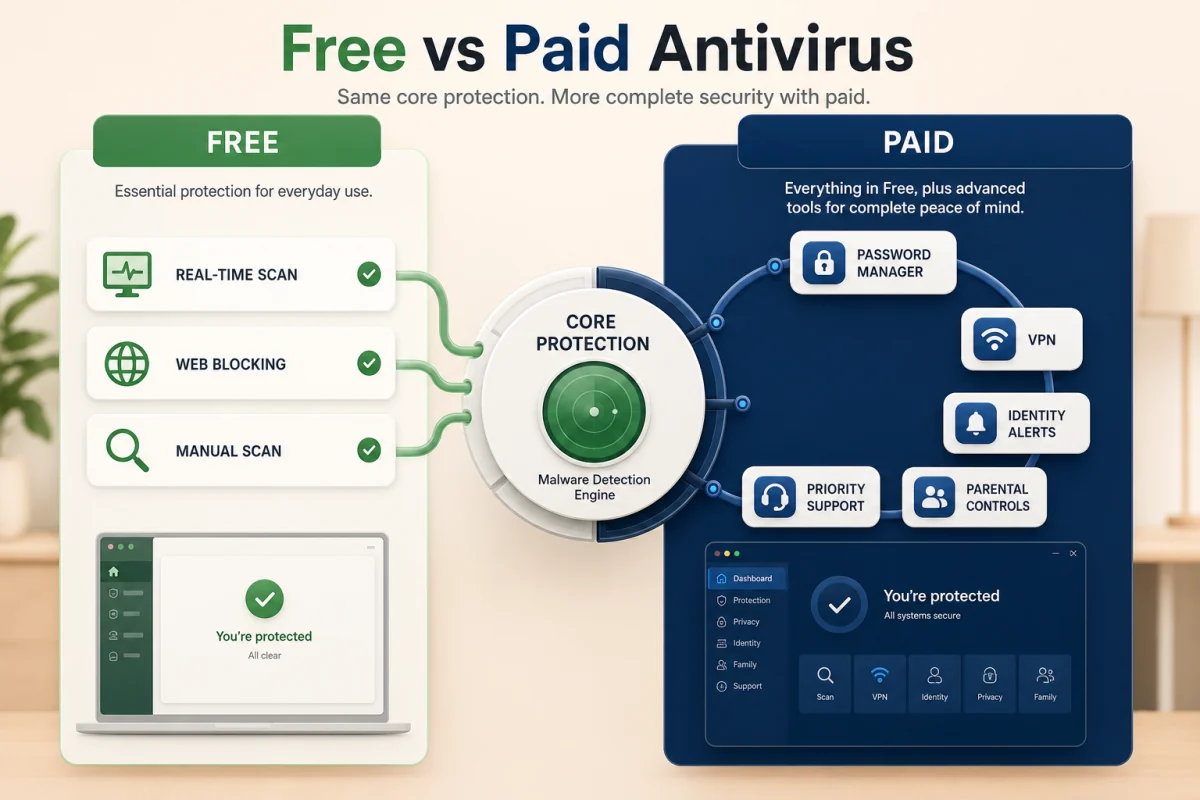
Quick answer: Microsoft Defender or a reputable free product is enough for many careful Windows users. Pay when you need stronger phishing and scam tools, identity monitoring, parental controls, a cross-platform licence, responsive support or a bundled service you'd otherwise buy separately.
Free doesn't automatically mean weak malware detection
Independent labs test engines and product configurations, not price tags. In AV-TEST's March–April 2026 Windows 11 cycle, Microsoft Defender scored 6/6 for protection, 6/6 for performance and 6/6 for usability. Several paid suites also reached 18/18. That makes the useful question narrower: what risks and support gaps remain after core malware protection?
Read the current AV-TEST Windows results by their three separate columns. A high protection score doesn't guarantee low slowdown or few false alarms. AV-Comparatives likewise separates real-world blocking, malware protection and system performance testing.
Microsoft Defender isn't a trial: it's included with supported Windows and receives platform updates. Apple's XProtect is built into macOS. Neither removes the need for browser safety, software updates, MFA or backups.
What a paid antivirus suite actually adds
| Capability | Free or built-in | Paid suite |
|---|---|---|
| Real-time malware scanning | Usually included | Included |
| Phishing and malicious-site blocking | Browser and OS baseline; depth varies | Often adds extension, link and message analysis |
| Ransomware controls | Basic controls may exist | May add protected folders, remediation or backup |
| Firewall | Windows and macOS include one | May simplify rules and network alerts |
| Identity monitoring | Limited breach alerts are available free | Broader monitoring and, in some markets, restoration or insurance services |
| Parental controls | Platform family tools | Cross-device schedules, categories and reporting may be easier |
| Support | Self-service or community | Chat, phone or removal assistance depending on plan |
| Ads and upsells | Common in third-party free products | Usually fewer, but suite upgrade prompts still occur |
A bundled VPN isn't automatically a bargain. Check data limits, supported platforms, independent audits and whether the antivirus price jumps at renewal. A bundled password manager is useful only if it meets your recovery and export needs. Judge every extra as a separate service.

Who is best served by free protection?
- A single Windows 11 PC used by a careful adult
- Automatic OS and browser updates stay enabled
- Downloads come from known publishers and app stores
- Accounts use unique passwords, passkeys or strong MFA
- Important files have an offline or versioned backup
- The user can recognize and investigate a security warning
Who benefits from paying?
- A family needs one dashboard across Windows, Mac, Android and iOS
- A senior or less technical user benefits from scam warnings and human support
- Children need cross-device parental controls
- Work or financial activity makes identity and account monitoring valuable
- You'd separately pay for the included VPN, backup or password service
- You want a quieter product than an ad-funded free edition
Risk isn't just technical skill. A careful person who handles invoices, crypto, ads accounts or business admin may justify a paid anti-scam layer even if the free engine detects malware well.

Three sensible protection models
Built-in and disciplined
Microsoft Defender or XProtect, platform firewall, automatic updates, a password manager, MFA and versioned backups. Best for a user who can interpret warnings and maintain the system.
Free third-party engine
A reputable free product replaces the Windows engine for a preferred interface or detection behaviour. Evaluate advertisements, data collection and which modules are trials.
Paid integrated suite
One subscription covers endpoint, web, family, identity or privacy tools. Best when several included services are genuinely useful and work on every device.
Modular paid stack
Built-in antivirus plus a dedicated VPN, password manager or identity service. More accounts to manage, but each component can be chosen on its own merits.
There's no reason to treat “free” as one product category. Defender is funded as part of Windows, while a third-party free edition may use upgrade prompts or feature trials. Review telemetry settings and privacy documentation in either model. Web and cloud protection work partly by sending URLs, hashes or suspicious samples to a provider; the relevant question is what is sent, when and under which controls.
What small businesses shouldn't do
A free home licence can be technically capable yet contractually or operationally wrong for company devices. Businesses need central policy, inventory, tamper controls, offboarding and incident visibility. Check licence terms and evaluate business endpoint protection instead of installing unrelated consumer freebies employee by employee.
Compare year two, not the checkout banner
Consumer security pricing commonly uses a discounted first term. The relevant annual cost is the renewal total for the same device count and market. Our renewal-price dataset records both figures and the date each official page was checked.
- List the devices and operating systems. Don't pay for ten devices when you protect two.
- Mark the features you'll use. Ignore duplicates already supplied by Windows, Apple, your router or another subscription.
- Check independent lab cycles. Use current protection, performance and false-positive results.
- Find the renewal price. Confirm currency, tax wording and cancellation window.
- Review data collection. Web filtering, identity monitoring and VPNs can see sensitive metadata.
- Set a calendar reminder. Reassess before the next charge instead of after it.
For Windows users, our Windows 11 comparison shows which paid products add meaningful protection beyond Defender. If you change products, keep only one real-time antivirus.

Frequently asked questions
Is free antivirus safe in 2026?
Yes when it comes from a reputable vendor, receives current updates and remains active. Free protection still needs patched software, safe downloads, MFA and backups.
Is Microsoft Defender enough for Windows 11?
For many careful home users, yes. Current independent lab results are competitive. Paid tools can add scam, identity, family and cross-platform features.
Does paid antivirus detect more malware?
Sometimes a paid product or configuration performs better in a given test, but price alone doesn't predict detection. Compare current independent results by product and version.
What is the biggest limitation of free antivirus?
The largest gaps are usually support and protection around the engine: phishing, identity, parental controls, privacy tools and multi-device management.
Why does free antivirus show advertisements?
Some vendors use the free edition to fund development and market paid plans. Built-in Defender doesn't use the same ad-funded model.
Can I combine free and paid antivirus?
Don't run two real-time engines. You can keep one primary antivirus and use a reputable second-opinion scanner on demand.
Bottom line
Free protection can cover the malware baseline. Pay for a specific, verified improvement in your risk model—not for a larger list of features or an artificially low first-year price.