
What Happens When Your Antivirus Subscription Expires?
Expiry doesn't have one universal outcome. A suite may stop receiving protection updates, fall back to a free edition, disable paid web and identity tools, or remain installed while Windows hands real-time protection back to Microsoft Defender.
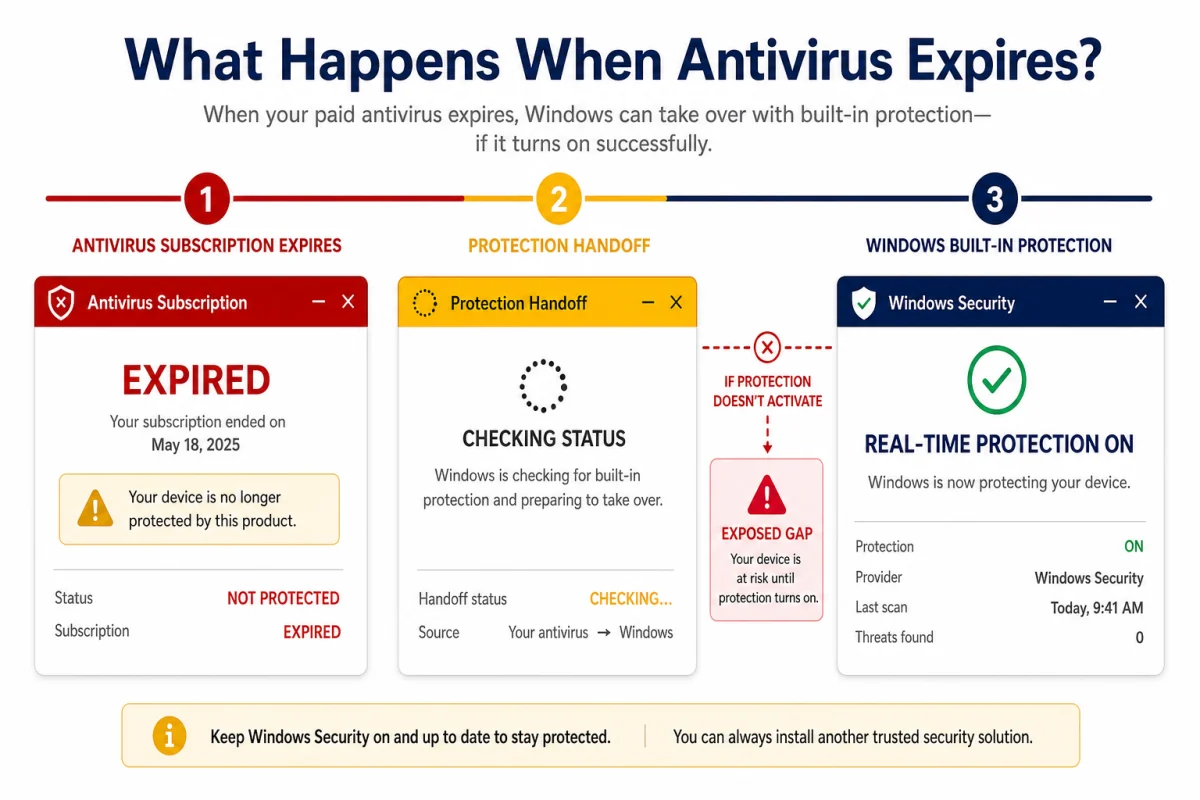
Quick answer: don't ignore an expiry banner. Confirm which provider is active, update it, and either renew at the disclosed renewal price, switch to another product, or deliberately use the built-in protection. The unsafe state is an expired suite that still looks installed while its protection or definitions are inactive.
Expiry can affect the engine, updates and extras differently
An antivirus subscription bundles several services under one date. Real-time malware detection, cloud reputation, signature updates, phishing protection, VPN data, password management, identity monitoring and technical support don't necessarily expire in the same way. The account page and Windows Security status matter more than the product icon.
Protection stops
Some paid products require a valid subscription for updated definitions and active protection. Leaving that installation in place isn't a safe long-term plan.
Free edition takes over
Some vendors convert the installation to a free tier. Core antivirus may continue, while firewall, ransomware, scam, privacy or identity tools disappear.
Built-in antivirus returns
Windows can reactivate Defender when the third-party provider is no longer registered as active.
Automatic renewal charges
If auto-renew was enabled, the product may not expire at all; the card is charged at the then-current renewal price.
Expiry shouldn't delete quarantined files or personal data, but the suite's backup or password-vault terms can be separate. Export or migrate data before the subscription date, not after access becomes uncertain.

Vendor rules aren't interchangeable
| Example | Published outcome | What to verify |
|---|---|---|
| Norton | Norton's support material says a valid subscription is required to keep protection and definition updates current | Subscription status, automatic renewal and Windows provider |
| Avast Premium Security | Avast says an expired paid subscription can change to Avast Free Antivirus | Which paid modules were disabled and whether Free is updated |
| Microsoft Defender | No separate consumer antivirus subscription; it's included with supported Windows | Real-time, cloud-delivered and tamper protection status |
| Bundle services | VPN, identity and cloud-backup allowances follow the plan's own terms | Renewal date, stored data and any account grace period |
Read the current product-specific support page rather than a forum answer. Norton explains subscription and protection status, while Avast documents the paid-to-free transition. Terms can change by product, platform and market.
How to confirm that Windows is protected after expiry
- Open Windows Security. Go to Virus & threat protection and view security providers.
- Identify the active antivirus. One provider should report that it's on and up to date.
- Check real-time and cloud protection. If Defender is active, verify its protection settings and updates.
- Run an update and quick scan. Don't trust a stale green icon.
- Uninstall the abandoned suite. Restart and confirm Windows Security again so old filter drivers and extensions don't linger.
Microsoft's antivirus and antimalware FAQ explains the built-in Windows protection and why running two real-time products is discouraged. On macOS, built-in XProtect continues independently of a third-party subscription, but that doesn't mean every paid feature survives. Check login items, browser extensions and full-disk-access permissions when removing a suite.

Grace periods, failed payments and cancellation are different events
A cancelled renewal normally means “do not charge for the next term,” not “turn protection off today.” A failed payment can create a retry or grace period. A refund can end entitlement sooner. The product dashboard, vendor account and card statement may therefore show different stages of the same subscription.
| State | What it usually means | Safe action |
|---|---|---|
| Auto-renew cancelled | Current paid term continues to its scheduled end | Record the expiry date and prepare the replacement |
| Payment retry | Vendor may attempt another charge; benefits can remain temporarily | Check the account and resolve or cancel deliberately |
| Grace period | Some protection or account access continues briefly | Don't treat an undocumented grace period as a plan |
| Expired / free fallback | Paid modules end; core free protection may remain | Confirm the active modules and updates |
| Refunded subscription | Paid entitlement may be revoked | Verify protection immediately |
Mobile devices add another layer: an App Store or Google Play subscription can be managed separately from a licence bought on the vendor website. Cancelling one billing route doesn't prove that every subscription under the same email is cancelled. Search the vendor account and platform subscriptions for duplicates.
Beware of expiry-themed phishing. A real-looking “your antivirus has expired” email can send you to a copied checkout page. Open the installed product or type the vendor account address yourself; don't renew through an unsolicited button.
Renew, switch or use free protection?
Renew if you use the paid features, trust the product and accept the next-term price. Switch if the renewal is poor value, the suite caused compatibility problems, or another product fits your devices better. Built-in or free protection can be reasonable for a careful home user who keeps software patched, uses unique passwords and maintains tested backups.
- Compare the renewal total, currency, device count and term—not the old introductory banner.
- Check whether cancelling auto-renew also removes an advertised guarantee or benefit.
- Export password or backup data before cancelling a bundled service.
- Overlap licences only long enough to download the replacement; don't run both engines in real time.
- Keep the cancellation confirmation and check the card statement.
See our 2026 renewal-price report for a source-dated comparison, free versus paid antivirus for the feature decision, and the safe switching guide before installing a replacement.

Frequently asked questions
Does antivirus stop working immediately when it expires?
It depends on the vendor and product. Protection may stop, the installation may fall back to a free edition, or Windows may reactivate Microsoft Defender.
Will Microsoft Defender turn on when antivirus expires?
Windows is designed to restore built-in protection when no compatible third-party antivirus is active, but you should verify the provider and update status in Windows Security.
Can I still scan with expired antivirus?
The interface may permit a scan, but detection data or cloud services can be out of date. Don't treat an expired engine as dependable primary protection.
Will an expired antivirus delete my files?
Expiry normally doesn't delete personal files. Bundled backup, vault or identity services may have separate retention rules, so migrate important data first.
Can I cancel automatic renewal and stay protected?
Yes until the paid term ends. Before that date, choose and verify the protection that will take over.
Should I uninstall expired antivirus?
Yes if you won't renew or use its free edition. A clean uninstall reduces driver, extension and status conflicts with the replacement.
Bottom line
Expiry is a handoff, not a reason to panic. Decide who protects the device next, verify that engine in the operating-system security centre, and remove the abandoned suite cleanly.