
Windows 10 ESU Guide 2026: How to Enroll, What It Costs, and What Comes After October
Windows 10 support ended in October 2025, but the consumer ESU program keeps security updates coming through October 13, 2026. Here is how to enroll in about five minutes, what it actually covers, and what to do when the final deadline lands.
Where Windows 10 stands in June 2026
Windows 10 hit end of support on October 14, 2025. Eight months later it hasn't gone anywhere: StatCounter showed Windows 10 at about 26% of desktop Windows usage worldwide in May 2026. Microsoft's one-year consumer lifeline — the Extended Security Updates (ESU) program — ends October 13, 2026. As of June 2026, that leaves only a few months to enroll and prepare an exit plan.
If your PC is on Windows 10 right now, you're in one of three camps:
- Enrolled in ESU — you're still getting monthly security patches. Good. This guide covers what those patches do and don't include, and what your exit plan should look like.
- Not enrolled — your last security update was October 2025, and every Patch Tuesday since has fixed holes your machine still has. You can fix that today; enrollment stays open until the program's final day.
- Planning to ride it out unpatched — we'll be blunt: that's the one option we'd talk you out of. Unpatched Windows versions are where ransomware and infostealer campaigns go first, because the exploits are public and the fixes never arrive.
We've covered which antivirus holds up best on Windows 10 in our Best Antivirus for Windows 10 guide. This page is the companion piece: the operating-system side of keeping a Windows 10 machine defensible in 2026.
What ESU actually covers — and what it doesn't
ESU is narrower than normal Windows support, and Microsoft is explicit about it (program docs):
You get: security updates rated Critical and Important by the Microsoft Security Response Center, delivered through Windows Update on the normal Patch Tuesday cadence.
You don't get:
- New features or quality-of-life fixes
- Non-security bug fixes — if something's broken and it isn't a security hole, it stays broken
- Driver or firmware updates
- General technical support from Microsoft
Think of ESU as a tourniquet, not treatment. It stops the most dangerous bleeding — kernel and OS-level vulnerabilities that worms and ransomware exploit — while you work out where you're going next. It does nothing about phishing, malicious downloads, scam pop-ups, or infected email attachments. That layer is your antivirus's job, ESU or no ESU (more on that below).
The three ways to enroll (and the EEA difference)
Enrollment is open to devices running Windows 10 version 22H2 — Home, Pro, Pro Education, or Pro for Workstations. All three paths produce the same coverage through October 13, 2026 (Microsoft's consumer ESU page):
| Path | What it costs | The catch |
|---|---|---|
| Windows Backup settings sync | Free | Your PC settings sync to OneDrive under your Microsoft account |
| Microsoft Rewards | 1,000 points | Points come from Bing searches and Microsoft Store activity; most people accumulate them in weeks |
| One-time purchase | $30 + tax | One license covers up to 10 devices on the same Microsoft account |
Three things apply to every path:
- A Microsoft account is mandatory. Local accounts can't enroll. The account needs administrator rights on the PC.
- One license, ten devices. Enroll once, reuse it on the rest of the household's Windows 10 machines signed into the same account.
- Enrolling doesn't lock you in. You can upgrade to Windows 11 any time; ESU just covers you meanwhile.
If you're in the European Economic Area: after pressure from European consumer groups, Microsoft made ESU free in the EEA without the Backup-sync requirement. The trade-off: you must sign in with your Microsoft account at least once every 60 days, or the device drops out of the program (you can re-enroll without penalty). US readers don't get this version — for you it's Backup sync, Rewards points, or $30.
Step-by-step: enrolling in about five minutes
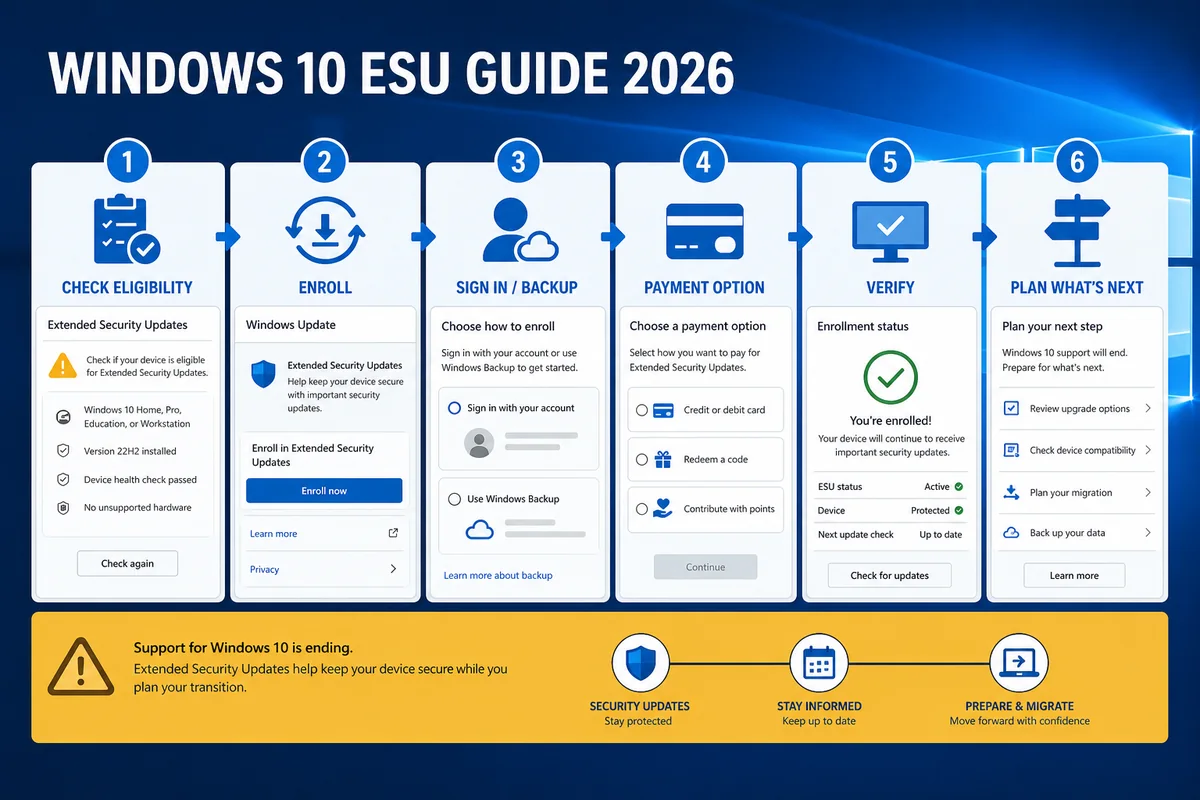
- Confirm you're on 22H2. Settings → System → About, check "Version". If you're on 21H2 or older, run Windows Update until 22H2 lands — older builds can't enroll.
- Install pending updates. The enrollment wizard shipped with the August 2025 cumulative update (KB5063709), and because Windows 10 updates are cumulative, any later update includes the same enrollment fixes. Fully update first.
- Sign in with your Microsoft account. Settings → Accounts. If you use a local account, the wizard will walk you through signing in.
- Open Windows Update. Settings → Update & Security → Windows Update. Look for "Enroll now" under the check-for-updates button.
- Pick your path — Backup sync, 1,000 Rewards points, or $30 — and finish the wizard.
- Verify. Back in Windows Update, the page should now say the device is enrolled in Extended Security Updates. Patches arrive through the normal update channel from then on.
"Enroll now" missing? Work down this list
This was the single most common ESU complaint on Microsoft's own Q&A boards through late 2025, and the fixes are consistent:
- Not on 22H2 → update to 22H2 first; the option won't appear on older builds.
- August 2025 cumulative (KB5063709) or a later one not installed → install all pending updates and reboot. Microsoft's notes for that update specifically call out a fix for the enrollment wizard's "Enroll now" issues.
- Signed in with a local account → sign in with a Microsoft account that has admin rights.
- Domain-joined or managed PC → consumer enrollment doesn't apply; that's the commercial ESU track your IT department handles.
- Everything checks out and it's still missing → Microsoft rolled the wizard out in waves; on a fully patched 22H2 machine in June 2026 it should be present. If it genuinely isn't, run Windows Update once more, reboot, and check again — that resolves the stragglers.
ESU + antivirus + browser: the minimum safe stack
Safer — not safe. ESU closes OS-level holes. It doesn't screen what comes in through your browser, inbox, or USB ports, and after October 2026 even the OS patches stop. Two facts shape the final year:
Microsoft Defender keeps working past the OS deadline. Defender's security-intelligence and engine updates continue on Windows 10 through at least October 2028 (Microsoft's Defender lifecycle docs) — Microsoft knows hundreds of millions of these machines aren't going anywhere. Same for Microsoft 365 apps: security updates through October 10, 2028. Useful — but security intelligence updates aren't OS patches; don't read "2028" as "supported until 2028." Whether Defender alone is enough is its own question — we've answered it for Windows users here.
Third-party antivirus still covers Windows 10 — at our check. At our June 2026 check, the major products in our Windows 10 antivirus ranking — Bitdefender, Norton, ESET, Avast, AVG, Malwarebytes — still listed Windows 10 22H2 as a supported platform, and the April 2026 AV-TEST Windows cycle scored Bitdefender, Norton, Defender, Avast, AVG, ESET and Kaspersky at 6/6 for protection. (Kaspersky remains a separate conversation for US readers — our Kaspersky review explains why.) Given Windows 10's remaining install base, third-party antivirus support is likely to continue beyond Microsoft's consumer ESU window — but verify your vendor's current system requirements before renewing.
The practical takeaway, in priority order, for a Windows 10 machine in 2026:
- ESU enrolled — kernel and OS holes patched through October 2026.
- A current antivirus with strong web/phishing protection — that's the layer actually catching the malware, scam pages, and malicious attachments that dominate real-world attacks. Microsoft Defender is a defensible free baseline while its updates continue; paid suites add the web, scam and identity layers.
- An updated browser — Chrome, Edge, and Firefox all still update on Windows 10, and the browser is where most 2026 attacks start.
The scam wave riding the Windows 10 deadline
A predictable side effect of a publicized deadline: scammers borrow it. Since late 2025 we've seen a steady stream of fake "Your Windows 10 support has expired" pop-ups, scareware pushing fake "extended support" subscriptions, and cold calls from "Microsoft support" offering to "migrate" PCs — sometimes via remote-access tools like AnyDesk.
What's real and what isn't:
- Real Microsoft EOL notices appear inside Windows Update settings or as a desktop notification from the system — they never include a phone number, never ask for payment in the notification itself, and never arrive as a browser pop-up that locks the page.
- Microsoft doesn't cold-call about Windows 10 end of support. Nobody legitimate does.
- ESU is bought inside Windows Settings — not from a website reached via a pop-up, an email link, or a "support agent" on the phone. The only consumer price is $30; anyone quoting a different "extension fee" is selling you nothing.
- A browser pop-up that "scans" your PC and finds infections is theater; a webpage can't scan your disk.
Older relatives on aging Windows 10 machines are the prime target for this wave — our seniors guide and scam-protection ranking cover the playbook in depth.
What happens after October 13, 2026
The hard part. As of our June 2026 check, Microsoft has announced no second consumer ESU year — its own Q&A staff confirm consumers can't pay to extend past October 13, 2026. Plan on the consumer program ending on schedule. Your realistic options, roughly in order of how many people they fit:
Upgrade to Windows 11 (free, if eligible). Same license, in-place upgrade via Windows Update or the Installation Assistant once the machine meets requirements (TPM 2.0, 8th-gen Intel / Ryzen 2000 or newer, Secure Boot). Our Windows 11 antivirus guide covers security on the other side.
Replace the hardware. If the PC predates 2018, it likely can't take Windows 11 — and at some point a $400 machine with current support beats $30-a-year life support on a 10-year-old box. Migrate with Windows Backup.
0patch (third-party micropatching). Slovenian firm ACROS Security ships in-memory "micropatches" for selected high-risk Windows 10 vulnerabilities and has committed to coverage through at least October 2030 — free tier for 0-day fixes, Pro at roughly €25/year per machine (Tom's Hardware's coverage). Honest framing: this is not "Windows 10 support" — it's third-party micropatching of selected high-risk holes, a serious and well-regarded compensating control for machines that genuinely can't migrate. It patches the worst vulnerabilities, not all of them.
Switch the OS. ChromeOS Flex or a beginner Linux distribution (Mint is the usual recommendation) turns an un-upgradeable PC into a supported machine for browsing-class workloads. Real trade-off: Windows software doesn't come along.
The commercial track (context, not advice): businesses can buy up to three ESU years — through October 2028 — at escalating per-seat prices. That's volume licensing, not something a home user can purchase. There's also a niche advanced path — Windows 10 IoT Enterprise LTSC 2021 is supported into 2032 — but it's a different edition requiring a separate license and a reinstall; we mention it because forums bring it up, not because we recommend it for a family PC.
Which path fits you — 30-second version
- PC is Windows 11-eligible → upgrade now; ESU was your testing window, not your destination.
- PC can't run Windows 11, still daily-driver → ESU today + a current antivirus, replace the machine before October 2026.
- PC can't upgrade and won't be replaced → ESU now; evaluate 0patch for after; consider ChromeOS Flex/Linux if it's a browsing machine.
- Managing a parent's or relative's PC → enroll them in ESU under their account (the caregiver checklist covers the rest, including the scam talk).
- It's a business machine → commercial ESU through your licensing partner, not the consumer wizard.
The final-year checklist
- Confirm Windows 10 22H2 and fully patched (Settings → System → About).
- Enroll in ESU — free via Backup sync (or EEA), 1,000 Rewards points, or $30 for the household's ten devices.
- Verify enrollment took: Windows Update should say so.
- Run one current antivirus with web protection — paid (why paid vs free) or free (our free picks) — or confirm Defender is healthy: Windows Security → green checks, "Cloud-delivered protection" on.
- Keep the browser on auto-update.
- Back up what matters now — Windows Backup doubles as your migration path.
- Put a calendar reminder in August 2026 to execute your exit plan before the rush.
- Brief the household on the fake-EOL scam wave — no real Microsoft notice contains a phone number.
Bottom line
ESU is the cheapest security decision a Windows 10 holdout will make this year — free to $30 for patches through October 13, 2026 — and it takes five minutes in Settings. But it's a bridge with a posted end date and no consumer extension coming. Use the year it buys: enroll today, run a current antivirus underneath it (our Windows 10 picks), ignore anyone who calls about your "expiring Windows," and have your exit — Windows 11, new hardware, 0patch, or a different OS — executed before the October 2026 rush.
Sources
- support.microsoft.com — consumer ESU program page (33e17de9) ✅ inline
- learn.microsoft.com — ESU program docs ✅ inline
- support.microsoft.com — KB5063709 official page (96d99cf6) ✅ inline ×2 (официальный источник найден — claim не смягчён, подтверждён)**
- learn.microsoft.com — Defender AV updates lifecycle ✅ inline
- windowscentral.com — EEA free-ESU story ✅ inline (пункт 3)**
- tomshardware.com — 0patch through 2030 ✅ inline
- learn.microsoft Q&A 5585119 — no consumer extension past Oct 2026 (текст «its own Q&A staff confirm»)
- StatCounter — Windows 10 ≈26% desktop Windows worldwide, May 2026 (пункт 2; в HTML дать ссылку на gs.statcounter.com)**
- AV-TEST April 2026 Windows cycle (av-test.org/en/antivirus/home-windows/)
- microsoft.com/windows/end-of-support
Frequently asked questions
How much does Windows 10 ESU cost in 2026?
For home users: free if you sync settings via Windows Backup (or live in the EEA), 1,000 Microsoft Rewards points, or a one-time $30 plus tax. All three cover security updates through October 13, 2026, and the paid license works on up to 10 devices on the same Microsoft account.
Can I still enroll in June 2026?
Yes. Enrollment stays open until the program ends on October 13, 2026. Enrolling late still works in your favor: Windows 10 updates are cumulative, so the latest cumulative update should bring the device current once enrollment succeeds.
Do I need a Microsoft account?
Yes, for every path — including the paid one, and including the EEA's free route (which additionally requires signing in at least every 60 days). Local accounts can't enroll.
Does Windows 10 ESU include new features or bug fixes?
No. ESU delivers only security updates rated Critical and Important by Microsoft's Security Response Center. It doesn't include new features, non-security bug fixes, design changes, driver or firmware updates, or general technical support.
Can I enroll more than one Windows 10 PC?
Yes. One ESU license can be used on up to 10 devices signed into the same Microsoft account — enroll once, then activate it on the household's other Windows 10 machines.
Will there be a second consumer ESU year after October 2026?
As of June 2026, no — Microsoft has announced nothing beyond October 13, 2026 for consumers and has told users they can't pay to extend further. Only businesses can buy years two and three (through October 2028).
Do I still need antivirus if I have ESU?
Yes — arguably more than ever. ESU only patches Critical/Important OS vulnerabilities. It doesn't block phishing sites, scam pop-ups, malicious email attachments, or infostealer downloads — the attacks that actually dominate 2026. See our Windows 10 antivirus ranking for current picks.
Is Windows 10 still getting Microsoft Defender updates?
Yes. Defender's security-intelligence updates continue through at least October 2028 regardless of ESU status, and Microsoft 365 apps get security updates to October 2028 too. Useful — but security intelligence updates aren't OS patches; don't treat 2028 as a support date.
Will Windows 10 stop working after October 2026?
No. The PC keeps booting and running normally. It just stops receiving security fixes, and every newly discovered Windows 10 vulnerability from then on stays open on your machine.
Is 0patch a real alternative after ESU ends?
It's a legitimate, long-running micropatching service that has committed to Windows 10 coverage through at least 2030 (~€25/year for Pro). It covers selected high-risk vulnerabilities rather than everything Microsoft would have patched — a strong harm-reduction layer for machines that truly can't migrate, not "Windows 10 support."
My "Enroll now" button is missing — what do I check?
In order: you're on 22H2 (older builds can't enroll) → all updates installed, including the August 2025 cumulative (KB5063709) or any later one → signed in with an admin Microsoft account, not a local account → the PC isn't domain-managed. On a fully patched consumer 22H2 machine in mid-2026, the option should be there after one more update-and-reboot cycle.