
MacKeeper Premium Services Review: Worth the Cost?
Premium Services can put a real technician on your computer, which is useful precisely because the access is powerful. We separate the support plan from MacKeeper software, price the current checkout, map the contract limits and show how to supervise a session without handing over your digital life.

Quick verdict: MacKeeper Premium Services is legitimate 24/7 remote technical support from Clario Tech FZCO, but it isn't automatically the support included with a normal MacKeeper license. The current agreement covers many household setup and troubleshooting jobs while excluding hardware failure, unsupported systems, ISP/vendor-owned faults and work outside the named scope. Our regional checkout showed €696 upfront for 12 months, €408 for six months, or a €299 setup fee followed by €39.99 monthly; that makes value depend on repeated use, not one cleanup. Buy only when the exact plan, device count and renewal are written down—and treat every remote session as real privileged access.
MacKeeper Premium Services verdict at a glance
This isn't a feature that runs quietly in the background. It's a continuing technical-support relationship in which a technician may view and control a device, install tools and change settings with permission. That breadth can rescue a household that dreads every printer, iCloud, account or update problem, but it also creates a higher trust and billing decision than ordinary chat support.
The current public evidence is unusually detailed once you leave the marketing page and read the agreement. Premium Services covers a long list of jobs, yet the same contract narrows “any problem” to named categories, system requirements and fair use. The checkout is expensive enough that a buyer should compare expected sessions with Apple/vendor support and a reputable local technician before treating convenience as savings.
| Question | Marketing surface | Contract reality | Buyer check |
|---|---|---|---|
| What is it? | 24/7 expert help across devices | Separate personal remote-support service | Invoice line and exact service name |
| How broad? | Many gadgets and unlimited annual requests | Named scope, exclusions, system limits and Fair Use Policy | Problem, device and plan eligibility |
| What access? | Convenient remote diagnosis and repair | Remote control, software/settings changes and third-party tools | Consent, supervision and residual permissions |
| What price? | Localized checkout after Pricing | High upfront or setup-plus-monthly options observed | Total, currency, merchant and renewal |
| Who benefits? | Anyone needing frequent device help | Best for repeated covered jobs, weak for one vendor-specific fix | Likely sessions and alternatives |
The broader MacKeeper review evaluates the security and maintenance software. This article makes no antivirus-quality claim: it asks whether the separate human-support contract is worth its price and access.
Start with the invoice: Premium Services is a separate purchase
MacKeeper's software agreement says Premium Services may be offered separately from the software. The dedicated service has another agreement, another plan table and another refund calculation. A person can therefore have MacKeeper antivirus, Premium Services, both, or a related Security Tech Care or Performance Tech Care plan.
That distinction explains many billing disputes. A user may cancel the MacKeeper software card while a separately listed support subscription remains active, or remove the app while neither renewal is canceled. The first diagnostic step isn't “Did I uninstall?” but “Which merchant and plan appear on the order email, account and statement?”
Record the exact product name, order reference, purchase date, billing period, device count, currency, total paid and next renewal. If the receipt says MKPS, STC or PTC, use the service terms that match that label rather than borrowing the ordinary software refund window. Our MacKeeper software pricing guide handles the antivirus/utility plan; this page owns the support service.
A one-time Free Fix also appears in the service agreement, but it covers limited issues on one computer and is provided at company discretion. It isn't proof that every buyer gets a full remote repair before paying, and it shouldn't be described as a permanent free support tier.
Ordinary product support and Premium Services solve different problems
Normal MacKeeper support should explain the product: account state, installation, licensing, a broken scan or a billing route. Premium Services sells broader hands-on technical work, such as operating-system setup, data transfer, iCloud, networks, mail, third-party apps, peripherals and device coaching. The difference is the job being purchased, not whether a chat agent is polite.
A customer shouldn't need a separate technical-care contract merely to make a paid MacKeeper feature work as documented. Start with ordinary product support for a MacKeeper bug or entitlement error. Consider Premium Services when the problem reaches beyond the app and the quote covers a defined result that you actually want.
This boundary also protects against sales escalation. A scan result, generic “performance issue” or support conversation shouldn't become automatic consent to a long support plan. Ask for the fault, evidence, proposed work, term, total and renewal in writing before a technician connects or payment is approved.
For installation and permission issues inside MacKeeper itself, the installation and setup guide already provides a bounded path. If the actual complaint is memory pressure, updates or login items, compare the proposed support work with the safe steps in our MacKeeper performance-tools review.
Premium Services, Security Tech Care and Performance Tech Care aren't synonyms
The current services agreement, last updated September 1, 2025, defines three main support lines plus smart-home plans. Premium Services is the broad household technical-support contract. STC narrows toward security/privacy work, while PTC narrows toward Mac performance and maintenance.
| Service line | Published scope | Platforms in current terms | Important boundary |
|---|---|---|---|
| Premium Services | General setup, troubleshooting, apps, accounts, networks, devices and coaching | Mac, Windows, Android and iOS requirements; plan-dependent gadgets | Named exclusions and Fair Use Policy |
| Smart Home plan | Setup, privacy/security and connectivity for covered smart devices | Plan/service-description dependent | Personal computers excluded from smart-home-only plans |
| Security Tech Care | Account, app, system, network, backup and security/privacy guidance | macOS and iOS | Six-month one- or three-device plans in current table |
| Performance Tech Care | Diagnostics, caches, storage, apps, system settings, backups and optimization | Plan table says macOS; description also mentions iOS setup | Current internal wording needs invoice-level confirmation |
The PTC platform wording is internally awkward: its service description mentions iOS setup, but the plan table says “for macOS devices only,” and its compatibility section says Windows and Android are unsupported. We don't resolve that contradiction by guessing. A PTC buyer should get eligible devices and the exact work written into the order or case.
Security Tech Care can include account recovery and breach checking, but it isn't an identity-restoration or credit-monitoring service. The ID Theft Guard review explains the narrower email-breach feature and the point where carriers, issuers or official recovery authorities must take over.
What Premium Services can help with—and what “help” means
The agreement lists operating-system installation and adjustment, updates, data transfer, secure backup, account management, security/privacy configuration, semiannual maintenance, new-Mac QuickStart, storage, passwords, networks, iCloud, boot and battery issues, hardware/peripheral setup, apps, mail, browsers, consultation and coaching. The current Premium Services page adds examples spanning Macs, mobile devices, printers, cameras, Apple Watch and other gadgets.
“Covered” doesn't always mean the technician can repair the root cause remotely. They may configure, diagnose, guide, reinstall, clean up or identify the vendor that owns the fault. A dead drive, damaged port, ISP outage or cloud-service incident can end with a useful diagnosis rather than a remote fix.
Define success before the session. “Make the Mac faster” is too vague; “reduce the repeatable five-minute Mail freeze without disabling protection, losing data or changing unrelated apps” is testable. A clear target also makes it easier to stop scope creep and judge whether another session adds value.
Device count matters as much as job type. The current table ranges from one computer to three-to-five computers plus devices, with separate Lite, smart-home, STC and PTC options. Don't assume a phone or printer is included because a marketing page shows one; match it to the purchased plan.
“Any problem” stops at exclusions, compatibility and fair use
The marketing page says “any problem, any time, any place,” but the legal description is narrower. Hardware failure, vendor-owned operating-system/app/plugin problems, ISP problems, pirated software, unsupported or end-of-life software and jobs needing specialist vendor expertise can fall outside Premium Services. Devices with unlicensed, unauthorized or unsupported operating systems aren't covered.
PTC has additional exclusions for IoT, most peripherals, advanced privacy/security policy changes, advanced VPN/firewall/router work, encryption, password management and non-bootable devices. That matters because those topics sound close to general “performance and setup” marketing. The service line on the invoice determines which list applies.
The product page markets unlimited annual requests, while the agreement says requests are subject to fair use. It gives the company discretion to decide whether usage exceeds what is reasonably expected for an individual plan and to suspend or terminate access. “Unlimited” therefore means no simple published request counter, not an unconditional promise of infinite technician hours.
Ask for exclusions before buying if the target is unusual, business-critical or vendor-specific. A professional audio interface, enterprise VPN, failing storage device or unsupported OS may require the manufacturer, an authorized repair provider or a specialist who can assume responsibility for that system.
Current plan structure: term, devices and renewal are separate variables
The agreement publishes plan shapes rather than one universal storefront. Regular Premium Services plans for one, six, 12 and 24 months auto-renew unless canceled. Long-term 36- and 60-month plans are described as expiring at the end of the period without auto-renewal, while smart-home, STC and PTC plans in the table auto-renew.
| Plan family | Published term | Published device shape | Renewal wording |
|---|---|---|---|
| Regular Basic/Standard/Premium | 1 month | 1 computer; 1 computer + devices; or 3 computers + devices | Auto-renews unless canceled |
| Regular multi-month | 6, 12 or 24 months | 1–5 computers plus plan-dependent devices | Auto-renews unless canceled |
| Long-term | 36 or 60 months | 3–5 computers plus devices; Advanced may add smart home | Expires; no auto-renewal stated |
| Smart Home | 1 or 12 months | Covered smart-home devices; PCs excluded | Auto-renews unless canceled |
| STC | 6 months | 1 or 3 macOS/iOS devices | Auto-renews unless canceled |
| PTC | 6 or 12 months | 1 or 3 devices in table | Auto-renews unless canceled |
A plan name without the checkout isn't enough to calculate cost. Save the total due today, whether a monthly-looking number is billed upfront, the renewal amount or method, taxes, currency and merchant. If any field is missing, treat the sales conversation as incomplete rather than assuming the cheapest interpretation.
The MacKeeper account and device guide explains how software seats appear, but Premium Services device scope comes from its own order. Don't merge antivirus licenses and remotely supported devices into one count.
Our August 2026 checkout: €696 upfront, €408 upfront or setup plus monthly
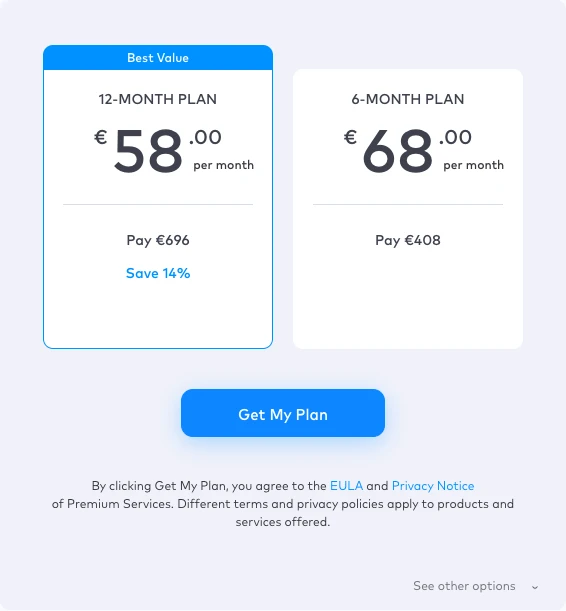
We opened the Pricing control on MacKeeper's official Premium Services page in a clean Chrome session on August 9, 2026. The rendered regional checkout showed €58 per month for a 12-month plan with €816 crossed out and €696 payable, plus €68 per month for six months with €408 payable. Those “per month” labels are arithmetic; the cards say Pay €696 or Pay €408 upfront.
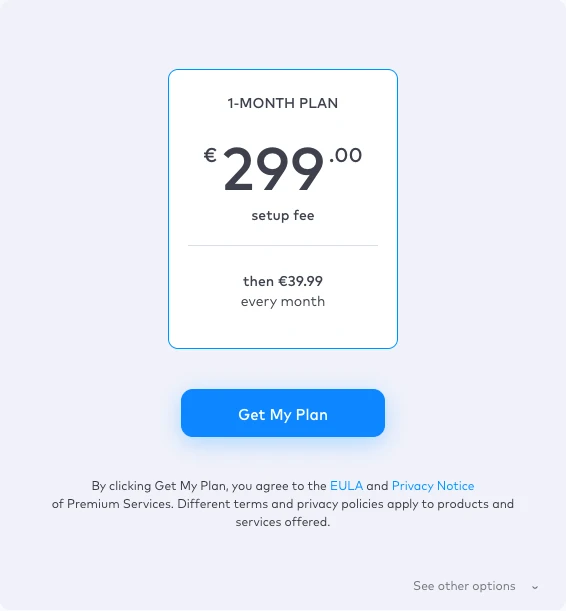
Switching to monthly payments exposed a one-month plan with a €299 setup fee and then €39.99 every month. That creates a very different first-year cash flow from a simple €39.99 subscription. The article records the observed euro checkout only; location, campaign and future changes can produce another currency or offer.
| Observed option | Displayed rate | Displayed immediate payment | Editorial reading |
|---|---|---|---|
| 12 months | €58/month | €696; €816 crossed out | Annual total paid upfront in captured checkout |
| 6 months | €68/month | €408 | Six-month total paid upfront in captured checkout |
| 1 month | €299 setup, then €39.99/month | €299 setup fee | Large first payment plus continuing monthly charge |
Before clicking Get My Plan, save both the offer and the legal/refund pages as PDF or screenshots. Record included devices and the problem promised, because the public card doesn't show every contract distinction. Don't quote our snapshot to support as if it were your order; use the receipt that governed your purchase.
ZoomDiagnostics is the door into a remote support relationship
The product page says ZoomDiagnostics for Mac comes with a Premium Services subscription, analyzes hardware and performance, highlights software or security issues and connects the user to live chat. It lists macOS 10.13+, Intel and Apple silicon, while the broader agreement still contains older minimum versions for different service lines. Verify the current download requirement on the device being serviced.
A diagnostic label isn't a repair verdict by itself. Ask what each finding measures, whether it reflects an active fault and which change will test the hypothesis. Generic cache, temperature or “optimization” language shouldn't justify deleting data or extending a plan without a repeatable symptom.
The service agreement authorizes remote access and control for diagnosis, service and repair. It also allows software downloads and settings changes, and says the technician may act as the user's agent in accepting third-party software licenses. This is broader than screen viewing, so the user needs a live change boundary rather than passive trust.
Remote tools named in current documentation include LogMeIn and TeamViewer. A familiar logo proves only which tool is running, not who initiated the session or whether the request is legitimate. Provenance comes from an independently opened official case, matching order details and a technician who can explain the work before touching the device.
Remote access, session recording and retained logs change the privacy equation
The current MacKeeper privacy policy says a remote connection requires prior explicit consent and can be terminated at any time. It also says the agent may access a computer containing personal files and documents, and recommends securing sensitive files before connection. That warning should be treated as preparation, not boilerplate.
The service agreement goes further. It permits collection and retention of logs or transactional data generated by third-party tools, and says calls and/or online sessions may be monitored and recorded for service, training and market research. Its current wording says users can't opt out of call recording for the agreement duration.
Don't read “the agent will try to limit interaction” as a technical isolation guarantee. If a file is open, a notification arrives or a browser session is authenticated, the information may be visible during screen control. Close or lock it before the session instead of relying on the technician to look away.
The policy provides routes to request access, correction, portability, restriction or erasure of personal data through support or the account, with legal and business-retention caveats. Ending the remote session, canceling billing and requesting deletion are three separate actions.
Before remote support: verify the case, back up and reduce exposure
Start from the official account or a bookmark to the vendor site. Don't use a phone number from a popup, an unexpected renewal email or a sponsored result merely because it includes the brand. Match the case reference, plan, merchant and covered device before downloading a remote tool.
Create a usable backup of the data that matters and confirm it's readable. The service agreement puts backup responsibility on the user and disclaims responsibility for loss, alteration or corruption. A backup is especially important before OS work, storage cleanup, permissions repair, app reset or account recovery.
Close banking, investment, password-manager, tax, health, private email/chat and employer-confidential windows. Pause notification previews and disconnect external storage that the job doesn't require. Log out of unrelated admin consoles; a cleaner desktop isn't cosmetic when someone else can control it.
Ask the technician to state the symptom, proposed tool, permissions, changes, restart risk and expected test. If the answer is only “we found many issues,” request evidence. A specific plan protects both sides and gives the user a reasoned stop point.
During remote support: stay present and approve one change at a time
Watch the session. Keep control of the keyboard and don't let the work continue unattended while banking, email or a password manager remains signed in. If a restart is needed, ask how the connection returns and whether unattended access will be enabled.
Approve changes in small groups. A technician can explain why an app is being removed, which setting is changing and how the result will be tested. “Optimization” isn't permission to disable protection, erase backups, exclude broad folders or delete unknown files without a reversible plan.
Stop for secrets. Don't reveal or type an Apple Account, email, banking or password-manager password, recovery key, MFA code or payment credential while the technician can see it. If an account login is necessary, take back control, obscure the screen if the tool supports it and confirm the technician no longer controls the device.
Stop for a payment request by phone, gift card, crypto, wire transfer, banking login or offline method. MacKeeper's own Premium Services page says payment information is collected only through its website and never over the phone or through offline payment. A real support tool can still be used by an impersonator.

After remote support: disconnect, inspect permissions and test the promised result
Ask for a plain-language change summary: applications installed or removed, settings changed, files moved or deleted, updates applied, accounts touched and follow-up work. Then end the session and verify the remote tool shows disconnected. Don't rely on a closed chat window as proof that control ended.
Remove a remote client when no continuing service requires it, or disable unattended access and saved-device authorization according to the tool's official instructions. Review macOS Screen Recording, Accessibility, Full Disk Access, Automation, Login Items and General → Sharing for entries created by the session. Apple's current FaceTime remote-control guide explains that a controller can open files, change settings and restart a Mac, and that the user can deny or stop control. The MacKeeper session uses its own named remote tool, but the Apple warning accurately illustrates the power boundary.
Test the original symptom under the same safe conditions. Also check network access, security status, Time Machine or another backup, browser behavior and the important apps that were changed. A “successful” tune-up that disables protection or breaks a backup isn't a successful result.
Save the case number, session date, technician name or identifier, change summary and screenshots of any remaining permissions. If a new fault appears later, this record separates a support change from an unrelated update and gives the next technician something concrete to investigate.
Community evidence is positive on patience—and mixed on consistency and sales pressure
The current MacKeeper Premium Services Trustpilot profile contains more than a thousand reviews and recent 2026 activity. Many reviewers describe prompt, patient help, repeat use and technicians who stayed with difficult problems. Those are the outcomes a recurring support plan should deliver.
The same profile also contains reports of an inconsistent technician experience, unclear guidance, high cost and sales or extension pressure. One person's good or bad session can't establish a resolution rate, and a hosted review profile isn't an independent technical benchmark. The useful signal is variability: buyer value depends heavily on the actual technician, problem and escalation path.
Reddit discussions are older and strongly colored by MacKeeper's historical reputation. We use them only to identify practical questions: Did the user initiate the case? Which remote tool and permissions remain? What changed? How does the user know access ended? We don't convert anonymous fear or approval into a current product-wide finding.
Community experience should change the buying checklist, not replace evidence. Get the work and cost in writing, supervise the first session and judge the service by whether it solves a reproducible problem without pressure to widen the contract.
Cancellation, refund, software removal and data requests are four tasks
MacKeeper's current termination page lists account, order-email, billing email, official phone and website-chat routes. In the account, it directs the user to Manage subscription and Turn off auto-renewal protection. Save the confirmation and recheck the card rather than accepting a verbal “noted” response.
Cancellation prevents a future renewal under the confirmed terms; it doesn't automatically refund a past charge. A refund request needs the order reference, payment date, service line, amount, reason and the current policy window. Keep the request and response in writing even if chat or phone starts the process.
Removing MacKeeper or ZoomDiagnostics doesn't cancel a subscription. Conversely, canceling renewal doesn't uninstall remote tools or revoke macOS permissions. End the contract and clean up device access as separate checklist items.
A privacy request is separate again. If the goal is access, correction, restriction or erasure of stored personal data, use the privacy-policy route and name the data request explicitly. Don't assume subscription cancellation instructs every processor to delete records that law or legitimate business needs may retain.
The live refund page now says 30 days—older search snippets still say 14
The live service refund policy fetched twice on August 9, 2026 says a 30-day money-back guarantee for Premium Services, STC and PTC. It says this applies to initial purchases and subsequent rebills during an active subscription. Google-style snippets and an older cached extract still showed 14 days, so the live page and saved purchase-time terms are the stronger evidence.
| Request timing/use | MKPS wording | STC/PTC wording | Action |
|---|---|---|---|
| Within 30 days | Money-back guarantee for initial purchase or rebill | Same live 30-day statement | Submit during active term with order evidence |
| After 30 days | Within 6 months, possible partial refund using USD 199 one-month basis | Within 3 months, possible partial refund using USD 99 basis | Ask for written calculation |
| Additional usage | After 3 fixes, USD 69 deduction for each later fix; not stated for STC/PTC | Different service calculation | Compare case history with deduction |
| Late/heavy use | More than 6 months or 10 uses within 6 months stated non-refundable | After 3 months, page says no refund within later 6-month range | Still check local law and request promptly |
The page states one to five business days for review and five to 15 business days for an approved refund to reach the bank, with processing fees non-refundable. Those are published ranges, not guarantees for every payment rail. Preserve the approval date and follow up through the official billing channel if the bank window passes.
Refund calculations are easy to misunderstand because the current observed checkout and the policy's USD 199/99/69 bases aren't the same thing. Ask support to show the original payment, elapsed term, counted fixes, deductions, processing fees and refund total line by line. Don't accept an unexplained “partial refund” percentage.
MacKeeper Premium Services is real; an unexpected caller may still be an impersonator
The service is a real Clario Tech FZCO offering with current product, agreement, privacy, cancellation and refund pages. That establishes the company route, not the authenticity of every popup, search ad, email or caller using its name. Brand recognition is a weak security control.
The FTC's tech-support scam guidance warns about fake warnings, unexpected calls, search-result placement and remote-access requests. Impostors may claim infection, offer a refund or invent an overpayment, then request remote control, banking access or hard-to-reverse payment.
A genuine route starts with the user independently opening the official account or site and matching an existing order or case. The technician can name the service and explain the task without demanding secrets. Payment stays on the official website, consistent with MacKeeper's own fraud warning.
If a caller is unexpected, end the call. Use another trusted device to open the saved official route and ask whether the case exists. If remote access already occurred, disconnect the network, end the tool, preserve evidence, review permissions and accounts, change high-value credentials from a clean device and contact financial institutions when payment or banking data was exposed.
Who should buy Premium Services—and who should skip it
The strongest fit is a nontechnical person or household with recurring covered problems across several devices, no trusted local helper and a preference for one 24/7 contact. Value improves when sessions replace real paid work: new-device setup, migrations, repeated mail/network issues, careful coaching and follow-up maintenance.
It can also make sense for an adult helping a distant parent, but only when the account holder understands the contract and remains involved. Remote support should increase autonomy, not create a dependency in which every warning becomes a sales call or a technician permanently retains access.
Skip the long contract for one vendor-specific defect. Apple, Microsoft, an ISP, printer maker or app developer may own the root cause and have the logs, replacement authority or account tools that a general technician lacks. A reputable local repair shop can also inspect hardware that remote software can't.
Confident users who can back up, follow official documentation and isolate one change at a time may find the service redundant. The published price is high enough that buying convenience without a likely session plan is poor value.
Compare alternatives by the job, not by the word “support”
| Alternative | Best for | Strength | Limit |
|---|---|---|---|
| Apple Support / Apple Store | macOS, Apple Account and Apple hardware | Vendor ownership, diagnostics and repair path | Doesn't own every third-party app/device |
| Device/app vendor | Printer, router, cloud service or application defect | Product-specific logs, replacement and account authority | Support boundaries can bounce multi-vendor issues |
| Reputable local technician | Hardware, non-bootable systems and hands-on repair | Physical inspection and bounded quote | Availability, travel and quality vary |
| Trusted family helper | Simple setup and coaching | Known relationship and low cost | May lack expertise, availability or accountability |
| Premium Services | Recurring cross-device household help | 24/7 continuity and broad remote scope | High price, remote-access trust and contract limits |
Apple's current remote-control guidance makes the power boundary clear: a controller can open windows and files, change settings or restart a Mac, while the user can deny or stop access. That's useful context whether the helper is MacKeeper, Apple, a local shop or a relative. Familiarity doesn't remove the need to supervise.
For a cleanup-only problem, compare the specific task with built-in storage tools and the deletion boundaries in our MacKeeper cleanup-tools review. For browser ads, determine whether the issue is a website, notification permission, extension or adware before buying broad support; the StopAd guide maps those layers.
A practical value test: price the sessions you'll really use
List the next 12 months of likely covered jobs and be honest. A migration, recurring coaching for two family members, printer/network setup and several follow-ups may justify a continuing plan. One browser reset and an annual “tune-up” built from generic cache clearing probably won't.
Divide the total paid—not the headline monthly arithmetic—by realistic successful sessions. Then add the cost of supervision, privacy preparation and possible sales friction. Compare that figure with vendor support and two local quotes for the same bounded jobs.
Run the first session as a trial of process even when the policy offers a refund window. Did the technician explain the diagnosis, respect scope, avoid pressure, document changes and leave no unnecessary access? A solved symptom with poor access discipline isn't a strong long-term service.
Recheck the subscription after every renewal decision. Save the current plan, devices and policy, and cancel early when the expected jobs disappear. The best support subscription isn't the one used most often; it's the one that solves problems safely enough to justify the full recurring cost.
MacKeeper Premium Services FAQ
Is MacKeeper Premium Services included with MacKeeper?
Don't assume it is. MacKeeper's software EULA says Premium Services may be offered separately, and the service has its own agreement, plans, device counts, renewal rules and refund policy. Check the invoice and account for separate MacKeeper software and Premium Services line items.
What does MacKeeper Premium Services do?
It's paid 24/7 remote technical support for covered computers and devices. The current agreement lists operating-system setup, data transfer and backup, accounts, networks, iCloud, storage, apps, mail, browsers, peripherals, security/privacy configuration, maintenance and coaching, subject to scope and system limits.
How much does MacKeeper Premium Services cost?
Pricing is localized and can change. In our August 9, 2026 rendered checkout, the regional euro offers showed €58 per month billed €696 for 12 months, €68 per month billed €408 for six months, and a one-month option with a €299 setup fee followed by €39.99 monthly. Save the price and currency shown in your checkout.
Are MacKeeper Premium Services requests really unlimited?
The current product page markets unlimited requests for covered gadgets on a yearly plan, while the service agreement applies a Fair Use Policy. It says the company may decide that use exceeds what is reasonably expected from an individual plan and may suspend or terminate service.
Is it safe to give MacKeeper remote access?
A real session can be legitimate, but remote control is still powerful access. Start only from the official account or website, verify the case, back up and close sensitive material, stay present, approve each change and stop if anyone requests passwords, MFA codes, banking access or phone/offline payment.
Can a MacKeeper technician see my files?
Potentially, yes. MacKeeper's privacy policy says a remote agent can access a device that may contain personal files and documents, and advises securing sensitive files first. The service agreement also permits remote control, software installation, settings changes, third-party tools and session/call monitoring.
How do I cancel MacKeeper Premium Services?
Use the MacKeeper Account Manage subscription control, the cancellation route in the order email, [email protected], the official cancellation phone numbers or website chat. Save confirmation that auto-renewal is off. Cancellation doesn't itself prove a refund was approved or remove a remote-access client.
Can I get a MacKeeper Premium Services refund?
The live service refund page checked August 9, 2026 says a 30-day money-back guarantee for MKPS, STC and PTC, including initial purchases and rebills during an active subscription. Later partial-refund rules and usage deductions differ by service, so save the live policy and submit promptly rather than relying on an older search snippet.
Does uninstalling MacKeeper cancel Premium Services?
No. Software removal, Premium Services cancellation, refund processing and removal of remote-access tools or permissions are separate tasks. Turn off renewal through an official billing route, save the response, then remove software and permissions that are no longer needed.
Is MacKeeper Premium Services worth it?
It can be worthwhile for a nontechnical household that repeatedly needs patient, cross-device remote help and values one continuing contact. It's poor value for a confident user with one vendor-specific problem, especially when Apple or the device vendor provides support or a reputable local technician can quote a bounded one-time job.
Verdict: useful human help, expensive privileged access
MacKeeper Premium Services is a real and unusually broad remote-support offer, not another name for antivirus. Its 24/7 availability, cross-device scope and patient coaching can be valuable to a household that repeatedly needs help and lacks a trusted alternative.
The contract matters more than the superhero examples. Coverage has exclusions, “unlimited” requests have fair-use discretion, calls and sessions may be recorded, remote tools can change the device, and the regional checkout we captured demands a large upfront or setup payment. Those are manageable terms only when the buyer understands them before the connection starts.
Our recommendation is conditional: buy for a written set of recurring covered jobs, verify the exact plan and total, supervise every session, remove access afterward and treat cancellation, refund and data requests separately. For one Apple, hardware, ISP or app-vendor problem, start with the party that owns the product or get a bounded local repair quote.