
Norton 360 Not Working? Fix the Symptom Without Leaving the PC Unprotected
“Norton is broken” can mean a frozen interface, failed LiveUpdate, stalled scan, blocked site or stale account status. Identify the layer first, make one reversible change at a time, and finish by proving that real-time protection is active.
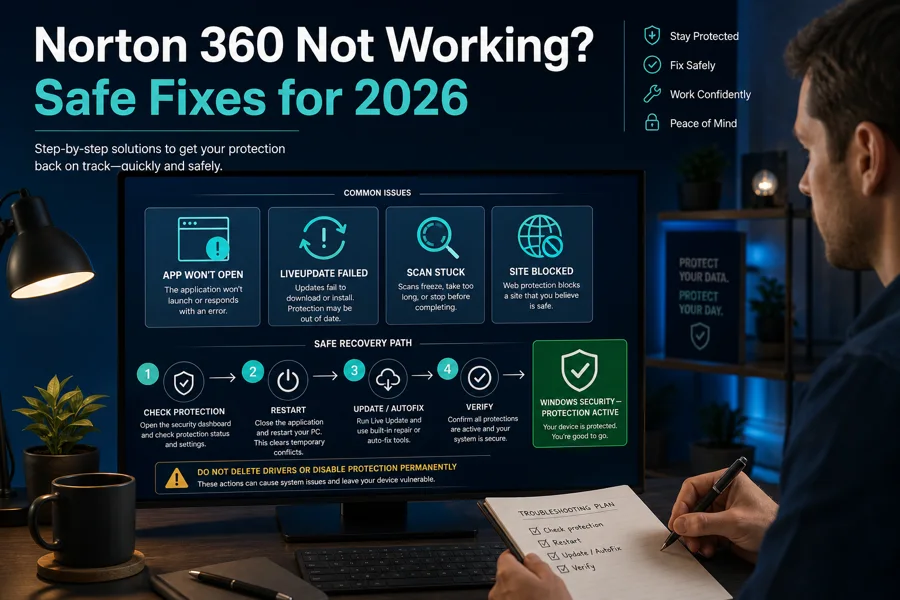
60-second triage: open Windows Security and the local Norton app if possible. Record whether protection is active, the exact error and the one thing that fails. Restart once. If Norton opens, run LiveUpdate and Norton Autofix under Help/Get Support. If only a site or app fails, test that layer narrowly rather than disabling the whole suite. Use Norton's official remove/reinstall tool only after the supported first steps fail.
Start with the symptom, not a generic “cleaner”
A frozen Norton window doesn't prove malware, and one blocked page doesn't prove the firewall is broken. Before changing settings, capture a screenshot without account details, note the Windows or macOS version, Norton build, last successful update, and whether the failure began after a restart, update, new VPN or other security software.
If the product is functioning but the alerts, renewal price or bundle design are the real problem, troubleshooting is the wrong intent. Read our Norton 360 review for the current product verdict or compare supported replacements in the Norton alternatives guide.
| Symptom | Likely layer | First safe check |
|---|---|---|
| App doesn't open or spins | Interface, service, incomplete update or conflict | Restart, Start menu, Windows Security |
| LiveUpdate error | Connectivity, proxy, service or server | Normal web access, date/time, exact code |
| Scan doesn't start/finish | Update state, archive, disk or damaged install | Elapsed time, current file, smaller scan |
| One site/app is blocked | Safe Web, extension, AntiTrack or firewall | Exact alert, URL/process and reputation |
| Account says unprotected | Wrong account, old plan, seat or sync | Local app + Windows Security + subscription |
Don't stack fixes. If you reset the router, remove the browser extension, disable the firewall and reinstall Norton at once, the PC may work again but you won't know why—or which protection never came back. Make one change, retest the original symptom, write down the result and reverse temporary changes. Keep the original error until the final verification is complete.
If Norton 360 won't open or shows a spinning screen
First use a real Restart, not shutdown followed by power-on when Windows Fast Startup may preserve state. After sign-in, wait for the desktop to settle and open Norton from the Start menu. Norton's current start instructions also remind users that the notification-area icon may simply be hidden.
- Check Windows Security. Under Virus & threat protection, identify the registered provider. If no provider is active, avoid downloads and sensitive work while repairing.
- Close competing resident tools. A second antivirus or always-on VPN can conflict, but don't uninstall unrelated software blindly.
- Run Norton Autofix if the interface opens. Open Help, choose Get Support and let the built-in tool check the installation and services.
- Finish pending updates. Complete Windows restart requirements, then try Norton again.
- Escalate to official reinstall only if needed. Preserve the account route and note any other Norton components first.
Norton's spinning-circle guidance points to restart, a conflicting VPN or non-Norton security application, then remove/reinstall. Treat that order literally. If Norton opens after closing one VPN, update both products and test; don't conclude that every VPN is incompatible.
If LiveUpdate fails, separate internet, proxy and Norton-server problems
LiveUpdate supplies protection and product updates. A failed run should be fixed, but it isn't permission to download random definition packs. Confirm ordinary HTTPS websites work, the system clock and time zone are correct, and a captive portal isn't waiting for sign-in. Temporarily disconnect a third-party VPN only for the test, then reconnect it.
Error 8921,250 means Norton couldn't connect to the LiveUpdate server. Norton's guidance, updated March 25, 2026, checks the internet connection and then the product's network-proxy configuration. Enter proxy details only if the network actually uses one; invented proxy settings will create another failure.
- Record the complete error code and time.
- Try Norton once on a normal trusted connection.
- Check whether work, school or family policy blocks the service.
- Run LiveUpdate again after restart.
- Use the official update guidance, then Autofix.
Norton's service-status dashboard doesn't monitor every LiveUpdate transaction, so a green public page can't fully clear a local update problem. If normal internet works and the same code persists across a reasonable retry, keep the logs and contact verified support rather than cycling the firewall off and on.
On a work, school or filtered home network, compare one trusted alternative connection only if policy permits it. Success on a phone hotspot doesn't mean “Norton is fixed”; it narrows the fault to DNS, proxy, certificate inspection or an outbound rule on the original network. Give the administrator the timestamp, destination category and error code instead of asking them to disable the gateway. Never bypass an organization’s controls on a managed device.
If a Norton scan is stuck, decide whether it's slow, stopped or unable to start
A full scan can sit on a large archive, virtual-machine image, backup or damaged disk for a long time. Note the filename and whether the processed-file count or disk activity changes. “The percentage stayed at 82 for ten minutes” isn't the same as a process that has consumed no CPU or disk and changed nothing for hours.
When a scan doesn't start at all, Norton's June 3, 2026 scan guidance begins with restarting the computer and escalates to the official remove-and-reinstall tool if the failure remains. Before that escalation, run LiveUpdate and try a quick or targeted scan. A smaller scan tells you whether the engine works without waiting through the entire disk.
If the machine freezes, Windows reports disk errors, or the same physical drive causes multiple scanners to stall, back up irreplaceable data and check storage health. Don't repeatedly hammer a failing disk with maximum-sensitivity scans. For a suspected active compromise, disconnect unnecessary network access and run the supported Startup Scan or a trusted offline/second-opinion route rather than declaring a short scan “proof” of infection.
Quarantine history also matters. A scan can appear to stop while Norton waits for a remediation decision, archive password or restart. Bring the window to the foreground and check Security History before ending the process. If the same file path repeatedly stalls, don't upload a private archive or customer document to a public scanner; record its hash and path, then use the organization’s approved incident route.
Performance symptoms belong to our separate Norton high CPU, memory and disk guide. That page covers scheduling, overlapping maintenance and resource measurement without diluting this failure diagnosis.
If Norton blocks a safe site, app or connection, identify the blocking component
Safe Web, its browser extension, Norton AntiTrack, Smart Firewall, Download Insight and Email Protection can all interrupt different traffic. Save the exact warning text, destination URL or program path, detection name and time. Test the same destination against the vendor's official URL and a reputable multi-engine reputation service; popularity alone doesn't make a site safe.
Norton's site-access article recommends toggling Safe Web off and back on, then submitting a confident false positive for analysis. Perform that as a brief diagnostic with no downloads or account sign-in, and re-enable the feature immediately. If the problem is one embedded image or tracker domain, don't whitelist the entire parent site without understanding the dependency.
Only one browser fails
Check the Norton extension, browser update, profile and cache. Compare a clean supported profile before changing the firewall.
Every browser fails
Check Safe Web in the app, AntiTrack, DNS/VPN, firewall history and ordinary network access.
One application fails
Verify the signed executable and firewall event. Create the narrowest program rule only after confirming the file.
Email shows a certificate warning
Don't click through automatically. Current Email Protection can require client-specific configuration after migration.
Community reports about the newer Norton interface describe legitimate pages or embedded resources being blocked and exclusions not always taking effect. Those reports are useful for finding the right branch, not for assuming every warning is false. Update first, preserve the event and let Norton review the URL.
If Norton says unprotected, expired or has no subscription
Compare three views: the local Norton dashboard, Windows Security's registered provider and My Subscriptions in the Norton account. A web-account device card can lag behind a protected local installation. Norton's April 2026 device-status guidance says a stale account alert can be ignored when the local product clearly shows Protected after sync time.
An “expired” alert with an active purchase often means the app is signed into a different email, attached to an old retail subscription or missing a device seat. Sign out and back in with the account that owns the current plan, then check Manage Devices. Don't buy another subscription from the alert until the existing entitlement is located.
If Windows Security shows no active provider, treat that as the urgent fact. Connect only as needed for repair, avoid risky browsing and restore Norton or another protection layer. If Norton and Defender both claim an ambiguous state after reinstall, restart again and use verified support; manually forcing antivirus services can leave provider registration inconsistent.
Use repair or reinstall after the narrow fixes fail
Reinstallation is justified when Norton won't open after restart, Autofix can't repair services, a scan still can't run, LiveUpdate remains broken on a working connection, or Norton's exact error article directs you there. Download the tool through Norton's current support route. A copied old remover or third-party “Norton cleaner” isn't equivalent.
Before running it, record the account email, installed Norton products and any Family, VPN, browser or backup component that needs separate attention. The tool can remove more than the one window that looks broken. Finish the restart, reinstall from the account, run LiveUpdate, verify real-time protection and perform a small scan plus normal network test.
If the goal is removal rather than repair, use our complete Norton uninstall guide. If the fresh installer can't activate or reports no seats, use the installation and activation guide. Keeping these intents separate prevents a troubleshooting loop from turning into an accidental cancellation or duplicate purchase.
Give support evidence, not account secrets
Prepare the Norton product and build, operating-system version, exact error, time, affected URL or signed program path, last successful LiveUpdate, steps already tried and what Windows Security reports. A short sequence such as “8921,250 on two trusted networks after restart; normal HTTPS works; no proxy” is more useful than “nothing works.”
Redact email addresses, licence keys, device names, payment data and browser history not relevant to the failure. Start from support.norton.com and verify the domain before granting any screen-sharing access. A legitimate troubleshooting case doesn't require posting a product key in a public forum or paying a caller with gift cards or cryptocurrency.
Norton 360 troubleshooting FAQ
Why is Norton 360 not opening?
A pending restart, damaged update, conflicting VPN or security app, stopped service or incomplete installation can prevent the interface from opening. Restart once, try the Start menu, check Windows Security, then use Norton Autofix or the current official remove-and-reinstall route if the app still doesn't launch.
How do I fix Norton LiveUpdate?
Confirm normal internet access, the computer date and time, and whether a proxy, VPN, firewall or parental-control policy blocks Norton's connection. Restart, run LiveUpdate again and use Norton's documented proxy settings only when the network actually requires a proxy. Record the exact error code before reinstalling.
What does Norton LiveUpdate error 8921,250 mean?
Norton's March 25, 2026 guidance describes 8921,250 as an inability to connect to the LiveUpdate server. Test ordinary connectivity, check proxy or firewall requirements and retry. Don't download definition files or repair utilities from third-party mirrors.
What should I do when a Norton scan is stuck?
Note the scan type, elapsed time and current file, then allow for large archives or slow disks. If progress never changes, restart once and try a smaller scan. Norton's current guidance for a scan that won't run escalates from restart to the official remove-and-reinstall tool.
Why is Norton blocking a safe website?
Safe Web, the browser extension, AntiTrack, Smart Firewall or another Norton layer may be responsible. Record the exact block page and URL, update Norton, verify the site independently, test only the implicated layer briefly, then submit a false-positive review or add the narrowest supported exception.
Can I turn off Norton to test a problem?
Only briefly, for a specific test, while avoiding downloads and sensitive activity. Choose the shortest timed disable option, reproduce the issue once, re-enable protection immediately and verify the dashboard. Don't leave Auto-Protect or Smart Firewall permanently disabled.
Why does Norton say unprotected when my account is active?
The device may be signed into a different Norton account, using an old subscription, missing a device seat or waiting for status sync. Compare the local app, My Subscriptions and Windows Security. Norton says a stale web-account status can be ignored when the local app clearly shows Protected.
Should I reinstall Norton for every error?
No. Reinstall after restart, LiveUpdate, protection-status checks and Norton Autofix fail, or when Norton's symptom-specific article directs it. The official removal tool can affect multiple Norton products, so record installed components and verify protection after the restart.
Bottom line: fix one layer, then prove protection returned
The safest Norton troubleshooting order is simple: classify the symptom, preserve the exact error, restart, update, use the built-in repair route and test one layer at a time. Reinstall only when the narrower supported steps fail.
Don't declare victory because the website loads or the window closes. Finish with an active provider in Windows Security, current Norton updates, a successful small scan and the temporary settings restored.