
Norton Family Review: Strong Windows and Android Controls, Real Platform Gaps
Norton Family combines web rules, screen schedules, app supervision, location tools and 30-day reports for $49.99 a year. It can be good value—especially inside Norton 360 Deluxe—but only after you account for no child-Mac support, weaker iPhone coverage and no text or call monitoring.
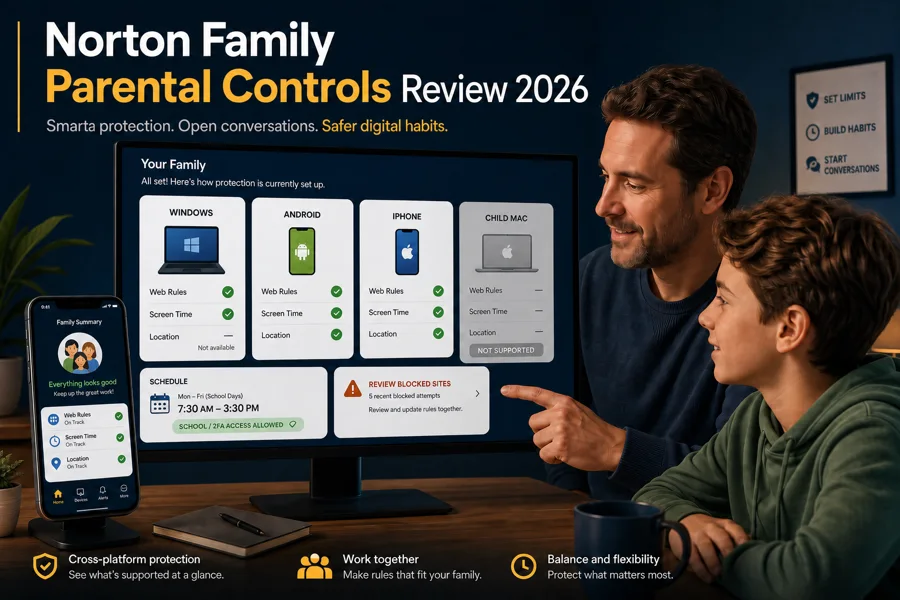
Our verdict: Norton Family is a sensible guardrail for a household built around Windows PCs and Android phones. Web categories, schedules, School Time, app supervision, location and reports cover the everyday jobs well, and the price is hard to fault if Norton 360 Deluxe already supplies it. Don't buy it for a child Mac, covert message surveillance or precise per-app time budgets. We rate it 8.1/10, with platform fit doing more work than the feature count.
Norton Family at a glance: useful guardrails, not invisible surveillance
- Web categories, safe-search rules and activity alerts
- Overall time limits, weekly schedules and School Time
- Android and Windows app supervision
- Android/iPhone location history and geofencing where available
- One parent portal and 30-day activity reports
- Strong value when included with Norton 360 Deluxe
- No parental-control agent for a child's Mac
- iPhone coverage depends heavily on Apple's permitted controls and Norton browser
- No current SMS supervision or call blocking
- No dedicated social-message risk analysis
- No granular daily time allowance for each app
- Browser extensions and permissions create bypass and reliability edges
The product name can cause the first misunderstanding. A parent may manage the household through a browser on a Mac, yet Norton explicitly says its parental-control features aren't supported on the child's Mac. “I can open the dashboard” and “this laptop is supervised” are different claims. Check the child device before valuing the subscription.
The second misunderstanding is what monitoring means. Norton Family can report categories, sites, searches, supported videos, apps, time and location. It isn't a message-content scanner. That narrower scope can be healthy for a family that wants boundaries without reading every conversation, but it's the wrong product when the stated need is bullying, self-harm or risky-contact detection across messages.
Norton Family costs $49.99; compare it with the bundle you already need
The official US Norton Family page showed $49.99 for the first year and $49.99 per year afterwards when checked July 29, 2026. It also states that Norton 360 Deluxe and Premium include the same service under the name Parental Control. Country, tax and bundle availability still change the checkout, so save the cart terms rather than copying a US price into a different market.
| Option | Current US reference | Best for | Watch |
|---|---|---|---|
| Norton Family standalone | $49.99/year | You already have security software | No antivirus, VPN or password manager |
| Norton 360 Deluxe | $49.99 first year; $124.99 renewal | Five-device security plus family controls | Large second-year increase |
| Built-in controls | Usually no separate fee | One-platform households | Fragmented when devices mix |
Standalone Family is attractive because its renewal is straightforward. Deluxe can be better first-year value when the family will genuinely use antivirus, VPN and Windows backup, but it renews much higher. Our Norton plans and renewal guide does the long-term arithmetic; the full Norton 360 review covers whether the security bundle earns its place.
Don't buy two licences by accident. Sign in first and check whether Parental Control already appears in the Norton account. If you start a trial, note its end date and billing route. A parent-control rollout often takes more than one evening, so test every child's actual browser, school login and emergency workflow well before the refund window closes.
The platform matrix matters more than the headline feature list
| Child device | What is useful | Main limits |
|---|---|---|
| Windows 11/10 | Web/search/video rules, time schedules, School Time, supported app supervision, Instant Lock | No location; full web coverage needs a supported extension; no Windows S mode |
| Android 8+ | Web, time, apps, location, Favorite Locations, alerts and Instant Lock | Permissions must remain active; SMS supervision and call blocking are disabled |
| Current/recent iOS | Time, location, selected web/search/video rules and Instant Lock | More browser/profile dependence; no app supervision equivalent to Android |
| macOS child device | None through Norton Family | Norton says Parental Control isn't supported |
Norton's current requirements list Windows 7 SP1 with SHA-2 support through Windows 11, excluding S mode; Android 8 or later; and the current plus previous two iOS versions. Supporting an old Windows release technically doesn't make it wise to keep an internet-facing child PC on an operating system without normal security support. Update the platform first.
Parents can manage rules through the web portal or parent mobile app from more devices than Norton can protect as child endpoints. This is why a Mac may appear in marketing language around “parents can supervise from any device” while the footnote says a child's Mac is unsupported. For a Mac-heavy household, Apple Screen Time or a cross-platform rival is the cleaner foundation.
Web filtering is broad, but browser routes define the blind spots
Norton groups sites into categories and lets a parent monitor, warn or block based on age and house rules. It can also flag searches on services such as Google, Bing and YouTube. The useful workflow isn't “block everything unknown.” Start with age-appropriate defaults, review a week of activity, then tighten only the categories connected to a clear risk or family agreement.
On Windows, full Web Supervision and Search Supervision require a supported browser extension. On mobile, Norton says families get the best coverage through the Norton Family browser. Video Supervision watches YouTube.com, not videos embedded on unrelated pages or the YouTube app; Hulu monitoring is Windows-only. A dashboard that shows no YouTube activity may therefore describe the route, not the child's behaviour.
A January 2026 Reddit discussion about overblocking illustrates the human fix: category rules can catch legitimate gaming or educational resources, so the child needs a low-friction way to request an exception and the parent needs to review the exact URL. This is directional evidence, not proof of a universal Norton defect.
Screen schedules are effective only when they preserve emergency and school access
Time Supervision can set daily limits and weekly availability windows, while School Time creates a restricted list of education sites during study hours. Instant Lock provides a quick family pause. These are good household controls because they target routines rather than trying to interpret every piece of content.
The weak point is granularity. Norton doesn't provide the same per-app daily time budgets as some competitors, and a broad lock can interrupt something the parent didn't anticipate. A 2026 community post from an adult student described an early schedule blocking access to a school authenticator. One anecdote doesn't measure failure frequency, but the scenario is credible and preventable.
- Allow phone, emergency contacts and required authentication routes.
- Test school login before the first restricted morning.
- Create different weekday, weekend and holiday schedules.
- Explain what Instant Lock changes and how the child can contact the parent.
- Review the policy as the child gains independence or starts work or college.
Controls should reduce negotiation fatigue, not outsource parenting. A visible bedtime schedule agreed in advance is easier to defend than a surprise lock. When a teenager repeatedly needs exceptions for legitimate work, the rule—not the teenager's technical skill—is probably the part that needs redesigning.
App control is strongest on Android; location needs consent and regional checks
App Supervision can show and restrict apps on Android and supported Windows devices. Norton notes that Windows coverage excludes UWP or Microsoft Store apps and software that runs as a service. Android can report app usage time, but this doesn't become a precise “30 minutes of TikTok, 45 minutes of games” budget. If per-app allowances are the core job, compare Qustodio or the platform's native controls.
Location Supervision, Favorite Locations, scheduled Alert Me checks and a 30-day history work on Android and iOS, not Windows. Availability varies by country, the phone must be powered and connected, and operating-system location permission must remain enabled. Treat the pin as an approximate device location, not proof of who is holding it or what happened there.
Geofencing is useful for “the school phone arrived home” or “the device left an agreed area,” but constant tracking changes the family relationship. Tell the child what is collected, who can see it, how long it's kept and when it will be disabled. For an older teen, a voluntary check-in may solve the safety need with less intrusion.
Set up Norton Family child by child, not with one blanket policy
- Choose the parent account. Use an adult-controlled email, MFA and recovery details. Don't share the parent password with the child device.
- Create a separate child profile. Use the correct age and attach only that child's devices so reports remain intelligible.
- Install from the official route. Add Norton Family on the child's Windows, Android or iOS device and grant only the documented permissions.
- Enable the supported browser path. Confirm the Windows extension or mobile Norton browser before judging web/search coverage.
- Start with moderate house rules. Add school, health, authentication and emergency exceptions before the first lock window.
- Run a visible acceptance test. Try an allowed site, blocked category, time request, app rule, school login and location update together.
- Review after one week. Fix false blocks, stale devices and noisy alerts. Don't wait until the child needs an urgent exception.
The official Norton Family feature guide is the right baseline when a control seems absent. Confirm the operating system and feature route before reinstalling. A missing Windows app entry, an iPhone browser limitation and a disabled Android permission are different problems.
If Norton is part of a new Deluxe subscription, install the security suite and Family service as separate jobs. Our Norton installation guide covers activation and device seats. Avoid adding every component to every device in one rushed session; validate one child endpoint, then reuse the working policy.
False blocks, missing activity and bypasses: diagnose the route first
A safe site is blocked
Record the full URL and category, check whether an embedded domain is blocked, add the narrowest exception and retest from the child's normal browser.
Activity is missing
Confirm the right child/device, supported browser or Norton browser, extension status, permissions, network access and activity-report date range.
Rules stopped applying
Check the device is online, the app remains enrolled, required accessibility/profile permissions are active and the operating system still falls within support.
The device is unusable
Restore school, authentication, phone and emergency access first. Adjust the parent policy instead of telling the child to find a bypass.
No parental-control product is impossible to evade. An unsupported browser, guest profile, disabled extension, VPN, alternate DNS route or newly installed app can create a gap. The answer is a layered device policy—standard child account, controlled install permissions, updated OS, supported browser and regular review—not a hidden battle of escalating surveillance.
If enrollment is broken and the child app can't complete setup, repair or removal, save the exact error, app version, OS version and parent-account state. Use Norton's official support route. Manual deletion can leave profiles, filters or protected services in an ambiguous state; our Norton removal guide explains the supported cleanup boundary.
Parental controls work better when the child knows the rules and the exit date
Norton Family can collect sensitive information: browsing categories, searches, videos, app activity, time and location. A technically successful deployment can still be a poor family decision if a child doesn't understand the monitoring or has no way to challenge a false interpretation. Explain the controls in plain language and show the dashboard rather than treating it as a secret dossier.
Use the least intrusive setting that solves the concrete risk. A younger child may need a strict install policy and web categories; an older teen may only need bedtime limits, scam coaching and a voluntary location check-in. Don't turn a safety product into permanent monitoring of an adult family member. Consent, ownership and local law matter when the person is old enough to control their own device or account.
Reports should start conversations, not verdicts. A search term can be homework, a blocked domain can be an advertisement embedded in a safe page, and a location pin can lag. Ask what happened, inspect the route together and adjust the rule. That approach also makes the child more likely to report a phishing message or unsafe contact instead of hiding it.
Norton Family alternatives: choose by the missing job
| Need | Better starting point | Why |
|---|---|---|
| Granular app time and broader cross-platform controls | Qustodio | More detailed app and communication options on supported tiers |
| Risk alerts in texts and social conversations | Bark | Designed around message-content risk signals rather than broad web reporting |
| Windows/Xbox family with no extra subscription | Microsoft Family Safety | Native account, screen and purchase controls |
| Android/Chromebook household | Google Family Link | Strong native app approvals and device-time controls |
| Apple-only household | Apple Screen Time + Family Sharing | Native child-account, app and content controls across Apple devices |
Norton wins when the family already wants its broader security bundle and the child devices match its strengths. Qustodio or Bark can justify a higher price when their missing job is the actual reason for buying. Native controls are often easier in a single ecosystem, while mixed households may accept a paid dashboard to avoid managing three incompatible rule sets.
Run the same five tests during any trial: a blocked site, school login, time request, app install, and emergency/authenticator access. Marketing checklists don't reveal how a product interacts with the family's real browsers, permissions and routines.
Norton Family FAQ
Is Norton Family worth it in 2026?
Yes for a Windows-and-Android household that wants web categories, schedules, app supervision, location tools and 30-day reports. It's less convincing for a child who mainly uses a Mac or iPhone, or for parents who need text, call, social-message or granular per-app time monitoring.
How much does Norton Family cost?
Norton's US product page listed the standalone plan at $49.99 per year on July 29, 2026 and showed the same $49.99 annual renewal. Norton Family is also included as Parental Control in Norton 360 Deluxe and selected higher tiers. Prices, taxes and bundle names vary by country.
Does Norton Family work on a child's Mac?
No. Norton says its parental-control features can be installed on a child's Windows, Android or iOS device, but aren't supported on a child Mac. A parent can still open the Norton web portal from a Mac browser; that's management access, not Mac child-device protection.
Can Norton Family monitor text messages and phone calls?
No. Norton's current feature documentation says Android text-message supervision and call blocking are disabled. Norton Family also doesn't provide Bark-style analysis of conversations across supported social and messaging services.
Can Norton Family see YouTube videos and searches?
It can report supported searches and videos, but coverage depends on the platform and route. Norton says video supervision watches YouTube.com, not videos embedded elsewhere or the YouTube app, and mobile search/video supervision relies on the in-app Norton browser. Hulu monitoring is Windows-only.
Can a child bypass Norton Family?
No parental-control app is impossible to bypass. Alternative browsers, disabled extensions, VPNs, guest accounts and unsupported apps can create gaps. Use supported browsers, review alerts and device permissions, keep the operating system updated and treat repeated workarounds as a family-policy problem rather than an arms race.
Does Norton Family have per-app time limits?
It can show and restrict supported apps on Android and Windows, and it can set overall time limits and schedules. It doesn't offer the same granular per-app daily time budgets as some rivals. Windows app supervision also excludes Microsoft Store/UWP apps and apps that run as services.
Is Norton Family included with Norton 360 Deluxe?
Yes. Norton's current US product page says Norton 360 Deluxe and Premium include Norton Family, labelled Parental Control in the bundle. Compare the total device allowance, renewal price and antivirus features before buying standalone Family and a separate security suite.
Bottom line: excellent value for the right device mix
Norton Family earns an 8.1/10 for a Windows-and-Android household that wants understandable web rules, schedules, app supervision, mobile location and reports without reading a child's messages. At $49.99 a year—or included in a Norton bundle—it covers the practical middle of parental control well.
The rating falls quickly when the child uses a Mac, the family is iPhone-first, or the buying reason is text/social risk detection or per-app time budgets. Treat the platform table as the purchase decision, configure school and emergency exceptions together, and review the policy as the child grows.