
How to Cancel HitmanPro and Request a Refund Safely
The first surprise is useful: current HitmanPro licenses renew manually, so most buyers don't have an automatic subscription to cancel. If the real goal is money back, identify the Cleverbridge order, ask for a case-specific decision and save the effect on the license before changing the PC.

Quick answer: current official support for both HitmanPro and HitmanPro.Alert says licenses aren't auto-renewed and renewal is manual. Check your actual Cleverbridge order anyway. If you want money back, use the official refund route with the purchase email, order reference and reason. Cleverbridge says eligibility varies and a completed refund deactivates the license.
Cancellation, refund and uninstalling are three different jobs
Search results make this look like a familiar subscription problem: find an account toggle, switch off auto-renewal and expect the last payment to return. That's the wrong starting model for current consumer HitmanPro. The product’s own scanner and Alert support pages say renewal is manual. A normal one- or three-year license therefore reaches its expiry unless the user chooses to renew it.
A refund is different. HitmanPro’s current site routes purchases through reseller Cleverbridge, which owns the order and payment workflow. Cleverbridge can evaluate a refund request, but its published help page says eligibility depends on the partner company, product, purchase date and payment method. It doesn't publish one blanket HitmanPro approval rule.
| Your actual goal | Correct route | What it doesn't do |
|---|---|---|
| Prevent an automatic future charge | Verify the order; current HitmanPro renewal is manual | Doesn't reverse the current purchase |
| Get money back | Submit a Cleverbridge refund request | Approval isn't guaranteed |
| Fix HitmanPro vs Alert purchase | Keep both order references and contact HitmanPro | Don't force the wrong key into the app |
| Remove software from Windows | Use the supported scanner or Alert removal route | Doesn't create a refund request |
| Stop using a key | Let it expire or settle the refund | Deleting email doesn't alter the order |
Write down the desired outcome before opening support: “Verify that order [reference] will not recur, request a refund for [transaction], and tell me whether the license remains active.” That sentence is precise enough for billing staff to answer without guessing what “cancel everything” means.
For the commercial context behind the order, see our HitmanPro plans, pricing and renewal guide. The broad HitmanPro review covers whether keeping the product makes sense; this page begins after the billing decision.
HitmanPro and HitmanPro.Alert currently use manual renewal
The strongest answer comes from two separate official support entries. The regular scanner page says HitmanPro doesn't auto-renew licenses, wouldn't start without express permission and treats renewal as a manual procedure. The Alert page uses the same policy. That's more reliable than an affiliate page that assumes every annual security license behaves like a recurring SaaS subscription.
Manual renewal means there's normally no account cancellation switch to hunt for. The key remains usable for its purchased term, then expires unless the user buys another term. The current product page also presents the trial as 30 days with no credit card required, so merely starting the trial shouldn't create a surprise conversion charge.
Still, judge a real transaction by its own receipt. An older checkout, reseller order or explicitly authorized arrangement can have terms that differ from the current direct consumer flow. Search the order email for renewal, recurring, subscription, next billing date, cancellation or manage-payment language. If none appears and official support confirms manual renewal, save that evidence rather than trying random Cleverbridge subscription controls.
Don't buy a replacement key early just to “renew safely.” HitmanPro’s activation guidance warns that remaining days on an active license aren't added to the new one. Keep the new key private and activate it only when the old term has finished.
Identify the exact Cleverbridge order before requesting anything
The current HitmanPro product page says Buy Now purchases go through Cleverbridge. That explains why a card statement or confirmation email may show Cleverbridge or an older SurfRight-related descriptor instead of the product name a buyer remembers. A descriptor is a clue, not enough evidence to approve, refund or dispute a charge.
Search every plausible purchase inbox, including spam, for Cleverbridge, HitmanPro, HitmanPro.Alert, Sophos and SurfRight. Open the genuine confirmation and capture the product, order reference, email, purchase date, amount/currency, device count, license term and payment method. Match those fields to the statement without circulating the full statement.
| Evidence | Why it matters | Safe handling |
|---|---|---|
| Cleverbridge order reference | Primary transaction identifier | Send only through official support |
| Purchase email | Drives lookup and refund matching | Try old and alternate addresses |
| Product and device count | Separates HitmanPro from Alert and duplicate orders | Don't expose the full key |
| Date, amount and currency | Matches the bank or PayPal record | Crop unrelated statement rows |
| Last four card digits / PayPal invoice ID | Helps locate a missing order | Never send full card or CVV |
| Activation state | Shows whether the license is already in use | Describe it; don't share credentials |
Cleverbridge’s current charge-identification guide says support can search with the exact amount/currency, charge date, last four card digits or PayPal invoice ID, alternative emails and a masked screenshot. Those are enough for identification; a password, CVV or complete key isn't.
Recover a missing order or product key through the official lookup routes
If the confirmation email is missing, start with the official HitmanPro recovery page at shop.hitmanpro.com/?scope=ccinfo. The scanner’s lost-key article and the separate Alert article both say entering the registered email sends a link to the product key.
Cleverbridge also provides a purchase lookup from its official help center. Use the email that was entered at checkout and check spam. If the first address returns nothing, try an older work, personal or PayPal address. Don't create a Cleverbridge business account; customer order retrieval is an order-and-email workflow, not the merchant dashboard discussed in unrelated forum posts.
If lookup still fails but the charge exists, use the official Cleverbridge request form. State that the goal is to identify an order, then provide the limited matching fields from the previous table. Ask support to name the partner/product and resend the confirmation before discussing a refund.
Preserve the original message headers or download the invoice, but don't publish them in Reddit or a vendor forum. Order references and license-delivery links can help prove ownership. A community post is useful for general direction, not a secure billing channel.
Choose the route that matches the result you need
There are three common cases. A buyer worried about a future charge should verify manual renewal and the absence of a recurring agreement. A buyer who wants money back should submit a refund request. A buyer who purchased the scanner instead of Alert should use the vendor’s documented wrong-product remedy. Mixing the routes creates duplicate orders or support loops.

If the order is duplicated, name both references and say which one should remain. If the transaction is simply not recognized, ask Cleverbridge to identify it before labeling it fraudulent. If the software is malfunctioning, preserve the error and ask HitmanPro technical support whether a fix is available while the separate refund clock, if any, is still running.
One clear case is better than multiple vague forms. Repeated submissions under different emails can fragment the evidence trail. Save the first ticket number and reply to it with any missing detail.
Refund eligibility is case-specific, not a verified global guarantee
We found no current official HitmanPro page promising a universal “30-day money-back guarantee.” The site’s 30-day no-card trial is a pre-purchase evaluation period, not proof that every completed purchase can be reversed for 30 days. Third-party coupon and legal-summary pages shouldn't be promoted over the current seller’s wording.
Cleverbridge’s refund help page is precise: each partner has its own policy, and eligibility depends on the product, purchase date and payment method. That means the responsible promise is “request a decision promptly,” not “you are guaranteed a refund.” Local statutory rights may add protections, but they depend on the buyer, location, checkout contract and digital-content circumstances.
Timing still matters. Submit promptly because purchase age is one of the factors Cleverbridge lists. Don't fabricate non-use, an unauthorized charge or a technical failure. A short truthful reason—duplicate order, wrong product, accidental purchase or unresolved technical problem—is easier to verify than a dramatic story.
For a partial refund, Cleverbridge directs the buyer to customer support with supporting details, such as a coupon code or screenshot, and says it checks eligibility with the publisher. That's another reason not to convert the help page into a blanket self-service promise.
Request the refund through Cleverbridge and complete the email confirmation
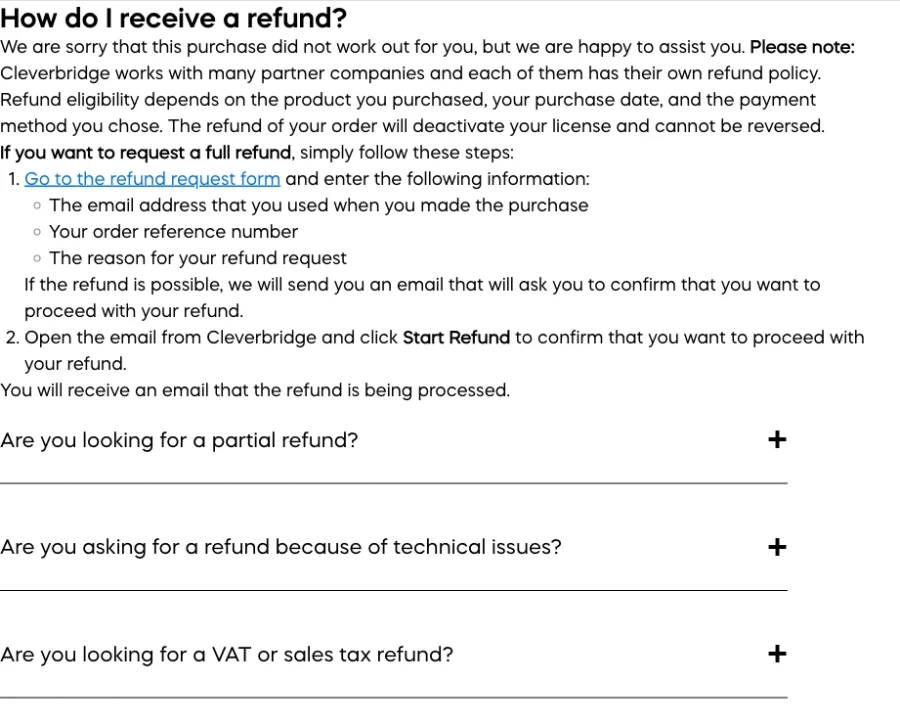
Use the refund link from the official Cleverbridge help page, not a lookalike search advertisement. For a full-refund request, Cleverbridge asks for three fields: the email used for purchase, the order reference number and the reason. Copy them from the confirmation rather than retyping from memory.
If the order is eligible, Cleverbridge says it sends an email asking the buyer to confirm. Open that message, verify the sending domain and order identity, then use the Start Refund control. A form-submission screen alone isn't a completed refund. Save the processing email that follows.
If the self-service route can't match the order, use the official request form and include the identification packet. Ask support to answer four items in writing: whether the refund is approved, the amount/currency, what happens to the license and which payment method receives the credit. Don't demand a bank-posting date the seller hasn't promised.
For a technical issue, Cleverbridge points buyers to the software provider for technical support. That doesn't prevent a refund request; it clarifies who can diagnose the app. Submit the financial request promptly and the technical evidence through the appropriate official channel instead of sending logs to a payment form.
If you bought HitmanPro instead of Alert, keep both order references
The regular HitmanPro scanner and HitmanPro.Alert are different licenses. A scanner key won't activate Alert. HitmanPro’s official wrong-product article gives a specific remedy: purchase the correct Alert license, then contact HitmanPro support with the reference numbers for both the incorrect and correct orders so the team can remedy the situation.
That advice is unusual enough to follow exactly. Don't discard the first email or activate keys across random devices. Keep the two references labeled “incorrect HitmanPro order” and “correct Alert order,” contact the official support address or help center named by HitmanPro, and ask for a written statement of which order is being refunded, replaced or otherwise corrected.
Before buying the second product, read our HitmanPro vs HitmanPro.Alert comparison. The scanner is an on-demand second opinion; Alert adds continuous defensive modules and includes the scanner. Buying another scanner term won't turn it into Alert.
If the first purchase was already activated, say so. Don't claim it was unused. The support team needs the real activation state to choose a valid remedy, and the refund processor may deactivate whichever license is tied to the reversed order.
A technical problem needs evidence before the license is deactivated
If the refund request follows a failed installation, scan freeze or activation error, preserve the exact message, HitmanPro or Alert build, Windows version, order reference and steps already tried. Don't run registry cleaners or delete ProgramData just to make the product appear unused. Those actions can remove useful diagnostic evidence without changing the purchase.
HitmanPro’s support center separates billing from product troubleshooting. For activation, the official articles cover product mismatch, maximum activations and proxy-related errors. For detections, support asks users to save a scan log and send it with a short explanation. A concise support record can distinguish a fixable key problem from a purchase that truly doesn't meet the need.
At the same time, don't wait indefinitely if refund eligibility may depend on purchase age. Open the refund case promptly and state that a technical-support case is also active. Give each team the other case number without sending sensitive keys through public comments.
Our HitmanPro install and setup guide covers the official download, architecture, first scan and activation paths. Use it to rule out a wrong binary or wrong product before requesting a financial remedy.
A completed Cleverbridge refund deactivates the license
Cleverbridge says the refund of an order deactivates its license and can't be reversed. That's the operational consequence most cancellation pages omit. If HitmanPro is cleaning an infected PC or Alert is the only resident layer protecting a device, confirming the refund can create an immediate capability gap.
Before confirmation, export any scan logs, record the current result and arrange the next protection state. Windows Security should show a supported resident provider after Alert is removed or deactivated. The ordinary HitmanPro scanner is an on-demand second-opinion tool, so its license effect is different from removing continuous protection, but paid cleanup functions can still be affected.
Don't assume that buying another key restores unused days. The official activation page says remaining time on an older active license isn't added to a new key. If the refund concerns a duplicate or replacement order, ask support which key will remain valid before activating either one.
Save the final license answer next to the refund confirmation. A bank credit without a matching license decision can cause confusion later when a key stops working.
Send a compact refund packet that can be matched in one reply
A useful request is factual and small. It identifies one order, states one primary outcome and includes only the evidence needed to match it. The aim is to avoid a second round asking which product, email or transaction the buyer meant.
| Field | Include | Never include |
|---|---|---|
| Order | Cleverbridge reference and product | Complete license key in a public post |
| Buyer | Purchase email | Email password or recovery code |
| Transaction | Date, amount, currency, payment type | Full card number or CVV |
| Reason | Short truthful explanation | Fabricated fraud or non-use claim |
| Supporting proof | Masked receipt, error or duplicate order | Uncropped statement history |
| Requested reply | Decision, amount, license effect, reference | A response by public phone or forum |
A clean message is: “Please evaluate a refund for HitmanPro order [reference], purchased on [date] for [amount/currency] using [purchase email]. The reason is [one sentence]. Please confirm eligibility, the amount, the effect on this license and the refund reference in writing.” For a wrong-product case, add both references and label them clearly.
Save the sent text, submission timestamp and any uploaded masked file. If support asks for more, reply in the same thread. Never expose the full product key; the order reference is the transaction identifier the refund system expects.
A real outcome includes the decision, license status and payment trail
Cleverbridge’s workflow contains at least two distinct messages: the eligibility/confirmation email and the notice that the refund is being processed. A support ticket acknowledgment is earlier than both. Read every message for the exact order and amount instead of treating “we received your request” as a credit.
| Checkpoint | Evidence to save | If missing |
|---|---|---|
| Order identified | Product, reference, purchase email | Use official lookup/support |
| Eligibility decided | Approved or declined in writing | Ask for a case-specific answer |
| Buyer confirmation complete | Start Refund confirmation | Check genuine email and spam |
| License effect recorded | Deactivation or retained key named | Ask before relying on it |
| Refund processing | Amount, method, refund reference | Reply to the same case |
| Credit reconciled | Original payment account entry | Use reference with seller/issuer |
Posting time depends on the payment method, network, currency and bank. The current pages checked for this guide don't promise one universal HitmanPro timeline, so we don't invent “five to ten days.” Use the seller’s stated estimate for the actual case and keep the reference until the credit appears.
If a refund is declined, ask for the policy basis and preserve it. A truthful written decision is useful if the payment was genuinely unauthorized or the buyer later exercises a statutory or payment-provider right. Don't turn an ordinary merchant disagreement into a false fraud report.
Uninstalling HitmanPro doesn't submit or complete a refund
Removing an executable from Windows changes the device, not the Cleverbridge order. Deleting the scanner, uninstalling Alert, clearing a key or reinstalling Windows doesn't send the purchase email and order reference to the refund system. Finish the billing work first and save the result.
For the ordinary HitmanPro scanner, determine whether it was run once or installed for convenient repeat scans. For Alert, note that uninstalling removes continuous protective modules, so confirm another supported resident provider is active. Don't leave a banking or work PC unprotected because a refund was approved.
A dedicated complete-removal article is the next HitmanPro spoke and will cover supported uninstall paths, leftovers and Windows Security checks. Until then, avoid third-party uninstallers and registry-deletion recipes from generic support pages. They can erase evidence or break unrelated security components.
If the buyer merely doesn't want to renew, there may be nothing to uninstall immediately. Manual expiry can coexist with using the paid term already purchased. Keep or remove the program based on protection needs, not as a symbolic cancellation step.
Avoid fake HitmanPro and Cleverbridge support numbers
Cancellation queries attract pages that publish unofficial phone numbers, remote-access offers and generic “refund departments.” Cleverbridge’s current contact guide says it uses an email contact form and doesn't currently offer telephone support. A number presented as Cleverbridge support in a search snippet therefore fails an immediate identity check.
Navigate manually to hitmanpro.com, support.hitmanpro.com, support.cleverbridge.com or the exact seller link in the genuine order. Don't let a stranger control the PC to “process” a refund, and never move money, buy gift cards or cryptocurrency, reveal a one-time code, or type bank credentials while screen sharing.
If remote access already occurred, disconnect the tool, secure email and financial accounts from another trusted device, review sessions and contact the bank through its official channel. Keep the fraudulent page URL and communications for the real provider, but don't continue negotiating with the caller.
The site’s privacy policy covers Antivirus-Review.com; we can't see or refund a HitmanPro order. All billing evidence belongs in the official merchant channel, never our comments or a public forum.
HitmanPro cancellation and refund FAQ
How do I cancel a HitmanPro subscription?
Current official support for both HitmanPro and HitmanPro.Alert says licenses aren't auto-renewed and renewal is manual. Check the actual Cleverbridge order and receipt first. If it contains no recurring-billing agreement or cancellation control, there's no future subscription to turn off. A refund for the current purchase is a separate request.
Does HitmanPro auto-renew?
No under the current official consumer support wording. HitmanPro and HitmanPro.Alert support each say the company doesn't auto-renew licenses, wouldn't start without express permission, and uses a manual renewal procedure. Preserve the order confirmation because an old, reseller or explicitly authorized agreement should still be judged by its own terms.
Does HitmanPro have a 30-day money-back guarantee?
We didn't find a current official HitmanPro page promising one universal 30-day money-back guarantee. The product offers a 30-day trial with no card required, but that isn't the same as a post-purchase guarantee. Cleverbridge says refund eligibility varies by partner, product, purchase date and payment method.
How do I request a HitmanPro refund from Cleverbridge?
Use the official Cleverbridge refund page or support form. A full-refund request requires the purchase email, Cleverbridge order reference and reason. If the order is eligible, Cleverbridge sends an email asking you to confirm with Start Refund. Save the request, confirmation and processing notice.
What happens to my HitmanPro license after a refund?
Cleverbridge says refunding an order deactivates its license and can't be reversed. Don't request or confirm a refund while relying on that license for malware cleanup or protection. Arrange replacement protection and save any logs or evidence you still need first.
What if I bought HitmanPro instead of HitmanPro.Alert?
HitmanPro says a regular scanner key can't activate Alert. Its documented remedy is to purchase the correct Alert license and then contact HitmanPro support with both the incorrect and correct order references. Don't activate or publish either key, and ask for a written explanation of how the incorrect order will be remedied.
How can I find a lost HitmanPro order or product key?
Use the official HitmanPro license-information resend page and enter the email used for the purchase. HitmanPro says it emails a link to the product key. For a Cleverbridge order, use its purchase lookup or support form and search all plausible purchase inboxes, including spam.
Does uninstalling HitmanPro cancel or refund the license?
No. Uninstalling changes the Windows device; it doesn't submit a refund request or prove that future billing is off. Settle the order, save the refund decision and note the license effect first. Then remove the scanner or Alert through the supported Windows route.
What should I send with a HitmanPro refund request?
Send the Cleverbridge order reference, purchase email, product name, purchase date, amount and currency, a concise truthful reason, and masked evidence when relevant. Never send a password, complete license key, full card number, CVV or one-time code. Ask for the refund decision and license status in writing.
What should I do about an unauthorized CBI or Cleverbridge charge?
First use the official Cleverbridge lookup and support route to identify the merchant and order. If nobody authorized it, secure the purchase email and payment account, contact the payment provider through its authenticated app or the number on the card or statement, and preserve the merchant response. Don't call a phone number copied from search results.
Verdict: verify manual renewal, then handle the real transaction
For a current direct consumer license, HitmanPro’s answer is simpler than the search query suggests: both the scanner and Alert renew manually. There's normally no automatic subscription switch to disable. The responsible first step is to verify the actual Cleverbridge order and preserve that result.
If the goal is money back, submit the purchase email, order reference and truthful reason through the official Cleverbridge refund route. Expect a case-specific eligibility decision, complete the emailed confirmation if approved, and record that a processed refund deactivates the associated license. Don't promise yourself a universal guarantee the current official pages don't publish.
Wrong product, technical failure, unauthorized charge and uninstalling each have their own route. Keeping those routes separate—and saving the order, decision, license effect and payment reference—produces a safer result than a generic cancellation script or a phone number copied from search.