
Is MacKeeper Mac-Only? What Windows, iPhone and Android Users Get
MacKeeper protects and maintains supported Macs. The confusion begins when a multi-Mac license, browser extension or separately sold remote-support plan is described as “device coverage.” We separate those layers so you know what installs, what merely activates, and what puts a technician—not antivirus—on another device.

Short answer: MacKeeper is Mac-only software. The live download page checked August 9, 2026 offers version 7.7 for macOS 10.15 or later; there's no current MacKeeper Windows, Android, iPhone or iPad client. A plan with several software licenses covers several eligible Macs. Premium Services can separately provide remote technician help for plan-covered PCs, phones and gadgets, but that doesn't install MacKeeper antivirus, cleanup or VPN on those devices.
MacKeeper platform coverage at a glance
The brand has one native security-and-utility application: MacKeeper for macOS. Its antivirus engine, cleanup tools, performance utilities, Private Connect VPN and feature controls run on the Mac where the application is installed. A Windows laptop or phone doesn't inherit that protection because it shares an email address, Wi-Fi network or household.
The marketing language becomes broader in the separate Premium Services layer. A technician may remotely help with a covered Windows PC, phone, tablet, printer or smart device. That's a service relationship with its own agreement and device count, not a silent cross-platform version of the MacKeeper app.
| Platform | Native MacKeeper app? | Normal software license? | Separate remote help? |
|---|---|---|---|
| Supported Mac | Yes: current Mac app | Yes: one eligible Mac per software seat | Possible under Premium Services |
| Windows | No current client | No Windows software seat | Possible under eligible Premium Services scope |
| iPhone / iPad | No current iOS/iPadOS client | No mobile software seat | Possible under eligible plan; STC names iOS |
| Android | No current client | No Android software seat | Possible under broad Premium Services; PTC excludes Android |
That distinction also changes the buying question. If every endpoint needs continuous native protection, a household must either combine MacKeeper with other platform apps or choose a cross-platform suite. Our full MacKeeper review evaluates the Mac product itself; this guide owns the device boundary.
App, software license and remote support are three different things
An app runs code on a device. A software license activates paid features in an eligible copy of that app. Remote support authorizes a person to help with a covered problem, often through a separate access tool. Those three concepts can share one account or sales conversation and still produce completely different protection.
The current MacKeeper software EULA defines the software as an application designed for macOS. It also says Premium Services may be offered separately for work involving PCs, Macs, tablets, phones, routers and other hardware. The second sentence doesn't expand the operating systems of the first.
A web account is a control panel rather than an endpoint client. You can sign in from another browser to review billing or a license, yet that browser session doesn't scan the device, filter its network traffic or clean its storage. A help-chat window likewise doesn't prove that the device has real-time protection.

The current install target is MacKeeper 7.7 on macOS 10.15 or later
We rendered the official MacKeeper download page in clean Chrome on August 9, 2026. It identified software version 7.7, dated July 2026, and listed macOS 10.15 or later with 100 MB of space. That live release surface is the right starting point for a new installation.
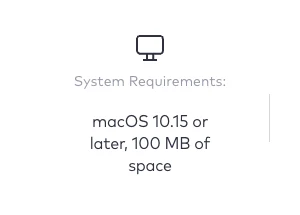
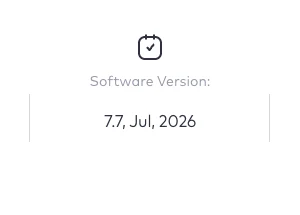
The page doesn't offer platform tabs for Windows, Android or iOS. The download flow produces the Mac installer and tells the reader to complete installation on a Mac. The installation and permission sequence is documented in our current MacKeeper setup guide.
Supported macOS doesn't mean every feature operates before permissions are granted. Real-time protection and other functions can require current system extensions, Full Disk Access, browser extension approval or a helper component. Compatibility is the doorway; configuration determines whether protection is actually active.
Why official system-requirement pages disagree
The MacKeeper help center still contains a version-specific requirements article that lists MacKeeper 5 for macOS 10.11–10.12 and MacKeeper 6 for macOS 10.13+, with 2 GB RAM and 113 MB of storage. Another older update article says the latest MacKeeper works on macOS 10.11 or later. Those pages describe earlier branches, not the live version 7.7 download we captured.
We don't average 10.11, 10.13 and 10.15 into an imaginary requirement. For a new install, use the current download page and the requirement shown by the installer at that moment. For an old Mac already running version 5 or 6, identify the exact build before deciding whether it can remain, update or should be replaced.
An old app opening successfully isn't the same as current security support. Definitions, engine components, certificates, browser integration and operating-system security interfaces change. The EULA also says the company isn't obligated to maintain compatibility with prior versions or specific operating systems.
On an unsupported Mac, don't weaken macOS security or install a package from an archive just to force compatibility. Keep the operating system and browser supported where possible, use Apple's built-in controls, and choose a security product that explicitly supports that exact macOS version.
What actually runs on a supported Mac
The Mac app combines security, privacy, cleaning and performance tools. Antivirus and Adware Cleaner inspect the Mac; Find & Fix coordinates scans; Safe Cleanup, Smart Uninstaller and Duplicate Finder act on Mac storage; Memory Cleaner, Update Tracker and Login Items work with Mac processes and applications.
Private Connect is a VPN client inside MacKeeper. The official help flow starts by opening the Mac app, selecting Private Connect and installing a Mac helper. Turning it on protects the connection from that Mac; it doesn't create a VPN tunnel on a phone or Windows PC sharing the account. Our Private Connect review and repair guide stays inside that Mac boundary.
ID Theft Guard monitors verified email addresses for known breach records, but its setup and review interface is in MacKeeper. The monitored identity can belong to a person who also uses phones and PCs; that doesn't make the other hardware a protected endpoint. The ID Theft Guard review explains the alert boundary.
StopAd is the awkward edge case because it appears as a browser extension. MacKeeper's current help page describes it as built into MacKeeper and installed for Google Chrome for Mac or Safari. That wording doesn't promise a supported Windows suite, and browser synchronization shouldn't be used to invent one.
Multiple-device and Family plans mean multiple Mac licenses
The account guide says one MacKeeper license is used on one Mac at a time. The license attaches to the Mac after sign-in and can be assigned or reassigned to another Mac in the account. A second Mac needs another eligible seat or a transfer from the first.
The current EULA allows installation on permitted personal computers within the purchased count and describes a Family Plan containing multiple individual licenses. It doesn't say those software seats become Windows, iOS or Android apps. “Three devices” is dangerous shorthand when the product being licensed exists only for macOS.
| Order wording | Safe interpretation | Not included by implication | Check before paying |
|---|---|---|---|
| 1 Mac | One current eligible Mac | Windows PC, phone, second Mac | Mac name and next billing date |
| 3 Macs | Up to three eligible Mac software seats | Three arbitrary mixed devices | License cards and sharing terms |
| Family Plan | Multiple individual Mac licenses under EULA | One universal family security app | Number of licenses and authorized users |
| Premium Services devices | Technician support targets under service order | MacKeeper endpoint licenses | Service line, device types and exclusions |
Reassignment isn't simultaneous use. If a one-seat license moves from an old Mac to a new Mac, verify that the old assignment is unlinked and the new Mac appears correctly. Our account, activation and transfer guide gives the exact account workflow.
MacKeeper for Windows: no current app, even if support can touch a PC
There's no current MacKeeper Windows 10 or Windows 11 installer under the MacKeeper software subscription. The vendor's own current MacKeeper versus McAfee comparison says MacKeeper is developed purely for macOS and contrasts it with McAfee's native Windows, Android and iOS coverage.
A Premium Services technician may still help a covered Windows laptop with setup, an application, account, browser, network or other in-scope problem. That session may install a remote-support or diagnostic tool, but it doesn't turn into continuous MacKeeper antivirus. When the session ends, Windows still needs its own native security controls and any chosen Windows security product.
Don't send a Mac license key to a third-party download site looking for an `.exe`. Don't run a package just because its filename contains MacKeeper or Clario. A nonexistent official Windows client creates ideal search space for impersonation, bundled software and obsolete packages.
If a mixed household keeps MacKeeper for its Mac utilities, document the split: MacKeeper on eligible Macs, Windows Security or another supported suite on PCs, and separate native apps on mobile. Operational clarity matters more than forcing one brand name across devices.
PCKeeper is historical—not a hidden Windows edition of MacKeeper
Search results sometimes surface PCKeeper, a separate Windows product associated with an older corporate era. The similar name and history don't make an old PCKeeper installer a current MacKeeper release. It's outside the present MacKeeper 7 product and support path.
Old download mirrors are especially poor evidence. A package can be genuine to its historical product yet lack current updates, supported servers, modern Windows compatibility or a safe commercial relationship. Antivirus software that can't receive trusted updates becomes a risk rather than a solution.
Use the current vendor navigation as the authority. If `mackeeper.com/download/` offers the Mac package and the current EULA defines macOS, a mirror can't create an official Windows edition by preserving an old file. The correct action is to choose a current Windows product from its vendor or Microsoft Store route.
This also prevents brand confusion with Keeper, the unrelated password manager that does have cross-platform apps. Product name, publisher, domain, code signature and store listing should all agree before installation.
MacKeeper for iPhone and iPad: no app under the software license
There's no native iPhone or iPad MacKeeper application under a normal software plan. There's no MacKeeper mobile antivirus, cleanup dashboard, Private Connect client or Mac-style feature set to install from the standard software purchase. The Mac remains the only endpoint running the suite.
Premium Services plan tables can name iPhones and iPads as supported devices, and Security Tech Care is labeled for macOS and iOS. That can provide setup, account, backup or security-configuration help under the purchased service. It remains technician assistance governed by scope, not a background MacKeeper agent on iOS.
A remote specialist might recommend iOS settings, updates, account recovery steps or another vendor's application. Ask which app, publisher and subscription will remain afterward. A support plan shouldn't blur third-party software into a native MacKeeper entitlement.
If the goal is mobile VPN, phishing defense, identity monitoring or family controls, compare actual iOS apps and their platform limits. Don't buy a multi-Mac license expecting an iPhone icon to appear later.
MacKeeper for Android: no native client and service wording varies
There's no current Android MacKeeper app under the normal software license. No MacKeeper antivirus, Safe Cleanup, Private Connect or StopAd package should be sideloaded as an APK. An APK from an unofficial result isn't a workaround for a missing vendor product.
The broad Premium Services description can include smartphones and tablets, including Android devices, depending on the plan. Performance Tech Care is narrower: its compatibility language explicitly says Windows and Android are unsupported. A user can't transfer eligibility from one service line to another because both are sold under the same brand.
Ask support to put the exact Android device and job in the case before remote access or payment. “Phone support” might mean email setup or coaching, not malware removal, device recovery or a permanent security app. The result must be defined in terms the user can test.
For continuous Android protection, install a current app from the official vendor and Google Play route. Keep Play Protect and system updates enabled, and avoid device-administrator or accessibility permissions requested by an unknown package claiming to be MacKeeper.
A web account or browser extension doesn't make MacKeeper cross-platform
The MacKeeper account can be opened in a browser to manage licenses, activation codes, subscription status, billing details and reassignment. That portability belongs to the management page, not to the protected endpoint. A phone used to cancel renewal isn't thereby covered by MacKeeper antivirus.
StopAd can look more portable because Chrome extensions often sync. MacKeeper's official StopAd guide specifically says Google Chrome for Mac or Safari and starts installation from inside MacKeeper. We wouldn't describe a synced or separately discovered extension on Windows as a supported MacKeeper Windows product.
The same rule applies to breach-alert emails. Receiving an ID Theft Guard notification on an iPhone only means the mailbox is reachable there. The scan, account relationship and alert concern identity data; they don't certify the iPhone's apps, storage or network connection as protected.
When a feature crosses devices through email, a web dashboard or human advice, name the channel precisely. “Accessible from a phone” and “protects the phone” aren't synonyms.
Feature availability: native Mac tool, portable identity signal or separate service
A platform table is more honest when it distinguishes execution from reach. A breach record can concern accounts used everywhere; a technician can advise several devices; a browser account can be opened anywhere. None of those facts creates a native antivirus client.
| Capability | Mac | Windows | iPhone/iPad | Android |
|---|---|---|---|---|
| MacKeeper app / Find & Fix | Native app on supported macOS | No client | No client | No client |
| Antivirus / Adware Cleaner | Mac endpoint tools | Not MacKeeper protection | Not offered | Not offered |
| Cleanup / performance tools | Act on Mac storage and processes | No native tools | No native tools | No native tools |
| Private Connect VPN | Mac client inside MacKeeper | No MacKeeper client | No MacKeeper client | No MacKeeper client |
| ID Theft Guard | Managed in MacKeeper; monitors verified email | Identity signal may concern accounts used here, but it isn't endpoint protection | ||
| StopAd | Documented for Safari and Chrome for Mac | No basis for calling it a full MacKeeper client | ||
| Premium Services | Remote technician help when the exact plan, platform and task are covered | |||
The current vendor Bitdefender comparison makes the same core operating-system distinction: Bitdefender is listed for macOS, Windows, iOS and Android, while MacKeeper is listed for macOS. The vendor's own comparison is stronger evidence than a download mirror promising otherwise.
Five household scenarios—and the right reading for each
| Household | Does MacKeeper software fit? | What else is needed? | Common mistake |
|---|---|---|---|
| One current Mac | Potentially, with one seat | Nothing platform-specific beyond chosen Mac stack | Buying support for an app configuration issue |
| Three current Macs | Potentially, with three Mac licenses | Confirm each Mac and user assignment | Assuming one license runs simultaneously on all three |
| Mac + Windows PC | Only for the Mac | Windows-native protection or one cross-platform suite | Searching for MacKeeper.exe |
| Mac + iPhone + Android | Only for the Mac | Native mobile security/privacy apps as required | Counting phones as software seats |
| Distant parent with many gadgets | Mac app only on eligible Mac | Premium Services may help if scope and access are acceptable | Confusing technician coverage with installed protection |
A Mac-only household can prefer a Mac-specialist suite without penalty. A mixed household pays an operational cost if every device has a different vendor, account and renewal. That cost may be worth it for MacKeeper's utility mix, but it should be chosen rather than discovered after checkout.
Count operating systems before devices. Then list the protection needed on each: antivirus, web defense, VPN, breach monitoring, parental controls, backup or merely occasional support. A device count without this feature map produces false confidence.
Don't download an unofficial EXE, APK or configuration profile
The missing-client queries attract pages that promise exactly what the vendor doesn't provide. Treat “MacKeeper for Windows,” “MacKeeper Android APK” and “MacKeeper iPhone profile” as verification problems, not convenient shortcuts. The official Mac download isn't supposed to run on those platforms.
Start from a typed or saved `mackeeper.com` address. Check the final domain, publisher and code signature, and reject a package delivered through a phone call, popup or unexpected renewal email. MacKeeper's own current route distributes the Mac installer; it doesn't ask the user to sideload a mobile package.
The FTC's tech-support scam guidance warns that fake alerts, search results and unexpected callers can lead to remote access and payment demands. A missing platform version is a natural pretext: the caller offers a special installer and then asks to control the device.
If an unofficial file was already opened, disconnect when active control is suspected, preserve the file name and source, run the native security checks for that operating system, remove unknown profiles/apps/extensions and review high-value accounts from a clean device. Don't call a number embedded in the same page that supplied the file.
Mixed-platform alternatives: choose native apps, not just a large device number
A cross-platform subscription is valuable only when it ships a supported client for every operating system you own. The feature set may still differ—especially on iOS and macOS—so compare the exact platform rows rather than treating one plan name as identical software everywhere.
| Option | Best reason to consider it | Platform decision | Tradeoff versus MacKeeper |
|---|---|---|---|
| Norton | One consumer security ecosystem across common platforms | Verify current native app and feature row for each device | Less Mac-utility specialization; bundle complexity |
| Bitdefender | Cross-platform security with strong endpoint focus | Choose a multi-device plan, not Mac-only Antivirus for Mac | Mac cleanup/performance mix differs |
| McAfee | Household coverage under one account | Match Windows, Mac, iOS and Android app capabilities | Different Mac feature depth and renewal economics |
| Malwarebytes | Straightforward malware-focused coverage across devices | Check chosen plan, device count and mobile feature limits | Fewer integrated Mac maintenance utilities |
| MacKeeper + native apps | Keep Mac-specific utilities while choosing each other endpoint separately | Document one app and renewal per platform | More vendors, accounts and support boundaries |
Don't select a replacement from a comparison row alone. Open the current official system requirements and store/vendor page for every device, confirm a platform-specific app, then price the renewal total. The right bundle is the one that leaves no endpoint assumed rather than actually enrolled.
Before buying: write the platform boundary on one page
List every Mac by model, macOS version and user. Confirm that each meets the live requirement and that the order contains enough Mac software seats. Record which Mac receives each license and whether reassignment or simultaneous use is expected.
List Windows PCs, iPhones, iPads and Android devices separately. For each, write the native app that will provide any required antivirus, VPN, web defense, family control or identity feature. If the answer is only “MacKeeper account,” the endpoint plan is incomplete.
If Premium Services is proposed, create another row with the exact service line, supported device, job, term, renewal and remote-access method. Don't merge that count with Mac licenses. The invoice should make the separation obvious enough that another family member can explain it later.
Save the live requirement, checkout and agreements with the order. Product pages and help articles can drift at different speeds, as the 7.7/10.15 download and older version-six requirements demonstrate. Your dated evidence is the cleanest way to resolve a later compatibility or sales dispute.
MacKeeper platform coverage FAQ
Is MacKeeper only for Mac?
Yes. The current MacKeeper software is a macOS application. The live August 2026 download page lists version 7.7 for macOS 10.15 or later. MacKeeper doesn't provide a current native Windows, Android, iPhone or iPad security app under the normal software license.
Can I install MacKeeper on Windows 11?
No. There's no current MacKeeper Windows installer. A separately purchased Premium Services plan may provide remote help for a covered Windows PC, but that technician service doesn't install the MacKeeper antivirus, cleanup tools or VPN on Windows.
Is there a MacKeeper app for iPhone or iPad?
No current native MacKeeper iOS or iPadOS app is included with the software subscription. Premium Services or Security Tech Care may list iPhones and iPads as support targets under separate terms, which is remote assistance rather than a MacKeeper endpoint app.
Is there a MacKeeper Android app?
No. A normal MacKeeper software license doesn't install antivirus, cleanup or VPN tools on Android. Some Premium Services plans may cover remote help for Android devices, while Performance Tech Care specifically says Windows and Android are unsupported.
Does a three-device MacKeeper plan cover Windows and phones?
Treat the software device count as Mac licenses unless the order explicitly describes a separate support service. A three-Mac or Family Plan doesn't become a mixed Windows, Android and iOS antivirus bundle simply because it contains several licenses.
Can I transfer a MacKeeper license to another computer?
You can reassign a software license between eligible Macs through the MacKeeper account, within the purchased device count. Reassignment doesn't convert the license into a Windows or mobile license and doesn't authorize sharing beyond the applicable plan terms.
Does MacKeeper VPN protect my iPhone or Android phone?
No under the standard MacKeeper software license. Private Connect is the VPN client inside the Mac app. A phone needs its own native VPN or security app; signing into the MacKeeper web account from the phone doesn't route that phone's traffic through the Mac VPN.
Does StopAd work on Windows because it uses Chrome?
The MacKeeper help flow describes StopAd as built into MacKeeper and installed for Google Chrome for Mac or Safari. Don't treat browser synchronization or an extension search result as proof of a supported Windows MacKeeper product.
What happened to PCKeeper for Windows?
PCKeeper was a separate historical Windows product associated with an older company era. It isn't the current MacKeeper for Windows. Don't install an old PCKeeper package or a third-party executable offered as a modern MacKeeper client.
What should a Mac-and-Windows household use?
Use MacKeeper only if its Mac-specific tools justify a separate Mac subscription, then protect Windows and phones with their own official apps. If one dashboard and one mixed-device license matter more, choose a current cross-platform suite with native clients for every operating system you own.
Verdict: MacKeeper is Mac-only; the support service is the cross-device layer
The current MacKeeper product isn't ambiguous once the layers are separated. Version 7.7 installs on supported Macs, and software seats activate eligible Macs. Windows, iPhone, iPad and Android don't have a current native MacKeeper client under that subscription.
Premium Services can legitimately reach beyond Mac because a technician can help with plan-covered devices. That can be useful, but it's remote service with its own scope, access and billing—not endpoint protection. The Family Plan, web account, StopAd extension and breach alerts don't erase that boundary.
Buy MacKeeper for the Macs where its native feature set earns a place. For every other device, install a current official platform app or choose a cross-platform suite. Never fill a missing client with an old PCKeeper package, unofficial EXE, APK or profile.