
ThreatDown Review 2026: What the Business Bundles Really Cover
ThreatDown makes business endpoint security unusually approachable. The hard question is whether your team will deploy, tune and own everything the managed-service promise assumes.

Quick answer: ThreatDown deserves a shortlist place for a small or midsize business that wants a relatively understandable path from prevention to EDR and 24/7 managed response. Core is the prevention tier; Advanced adds EDR, rollback and management controls; Elite adds MDR; Ultimate adds MDR Plus, ITDR, ThreatDown AI and Premium Support. The catch is operational: ThreatDown's May 2026 service description requires EDR and MDR to be fully deployed, healthy, connected, supported and correctly configured across all covered endpoints. Run a real pilot, include servers and Macs, test response authority and preserve the final quote before treating the bundle name as coverage.
Quick verdict: approachable security, but not set-and-forget coverage
ThreatDown is easier to understand than many business endpoint portfolios. A buyer starts with preventive controls in Core, adds investigation and recovery in Advanced, buys analyst-operated monitoring in Elite, and reaches identity-aware response plus stronger managed-service commitments in Ultimate. That progression makes sense for a lean team that doesn't want to assemble six disconnected tools before protecting its first laptop.
The clean bundle names can also create false confidence. ThreatDown's current May 2026 MDR service description says the service depends on EDR and MDR being fully deployed, healthy, connected, updated, supported and correctly configured across 100% of covered endpoints. If twelve laptops are protected and the forgotten accounting server is not, the managed-service badge doesn't close that gap.
Our verdict is therefore conditional. Shortlist ThreatDown when operational simplicity, a single endpoint agent and an available 24/7 team solve real staffing problems. Before signing, run a pilot that includes the awkward devices, confirm who can isolate a machine at 2 a.m., test a rollback on disposable data, preserve the exact quote and measure how quickly the team notices an unhealthy agent.
We reviewed current product pages, the service description, July support documentation, legal terms, independent test material and findable operator discussions. We didn't claim access to a live customer tenant or stage a fake MDR incident. This is a contract-and-operations review: it tells you what the purchase appears to cover, where the evidence is strong and what a buyer must prove in their own environment.
ThreatDown is the business family, not a larger consumer Malwarebytes plan
Malwarebytes created the ThreatDown name for its business security portfolio. The endpoint agent, Nebula and OneView consoles, fleet policies, EDR actions and managed services belong to that business context. A home user choosing between Free and Premium is solving a different problem, which is why our consumer Malwarebytes review and Free versus Premium comparison live on separate URLs.
The distinction matters for research. A current consumer Malwarebytes result in AV-Comparatives or SE Labs can't be copied into a ThreatDown table as if it measured the business EDR stack. The products may share technology, but policy, version, workload, management layer and test program differ. We name the tested product and date every time the evidence changes context.
Pricing can't cross the boundary either. The consumer Malwarebytes plans guide covers personal subscriptions, introductory offers and auto-renewal. ThreatDown bills business seats and add-ons through a dynamic cart, account representative, reseller or MSP arrangement, so a familiar Malwarebytes logo doesn't make a personal-device license valid for a company fleet.
The buyer should also decide whether they're a direct customer or an MSP-managed customer. That choice affects console, billing, support path and who owns policy. A business can reasonably like Malwarebytes at home and still select another business platform; the decision should follow fleet requirements, not brand recognition.
EPP, EDR, threat hunting and MDR are four different ownership models
Endpoint protection, or EPP, tries to prevent and automatically remediate known and suspicious activity. EDR records behaviors, raises richer detections and gives an operator tools to investigate, isolate, terminate or remediate. Managed Threat Hunting adds analysts who look for signs of compromise and provide findings or guidance. MDR goes further by continuously monitoring, investigating and taking agreed response actions.
The technology stack may use one agent, but the human responsibility changes at each step. Core expects the customer's team to own the console and follow up on what automation doesn't settle. Advanced provides more evidence and response controls, yet someone still needs to interpret them. Elite assigns continuous monitoring to the MDR team, while the customer remains responsible for enrollment, healthy agents, contacts, permissions and business decisions that only the organization can make.
| Layer | Primary job | Who operates it | Question before buying |
|---|---|---|---|
| Core EPP | Prevent, block and remediate common endpoint threats | Automation plus customer IT | Who reviews detections and unhealthy devices? |
| Advanced EDR | Investigate behavior, isolate endpoints and recover | Customer IT/security, with guided hunting | Who is qualified and available to use response controls? |
| Managed Threat Hunting | Look for suspicious activity and provide guidance | ThreatDown analysts plus customer remediator | Is the service alerting, acting, or both for this event? |
| Elite MDR | 24/7 investigation and agreed active response | ThreatDown MDR team with customer authority | What can analysts do without waiting for approval? |
| Ultimate MDR Plus | MDR plus deeper removal, RCA, intelligence and SLA | ThreatDown team under enhanced service terms | Which incidents and response times are contract-backed? |
That last column is more useful than a feature count. A midnight alert that requires customer approval can sit differently from one that permits immediate isolation. During the pilot, write a one-page response matrix covering endpoint isolation, process termination, quarantine, rollback, account suspension and executive notification.
Core, Advanced, Elite and Ultimate at a glance
The current ThreatDown endpoint product page places Endpoint Protection in every bundle. Core includes next-gen AV, incident-response tooling, device control, application blocking, vulnerability assessment, browser phishing protection and the first visibility phase for AI-tool use. It's the prevention-and-hygiene tier, not a staffed security service.
Advanced adds EDR, ransomware rollback, patch management, firewall management, drive-encryption management and managed threat hunting. Elite contains Advanced and adds 24/7/365 MDR. Ultimate adds MDR Plus, ITDR, ThreatDown AI and Premium Support, creating a wider device-and-identity service rather than simply a faster antivirus engine.
| Bundle | Distinctive additions | Best fit | Main trap |
|---|---|---|---|
| Core Next-Gen AV | Prevention, vulnerability view, application and device controls, phishing protection | Small team that can review the console during business hours | No EDR investigation or staffed 24/7 response |
| Advanced EDR | EDR, one-to-seven-day rollback, patch, firewall, drive encryption, managed hunting | IT team prepared to investigate and respond | Tools don't create after-hours staffing |
| Elite MDR | Advanced plus 24/7 managed detection and response | Lean team that needs analyst coverage | Coverage depends on complete healthy deployment and agreed authority |
| Ultimate MDR Plus | Enhanced MDR, ITDR, ThreatDown AI and Premium Support | Organization needing identity context, RCA and contract-backed commitments | Identity, server and other allocation details still need a written quote |
The table is a decision map, not a substitute for an order form. Feature availability can vary by operating system, device type, existing account and purchase route. Ask the seller to mark every required workstation, server, mobile device, identity and mailbox against a named license line.
ThreatDown pricing: preserve the cart, not a search-result number
ThreatDown's official price controls are dynamic and can change with device count, term and route. A G2 pricing snapshot checked for this review listed Core at $345, Advanced at $395 and Elite at $495 for five devices for one year, with Ultimate requiring contact. That works out to $69, $79 and $99 per device for the displayed bundle, but it remains a secondary snapshot rather than a binding quote.
The gap between tiers looks modest for five workstations, which can make Elite appear automatic. Real invoices become more complex when the fleet includes servers, mobile security, DNS filtering, email security, Premium Support or per-identity ITDR. An MSP may also package ThreatDown with its own monitoring, response and support, so the per-endpoint figure no longer describes the whole service.
| July 2026 secondary snapshot | Displayed scope | Before signing |
|---|---|---|
| Core — $345/year | Five devices | Confirm renewal, taxes, minimum and workstation definition |
| Advanced — $395/year | Five devices | Confirm server, rollback and management-feature entitlement |
| Elite — $495/year | Five devices | Confirm MDR authority, onboarding and service terms |
| Ultimate — contact | Device and identity service | Get identities, servers, SLA, support and every add-on in writing |
Save a PDF or screenshot of the official quote and order confirmation. The record should show term, renewal, endpoint types, seat count, server count, identity count, mailboxes, add-ons, support level, response authority and cancellation terms. A good procurement file lets the next administrator understand coverage without reconstructing a sales call.
A workstation bundle doesn't automatically cover servers, phones, inboxes and identities
The current pricing matrix lists server protection, mobile security, DNS filtering, email security and Premium Support as separate options around the main bundles. ITDR can be an add-on to eligible tiers and is included in current Ultimate offers, but it's licensed around identities rather than merely endpoints. These boundaries matter because the riskiest asset is often the one that was assumed to be “included.”
Server coverage deserves its own count. Windows and Linux servers have different operating-system, memory, disk and EDR requirements from workstations. A file server may also need a dedicated rollback location and a backup policy that has nothing to do with the endpoint license. Ask whether each server receives prevention only, EDR, MDR and the same response actions as user devices.
Mobile coverage is also separate. ThreatDown documents current Android, iOS, iPadOS and ChromeOS support, but the feature set isn't desktop EDR transplanted to a phone. Email Security protects Microsoft 365 or Google Workspace mailboxes through its own configuration, while DNS Filtering adds another policy and data path.
Build a simple asset-to-license matrix before requesting a quote. Include remote laptops, lab machines, kiosk devices, virtual desktops, domain controllers, Linux workloads, executives' phones, service accounts and privileged identities. Anything without a named owner and entitlement is a gap until proven otherwise.
Nebula versus OneView: choose the operating model first
Nebula is the cloud platform a direct business uses to manage its endpoints, policies, detections and services. OneView is designed for MSPs that operate multiple customer sites through one multi-tenant console. They share ThreatDown capabilities, but their account hierarchy, allocation, migration and workflow are different enough that a procedure written for one shouldn't be assumed correct for the other.
The current OneView site documentation separates workstation, server and mobile allocations and distinguishes paid sites from 14-day trials. It also places managed services at the site level. That's useful for an MSP, but it creates another responsibility: the provider must ensure the right bundle and service are actually assigned to every client site.
Migration can carry non-obvious constraints. ThreatDown's Nebula-to-OneView guide documents account, policy and email-security considerations, including matching email data-residency regions. A buyer changing MSPs should export inventory, policy and incident records before a console migration rather than treating it as a cosmetic rename.
Direct customers should ask who holds the global administrator role, who can change policy and who receives critical notices. MSP customers should ask the same questions twice: once for the provider and once for the client. Multi-tenancy simplifies operations only when roles and escalation paths are explicit.
The single agent reduces sprawl; plugins and policy health still matter
ThreatDown describes one lightweight Endpoint Agent that loads product-specific components. The current component reference shows platform-specific services, plugins, drivers and extensions behind that single installer. This is operationally cleaner than deploying unrelated products, but “one agent” doesn't mean one process or one failure mode.
EDR, DNS, browser protection, inventory and management capabilities depend on the relevant component being installed and healthy. July 2026 release notes describe automatic recovery for crashed protection components and improved connectivity diagnostics, which is encouraging evidence of active maintenance. Release notes also remind us that health changes over time; a green rollout on day one doesn't prove every plugin remains current.
Policy determines what the agent actually does. ThreatDown publishes recommended Nebula defaults, with features varying across Windows, Mac, Linux and mobile. Review the effective policy on representative devices instead of assuming a checkbox is available everywhere.
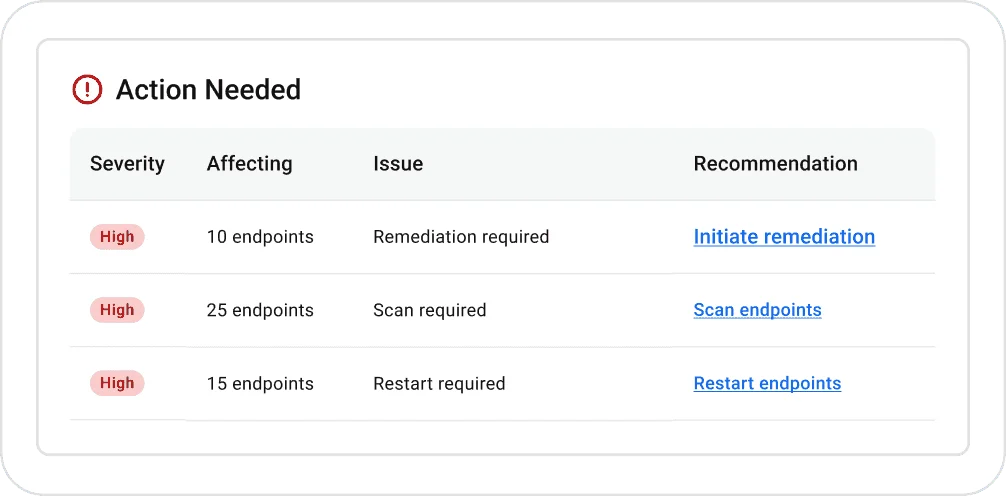
A mature rollout reports more than installed seat count. Track last check-in, operating system, agent and plugin versions, policy assignment, protection state, EDR state and pending restart. The page's official “Action Needed” visual below is useful because it centers remediation, scan and restart work rather than treating a deployment total as the finish line.
Windows deployment is flexible, but cloned images can break identity
ThreatDown supports Windows 11, Windows 10 from version 1607 and current Windows Server generations, with a separate Windows 11 ARM installer. The current Windows deployment guide offers manual MSI, silent command line, SCCM, Intune, Group Policy, RMM and the Discovery and Deployment Tool. That range is a strength for a mixed small-business environment.
The installer isn't the end of enrollment. ThreatDown says Scan and Report data should begin appearing after deployment, with an expected window around 30 minutes in the current guide. The pilot should flag a machine that installed locally but never checked in, received the wrong policy or lacked the intended EDR component.
Golden images need special handling. The updated Sysprep procedure says the base image should remain offline during agent preparation so clones don't share one machine identity. It recommends testing two or three machines before broad use, which is exactly the kind of small validation step a rushed deployment skips.
Test Windows Server separately from a laptop. Server Core isn't supported in the current Nebula requirements, and legacy systems may receive only a legacy installer without new features. If the business still runs Server 2012 or 2008, that's a modernization risk, not a reason to describe the old machine as fully covered.
Mac support is real, but MDM permissions are part of the product
Current Nebula requirements list Intel and Apple Silicon Macs from Big Sur 11 through Tahoe 26. That's broad version coverage, and the July endpoint release adds an automatic threat scan after installation. The meaningful deployment question is whether every protection extension receives the permissions it needs without asking an employee to click through security prompts.
ThreatDown's July macOS MDM guide documents Full Disk Access, system extensions, web-content filtering, DNS proxy configuration and certificates. It recommends managed profiles and warns that some MDMs require two separate mobileconfig files. A Mac agent installed without those approvals can look present while delivering incomplete protection.
Feature parity also needs testing. Vulnerability inventory is available for supported Mac applications, while OS patching is currently Windows-only. Device control, web protection and EDR behavior can differ by platform, so one successful Windows demo shouldn't decide a mixed-fleet purchase.
Use an MDM-enrolled Mac and an Apple Silicon Mac in the pilot. Confirm silent permissions, system-extension state, full-disk scan, web blocking, detection visibility and removal. If the company lacks MDM, add the recurring cost of manual permission support to the product decision.
Linux, servers and mobile coverage require separate feature maps
The current Nebula requirements list common x86_64 and ARM64 distributions, including current Ubuntu, Debian, Red Hat, Rocky, Alma, Oracle, Amazon and selected SUSE releases. Linux EDR requires at least kernel 3.10, more memory and disk than prevention alone, and DKMS on some distributions. Secure Boot can add module-signing work.
Support isn't identical across every distribution. Some versions receive Incident Response and Endpoint Protection but not EDR. A table with a single Linux checkmark hides this difference, so procurement should record distribution, version, architecture, kernel and intended module for every server group.
Mobile Security for Business currently covers Android 9 through 16, iOS and iPadOS versions listed through 26, plus ChromeOS through Google Play. That's useful for fleet hygiene, but mobile protection is separately allocated and doesn't turn a phone into a desktop EDR endpoint. Ask which policies, telemetry and response actions exist on each mobile platform.
The most honest rollout has one acceptance test per platform class. A Windows laptop, managed Mac, Linux server and mobile device should each prove enrollment, policy, alert visibility and removal. Our business antivirus guide explains why a company-wide product decision must follow the hardest workload rather than the easiest demo.
Firewall, proxy and browser requirements can create silent blind spots
Nebula is cloud-managed, so endpoints need reliable access to ThreatDown service addresses. The current Nebula network guide publishes destinations and ports. OneView has a separate firewall and proxy reference that calls out TCP 443, packet inspection and proxy behavior.
This matters in restrictive networks. TLS inspection, stale allowlists, authenticated proxies and regional egress controls can leave an agent installed but unable to sync. ThreatDown updated service addresses and connectivity diagnostics during 2026, so a static firewall document copied into a wiki needs an owner and review date.
The Nebula console itself requires a current Chromium-based desktop browser, currently Chrome or Edge. Mobile browsers aren't supported. An on-call responder who expects to work only from a phone should know that before the first incident.
Include a restricted VLAN, VPN-connected laptop and proxied server in the pilot. Verify check-in, plugin update, task execution, policy receipt and incident delivery from each segment. The support article for OneView sync failures is a useful test checklist because it spans network, service, certificate and latency causes.
Protection evidence is credible but narrower than a consumer lab collage
ThreatDown Endpoint Protection appears in MRG Effitas' business-oriented 360° program. The underlying Q1 2025 assessment names the product, and MRG Effitas gave it the inaugural 2025 Product of the Year recognition. ThreatDown says that recognition followed 13 consecutive quarterly certifications, a meaningful consistency claim tied to a named testing program.
The evidence has limits. The visible AV-TEST business archive contains Malwarebytes Endpoint Protection results, but the entries aren't a current July 2026 ThreatDown score. Current AV-Comparatives consumer results for Malwarebytes also test another product context and can't stand in for EDR, MDR or server coverage.
TechRadar's June 2026 endpoint roundup adds a practical observation: its Windows 11 agent felt lightweight and stopped test threats when execution was attempted, while the supplied Browser Guard didn't block the compressed download. That's a useful workflow note, not a malware protection percentage or fleet-scale performance benchmark.
We would score the evidence as good enough to justify a pilot, not strong enough to skip one. Test the exact business policy, agent version, operating systems, applications and response path you plan to run. Compare the result with the same scenarios on shortlisted rivals rather than comparing unrelated star ratings.
Advanced EDR gives a lean team real response tools—and real responsibility
ThreatDown Advanced adds suspicious-activity monitoring, investigation data, endpoint isolation, Active Response and ransomware recovery controls. Those features can help an administrator contain a compromised device and understand what happened beyond a simple antivirus alert. The EDR data sheet presents the platform as powerful enough for growing skill levels without the complexity of a large enterprise tool.
Simplicity is valuable, but the operator still needs a procedure. Isolation can interrupt a critical workflow, a remote shell can change evidence, and a remediation action can remove a business file if the detection is wrong. Roles, approval thresholds and evidence preservation should exist before anyone clicks the response button.
Agent health is especially important. ThreatDown's current support article for an EDR plugin that didn't start warns that files can't be cleaned and events can't be logged in that state. Its recovery sequence disables and reloads EDR functions, which is a reminder that “licensed” and “operational” are different properties.
During the pilot, create a harmless scenario that exercises detection, investigation, isolation and release on a disposable endpoint. Measure who receives the alert, what context appears, how the action affects network access and how the machine returns to service. Don't test ransomware or live malware on a production network.
Ransomware rollback reaches seven days, but the current default is three
ThreatDown promotes the ability to restore files changed, encrypted or deleted by ransomware for up to seven days. The current OneView EDR policy guide says the configurable window is one to seven days and lists three days as the default. A buyer who remembers only the maximum may deploy a shorter recovery window than expected.
Rollback works by preserving file-change data on the endpoint. ThreatDown's current rollback page emphasizes that it doesn't rely on Windows Volume Shadow Copy, while an official technical FAQ explains disk-space, file-size and exclusion limits. If the disk is full or the relevant change is outside policy, the marketing headline can't restore the file.
This is a recovery layer, not a backup replacement. It can't substitute for immutable copies of databases, SaaS data, server workloads and business records. A ransomware response also needs credential rotation, root-cause investigation, clean rebuild decisions and proof that the attacker no longer has access.
Test rollback with ordinary disposable documents in an isolated lab. Record storage overhead, effective window, supported paths, user impact and restore result. Keep the organization's business security directory and backup plan linked in the incident runbook so endpoint recovery isn't mistaken for complete disaster recovery.
Patch, vulnerability, firewall, device and drive controls reduce tool switching
Advanced includes several operations features that can make the bundle more valuable than its antivirus component alone. Vulnerability Assessment inventories supported software and highlights exposure. Patch Management can deploy supported third-party updates and Windows operating-system patches. Application Block and Device Control can reduce execution and removable-media risk.
The limits deserve equal space. The current Patch Management requirements say OS patching is Windows-only and warn that WSUS and Configuration Manager aren't supported as update sources for this module. Mac inventory and supported application updates have a different scope, while Linux patching isn't represented by a universal checkmark.
Firewall Management and Drive Encryption management are also management layers, not magic replacements for architecture. The buyer should verify supported Windows editions, BitLocker state, recovery-key handling, firewall-policy precedence and reporting. A central dashboard is useful only when its controls match the organization's existing Intune, Group Policy or RMM ownership.
Use the pilot to find overlap. If Intune already enforces encryption and Windows Update policy, decide which console is authoritative. Duplicate tools can be acceptable, but duplicate ownership produces drift and contradictory remediation.
AI visibility, ThreatDown AI and ITDR solve different problems
ThreatDown's first AI Detection and Response phase is mainly visibility. The July 2026 AIDR FAQ says the existing agent identifies installed AI applications and outbound AI-domain traffic on Windows and macOS. Enforcement and tool blocking are planned for a later phase and higher bundles, so “AI response” shouldn't be read as current universal blocking.
ThreatDown AI in Ultimate is a separate assistant that translates security data into plain-language guidance and suggests actions for an administrator to approve. That may help a generalist interpret a complex incident. It doesn't remove the need to validate the recommendation, preserve evidence and understand business impact before acting.
ITDR is different again. The current ITDR requirements call for EDR across endpoints plus Microsoft Entra ID, Okta or both. Setup needs privileged identity-provider roles, audit data and API permissions, and MDR analysts can review identity alerts only when the purchased service and authorization support it.
Identity coverage matters because a valid cloud session can outlive a cleaned laptop. During evaluation, map endpoint isolation, forced sign-out, account suspension, MFA reset and privileged-account escalation. Our consumer Malwarebytes identity review is intentionally separate; credit monitoring for an individual isn't business ITDR.
Managed Threat Hunting isn't the same promise as MDR
Advanced includes Managed Threat Hunting, which ThreatDown describes as continuous expert-led hunting with alerts and remediation guidance. This can add valuable human review for a team that lacks dedicated hunters. The customer still needs someone prepared to receive the finding, decide what business disruption is acceptable and carry out or approve the response.
Elite's MDR changes the operating model. Analysts monitor around the clock, investigate, filter noise and can perform agreed remediation such as process termination and endpoint isolation. The difference isn't simply “more detection”; it's who is watching and who is empowered to act at night, on weekends and during holidays.
ThreatDown's public MDR page reports five-minute mean time to detect, 19-minute mean time to respond and 95% of alerts filtered before reaching the customer. The page explicitly describes the timing as internal incident data. Treat it as a vendor service indicator to clarify in the contract, not an independent comparison against every MDR provider.
Ask the seller to walk through three cases: a low-confidence script event, confirmed ransomware and a stolen administrator session. For each, record whether the service only notifies, investigates, isolates, removes, rolls back or contacts the customer. The gaps between those verbs determine the real workload.
MDR coverage starts with complete deployment, not the purchase date
The strongest fact in this review is hidden in the service description rather than the landing page. ThreatDown says 100% of covered endpoints must have EDR and MDR fully deployed, healthy, connected, updated, supported and configured. It can suspend, limit or decline parts of the service when prerequisites aren't met.
That condition is reasonable: analysts can't investigate telemetry an endpoint never sends. It also changes procurement. Asset inventory, rollout completion and agent-health monitoring are part of the security service, not preliminary chores that can be postponed after purchase.
The May document describes a 31-day lookback for critical indicators of compromise, incidents raised in Nebula and two-way communication with trained personnel. Customer-driven notifications vary by incident severity. Read the actual order and service description together because onboarding, contacts, response authority and exclusions determine how those features operate for one organization.
Create a weekly exception report listing uncovered, offline, unsupported and unhealthy endpoints. Give each exception an owner and deadline. If the MDR vendor filters alerts but the customer ignores fleet-health alerts, the program can still fail quietly.
MDR Plus adds deeper service and an SLA; Premium Support isn't the SOC
Ultimate's MDR Plus adds hands-on Malware Removal Service, root-cause analysis for critical incidents, credential-exposure intelligence and contractual response commitments. These additions address the work after containment: removing persistent artifacts, explaining entry and scope, and identifying what must change. They're materially different from a larger alert quota.
The public MDR page says MDR Plus carries contract-backed response and containment guarantees, but it doesn't publish every threshold in the product copy. The May service description includes a service-credit process and conditions. Ask for the current schedule, covered incident severities, clock start, containment definition, exclusions and remedy before assigning value to “published SLA.”
Premium Support concerns product support and faster response for technical issues. Its current product page describes 24/7 expert coverage for all severity levels, faster support SLAs and a dedicated technical resource. That's helpful when an agent or policy fails, but it isn't the same function as analysts monitoring threats in MDR.
Keep three contacts in the runbook: product support, MDR incident communication and the organization's own incident commander. An Ultimate label may put all three under one vendor relationship, but their queues, authority and success criteria remain different.
Privacy and compliance evidence is useful, but review the data path
ThreatDown processes endpoint, account and incident data to deliver a cloud service. Its current Data Processing Addendum describes categories including names, contact data, IP addresses, device identifiers, machine IDs, endpoint and network domain information, operating-system account names and approximate location data. It also covers subprocessors, cross-border transfers, deletion and recognized transfer mechanisms.
The vendor publishes a subprocessor list and allows objections to new subprocessors within the DPA process. Its Trust and Compliance page says Malwarebytes has a SOC 2 Type II attestation performed by Schellman, with reports available to interested parties under NDA. A serious buyer should request the report and map relevant controls to its own risk assessment.
Email Security currently offers US and EU data-residency choices, with the selected region locked after configuration. That specific choice shouldn't be generalized to every ThreatDown telemetry stream without documentation. Ask where endpoint, incident, identity and email data are stored, which teams can access them and how long each category remains.
ThreatDown can support HIPAA, PCI-DSS, CMMC/NIST, SOC 2 and privacy-control work, but no endpoint product makes a customer compliant automatically. Policies, access, evidence, risk acceptance and business processes remain the customer's responsibility. Use the product's reports as evidence inputs, not a compliance certificate for the buyer.
Current operator signals praise setup and question stack coherence
Community evidence is small and reseller-dependent, but it reveals what buyers worry about. In an April 2026 r/SmallMSP discussion, one user described ThreatDown EDR as easy to set up and configurable. Another preferred a competing managed platform, saying the full ThreatDown stack became expensive and felt less unified when many services were assembled.
Those comments don't establish detection quality or support performance. They do suggest two pilot questions: how many portals and policy surfaces remain after purchasing the desired add-ons, and whether the quoted full stack still beats a broader managed platform. An MSP's integration and help desk can change the answer significantly.
Older sysadmin and MSP discussions raise false positives, patch quality, layering with Huntress or another EDR, and vendor support. Versions and packaging have changed, so we don't convert them into a 2026 reliability score. We use them to design tests for exclusions, alerts, support response and coexistence.
If your organization buys through an MSP, ask for its ThreatDown experience separately from public vendor reviews. Request its enrollment-health report, escalation matrix, response examples and offboarding plan. The quality of the managed relationship can matter as much as the underlying endpoint agent.
ThreatDown alternatives depend on the operating model
Microsoft Defender for Business is the first comparison for a Microsoft 365 Business Premium organization. It can reduce incremental licensing and integrate with Entra, Intune and the Microsoft security stack, but configuration breadth and alert ownership still require skill. Our Microsoft Defender review covers the product family, while a business pilot should use Defender for Endpoint documentation and the exact tenant license.
CrowdStrike and SentinelOne are natural comparisons when a security team values deep enterprise telemetry, custom detection and a broad integration ecosystem. They can be more complex and expensive for a small team, especially after adding managed hunting or MDR. Sophos is relevant for organizations that want endpoint, firewall and MDR in one vendor ecosystem; see our Sophos review for brand context without treating the consumer page as a business test.
Bitdefender GravityZone competes on flexible business tiers and a broad endpoint-control portfolio. ESET is often attractive to teams that prioritize endpoint policy and a mature cross-platform agent. Our Bitdefender review and ESET review provide product-family context, while the procurement comparison should use current business editions and identical workloads.
Managed-first providers such as Huntress or Field Effect can be better comparisons for an organization buying human coverage rather than an EDR console. The right test isn't a generic feature grid. Give every finalist the same mixed fleet, the same harmless detection scenarios, the same after-hours escalation requirement and the same total-cost worksheet.
Who should choose ThreatDown
ThreatDown fits a small or midsize business that wants a clear upgrade path and doesn't have a large security engineering team. Core can suit a disciplined IT team that will watch health and detections. Advanced makes sense when the team can operate EDR and values rollback plus patch, firewall and encryption visibility in the same platform.
Elite is the strongest fit when after-hours coverage is the missing control. It gives the company an analyst team without building a 24/7 SOC, provided enrollment and response authority are treated as operational requirements. Ultimate becomes interesting when identity telemetry, deeper post-incident work, contract-backed commitments and Premium Support justify the broader quote.
MSPs can benefit from OneView's multi-tenant model and predictable bundle progression. The provider should be able to prove site allocation, agent health, response ownership and customer-specific escalation. A small client shouldn't accept “we use ThreatDown” as a complete description of its managed service.
Choose the product when the pilot shows fewer operational gaps than the alternatives, not merely fewer settings. Ease of use is a security feature when it causes policies to be deployed and alerts to be handled. It's a liability only when simplicity hides missing coverage.
Who should skip it or demand a deeper comparison
A mature SOC may outgrow the platform if it needs extensive custom detections, cross-domain telemetry, data-lake control or a larger third-party integration ecosystem. ThreatDown has SIEM, SOAR and threat-intelligence elements in its managed service, but the buyer should validate every required export and integration rather than infer parity with a larger XDR platform.
Organizations with unsupported legacy systems, non-persistent VDI, unusual Linux distributions or highly restricted networks need a workload-specific proof. The legacy installer can continue protection on some old Windows systems without new features, which isn't the same as current EDR coverage. A product that protects 95% of the fleet may be the wrong choice if the remaining 5% contains the core business application.
A company that can't maintain asset inventory and agent health shouldn't assume MDR compensates for that weakness. The service description makes complete healthy deployment a prerequisite. In that situation, a stronger managed provider, RMM practice or endpoint-management project may be needed alongside any security product.
Finally, skip a quote that doesn't separate workstations, servers, mobile devices, identities, mailboxes, support and managed response. Ambiguous packaging makes incident-time disputes more likely. The best alternative is sometimes the vendor whose order form is easiest to audit.
A 14-day ThreatDown pilot should test coverage and ownership, not just installation
Start with a representative group: a Windows 11 laptop, an Apple Silicon Mac under MDM, a Windows Server, a supported Linux server, a remote VPN device and any separately licensed mobile or identity component. Include one restricted network segment. Don't select only fresh laptops that make every product look easy.
During the first week, measure enrollment, component health, policy delivery, scan completion, alert routing, user impact, update behavior and false positives from business software. During the second, exercise harmless response workflows on disposable systems: EICAR for basic detection, endpoint isolation, release, a rollback of test documents and an identity-response tabletop. Never run live malware or destructive ransomware in the production environment.
| Check | Pass evidence | Failure that matters |
|---|---|---|
| Enrollment | Every planned asset has the correct license, policy and current plugins | Installed agent without console check-in or intended EDR/MDR state |
| Platform fit | Windows, Mac, Linux and servers pass their own tests | One easy platform is used to infer fleet-wide coverage |
| Network | Restricted, proxied and VPN endpoints sync reliably | Silent gaps caused by inspection, proxy or stale allowlist |
| Detection | Harmless test appears with enough context and correct severity | No alert, duplicate alert storm or unclear next action |
| Response | Named operator can isolate, communicate and restore service | Approval or contact gap after hours |
| Rollback | Disposable files restore inside the configured window | Maximum seven-day claim assumed while policy remains at three |
| Health | Broken/offline components produce an owned exception | Seat count looks complete while protection is unhealthy |
| Commercial | Quote maps every asset and service to a line item | Server, identity, mobile, email or support scope remains verbal |
End with a go/no-go meeting that includes IT, security, finance and the incident owner. Record unresolved gaps, responsible party, target date and rollback plan. If ThreatDown passes, the result is more valuable than a generic score because it proves fit for the actual company.
Keep the completed scorecard beside the order confirmation and renewal calendar. Re-run the health, response and rollback checks after major agent, operating-system or network changes. Our current review directory can help reopen the market when the operating model changes rather than renewing by inertia.
ThreatDown Business FAQ
Is ThreatDown the same as Malwarebytes?
ThreatDown is the Malwarebytes business-security family, while Malwarebytes consumer plans are designed for personal devices. They share company history and detection technology, but ThreatDown uses business licensing, centralized consoles, endpoint policies, EDR and managed services. Don't use a consumer price, feature or lab result as evidence for a ThreatDown deployment.
How much does ThreatDown cost?
The official site uses a dynamic cart or quote. A G2 pricing snapshot checked in July 2026 listed Core at $345, Advanced at $395 and Elite at $495 for five devices for one year; Ultimate required contact. Those figures are secondary and dated. Save the official quote showing devices, servers, identities, mailboxes, term, renewal and add-ons before purchasing.
What is the difference between ThreatDown Advanced and Elite?
Advanced is the EDR tier: it adds investigation and response, ransomware rollback, patch and firewall management, drive-encryption visibility and managed threat hunting to Core. Elite includes those features and adds 24/7/365 Managed Detection and Response, where analysts investigate and can respond to confirmed threats. Response authority and deployment health still need explicit validation.
Does ThreatDown MDR monitor every device automatically?
No. ThreatDown's May 2026 MDR service description says covered endpoints must have the required EDR and MDR services fully deployed, healthy, connected, updated, supported and configured. An unmanaged, offline, unsupported or broken agent creates a visibility gap. Enrollment and policy-health reporting belong in the rollout plan.
Does ThreatDown ransomware rollback replace backups?
No. Rollback keeps local endpoint file-change data for a configurable one-to-seven-day window, with three days listed as the current OneView default. Disk availability, policy, agent health and supported workload matter. Keep tested offline or immutable backups and a separate recovery plan for servers, cloud data and business applications.
Does ThreatDown support Macs and Linux servers?
Yes, but feature parity and deployment differ. Current documentation supports Intel and Apple Silicon Macs across macOS 11 through 26 and lists many x86_64 and ARM64 Linux distributions. Macs need privacy and system-extension approvals, preferably through MDM. Linux EDR has kernel, memory, disk and distribution-specific requirements.
What is the difference between Nebula and OneView?
Nebula is the direct cloud management platform for a business tenant. OneView is the multi-tenant platform intended for MSPs that manage multiple customer sites. Both use ThreatDown endpoint capabilities, but billing, site allocation, migration, roles and workflows differ. Choose the operating model before documenting procedures.
Is ThreatDown independently tested?
ThreatDown Endpoint Protection appears in MRG Effitas 360-degree assessments and received the lab's inaugural 2025 Product of the Year recognition after a reported run of quarterly certifications. Older AV-TEST business entries exist under Malwarebytes Endpoint Protection. Current consumer Malwarebytes results from other labs shouldn't be presented as ThreatDown EDR or MDR scores.
Can ThreatDown run beside another endpoint-security product?
ThreatDown says evaluation alongside existing tools is possible, but coexistence isn't a universal compatibility promise. Two real-time agents can duplicate inspection, exclusions, network filtering or response actions. Pilot the exact versions, document exclusions and decide which product owns prevention, isolation and remediation before broad deployment.
Who should choose ThreatDown?
The best fit is a small or midsize organization, lean IT team or MSP that values a single endpoint agent, understandable progression from prevention to managed response and straightforward policy controls. A large SOC needing the deepest cross-domain telemetry, custom detections or broad third-party integrations should compare ThreatDown with Microsoft Defender for Endpoint, CrowdStrike, SentinelOne and Sophos in a workload-matched pilot.