
McAfee vs Trellix: What Happened to McAfee Enterprise?
Consumer McAfee didn't become Trellix. The enterprise business split, merged with FireEye products and later sent its SSE portfolio to Skyhigh Security.

Quick answer: McAfee consumer didn't become Trellix. McAfee sold its enterprise business to an STG-led consortium for $4.0 billion on July 27, 2021 and continued as a consumer online-protection company. STG combined McAfee Enterprise with the FireEye products business and launched Trellix on January 19, 2022. The former McAfee Enterprise SSE portfolio became the separate Skyhigh Security company on March 22, 2022. Home antivirus, VPN and identity customers should use McAfee; ePO, Agent, Endpoint Security and XDR administrators should use Trellix; CASB, Secure Web Gateway, Client Proxy and Private Access customers often belong with Skyhigh. Old McAfee strings can remain for compatibility and shouldn't be deleted manually.
Short answer: McAfee consumer didn't become Trellix
McAfee and Trellix are separate cybersecurity companies serving different buyers. McAfee sold its enterprise business to a Symphony Technology Group-led consortium on July 27, 2021, then continued as a consumer online-protection company. STG combined McAfee Enterprise with the FireEye products business and launched Trellix on January 19, 2022.
A home user looking for antivirus, VPN, scam protection or identity features should use McAfee's consumer site and account. A company running McAfee Endpoint Security, McAfee Agent or ePolicy Orchestrator should use current Trellix documentation, support and lifecycle records. Former McAfee Enterprise cloud-security products can belong to a third route, Skyhigh Security.
McAfee, Trellix or Skyhigh: the practical routing table
| You have or need | Current company | Examples | Correct first stop |
|---|---|---|---|
| Home and family protection | McAfee | McAfee+, antivirus, Secure VPN, Scam Detector, identity tools | McAfee consumer account and support |
| Managed endpoint and security operations | Trellix | Endpoint Security, Trellix Agent, ePO, EDR, XDR, NDR, email security | Trellix product docs, support and downloads |
| Security Service Edge and cloud data controls | Skyhigh Security | CASB, Secure Web Gateway, Private Access, cloud DLP | Skyhigh Security docs and support |
| Old McAfee Enterprise license or grant number | Usually Trellix or Skyhigh | Depends on the exact SKU and portfolio | Map the product before downloading or renewing |
The product name matters more than the shield icon. “McAfee” can remain in a service name, file path, installer cache, policy object or old purchase record even after the vendor and visible branding changed. Don't choose a support portal from one surviving string.
If the product controls a company fleet, email gateway, cloud access or ePO system, don't use consumer instructions. If it was purchased for a family's own laptops and phones, don't use enterprise agent-removal or grant-number documentation. The two worlds share history, not current account systems.
What happened to McAfee Enterprise
On July 27, 2021, McAfee completed the sale of certain enterprise assets and liabilities to an STG-led consortium for $4.0 billion in cash. McAfee said the divestiture would let it focus solely on consumer online protection. That transaction is the cleanest date for the consumer-versus-enterprise split.
The enterprise business didn't immediately erase its name from every console. Transitional branding, support domains, certificates and product builds continued while STG assembled the new company. That is why an endpoint installed in 2021 can show McAfee labels even though its current support route is Trellix.
How Trellix was created
STG had also acquired the FireEye products business. Its January 19, 2022 launch announcement said Trellix emerged from the October 2021 merger of McAfee Enterprise and FireEye. The new company positioned itself around extended detection and response, automation and enterprise security operations.
Trellix is therefore descended from McAfee Enterprise, but “McAfee changed its name to Trellix” leaves out the consumer company and the FireEye combination. A more accurate sentence is: the sold McAfee Enterprise business merged with FireEye's products business to form Trellix, while McAfee continued separately for consumers.
Did FireEye become Trellix too?
The FireEye products business became part of Trellix. The transaction didn't mean every organization and service historically associated with FireEye followed the same path. Mandiant continued separately and was later acquired by Google, so a historical FireEye document needs its exact product and publication date before it can be routed correctly.
In practical terms, FireEye-era endpoint, network, email and Helix product references are likely Trellix territory. Incident-response consulting or Mandiant intelligence references can lead elsewhere. Don't infer current ownership from an old FireEye logo alone.
Why Skyhigh Security is a third company in the story
The former McAfee Enterprise Security Service Edge portfolio launched as Skyhigh Security on March 22, 2022. Skyhigh's launch explanation focused on CASB, Secure Web Gateway, Zero Trust Network Access, Data Loss Prevention and related cloud controls. It isn't merely a Trellix product-page subsection.
Old names map accordingly: MVISION Cloud became Skyhigh CASB, MVISION Private Access became Skyhigh Private Access, McAfee Client Proxy became Skyhigh Client Proxy, and McAfee Web Gateway moved into the Skyhigh line. This split is why “contact Trellix for every old McAfee Enterprise product” can still send an administrator to the wrong place.
The brand split in one picture
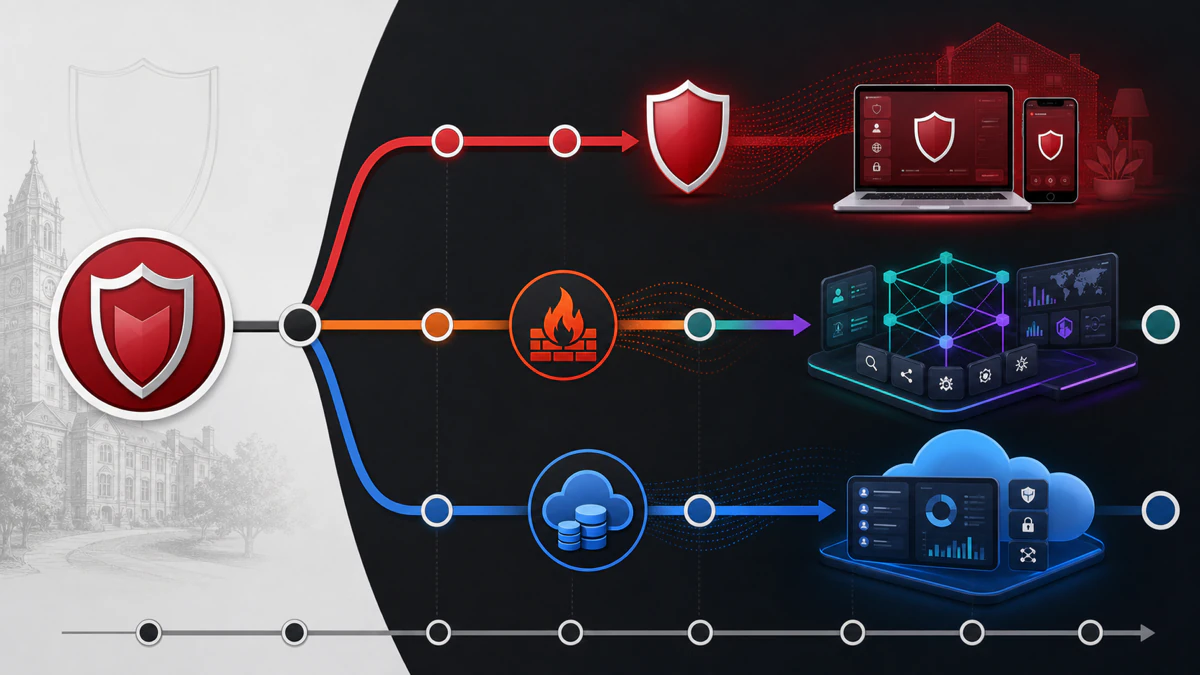
The red branch represents McAfee's continuing consumer company. The teal and purple branch combines McAfee Enterprise and FireEye product lineage under Trellix. The blue branch represents the separate SSE and cloud-data portfolio under Skyhigh Security.
This is a routing diagram, not a corporate-ownership chart for every subsidiary and investor. It answers the support question a reader usually has: which current product site and documentation set should handle the old name on the screen.
What McAfee sells now
Current consumer McAfee plans protect personal Windows PCs, Macs, Android phones, iPhones and household identities. The live US lineup centers on antivirus, VPN, web protection, scam detection, identity monitoring, data cleanup, social privacy and family features depending on plan. These are subscriptions for individuals and families, not centrally managed enterprise endpoint licenses.
Our McAfee consumer review covers that product line, while the pricing and renewal guide explains the current account and billing model. The McAfee Android review shows what a current consumer app looks like; Trellix doesn't replace those plans, accept their home activation codes or provide their cancellation route.
What Trellix sells now
Trellix describes itself as an enterprise cybersecurity company for intelligence-led cyber resilience. Its portfolio spans endpoint security, EDR/XDR, network detection and response, email security, data security, threat intelligence and orchestration across cloud, on-premises, air-gapped and operational-technology environments. Procurement, deployment and support assume organizational administration.
A company generally manages these products through contracts, support entitlements, grant numbers, consoles and policies. A home user can't reproduce that model by downloading a Trellix agent. Conversely, an enterprise administrator shouldn't replace a managed endpoint with a retail McAfee+ subscription.
Old McAfee Enterprise names and current routes
| Older name | Current family | What changed | Migration caution |
|---|---|---|---|
| McAfee Agent | Trellix Agent | Visible brand changed; management role continues | Use compatible agent and ePO extensions |
| McAfee Endpoint Security | Trellix Endpoint Security | Portfolio and branding transitioned | Map modules, versions and OS support |
| McAfee ePolicy Orchestrator | Trellix ePolicy Orchestrator | ePO name remains, vendor branding changed | Back up database and disaster-recovery data |
| McAfee MVISION EDR | Trellix EDR / XDR family | Platform and packaging evolved | Verify telemetry, retention and integrations |
| McAfee Web Gateway | Skyhigh Web Gateway | Moved to separate SSE company | Don't route as a Trellix endpoint product |
| McAfee Client Proxy | Skyhigh Client Proxy | Moved with SSE portfolio | Follow Skyhigh policy and tunnel documentation |
The table is a starting map, not an upgrade matrix. Product editions, modules and releases don't all share one migration path. Trellix's own rebranding documents show a staged transition in which some interfaces changed earlier than others and some components required new packages.
Before upgrading, match the installed build to current product documentation and end-of-life records. An administrator should know the ePO version, Agent version, ENS modules, operating systems, extensions and support entitlement. A marketing-family match doesn't establish package compatibility.
McAfee ePO became Trellix ePO, not a consumer dashboard
ePolicy Orchestrator remains the central policy and system-management concept. Current Trellix ePO documentation still describes system trees, policy catalogs, client tasks, repositories and product extensions. The familiar ePO abbreviation surviving the rebrand is expected.
Don't point ePO-managed endpoints at a consumer McAfee account. Their policies, updates, certificates and agent-server communication belong to the enterprise environment. If an employee can't change a setting locally, that can be deliberate policy rather than a broken antivirus interface.
McAfee Agent became Trellix Agent
Trellix release notes document that McAfee Agent was renamed Trellix Agent in the ePO console. The agent still brokers management communication, policy enforcement, tasks and product updates between an endpoint and its ePO environment. Rebranding didn't turn it into the malware-scanning engine itself.
Old paths and logs can still contain McAfee for compatibility. Trellix's own testing guidance continues to reference paths such as C:\ProgramData\McAfee\Endpoint Security\Logs. Administrators shouldn't rename directories or services manually just to make branding visually consistent.
McAfee Endpoint Security became Trellix Endpoint Security
Endpoint Security, often shortened to ENS, remains the enterprise endpoint-protection family. Its modules can cover threat prevention, firewall, web control and exploit prevention depending on license and platform. The current Trellix security-update page still publishes ENS exploit-prevention content under 10.7 naming in July 2026.
That continuity doesn't make every old ENS build supported. Use Trellix's current compatibility, known-issue and end-of-life records for the exact release. A visible McAfee copyright string inside an older module isn't a substitute for support status.
DAT, AMCore and content updates moved with enterprise support
Trellix's security updates page publishes DAT, engine and content packages and says customers need a current Technical Support agreement for entitled updates and upgrades. On July 31, 2026, the page showed current July content, confirming that the enterprise update channel remains active under Trellix.
Don't download a consumer McAfee definition package for Trellix ENS or assume a free SuperDAT is the right maintenance path. Product repositories, ePO tasks and support grants determine the correct package. Verify signatures and hashes where Trellix provides them.
Why XDR is central to the Trellix name
The launch positioned Trellix as an extended detection and response provider. XDR correlates endpoint, network, email and other security signals so an operations team can investigate and respond across controls. That's a different buying and operating model from a household antivirus dashboard.
Organizations should evaluate integrations, telemetry coverage, response authority, retention and analyst workflow rather than treating XDR as “stronger antivirus.” Endpoint prevention remains one layer. The value appears when the surrounding sensors, data quality and response process are configured and staffed.
Why “McAfee” still appears after a Trellix upgrade
Software vendors preserve identifiers to avoid breaking policies, integrations, installation detection and file references. A path, registry key, service, product code or log folder can keep an old name even when the visible UI and support owner change. A mixed string set is therefore not automatically evidence of a failed upgrade.
Judge the endpoint by installed package versions, digital signatures, ePO extension state, policy communication and current documentation. If a current release note explicitly retains an old path, leave it. Manual cosmetic cleanup can make future repair or uninstallation harder.
What happened to McAfee Enterprise licenses
Enterprise entitlements followed product contracts and the sold business rather than converting into retail McAfee subscriptions. Current Trellix downloads still use organizational entitlement concepts such as grant numbers and Technical Support agreements. Exact rights depend on the contract, product and maintenance status.
Don't publish a grant number in a support forum or reuse a download obtained for another organization. Trellix's license-management guidance treats access to future versions after support expiration and use beyond licensed capacity as noncompliance. Procurement or the authorized reseller should resolve uncertain ownership.
Where old McAfee Enterprise customers get support
Endpoint, ePO, EDR/XDR, network and other Trellix-line products belong in Trellix support and documentation. Former McAfee SSE, CASB, Secure Web Gateway and Client Proxy products may belong in Skyhigh Security support. Retail McAfee antivirus belongs in McAfee consumer support.
Supply the exact product, version, entitlement, ePO or cloud tenant, operating system and error. Avoid opening parallel cases with all three companies before mapping the SKU. That scatters logs and delays ownership.
Don't treat the rebrand as an ordinary logo update
Some packages received branding-only changes, while others changed extensions, certificates, application identities or installation behavior. Trellix Endpoint Assistant, for example, documented a fresh application rather than an in-place upgrade from McAfee Endpoint Assistant. The correct path is product-specific.
An enterprise migration should begin with current Trellix release notes and a compatibility matrix, not a mass push. Record every management extension and dependency, including DLP, drive encryption, proxy, EDR and third-party integrations. One unsupported extension can damage the console even when the endpoint package itself is compatible.
Step 1: inventory the environment
Export the ePO system tree, installed-product properties, policy assignments, client tasks, repositories, agent handlers and extension list. Record endpoint operating systems, Agent versions, ENS modules, encryption state and any FireEye-era components. Identify products that actually belong to Skyhigh before building a Trellix-only plan.
Document support and business owners for each control. A web gateway, endpoint agent and database-security sensor may share old branding but have different maintenance windows and rollback owners. Inventory is the boundary against deleting something simply because its name looks old.
Step 2: create recoverable backups
Follow current ePO disaster-recovery guidance for the database, application server, certificates and required file paths. Test that the backup is readable and record the restoration owner. A virtual-machine snapshot alone can be inconsistent with an external SQL database and shouldn't be presented as a complete recovery plan.
For endpoint products, preserve the current installer packages, removal credentials, policies and rollback version allowed by support. Drive encryption requires special care because an endpoint that loses management or keys can become unrecoverable. Involve the encryption owner before changing Agent or ePO dependencies.
Step 3: map versions, modules and entitlements
For every product, record the current name, target version, supported operating systems, required ePO version and extension prerequisites. Check end-of-life status instead of assuming a new logo means the old binary receives fixes. Confirm the support grant can access the required packages before the maintenance window.
Separate a rebrand-only package from a functional upgrade. A rebrand-only extension can still deserve testing because queries, reports and automation may match old strings. A functional upgrade needs an even wider application, performance and security validation plan.
Step 4: build a canary group
Select a small, representative set of endpoints: common laptops, desktops, servers where supported, remote systems, VPN users and machines with important business applications. Keep high-impact infrastructure out of the first wave. Assign explicit success owners and a rollback decision time.
Push the target Agent or security package only to the canary group. Confirm wake-up calls, policy enforcement, content updates, client tasks and reporting. Trellix's own change-testing guidance emphasizes canary testing and verification of agent communication, policies and ePO performance.
Step 5: validate protection and operations
Check that endpoint protection is active, content is current, policies match the baseline, exclusions remain intentional and events reach the console. Use an organization-approved harmless test method such as the EICAR test file only inside the security team's controlled procedure. Confirm quarantine, alerting and ticket integrations without using real malware.
Measure boot, application launch, CPU, memory, network and ePO server impact against the baseline. Verify that help-desk staff can identify the new product names and paths. A technically successful upgrade that breaks support triage isn't ready for wide deployment.
The safe enterprise migration sequence
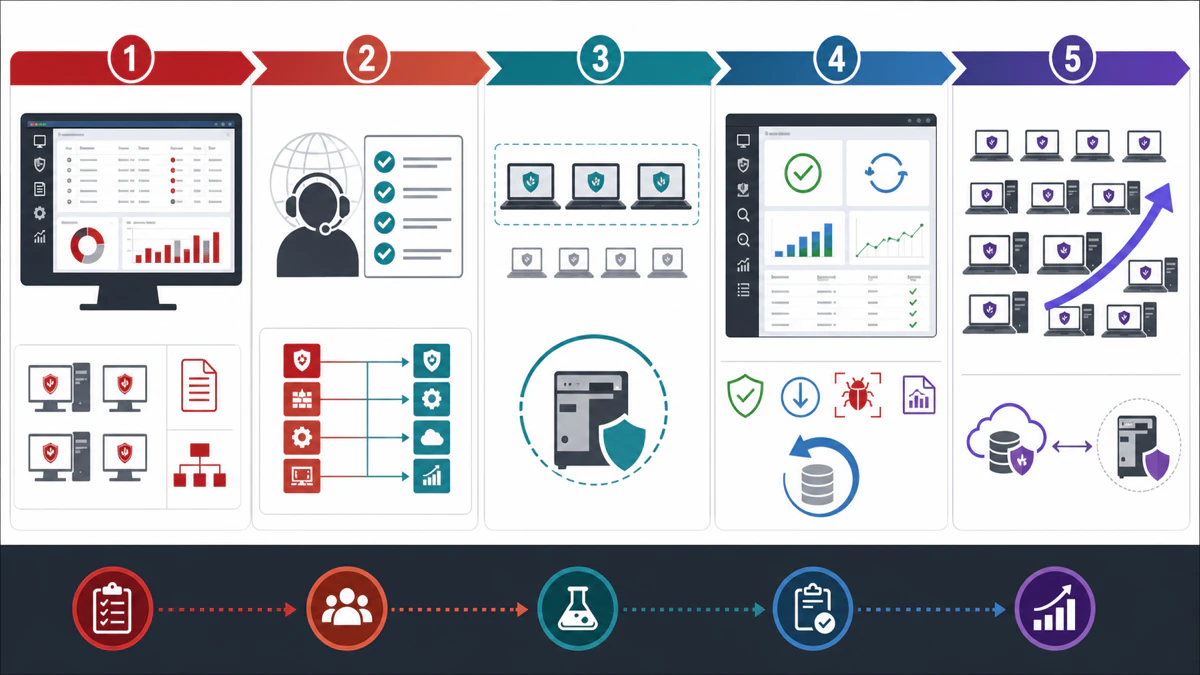
The diagram deliberately places expansion last. Rebranding can tempt teams to approve a fleet-wide “cosmetic” update, but enterprise security agents sit close to the operating system and business applications. Small controlled waves make both product bugs and environment-specific conflicts visible.
Keep the old package, policy exports and rollback owners available until the new wave meets its observation period. If the target release changes certificates or communication, include offline and intermittently connected endpoints in the plan. A laptop that misses the transition window shouldn't become unmanaged.
Step 6: deploy in controlled waves
Expand by business unit, platform and risk, not by one undifferentiated device count. Pause between waves long enough to review failed deployments, endpoint health, support volume, detections and ePO performance. Retain an exclusion list for systems that need a vendor-approved application fix.
Publish the visible name changes to employees and help-desk staff so a new Trellix icon isn't reported as unknown software. State that old McAfee paths may remain. Communication reduces both false alarms and unsafe attempts to uninstall an organization-managed agent.
Removing McAfee Enterprise or Trellix is an administrator task
Use the product's supported removal path, required password or policy release and the current enterprise removal tool available through authorized support. Remove encryption and management dependencies in the documented order. Confirm another security control is active before leaving an endpoint without protection.
The McAfee Consumer Product Removal tool, MCPR, is for consumer products and isn't the enterprise Endpoint Product Removal tool. Sysadmin threads repeatedly expose this confusion. Our consumer uninstall guide must not be used as an ePO or Trellix fleet procedure.
If Trellix appears on a work laptop
Don't remove it, stop its services or create exclusions unless the organization's IT team authorizes the change. The agent may enforce corporate policy and report security events even when the local interface is limited. Tampering can violate policy and leave the device unable to reach company resources.
Send IT the device name, visible Trellix or McAfee product name, time, error and screenshot without confidential data. If performance is the concern, include Task Manager metrics and the application affected. The administrator can check policy and update state from ePO or the relevant console.
If Trellix appears on a personal computer
First determine whether the computer is actually personal or enrolled by an employer, school or previous owner. Check Windows Settings → Accounts → Access work or school and look for management notices, but don't disconnect an active organization casually. A legitimate Trellix Agent can remain from a former corporate image.
If the owner has proof the device is no longer managed, contact the former organization or Trellix support for the authorized removal path. Don't download an enterprise removal utility from a file-sharing site. If the installed product is retail McAfee or WebAdvisor instead, use the consumer account, our preinstalled McAfee decision guide and the WebAdvisor guide.
Trellix's July 2026 source-code incident update
On July 15, 2026, Trellix published an official incident statement saying it had identified unauthorized access to part of a source-code repository earlier in the year. Trellix said it activated incident response, engaged forensic experts and notified law enforcement. The company said its forensic investigation was complete and that containment and eradication had been achieved.
Trellix also said it found no evidence that the source-code release or distribution process was affected, no evidence that its source code was exploited, and no evidence of successful unauthorized activity after April 18, 2026. Those are the company's findings, not a guarantee that no data was ever accessed or that customers can ignore ordinary update, monitoring and risk-review duties.
What customers should do with that statement
Read the current statement and any support notifications tied to the organization's products. Confirm update channels, package signatures, endpoint health and privileged access according to the existing security program. Don't install unofficial builds or freeze all updates based on a headline.
Organizations with regulatory, supplier-risk or incident-response obligations should document their assessment and ask Trellix the questions relevant to their environment through the authorized account team. The public statement says the release and distribution process wasn't affected based on Trellix's investigation; it doesn't replace a customer's own governance process.
Is Trellix safe after the incident?
A binary safe-or-unsafe label would overstate what public evidence can establish. Trellix disclosed repository access and later reported containment, eradication and no evidence of compromised releases or exploitation. Buyers should consider that response alongside product fit, architecture, independent testing, support performance, vulnerability handling and their own control requirements.
Existing customers shouldn't uninstall fleet protection impulsively. A rushed removal can create a known exposure while the organization is reacting to an event that, according to the vendor's completed investigation, didn't affect its release pipeline. Escalate through vendor-risk and security leadership.
Can a home user buy Trellix antivirus?
Trellix isn't the retail successor to McAfee+ and isn't the normal home-antivirus purchase path. Its endpoint products are designed for centrally managed organizations with policy, telemetry, support and deployment infrastructure. A single consumer doesn't gain a better version of McAfee by installing an enterprise agent.
For a personal PC, compare current consumer products by protection, performance, support and renewal cost. Our Windows 11 antivirus guide and McAfee alternatives guide cover that market. Keep Trellix evaluation inside an organization's procurement process.
Is McAfee Enterprise antivirus still supported?
Some product families continue under Trellix, but support is version-specific. The presence of a current Trellix ENS 10.7 content package doesn't make every old McAfee Endpoint Security or VirusScan Enterprise release supported. Check the exact product's Trellix end-of-life listing and entitlement.
VirusScan Enterprise, MOVE, ENS and MVISION Endpoint aren't interchangeable names for one build. An administrator must map the installed product and target. If a vendor or reseller says “McAfee Enterprise is supported,” ask for the SKU, version, platform and support-end date.
What about McAfee VirusScan Enterprise?
VirusScan Enterprise is an older enterprise product line, not McAfee's current home antivirus and not simply a Trellix logo update. Organizations that still find it should verify lifecycle status and supported migration targets with Trellix. Don't layer current ENS over it without the documented coexistence or removal path.
Inventory ePO policies, exclusions, scheduled tasks and application dependencies before replacement. A direct settings translation may not exist for every feature. Treat the move as a security-control migration with testing, not a package rename.
MCPR versus EPR: the removal-tool trap
MCPR means McAfee Consumer Product Removal and belongs to home products. Enterprise Endpoint Product Removal tooling is distributed through enterprise support and can require specific authorization, product knowledge and command options. The similar initials don't make the tools interchangeable.
Using MCPR on a managed endpoint can fail to remove enterprise services while deleting unrelated consumer components. Using an enterprise removal tool without the organization's plan can disrupt agent communication, encryption or compliance. Start with the owner and current product documentation.
Where to download current Trellix software
Trellix's official downloads page directs entitled customers to software, upgrades, security updates, trials and tools. Product downloads can require a grant number or support agreement. That access boundary is intentional and helps tie packages to licensed versions and support.
Don't use legacy McAfee download mirrors, public cloud shares or forum attachments. Verify the destination domain, package signature and published hash where available. Maintain an internal software repository with acquisition date and source for auditability.
McAfee versus Trellix isn't a product shootout
McAfee sells consumer protection; Trellix sells enterprise security. Comparing their sticker prices, device counts or feature checkboxes produces a category error. An enterprise endpoint program needs central policy, deployment, telemetry, integration, incident response and organizational support, while a household needs understandable protection and account management.
The correct choice begins with the buyer. A family should compare McAfee with Norton, Bitdefender, ESET and Microsoft Defender. A security team should compare Trellix with enterprise endpoint, XDR and operations platforms against its architecture, staff and risk model.
Administrator checklist before any change
Confirm product ownership, current vendor, exact version, support entitlement, ePO or cloud-console dependency, encryption state, operating systems, business owners, maintenance window, backup, pilot group and rollback. Map any Skyhigh component separately. Obtain the vendor's current documentation rather than relying on a 2022 rebrand table alone.
After change, verify agent communication, content, policy, detection, quarantine, reporting, integrations, performance and recovery. Record the new visible names and the old identifiers that intentionally remain. Close the change only after intermittently connected endpoints return and report.
When Trellix Agent won't uninstall
A managed agent can be protected against local removal by policy, password or product dependency. That's expected enterprise behavior, not proof that the software is malware. Check whether the endpoint still appears in ePO, which products depend on the agent and whether tamper protection or an organizational uninstall policy is active.
Release the device through the authorized management process and use the supported product version's removal path. If the console is gone or the company changed providers, open a support case with entitlement and ownership evidence. Random service deletion can strand ENS, encryption or DLP components and make the supported cleanup harder.
When an old McAfee Agent stops talking to Trellix ePO
Check the agent's last communication time, assigned handler, DNS, proxy, certificates, clock and supported TLS path before reinstalling. Confirm that the ePO server and extensions support the endpoint's Agent version. A logo mismatch between console and endpoint is less important than a failed agent-to-server handshake.
Test a wake-up call and normal policy enforcement on one endpoint, then inspect the current Agent and ePO logs named by Trellix documentation. Preserve the system record and keys until the cause is understood. Recreating the device too early can hide duplicate GUID or certificate problems rather than solve them.
Don't migrate Skyhigh Client Proxy as a Trellix Agent module
McAfee Client Proxy followed the SSE portfolio into Skyhigh Security. Its job is to steer web and cloud traffic according to enterprise policy, while Trellix Agent manages endpoint security products. They can coexist on one corporate device but belong to different control planes and support routes.
Before changing either one, map traffic forwarding, certificates, private access, VPN coexistence and web-gateway policy. Removing the proxy as though it were obsolete branding can break access or data controls. Skyhigh's current documentation and tenant owner should define that migration.
What to do with old McAfee knowledge-base links
Some old enterprise links redirect to Trellix, while others remain on legacy download or documentation hosts. A redirect is useful for routing but doesn't prove the article applies to the current product version. Check the title, last-updated date, affected builds and replacement article before acting.
Archive the evidence used for a change request, including the current canonical URL and document revision. If a legacy article conflicts with a current release note, the current product-specific instruction wins. Ask support to reconcile any difference that affects encryption, certificates or removal.
How we verified the history and current status
We used McAfee's completed-sale announcement, Trellix's launch release and current company history, Skyhigh's launch and product mapping, current Trellix ePO documentation, rebranding notes, security updates, end-of-life pages and the July 2026 incident statement. We compared those primary sources with sysadmin discussions to identify practical confusion around removal tools and surviving McAfee names.
Community reports informed the questions, not the corporate timeline. We didn't turn a Reddit comment into a lifecycle date or publish an enterprise removal command without product context. Version-specific migration must still be verified against the current contract and release.
Verdict: three routes, not one renamed antivirus
McAfee is the continuing consumer protection company. Trellix is the enterprise security company created from McAfee Enterprise and FireEye's products business. Skyhigh Security is the separate destination for much of the former McAfee Enterprise SSE and cloud-data portfolio.
Home users should stay with consumer McAfee support; employees should leave managed Trellix agents to IT; administrators should map each old product, entitlement and dependency before migration or removal. That simple routing rule prevents the most damaging mistake in this topic: using a plausible instruction for the wrong product family.
McAfee and Trellix FAQ
Did McAfee become Trellix?
No. McAfee sold its enterprise business in July 2021 and continued as a consumer online-protection company. The sold enterprise business was combined with the FireEye products business and launched as Trellix in January 2022. Consumer McAfee subscriptions didn't convert to Trellix.
Is Trellix owned by McAfee?
No. Trellix was launched by Symphony Technology Group after STG acquired McAfee Enterprise and the FireEye products business. McAfee's consumer company is separate. Current ownership structures can change, but the product and account separation remains the practical support boundary checked here.
What is the difference between McAfee and Trellix?
McAfee sells home and family protection such as antivirus, VPN, scam and identity features. Trellix sells centrally managed enterprise security such as Endpoint Security, Trellix Agent, ePO, EDR/XDR and network or email controls. They aren't plan-for-plan competitors.
What happened to McAfee Endpoint Security?
McAfee Endpoint Security continued under the Trellix enterprise portfolio and is now branded Trellix Endpoint Security. Support remains version-specific. Administrators should map the exact ENS modules, Agent, ePO version, operating systems and end-of-life dates before an upgrade.
What happened to McAfee ePO and McAfee Agent?
ePolicy Orchestrator continues as Trellix ePolicy Orchestrator, and McAfee Agent was renamed Trellix Agent in current console extensions. Old McAfee paths and identifiers can remain for compatibility. Don't rename or delete them manually.
Is Skyhigh Security part of Trellix?
Skyhigh Security is the separate destination for much of the former McAfee Enterprise Security Service Edge portfolio. Products such as MVISION Cloud, McAfee Web Gateway, McAfee Client Proxy and MVISION Private Access moved to Skyhigh names and support routes.
Can I use MCPR to remove Trellix or McAfee Enterprise?
No. MCPR is the McAfee Consumer Product Removal tool. Enterprise endpoint removal uses product-specific administrator procedures and enterprise tooling available through authorized support. The wrong tool can leave services behind or disrupt managed security and encryption dependencies.
Why is McAfee still in Trellix file paths?
Vendors preserve paths, services, product codes and other identifiers to maintain compatibility with policies, upgrades and integrations. A current Trellix release can legitimately retain a McAfee path. Verify version, signature, policy and documentation rather than cleaning up branding manually.
What did Trellix say about its 2026 source-code incident?
On July 15, 2026, Trellix said its forensic investigation was complete, containment and eradication were achieved, and it found no evidence that its release or distribution process was affected or that source code was exploited. It reported no successful unauthorized activity after April 18, 2026.
Can a home user buy Trellix antivirus?
Trellix isn't the retail successor to McAfee+ and is designed for organizational management, policy and security operations. A home user should compare current consumer antivirus products. An employee who sees Trellix on a work device should contact IT rather than remove the managed agent.