
How to Cancel ESET Auto-Renewal and Request a Refund
Stopping the next charge, reversing a recent charge and removing ESET from a computer are three separate jobs. Start with the receipt, because the merchant decides which button and policy apply.

Quick answer: For a direct subscription, sign in to ESET HOME, open Subscriptions, choose the subscription and select Manage subscription to reach ESET eStore, then disable auto-renewal and save the confirmation. Protection remains active until the paid term ends. If you want money back, submit a separate refund request to the merchant that charged you; the ESET US consumer page advertises a 30-day return policy, but region and seller rules control eligibility.
Need a different ESET task? The complete ESET guide hub routes review, plans, setup, banking, troubleshooting, firewall and HTTPS, Android, VPN, password migration, billing and removal without mixing their steps.
First separate the three jobs
Disable auto-renewal when you want the current subscription to run until its paid expiration but don't want another charge. Request a refund when a completed charge is eligible to be reversed. Uninstall ESET when you want the application removed from a device. One action doesn't reliably perform the other two.
This separation prevents the most expensive mistake: uninstalling ESET, assuming the subscription disappeared, and discovering the renewal months later. It also prevents the risky opposite: deleting the antivirus before a refund is approved and leaving the device without a registered security provider.
ESET’s current auto-renewal help says disabling the setting leaves protection active until the current period ends. That makes it safe to turn renewal off early and decide later whether to renew manually.
Identify who charged you before opening support
Search the receipt and card or PayPal statement. A direct ESET order normally points to ESET eStore and an activation key or public ID. An Android purchase can belong to Google Play. An iOS VPN or related purchase may belong to Apple. A boxed key, marketplace order or managed subscription belongs to a reseller or distributor.
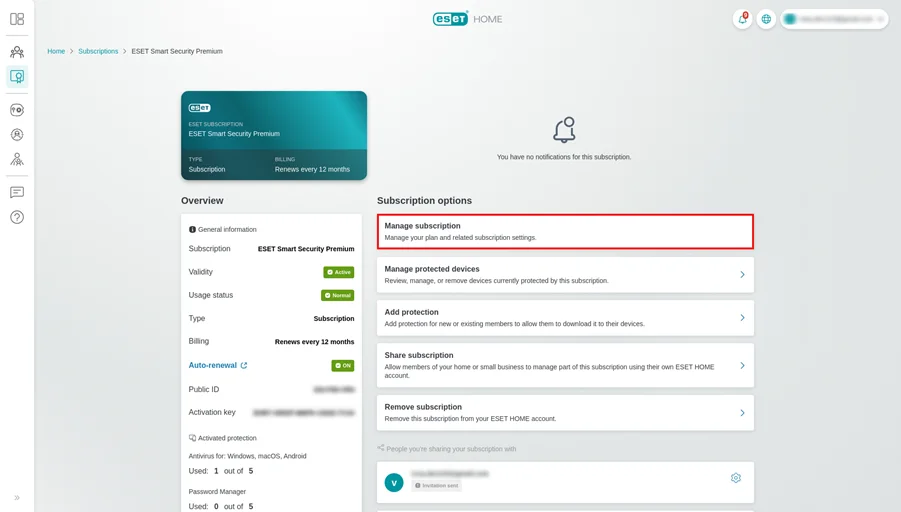
Next, sign in to ESET HOME using the email used at purchase. Open Subscriptions and select the record. If Manage subscription redirects to eStore, it's likely a direct route. If it redirects to Google Play or tells you to contact a distributor, that seller controls the next payment. Don't buy a second subscription because the first one is absent from a different email account.
| Receipt or account shows | Cancel renewal in | Refund request starts with |
|---|---|---|
| ESET eStore / direct ESET order | ESET HOME → Manage subscription → eStore | ESET order support for the region |
| Google Play | Google Play subscriptions | Google Play purchase support or policy route |
| Apple | Apple subscriptions | Apple’s refund request service |
| Retailer or reseller | Retailer/distributor account or support | The seller named on the receipt |
The installed ESET logo doesn't identify the merchant. The receipt does.
How to disable auto-renewal for a direct ESET subscription
- Sign in to ESET HOME. Use the purchase email and two-factor authentication if enabled.
- Open Subscriptions. Choose the exact plan and verify the device count and expiration date.
- Select Manage subscription. ESET redirects eligible direct subscriptions to the correct eStore record.
- Disable auto-renewal. Read the confirmation carefully; don't confuse a renewal offer with the final status.
- Return and verify. The subscription should show that renewal is off or that it will expire at the end of the current period.
- Save evidence. Capture the status and keep the confirmation email with the order.
ESET also documents logging directly into eStore with an activation key or Public ID for renewal management. Treat the activation key like a password. Don't include it in a public support screenshot; mask all but the minimum characters needed for identification.
If you only want fewer devices or a different tier, cancellation may be unnecessary. ESET’s renewal guide says eStore can adjust device count, validity and upgrades. Compare that quote with the current ESET pricing guide before accepting a new term.
Google Play, Apple and reseller subscriptions use their own controls
For a Google Play subscription, open the Google Play account used at purchase, go to Payments & subscriptions → Subscriptions, select ESET and cancel the renewal. ESET HOME may redirect there, but Google owns the billing mandate. Confirm the end date in Google Play after the change.
For an Apple-managed subscription, use the Apple ID subscription settings. ESET can't reverse an App Store payment from its own eStore panel. If the app is installed under one Apple ID but the subscription was purchased under another family account, the receipt email reveals the owner.
A reseller can use a license key without exposing direct eStore controls. Contact the merchant on the invoice and ask specifically to disable recurring billing. A key that expires naturally may have no renewal instruction at all. Don't infer auto-renewal from an expiration message; verify the seller’s account or payment mandate.
When work, school or an IT provider supplied ESET, don't cancel or remove it through a personal account. It may be an organization-managed endpoint product outside the home subscription described here.
How to request an ESET refund without losing the paper trail
The official US product page says ESET offers a 30-day return policy. That statement supports eligible direct US consumer orders; it doesn't override a different country’s terms, an app store’s process or a reseller contract. Open the receipt, check the purchase date and use the seller’s official support or refund form.
Include the order number, account email, product, amount, currency, charge date and a concise request. If the charge was an unwanted renewal, state whether auto-renewal has now been disabled. If it was unauthorized, use that exact language and contact the payment provider as well. Don't send a full card number, account password or activation key in an ordinary email.
A refund request is separate from cancellation. Submit both when the goal is to reverse the latest eligible charge and prevent another one. Save the case number and response. A pending bank credit isn't complete until it appears on the statement.
If the purchase is outside the policy window, ask support what options exist, but don't promise yourself an exception based on a forum anecdote. Community reports are useful for finding common account friction, not for overriding written terms.
If the cancel button or subscription is missing
- Try the purchase email. Multiple ESET HOME accounts are a common source of invisible subscriptions.
- Search every receipt. The merchant may be Google, Apple or a reseller rather than ESET.
- Check whether the subscription already expires manually. A fixed-term key may have no auto-renewal switch.
- Open the exact subscription. Manage subscription is inside the selected record, not a global account setting.
- Contact the distributor shown by ESET. ESET’s help explicitly says distributor-managed auto-renewal must be changed with the distributor.
Don't delete the ESET HOME account to solve a billing problem. Removing an account or device doesn't necessarily cancel the seller’s recurring payment and can make the subscription harder to trace. Resolve the commercial record first.
What happens to protection after cancellation or refund
After auto-renewal is disabled, ESET says the subscription continues through the paid expiration date. Updates and premium features should remain available until then. Check the date in ESET HOME and in the Windows app under Help and support; ESET’s subscription-validity guide shows both locations. Set a reminder a few days before it expires so another security provider is ready if you're switching.
A successful refund can invalidate the associated subscription sooner. Watch ESET HOME and Windows Security. When ESET stops registering as the provider, Microsoft Defender should normally resume on a personal Windows PC, but verify it rather than assuming. The ESET vs Microsoft Defender comparison helps if the built-in option will replace it.
Removing the software is a separate step. Use normal Windows uninstall first, restart, and use ESET Uninstaller only if ordinary removal fails. Our ESET review covers the keep-or-switch decision, the installation guide explains provider verification, and comparisons with Bitdefender, Norton and AVG help identify a replacement before protection ends.
If several family devices use the same subscription, warn the other users before the end date. Export any settings that matter, remove confidential devices from ESET HOME when they're retired, and decide who owns the replacement account. Cancellation shouldn't turn into an unplanned day when laptops, Android phones and a parent’s PC all lose premium web or banking controls at once. A short transition checklist is more useful than leaving an expired red warning on every machine.
Keep a compact evidence folder and avoid support impersonation
Save the order confirmation, invoice, card descriptor, account email, cancellation screen, expiration status, refund form, case number and final bank credit. Redact activation keys, full payment numbers and home addresses before sharing a screenshot.
Billing searches attract fake support pages and sponsored phone numbers. Start from ESET.com, ESET HOME, the app store or the reseller printed on the receipt. A legitimate support agent doesn't need remote access to a computer simply to identify a subscription or disable renewal. Never install a remote-control tool from an unsolicited call.
After the issue is closed, remove the saved payment method if the merchant permits it, review other ESET subscriptions under the same account and enable two-factor authentication. Cancellation is complete when the future charge is off and the status is documented; a refund is complete when the credit arrives.
ESET cancellation and refund FAQ
How do I cancel ESET auto-renewal?
In ESET HOME, open Subscriptions, choose the subscription, select Manage subscription and use ESET eStore to disable auto-renewal. If the subscription is distributor-managed, contact that distributor.
Will ESET stop working as soon as I cancel?
No. ESET says disabling auto-renewal leaves the subscription active through the end of the current paid period. It then expires unless renewed manually.
Does uninstalling ESET cancel the subscription?
No. Uninstalling changes software on one device. It doesn't change the recurring billing instruction held by ESET, Google, Apple or a reseller.
Does ESET have a 30-day refund policy?
The current ESET US consumer page advertises a 30-day return policy. Eligibility can vary by country, seller and transaction, so use the terms attached to the receipt and request the refund from the merchant that charged you.
Can I cancel a Google Play ESET subscription in ESET HOME?
ESET HOME can redirect a Google Play subscription to Google Play’s subscription management. The recurring payment must be changed in the store account that owns it.
Why is there no auto-renewal switch in my account?
The subscription may be managed by a reseller or distributor, attached to another ESET HOME email, already expired, or not configured for direct auto-renewal. Use the receipt to locate the merchant.
What evidence should I save?
Keep the order number, merchant, account email, amount, currency, charge date, cancellation status, expiration date, refund request and case number. Never share the full activation key publicly.
Can I keep ESET after a refund?
A successful refund can cause the associated subscription to be cancelled or invalidated. Before requesting it, make sure another supported security provider will be active when ESET protection ends.