
How to Install and Set Up ESET Without Breaking Your PC
A clean ESET install is mostly preparation: verify the source, remove the old real-time antivirus, attach the right subscription and leave the machine online long enough to update before judging it.

Quick answer: Uninstall any other third-party real-time antivirus, restart Windows, sign in to ESET HOME, add the subscription and choose Protect device to download an automatically activated installer. Run it as the intended Windows user, review the privacy and detection choices, let modules update, then run a full initial scan and confirm the subscription, protection status and Windows Security provider. Never download ESET from a key site or video description.
Need a different ESET task? The complete ESET guide hub routes review, plans, setup, banking, troubleshooting, firewall and HTTPS, Android, VPN, password migration, billing and removal without mixing their steps.
Before you install: remove conflicts, not Windows security
A security suite inserts drivers into file, web and network traffic. Installing a second third-party real-time antivirus on top of the first can produce slow boots, blocked connections, failed updates or two products quarantining the same object. Start in Settings → Apps → Installed apps, remove the previous third-party antivirus using its official uninstaller, and restart even when Windows doesn't insist.
Don't attempt to remove Microsoft Defender. Windows Security is part of the operating system and normally yields real-time provider status when ESET registers successfully. It remains useful as the dashboard that tells you which product is active. If a work or school device is managed, stop and ask the administrator; a local home subscription can't safely override an organization’s policy.
Install pending Windows updates, confirm the clock and time zone, and make a current backup of important files. ESET lists Windows 10 and 11 for the current home applications. A backup isn't required because ESET is expected to damage files; it's the normal rollback point before adding any low-level security driver.
Finally, identify the subscription and account email. A plan name such as HOME Security Premium isn't necessarily the name shown by the installed app. The current ESET plan comparison explains the mapping before setup.
Download through ESET HOME so activation travels with the installer
The cleanest route for a paid subscription is ESET HOME. Sign in at the official portal, open Subscriptions and add the activation key if it isn't already associated with the account. Then choose Protect device and download the antivirus for the current machine. ESET’s current ESET HOME download guide says this installer can arrive already attached to the selected subscription.
To protect another person’s device, ESET HOME can send a download link to the account email. Read the destination carefully before forwarding it. Don't paste the activation key into a chat, forum or remote-support session. A legitimate installer doesn't require buying a second key when seats remain.
For a trial, use ESET’s official 30-day trial flow. The US page describes it as no credit card and no commitment. That's safer than accepting a “free ESET key” from search results. ESET warns that pirated or shared subscriptions can be disabled, and the installer offering the key may be the threat.
When the Live Installer can't reach the service, ESET provides a separate offline installer page. Download the current package into a new folder. Don't reach for an old version unless compatibility requires it and the support status is understood.
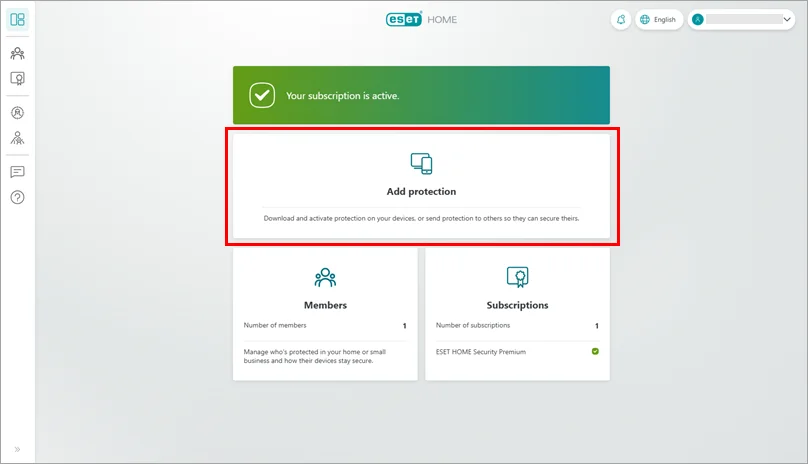
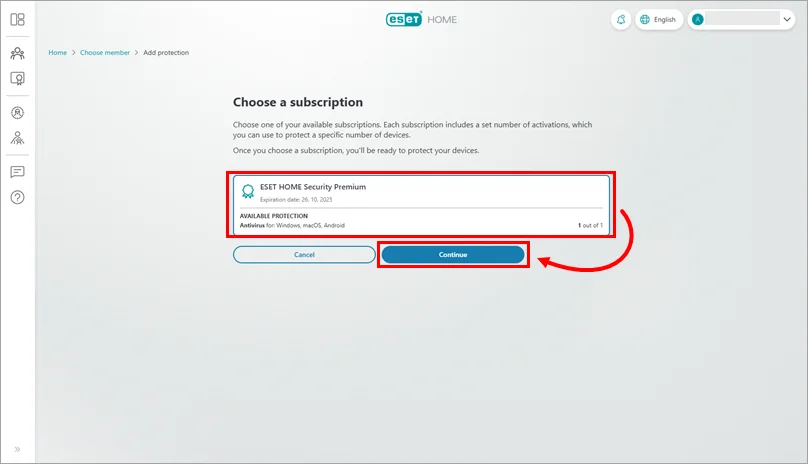
Run the installer and confirm the activation details
- Finish preparation. Close browsers and sensitive work, remove another third-party antivirus and restart Windows.
- Use the ESET HOME installer. Download it from the subscription’s Protect device path or use the official trial page.
- Launch the file. Approve the Windows prompt only when the publisher and download source are expected. Choose the language and continue.
- Review the agreements and data choices. Don't click through optional participation or marketing settings blindly. The product can protect the computer without turning every optional communication on.
- Confirm the subscription. The activation-details screen should show the expected account and tier. If it does not, stop rather than consuming the wrong seat.
- Let installation finish. Keep the laptop plugged in and online. Restart if the installer or Windows requests it.
An ESET HOME installer can activate automatically. A generic installer may ask you to sign in, enter an activation key or start a trial. These are different valid routes. The unsafe route is an unofficial executable paired with a shared key.
Choose the app deliberately when ESET offers several
ESET HOME Security is a subscription family, while Windows installs an application such as ESET Internet Security, Smart Security Premium, Security Ultimate or NOD32 Antivirus. By default, ESET selects the application with the most security features allowed by the chosen subscription.
The current Change your ESET application guide documents a Change product link on the Review your activation details screen. It also allows a later switch under Help and support → Change product. A technical user might select NOD32 Antivirus to avoid the firewall or suite features, but a household that bought Essential, Premium or Ultimate will normally want the default full application.
Changing the installed app doesn't rewrite the subscription or refund unused features. If the plan itself is wrong, handle that in eStore. If the interface merely shows a legacy product name, compare the subscription in ESET HOME before assuming activation failed.
Let modules update before judging protection or performance
Immediately after installation, ESET may download application components and detection modules, inspect the system and register network filters. CPU, disk and network activity can be higher during this settling period. Leave the device online and awake until Update reports current modules. A permanently stuck update is a fault; a busy first hour isn't evidence of a defective product. The full ESET review separates measured lab performance from reputation.
Open Update and check for updates manually once. Then run the initial complete computer scan. Plug in a laptop, close heavyweight applications and allow the scan to finish. Record any named detection, path and action before deleting something manually. Quarantine is reversible; a cleanup utility found through search may not be.
After the scan, open Overview and confirm a green protected state. Check the subscription name, expiration status and protected device in ESET HOME. Then open Windows Security → Virus & threat protection → Who’s protecting me or Manage providers and verify that ESET is registered. The goal is one active third-party provider and no unresolved Windows warning.
Set up the useful controls, then stop changing things
Start with the defaults for real-time protection, LiveGrid, web access protection, firewall and SSL/TLS inspection. Advanced setup is a powerful tool, not a checklist of toggles that must be customized. Every exclusion or disabled layer creates a maintenance obligation.
Open Network Inspector and label the current home network correctly. Test the browser sites and local devices you use, including a printer or NAS. Open Safe Banking & Browsing once before an urgent payment. If Premium or Ultimate supplies VPN, install it on the devices that actually need it and test work, streaming and local-network access separately.
Create one scan profile only when the default doesn't fit. Exclude a folder only after ESET confirms a false positive or an application vendor documents the conflict. If a game or full-screen tool needs fewer interruptions, use Gamer mode rather than switching off antivirus. Our ESET vs Avast comparison explains why configurability is an advantage only when the settings remain understandable; ESET vs Microsoft Defender explains what Windows should do when a third-party provider is installed.
If ESET won't install, diagnose in the least destructive order
- Restart once. A pending Windows or security-product removal can block a new driver installation.
- Confirm the source and system. Redownload the current official installer, verify Windows support, free disk space, date and time.
- Remove the other antivirus fully. Use that vendor’s official removal tool if normal uninstall left services or drivers.
- Try the official offline installer. It separates Live Installer download trouble from a local installation failure.
- Repair an incomplete ESET removal. Follow ESET’s uninstall and reinstall guide.
- Use ESET Uninstaller last. Its Safe Mode tool removes drivers and registry entries and can reset network-interface settings. It's an escalation, not a routine cleaner.
Capture the exact error code and installer log before escalating. “ESET won’t install” can mean a pending reboot, another filter driver, account activation, proxy or damaged prior removal. One screenshot of the error is more useful than ten speculative registry edits.
If the application installs but won't open, don't reinstall immediately. Check that ESET Service is set to Automatic and Running, then use the cluster’s troubleshooting route. A failed installation and a broken interface after installation require different evidence.
Installing on Mac, Android and family devices
For another Windows or Android device, use Protect another device in ESET HOME and send the official link. Count security seats and VPN activations separately. A Premium household can protect several endpoints but may have only three standard VPN activations.
On macOS, download ESET Cyber Security through ESET HOME and grant only the system permissions described by the current installer. ESET notes that Mac devices may not expose the same connected-device status as Windows in ESET HOME. Verify protection inside the Mac app rather than relying only on the portal.
On Android, install ESET Mobile Security from Google Play or ESET’s official route, then grant permissions as each feature is enabled. Payment Protection, Anti-Phishing, App Lock and web Anti-Theft belong to Premium. Android 9 or later is the current minimum stated on the US page. An iPhone can use ESET VPN where included, but there's no ESET antivirus scanner to install.
Once every endpoint is visible, name devices clearly in ESET HOME and remove obsolete activations. The pricing guide helps when seat counts no longer match the household, the cancellation guide handles an unwanted renewal, and ESET vs AVG provides a useful multi-device alternative.
ESET installation and setup FAQ
Where should I download ESET?
Use ESET HOME, the official ESET download page or an authorized reseller’s official handoff. Avoid shared keys, cracked installers, download portals and links in video descriptions.
Do I need to uninstall Microsoft Defender first?
No. Windows manages Microsoft Defender when a compatible third-party antivirus registers with Windows Security. Remove another third-party real-time antivirus, but don't try to delete Defender.
Can two antivirus programs run together?
Two third-party real-time antivirus products can conflict over file, web and network inspection. Keep one primary real-time suite. A clearly compatible on-demand scanner can be used separately when its real-time modules are disabled.
Why did ESET install a different product name than my plan?
ESET HOME Security is the subscription family. The installed Windows app can be ESET Internet Security, Smart Security Premium, Security Ultimate or NOD32 Antivirus. ESET normally installs the most capable app allowed by the subscription.
Can I install ESET without an internet connection?
ESET provides offline installers for supported Windows products, but activation and current detection updates still require planning. Use the official offline-installer page and create a fresh folder for the package.
What should I do if the installer fails?
Restart Windows, remove remnants of another antivirus, verify date, time and network access, then try the current official installer. If an old ESET removal was incomplete, follow ESET’s reinstall guidance and use ESET Uninstaller only as the escalation path.
Should I run a scan immediately after installing?
Yes, after the program and detection modules finish updating. A complete initial scan establishes a clean baseline; later real-time protection and scheduled or idle scans handle routine monitoring.
How do I know ESET is active?
Open ESET and confirm a protected status, the correct subscription and current modules. Also open Windows Security and confirm ESET is registered as the antivirus provider without a warning requiring action.