
VIPRE Product Keys, Activation and Device Moves Explained
A key can be valid and still fail because the wrong product is installed, the local status is stale or earlier registrations triggered a lock. This guide separates those cases without sending you to an imitation support page.

Quick answer: find the 25-character key in the original receipt, identify the exact VIPRE product, then activate it during installation or from Account → Product Key → Change. If the displayed key already matches but VIPRE says Trial or Expired, use Account → Subscription Status → Refresh. Prefixes 411, 405 and 422 belong to Advanced Security; 413 belongs to Antivirus Plus. A matching key that remains blocked after multiple registrations needs official Home Support—not a search-result number and not instructions for VIPRE's business cloud console.
Start by separating four things that VIPRE calls “account”
Most activation confusion starts when four different records are treated as one. The product key unlocks a named product. The purchase record says who sold it, when it renews and which email received the receipt. The subscription status is what the installed application most recently learned from VIPRE's licensing service. The device is one Windows or Mac computer consuming the purchased entitlement.
The Windows home application's Account tab is primarily a local control panel. VIPRE's current interface guide describes it as the place for purchasing information, personal configuration and support information. That isn't the same thing as a web portal listing every consumer device. VIPRE also sells Endpoint Security Cloud to businesses, but its console and seat-removal procedures belong to that product.
Change the key when…
The installation contains a trial key, an old key or a key for a different subscription. Change submits a new credential and should update the expiration date after registration succeeds.
Refresh the status when…
The displayed key is already correct but a recent purchase or renewal hasn't appeared. Refresh checks the current subscription record without replacing the key.
This distinction prevents an expensive mistake: buying another subscription because a correct key has stale local status. It also prevents the reverse mistake—pressing Refresh repeatedly when Antivirus Plus is installed but the receipt contains an Advanced Security key.
Find the key in the receipt before searching the web
VIPRE's key-recovery article says the license key is in the initial purchase receipt email. It contains 25 letters or numbers arranged as five groups of five. Customers who bought a physical Home Shopping Network package may find the key on a card or label inside the shipment instead.
Search the mailbox used at checkout for the seller, order number and product name, not just the word “VIPRE.” Direct VIPRE orders and reseller orders can have different receipt senders and billing routes. The receipt is evidence of ownership; the application screen alone doesn't tell you which retailer controls renewal or refunds. Our VIPRE pricing and renewal guide explains that seller boundary.
If the receipt is missing, contact the seller that took payment or navigate to official VIPRE Home Support yourself. Share an order reference only through the vendor's protected form. Never paste the full key into Reddit, a screenshot, a public ticket, an email subject line or a chat opened from a search ad.
A valid key still has to match the installed product
Current direct US plan cards separate Antivirus Plus, Advanced Security and Ultimate Security. Plus is sold for one Windows device. Advanced is sold for one Windows or Mac computer. Ultimate includes five Windows/Mac antivirus seats and separate Privacy Shield and Internet Shield VPN applications. Android Security remains a separately sold mobile product; an Ultimate desktop seat isn't automatically an Android or iPhone antivirus license.
VIPRE's official activation troubleshooting provides a useful prefix check. Keys beginning 411, 405 or 422 belong to Advanced Security. A key beginning 413 belongs to Antivirus Plus. These first three digits are diagnostic evidence, not permission to publish the remaining 22 characters.
| What you have | What to verify | Safe next action |
|---|---|---|
| Key starts 411, 405 or 422 | Advanced Security installer | Install or repair Advanced, then enter the key |
| Key starts 413 | Antivirus Plus installer | Remove the mismatched app and install Plus |
| Ultimate receipt | Advanced antivirus plus separately installed bundle apps | Activate each supported component through its official route |
| Android Security receipt | Separate Android product and Google Play route | Don't count it as a Windows/Mac seat |
The full VIPRE review covers whether the protection itself is worth keeping. This page handles ownership and activation; it doesn't treat successful registration as proof of independent malware-test performance.
Activate a first install or replace the key in an existing copy
A first installation asks for the key during setup. Use the matching official package and follow our safe VIPRE installation guide if the computer still has another real-time antivirus or if macOS permissions are involved. Activation needs an internet connection because the local app must validate the subscription.
If VIPRE is already installed, the official product-key update guide gives four steps: open VIPRE, select Account, choose Change under Product Key, enter the 25-character key and select Save & Close. VIPRE should then show the new expiration date.
- Preserve the receipt. Record the exact product, seller, order reference, expiry and a masked key before changing anything.
- Open the expected product. Confirm that the installed edition matches the receipt and the official prefix mapping.
- Choose Account → Product Key → Change. Don't use Change merely because the subscription screen hasn't refreshed.
- Paste the 25-character key. VIPRE says pasting into the first box can populate the remaining groups. Remove accidental leading or trailing spaces.
- Save and verify. Read the resulting product name and expiration date; don't stop at a generic success dialog.
- Refresh status if needed. Use Refresh only after confirming that the displayed key is the one you intend to keep.
- Confirm protection. Update definitions, restart and verify the healthy state again so registration isn't confused with working real-time protection.
The Account screenshot is useful, but its interface is old
VIPRE's subscription-status article was updated in September 2025, yet it still embeds an Internet Security 2017 screenshot. The control model remains useful: Account contains Subscription Status, a last-checked timestamp, Refresh, the masked Product Key and Change. The colors, labels and pixel positions in a current v12 build may differ.
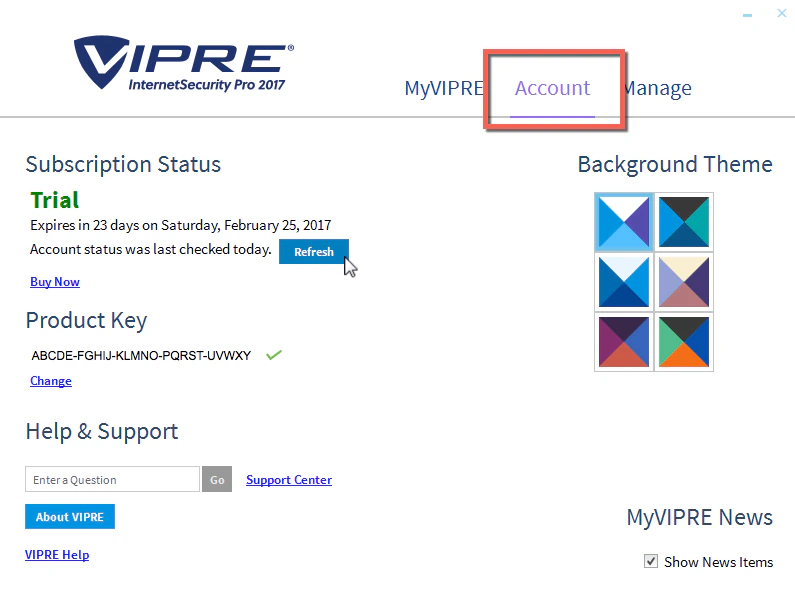
That age mismatch is precisely why a safe guide names the control and expected result instead of saying “click the blue button in the picture.” If the current app lacks Account, Product Key or Subscription Status entirely, confirm that it's a supported VIPRE home product rather than an obsolete installer, a business agent or an imitation application.
Trial and Expired are status problems, not the same error
VIPRE's current subscription-status documentation says the state can be Active, Expired or Trial. The screen also shows an expiration date and the time it was last refreshed. VIPRE says it auto-refreshes once a day; the Refresh control forces an immediate check after a recent change.
Trial after payment: compare the key in Account with the receipt. If they differ, use Change. If they match, keep the computer online and use Refresh. A trial state can survive an otherwise successful installation when the paid key was never entered or when the licensing service was unreachable during setup.
Expired after renewal: first determine whether the seller extended the old key or issued a new one. Refresh an extended key; use Change for a genuinely new key. Then verify the date. A charge on a card statement is evidence of payment, not evidence that this installation received the correct entitlement.
Active but protection is red: stop working on licensing. Active describes the subscription, not the real-time engine, firewall, definitions or macOS permissions. Move to the diagnostics in our VIPRE repair guide once that planned cluster page is available.
Use the error message to choose the next step
The safest order is deliberately narrow: match the product, enter the key once carefully, inspect subscription status, refresh only a matching key, then use official support if the server reports a registration limit. Reinstalling repeatedly can add noise and may contribute to the very registration problem you're trying to solve.

Take a screenshot of the exact error with the key masked. Record the installed product, Windows or macOS version, purchase seller, expiration date shown and what changed immediately before the failure. That gives official support enough context without handing a reusable license credential to strangers.
Fix “incorrect,” “unable to activate” and registration-lock errors differently
“The product key entered is not correct” calls for a character check first. Paste from the original receipt, remove spaces at the ends and watch for a partial selection. Don't transform letters based on guesswork; use the exact five groups. Then compare the first three digits with the installed product.
“VIPRE was unable to activate your copy” is where the product mismatch matters. VIPRE tells Advanced users to install Advanced for 411, 405 or 422 keys and Plus users to install Antivirus Plus for a 413 key. Download the replacement through official Home Support rather than a search result. Preserve the key and receipt before uninstalling the wrong edition.
A matching product and correctly entered key still fail can indicate a lock from multiple registrations. VIPRE's official article says support can verify this. It doesn't publish a home-user button that guarantees a reset. Send the masked error and proof of purchase through official support; never pay an unsolicited “technician” to release the key.
The app can't reach the service may be a network, date/time, proxy, firewall or temporary service problem. Confirm the system clock, ordinary HTTPS access and that no corporate filter blocks VIPRE. Avoid disabling the firewall globally. If a short retry window changes nothing, use the official support form and preserve the exact timestamp.
Move VIPRE to a new computer without inventing a seat-release button
A replacement-computer move has two independent jobs: stop protecting the retiring device and activate the correct product on the replacement. Before touching the old computer, preserve the receipt, full key in private storage, product name, seller and current expiration date. Download the new official installer and confirm that the replacement meets the current requirements.
For a one-device Plus or Advanced subscription, use VIPRE's normal uninstall route on the retiring computer, restart it and confirm the application no longer runs. Then install the matching product on the replacement and enter the same still-active key. For Ultimate, count the active Windows/Mac installations against the five-seat entitlement rather than assuming every household device is covered.
Current public home documentation doesn't establish a self-service web dashboard where a consumer can select an old PC and release its seat. Search results often borrow that idea from the business Endpoint Cloud console, whose device-removal instructions do release business seats. Don't apply those instructions to a home key.
If the replacement reports too many registrations, stop reinstalling. Provide official Home Support with the masked key ending, order evidence, old and new device descriptions and the exact error. VIPRE can verify a registration lock. Don't claim the move is complete until the new app shows the correct expiration, updates successfully and remains active after restart.
Count device seats by product and platform
The current direct US Antivirus Plus and Advanced Security cards each advertise one device; Plus is Windows, while Advanced is Windows/Mac. Ultimate Security advertises five Windows/Mac devices. The separate Android Security product has its own purchase path.
Count installed antivirus endpoints, not laptops owned, family members or email addresses. An old PC that still has an activated copy can matter even when it's rarely used. A Mac installation and a Windows installation both count against an Ultimate desktop entitlement. Privacy Shield and Internet Shield are separate components; installing or removing them doesn't prove that the antivirus seat moved.
For mixed-device households, use our Mac antivirus and Android antivirus guides before buying. The future VIPRE hub will connect the dedicated Mac, Android, VPN and Privacy Shield guides after every spoke passes the same QA gate.
Renewal can extend a key or replace it—verify the date
Don't assume every renewal behaves identically. A direct renewal may extend the existing entitlement, while a new purchase or reseller transaction may provide a different key. Read the receipt. If the full key matches the installed one, Refresh is the low-risk first action. If the seller explicitly issued a different key, use Change and confirm the resulting product and expiration.
A new expiration date is the success condition. “Payment received,” “key accepted” and “subscription active” are intermediate signals. Capture the final date and save the receipt. If two subscriptions now overlap, resolve billing with the seller before the next renewal window rather than deleting the application and assuming the charge stops.
Keep the before-and-after evidence together: old expiration date, renewal receipt, new expiration date and the last five characters of the key that produced it. That small record is enough to explain a failed extension without circulating the full credential. It also exposes a common mix-up in households with several purchases: the charge may belong to one subscription while the computer displays another.
Uninstallation and cancellation remain separate. The upcoming VIPRE cancellation and refund guide will cover the seller-specific billing route; the upcoming uninstall guide will cover removing local software. Neither action should be represented as the other.
Old “lifetime” and boxed keys may belong to unsupported software
A key can exist long after its original installer becomes unsafe to use. VIPRE's home product lifecycle matrix lists current/TBD support entries for Advanced Security for Windows v12, Antivirus Plus v12, Advanced Security v11 for macOS and Android Security v11. Older Windows home releases, including Advanced Security 11 and Antivirus Plus 11, reached end of life in May 2024.
Don't install a 2015 USB package on Windows 11 merely because the cardboard promises “lifetime.” “Lifetime” can refer to the licensed device or product generation, not perpetual compatibility with future operating systems. Use the current official installer and ask official support whether the old entitlement can activate a supported replacement. If not, use our antivirus comparison index instead of disabling modern security controls to make legacy software run.
Activation search results are a support-scam trap
Our SERP check found imitation setup guides on documentation hosts, fake support posts on community platforms and an activation PDF uploaded to an unrelated healthcare domain. Several supplied telephone numbers that aren't established by VIPRE's official pages. Some invented an online consumer device dashboard or a `VIPRE.com/setup` workflow, then steered the reader toward a call.
Navigate to VIPRE's domain yourself. A legitimate troubleshooting path doesn't require gift cards, cryptocurrency, a wire transfer, remote desktop access or the full product key in a public form. Don't let anyone disable antivirus, remove Windows security, install a “support client” from a file-sharing site or open online banking while a remote session is active.
If you already disclosed the key, stop the session, disconnect remote-access software, change affected passwords from a clean device, review payment accounts and tell official VIPRE support that the credential may be compromised. If money or identity data was exposed, follow the relevant bank and national fraud-reporting process. Treat the incident as credential theft, not merely a failed installation.
Final activation and device-move checklist
- The receipt seller, product name and renewal date are recorded.
- The full key is stored privately; screenshots show only a masked ending.
- The installed edition matches the official key-prefix mapping.
- Account shows the intended key ending, status and expiration date.
- Change was used only for a different key; Refresh was used for a stale matching status.
- The number of Windows/Mac installations fits the purchased entitlement.
- The retiring computer is normally uninstalled and the replacement is fully updated.
- The new computer remains protected after restart and a definition update.
- Any registration lock is handled through official Home Support.
- Billing is checked separately; uninstalling isn't treated as cancellation.
VIPRE product key, activation and device FAQ
Where can I find my VIPRE product key?
VIPRE says the 25-character key is normally in the original purchase receipt email. A boxed Home Shopping Network purchase may instead include it on a card or label. Search the mailbox used at checkout, preserve the receipt and contact the actual seller or official VIPRE Home Support if it's missing. Never publish the full key.
How many characters are in a VIPRE product key?
A current VIPRE home key contains 25 letters or numbers arranged in five groups of five. Copying the entire string from the receipt into the first field can populate the remaining fields. Check for leading or trailing spaces before treating a key as invalid.
How do I activate VIPRE after installation?
A first installation asks for the key during setup. If VIPRE is already installed, open Account, find Product Key, choose Change, enter the matching 25-character key, then Save & Close. Confirm the expected expiration date and protection status afterward.
What is the difference between Change and Refresh in VIPRE?
Change submits a different product key. Refresh asks the current installation to retrieve the latest subscription state for the key it already has. Use Change when the displayed key is wrong; use Refresh after a purchase or renewal when the key matches but the status still says Trial or Expired.
Why does VIPRE still say Trial after I paid?
Compare the masked key in Account with the purchase receipt. If it differs, use Change. If it matches, stay online and use Refresh; VIPRE says status also auto-refreshes once a day. If the paid status still doesn't appear, preserve the receipt and use official Home Support.
Why does VIPRE say my product key is incorrect?
First check every character and remove accidental spaces. Then match the product: VIPRE says prefixes 411, 405 and 422 belong to Advanced Security, while 413 belongs to Antivirus Plus. If the installer and key match but activation still fails, official support can verify whether multiple registrations locked the key.
Can I use my VIPRE key on a new computer?
Use it only within the device count and platform scope purchased. Preserve the receipt and key, remove VIPRE normally from the retiring computer, install the matching official product on the replacement and activate it. If a registration-limit message appears, use official Home Support; current consumer documentation doesn't establish a self-service seat-release dashboard.
Does uninstalling VIPRE free a device or cancel billing?
Uninstalling removes software from that computer; it doesn't cancel automatic renewal. VIPRE's home documentation doesn't clearly promise that uninstall alone immediately clears a server-side registration count. Verify the new activation and contact official support if the key is locked, while managing billing separately through the original seller or receipt link.
Is the VIPRE Account tab an online device-management account?
No. In the Windows home app, Account is a local screen for subscription status, product key, purchase and support information. VIPRE also has business cloud consoles, but their device-removal instructions don't prove that a home subscription has the same controls.
Is it safe to call a VIPRE number shown in search results?
Don't trust a telephone number merely because it appears beside a VIPRE query. Activation results contain impersonation pages, unrelated PDFs and spam posts. Navigate to vipre.com or VIPRE Home Support yourself, never disclose the full key, and refuse remote-control or gift-card requests.
Verdict: verify the relationship, not just the key
A clean VIPRE activation ties together five facts: the receipt belongs to the right seller, the 25-character key matches the installed edition, the subscription status carries the expected expiration, the number and platform of active devices fit the purchase, and protection remains healthy after restart.
When one fact fails, fix that branch. Change a wrong key, Refresh a stale matching status, replace a mismatched installer and send a multiple-registration lock to official Home Support. Don't buy again, expose the key or borrow business-console instructions until the actual failure is known.