
How to Cancel Avast and Request a Refund Without Missing a Step
Stopping renewal, reversing a charge and uninstalling the app are three different jobs. This guide identifies the merchant first, then gives the exact route and evidence to save.

If you were just charged: identify the merchant, save the receipt and submit an eligible refund request immediately. For direct Avast orders, sign in at id.avast.com, cancel renewal under Manage subscriptions and separately use Request a refund in Order history when available. Avast's current guarantee covers eligible direct website/app and Google Play payments requested within 30 days; Apple and other resellers use their own process. Annual billing can occur up to 35 days before the next term.
Need a different Avast task? The complete Avast guide hub routes review, plans, Free versus Premium, setup, troubleshooting, privacy, features, billing and removal without mixing their steps.
Cancellation, refund and uninstall solve different problems
| Action | What it changes | What it doesn't do | Evidence to keep |
|---|---|---|---|
| Cancel / unsubscribe | Stops a future renewal with the merchant | Doesn't reverse a past charge | Confirmation and expiring status |
| Request a refund | Asks to reverse an eligible payment | Doesn't always stop every future subscription | Case number and refund status |
| Uninstall | Removes software from one device | Doesn't alter the billing contract | Provider status after removal |
If a renewal already posted, perform the first two actions: stop the next renewal and request the current refund. If you only want to switch software at the end of a paid term, cancel now, keep protection through the access-through date and uninstall when the replacement is ready. Deleting the app first can make order details harder to find without changing the bill.
Avast's current cancellation FAQ says cancellation leaves paid access active through the current subscription period and doesn't itself create a refund. The planned Avast uninstall guide will handle device removal; this page stays focused on the contract and payment.
Find who billed you before looking for a cancel button
Search email for “Avast,” the product name, “order,” “renewal,” “Google Play,” “Apple” and the amount. Open the receipt, not an advertising message, and record the order ID, merchant, purchase email, product, device count, payment date, Next payment date and renewal amount. Redact activation codes and all but the final payment digits in any screenshot.
Then compare the statement descriptor. A direct Avast order may be processed by a commerce partner, while a mobile purchase appears under Google or Apple. A retail key or online-reseller order belongs to that seller. The product installed on a device can't reliably tell you which merchant owns the subscription.
| Receipt / statement source | Cancel renewal at | Refund route | Account to use |
|---|---|---|---|
| Avast website or Windows/Mac app | Avast Account or Avast Support | Eligible Order history or Support | Checkout email |
| Google Play | Google Play Subscriptions | Avast's eligible guarantee route or Google process as directed | Purchasing Google Account |
| Apple App Store | Apple Subscriptions | Apple refund request | Purchasing Apple Account |
| Retailer / other reseller | That merchant | That merchant's policy | Seller account or receipt |
Don't buy a replacement subscription because the first one is missing from the account. Locate it first. Avast One can display separate Premium Security, VPN, Cleanup and other apps, so one orange dashboard can correspond to several merchants or renewal dates. The Avast pricing guide explains that modular structure, and our Cleanup review helps decide whether that separate renewal has value.
Cancel a subscription purchased directly from Avast
- Identify the merchant and exact subscription. Find the receipt, order ID, account email, product, Next payment date and statement descriptor before changing anything.
- Cancel direct Avast renewal. Sign in to the purchase account, open Manage subscriptions, select Unsubscribe for the exact product and finish every confirmation screen.
- Use the store route when applicable. Cancel Google Play or Apple subscriptions under the same store account used for purchase; contact another reseller under its policy.
- Save cancellation evidence. Capture the expiring status, access-through date and confirmation email without exposing an activation code or full payment number.
- Check refund eligibility. Measure 30 days from the payment and confirm whether Avast, Google Play, Apple or another reseller owns the refund route.
- Submit the refund separately. Use Request a refund beside an eligible direct order or the correct Support/store process and obtain a case or transaction reference.
- Monitor the original payment method. Allow the published processing period, check the refund status and preserve any email or merchant response.
- Verify no other renewals remain. Review every Avast-related product, account and merchant for separate VPN, Cleanup, mobile, legacy or duplicate subscriptions.
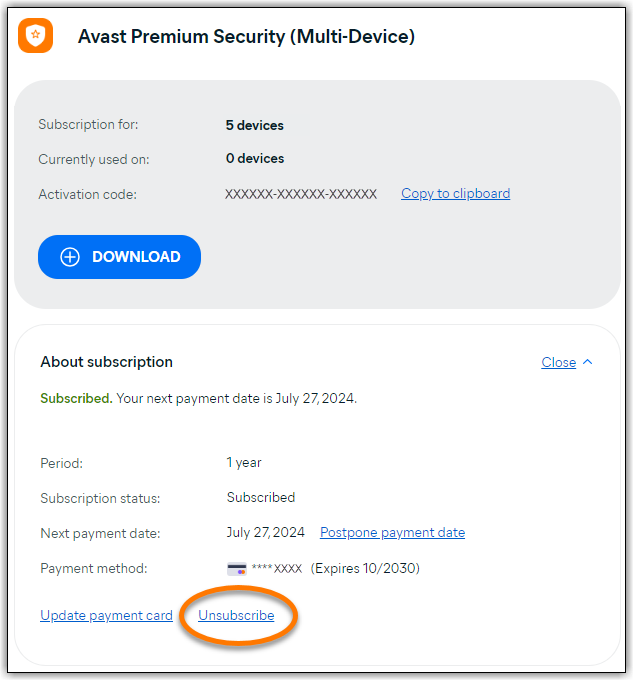
Sign in to the email used at checkout, open Manage subscriptions, expand the exact product and choose Unsubscribe. Avast can present retention offers or ask why you're leaving. Continue until the page says the subscription is expiring or renewal is off. Closing the browser after the first prompt isn't proof that cancellation completed.
Save the confirmation email and a screenshot showing product name, status and access-through date. Hide the activation code and payment details. Reopen the account in a new session and verify the status again. If there's no Unsubscribe option, use the direct Avast Account cancellation guide and Support route instead of assuming the button is merely hidden.
Work from the Next payment date. Avast says billing for one-, two- and three-year subscriptions can occur up to 35 days before the new period. A licence that expires in September can therefore create a charge in August. The anniversary in the app isn't a safe cancellation deadline.
Cancel Google Play and Apple purchases in the store account
Google Play
Open Google Play with the purchasing Google Account, tap the profile image, choose Payments & subscriptions → Subscriptions, select Avast and cancel. If Avast is absent, switch Google accounts and check the receipt. Removing the app or signing into an Avast Account doesn't replace store cancellation.
Apple App Store
Open the App Store or Apple Account subscription settings with the purchasing Apple Account, choose Avast and select Cancel Subscription or Cancel Free Trial. Apple controls both the subscription and the refund route for App Store purchases. Avast's own guarantee page explicitly directs App Store refund requests to Apple.
Save the store's confirmation and the access-through date. A subscription can remain visible as active until that date after renewal is turned off; that's expected. What matters is whether it shows a future renewal. Avast's store-cancellation guide follows the same merchant-specific rule.
Request a refund separately and within the correct window
Avast's refund article updated June 26, 2026 says eligible consumer payments receive a full refund when the customer contacts Avast within 30 days. The guarantee covers subscriptions bought from the official Avast website, the Avast app on Windows or Mac, and Google Play. Avast's full cancellation and refund policy provides the governing limits and doesn't replace statutory rights that may apply in a country.
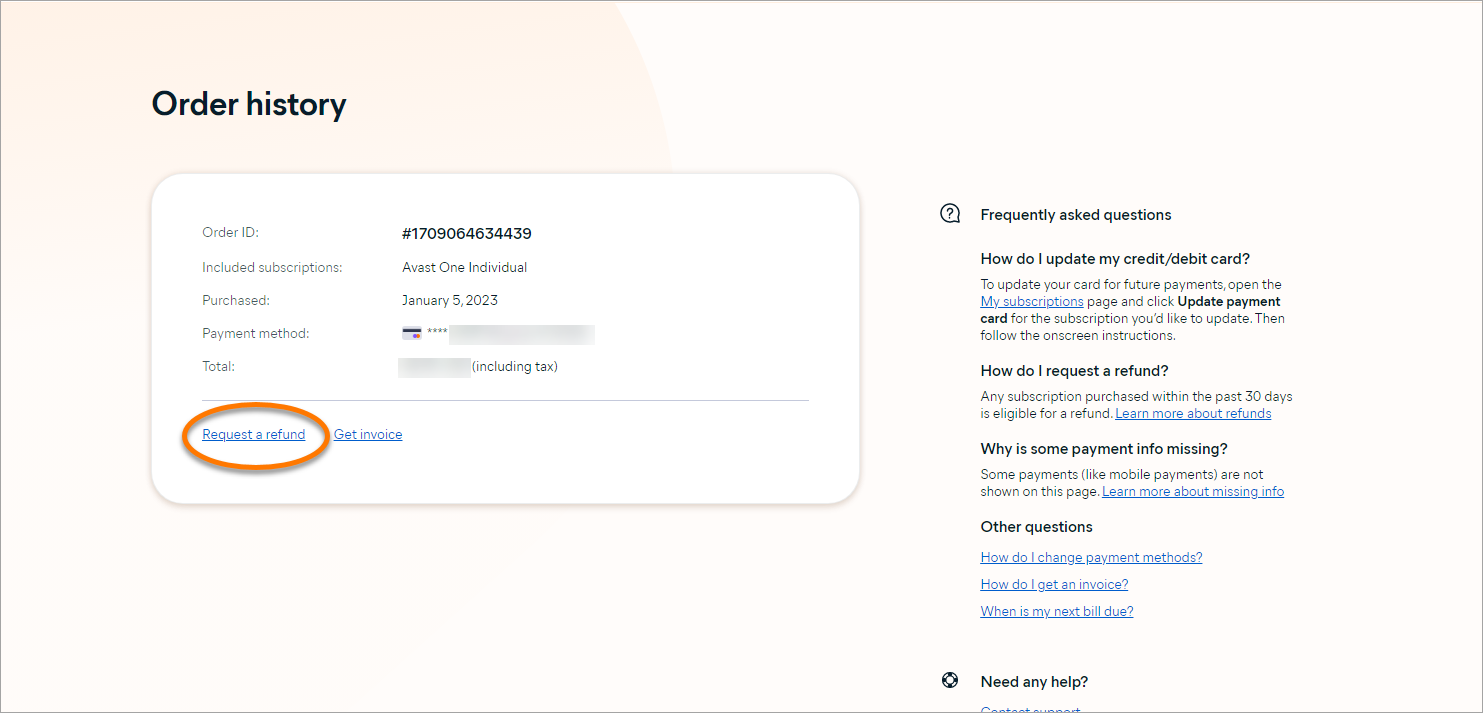
In Avast Account, open Order history and choose Request a refund beside the eligible order. Select the subscriptions included in the request, choose the reason, submit and retain the resulting status or case. If the option is absent, confirm the payment date and merchant, then use Avast Support. Absence of the button doesn't move an Apple or reseller payment into Avast's control.
For Google Play, Avast's policy can cover an eligible payment, but preserve the Google account email and transaction ID and follow the route the current support form presents. For Apple, request the refund through Apple's Report a Problem refund process. For another reseller, contact that seller under its terms.
If the order is missing, trace identity before escalating
- Try the checkout email. An Avast Account uses the email entered during purchase, not necessarily the address used every day.
- Search alternate inboxes. Look for the order ID, invoice and merchant receipt.
- Check Google and Apple accounts. Mobile family members may have purchased through another store identity.
- Inspect the statement descriptor. Record the exact wording, amount and date without posting full card details.
- Use Avast's missing-subscription or Support path. Provide order ID, masked payment information and purchase email for a direct order.
A product can also be attached to another Avast Account or appear under a legacy name. Don't publish activation codes in a forum. If Support asks for evidence, use the official Avast Support route and share only the minimum needed. Avast says Support usually responds within two business days, although workload, language and category can change the timing.
If the card descriptor is truly unknown and no household member recognizes the payment, contact the card issuer promptly under its unauthorized-payment procedure. That's different from a recognized renewal whose price or date was unwanted; the latter should normally be documented with the merchant and refund route first. The documented Avast privacy history can influence whether you keep the product, but it doesn't identify which merchant made a particular charge.
Check for several Avast subscriptions, not just the antivirus
Avast One can surface Premium Security, SecureLine VPN, Cleanup, AntiTrack, BreachGuard, Driver Updater and browser services. A household can therefore cancel the antivirus while a VPN or maintenance subscription continues. Search every receipt and account tile, and compare each item with the statement.
Duplicate charges can also be two legitimate but overlapping orders: an older one-PC licence and a newer ten-device plan, a direct purchase plus an app-store subscription, or a trial that converted while another entitlement remained. Build a small ledger with product, merchant, account, order ID, charge, next-payment date and desired action. Cancel only after matching each line.
If two direct Avast orders overlap, contact Support with both order IDs and ask which remedy applies. Avast's billing FAQ says eligible duplicate orders may be combined or one may be refunded under the cancellation policy. Don't assume a payment dispute will preserve the preferred licence or identify which order should remain active.
A submitted refund isn't complete until the money returns
Avast says refunds to cards and PayPal can take up to 7 business days, while other payment methods can take up to 14 business days. Count business days, watch the original payment method and keep the request status. A pending credit can appear differently from a posted refund in online banking.
Save a compact evidence pack: receipt, order ID, product, payment date, merchant, cancellation status, refund case, confirmation emails and masked statement lines. Note the time zone for deadlines and support interactions. Never include the full card number, password or activation code in ordinary email or a public post.
If the published period passes, reply in the existing case rather than starting several disconnected chats. Provide the case number, original payment reference and current status. Ask whether the refund was approved, when it was issued and whether a trace or reference number is available for the bank.
If Avast charged after cancellation, compare dates and products before disputing
First verify that the confirmation belongs to the same product and merchant as the charge. A Premium Security cancellation doesn't stop a separate SecureLine VPN order. Next compare the cancellation timestamp with the account's Next payment date, because Avast can initiate annual billing up to 35 days before the new term.
Contact the controlling merchant with the exact evidence and request an eligible refund promptly. Explain that future renewal was cancelled, identify the disputed order and attach the confirmation without exposing sensitive details. If the charge is from Apple or a reseller, direct-account support may correctly tell you to use that merchant.
A payment dispute is a serious escalation, not a substitute for identifying the order. It can terminate access, complicate an active refund and may be inappropriate for a recognized transaction still inside the merchant process. Use it when the charge is genuinely unauthorized, the merchant route has failed after documentation, or the bank or local law directs it. This guide is operational information, not legal advice.
After cancellation, paid protection normally continues until the term ends
Avast says a cancelled subscription remains usable through its current paid period, then loses paid features. The account should show Expiring rather than Subscribed. That gives time to choose a replacement, export data from any separate service and avoid a protection gap.
If Premium falls back to Free, recheck which shields remain and which premium controls switch off. Don't assume a VPN, Cleanup or other separately billed app follows the antivirus status. Our Free versus Premium guide maps the feature boundary, while the Avast alternatives guide helps choose another provider.
Set a calendar reminder a week before paid access ends. That leaves time to install and verify the replacement without accepting another renewal merely to avoid a gap.
When removing Avast, prepare the replacement first and verify Windows Security after uninstalling. Don't run two primary real-time suites. The current Avast review explains the protection and trust tradeoff, and the installation guide covers clean activation if the decision is to keep Avast on another device.
Avast cancellation and refund FAQ
How do I cancel an Avast subscription?
For a direct Avast purchase, sign in to the Avast Account used at checkout, open Manage subscriptions, choose Unsubscribe for the exact product, finish every confirmation step and save the email or expiring-status screen. Google Play, Apple and reseller purchases must be managed by that merchant.
How far before renewal should I cancel Avast?
Cancel before the Next payment date shown in the subscription. Avast says one-, two- and three-year subscriptions can be billed up to 35 days before the next subscription period begins, so the product anniversary may be too late.
Does canceling Avast automatically give me a refund?
No. Cancellation stops a future renewal and normally leaves paid access active through the current term. A refund is a separate request for an eligible payment. Submit both actions when a recent charge has already occurred and future renewal must also stop.
Can I get a refund from Avast within 30 days?
Avast's current consumer guarantee says eligible purchases billed through the official Avast website, the Windows or Mac app, or Google Play can receive a full refund when requested within 30 days of payment. Apple and other resellers apply their own refund rules, and statutory rights remain separate.
How long does an Avast refund take?
Avast says card and PayPal refunds can take up to 7 business days, while other payment methods can take up to 14 business days. That's a processing estimate, not proof that an ineligible request will be approved. Save the case and monitor the original payment method.
Why is my Avast subscription missing from my account?
The purchase may use another email or merchant. Search all receipt emails for Avast, order ID, Google Play, Apple or the card descriptor; try the checkout email in Avast Account; check the exact Google or Apple account; and use Avast's missing-subscription or Support route for direct orders.
Does uninstalling Avast cancel the subscription?
No. Uninstalling removes software from one device. It doesn't change a direct Avast, Google Play, Apple or reseller billing contract. Cancel with the merchant, save proof, then uninstall or transfer the device separately.
What should I save after canceling Avast?
Save the order ID, product, merchant, account email, Next payment date, cancellation confirmation, expiring status, refund case number, original receipt and card or wallet transaction. Redact activation codes and full payment details before sharing anything with support.
What if Avast charged me after I canceled?
Compare the charge date with the Next payment date, verify the exact product and merchant, locate the confirmation and contact the merchant with that evidence. Request an eligible refund promptly. Use a bank dispute only after documenting the merchant route, unless the payment is genuinely unauthorized or local law requires immediate reporting.
Final check: stop renewal, request the refund and prove both states
The safest sequence is merchant first, cancellation second, refund third and evidence throughout. Work from the Next payment date rather than the anniversary, because Avast can bill an annual plan up to 35 days early. Submit an eligible refund inside 30 days of payment and use the store or reseller that actually charged you.
Before closing the case, confirm the subscription is expiring, the refund has reached the original payment method and no separate Avast service still renews. Only then decide whether to uninstall, fall back to Avast Free or move to another primary antivirus.