
How to Cancel Scanguard and Request a Refund
Stopping a renewal and asking for money back are two different actions. This guide gets you to the right Scanguard, Apple or Google route, then helps you prove what happened.

Direct answer: For a direct card or PayPal subscription, use Scanguard’s Online Portal: My Subscriptions → the relevant service → Cancel Subscription → identity verification. That turns off auto-renewal for that service but normally leaves access active through the paid term. A direct refund is separate: the service must be fully terminated and an eligible refund request submitted. Direct annual or biannual plans generally use a 30-day window from purchase or renewal; monthly, quarterly and add-on services generally use 14 days. Apple and Google purchases follow the store’s routes and policies.
First decide what you want: stop renewal or end service for a refund
The word “cancel” causes most of the trouble. In Scanguard’s current direct-purchase flow, cancelling the subscription means disabling auto-renewal. The paid service continues until the billing period ends. Nothing in that action asks the company to return the last payment, and the software should not shut down immediately. That is the right outcome if you simply want to prevent the next charge while using the time already purchased.
A refund is a different state change. Scanguard’s current money-back guidance says a refund requires full termination of the relevant plan and a separate eligible request. Once processed, access ends immediately. The request may be approved or refused according to the plan, timing, billing owner, location and applicable terms; turning off renewal does not reserve or guarantee a refund.

Write the desired outcome before clicking: “No renewal after this paid term” or “Terminate now and request an eligible refund.” If you have antivirus, VPN, unlimited devices, identity protection or another add-on under the same login, write the outcome for each line. One successful cancellation screen cannot prove that another separately billed service also changed state.
Choose the billing owner before following any steps
The fastest way to waste a refund window is to ask the wrong company to reverse the charge. Open the receipt or order email and compare the statement descriptor. A purchase made on Scanguard’s website normally belongs in the Scanguard portal; an App Store receipt belongs to Apple; a Google Play receipt belongs to the Google account that made the purchase. The Scanguard Help Center itself presents Card or PayPal, Apple App Store and Google Play Store as different branches.
| What the receipt or account shows | Where to cancel | Where to request a refund |
|---|---|---|
| Scanguard website, direct card or PayPal | Scanguard Online Portal | Scanguard support after eligible full termination |
| Apple / App Store | Apple Account subscriptions | Apple’s Report a Problem route |
| Google Play | Google Play subscriptions | Google’s refund request or developer route under current policy |
| Descriptor recognized but no account found | Identify the account first | Do not guess; trace the transaction through the official billing owner |
If the statement only gives an unfamiliar descriptor, do not call a number supplied by a search ad, forum post or unsolicited “billing support” message. Navigate independently to the official Scanguard billing site or the Apple/Google support domain. Scammers exploit cancellation searches with fake phone numbers and remote-access requests. A real transaction can still be followed by an impersonation attempt.
This article is about billing state, not software removal. If you are cancelling because the app did not install or activate, preserve coverage while checking our Scanguard installation and setup guide. Removing the program before confirming the subscription route neither cancels billing nor improves your evidence.
How to stop renewal for a direct Scanguard subscription
Use a browser you control and type or bookmark the Scanguard site instead of opening a link from a renewal email. Sign in to the Online Portal, open My Subscriptions, select the service you want to stop, choose Cancel Subscription and complete the identity-verification step. The official cancellation page says website buyers receive a verification code at the email associated with the account.
Do not close the browser after pressing the first cancel button. Continue until the portal shows the final renewal state and save the confirmation. Look for language that the subscription will not renew and record the date through which access remains active. Scanguard’s current terms say cancellation must be completed at least one day before the end of the current billing cycle to avoid the next renewal, so the confirmation timestamp matters.
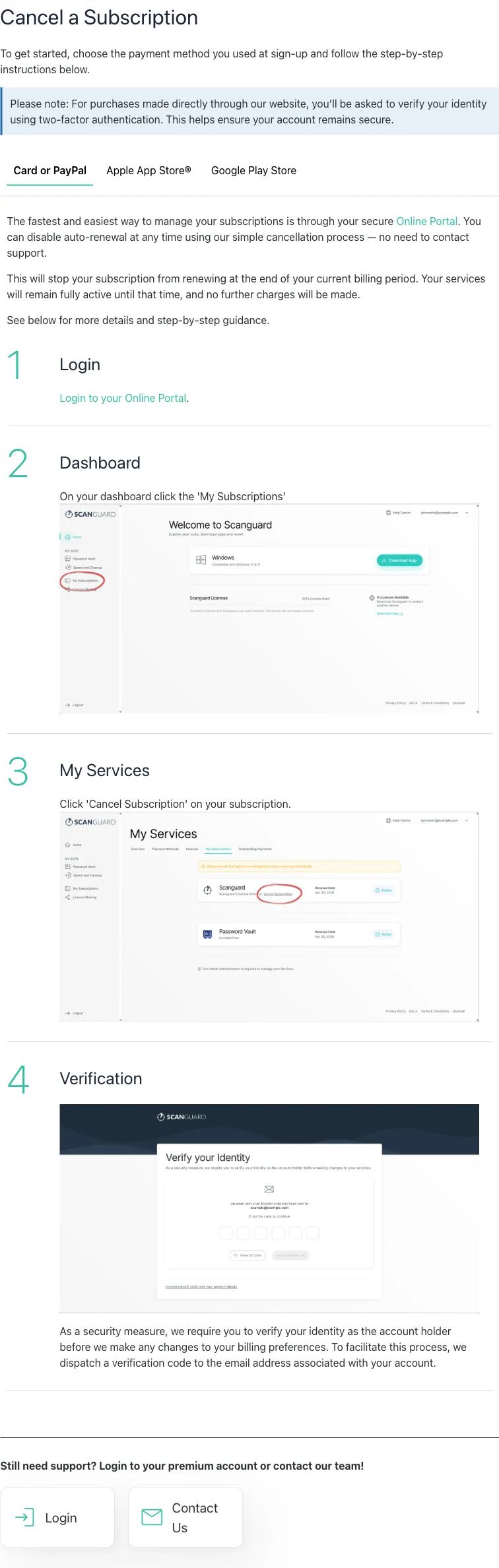
The verification step protects the account, but it also means access to the original inbox can become a practical dependency. Never read a one-time code to someone who called you, and never install a remote-control tool so a “refund agent” can cancel on your behalf. If you cannot receive the code, stop at the recovery route below rather than repeatedly creating codes or paying for another account.
One login can contain several subscriptions: check every service and add-on
Scanguard’s billing materials explain that the core antivirus and optional services can be managed independently. A buyer may see Safe Browsing or VPN, Unlimited Devices, identity-related protection or another feature under one customer login, yet each can have its own price, renewal date and cancellation state. This is why a person can honestly say “I cancelled Scanguard” and still receive a later charge for a different line item.
Build a small inventory from My Subscriptions or My Services, every recent invoice and the payment statement. Record the exact service name, billing owner, last charge, next renewal date and current auto-renew state. Then open each line individually. The official Billing Help Centre and current pricing page are useful for recognizing categories, but the portal and receipt are the evidence for your account.
| Service line | Billing owner | Renewal state | Evidence saved |
|---|---|---|---|
| Core antivirus | Direct / Apple / Google | Active or auto-renew off | Portal/store confirmation |
| VPN or Safe Browsing | Check receipt | Check separately | Service name and next date |
| Unlimited devices | Check receipt | Check separately | Invoice line and confirmation |
| Other add-on | Check receipt | Check separately | Exact descriptor and case number |
Do not assume that cancelling the most expensive line automatically cancels cheaper add-ons. Do not rely on an empty app screen, an expired card or a marketing-email unsubscribe. Scanguard’s email unsubscribe page explicitly says that opting out of promotional messages does not affect a subscription.
How to request a refund for a direct Scanguard purchase
First confirm that Scanguard—not Apple or Google—processed the payment. Then check the plan type and dates in the portal, gather the account email, purchase date and invoice number, and contact Scanguard through the official Help Center. Ask for full termination of the specific service and an eligible refund. Name every line item you want reviewed rather than asking vaguely to “refund my Scanguard account.”
The official refund page describes a review, not an automatic button. Eligibility depends on the subscription type and timing. A support agent may need to verify account ownership and identify the exact payment. State whether the charge was the initial purchase or a renewal, the amount and currency, and when you first attempted cancellation. If your request covers multiple services, list each invoice or service name separately.
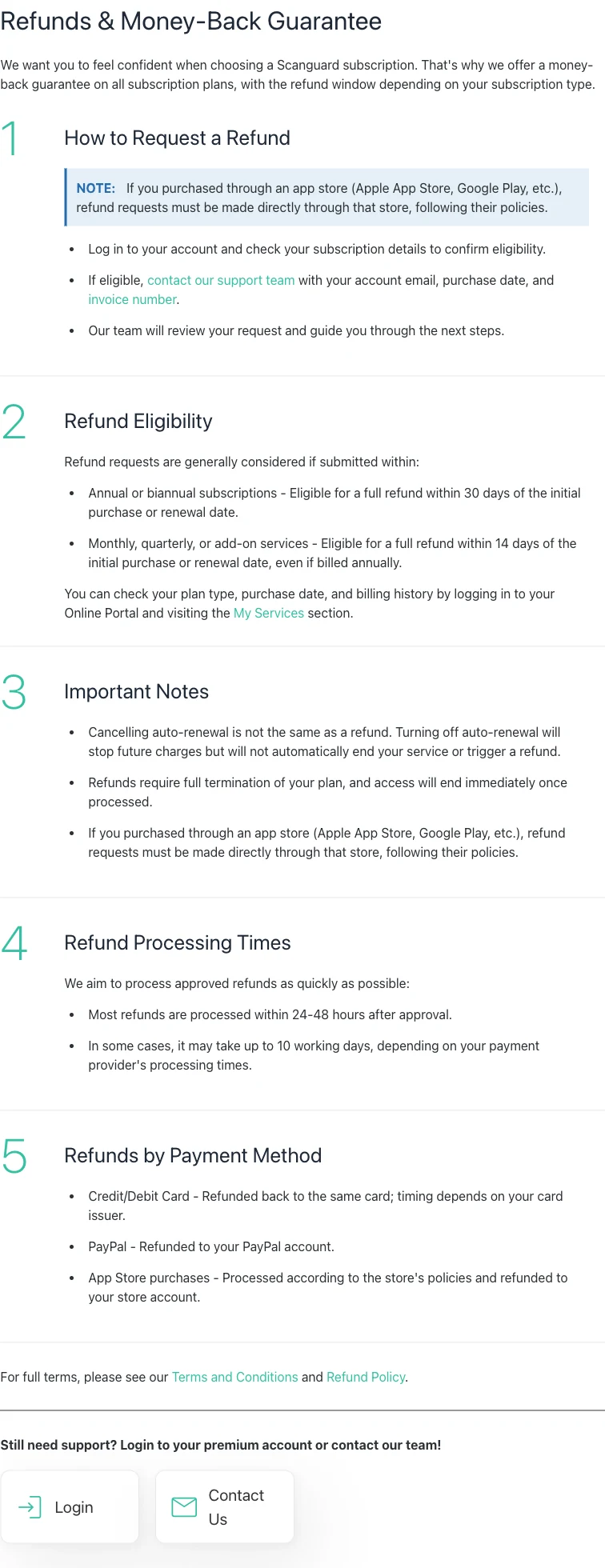
Before agreeing to termination, understand the consequence: Scanguard says access ends immediately once the refund is processed. If the computer still depends on the product for real-time protection, install or activate another trusted provider without running two full real-time engines indefinitely. Our Scanguard review explains the product and alternatives; the refund request should remain focused on the transaction evidence.
Scanguard refund windows: 30 days is not a universal rule
For direct purchases, the current help page says annual or biannual subscriptions are generally eligible for a full refund within 30 days of the initial purchase or renewal date. Monthly and quarterly subscriptions generally use 14 days. Add-on services also generally use 14 days from purchase or renewal, even when the add-on itself was billed annually. That last detail is easy to miss and makes “Scanguard has a 30-day guarantee” an unsafe summary.
| Direct-purchase type | Published general window | Clock starts from |
|---|---|---|
| Annual or biannual subscription | 30 days | Initial purchase or renewal date |
| Monthly or quarterly subscription | 14 days | Initial purchase or renewal date |
| Add-on service | 14 days, even if billed annually | Initial purchase or renewal date |
| Apple or Google purchase | Store policy controls | Store-specific rules and transaction details |
Use the transaction date, not the day you noticed the bank statement or stopped using the software. Submit promptly and preserve a timestamp. “Generally considered” still allows terms, country rules and transaction facts to affect the result; this article cannot promise approval. If the published window has passed, you can still present a documented billing error, duplicate transaction or unauthorized charge, but that is a different claim from an ordinary money-back request.
The pricing and renewal mechanics are covered more fully in our Scanguard plans, pricing and renewal guide. For cancellation, the practical rule is narrower: identify every service, calculate its own clock and submit the right request to the actual billing owner.
Apple purchase: cancel the subscription and request the refund separately
If the receipt came from Apple, use the Apple Account that owns the purchase. Apple’s subscription-cancellation instructions, updated June 26, 2026, direct iPhone and iPad users to Settings → their name → Subscriptions → the relevant subscription → Cancel Subscription. Apple says that if there is no cancel button or a red expiration message appears, the subscription is already canceled.
That action stops future renewal under Apple’s account system; it does not automatically request money back. For a refund, sign in independently at Apple’s Report a Problem service, choose Request a refund, select the reason and the Scanguard item, and submit. Apple’s current refund-request guidance, published May 15, 2026, says to allow 24–48 hours for an update and warns that eligibility varies by country or region.
Do not apply Scanguard’s direct 30-day or 14-day language as if it guaranteed an Apple decision. Apple controls the transaction and its current rules. Save the Apple receipt, order identifier, cancellation status and refund-request status. If the subscription does not appear, search the inbox for the Apple receipt and identify which family member or Apple Account made the purchase before creating another request.
Google Play purchase: uninstalling the app does not cancel billing
Use the Google account that owns the transaction and open its Google Play subscriptions. Choose Scanguard, select Cancel subscription and follow the confirmation flow. Google’s official subscription guide explicitly says that uninstalling an app does not cancel its subscription. After cancellation, access generally remains until the paid period ends unless another policy or refund action changes it.
A Google refund is separate. Google’s current refund policy says a purchase within 48 hours may be eligible depending on the details; after 48 hours, it directs users to contact the developer for troubleshooting and possible refund under the developer’s policies and applicable law. This is not a 48-hour guarantee, and it should not be combined with Scanguard’s direct-purchase windows.
Use Google’s official refund request and status route. Google says a decision usually arrives within one day but may take up to four days. Preserve the order ID, owning Google account, request timestamp and result. If multiple household accounts exist, check each account’s subscriptions and receipts rather than assuming the app’s currently signed-in profile owns the billing.
No verification code or lost account email: recover ownership safely
Start with the mundane checks: spam and junk folders, storage limits, filtering rules and the masked destination shown by the portal. If several codes were requested, wait for the older one to expire and use only the newest. A code is an account-control credential. Scanguard support does not need you to read it to an unsolicited caller, and no legitimate cancellation requires remote access to your banking app.
If the original inbox is gone—an old employer, university address or closed provider—use the official Help Center contact path from a clean browser. Prepare the customer number, invoice, purchase date, amount, currency and statement descriptor. The official flow may use limited payment information for verification; provide only what the verified form asks. Never send a full card number, CVV, password or one-time code by email or chat.
Public customer reports include people who struggled after losing access to an old address. That signal is useful because it reveals a predictable recovery failure, not because it proves every support case will fail. A buyer setting up Scanguard today should use a durable personal email and store the customer number securely. An existing buyer should build the strongest ownership packet possible and keep case numbers from each contact.
Subscription not visible: trace the account instead of buying again
A missing subscription usually means the wrong billing owner, wrong account identity or a transaction that has not been matched to the visible profile. Search receipts for Scanguard, Total Security, Apple and Google Play. Compare the exact date, amount, currency and descriptor. Try other email, Apple and Google accounts you control, including a family organizer who may have made the purchase.
For a recognizable direct Scanguard charge that is not visible, use the company’s official billing-questions route and ask it to identify the transaction. Do not publish statement images containing full card numbers, addresses or unrelated purchases. Mask the data before attaching evidence, and record exactly which limited fields support requests.
Do not create a second paid Scanguard account to unlock chat, prove identity or reach a cancellation button. That can produce another subscription while leaving the original unresolved. If the descriptor does not match any account and the merchant cannot identify the charge, preserve the merchant response before taking the documented mismatch to the card issuer or PayPal through its official dispute channel.
Charged after cancellation: compare timestamps and every line item
A later charge does not by itself tell you whether the cancellation failed. Put the renewal timestamp beside the final confirmation timestamp and the end of the billing cycle. Scanguard’s terms require direct cancellation at least one day before the cycle ends. A click after the renewal transaction, an incomplete verification step or a browser closed before confirmation may explain why the next term began.
Then compare the service name. The antivirus may show auto-renew off while an add-on remained active. Match the amount against prior invoices and the current service inventory. If the amount differs, ask support to identify whether it is a renewal, add-on, tax adjustment, duplicate transaction or another account. Avoid assuming that every descriptor with the same merchant group is the exact subscription you cancelled.
Send support a compact timeline: account email, service, renewal date and amount, cancellation attempt, final confirmation, later transaction and prior case number. Ask for a written identification and resolution. If the evidence shows an unauthorized, duplicate or merchant-unresolved charge, contact the payment provider through the number printed on the card or its authenticated app. A chargeback is an escalation for a documented payment dispute, not a substitute for cancelling each subscription.
Refund approved but not visible: separate approval from settlement
“Approved,” “processed” and “posted to the statement” are different events. Scanguard says most approved direct refunds are processed within 24–48 hours, but the payment provider may take up to 10 working days. The card issuer can post a credit under the original transaction date or label it differently, so search the full statement rather than only the current day.
Once the published processor window has passed, give Scanguard the approval reference, original invoice, payment method and masked card details and ask for the refund transaction reference. Then provide that reference to the card issuer or PayPal through its authenticated channel. Do not start a second refund request merely because the first credit is not instantly visible; duplicate cases can make the timeline harder to reconcile.
Apple and Google refunds remain in the store’s status system and use their settlement rules. Check the same account that submitted the request. If the store says completed but the payment method has changed or closed, contact the store and payment provider with the order and refund references. Never pay a “release fee” or provide remote banking access to receive an approved refund.
Save proof, protect sensitive data and verify the final state
Before you leave the portal or store, capture the service name, billing owner, account identity, purchase or renewal date, amount, invoice/order ID, cancellation state and effective end date. For a refund, add the termination request, case number, approval status and settlement reference. Screenshots should include the useful timestamp and service label while masking card numbers, CVV, home address, passwords, codes and unrelated transactions.
| Evidence | Why it matters | What to mask |
|---|---|---|
| Receipt or invoice | Identifies billing owner, service and date | Address and payment details not needed |
| Portal/store cancellation state | Proves auto-renew status and effective date | Other subscriptions and account identifiers |
| Refund case and approval | Separates request, approval and processing | One-time codes and private correspondence |
| Bank or PayPal record | Matches amount, descriptor and settlement | Full account/card numbers and unrelated activity |
Verify the end state, not merely the action you remember taking. Every unwanted service should show auto-renew off or terminated, depending on your chosen outcome. A refund request should have a case or store status. The computer should remain protected if access ends. If the underlying concern is whether the seller or a message is genuine, use our evidence-led Scanguard legitimacy check before clicking a link or calling anyone.
Four actions do not prove cancellation: uninstalling the app, deleting a shortcut, unsubscribing from marketing email and letting a card expire. Closing the browser before verification is complete also provides no final evidence. The safe finish is boring but decisive: a saved confirmation for each service, a known access end date and a separate tracked refund request when money back is the goal.
Scanguard cancellation and refund FAQ
These answers use the current direct-purchase and app-store routes; regional rights and individual transaction facts can still change an eligibility decision.
How do I cancel a Scanguard subscription bought on its website?
Sign in to the Scanguard Online Portal, open My Subscriptions, choose the relevant service, select Cancel Subscription and complete identity verification. Repeat the check for every separately listed service or add-on. The official terms say to cancel at least one day before the billing-cycle end if you want to avoid the next renewal.
Does cancelling Scanguard automatically give me a refund?
No. Turning off auto-renewal normally keeps the service active through the paid term and does not create a refund request. Scanguard’s current refund guidance says an eligible direct-purchase refund requires full termination of the relevant plan plus a separate request to support; access ends when the refund is processed.
What is Scanguard’s refund window?
For direct purchases, Scanguard generally considers annual or biannual subscriptions within 30 days of the initial purchase or renewal. Monthly, quarterly and add-on services generally use 14 days, even if an add-on was billed annually. Apple and Google Play purchases follow the store’s policy instead.
Can I cancel Scanguard by uninstalling it?
No. Uninstalling removes the app from a device but does not change the subscription’s renewal status. Likewise, deleting a shortcut, unsubscribing from marketing email, replacing a card or blocking one transaction is not reliable proof of cancellation.
How do I cancel Scanguard billed by Apple?
On an iPhone or iPad, open Settings, tap your name, open Subscriptions, choose the Scanguard subscription and tap Cancel Subscription. Apple says that if there is no cancel button or a red expiration message appears, the subscription is already canceled. A refund is a separate request through reportaproblem.apple.com.
How do I cancel Scanguard billed by Google Play?
Use the Google account that owns the purchase, open Google Play subscriptions, choose Scanguard and select Cancel subscription. Google states that uninstalling the app does not cancel the subscription. A refund request is separate and eligibility depends on Google’s current policy and the purchase details.
What if the Scanguard verification code never arrives?
Check spam and junk, confirm the masked destination is the account email, allow an earlier code to expire and use only the newest code. Never disclose the code to a caller. If the inbox is inaccessible, use the official Help Center and prepare the customer number, invoice, date, descriptor and only the limited payment details the official form requests.
Why is my Scanguard subscription missing from the portal?
First identify who billed it: Scanguard, Apple or Google. Then check other email, Apple and Google accounts you own and compare the receipt or statement descriptor. A direct Scanguard charge that is not visible should be traced through the official billing-contact route; do not create a second paid account to unlock cancellation.
What should I do if Scanguard charged me after cancellation?
Compare the confirmed cancellation timestamp with the renewal timestamp and Scanguard’s one-day-before deadline. Check every add-on because another service may have renewed. Save the portal state, confirmation, invoice, descriptor and case number, then ask official billing support to identify the transaction before escalating a documented mismatch to the payment provider.
How long does a Scanguard refund take?
Scanguard says most approved direct refunds are processed within 24–48 hours, while the payment provider may take up to 10 working days. Those are processing expectations, not promises of approval or a guaranteed statement date. Apple and Google provide their own decision and settlement tracking.
Bottom line: cancel every service, then track any refund separately
Start with the receipt, not the app icon. Direct Scanguard purchases belong in the Online Portal, Apple purchases in the Apple Account and Google Play purchases in the owning Google account. Turn off auto-renewal for every unwanted service and save the final state. If you want money back, make the separate eligible refund request through the same billing owner.
The crucial distinctions are now simple: cancellation preserves access through the paid term; a processed direct refund ends access; add-ons can have their own renewal controls; and 30 days is not a universal promise. Keep the evidence packet until the last service and payment have reached the state you intended.