
ESET Mobile Security for Android Review: Strong Tools, One Evidence Gap
The app combines malware scanning with anti-phishing, App Lock, Anti-Theft and a protected payment launcher. The harder question is which tools your phone can actually use—and how much confidence to place in an app missing from the newest public lab rounds.
Quick answer: ESET Mobile Security Premium is a good Android choice for people who will use its anti-phishing, App Lock, Payment Protection and Anti-Theft tools and are comfortable granting the permissions those features need. The free edition is mainly a malware scanner with basic reporting. ESET scored 6/6/6 in AV-TEST’s July 2025 Android round, but it didn't appear in the published March or May 2026 participant lists, so that older result can't be presented as a current-year certification. Confirm device compatibility before paying: current version 12 documentation varies by distribution, while 64-bit Android, Google Play services and a non-rooted device are important constraints.
Need a different ESET task? The complete ESET guide hub routes review, plans, setup, banking, troubleshooting, firewall and HTTPS, Android, VPN, password migration, billing and removal without mixing their steps.
Verdict: worthwhile for Android users who will configure the extra layers
ESET Mobile Security is more than a file scanner once Premium is active. Its strongest case is a personal Android phone used for banking, travel and sideloaded work apps: anti-phishing monitors risky pages, Payment Protection creates a safer launch path for selected financial apps, App Lock adds a second gate to sensitive apps, and Anti-Theft can help locate or lock a missing device.
The trade-off is that several of those jobs require sensitive Android permissions. A buyer who will deny background location, accessibility and device-admin access may end up paying for features that can't operate fully. Conversely, granting every permission without understanding it isn't a sensible security strategy. Configure the features you need, test them, and leave the rest off.
Our confidence is also deliberately narrower than a roundup that simply calls the app “award-winning.” ESET Mobile Security 11.0 earned a perfect 6/6/6 in AV-TEST’s July 2025 Android test. ESET doesn't appear in the institute’s published May 2026 participant list or March list. Absence isn't a failure, but it leaves no direct 2026 result to cite.
Our editorial score is 8.4/10. Google Play displayed 4.9/5 from about 1.05 million reviews and more than 10 million downloads when we rechecked it on July 30, 2026. That large store signal supports usability and long-term adoption, but it's dynamic user sentiment—not a substitute for an independent malware test.
Choose it if
- You want malware, phishing, payment and theft tools in one Android app.
- You already manage a household through ESET HOME.
- You'll review permissions and test recovery before a loss.
Skip or compare if
- You need current 2026 Android lab participation as a buying requirement.
- Your phone is rooted, Android Go, 32-bit-only or lacks Google Play services.
- You mainly install Play Store apps and need only a lightweight free baseline.
ESET Mobile Security Free vs Premium: the meaningful differences
ESET’s current version 12 subscription matrix distinguishes an unlimited-duration Free mode, a time-limited trial and Premium. The trial normally enables paid features for 30 days when the Google Play build is first installed; availability and billing still depend on region and store account.
| Capability | Free | Trial / Premium | Why it matters |
|---|---|---|---|
| Antivirus | Yes | Yes | Core app and file scanning |
| Automatic scans | No | Yes | Removes reliance on remembering manual scans |
| Detection-module updates | Yes in current matrix | Yes | Threat knowledge must stay current |
| Security Report | Yes | Yes | Summarizes recent protection activity |
| Anti-phishing, App Lock, Payment Protection | No | Yes | The most useful day-to-day Premium layers |
| Anti-Theft portal and SIM protection | No | Yes | Remote loss response, subject to permissions and device limits |
| Call Filter and Security Audit | No | Yes | Extra phone and permission oversight |
| Network Inspector | No | Yes, Android 12 or older | Not available on newer Android versions |
Free is reasonable when the goal is an occasional second view of downloaded APKs and files, but it isn't the same product experience reviewers describe when they praise Anti-Theft or Payment Protection. Premium makes sense only if those paid layers solve a real need. If the app is included as one device inside an ESET HOME Security subscription, compare the whole household allocation rather than buying twice through Google Play.
Malware protection: strong last direct score, missing from the newest rounds
The core antivirus scans installed apps, updates and files, including attached USB On-The-Go storage where supported. ESET’s current Google Play listing also names adware detection, scheduled scans and real-time scanning. That scope is useful for people who install outside the Play Store, receive APKs through work or connect removable storage.
The latest direct AV-TEST entry we could verify is July 2025: ESET Mobile Security 11.0 received 6 points each for protection, performance and usability. The result supports the engine’s recent history, but version 12 and a newer Android environment can change behavior. The honest 2026 statement is therefore “perfect in the last available direct result, with a current coverage gap,” not “perfectly tested in 2026.”
That distinction matters because the May 2026 round included 12 products and tested malware detection, performance and false positives under current versions, but not ESET. We also found a 2025 AV-Comparatives mobile review of ESET 11.0; its age should be labeled rather than silently mixed with current features. Our Windows ESET review has fresh 2026 desktop lab evidence, but Windows results can't validate an Android app.
On your own phone, test behavior rather than throwing live malware at it. Confirm the detection modules update, scan a harmless EICAR test file only from its official source if you understand the workflow, inspect quarantine, and verify the app remains active after battery optimization and restart. Never download real malware to prove a consumer app works.
Anti-phishing and Payment Protection cover different moments
Anti-phishing watches supported browsing interactions for known malicious destinations. Android implements that visibility through accessibility-related permissions, so the operating system may display a serious warning when you enable it. That warning isn't proof ESET is malicious; it's Android explaining that the capability can observe screen interactions. Grant it only to the verified ESET app and recheck after major OS upgrades.
Payment Protection is a Premium layer for selected banking and payment applications. ESET’s official activation walkthrough opens the Payment Protection tile, requests the needed permission and adds Safe Launcher. You then manage which financial apps should open inside that protected path.
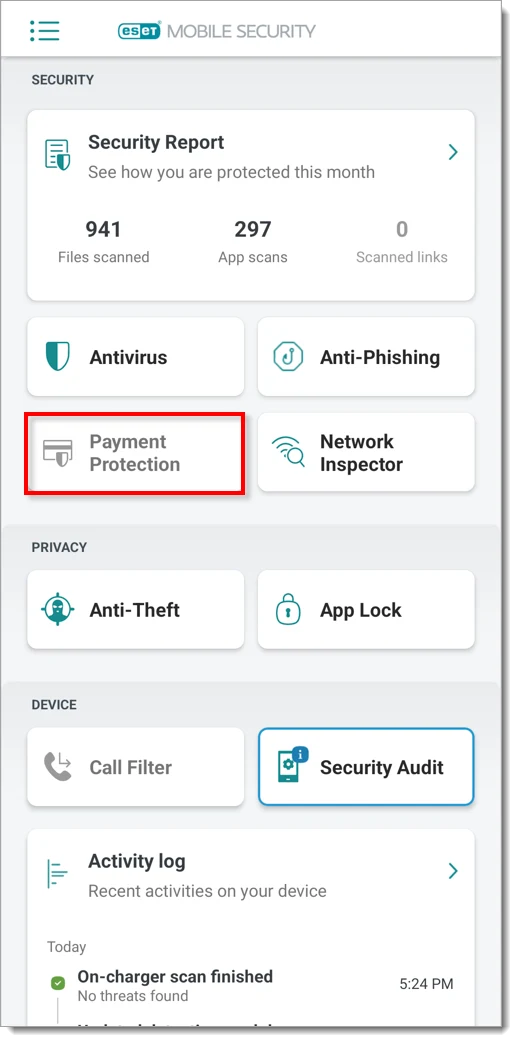
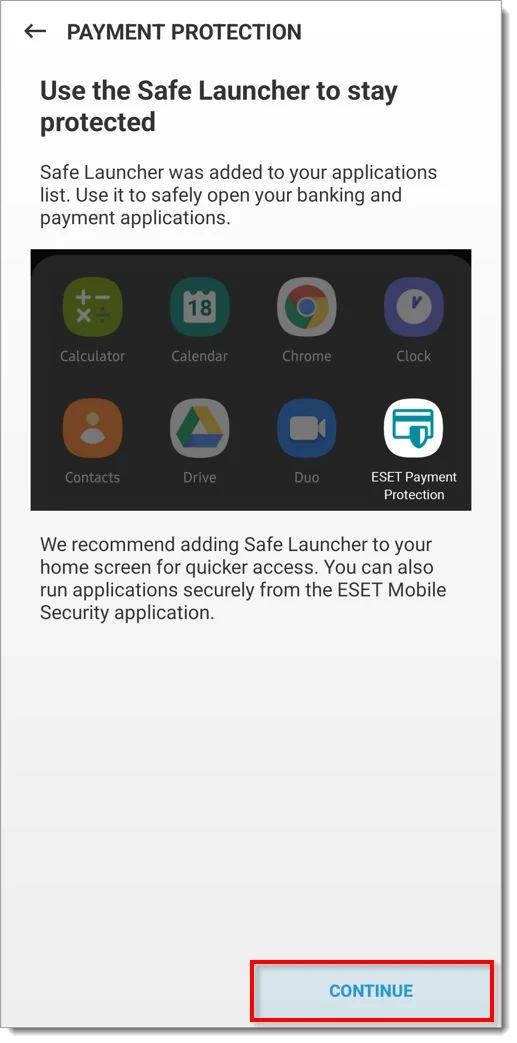
The protected launcher can't tell whether a person in a messaging app is a real bank employee, whether an invoice is legitimate or whether the account number you approve belongs to a scammer. Keep the bank’s device binding, passcode and transaction confirmation active. A security wrapper reduces technical attack paths; it doesn't supply judgment at the moment of transfer.
Anti-Theft and App Lock are useful only after a rehearsal
ESET’s current Anti-Theft documentation covers location, remote lock, a finder message, failed-unlock photos and SIM-change responses. Full operation can use camera, file, background-location, physical-activity, usage, device-admin and phone-information access. Some capabilities disappear on Wi-Fi-only tablets, CDMA devices or newer Android versions because the operating system limits what third-party apps can do.
Set it up while the phone is in front of you. Sign in to ESET HOME from a second trusted device, confirm the correct phone appears, test a benign location request and save the recovery password somewhere outside the phone. Don't wait until the device is lost to discover that background location was restricted or the ESET HOME password lives only in the missing handset.
App Lock is a different control. It adds a gate in front of selected applications when you lend an unlocked phone to a child, coworker or repair shop. It doesn't encrypt those apps’ cloud data or replace the phone’s screen lock. Protect email, password manager, payment and authenticator apps first, and choose a recovery route that doesn't create a circular dependency.
Android and Google already provide device-finding, screen-lock and Play Protect capabilities. ESET’s value is additive management and extra triggers, not a reason to turn the platform controls off. Document which service owns each recovery step so that competing locks don't surprise the account owner.
Permissions and data: make a feature-by-feature decision
A mobile security application is unusually privileged by design. It may inspect files, observe supported browser activity, locate a device and resist removal. The right question isn't whether it requests “many” permissions, but whether each request maps to a feature you enabled and whether the vendor explains the use.
Start with the verified Google Play publisher, then open Android Settings → Apps → ESET Mobile Security → Permissions. Location belongs to Anti-Theft and some Payment Protection network checks; accessibility supports anti-phishing; camera can support intruder photos; device-admin access can support loss response. Denying one may degrade that feature without breaking the core scanner.
Battery optimization can also suspend background work. Exempting the app may improve timely scans and loss tracking, but it can increase background activity. Observe battery use over several normal days instead of relying on a one-hour impression. If a vendor-specific power manager repeatedly kills the app, follow the current device maker and ESET guidance rather than installing a “battery booster.”
Review permissions again after an Android or ESET update. Remove Anti-Theft registration and device-admin control before uninstalling. If the product doesn't fit your privacy threshold, choose a smaller feature set; running a powerful app in a half-configured state is rarely the best compromise.
Compatibility: check channel, architecture and Google services
Current version 12 system documentation isn't perfectly synchronized across every regional and distribution page. One current general page lists Android 10 or later, while Google Play-oriented documentation has listed Android 9 or later. We therefore wouldn't promise compatibility from the OS number alone: use the exact store listing or installer checker for the phone in hand.
The stable constraints are more useful. ESET documents ARMv8+ 64-bit operation for recent versions, excludes devices limited to 32-bit instruction sets, doesn't support rooted devices or Android Go, and requires Google Play services. That last point can exclude some Huawei models even when their Android base looks recent.
Network Inspector is documented only for Android 12 or older. Anti-Theft and Call Filter can be unavailable on tablets without calling or messaging, SIM Guard has hardware and dual-SIM limits, and Android may restrict remote-wipe or device-admin behavior by version. Treat the visible feature list on your actual handset as authoritative for that installation.
ESET Mobile Security isn't an iPhone antivirus. If your household includes iPhones, count them separately when assessing the ESET subscription price and device seats. The bundled ESET VPN supports iOS, but VPN encryption and malware scanning are different jobs.
A 15-minute setup that proves the important controls
- Install from the official channel. Verify publisher ESET and reject repackaged APK sites.
- Update and run the first scan. Review detections before deleting an unfamiliar file.
- Choose Free or activate the correct subscription. Confirm the device appears in the intended ESET HOME account.
- Enable anti-phishing deliberately. Read the Android accessibility warning and grant access only to ESET.
- Add two test apps to Payment Protection and App Lock. Confirm both open normally through the protected path.
- Configure Anti-Theft from a second device. Test sign-in, location and recovery without marking a live phone permanently missing.
- Inspect battery and permissions after three days. Look for missed updates, excessive drain or disabled modules.
Don't stack ESET with Avast, AVG, Bitdefender or another full Android security suite just to “double” protection. Duplicate accessibility monitoring, local VPN filters and scheduled scans can create confusing failures. The best Android antivirus guide compares alternatives as primary choices, not simultaneous layers.
Alternatives: choose based on the gap you need to close
Bitdefender Mobile Security is the clearest comparison if current 2026 Android lab participation matters: it appears in AV-TEST’s May 2026 table with 6/6/6. Norton 360 also appears there and may fit households already paying for its broader bundle. Neither result means its interface, price or permissions will suit you better; it means the specific tested build was present in that round.
Google Play Protect is already built into certified Android devices and is a reasonable baseline for careful Play Store-only users, though the May 2026 test scored it 5.5 for protection, 6 for performance and 5 for usability. Sophos Intercept X can appeal to users seeking a different free security approach. Compare the exact current app, not a desktop brand reputation.
If the problem is broader than Android, start with the ESET alternatives decision guide, ESET vs Bitdefender, ESET vs Norton and ESET vs Microsoft Defender. A family may sensibly use one desktop suite and a different mobile app when platform support is uneven.
Bottom line: ESET Mobile Security Premium has a coherent Android toolset and credible recent history, but the newest public test gap should stay visible. Buy it for the features you'll configure, not for a vague badge or the assumption that every ESET HOME feature exists on every phone.
ESET Mobile Security for Android FAQ
Is ESET Mobile Security free on Android?
Yes. ESET documents a Free edition that can be used without a fixed end date. It includes antivirus, detection-module updates and the Security Report; scheduled scans, App Lock, Anti-Theft, anti-phishing, call filtering, Payment Protection and Security Audit are Premium features in the current matrix.
Is ESET Mobile Security good in 2026?
It has a useful Premium feature set and a clean July 2025 AV-TEST result of 6/6/6. However, ESET wasn't listed in AV-TEST’s published March or May 2026 Android rounds, so buyers shouldn't mistake the older result for current-year lab coverage.
What Android version does ESET Mobile Security require?
Check the exact store or installer channel before purchase. Current version 12 help pages aren't perfectly aligned across distributions and locales; the key exclusions include 32-bit-only builds, Android Go, rooted devices and phones without Google Play services.
Does ESET Mobile Security work on iPhone?
No. ESET Mobile Security is the Android antivirus app. ESET VPN has an iOS application, but that's a different privacy product and doesn't turn iOS into an ESET malware-scanning platform.
What permissions does ESET Anti-Theft need?
Full Anti-Theft operation can require camera, files, location including background location, physical activity, usage access, device-admin access and phone information. Grant only features you intend to use, then verify them while the phone is still in your possession.
What does ESET Payment Protection do?
It creates a Safe Launcher for selected banking and payment apps and adds a protection layer against phishing and related attacks. It doesn't validate a transfer recipient, reverse fraud or replace the bank’s own authentication.
Why is Network Inspector missing on my phone?
ESET’s current version 12 documentation limits Network Inspector to Android 12 or older. Its absence on a newer Android phone is therefore not necessarily an installation fault.
Should I install ESET alongside another Android antivirus?
Usually no. Two security apps can duplicate web accessibility hooks, scans, VPN-style filters and battery work. Keep Google Play Protect enabled, choose one primary third-party security app, and test its permissions and battery behavior.