
ESET VPN Review 2026: A Capable Bundle, Not Yet a Transparency Leader
ESET has upgraded its bundled VPN with unlimited traffic, modern protocols, a desktop kill switch and split tunneling. The app is now useful enough to replace a basic travel VPN—but privacy buyers should distinguish a written no-logs policy from an independently published audit.

Quick answer: ESET VPN is a strong value for an ESET HOME Security Premium or Ultimate subscriber who needs public-Wi-Fi protection, ordinary location changes and unlimited traffic without a second bill. The current app supports WireGuard, IKEv2 and OpenVPN-based modes, desktop kill switch, desktop/Android split tunneling and a written no-logs policy. Premium currently supplies 3 VPN device activations for security subscriptions covering up to 10 devices and 5 above that; Ultimate supplies 10 or 25. It's less compelling for buyers who want a standalone monthly plan, the widest country network, advanced streaming guarantees or a publicly available independent no-logs audit.
Need a different ESET task? The complete ESET guide hub routes review, plans, setup, banking, troubleshooting, firewall and HTTPS, Android, VPN, password migration, billing and removal without mixing their steps.
Verdict: a credible bundled VPN with one important proof gap
ESET VPN has moved beyond the token “limited VPN” that antivirus suites often attach to a middle plan. Current Premium and Ultimate subscriptions include unlimited traffic, and the app has the controls that matter for ordinary travel: WireGuard, IKEv2 and OpenVPN variants, auto-connect, a desktop kill switch, desktop/Android split tunneling, network-specific behavior and more than a single handful of locations.
That makes it easy to recommend to an existing ESET household before paying for another provider. Install it, enable the leak-prevention controls appropriate to the device, test the nearest locations and keep it if video calls, banking and daily sites behave normally. The bundle can be excellent value even if it isn't the VPN we would choose in isolation.
The reservation is transparency, not a claim that ESET secretly logs browsing. Its current documentation gives a fairly specific no-logs statement, which is better than vague marketing. We couldn't find a public independent audit of that policy or infrastructure comparable with evidence some specialist VPNs publish. Privacy-risk users should treat “documented policy” and “third-party verified operation” as different confidence levels.
Our editorial score is 8.0/10. The current Google Play listing displayed 4.8/5 from about 3,200 reviews and more than 500,000 downloads when rechecked on July 30, 2026. That's useful Android-app sentiment, but it says nothing by itself about desktop leak protection or whether the no-logs policy is implemented as written.
Best fit
- Existing Premium or Ultimate subscriber.
- Travel, airport Wi-Fi and ordinary location changes.
- Household that wants one ESET HOME control plane.
Look elsewhere if
- You need a standalone monthly VPN.
- A published independent no-logs audit is mandatory.
- You require a niche country, port forwarding or guaranteed streaming catalog.
Which ESET plans include VPN, and how many devices?
ESET’s current US protection-plan page includes unlimited VPN traffic in HOME Security Premium and Ultimate. This is a 2026 change many older reviews miss: articles that say Premium has no VPN or only a small data allowance are stale for the current US offer.
| Security plan | VPN traffic | VPN device activations | Important distinction |
|---|---|---|---|
| HOME Security Essential | Not included | 0 | Antivirus seats don't create VPN access |
| HOME Security Premium, up to 10 security devices | Unlimited | Up to 3 | VPN count is lower than antivirus-seat count |
| HOME Security Premium, more than 10 security devices | Unlimited | Up to 5 | Confirm the enlarged subscription in cart |
| HOME Security Ultimate, up to 10 security devices | Unlimited | Up to 10 | Higher bundle price also adds other Ultimate features |
| HOME Security Ultimate, more than 10 security devices | Unlimited | Up to 25 | Designed for larger households |
Don't equate a “five-device ESET subscription” with five VPN activations unless the plan table says so. VPN access is allocated to members and devices through ESET HOME. Availability varies by country, and an eligible plan can be unavailable in a regional store even when the app itself appears in an app store.
For a three-device US buyer, Premium was $89.99 for the first term when we checked the store on July 30, 2026; Ultimate was $179.99 for five security devices. Those are suite prices, not permanent standalone VPN rates, and the page marks displayed pricing as first-term. The ESET pricing and renewal guide explains auto-renewal and how to compare the later charge.
Apps and activation: good platform coverage, unusual code flow
The current system-requirements page supports Windows 10 version 1809 or later on x64 and ARM64, macOS Monterey 12 or later on Intel and Apple silicon, Android 8 or later, and iOS 11 or later. That's broad household coverage, although operating-system support alone doesn't guarantee every feature is identical.
Desktop installation begins in ESET HOME; mobile users can install from Google Play or Apple’s App Store. The account owner assigns VPN protection to a household member or device. Activation uses a one-time 10-character code: ESET documents that the code lasts 72 hours and is valid for one device/account activation. It isn't the same as the antivirus subscription key.
That separation is slightly awkward the first time, but it prevents the account owner from sharing the primary ESET HOME password. Send the official activation email to the intended member, verify the sender and domain, and generate a fresh code if the window expires. Don't post a code in a forum or reuse screenshots that expose it.
Once connected, the app can sort locations alphabetically, geographically or by latency and optionally show load. Start with Automatic protocol and the nearest low-latency location. Enable auto-connect for untrusted networks before the trip, not while standing in an airport with a failing captive portal.
Protocols and kill switch: a stronger technical set than most bundles
ESET’s current connection guide lists six modes. WireGuard uses ChaCha20-Poly1305 and modern key primitives; IKEv2 uses IPsec with AES-256-GCM; UDP and TCP run OpenVPN; Stealth wraps OpenVPN in a TLS tunnel through Stunnel; Wstunnel carries it through WebSocket. Automatic is the right default for most people.
Use WireGuard when you want a fast modern baseline. IKEv2 can recover well when a phone moves between Wi-Fi and cellular, though network policy can block it. OpenVPN UDP is a conventional speed choice, TCP can be more resilient on rough links, and the disguised modes are fallbacks for networks that interfere with ordinary VPN protocols. More protocol names don't automatically mean a safer session; stable connection plus leak controls matter more.
The kill switch is documented as a desktop feature. Always-on blocks internet access unless the VPN is connected, including after restart or app failure. Automatic couples blocking to an active VPN session. ESET also lets the user decide whether protection begins while the tunnel is connecting or only after connection. Travelers handling sensitive work should test Always-on before departure because a captive portal may need a temporary, deliberate exception.
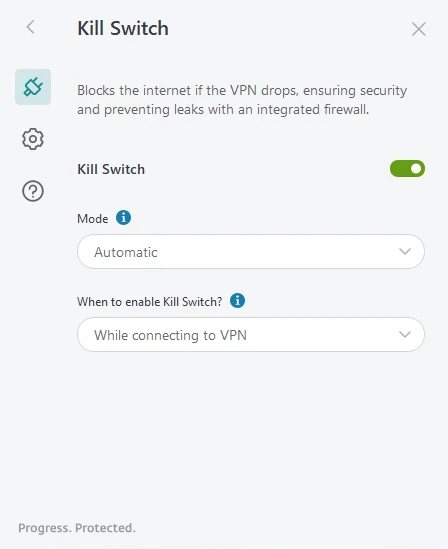
A kill switch that blocks the network during a failure can look like “ESET broke my internet.” Check VPN state before resetting adapters or uninstalling antivirus. If connectivity returns only after disabling Always-on, restore a working protocol or location rather than leaving the leak protection silently off.
No-logs policy: specific wording, but no public verification found
ESET’s current no-logs page says the service doesn't store VPN session history, source IP addresses or visited sites and doesn't keep connection logs, IP timestamps or session logs. During a live connection, server memory holds an anonymous identifier, connection time and transferred amount, then discards them at disconnect.
The same page says a central system stores the number of parallel connections to control account abuse and a counter of total uploaded/downloaded bytes over 30 days. That's more precise than saying “nothing is ever collected.” It also means unlimited traffic isn't synonymous with zero operational accounting.
Policy language still asks the reader to trust the provider and implementation. We searched ESET’s current help, policy and product material and didn't find a public independent no-logs audit report for ESET VPN. We also didn't find enough primary evidence to repeat community claims about a white-label infrastructure partner as established fact. If ESET publishes an audit or named provider disclosure, this review should be updated.
For ordinary hotel Wi-Fi, the encryption and IP change solve a practical problem. For investigative journalism, political organizing or a legal threat model, choose a provider whose ownership, jurisdiction, server controls, audits and incident history you have examined directly. Antivirus reputation is relevant but doesn't substitute for VPN-specific evidence.
Speed and streaming: test your routes, not someone else’s headline
A VPN speed number without the baseline connection, city, protocol, server, time and test method is decoration. ESET’s current Android listing advertises more than 450 servers across more than 70 countries and 100 cities, with availability depending on the subscription. That's enough for common travel routes, but the useful question is whether the particular country and nearby server you need appear in your account.
Run three repeatable tests on the same device: no VPN, nearest ESET location and the destination country you actually need. Measure download, upload, latency and packet loss at two different times. Then make a real video call and open the work or streaming service. A fast synthetic result doesn't prove stable conferencing, and one overloaded evening result doesn't define the whole network.
Community reports in r/ESET during 2025–2026 range from very fast and stable service to protocol-specific connection failures. One June 2026 iOS thread reported that switching to WireGuard resolved an authentication-style connection problem. Treat that as a troubleshooting lead, not a universal fix or laboratory result.
ESET doesn't make a binding promise that every streaming catalog will work indefinitely. Services change blocking rules, servers change addresses and licensing differs by region. If access to one catalog is the sole reason for buying, test it during the applicable refund period and keep a specialist alternative in mind.
Split tunneling, MAC spoofing and VPN for Router
The advanced setup documentation provides split tunneling on desktop and Android. Exclusive and Inclusive modes can route or bypass selected applications, IP addresses and hostnames. That's useful when a bank rejects VPN addresses, a game needs lower latency or only a work app should enter the tunnel.
Keep the rule narrow and test the actual destination. ESET warns that hostname-based tests can behave unexpectedly when an IP-check site redirects through a content delivery network. Wildcard behavior is also a recurring community question; don't assume a pattern such as *.example.com is supported unless the current interface validates it.
Desktop MAC spoofing can rotate the local network-interface address when reconnecting, reducing simple tracking across Wi-Fi networks. It doesn't hide the device from every fingerprinting technique, and some managed or hotel networks bind access to the original MAC. Record how to restore it before enabling it on a network with registration.
VPN for Router belongs to Ultimate and Small Business Security. ESET provides Asus and TP-Link paths, while other routers can use downloaded WireGuard or OpenVPN configurations if their own firmware supports a VPN client. A router tunnel protects televisions and IoT devices without individual apps, but it also makes location changes and exclusions household-wide. Keep the router’s current configuration backup and know how to bypass the tunnel for banking or local services.
Common failures and the safest order to fix them
No internet after enabling kill switch: open ESET VPN, confirm whether Always-on is active, choose Automatic protocol and a nearby location, then reconnect. Don't reset Windows networking until you have proved the kill switch isn't intentionally blocking an unprotected path.
Mobile VPN asks for credentials or won't connect: update the app and OS, switch from Automatic to WireGuard for one test, remove and recreate the OS VPN profile if official support directs it, and generate a fresh activation code if the install was never completed. The code expires after 72 hours; the ESET HOME password isn't a substitute.
One site or bank fails: confirm it works without the VPN, choose a location in the expected country, then create a narrow split-tunnel rule if the service legitimately rejects VPN traffic. Don't enable “Ignore SSL errors”; ESET’s own help says that setting makes API communication insecure by skipping certificate authenticity validation.
The antivirus, browser or VPN appears to conflict: isolate one layer. The ESET firewall and SSL/TLS guide separates firewall, web scanner, certificate and VPN symptoms. Collect exact versions and logs before reinstalling. A broad exception for the whole browser makes the symptom disappear without proving the cause.
ESET VPN versus a specialist VPN
Keep ESET VPN when it's already included, the locations cover your travel, the apps are stable and the written privacy policy meets your risk level. Paying separately for the same basic public-Wi-Fi and location-change job is unnecessary. Premium is particularly attractive for one to three VPN devices; Ultimate makes more sense when the household genuinely uses its larger allocation and other security features.
Compare Proton VPN, Mullvad, IVPN, Windscribe or another specialist when you need a standalone contract, public audits, open-source app evidence, a different jurisdiction, more countries or a specialist feature. Verify each provider’s current plan and audit rather than assuming every “privacy VPN” has the same proof.
Within antivirus bundles, compare Bitdefender VPN and Norton VPN on included devices, renewal cost, protocols and independent evidence. The broader ESET alternatives guide helps if the VPN is only one reason you may change the security suite.
Bottom line: ESET VPN is no longer a throwaway extra. It has enough security controls and unlimited traffic to be the sensible first test for current subscribers. We would still choose an independently audited specialist for a demanding privacy threat model, and we wouldn't upgrade to Ultimate solely for a VPN without comparing the full renewal cost.
For setup and account allocation, use the ESET installation guide. If the plan no longer fits, the cancellation and refund guide explains how to stop renewal without deleting protection early, while ESET vs Bitdefender and ESET vs Norton compare the full suites.
ESET VPN FAQ
Is ESET VPN included with ESET Premium?
Yes in the current US offering. ESET HOME Security Premium includes unlimited VPN traffic, with 3 VPN device activations when the security subscription covers up to 10 devices and 5 activations when it covers more than 10.
How many devices can use ESET VPN?
Current US limits depend on tier and security-seat count: Premium provides 3 or 5 VPN devices; Ultimate provides 10 VPN devices for subscriptions up to 10 security seats and 25 for subscriptions above 10. Check the regional cart because availability varies.
Does ESET VPN keep logs?
ESET’s current no-logs page says it doesn't store source IPs, visited sites, connection histories, IP timestamps or session logs. It does keep parallel-connection counts and a rolling 30-day total byte counter. We didn't find a public independent audit that verifies this policy.
Does ESET VPN have a kill switch?
Yes on desktop. ESET documents Always-on and Automatic modes plus controls for blocking traffic while or after connection. The current help page labels kill switch as a desktop feature, so don't promise identical behavior on mobile.
Does ESET VPN support split tunneling?
Yes on desktop and Android. It can include or exclude apps, IP addresses and hostnames. ESET warns that hostname tests can be misleading when a site redirects its IP check through a content delivery network.
What protocols does ESET VPN support?
The current connection guide lists WireGuard, IKEv2, OpenVPN over UDP, OpenVPN over TCP, Stealth through Stunnel and Wstunnel. Automatic is the sensible default; Stealth and Wstunnel are fallback modes for restrictive networks.
Can I install ESET VPN on a router?
ESET VPN for Router is included with ESET HOME Security Ultimate and Small Business Security. ESET provides Asus and TP-Link walkthroughs, and manual configuration can work on routers that support WireGuard or OpenVPN clients.
Is ESET VPN better than a standalone VPN?
It's better value when already bundled and the supported locations and controls meet your needs. A specialist VPN can be stronger for independently audited privacy claims, more countries, advanced streaming, port forwarding or a standalone monthly subscription.