
Bitdefender VPN Review: Fast and Easy, with Privacy Questions to Test
Bitdefender Premium VPN has grown into a real service with WireGuard, Double Hop and ten-device coverage. It's no longer fair to dismiss it as a 200 MB antivirus extra—but conflicting leak evidence and limited audit transparency keep it below the best privacy-first VPNs.
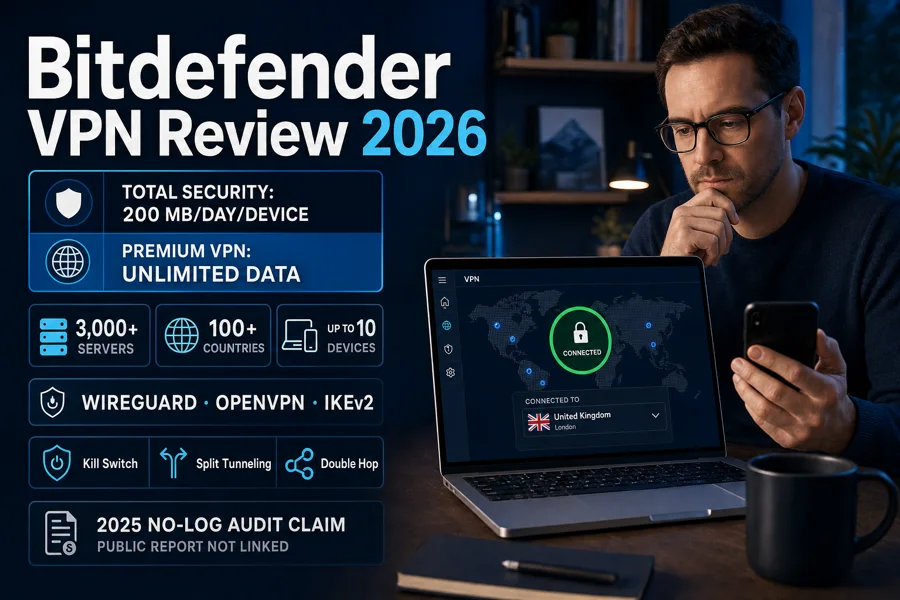
Quick answer: Bitdefender Premium VPN is a sensible everyday choice when you already want Bitdefender, need simple apps on up to ten devices and can verify the kill switch on your setup. WireGuard performance can be very good, and the feature set now includes split tunneling, Double Hop and ad/tracker blocking. We would pick a specialist VPN instead for Linux, routers, port forwarding, maximum audit transparency or work where a reconnect leak would have serious consequences.
Bitdefender VPN at a glance
The best part of Bitdefender VPN is that a normal person can understand it. The main screen connects with one control, Automatic mode picks a protocol and location, and the app exposes enough useful settings without presenting a networking exam. WIRED's June 2026 review reached a similar conclusion: approachable apps and competitive speeds, with fewer advanced privacy options than the leaders.
The weakest part is the trust chain. Bitdefender makes a clear no-activity-log claim and says the infrastructure passed a 2025 independent audit, but its cited page doesn't name the auditor or publish a report. An updated third-party bench also found leak and kill-switch problems under specific interruption tests. That isn't proof that every current device leaks; it's a reason to verify the failure path before treating the green “Connected” state as sufficient evidence.
What it gets right
- WireGuard, OpenVPN and IKEv2 options
- More than 3,000 advertised servers and 100+ locations
- Ten simultaneous device connections
- Kill switch, split tunneling and Double Hop
- Simple apps and a seven-day no-card trial
What keeps it from the top
- No first-party Linux app or generic router setup
- No port forwarding or static/dedicated IP
- Public audit details are thin
- Independent leak and kill-switch concerns
- First-year standalone price doubles at renewal in a current observed offer
| Area | Score | Editorial reason |
|---|---|---|
| Ease of use | 4.5/5 | Clear mainstream apps, simple default mode and readable connection data |
| Speed | 3.9/5 | Excellent results in one current test, much heavier loss in another methodology |
| Privacy | 3.3/5 | Strong written no-activity position, but limited public audit detail and a third-party processor |
| Security | 3.4/5 | Modern protocols and useful controls offset by interruption-test concerns |
| Value | 4.0/5 | Good first year and strong bundle economics when the antivirus is also wanted |
Standalone Premium VPN or the Premium Security bundle?
Bitdefender's US VPN page renders the checkout amount dynamically. WIRED recorded $35 for the first year and $70 after the first year in June 2026, plus a 30-day refund policy. Use those figures as a dated comparison, not a promise. The official page also offers a seven-day trial without a credit card, which is the better way to test a specific network before committing.
| Route | Current reference | Devices | Choose it when |
|---|---|---|---|
| Standard VPN in Total Security | $59.99 Individual security plan | 5 | 200 MB/day is enough or you only need an emergency tunnel |
| Standalone Premium VPN | $35 first year / $70 renewal observed June 2026 | 10 | You want the VPN without Bitdefender antivirus |
| Premium Security Individual | $79.99 checked July 29, 2026 | 5 | You want antivirus, password manager, scam tools and unlimited VPN together |
| Premium Security Family | $99.99 checked July 29, 2026 | 25 security slots across 5 accounts | The household also needs family profiles and parental controls |
Standalone Premium VPN is the cleaner choice if you use Microsoft Defender, another antivirus or no desktop security suite. Premium Security is economically stronger only when you independently want the security bundle. Buying a large package to “get the VPN free” hides the real cost and makes the renewal decision harder.
Bitdefender subscriptions can renew automatically, and the current price need not remain the next charge. Save the cart and use Central or the documented processor route to inspect renewal. Our separate cancellation and refund guide will cover the billing workflow; don't uninstall the app as a substitute for cancelling a subscription.
Bitdefender's no-log claim is stronger than its public audit detail
The current Bitdefender Home User privacy policy, version 10.3 adopted June 17, 2026, says the VPN processes randomly generated or hashed user and device identifiers, IP addresses and random tokens to establish a connection. It names IPVanish as the data processor acting on Bitdefender's instructions. The policy says device location may be processed for unsafe-Wi-Fi notifications or auto-connect, but that location and online-activity details aren't stored.
That language is materially different from “we process nothing.” A VPN needs an origin IP long enough to establish a tunnel, and a paid service needs account and subscription state. The useful privacy question is what remains identifiable after the session and who operates the infrastructure. Bitdefender says identifiable session data isn't retained and activity isn't logged; the processor relationship still belongs in the decision.
Older regional policies and reviews named Aura or Hotspot Shield, and RTINGS' current page discusses Hotspot Shield and WLVPN based on an investigation dated November 17, 2025. The June 2026 policy now names IPVanish. We don't merge those snapshots into one timeless architecture or accuse a current build of using every historical supplier. The processor and terms should be rechecked whenever Bitdefender changes the policy.
What the 2025 no-log audit claim proves—and doesn't prove
Bitdefender's no-log support page says the infrastructure underwent an independent audit in 2025 and that the work confirmed no activity logs or sensitive connection records were stored. This is better evidence than an unsupported slogan. The page doesn't name the auditor, link a report, define the sampled systems or show the assessment period, so readers can't independently inspect the scope.
We therefore score the claim as positive but incomplete. A transparent audit normally lets a reader identify the assessor, date, assurance standard, systems examined and exceptions. Bitdefender may have valid contractual reasons not to publish the report, but the absence of those details still separates this evidence from providers publishing repeatable public assessments and open-source client code.
Modern protocols, useful controls and a kill-switch warning
Bitdefender's current protocol guide lists Automatic, WireGuard, OpenVPN and IKEv2, with availability varying by operating system. Automatic is sensible for a beginner; WireGuard is usually the first manual choice for speed and battery efficiency. OpenVPN TCP can help on a restrictive or unstable network, while IKEv2 is useful for quick mobile reconnection where supported.
The app includes an Internet Kill Switch, split tunneling, ad blocker, anti-tracker, custom or predefined Double Hop routes and App Traffic Optimizer for up to three selected applications. These are no longer the features of a throwaway antivirus add-on. They also require careful configuration: anything excluded through split tunneling goes out directly, and Double Hop normally adds latency because traffic crosses two VPN servers.
| Tool | What it does | What to verify |
|---|---|---|
| Kill Switch | Blocks traffic when the VPN unexpectedly disconnects | Reboot, app crash, network loss and reconnect behavior |
| Split tunneling | Excludes selected apps or sites from the tunnel | Excluded traffic exposes the normal IP and DNS path |
| Double Hop | Routes through two chosen VPN locations | Latency cost and whether both locations are appropriate |
| App Traffic Optimizer | Prioritizes up to three applications | Improves scheduling, not raw ISP bandwidth |
| Ad blocker / anti-tracker | Blocks selected advertising and tracking requests | Not a substitute for browser isolation or malware protection |
The concern comes from RTINGS' updated July 13, 2026 test bench. It reported system DNS and some system traffic outside the tunnel, plus traffic after system reboot and a software crash; loss of internet didn't leak in its table. Bitdefender separately says an enabled kill switch materially mitigates TunnelVision and emphasizes keeping it on for macOS and iOS. Both statements can be true under different builds, protocols and procedures.
Don't settle the conflict by choosing the source you prefer. Enable the kill switch, use a reputable IP/DNS/WebRTC test, interrupt Wi-Fi, restart the app, reboot the device and watch whether background traffic resumes before the tunnel. Repeat after an update. If a failure would be consequential, use a service with consistently reproduced fail-closed results on the same platform.
Current speed tests disagree more than the marketing implies
WIRED tested WireGuard in several situations and reported an average 14% reduction in download speed and 13% in upload speed, with peaks around 480 Mbps from a roughly 550 Mbps home baseline. That's excellent for ordinary browsing, 4K video, downloads and calls. The reviewer also reported no connection dropouts during the test period.
RTINGS' ongoing bench produced a different picture: 195 Mbps with the VPN from a 1,015 Mbps download baseline and 305 Mbps from a 953 Mbps upload baseline. Its latency measurements also rose substantially. The absolute speeds remain usable, but the percentage loss is far larger. Neither result predicts your home because distance, server load, ISP routing, protocol, device and test server all change the path.
| Source | Test snapshot | Result | What it tells us |
|---|---|---|---|
| WIRED, June 2026 | WireGuard, home and away | 14% download and 13% upload reduction on average | A nearby server can feel almost transparent |
| WIRED, June 2026 | Home fiber/Wi-Fi | Up to 480 Mbps vs about 550 Mbps baseline | Plenty of real throughput for downloads and video |
| RTINGS, July 2026 bench | Standardized high-speed line | 195 Mbps vs 1,015 Mbps download baseline | A large relative loss can still leave usable capacity |
| RTINGS, July 2026 bench | Latency measurement | Download +71 ms; upload +267 ms | Gaming and calls need a local test, not a bandwidth headline |
Our buying rule isn't “fast” or “slow.” Start with Automatic, then compare a nearby location on WireGuard. Run three tests at similar times with and without the VPN, then test the application that matters: a call, remote desktop, game or large download. If latency is the problem, Double Hop and a distant country will normally make it worse; Traffic Optimizer can't shorten geography.
Streaming, gaming and torrenting: capable, never guaranteed
Bitdefender advertises streaming and access around geoblocks, and current reviews describe the service as capable for mainstream viewing. That's useful, but a successful Netflix or regional-TV check is temporary. Streaming platforms continually block shared VPN addresses, account-country rules still apply, and a server working today can fail tomorrow. There are no honest permanent “unblocks everything” results.
For gaming, the nearest server and latency matter more than unlimited bandwidth. Use split tunneling when a game rejects VPN traffic but another app still needs protection, understanding that the game then uses the normal connection. App Traffic Optimizer can prioritize a game, call or stream within the VPN, but it doesn't create new bandwidth or fix a distant route.
Bitdefender supports P2P, while RTINGS confirms torrent capability and no data limit on Premium. The service doesn't provide port forwarding. Turn on the kill switch, verify DNS and IP behavior, and follow local law and the content owner's rights. A heavy P2P user may prefer a provider with public audit reports, stronger fail-closed evidence and more networking controls.
Restrictive networks are a separate case. Switching from Automatic to OpenVPN TCP or another supported protocol may restore connectivity, but no vendor should promise operation in every country or workplace. Check local law before traveling, review our security guide for travelers, and install/test the app before entering a network where the download page may be blocked.
Ten devices, but not every device you own
Bitdefender Premium VPN covers up to ten simultaneous devices and provides apps for Windows, macOS, Android and iOS. The official page also references Android smart TVs and Amazon Fire TV/Firestick. There's no comparable first-party Linux app, and advanced users don't receive generic WireGuard or OpenVPN profiles for arbitrary routers and headless devices.
| Platform | Current support | Important caveat |
|---|---|---|
| Windows | Full desktop app | Retest kill switch after reboot and updates |
| macOS | Desktop app | Feature behavior can differ; keep kill switch enabled |
| Android | Mobile app | Website vs app split-tunneling support varies by protocol |
| iOS | Mobile app | VPN and local web-protection profiles can compete for the system VPN slot |
| Android TV / Fire TV | Selected official app support | Check the exact store and device generation |
| Linux / router | No normal first-party path | No generic manual profiles for a whole-network setup |
The ten-device figure therefore works best for a conventional mix of laptops and phones. A household with Linux, a NAS, game consoles or a router-level privacy plan may have fewer usable slots than the headline suggests. Count supported installations, not electronics, and use our Bitdefender setup guide when the VPN is part of a larger security subscription.
What to do when Bitdefender VPN blocks a site or won't connect
VPN endpoints are frequently blocked by search engines, banks, streaming platforms and abuse-sensitive sites. A July 2026 r/BitDefender report described Google and Reddit trouble even after trying Automatic and a named US server. That's one person's experience, not a measured outage rate, but it matches a common shared-IP problem and belongs in the troubleshooting plan.
- Confirm the VPN is the cause. Disconnect briefly on a trusted network and retry the same site. Reconnect before doing sensitive work.
- Choose a nearby server manually. Start in your own country; another shared IP may not be blocked or overloaded.
- Change protocol. Try WireGuard, then OpenVPN or IKEv2 where available. Recheck the kill switch after every change.
- Inspect split tunneling. Exclude only the affected low-risk app or site; excluded traffic is outside the tunnel.
- Check another network. A workplace, hotel or ISP can block protocols differently from mobile data.
- Update and collect the exact error. Record the app version, operating system, protocol, location and time before contacting official support.
If iPhone web protection stops when the VPN connects, inspect which local VPN-style profile owns the iOS network extension; iOS normally permits only one active VPN tunnel configuration of that type. Don't repeatedly install profiles from forum links. If the issue spreads beyond the VPN, use the broader Bitdefender troubleshooting guide.
Better alternatives for a specific priority
Proton VPN: transparency and Linux
Choose a privacy-focused provider when open-source apps, a Linux client and recurring public audit evidence matter more than an antivirus bundle. Compare current plans and renewal terms because privacy strength doesn't automatically mean the cheapest offer.
Mullvad: less account identity
Choose an account-minimized model when you don't want a conventional email-and-marketing relationship around the VPN. It's a coherent fit for a stronger anonymity goal, though streaming and bundle convenience may be less important.
NordVPN or Surfshark: broader device ecosystem
Choose a specialist with router and Linux options when ten mainstream-device slots aren't enough. Check current audits, simultaneous-connection rules, renewal totals and recent streaming tests rather than accepting a lifetime “best VPN” label.
Keep Bitdefender: simplest bundle
Keep Bitdefender when Premium Security already solves antivirus and VPN needs, the nearby WireGuard route performs well and your interruption tests stay sealed. Complexity has a cost too; a well-tested bundle can be safer than two services nobody maintains.
Our current editorial score is 3.7 out of 5. That isn't a customer-rating aggregate. Bitdefender earns points for usability, modern features, coverage and good best-case speed, while public audit detail, networking limits and conflicting leak evidence keep the recommendation conditional. The broader Bitdefender alternatives guide will compare the entire security suite rather than only the tunnel.
Bitdefender VPN FAQ
Is Bitdefender VPN good in 2026?
It's a good everyday VPN for someone who values simple apps, ten-device coverage, WireGuard, split tunneling and more than 100 advertised server locations. Current speed evidence is mixed but usable. We wouldn't make it the first choice for Linux, router installation, port forwarding or a high-risk workflow that requires independently reproducible fail-closed behavior.
Is Bitdefender VPN free with Total Security?
Total Security includes Standard VPN traffic capped at 200 MB per day per device. It's useful for short public-Wi-Fi sessions but not normal streaming or all-day browsing. Premium Security, Ultimate and Ultimate Plus include unlimited VPN data for the devices covered by those plans.
How much is Bitdefender Premium VPN?
WIRED observed the standalone US plan at $35 for the first year and $70 after the first year in June 2026. Bitdefender renders prices dynamically and can change promotions, taxes and renewal amounts, so confirm the live checkout and save the order terms.
Does Bitdefender VPN keep logs?
Bitdefender says it doesn't store online activity or location details. Its June 17, 2026 privacy policy says it processes random or hashed user and device IDs, IP addresses and random tokens to establish the VPN session, with IPVanish acting as its data processor.
Has Bitdefender VPN passed a no-log audit?
Bitdefender says the infrastructure used by its VPN underwent an independent no-log audit in 2025. The cited support page doesn't name the auditor or link the report, so the claim is positive evidence but less transparent than a provider publishing the assessor, scope, date and report.
Does Bitdefender VPN have a kill switch?
Yes, and Bitdefender recommends enabling it. A current RTINGS bench reported leaks after reboot and software crash, while the vendor says the kill switch mitigates the TunnelVision class of issue. Test disconnect, reboot and app-crash behavior on your own operating system and protocol before relying on it for a high-risk task.
Does Bitdefender VPN work with Netflix and streaming?
Bitdefender advertises streaming access and current independent reviews found it usable for everyday streaming, but no VPN can guarantee a specific service or region indefinitely. If a service blocks one endpoint, try a nearby server and confirm that the account's country rules permit the content.
Can I torrent with Bitdefender VPN?
Bitdefender supports P2P traffic, but it doesn't offer port forwarding. Use the kill switch, perform DNS and IP leak checks, and understand local law and the content owner's rights. Heavy torrent users may prefer a specialist VPN with stronger public audit transparency and more networking controls.
Does Bitdefender VPN work on Linux or routers?
Bitdefender's current consumer service focuses on Windows, macOS, Android and iOS, with support for some Android TV and Fire TV devices. It doesn't provide the Linux app, generic WireGuard or OpenVPN configuration files, or broad router setup that advanced households often expect.
Verdict: good bundle VPN, conditional privacy recommendation
Bitdefender VPN is now much better than the throwaway extra its 200 MB mode suggests. Premium gives a normal household fast-enough throughput, ten connections, modern protocols, split tunneling and Double Hop in apps that don't fight the user. If Premium Security already makes sense, the included unlimited VPN can be excellent value.
The recommendation remains conditional. Bitdefender should publish the auditor and scope behind its 2025 no-log claim, and the current leak findings deserve a reproducible answer rather than marketing reassurance. Test the kill switch on your device, use the seven-day trial, compare the renewal total and choose a specialist when Linux, routers, port forwarding or a high-consequence privacy model matters.
Next, read our complete Bitdefender review for malware protection and performance, or use the Bitdefender help hub to reach every setup, billing and troubleshooting guide without hunting through support search results.