
How to Install and Set Up Bitdefender Without Creating New Problems
The installer is the easy part. The decisions that prevent broken protection are made before and after it: use the right Central account, remove the old antivirus, grant only the required permissions, let the first update finish and verify what is actually active.

Quick answer: open Bitdefender Central on the device you want to protect, verify the correct subscription, remove another third-party real-time antivirus, restart, then use Install Bitdefender Products → Download. Finish Set up services, grant the operating-system permissions needed for the selected modules, update, run one full scan and confirm the device and renewal state in Central. Don't paste the activation code into every device; it belongs to the account once.
Before you install: five minutes that prevent most failures
Start in Bitdefender Central, not a search advertisement or an attachment. Under My Subscriptions, record the plan name, expiration date, Central email and remaining device slots. If the order uses another email, find the receipt before adding another account. A correct installer can't attach the subscription you bought to the wrong identity by guessing.
Remove the old third-party antivirus before adding Bitdefender. Real-time security products install low-level file, browser and network filters; two suites can block each other, multiply scans or leave Windows in a confusing protection state. Use the old vendor's normal uninstaller, then its cleanup tool if documented, and restart. Don't manually delete program folders. If the conflict is an earlier Bitdefender installation, follow our complete Bitdefender removal guide before downloading a fresh kit.
| Platform | Current Hub requirement | Before installing |
|---|---|---|
| Windows | Windows 10 64-bit or Windows 11 | Administrator account, current updates, old antivirus removed |
| macOS | macOS 12 or later | Administrator password and permission to enable security extensions |
| Android | Android 7 or later in current cross-device guide | Official Play Store app, active internet, review Accessibility use |
| iPhone / iPad | iOS 14 or later in current cross-device guide | Official App Store app, understand VPN/web-protection profile |
Bitdefender maintains older product-specific pages with lower historical minimums, but the current unified App/Hub cross-device guide uses the requirements above. A machine outside them may run a legacy product today without being a sound new installation. Update the operating system or choose supported protection rather than forcing a current security driver onto an unsupported build.
- Save important files. A normal install shouldn't alter documents, but backup is the rollback plan for any system-level change.
- Finish pending OS updates. Restart until Windows Update or macOS no longer waits for a reboot.
- Know the administrator credential. Bitdefender can't install security services with a standard account alone.
- Keep the receipt, not just the code. Region, seller, plan and term are part of the entitlement.
- Use a trusted network. The installer downloads current modules, so an unstable connection can leave it waiting or incomplete.
Install Bitdefender in eight safe steps
- Verify the Central account and subscription. Sign in, open My Subscriptions, and confirm the exact product, expiration, email and free device slots.
- Remove the old real-time antivirus. Uninstall the other suite, use its vendor cleanup tool only when required, then restart.
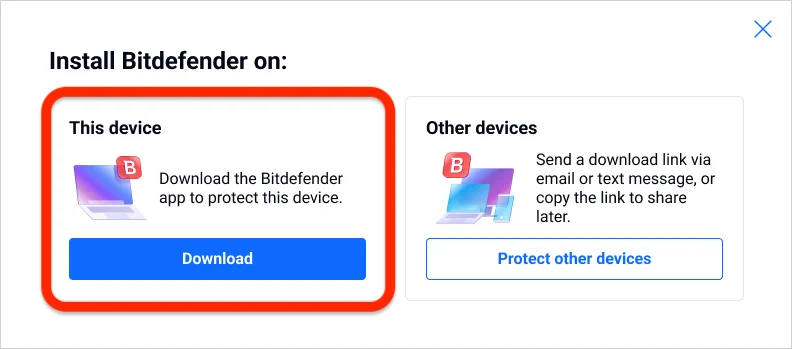
- Download from Bitdefender Central. Choose Install Bitdefender Products, then Download for this device or Protect other devices for a trusted link.
- Run the installer with OS permission. Open the download, approve the Windows or macOS administrator prompt and accept the subscription agreement.
- Complete platform permissions. Enable the named macOS endpoint-security/Full Disk Access entries or the specific mobile permission needed by a feature.
- Set up the included services. Let the app attach active subscriptions and configure Security, VPN, SecurePass or identity services that belong to the plan.
- Update and run the first full scan. Let modules and signatures finish background setup before judging resource use, then scan once.
- Verify protection and billing. Confirm the device in Central, check real-time/web protection, test normal apps and inspect allocation and renewal.
The new Bitdefender App may show several services because it reads every active subscription in the account. “Set up” isn't permission to enable every upsell or share every optional data source. Configure only the services you own and intend to maintain, and keep the rest out of the initial troubleshooting picture.
How to install Bitdefender App on Windows 10 or 11
Bitdefender's current Windows App installation guide requires Windows 10 64-bit or Windows 11. On the PC, sign in to Central and open the installation flow. Choose Download under “This device.” Use Protect other devices only when you intend to send a QR code, link or email to another machine.
Open the downloaded file and approve Windows' User Account Control prompt only after checking that the publisher and source are Bitdefender. The installer updates its package, asks you to accept the agreement and downloads modules. A slower connection can make “Getting everything ready” look stuck; check network activity and give it time before launching duplicate installers.
At Set up services, the app displays the most suitable active subscription and its expiration when several products exist. Security components install in the background; the VPN may install separately, and SecurePass or identity monitoring requires its own setup. Save a SecurePass recovery key outside the device if you create a vault. A password manager that can't be recovered safely isn't ready for production use.
First Windows checks
Open Windows Security → Virus & threat protection and confirm Bitdefender is registered as the active provider. Windows Defender normally changes its real-time role automatically; don't disable services with registry tweaks. In Bitdefender, confirm Security is active, update completes and no module reports setup pending. Run a full scan once, then judge idle CPU and disk use only after the scan and initial indexing settle.
How to install Bitdefender on Mac without missing permissions
Use Central on the Mac, download the installer and open Bitdefender Installer from the mounted package. The current unified guide requires macOS 12 or later. Enter the Mac administrator password when requested. The app can appear installed before the operating system has granted enough access for full protection, so don't stop at “installation complete.”
On macOS Tahoe 26 and Sequoia 15, Bitdefender's guide directs users to enable Bitdefender Agent under Endpoint Security Extensions, then switch on the listed Bitdefender security components under Privacy & Security → Full Disk Access. Ventura 13 and Sonoma 14 use an Allow control in Security, followed by Full Disk Access. Monterey 12 uses the older preference-panel path. Follow the section for the OS actually running.
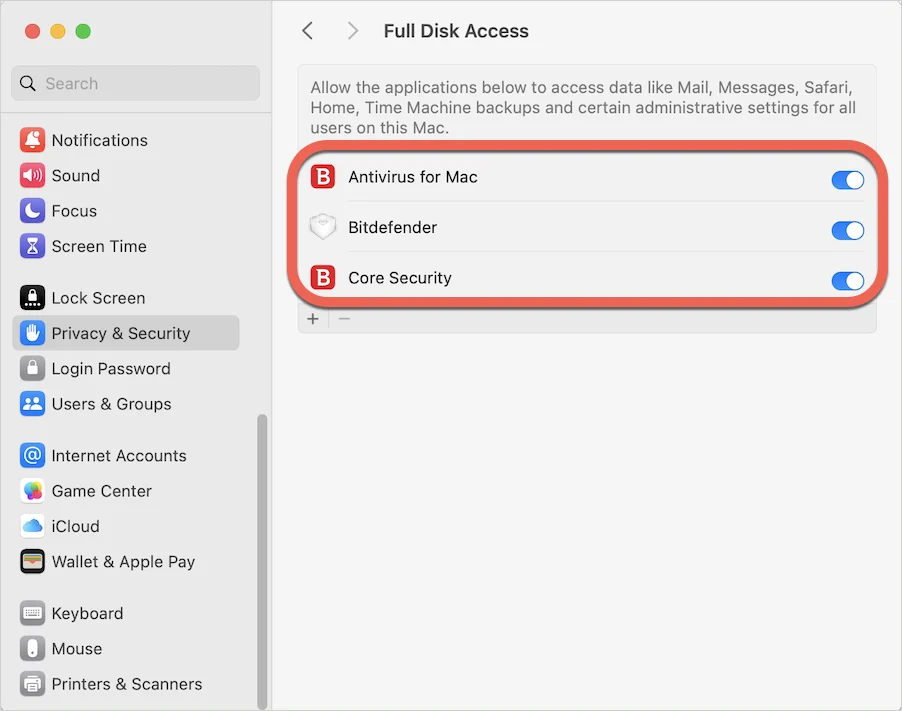
After permission changes, macOS may require Quit & Reopen. Install the web-protection extension only from the browser store or path linked by the official guide, review its requested access and enable it in the browser you actually use. If the extension or Full Disk Access remains off, the dashboard can look healthy while parts of scanning or web protection remain incomplete.
Android and iPhone setup: permissions are the feature
On Android, install Bitdefender Mobile Security or the current Bitdefender Hub from Google Play or a Central link. Sign in with the Central account that owns the subscription. Web Protection asks for Accessibility access so the app can inspect and block dangerous destinations in supported browsers. Grant it to the verified Bitdefender package only, then allow the file/app scan permissions needed for the malware scan.
Run Scan Now after setup and confirm the result. Android vendors can aggressively suspend background apps, so check Bitdefender's battery/background status if web protection repeatedly turns off. Avoid disabling all battery optimization without testing; the least-permissive exception that keeps protection stable is preferable.
On iPhone or iPad, install from the App Store or Central's official link and sign in. iOS security apps don't perform a Windows-style full filesystem antivirus scan. Their useful protections center on malicious-site blocking, scam/account features and a local network-extension or VPN-style profile. Because iOS limits concurrent VPN configurations, Bitdefender web protection and another VPN can compete; decide which service owns the tunnel rather than repeatedly reinstalling profiles.
A device slot doesn't guarantee identical modules. The full Windows firewall and Safepay experience doesn't become an iPhone feature, and macOS permissions don't apply to Android. The plan's value comes from appropriate protection and management on each platform, not a copied checklist.
Settings worth changing—and settings to leave alone
Start with defaults for the first day. Changing many modules before a baseline makes any blocked site, slow app or notification impossible to diagnose. Turn on automatic updates and keep real-time protection active. Review web protection, ransomware controls, firewall prompts and VPN auto-connect one category at a time.
| Setting | Initial choice | Reason |
|---|---|---|
| Automatic updates | On | Security software without current modules loses value quickly |
| Real-time protection | On | Don't trade core defense for a temporary performance guess |
| Full scan schedule | After initial scan, fit the device's workload | Continuous repeated full scans are rarely necessary |
| VPN auto-connect | Trusted-use rules, not every network blindly | Always-on can break local devices and sites before it's tested |
| Notifications | Keep security; reduce promotional noise | Threat and subscription alerts shouldn't be lost among offers |
| Exceptions | None until a false positive is verified | Broad folder exclusions create a durable blind spot |
If a legitimate file is detected, verify its source and hash, then submit it through Bitdefender's false-positive route. Don't exclude Downloads, a development tree or the whole game library because one item failed. If gaming or work is interrupted, test the relevant profile and a narrow exception after confirming the file is safe.
Review the VPN separately. Total Security's 200 MB/day/device allowance isn't suitable for normal all-day tunneling, while Premium includes unlimited subscription data. Our Bitdefender VPN review explains protocols, split tunneling and kill-switch verification instead of treating the VPN as an install checkbox.
Activation codes, subscription timing and device seats
Bitdefender's current subscription FAQ says a direct online subscription starts when purchased, not when the code is later activated. The code is used once and attached to one Central account. Every later installation obtains validity from that account; repeatedly typing the code is unnecessary and can obscure which email owns it.
Matching paid codes with the same product and user/device count may extend an existing subscription without losing remaining days, subject to Bitdefender's limits. A different plan or capacity can create a separate subscription instead of merging. Decide whether to extend or add, and verify the result in My Subscriptions before assigning devices.
- Virtual machines consume seats. Treat each VM installation as a separate protected device.
- Reinstalling the same Windows device doesn't normally add a seat. The built-in reinstall workflow preserves the subscription association.
- Retail codes can be region restricted. Contact the seller; don't use a VPN to work around licence terms.
- Protect other devices sends access, not your password. Use the Central link/QR flow instead of sharing account credentials.
- Family and Individual ownership differ. Family plans support separate accounts; Individual plans are tied to one Central account.
If activation fails, check characters, region, previous use and the account email. Bitdefender says codes are seven or ten uppercase alphanumeric characters and are valid in only one Central account. Never publish the code in a forum screenshot. Our pricing and renewal guide covers the contract after activation.
When the Bitdefender installer does nothing or setup fails
Bitdefender's current Windows troubleshooting starts with administrator rights, other security software, Windows updates and a fresh Central installer. That order is sensible because it changes one cause at a time. It doesn't require disabling the firewall, Secure Boot or every browser control.
- Check the account type. Windows Settings → Accounts → Your info should show Administrator, or an administrator must approve the install.
- Remove security conflicts. Uninstall another antivirus and old Bitdefender versions; restart before retrying.
- Finish OS updates. Install pending updates and restart again.
- Download a new kit. Delete the old installer and use Central so the package is current and tied to the intended account.
- Record the exact stage. “Nothing happens,” “getting ready,” download failure and subscription error are different problems.
- Use official diagnostics. If the retry fails, contact Bitdefender with logs and screenshots, not a support number from an ad.
On Mac, a successful package install followed by no security module often points to a blocked extension or incomplete Full Disk Access. A stuck installer has a separate official removal/reinstall path. Don't repeatedly force-quit while it's downloading; check network and process activity, then follow the documented recovery. Use the Bitdefender troubleshooting guide for update, scan and blocking failures after installation, and the separate performance guide for sustained resource use.
How to verify Bitdefender is actually protecting the device
A green dashboard is a starting point. Check the provider registration, module status, update time and Central device list. Run one full scan and restart. Then open normal browsers, calls, games, work applications, backup software and local network devices. A security suite that silently breaks the real workload hasn't completed setup.
Protection checks
- Real-time Security shows active
- Last update is current
- Web protection/extension is enabled where intended
- First full scan completes
- No duplicate third-party antivirus remains
Account checks
- Correct plan and expiration in Central
- Device appears once with the right name
- Unused old devices are identifiable
- Renewal state matches your decision
- Recovery keys are stored outside the protected device
Use harmless checks rather than downloading live malware. The official EICAR anti-malware test file can verify basic antivirus response, and browser vendors provide safe phishing-test pages. Don't weaken protection to make a test “work.” If detection or updates remain broken, collect evidence during the 30-day eligible refund window instead of assuming time will fix it. Our Bitdefender cancellation and refund guide explains the evidence and timing to preserve.
Bitdefender installation FAQ
How do I install Bitdefender on Windows?
Sign in to Bitdefender Central on the Windows 10 64-bit or Windows 11 PC, choose Install Bitdefender Products, download the installer for this device, approve the Windows prompt, accept the agreement and finish Set up services. Remove another third-party real-time antivirus and restart before beginning.
Do I need an activation code every time I install Bitdefender?
No. A code is activated once in one Bitdefender Central account. After the subscription is attached, new and repeat installations retrieve the entitlement from Central. Keep the code and receipt private, and verify the subscription under My Subscriptions.
When does a Bitdefender subscription start?
Bitdefender says a subscription purchased directly online begins on the purchase date, not when you later type a code or install the app. Retail and promotional terms can differ, so read the seller's activation deadline and save the order confirmation.
Can I install Bitdefender with another antivirus?
Don't run two full third-party real-time antivirus products together. Their filters can conflict, slow the device or block installation. Remove the old suite with its normal or vendor removal tool, restart, and let Windows Defender change state automatically when Bitdefender becomes active.
Why does Bitdefender need Full Disk Access on Mac?
macOS restricts security software from inspecting all protected files unless the user grants the required endpoint-security extension and Full Disk Access. Follow the Bitdefender prompts for your exact macOS version and enable only the named Bitdefender components shown in the official guide.
Does installing Bitdefender on a virtual machine use a device slot?
Yes. Bitdefender says a virtual machine consumes a subscription seat. Reinstalling on the same Windows device doesn't normally consume another seat, but a separate VM is treated as another protected device.
Why will the Bitdefender installer not start?
Confirm you're using an administrator account, remove another antivirus and old Bitdefender leftovers, restart, install current Windows updates and download a fresh installer from Central. Don't disable Secure Boot, firewall or system integrity as a generic workaround.
What should I do after installing Bitdefender?
Let modules and signatures update, run the first full scan, reboot, verify real-time and web protection, test normal applications, review VPN and notification settings, confirm the device in Central and inspect the subscription's renewal state.
Can I install Bitdefender on another person's device?
Use Protect other devices in Central to send a QR code, direct link or email. Family plans can use separate accounts; Individual plans remain tied to one account. Send links only to people you trust and never share your Central password or activation code.
Setup is complete when protection, workload and account all agree
A clean Bitdefender installation has three green lights. The operating system recognizes the security provider and required permissions; Bitdefender updates, scans and protects web traffic; Central shows the correct device, entitlement and renewal state. Missing any one can leave a polished dashboard attached to the wrong account or an installed app without complete access.
Keep defaults until the first full scan and one normal workday are complete. Then reduce promotional notifications, configure VPN rules and adjust narrow compatibility exceptions with evidence. If stability stays poor, use the functional fix guide; if the problem is sustained CPU, RAM or disk use, follow the performance guide rather than disabling core protection.
For the product decision behind the setup, read our full Bitdefender review, Free vs paid comparison or the Bitdefender help hub.