
Bitdefender Free vs Paid: Pay for Useful Features, Not Fear
Bitdefender Free isn't a glorified scanner. It has real-time protection, behavior monitoring and basic ransomware defense. Paid plans earn their price through recovery, network and privacy tools, multiple platforms and family management—not a magic second malware engine.
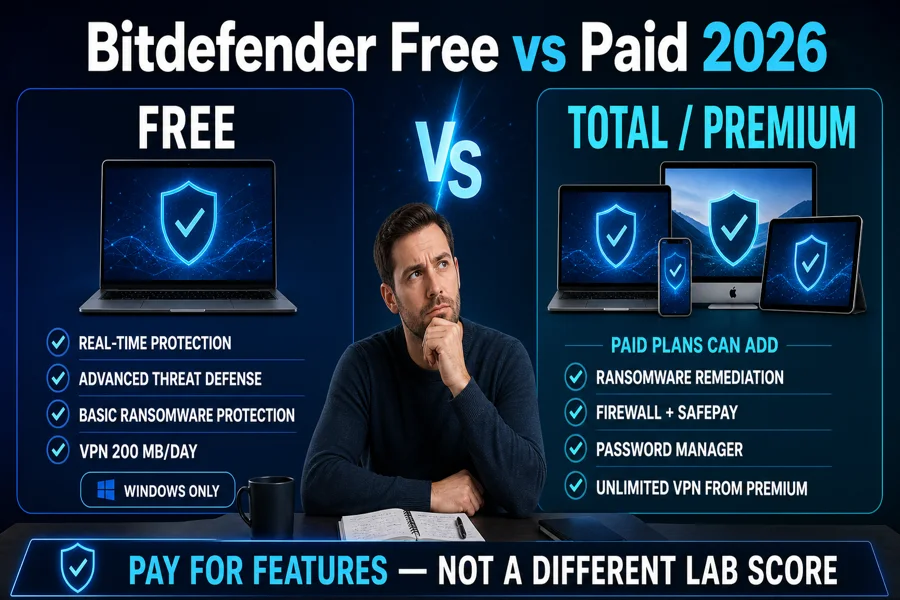
Quick answer: stay with Bitdefender Free on one ordinary Windows PC when you want quiet real-time malware protection and are comfortable using Windows Firewall, a separate password manager and backups. Buy Total Security when multiple operating systems, Ransomware Remediation, Bitdefender's firewall, Safepay, password manager or centralized device management will be used. Move to Premium only when unlimited VPN and its added scam/email tools justify the $20 step.
The honest verdict: Free is enough for more people than the pricing page admits
A careful Windows user doesn't become unprotected because they decline a subscription. Bitdefender Antivirus Free continuously watches files and behavior, blocks known and emerging malware, checks malicious sites and can remove an existing infection. That's a legitimate antivirus foundation. It also keeps Windows Firewall active rather than replacing it with Bitdefender's paid firewall.
The paid decision begins when a specific failure would be expensive. Ransomware Remediation can restore affected files after Bitdefender blocks an attack; Safepay isolates a banking session; the vulnerability scan exposes outdated software and weak settings; the password manager reduces reused credentials; cross-platform plans put several devices in one account. None makes careless clicking safe, but each solves a problem the basic edition doesn't.
Stay free when…
- You protect a normal Windows PC
- Real-time malware defense is the main requirement
- Windows Firewall and your browser security are configured
- You already have backups and a password manager
- You accept a bare interface and upgrade prompts
Pay when…
- You need protection across Windows, Mac, Android and iOS
- File restoration after ransomware matters
- You want Safepay, Bitdefender firewall and vulnerability checks
- A household needs 25 slots, separate accounts or parental controls
- Unlimited VPN replaces another subscription
Bitdefender Free has real-time protection—not just a scanner
The current Bitdefender Antivirus Free page says the Windows product detects and isolates suspicious changes in real time. It also names Advanced Threat Defense, existing-virus removal, malicious-download and phishing protection, basic ransomware protection, zero-day defenses and a 200 MB/day/device VPN. A Central account is required, but no credit card is.
This matters because at least one ranking 2026 review still says the free edition is essentially a scanner and that real-time protection requires payment. That description doesn't match Bitdefender's live product page. Other current tests, including TechRadar's 2026 free-antivirus coverage, correctly describe automatic real-time scanning and shared core technology.
“Real-time” doesn't mean “everything in Total Security.” Free can identify suspicious behavior without providing paid Ransomware Remediation, anti-tracker, social-network protection, Safepay, the Bitdefender firewall, password manager, vulnerability/settings analysis or Game/Movie/Work profiles. Its simplicity is the product: fewer controls, fewer bundled services and less to maintain.
Bitdefender Free vs Total Security vs Premium Security
We use Total and Premium as the paid comparison because they're the current cross-platform plans most home buyers see. Prices are direct US annual amounts displayed July 29, 2026 before tax. Promotions and renewals can change; the functional differences matter more than a temporary checkout badge.
| Feature | Antivirus Free | Total Security Individual | Premium Security Individual |
|---|---|---|---|
| Current price | $0, no stated time limit | $59.99 / year checked | $79.99 / year checked |
| Accounts / devices | Basic Windows entitlement | 1 account / 5 devices | 1 account / 5 devices |
| Platforms | Windows | Windows, macOS, Android, iOS | Windows, macOS, Android, iOS |
| Real-time malware protection | Yes | Yes | Yes |
| Advanced Threat Defense | Yes | Yes | Yes |
| Ransomware protection | Basic prevention | Prevention + Remediation | Prevention + Remediation |
| Bitdefender firewall / Safepay | No / No | Yes / Yes on supported Windows devices | Yes / Yes on supported Windows devices |
| Password manager | No | Yes | Yes |
| VPN | 200 MB/day/device | 200 MB/day/device | Unlimited subscription data |
| Scam Protection Pro / Email Protection | No / No | No / No | Yes / two protected email addresses |
Total Security isn't “Free with a higher detection percentage.” It's a multi-device security suite. Premium is Total plus an unlimited VPN and additional scam/email layers. Our current Bitdefender pricing guide covers Individual versus Family, Ultimate identity features and renewal handling without forcing those commercial questions into this comparison.
Does Free use the same antivirus engine as paid?
Bitdefender says Antivirus Free uses the same Bitdefender technologies behind its wider product family, and the Free page explicitly names Advanced Threat Defense. That supports the reasonable conclusion that core signatures, cloud reputation and behavior technology are shared. It doesn't support copying every Total Security laboratory result into a “Bitdefender Free score.”
Current independent reports name a specific paid build. Bitdefender Total Security 27.0 earned 18/18 in AV-TEST's March–April 2026 Windows 11 cycle, while AV-Comparatives recorded 99.5% protection and five false alarms in its February–May 2026 real-world test. Those results are strong evidence for Bitdefender's current protection stack, but the labs didn't label the tested product “Antivirus Free.” Our full Bitdefender review gives the version, dates and limitations.
Feature differences can also affect a real outcome even when the detection core is shared. A paid firewall can block network behavior the basic product delegates to Windows. Ransomware Remediation can restore files after a malicious process is stopped. Safepay changes the environment used for a financial session. Those are layers around detection, not proof that Free ignores the same malicious file.
Basic ransomware protection isn't paid file recovery
Bitdefender's Free comparison lists basic ransomware protection. That means behavior monitoring can identify and stop ransomware activity. Paid products add Ransomware Remediation, which creates protected copies during a suspicious event and attempts to restore encrypted files after the threat is blocked. Stopping a process and reconstructing changed files are separate jobs.
Neither feature replaces a tested backup. Ransomware can target attached drives, cloud-synced folders and account credentials, while an antivirus may stop an attack only after some changes occur. Keep at least one versioned or offline copy, test restoration and protect the cloud account with phishing-resistant multifactor authentication. Paying for Remediation is sensible when active files are hard to recreate; it isn't permission to abandon backup discipline.
| Scenario | Free helps by | Paid adds | Still required |
|---|---|---|---|
| Known malicious file | Detection, quarantine and removal | Additional suite layers | Confirm the alert before restoring |
| Suspicious encryption behavior | Advanced Threat Defense and basic ransomware blocking | Ransomware Remediation workflow | Offline/versioned backup |
| Stolen cloud password | Limited relevance | Scam and account tools vary by tier | Unique password, MFA and recovery codes |
| Already encrypted archive | May remove the malware | No guaranteed universal decryption | Clean restore or verified decryptor |
Which paid extras actually earn the subscription?
Bitdefender firewall and Safepay
Free leaves Windows Firewall in place; it doesn't leave every network port open. Bitdefender's paid firewall integrates application and network decisions with the security suite, which can be easier for a household that wants one control surface. Safepay is a hardened browser for banking and shopping. It reduces exposure from normal browser extensions and session clutter, but it can't fix a fraudulent payment page entered by choice.
Vulnerability scan, anti-tracker and work profiles
The paid vulnerability scan looks for outdated software and unsafe system settings. That can be valuable for a person who doesn't maintain Windows and applications consistently. Anti-tracker limits selected web tracking, while Game, Movie and Work modes reduce interruptions. A disciplined user can cover much of this with Windows Update, browser controls and Focus Assist; convenience is still a legitimate product benefit.
Password manager
Total and higher current plans include a password manager. It earns value when it replaces reused passwords and synchronizes across supported devices. If you already use a well-audited manager and maintain recovery codes, a second vault is clutter rather than protection. Bitdefender Password Manager reached end of life June 15, 2026 in favor of SecurePass, so old comparisons naming the retired product need to be rechecked.
The VPN
Free and Total both include 200 MB/day/device, which is enough for a short public-Wi-Fi task and little else. Premium adds unlimited subscription data and location selection. Our Bitdefender VPN review checks current protocols, privacy processing, audit transparency, speed and leak evidence; don't assign the upgrade value until that specific VPN fits your use.
Who should stay free, choose Total or move to Premium?
One maintained Windows PC: Free
Free is a rational default when Windows is updated, Windows Firewall remains enabled, the browser blocks dangerous downloads and important files have tested backups. Add a dedicated password manager and strong account security. Paying solely because a warning tile says “basic” isn't a security strategy.
Mixed devices or recovery need: Total
Total is the practical paid choice when the household needs Windows, Mac, Android and iOS coverage, or when Ransomware Remediation, Safepay, firewall and password management will be used. Its five-device Individual limit should match the inventory before purchase.
Daily VPN use: Premium
Premium earns the $20 step over Total when Bitdefender's unlimited VPN can replace another paid service and the extra scam/email protection matters. If you prefer a specialist VPN, Total plus that provider may be the stronger combination despite two apps.
Family accounts: compare Family
A Family plan covers five accounts and 25 devices and adds parental controls. That's a management decision, not an automatic security upgrade. Count people, platforms and devices, then verify what each child platform can actually enforce.
Microsoft Defender is also a credible zero-cost alternative on an updated Windows 11 system. It integrates deeply with Windows and avoids another account, while Bitdefender Free offers a different protection stack and simpler set-and-forget interface. Read our current Microsoft Defender review, the Bitdefender versus Microsoft Defender comparison and our broader best free antivirus guide before installing two real-time products together.
Antivirus Free and the 30-day Total Security trial are different products
Bitdefender documents a no-card 30-day paid-product trial through Central. The trial exposes the selected paid edition's features and expires after the test period unless you subscribe. Antivirus Free is described separately as a permanent Windows entitlement with no validity date. A download page saying “free” can therefore mean either a permanent basic product or temporary access to a paid one.
| Question | Antivirus Free | 30-day paid trial |
|---|---|---|
| Time limit | No stated validity date | 30 days |
| Credit card required | No | Official trial says no card |
| Feature set | Basic Windows protection | Features of the selected paid product |
| After the period | Continues while the entitlement/product remains supported | Paid access ends unless subscribed |
| Best purpose | Long-term no-cost protection | Compatibility and feature evaluation |
The trial is useful when you actively test. Reboot, run normal applications, copy files, launch games, check VPN and browser behavior, inspect Central and decide before day 30. If the extras go unused, remove the paid trial cleanly and install the intended Free product or return to Defender. Our installation and setup guide will document that handoff.
Why Total Security may install when you wanted Free
A July 2026 r/BitDefender user reported a Free licence repeatedly expiring and Total Security appearing during reinstallation. In the thread, a Bitdefender representative said this can happen when the Central account is already associated with paid products and suggested creating another Central account for Free. That's a dated support response to one case, not proof of a universal forced-upgrade design.
- Open Central first. Record every active, expired and trial subscription attached to the account.
- Use the exact official Free page. Avoid a search ad or generic “trial downloads” page.
- Confirm the installed entitlement. The product name and expiry shown in Central should match the intended Free licence.
- Don't run two real-time antiviruses. Let Windows manage Defender's passive/active state during the transition.
- Use official support if the licence flips. Include the Central email, product name, screenshots and installer source; never post licence or payment details publicly.
If repeated expiry or update failure continues, use the Bitdefender functional troubleshooting guide; for sustained resource use, follow the separate CPU, RAM and disk guide instead of disabling protection indefinitely. If you decide to leave, follow the complete Bitdefender removal guide.
Bitdefender Antivirus Free for Android is a separate decision
The official Android Free app provides cloud scanning, automatic scanning when an app is installed and on-demand scanning. Bitdefender describes it as low-impact malware protection rather than the full Mobile Security product. Android's security model is different from Windows, so rows about Safepay, Windows Firewall or Ransomware Remediation don't transfer.
iPhone is different again: iOS security apps don't scan the whole file system like a desktop antivirus. Their useful functions center on web, scam, account and network protection within platform limits. A “five devices” paid subscription can cover an iPhone, but that doesn't make its feature list identical to Windows. Platform-specific value should be verified before paying for capacity.
Bitdefender Free vs paid FAQ
Does Bitdefender Free have real-time protection?
Yes. Bitdefender's current US page says Antivirus Free for Windows detects and isolates suspicious activity in real time and includes Advanced Threat Defense. It isn't merely an on-demand scanner, although the paid products add recovery, privacy, network and platform features.
Is Bitdefender Antivirus Free really free forever?
Bitdefender describes the current Windows product as free with no hidden costs, trial period or validity date. A free Central account is required. The company retains an end-of-life policy for free products, so permanent means the current entitlement doesn't expire, not that a vendor must support one product forever.
Does Bitdefender Free protect against ransomware?
It includes basic ransomware protection and behavior-based defense. Paid products add Ransomware Remediation, which is designed to restore files affected during a blocked ransomware incident. Prevention and file restoration are different capabilities.
Does Bitdefender Free include a VPN?
Yes. The current Windows Free product includes basic Bitdefender VPN traffic capped at 200 MB per day per device. That's enough for a short sensitive session, not normal all-day browsing or streaming. Unlimited VPN begins with Premium Security or a separate Premium VPN subscription.
Does Bitdefender Free include a firewall?
It doesn't include Bitdefender's paid firewall. Windows Firewall remains available, so the computer isn't automatically left without a firewall. Paying makes sense when Bitdefender's integrated network controls and other suite features solve a specific need.
Is Bitdefender Free as good at detecting malware as paid?
Bitdefender says Free uses its core technologies, but current independent lab reports usually name a paid Bitdefender product rather than the exact Free build. It's reasonable to expect shared detection technology, but not to copy a paid-suite score onto Free as if that SKU was separately certified.
Does Bitdefender Free work on Mac, iPhone or Android?
The comparison here is for Bitdefender Antivirus Free for Windows. Bitdefender separately offers Antivirus Free for Android with cloud and app scanning. Mac and iPhone options follow different product models; don't install the Windows package or assume identical features.
What is the difference between Bitdefender Free and a 30-day trial?
Antivirus Free is the permanent basic Windows product. The 30-day trial exposes paid-product features and expires after the test period unless you subscribe. Check Central to confirm which entitlement is attached before assuming a trial will fall back to Free.
Why did Bitdefender install Total Security instead of Free?
A July 2026 community case received a Bitdefender representative's explanation that a Central account already associated with paid products can affect the install flow. Verify the subscription shown in Central and use official support; a separate account was suggested in that case, but it isn't a universal requirement.
Verdict: Bitdefender Free is real protection, paid is a workflow upgrade
Bitdefender Antivirus Free is good enough for a maintained Windows PC whose owner has backups, a password manager and basic account security. It watches in real time, uses behavior detection and includes basic ransomware defense. Calling it merely a scanner is inaccurate; calling it equivalent to Total Security is equally misleading.
Total earns its price through cross-platform coverage, Ransomware Remediation, firewall, Safepay, vulnerability checking and password management. Premium earns the next step when unlimited VPN and scam/email features replace services you'd otherwise buy. Start free, name the missing capability, test the paid trial if necessary and subscribe only when that capability changes the outcome.
Continue with the complete Bitdefender review, the current price and renewal comparison, or the Bitdefender help hub.