
How to Uninstall Bitdefender Completely Without Breaking Protection
A complete removal isn't a hunt for every file containing the word Bitdefender. It's a supported uninstall, a restart, a deliberate decision about VPN and Central, and proof that another security provider is actually active.

Quick answer: on Windows 10 or 11, use Settings → Apps → Installed apps → Bitdefender → Uninstall, approve the prompt, finish Bitdefender's own removal window and restart. On Mac, open Applications → Bitdefender → Bitdefender Uninstaller and choose the components to remove. Use the official Windows Uninstall Tool or Mac recovery guide only when normal removal fails, then verify the active antivirus and network state.
Need a different Bitdefender task? The complete Bitdefender guide hub routes plans, Free versus paid, setup, VPN, troubleshooting, performance, billing and removal without mixing their steps.
Before removal, decide what “completely” means for this device
Start by opening the installed-app list and Central. Record the main security product, VPN, Agent/Hub, Central email and subscription. A user who wants to repair Antivirus shouldn't accidentally remove a paid standalone VPN; someone leaving Bitdefender entirely shouldn't stop after the first product disappears.
Finish any active quarantine decision before uninstalling. If a legitimate file or Windows setting was incorrectly removed, restore it through the product while the recovery interface still works, verify the file safely and make a normal backup. A community report blaming removal for broken Windows Update can also reflect a registry item quarantined earlier. Treat chronology as evidence, not proof of cause.
Download the replacement installer from its official vendor, but don't leave two complete real-time antivirus suites active together. On Windows, Microsoft Defender should normally return when Bitdefender unregisters. That handoff still needs to be checked after reboot. Our Bitdefender alternatives guide will help choose the next suite; the installation guide covers a clean reinstall, and the full Bitdefender review helps decide whether repair is worth the effort.
Software, device seat, subscription and account are independent
| Action | What it changes | What it doesn't guarantee |
|---|---|---|
| Uninstall locally | Removes selected apps and drivers from one device | Cancellation, refund or Central seat removal |
| Remove Central device | Signs apps out and frees a seat shortly | Local software removal |
| End automatic renewal | Stops the next eligible merchant charge | Immediate software removal or refund |
| Delete Central account | Deletes the account and associated services | A safe substitute for resolving active billing first |
This distinction prevents the most common “Bitdefender came back” confusion. An expired Central card or email isn't a running Windows service, while a local Agent can remain after someone removed only Total Security. Set four explicit outcomes: which apps go, whether the device stays in Central, what happens to renewal, and which protection remains.
If billing must also stop, use the separate Bitdefender cancellation and refund guide. It maps My Payments, Subscriptions, Verifone, Apple and Google rather than pretending uninstall changes the contract. The pricing and renewal guide explains which paid service may still be attached to the account.
Remove Bitdefender safely in eight steps
- Record the product and account. Note the installed Bitdefender products, Central email, subscription and whether VPN or other services must remain.
- Prepare replacement protection. Download the intended replacement or plan to verify Microsoft Defender after the restart, without running two real-time suites together.
- Use standard uninstall first. Remove Bitdefender from Windows Installed apps or the Bitdefender Uninstaller on macOS and approve the administrator prompt.
- Remove separate components deliberately. Uninstall VPN and other Bitdefender apps only when they're no longer needed; don't assume the main app removes every service.
- Restart the device. Reboot so security drivers, services, network filters and provider registration can unload cleanly.
- Escalate only if removal failed. Use Bitdefender's current official uninstall tool and Safe Mode instructions instead of registry cleaners or copied terminal commands.
- Update the Central device list. Remove the old device in Central only when you want to free the seat or sign its apps out.
- Verify removal and protection. Check installed apps, the active antivirus provider, VPN/network behavior and subscription status as separate outcomes.
How to uninstall Bitdefender App on Windows 10 or 11
Bitdefender's current Windows App removal guide begins with normal operating-system uninstall. Right-click Start, open Installed apps, find Bitdefender, choose the three-dot menu and Uninstall. Confirm the Windows message, approve User Account Control and choose Uninstall again inside Bitdefender's own window.
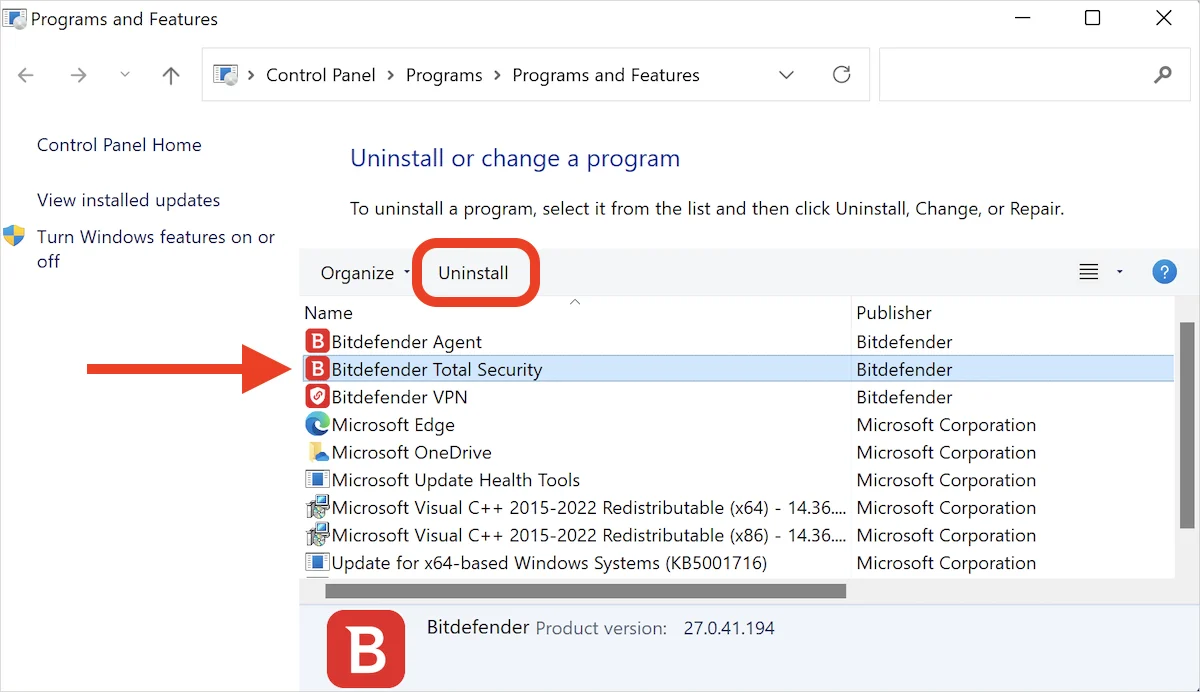
Wait for the removal to reach Close, save work and restart even if Windows doesn't seem to require it. Security filters can remain loaded until shutdown. Don't assess CPU use, networking or Microsoft Defender registration before the reboot has completed.
After the Windows restart
Open Settings → Apps and confirm the main Bitdefender product is gone. Then open Windows Security → Virus & threat protection → Who's protecting me or Manage providers and confirm Microsoft Defender Antivirus or the intended replacement is active. Update its protection intelligence and run a quick scan.
Test normal browsing, Windows Update, OneDrive or another sync client, printers and local network access. If something broke, record the exact error before installing cleaners or a second VPN. A previously quarantined policy, a pending Windows update and the uninstaller are different possible causes.
When to use the Bitdefender Uninstall Tool and Safe Mode
The official Windows article links a consumer Bitdefender Uninstall Tool when standard removal fails. Use that current link, not a copied executable from a download site or old forum attachment. Close other applications, run the tool with administrator approval, let it finish and restart.
If the tool says “removal has finished with errors,” does nothing or hangs, Bitdefender's current error-recovery page instructs users to run the official tool in Windows Safe Mode. That's the supported escalation. Safe Mode isn't a reason to delete services, drivers or registry keys manually.
Use the tool
Normal uninstall errored, Bitdefender remains registered after restart, a damaged install blocks reinstall, or official support directs you to it.
Don't use it first
The app works, you only want to stop billing, only VPN should go, or the machine is managed by an employer or school.
Consumer and business removal tools aren't interchangeable. GravityZone/BEST endpoints can be password protected, centrally managed and governed by an organization. Don't run business destructive flags or attempt to bypass policy on a work device; contact the administrator.
How to uninstall Bitdefender on macOS
For the current unified App, Bitdefender's macOS uninstall guide says to open Finder → Applications → Bitdefender and launch Bitdefender Uninstaller. Select Bitdefender, click Uninstall, enter the administrator password each time macOS asks, wait for completion and close the tool.
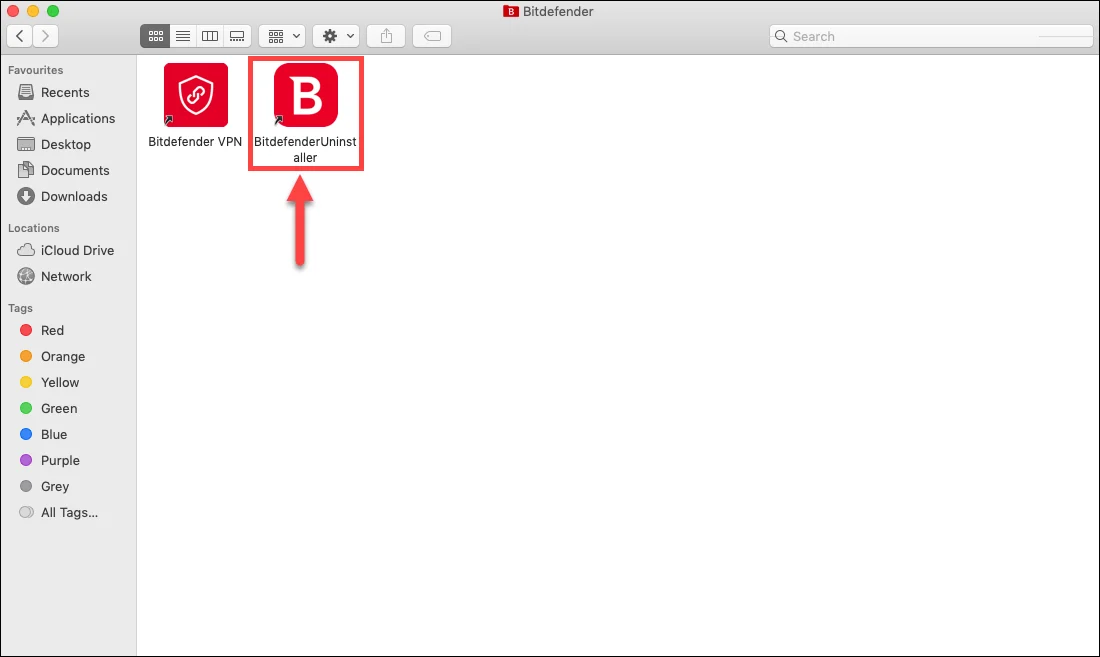
The Antivirus for Mac guide exposes separate checkboxes for Antivirus and VPN. Select both only if both should disappear. A user keeping Premium VPN shouldn't remove it merely because it shares the Bitdefender folder. Restart afterwards and review Login Items, network filters and VPN status without deleting unrelated profiles.
If the uninstaller is missing or errors, use Bitdefender's Mac uninstall recovery article. That page mixes current library cleanup with recovery commands explicitly limited to Catalina 10.15 and older. Don't paste its legacy deletion commands into Tahoe or Sequoia as a universal recipe. Back up first and follow the branch for the installed macOS version.
Bitdefender VPN, Agent and shared components need a decision
Bitdefender VPN has its own uninstall path. The official VPN removal guide uses the Windows installed-program list or the Bitdefender Uninstaller checkbox on Mac. On mobile, it uses the normal Android or iOS app-removal action. Remove VPN separately when it's no longer wanted, then confirm that no Bitdefender tunnel remains selected. Our Bitdefender VPN review identifies the kill-switch and profile checks worth repeating after removal.
Agent or ProductAgent can serve account, installation or shared-product functions. Its presence after the main suite isn't by itself malware. First check whether VPN, SecurePass, parental controls or another Bitdefender service remains. If every product is gone and Agent still runs after restart, use the consumer Uninstall Tool or verified support rather than deleting its service entry.
A few community threads describe VPN or Agent persisting because the user selected only one checkbox or because the uninstaller hung. That's useful diagnostic evidence, not a reason to label every component malicious. Capture the installed-app list, process name and signed publisher before escalating.
Android and iPhone removal: permissions matter
On Android without Anti-Theft, touch and hold Bitdefender Hub and choose Uninstall, or use Settings → Apps. With Anti-Theft configured, Android blocks ordinary removal by design. Bitdefender's current Android Hub guide recommends Profile → My account → Uninstall Bitdefender Hub, followed by the application PIN.
If the in-app route is unavailable, open Android Settings → Security or Privacy & security → Device admin apps, disable Bitdefender Hub, then return to Settings → Apps and uninstall. If the PIN is forgotten, Bitdefender says it can be retrieved in Central under the Android device. Don't factory-reset a personal phone merely because the uninstall button is disabled.
On iPhone or iPad, follow Bitdefender's current iOS Hub removal steps: hold the icon, Remove App, Delete App and confirm. “Remove from Home Screen” leaves the app in App Library; choose Delete App when removal is intended.
Apple warns that deleting an app doesn't cancel an in-app subscription. Review Settings → your name → Subscriptions separately. If a VPN configuration remains, identify its owner before deleting it; never remove an employer or school management profile to solve a consumer-app issue.
Remove the old device from Bitdefender Central only when needed
Bitdefender's device-removal guide uses Central → My Devices, Family Devices or Business Devices → View details/issues → Remove → confirm. The available seat count updates shortly, and the apps on that device are signed out.
Removing the record doesn't uninstall local software. Conversely, uninstalling locally doesn't guarantee that the old card disappears immediately. Remove the Central device when it was sold, is dead, duplicated or must release a limited seat. Keep it during a temporary repair if you intend to reconnect the same device and don't need the slot.
How to verify Bitdefender is gone without damaging the system
- Installed apps: the selected Bitdefender products are absent after restart.
- Protection provider: Windows Security names Microsoft Defender or the intended replacement and shows current updates.
- Network: browsing, DNS, local devices and corporate access behave normally; unwanted Bitdefender VPN isn't connected.
- Browser: extensions were kept or removed deliberately, not assumed to follow the desktop app.
- Central: the device record and free seat match your decision.
- Billing: renewal status is checked separately from software removal.
Don't chase historical log lines, an installer in Downloads or an empty non-running folder as if each were active protection. The meaningful remnants are a running service, installed app, loaded filter, active VPN profile, browser extension or registered antivirus provider. Cosmetic traces are safer to leave than to erase with a broad registry search.
If Bitdefender still won't uninstall
- Restart once. Finish pending operating-system updates and retry the standard route with an administrator account.
- Name the failing stage. “Uninstall button disabled,” “tool hangs,” “removal finished with errors” and “Agent remains” are different cases.
- Use the correct official fallback. Consumer Windows tool, its Safe Mode branch, or the macOS-version recovery article.
- Check management. Family Anti-Theft, work/school policy or GravityZone can require an authorized owner.
- Collect evidence. Product/build, OS version, screenshot, time, log path if Bitdefender requests it, and Windows Security status after reboot.
- Contact verified support. Start from Bitdefender's domain; ignore phone numbers in ads, attachments and unrelated PDFs.
Don't repeatedly install another antivirus over a half-removed provider. Finish the supported cleanup, restart and verify Windows Security first. If the operating system itself is unstable, preserve a backup and use Windows or Apple recovery guidance rather than assuming more Bitdefender deletion will repair unrelated corruption.
Bitdefender uninstall FAQ
How do I completely uninstall Bitdefender on Windows 11?
Open Settings → Apps → Installed apps, find Bitdefender, use the three-dot menu and choose Uninstall. Approve User Account Control, select Uninstall in Bitdefender's own window, wait for completion and restart. Use the official Bitdefender Uninstall Tool only if this route fails.
What is the official Bitdefender Uninstall Tool?
It's Bitdefender's Windows cleanup utility for a consumer installation that standard uninstall couldn't remove. Download it only from the current Bitdefender support page, run it, restart, and use Bitdefender's Safe Mode procedure if the tool reports errors or hangs.
Does uninstalling Bitdefender cancel my subscription?
No. Removing software, removing a Central device and ending automatic renewal are separate actions. Manage billing with Bitdefender or the store shown on the receipt and save the cancellation or refund confirmation.
Why are Bitdefender Agent or VPN still installed?
The main security product, VPN and shared account components can appear separately. Check which Bitdefender services you still use, uninstall VPN separately when unwanted, restart, and use the official cleanup route if an inactive Agent remains after all products are gone.
How do I uninstall Bitdefender from a Mac?
Open Finder → Applications → Bitdefender, launch Bitdefender Uninstaller, select Bitdefender and VPN if both should be removed, enter the Mac administrator password, wait for completion and restart. Use Bitdefender's current recovery guide if the uninstaller is missing or fails.
Should I delete Bitdefender folders or registry keys manually?
No. Security software uses protected services, drivers and network filters. Manual deletion can leave Windows or macOS in a broken state. Use the supported uninstaller, the official consumer tool when needed, and verified support for persistent errors.
How do I uninstall Bitdefender on Android when the button is disabled?
If Anti-Theft is configured, use the in-app Uninstall Bitdefender Hub option and application PIN. If that's unavailable, disable Bitdefender under Android Device admin apps, then return to Settings → Apps and uninstall it.
Does removing a device from Bitdefender Central uninstall the app?
No. Bitdefender says removing the device signs its apps out and frees the subscription seat shortly, but it doesn't remove local software. Uninstall on the device and manage the Central record separately.
Will Microsoft Defender turn on after Bitdefender is removed?
Windows normally restores Microsoft Defender Antivirus when no third-party provider is registered, but verify it after restarting. Open Windows Security, check the active provider, update protection intelligence and run a scan before normal browsing.
Bottom line: supported removal, restart, verify the handoff
Use standard uninstall first. The official consumer tool and Safe Mode are the Windows failure branch; Bitdefender Uninstaller is the Mac route. Remove VPN, Agent, mobile permissions and Central records only when the desired outcome requires them.
Don't finish at “Close.” Restart, confirm the active antivirus, test networking and verify the Central and billing states separately. That's a complete removal; deleting every historical string isn't.