
How to Cancel Bitdefender and Get the Right Refund
The difficult part isn't finding a Cancel button. It's finding who controls the payment, choosing end-of-term or immediate cancellation deliberately, and keeping enough proof to fix a charge that shouldn't have happened.

Quick answer: check the receipt before opening Central. For a direct order, use My Subscriptions → My Payments → View details → Manage renewal, or the three-dot menu under Subscriptions → Subscription & Continuous Protection. If neither route exists, use the official Verifone portal with the purchase email. Stopping renewal doesn't automatically return a charge: request an eligible refund separately from Bitdefender or the seller that billed you.
Need a different Bitdefender task? The complete Bitdefender guide hub routes plans, Free versus paid, setup, VPN, troubleshooting, performance, billing and removal without mixing their steps.
Cancel, refund, uninstall and delete are four different actions
Stopping automatic renewal normally prevents a future charge while the paid term continues. Requesting a refund asks the billing provider to return a qualifying payment and can terminate the entitlement. Uninstalling Bitdefender removes software from a device but leaves the contract untouched. Deleting an account is a privacy action and shouldn't be used as a substitute for a clear billing cancellation.
That distinction is the core of this guide. It prevents the two common failures: uninstalling the app and getting charged later, or switching renewal off after a charge and assuming the money is already on its way back. Treat future billing, the recent transaction and the device's active protection as three separate statuses.
| Action | Stops future billing? | Returns money? | Ends protection? |
|---|---|---|---|
| End auto-renewal | Normally, after confirmation | No | Usually at term end |
| Immediate cancellation with approved refund | Yes for that entitlement | Yes, if eligible and approved | Can end immediately |
| Uninstall the app | No | No | On that device only |
| Delete Central account | Don't assume it does | No | Can complicate account access |
If the decision is really about price rather than the product, check the current first-term and renewal figures in our Bitdefender pricing and renewal guide before accepting a retention offer. A new discount can be reasonable, but only if the next renewal price and term are visible in writing.
Start with the receipt: who owns the payment?
The Bitdefender logo on an app doesn't identify the merchant. Open the order email, card transaction and any Apple or Google subscription record. Match the amount, date, plan and email address. A household can have a direct Total Security order, an App Store mobile subscription and a separate Premium VPN term without realizing that three billing relationships exist.
Bitdefender or Verifone
The order came from Bitdefender's site and may name 2Checkout or Verifone as the payment processor. Use Central first, then the official Verifone fallback if the control is missing.
Apple App Store
Apple appears on the receipt. Manage renewal with the purchasing Apple Account and use Apple's purchase support for a charge.
Google Play
Google is the merchant. Open Play subscriptions with the Google Account that paid, not merely the account currently signed into Bitdefender.
Retailer, ISP or partner
The seller or service provider controls its own contract and refund. Bitdefender can explain the licence but can't automatically reverse another merchant's order.
If the purchase email and Central login are different, don't create accounts at random. Bitdefender's current My Payments flow can send a verification code to the purchase email, allowing the account holder to view payment details. Search every mailbox for the receipt before concluding that Central is broken.
Cancel Bitdefender safely in seven steps
- Find the billing owner. Match the charge to Bitdefender, Verifone, Apple, Google Play or another seller before changing anything.
- Open the verified account. Type the official Central or billing-store address yourself and sign in with the email that owns the purchase.
- Select the exact subscription. Match the plan, renewal date, amount and device tier so a second Bitdefender service isn't left recurring.
- End automatic renewal. Use My Payments, Subscriptions or the Verifone portal and continue through every confirmation screen.
- Save cancellation proof. Keep the final account status and confirmation email showing the plan and effective date.
- Request the refund separately. For an eligible charge, contact the merchant that processed it and state the order, date, amount and requested outcome.
- Verify money and protection. Track the case and payment method, then confirm another supported antivirus is active if the refunded plan ends.
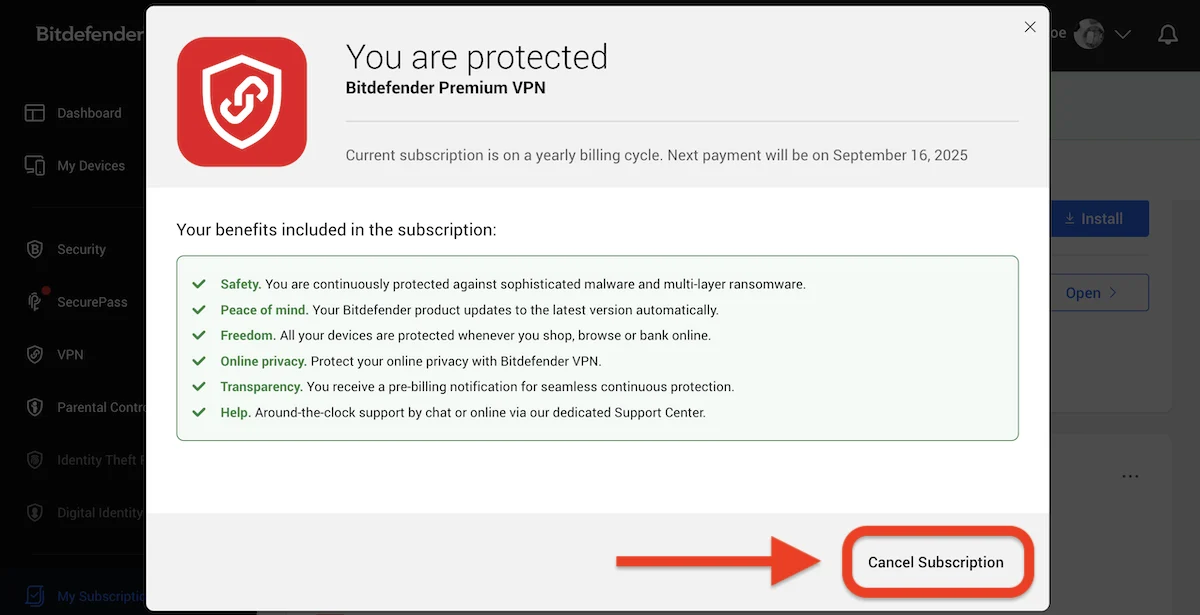
Don't rush through the consequence screen. The current Central path can offer “Cancel at the end of subscription term” or, during an eligible initial period, “Cancel immediately.” Those aren't cosmetic choices: the first normally preserves access to the expiry date, while the second can refund and end the subscription.
How to stop auto-renewal in Bitdefender Central
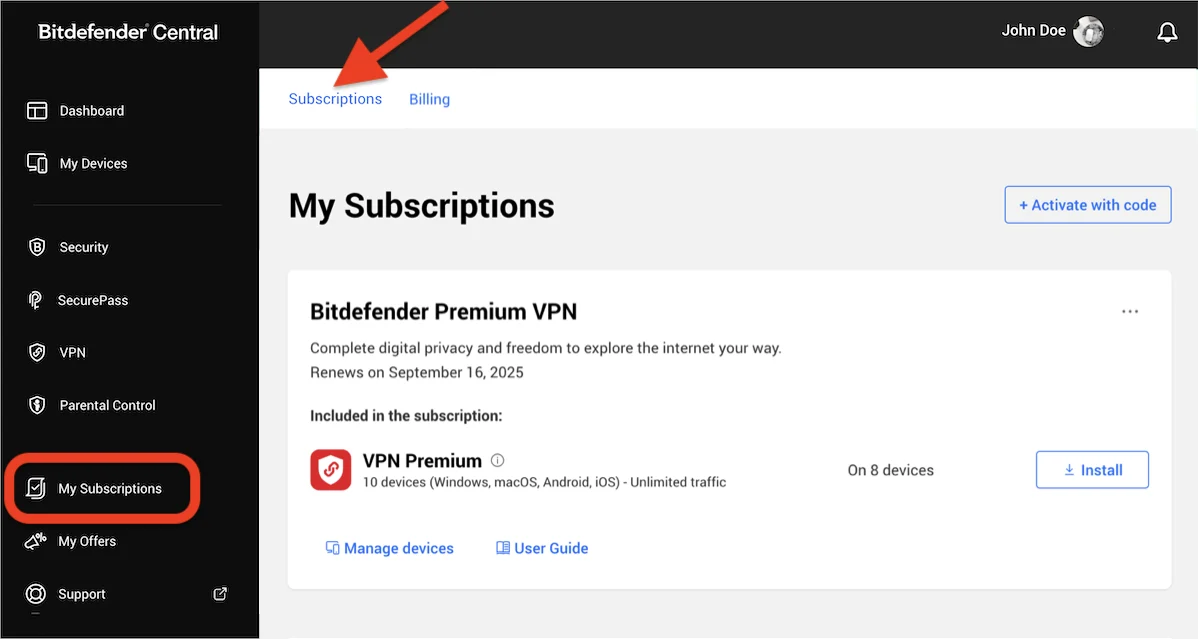
Bitdefender's current auto-renewal guide documents two Central layouts. This matters because a reader following an older article may search for My Payments when the account now exposes Subscriptions or Billing. Use the labels present in your account, not a copied path that belongs to another payment processor.
Route A: My Payments
- Sign in to Central and open My Subscriptions → My Payments.
- Select View details beside the exact Bitdefender product.
- If prompted, verify access with the code sent to the purchase email.
- Choose Manage your subscription renewal options.
- Select End Auto-Renewal, give the requested reason and confirm again.
The extra confirmation is easy to miss. A retention offer, survey or first End Auto-Renewal press isn't proof of completion. Bitdefender says the status updates immediately and a confirmation email follows shortly. Save the final state and message.
Route B: Subscriptions or Billing
- Open My Subscriptions → Subscriptions.
- Use the three-dot menu on the correct plan.
- Choose Subscription & Continuous Protection.
- Select Cancel Subscription and choose end-of-term or immediate cancellation deliberately.
- Confirm the reason and final cancellation.
Use Verifone when Central has no working payment control
Direct online Bitdefender orders have historically been processed by 2Checkout, now Verifone. The official guide provides a separate portal at store.bitdefender.com/myaccount. This is the useful fallback when My Payments is absent, the Central view redirects without exposing renewal management, or the order belongs to a different purchase email.
- Enter the purchase email. It must be the address on the order, which may differ from the Central login.
- Request the access link. Open the email from 2Checkout/Verifone and use the link within its one-hour validity period.
- Open My Products. Match the product and renewal details before selecting anything.
- Stop automatic subscription renewal. Choose the action beside that product, confirm the pop-up, select a reason and confirm again.
- Save the new state. Keep the portal result and confirmation email with the original receipt.
Don't enter card details on a look-alike site reached through a support number or advertisement. Navigate from the official Bitdefender guide or type the store.bitdefender.com address. If neither Central nor the official portal recognizes the order, send the receipt through Bitdefender's verified support form.
How the current 30-day Bitdefender refund route works
Bitdefender's current refund page states a 30-day money-back guarantee and covers both a new direct purchase and a renewal. Its US renewal page says refund requests can be sent to [email protected] within 30 days of the initial purchase or automatic renewal date. Use the transaction date as the practical clock and submit the request promptly.
| Purchase source | Stop renewal through | Refund request through |
|---|---|---|
| Official Bitdefender site | Central or official Verifone portal | Bitdefender Support / refund route within stated 30 days |
| Apple App Store | Apple Subscriptions | Apple purchase/refund support |
| Google Play | Google Play Subscriptions | Google Play policy route, then developer when applicable |
| Retailer or marketplace | Seller or the attached direct-renewal account | Seller shown on receipt |
| ISP / partner bundle | Provider account | Provider contract and support |
A useful request is short and auditable: include the purchase email, order number, product, charge date, amount, payment method and a direct sentence asking for a full refund and cancellation of automatic renewal. Attach the receipt if the secure form permits it. Don't post the order number, card digits or case transcript publicly.
Stopping renewal and submitting a refund request should both be recorded. If support offers a partial refund, extra year or discount, ask what happens to the subscription term, future renewal price and current charge before accepting. A retention offer is a new decision, not evidence that the original refund was impossible.
Apple, Google Play, free trials and other sellers
If Apple billed the subscription, follow Apple's current cancellation steps: Settings → your name → Subscriptions → the Bitdefender service → Cancel Subscription. No Cancel button or a red expiration message normally means renewal is already off. Use Apple's own purchase-support route for the payment because Bitdefender can't reverse an Apple transaction directly.
For Google billing, open the purchasing Google Account and follow the Google Play subscription flow. Google explicitly warns that uninstalling an app doesn't cancel its subscription. Its current app and subscription refund policy says a request within 48 hours may be eligible depending on the purchase, while later requests generally move to the developer, subject to policy and local law.
A free trial is governed by the platform that recorded it. Check the displayed conversion date and cancel there before it becomes a paid term. Bitdefender's own RealCheck guidance, for example, says Apple and Google process those subscriptions and that cancellation during the trial leaves access until the trial expires. Don't assume every desktop Bitdefender trial collects payment or follows that mobile path.
Retail keys add another wrinkle. A retailer may control the initial refund, while later automatic renewal was enabled through Central when payment details were added. Inspect both the retailer receipt and Central renewal status. Our Bitdefender Free vs paid guide can help if the goal is to keep core protection without another recurring term.
When the cancel button is missing or the renewal arrived early
First confirm that you're looking at the right account and the right processor. Try the Subscriptions three-dot menu if My Payments is absent, search the purchase inbox for the Verifone access route, then check Apple and Google subscription histories. A direct order can take a short time to appear after purchase, but waiting close to a refund deadline isn't a strategy; open an official support case and preserve the submission time.
Current community threads repeatedly describe hidden or missing controls and renewal charges before the date users thought of as “expiry.” They're useful warning signals, but not a universal billing rule. Bitdefender's public materials themselves use different timing language: the support page says a renewal email is sent 45 days before expiration, while the renewal page promises notice before billing. Older legal language and current support comments also differ on how far in advance a charge can be processed.
For that reason, don't publish or rely on a promise that Bitdefender will charge on exactly the expiration date. Turn renewal off as soon as you decide not to continue, then check the bank around the renewal period. If a charge has already posted, use its transaction date for the stated 30-day refund window and request the refund immediately.
If only VPN should end, select the VPN subscription rather than the security suite. Bitdefender can attach multiple services to one Central account, and canceling the wrong card can leave the unwanted service recurring. Review our Bitdefender VPN investigation before deciding whether the included VPN tier or separate Premium term is the one to remove.
Proof that cancellation and refund actually completed
A submitted form isn't the same as an outcome. For cancellation, save a screen and email naming the product, account, renewal state and effective date. For a refund, save the case number, approved amount, destination payment method and any processing estimate. Reopen Central after a short interval and confirm that the plan says it will expire rather than renew.
- Account status: the correct subscription shows renewal disabled or a named end date.
- Email: the confirmation identifies the product and purchase email.
- Refund case: the ticket contains the order, amount and requested outcome.
- Payment history: the refund posts to the original method or the issuer provides a trace.
- Second subscriptions: VPN, identity or mobile services are checked separately.
- Device protection: another supported provider is ready before access ends.
If no useful response arrives, reply to the same official case with the order and prior submission date instead of opening many unrelated tickets. If the merchant denies an apparently eligible request, ask for the policy reason in writing. Then take that record to the card issuer or local consumer route if escalation is necessary.
Fake Bitdefender renewal and refund support is part of this SERP
During research, search results contained keyword-stuffed PDFs on unrelated institutional domains that advertised “Bitdefender cancellation” phone numbers. Those documents aren't support just because a search engine indexed them. Bitdefender's official fake-renewal warning describes fabricated multi-year charges, urgent phone numbers and attempts to move victims into a refund scam.
Check whether the transaction exists before reacting. If the bank, Apple, Google and Central show nothing, don't call the sender to cancel an imaginary charge. Bitdefender says legitimate renewal emails don't contain customer-support phone numbers. A real merchant refund also doesn't require gift cards, cryptocurrency, a “test transaction,” remote-control software or a banking one-time code.
You didn't engage
Delete the message, reject calendar invitations, block the sender and enter Central independently if you want reassurance. Don't click an “unsubscribe” or cancellation link in a suspicious invoice.
You shared access or money
Disconnect remote-access software, call the bank using the number on the card, change email and financial passwords from a clean device, review account recovery settings and preserve evidence for a fraud report.
What happens to protection after cancellation or refund
End-of-term cancellation normally leaves the subscription active until the displayed date. An immediate cancellation with an approved refund can remove access sooner. Check the final screen rather than assuming which outcome occurred. Central may continue to display an expired product record even after devices lose paid modules.
Before the entitlement ends, export anything that's difficult to move later, store SecurePass recovery material safely, review VPN profiles and identify parental-control or identity features the household relies on. Then install a replacement in a controlled handoff. Our Bitdefender installation guide explains provider verification, while the complete removal guide covers leftovers without manual folder deletion.
On Windows, open Windows Security after removal and confirm which antivirus provider is active. Don't run two full real-time suites indefinitely. If Bitdefender still fits but the bundle does not, compare the full Bitdefender review and planned Bitdefender alternatives. The antivirus expiry guide covers the gap between a canceled term and replacement protection.
Bitdefender cancellation and refund FAQ
How do I cancel a Bitdefender subscription?
First identify the billing provider. For a direct Bitdefender purchase, sign in to Central, open My Subscriptions and use either My Payments or the three-dot menu under Subscriptions. Confirm the cancellation to the final state and save the email. Apple, Google Play and other sellers must be managed with that provider.
How do I turn off Bitdefender auto-renewal?
In Central, use My Subscriptions → My Payments → View details → Manage your subscription renewal options → End Auto-Renewal. If your account shows Subscriptions instead, open the subscription's three-dot menu, choose Subscription & Continuous Protection and cancel at the end of the term.
Can I get a refund from Bitdefender after automatic renewal?
Bitdefender currently advertises a 30-day money-back guarantee for direct new purchases and renewals. The request is separate from stopping future renewal. Contact Bitdefender for an official-site order or the seller shown on the receipt for another purchase route.
Does cancelling Bitdefender automatically refund the charge?
No. Ending auto-renewal normally prevents the next charge while access continues to the term end. A refund is a separate request and, if approved, can end the refunded entitlement. Save a cancellation confirmation and a refund case or decision separately.
Why is there no My Payments button in Bitdefender Central?
The current interface can show a Subscriptions or Billing route instead, and some orders are controlled by Verifone, Apple, Google Play or another seller. Check the three-dot menu on the subscription, the original receipt and the purchase email before assuming the subscription can't be cancelled.
How do I cancel Bitdefender through 2Checkout or Verifone?
Open Bitdefender's official Verifone account portal, enter the email used for the purchase and request an access link. Use that emailed link within one hour, open My Products, select Stop automatic subscription renewal for the correct product and confirm the choice twice.
Will Bitdefender keep working after I cancel auto-renewal?
If you cancel at the end of the subscription term, paid protection normally remains active until the displayed expiry date. Choosing an immediate cancellation with a refund can end access sooner. Read the final screen and prepare replacement protection before the entitlement ends.
Does uninstalling Bitdefender cancel the subscription?
No. Uninstalling changes one device; it doesn't reliably change the billing instruction. Stop renewal in the verified billing account, request any eligible refund separately and keep the confirmation even after the software is removed.
Is a Bitdefender refund phone number in an email or PDF safe?
Don't call it. Bitdefender warns that fake renewal messages use fabricated charges and phone numbers to start refund scams. Verify the transaction in your bank or store history and enter Central or the official Support Center yourself. Never grant remote access or disclose banking codes for a refund.
Bottom line: match the merchant, save two confirmations
For direct Bitdefender billing, use the Central layout your account actually shows or the official Verifone fallback. Continue until renewal is visibly off and save that confirmation. If money has already moved, submit the refund request separately within the stated 30-day period and save the case outcome.
For Apple, Google Play, a retailer or an ISP, use the merchant on the receipt. Don't let an email attachment or search result choose a phone number for a financial conversation. Once billing is settled, verify that every device still has supported protection rather than assuming uninstall, expiry and replacement happen automatically.