
ESET Blocking Internet, Apps or HTTPS? Fix Firewall and SSL/TLS Safely
A blocked printer, one denied app and every HTTPS site failing point to different layers. Prove whether the firewall, web protection or certificate filter caused the symptom, then allow the narrow connection instead of opening the whole machine.

Quick answer: If one app, printer or local device is blocked, briefly pause the ESET firewall only to confirm cause, then re-enable it and use Network access troubleshooting, Interactive mode or a narrow rule. If HTTPS sites show untrusted certificates or fail across browsers, update ESET and the browser, then disable and re-enable SSL/TLS filtering to re-register the ESET root certificate. Don't leave the firewall, Network traffic scanner or SSL/TLS inspection off; use an application, IP, certificate or website exception only after the destination is independently verified.
Need a different ESET task? The complete ESET guide hub routes review, plans, setup, banking, troubleshooting, firewall and HTTPS, Android, VPN, password migration, billing and removal without mixing their steps.
Map the symptom before touching a protection switch
| Symptom | Likely layer to test first | Don't assume |
|---|---|---|
| One desktop app can't connect | Firewall blocked communication or app rule | That all internet is down |
| Printer, NAS or SMB share is missing | Network profile, local address or firewall rule | That HTTPS filtering is involved |
| One website is blocked as malicious | Web access protection and site reputation | That the site is safe because it worked yesterday |
| Every HTTPS page shows certificate errors | SSL/TLS root certificate and browser trust | That the firewall needs a port opened |
| No sites load but router is reachable | DNS, proxy, VPN, web filter or upstream access | That one ESET rule caused it |
| No network adapter or IP address | Adapter/driver and Windows network state | That a website exception can help |
Record the exact app, destination, time and error. Test another website, another browser, a direct local device and—where appropriate—another network. Check ESET logs and Network access troubleshooting for a blocked event. A symptom map prevents a certificate problem from becoming a permissive firewall rule.
Confirm the installed product. ESET NOD32 Antivirus, Internet Security, Smart Security Premium and Security Ultimate expose different network controls. A company-managed Endpoint product can have locked policy and belongs with its administrator. Our ESET home-plan guide maps the current product names to their included network features.
Before testing ESET, preserve an ordinary baseline. Note whether Windows reports a Public or Private network, whether the same destination works from another device, and whether the failure follows the computer to a phone hotspot. If the printer fails from every device, the printer or router is a stronger suspect. If the computer fails on both home Wi-Fi and a hotspot, a local filter, proxy or adapter deserves more attention. These comparisons are safer and more informative than switching off several protections at once.
Pause the firewall only long enough to prove causation
ESET’s January 2026 firewall blocking guide recommends pausing the firewall for troubleshooting to determine whether it causes the connection problem. This is a controlled test, not the fix.
- Close sensitive work. Stay on a trusted home network and know exactly which action you'll test.
- Pause only the ESET firewall. Don't also disable web protection, SSL/TLS and antivirus.
- Reproduce once. Open the blocked app or connect to the printer.
- Re-enable immediately. Confirm the firewall status in ESET before interpreting the result.
If the symptom doesn't change, the firewall isn't proven. Check DNS, proxy, VPN, browser and SSL/TLS paths. If it disappears only while paused, open Network access troubleshooting and find the corresponding blocked communication.
Don't browse randomly with the firewall paused or repeat the test on public Wi-Fi. A short, scoped test limits exposure and produces a clear before-and-after result.
Write down all four states: firewall on before the test, the exact failure, firewall paused and the result, then firewall restored and the result. If the connection works while paused but remains working after re-enabling, the application may simply have retried, refreshed DNS or repaired a temporary session. Repeat once with the same destination before creating a permanent rule. A reliable cause reproduces; a one-off success doesn't justify weakening policy.
Fix a blocked app, printer or local device with the narrowest rule
Start with Network access troubleshooting. ESET says this window lists communication blocked by the firewall and can allow a specific device or application. Match the process, local/remote address, protocol, port and time to your failed action before allowing it.
If the wizard doesn't capture the event, use Interactive mode temporarily. Reproduce the connection, read each prompt and create a remembered allow only for the expected executable and direction. Return to the normal mode afterward. Interactive mode is a discovery tool; leaving it on can train users to click Allow without context.
For a printer or NAS, confirm the Windows network is private/trusted and the device has the expected local address. DHCP can move a printer from one IP to another, making an old narrow rule fail. Reserve the device address in the router or use a rule that fits the trusted subnet without exposing the same service on public networks.
For remote desktop, SMB or a game server, identify the exact process and inbound port from the application’s official documentation. Don't paste a long port list from a forum. An outbound web client and an inbound server require different rules.
Process identity matters as much as the port. An updater, launcher and main program may use separate signed executables, while a rule aimed at a temporary path can stop working after the next update. Check the executable’s publisher and path, then keep the allowed remote scope as small as the service permits. If the application needs access only to a device on the home LAN, a rule that also accepts unsolicited traffic from any address is too broad.
For local devices, also verify that Windows discovery and sharing behave correctly before blaming ESET. A network changing from Private to Public can remove discovery even when no ESET event was logged. Restore the intended trusted profile only on a network you control; never mark hotel or airport Wi-Fi trusted merely to make a printer or share appear.
If all internet access fails, test adapter, route, DNS and HTTPS separately
Open Command Prompt and check ipconfig. Verify the adapter has an expected local address and default gateway. Reach the router first. Then test whether a known domain resolves. If an IP can be reached but names fail, investigate DNS, not a broad firewall allow.
Disable an ESET or third-party VPN for one controlled test. Check Windows proxy settings and the ESET update proxy. A stale VPN kill switch or proxy can block ordinary traffic even when the antivirus firewall is healthy.
Compare HTTP and HTTPS only with safe test destinations. If plain connectivity works but every HTTPS page fails with certificate warnings, move to SSL/TLS diagnosis. If browsers fail but a command-line lookup and another app work, inspect browser extensions, protected-browser mode and profile state.
If the problem began after running ESETUninstaller.exe, check network adapters and restore the saved netsh configuration from the complete uninstall guide. A removed adapter isn't repaired by creating an ESET firewall rule.
Use the pattern of failure to avoid false leads. An IP address that works while its hostname fails points toward name resolution. A browser that fails while ESET Update succeeds points toward browser, proxy or certificate handling. A VPN that reconnects repeatedly can replace routes or DNS settings after every test. Record the state of each layer and change only one of them. Resetting the entire Windows network stack should come after you preserve adapter, VPN and proxy details, because it can erase a useful clue and require those components to be reinstalled.
Why ESET can appear in an HTTPS certificate chain
SSL/TLS protocol filtering is part of ESET’s Network traffic scanner. It inspects encrypted HTTPS and encrypted mail protocols for threats. To let a supported browser trust the locally inspected connection, ESET installs an ESET root certificate in the relevant trust store.
That architecture can produce errors when the root certificate wasn't registered correctly, a browser uses a separate certificate store, the site certificate is expired or invalid, or another security product also intercepts TLS. The appearance of “ESET SSL Filter CA” isn't by itself proof of an attack, but an untrusted warning must not be clicked through blindly.
ESET’s current certificate-notification guidance explains that the product adds a root certificate while SSL/TLS filtering is enabled. Verify the actual site domain and certificate problem before creating trust.
If one bank or service fails, check its certificate and status independently. If every HTTPS page fails across supported browsers immediately after ESET install or update, a local root-registration problem is more plausible.
Reset SSL/TLS filtering without leaving encrypted traffic uninspected
ESET’s May 2026 SSL/TLS protocol-filtering guide says disabling and re-enabling the feature can trigger correct import and registration of the root certificate.
- Update ESET, Windows and the browser. Close every browser process.
- Open Advanced setup. Press F5 and go to Protections → SSL/TLS.
- Turn Enable SSL/TLS off. Confirm and treat the period as diagnosis, because encrypted traffic isn't inspected at this layer.
- Turn it back on. Close and reopen the browser so it reads the restored trust state.
- Test the exact site. Confirm normal HTTPS and the ESET protection state.
ESET warns that disabling Network traffic scanner or SSL/TLS filtering removes network-level inspection of HTTP(S), POP3(S) and IMAP(S) traffic. Don't leave it off as a convenience fix.
After the reset, inspect the certificate warning again instead of merely checking whether the page opens. The browser should identify the requested domain, show a valid trust path and report dates that cover the current day. A successful page load with a warning bypassed isn't a repair. If a browser with its own trust handling still fails while another supported browser works, document the browser version and certificate chain for ESET support rather than importing an arbitrary certificate downloaded from a forum.
Use a specific exception only after verifying the destination
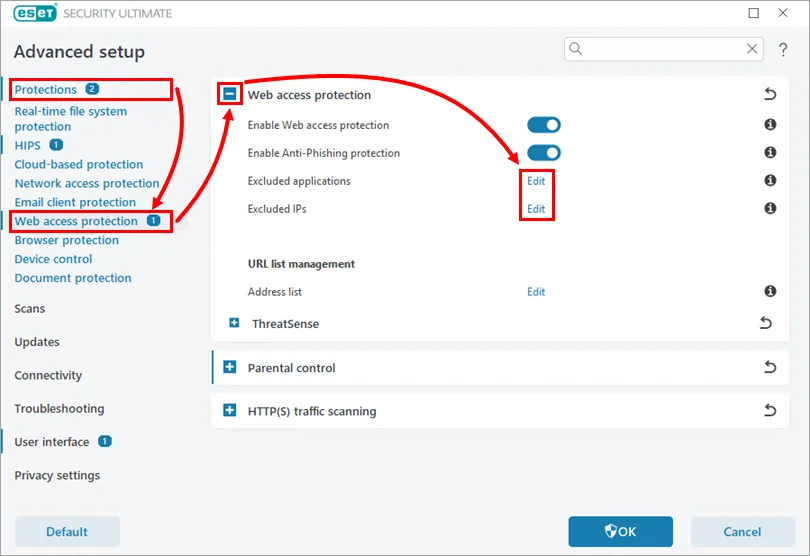
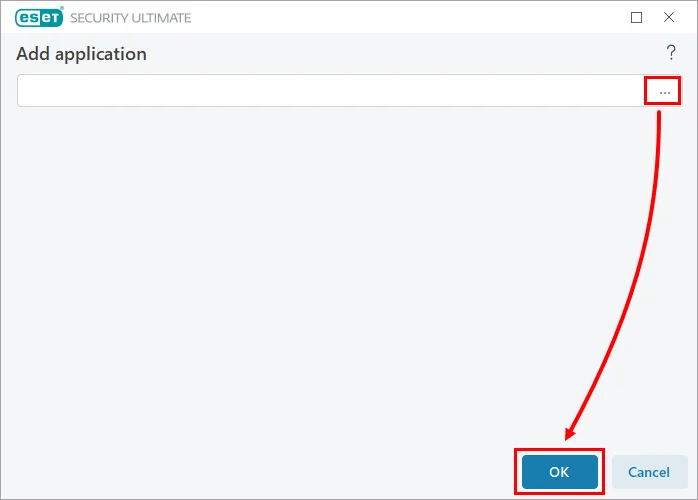
If one legitimate application or IP conflicts with network inspection, ESET allows an Excluded application or Excluded IP under Web access protection. For a changing-certificate service or wireless device, its specific SSL communication guide provides a narrower route than disabling inspection globally.
If ESET classifies a website as malicious, verify the exact domain through the organization’s official channel and independent reputation services. A compromised legitimate site is still dangerous. Report a suspected false positive to ESET and wait for correction when possible. Don't exclude a shortened link, wildcard domain or whole browser to reach one page.
ESET’s secured-sites guide describes Interactive SSL/TLS mode and certificate import for specific cases, then instructs returning the mode to Automatic. Interactive mode is temporary diagnosis, not the normal browsing state.
Document every exception: why it exists, exact scope, owner and review date. Remove it after the vendor or ESET fixes the incompatibility. An exception without a reason becomes invisible technical debt.
Retest the destination outside the affected application when possible. For example, verify that an API hostname belongs to the vendor before allowing the updater, or compare the printer address with the router’s client list before trusting it. Screenshots shared in community threads can reveal a similar symptom, but they can't validate your executable, certificate or address. Use community reports to find a test; use local logs and official documentation to approve the rule.
Final verification: the task works and every protection layer is back
Repeat the original task: launch the app, print one page, reach the NAS or open the exact HTTPS site. Confirm the ESET firewall is enabled, Network traffic scanner is enabled and SSL/TLS filtering is enabled. Check Windows Security for the expected firewall and antivirus providers.
Run ESET Update and confirm modules can reach the service. Open a second unrelated HTTPS site and one local device. The narrow fix should restore the intended connection without breaking other traffic or producing new certificate warnings. If protected-browser traffic alone is affected, continue with the focused ESET Safe Banking & Browsing guide instead of widening firewall rules.
Review the rule or exception one last time. It should name the exact executable, direction, address, port, certificate or site required. Delete temporary broad allows and return Interactive modes to their normal setting.
If ESET still breaks a required workflow after current updates and supported rules, collect logs and open an official case. The general ESET troubleshooting guide explains evidence collection. For a product change, compare the full ESET review, ESET vs Bitdefender, ESET vs Avast and ESET vs Defender.
ESET firewall and SSL/TLS FAQ
How do I know whether ESET firewall is blocking an app?
Pause only the firewall briefly, reproduce the connection once and immediately re-enable it. If the app works only during that test, use Network access troubleshooting or a narrow rule rather than leaving the firewall off.
Why is ESET blocking my printer or NAS?
The network may be classified incorrectly, the device address may have changed, or firewall rules may not allow the required local traffic. Confirm the trusted home network and use blocked-communication evidence to create the minimum rule.
Why do HTTPS websites show an ESET certificate?
ESET SSL/TLS filtering inspects encrypted traffic and installs an ESET root certificate so supported browsers can trust the locally inspected connection. The website’s HTTPS session remains encrypted on each side of the inspection.
How do I fix an untrusted ESET SSL Filter CA error?
Update ESET and the browser, close browser processes, then disable and re-enable SSL/TLS filtering in F5 → Protections → SSL/TLS. ESET says this can trigger correct root-certificate registration.
Is it safe to disable SSL/TLS filtering?
Only as a short diagnostic test. ESET warns that disabling it stops network-level inspection of HTTPS and encrypted mail traffic, so restore it and use a narrow supported exception if needed.
Should I exclude a website ESET blocks?
Only after verifying the exact domain, certificate and independent reputation and, ideally, reporting a suspected false positive. A warning can reflect a real threat, expired certificate or compromised site.
Why does internet fail but local network still work?
That pattern can involve DNS, proxy, VPN or web/SSL filtering rather than the firewall alone. Test IP reachability, name resolution, HTTP versus HTTPS and another browser before creating rules.
Does ESET NOD32 Antivirus have the same firewall?
No. Firewall availability depends on the installed ESET application and subscription. Confirm the product name before following Internet Security or Security Ultimate firewall steps.