
ESET Not Working, Not Updating or Using High CPU: Fix the Actual Symptom
A first scan, a broken update and an idle ESET Service using CPU aren't the same problem. Measure what is happening, finish the least destructive check, and change one protection layer at a time.

Quick answer: If ESET is busy immediately after installation or during a scheduled scan, let the current task finish before calling it a fault. If the app won't open, start it from Windows and verify that ESET Service is Automatic and Running. For Module update failed, confirm the subscription and free space, clear the update cache, restart and check again; then test proxy and update-server reachability. For persistent idle CPU, record the process, task and duration, update ESET, check scheduled startup scans and competing security software, then collect logs before reinstalling.
Need a different ESET task? The complete ESET guide hub routes review, plans, setup, banking, troubleshooting, firewall and HTTPS, Android, VPN, password migration, billing and removal without mixing their steps.
Two-minute triage: name the task before changing protection
Open Task Manager and sort by CPU, then by Memory and Disk. Record the exact process, current percentage, memory amount and how long it remains elevated. Open ESET Overview, Update and Tools → Log files. Look for a running computer scan, update, startup scan or repeated detection event.
A fresh install, product update and first complete scan are expected to be busy. A laptop waking from sleep may also catch up on module updates and scheduled work. Measure again after the named task finishes and after one normal restart. The useful symptom is “ESET Service stays at 18% CPU for 40 idle minutes with no scan,” not “ESET seems heavy.”
Check whether the problem is local or external. ESET’s service-status page can rule in a known vendor incident. If only one device fails while others update, focus on its subscription, proxy, cache, disk and competing software.
Don't turn off real-time protection, firewall, SSL inspection and LiveGrid together. If performance instantly improves, you still don't know which layer mattered. Change one documented control, reproduce once and restore it before the next test.
ESET won't open: verify the service before reinstalling
Press the Windows key, type ESET Security and open the result. A missing tray icon alone can be a startup-interface issue; it doesn't prove the protection service is absent. Check Windows Security → Settings → Manage providers to see whether ESET still registers as antivirus.
If the main window still won't open, press Windows+R, enter services.msc and find ESET Service. ESET’s current “Error communicating with kernel” guide says Startup type should be Automatic and Service status Running. Record any error if Start fails; don't delete the service or force-end its process.
Restart Windows once, install pending Windows updates and confirm the disk isn't full. If another third-party antivirus, anti-keylogger or endpoint agent was recently added, remove or disable it through that vendor’s supported path for one controlled test. Two products hooking the same files and browser can leave the interface waiting on a service conflict.
If ESET registers in Windows Security but the interface fails, protection state is uncertain rather than automatically off. Avoid sensitive browsing until the provider, service and update state are confirmed.
Module update failed: use ESET’s checklist in order
The current Module update failed checklist starts with the installed version, at least 1 GB of free space and a valid subscription. It then moves through the update cache, remnants of another antivirus, third-party firewall, proxy settings and reachability of ESET’s update server.
- Confirm internet and subscription. Open a normal HTTPS site, then check Help and support for validity.
- Install the current ESET build. Product components and modules are related but not identical.
- Free disk space. ESET’s checklist specifies at least 1 GB on the installed volume.
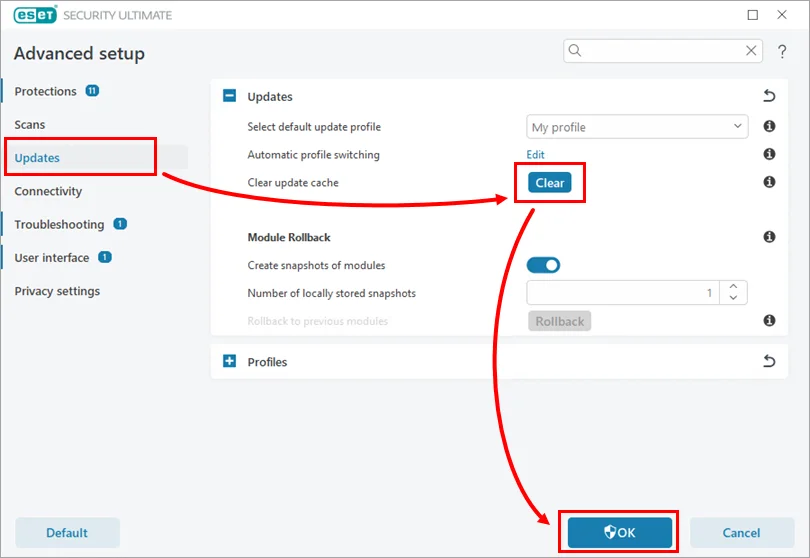
- Clear update cache. Press F5 → Updates → Clear, restart, then Update → Check for updates.
- Remove another antivirus. Leftover web and firewall drivers can block the updater even when its dashboard is gone.
- Check proxy. In a home setup that doesn't use one, choose Don't use proxy server. Managed computers can have a locked ESET Bridge policy; contact the administrator instead of overriding it.
- Test reachability. ESET documents checking
update.eset.com. A successful ping doesn't prove every download works, but a DNS or route failure is useful evidence.
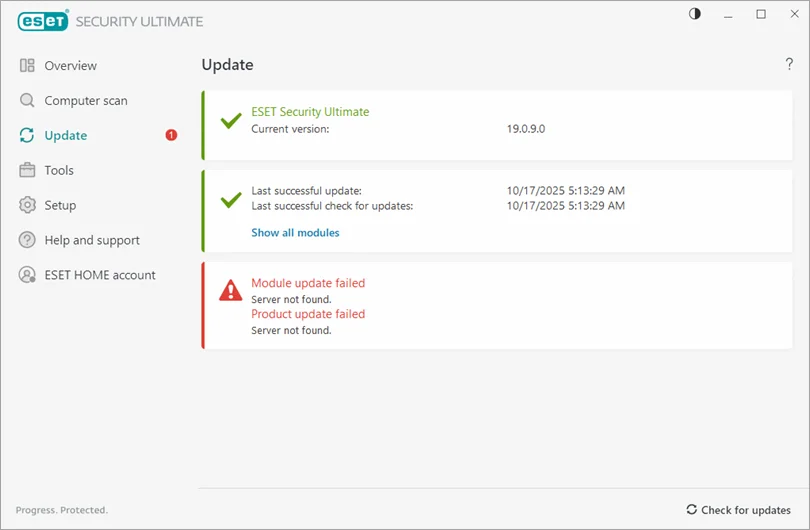
ESET’s shorter home-product cache repair says the Clear button can remain unavailable until Windows restarts. That's a reason to restart, not to delete module folders manually.
High CPU or memory: separate scanning from persistent idle load
Record three snapshots: during the complaint, five minutes after the current scan or update ends, and ten minutes after a restart with no browser or game open. Note CPU, memory, disk, power use and the foreground task. A single peak isn't a baseline.
Open ESET Tools → Log files and Scheduler. Look for a full scan, startup file check, update loop or repeated detection of a file that another process keeps recreating. A large archive, virtual-machine image, developer dependency tree or constantly changing mail store can keep a scanner busy legitimately. That doesn't make a broad exclusion safe.
Update ESET and Windows, restart and test without another third-party real-time antivirus. If the load began after a program update, preserve the build number and time. Community reports about ekrn.exe or ESET Service are directional; they don't establish that your workload has the same cause.
Memory needs context. Modern security software caches data and releases it under pressure; an apparently large working set isn't automatically a leak. A value that grows continuously across idle hours, reproduces after restart and affects paging or responsiveness is stronger evidence. Capture it rather than using a memory-cleaner utility.
Check power mode and temperature on a laptop as well. A security scan can expose thermal throttling, a failing drive or another background process that would be invisible during light browsing. Compare total CPU and disk use with the ESET process rather than blaming the product for a machine-wide spike. If ESET is waiting on a busy or damaged disk, lowering scan priority can improve responsiveness without addressing the underlying storage problem. Preserve SMART or Windows disk warnings and back up data before stress-testing a suspect drive.
Slow or stuck scans: identify which scan and which object
A first full scan can take much longer than later scans because the product has no prior clean-file context. Keep the laptop powered, let the current item advance and check disk activity. A scan that pauses on one huge archive is different from a progress counter that never changes with no I/O.
ESET’s May 2026 startup-scan guide covers the System startup file check task triggered at user logon. It allows the task’s Scan priority to be changed to When idle. That preserves the task while moving it away from the moment the user is trying to work.
For an on-demand scan, record the last displayed path. Update definitions and retry a custom scan of that narrow folder. If an archive or proprietary file reproduces the stall, submit it or the logs through official support rather than deleting it unexamined. If the path contains a backup image or virtual disk, coordinate with the application that owns it.
Don't interrupt every scan at the same percentage and then conclude ESET can't finish. The percentage can represent object counts rather than equal time. Compare file-path movement and system activity.
Conflicts and exclusions: prove the layer before weakening it
Common collision points include another antivirus, a second firewall, anti-keylogger, encrypted container, backup agent, VPN filter, browser-hardening extension and a development or virtual-machine workload that rewrites many files. Disable or remove one competing product through its own supported controls, reproduce once and restore protection.
An exclusion is justified only when the exact trusted object and protection layer are known, the application vendor or ESET supports it, and a narrower rule isn't possible. Excluding an entire user profile, download folder, project root or process tree can hide the very malware behavior ESET is meant to detect.
If the symptom is broken internet, printer access or HTTPS certificates, stop using this general guide and follow the dedicated ESET firewall and SSL/TLS page. Network filters require their own isolation sequence. If the symptom appears only in the green protected browser, use the Safe Banking & Browsing guide.
Check the current plan and installed application. A NOD32 Antivirus installation doesn't expose the same firewall controls as Internet Security or Security Ultimate, and a business endpoint managed by policy is outside this home-product workflow.
Collect evidence support can use
Write a short reproduction: Windows build, ESET application and version, subscription status, process name, exact error, start time, expected result and one change that makes the symptom stop. Include screenshots without activation keys or personal account data.
ESET’s February 2026 SysInspector submission guide explains how to create a compressed diagnostic log after opening a support case. SysInspector captures processes, registry, startup items and network connections; it can omit private personal information.
A diagnostic archive can still contain system paths, usernames, installed applications and network details. Send it only through the official support route attached to the case, not to a forum stranger. Delete the local copy when the case is closed and it's no longer needed.
For a performance complaint, a time-correlated Task Manager screenshot and scan/update log are often more useful than a generic hardware list. For an update complaint, include the error code, proxy mode, subscription validity and the result after cache clear.
Repair or reinstall only after the symptom-specific path fails
A restart, current build, valid subscription, free disk, clean update cache and absence of competing antivirus solve many home failures without removing the product. Reinstall when services or components remain damaged, update checks still fail or official support directs it.
Use normal uninstall first and restart. The complete ESET uninstall guide reserves ESETUninstaller.exe and Safe Mode for failed ordinary removal because that tool can reset network settings. Reinstall from ESET HOME with the existing subscription; you don't need a new key.
After reinstall, let modules update, run one controlled scan and recreate the original test. Don't immediately import every old rule or exclusion. If the symptom returns only after an imported configuration, the setting is evidence.
If the product remains incompatible with a required workflow, compare alternatives rather than operating permanently with protection disabled. The full ESET review, ESET vs Bitdefender, ESET vs Norton and ESET vs Microsoft Defender give distinct replacement baselines.
ESET not working and performance FAQ
Why is ESET using high CPU right after installation?
The application may be updating modules, registering filters or running its first scan. Let the named task finish, then measure idle use after a restart before diagnosing persistent high CPU.
What process is ESET Service?
ESET’s protection service runs core security components and can appear in Task Manager while the interface is closed. Don't end or delete it; identify the active scan or update and use supported controls.
How do I fix Module update failed?
ESET recommends checking the current version, at least 1 GB of free space, subscription validity, update cache, another antivirus, third-party firewall, proxy settings and update-server reachability before reinstalling.
How do I clear the ESET update cache?
Open ESET, press F5, go to Updates and choose Clear beside Clear update cache, restart Windows, then open Update and select Check for updates. If Clear is unavailable, ESET says restart and try again.
Why will the ESET window not open?
Start ESET from Windows search, then open services.msc and verify ESET Service is set to Automatic and Running. If the service won't run, save the error and follow ESET’s repair or reinstall path.
Can I lower the priority of a slow startup scan?
ESET’s current guide allows the System startup file check task triggered at user logon to use When idle priority. Change the documented scheduler task rather than disabling startup protection broadly.
Should I add a large exclusion to fix CPU use?
No. First identify the file, task and protection layer. A broad exclusion can hide malware and make the symptom disappear without proving the cause. Use a narrow vendor-supported exclusion only when evidence supports it.
When should I reinstall ESET?
Reinstall after updates, service checks, conflicts and symptom-specific fixes fail, or when logs indicate damaged components. Preserve settings and diagnostic evidence first, then use normal uninstall before the Safe Mode tool.