
Malwarebytes Browser Guard Review 2026: Useful, Free, Not Invisible
Browser Guard is a credible free scam and web-reputation layer, not a replacement for antivirus and not a privacy ghost. The best parts are free; one prominent control panel isn't.

Quick answer: Malwarebytes Browser Guard is worth trying if you want a free extra layer against scam pages, phishing, malicious downloads, browser lockers, ads and trackers. It works in Chrome, Edge, Firefox and Safari, but it doesn't replace real-time antivirus. Core protection is free; Access Control for camera, microphone, location and notification permissions requires a paid Malwarebytes subscription, the Windows app, and Chrome or Edge. Its June 2026 policy also discloses limited browsing and detection telemetry by default, with an opt-out in Support. Install it for scam and reputation coverage, keep only the protections you need, and avoid stacking multiple full ad blockers without a reason.
Quick verdict: install it for scams, not for magic
Malwarebytes Browser Guard earns a qualified recommendation in 2026. The extension adds a useful browser-specific layer against phishing, fake tech-support pages, browser lockers, malicious downloads and potentially unwanted programs. It also blocks ads and trackers, but that isn't the main reason we would choose it over a dedicated content blocker.
The strongest point is that the basic product is free and unusually focused on scam behavior. Malwarebytes describes checks for suspicious page content, spoofed favicons, deceptive URLs and tricks that trap the browser's back button. Those are useful signals when a new scam page hasn't yet landed on a conventional blocklist.
The limits are equally concrete. Browser Guard sees and changes web content only inside supported browsers. It can't replace a maintained real-time antivirus, protect a separate email client, inspect every process or clean an established infection. Our current Malwarebytes review covers the whole security product; this page owns only the browser extension decision.
Privacy also needs a straight answer. The extension doesn't simply “collect nothing.” Malwarebytes' June 2026 policy describes blocked URLs, excluded domains, device configuration, approximate location and anonymized browsing statistics, then provides an opt-out. We can accept that trade when the extra web intelligence is useful, but it should be a conscious setting rather than an invisible promise.
Our practical recommendation is to install Browser Guard from the correct browser store, leave malware and scam protection on, decide whether it or another extension will own ads and trackers, and review the anonymous-data switch. If a site breaks, change one layer for that trusted site instead of turning the entire extension off.
What Malwarebytes Browser Guard is—and what it isn't
Browser Guard is an extension, not a separate web browser. It sits inside Chrome, Edge, Firefox or Safari and evaluates pages, requests, downloads and behavior using the permissions each browser exposes. The official Browser Guard product page calls it an additional layer and explicitly says it isn't a replacement for real-time antivirus.
That distinction prevents several common buying mistakes. Browser Guard doesn't become a VPN because it changes what a page can load, and it doesn't hide the public IP address. It doesn't become identity monitoring because it spots a phishing page. The Malwarebytes Privacy VPN review and the forthcoming Scam Guard review cover those separate tools.
The extension can work without the main Malwarebytes desktop app. Installing Malwarebytes Security may recommend Browser Guard or connect the two through native messaging, but the free extension has its own store listing and controls. Conversely, paying for the desktop app doesn't mean every Browser Guard feature exists on every operating system or browser.
It's best understood as a browser checkpoint. Known malicious destinations can be blocked from reputation data, page patterns can flag a new scam, unwanted scripts can be filtered, and the current site can be given a narrow exception. That scope is useful precisely because it's narrower than a full security suite.
Current version and browser support in July 2026
Browser Guard supports Chrome, Edge, Firefox and Safari on desktop operating systems. The current 3.3.1 release note records a staggered rollout: Chrome on July 15, Firefox on July 17 and Edge on July 22, 2026. The release added a Learn more path for Access Control and miscellaneous bug fixes rather than a new protection category.
The Chrome Web Store listing showed version 3.3.1, 10,000,000 users and 3.9 out of 5 from 1.5K ratings when checked July 29. Those numbers describe the store, not an independent protection score. They're also too volatile and context-specific to place in our Review schema.
Safari is the awkward branch. Apple's Mac App Store listing still showed version 2.6.1 from February 19, 2025. The official product page still names Safari as supported, but a reader shouldn't assume the Safari build has version-three controls merely because the Chrome help article does.
| Browser | Current evidence | Important difference | What to verify |
|---|---|---|---|
| Chrome | 3.3.1 released July 15 | Manifest V3; subscriber Access Control on Windows | Version, permissions and extension publisher |
| Edge | 3.3.1 released July 22 | Manifest V3; subscriber Access Control on Windows | Store may display a lagging cached version |
| Firefox | 3.3.1 released July 17 | More flexible Manifest V2 blocking path; no Access Control | Optional all-sites and clipboard permissions |
| Safari | Mac App Store showed 2.6.1 from February 2025 | Separate macOS app and interface | App Store version and feature parity |
Release notes are more reliable than a screenshot in an old review, but they don't prove every store has delivered the update to every device. Open the browser's extension manager and compare the installed version before following a version-three troubleshooting step.
The free extension has one paid-looking trap: Access Control
The core Browser Guard promise is free. Malware, scam, phishing, PUP, ad and tracker blocking don't require a Malwarebytes subscription. A person who only wants the extension shouldn't be pushed into Standard or Plus by a vague “unlock protection” button. Our Malwarebytes Free versus Premium guide explains the broader device-protection boundary.
Access Control is different. The current Access Control instructions say it works only in Chrome and Edge on Windows, requires the Malwarebytes app, and requires an active subscription. It can show which sites have camera, microphone, location, notification and pop-up permission, then set each site to allow, block or ask every time.
Malwarebytes introduced the feature as a beta in its April 2026 Access Control announcement. Version 3.3.1 added help text, but the product announcement didn't turn it into a universal free feature or extend it to Safari and Firefox. That distinction is absent from many simple feature lists and materially changes the value calculation.
If Access Control is the only paid feature you want, first check the browser's built-in site-permission panel. Chrome and Edge already expose camera, microphone, location and notification controls. Malwarebytes adds one cross-site view and guidance, but it should earn its subscription through the entire paid security package rather than one repackaged browser setting.
What Browser Guard blocks: separate safety from cleanup
Browser Guard groups its main controls into Malware, Scams and Ads/Trackers. The current settings documentation makes a useful distinction: Ads/Trackers is a privacy setting and has no direct safety effect, while Malware and Scams affect safety. Turning off the ad layer for a broken site doesn't require turning off phishing protection.
Malware protection filters pages against Browser Guard's database and can stop a malicious download or code path. Scam protection targets phishing, fake technical support, browser lockers and other deception. PUP handling is aimed at unwanted toolbars, pop-ups and bundled software that may be intrusive without meeting the strictest malware definition.
Advanced Skimmer Protection watches checkout pages for tactics that steal card details. The suspicious-gTLD control blocks top-level domains frequently used in phishing and scam campaigns. These are useful layers, but a domain ending alone isn't proof of fraud; the point is to increase scrutiny when several signals align.
Ads and tracker filtering removes third-party requests and can make a page feel cleaner. It also creates the most compatibility pressure because sites constantly change their ad delivery and anti-blocking scripts. We would keep scam and malware controls on by default and decide separately whether Browser Guard should be the primary content blocker.
The extension icon's block count isn't a danger meter. A page with 80 blocked tracker requests isn't necessarily 80 times more malicious than a page with one phishing detection. Read the category before reacting, and use the statistics page for trends rather than turning a large number into a threat headline.
Chrome and Firefox don't run the same blocking engine
Chrome and Edge now require Manifest V3 for store extensions. Malwarebytes' February 2026 Browser Guard engineering explanation says the old extension could apply deeply customized request logic, while Manifest V3 pushes much of blocking into size-limited Declarative Net Request rule sets controlled by the browser.
The vendor says its temporary workaround retained the earlier static rules but lost some advanced logic. Large datasets can block main-frame requests rather than every subframe, and several layers of logic can't always be stacked. That's a real constraint, not proof that Chrome is unprotected. Browser Guard still uses static rules, page patterns and behavior analysis.
The newer pattern system can match full URLs, page content, XPath or query selectors and spoofed favicons. Malwarebytes says these rules can update every 30 minutes instead of waiting for a full store release. Behavior checks can also recognize traps such as a scam page repeatedly replacing browser history to disable the back button.
Firefox retained a more flexible Manifest V2 path, so Browser Guard can continue using techniques that Chromium no longer permits in the same form. This is one reason an extension may behave differently across browsers even when the version number matches. It doesn't justify a blanket claim that Firefox always blocks more; Malwarebytes hasn't published a current independent cross-browser protection score for 3.3.1.
Brave complicates the comparison because it's Chromium-based but includes its own blocking. Malwarebytes' engineering post notes that Brave kept some Manifest V2 flexibility while no longer offering new installs of removed Chrome-store MV2 extensions. A Brave user should test whether Browser Guard adds scam coverage without duplicating the browser's existing shields.
Browser Guard permissions look broad because the job is broad
A browser extension that reads pages, blocks requests, checks downloads and changes per-site permissions can't operate with access to only its own popup. The current permission table lists history and site-data access, content blocking, clipboard access, download management, native-app messaging and browser privacy or content settings. Browser wording can sound wider than the feature a permission enables.
Capability still deserves scrutiny. “Needed for a feature” doesn't mean a user must enable every optional feature. Firefox identifies clipboard and all-sites access as optional in the current documentation, while Google-account access is tied to Profile Checker and LinkedIn access to additional ad blocking. If a feature has no value to you, don't grant its optional permission merely to remove a prompt.
| Permission group | Why Browser Guard requests it | Risk or question to consider | Practical check |
|---|---|---|---|
| Read/change site data or history | Detect and stop page-level scams, trackers and malware | Broad visibility into browsing activity | Compare store disclosure with privacy policy and opt-out |
| Downloads | Check or stop a dangerous file before installation | Can inspect and change download history | Keep only the official extension and current version |
| Clipboard | Warn when copied material looks harmful | Clipboard can contain sensitive information | Firefox marks this optional; enable only if used |
| Content/site settings | Block page content and power Access Control | Can change camera, mic, location or notification settings | Access Control is paid and Windows/Chromium-only |
| Native application messaging | Coordinate with Malwarebytes for Windows | Connects browser and desktop security contexts | Verify publisher and installed desktop app |
We don't treat permissions as proof of abuse. We treat them as an attack surface and a trust decision. Install from the official store, verify the Malwarebytes publisher, review new permissions after updates, and remove duplicate or abandoned extensions. A reputable extension can still ship a bug, while a lookalike with a similar name is an entirely different risk.
Privacy audit: limited data, but not zero browsing data
The Chrome store says Browser Guard handles “Web history.” That label is intentionally broad. Malwarebytes' privacy policy updated June 16, 2026 provides the usable detail: the extension collects domains a user excludes, blocked-page URLs and counts, browser and operating-system configuration, Browser Guard version, IP-derived approximate location, and general browsing statistics.
General browsing statistics include domain names, page categories and visit frequency. Malwarebytes says this information is anonymized and aggregated before storage or analysis and that it doesn't retain full browsing histories. A temporary random device identifier may be used in limited processing and then deleted. The policy also describes additional domain lookup data for Chrome beta telephone and WHOIS features.
That isn't the same as recording a chronological copy of every page under an account. It's also not “no browsing data.” A blocked full URL can contain a query or path, an excluded domain reveals a site decision, and approximate city-level location can still matter to a privacy-conscious user. The honest description is limited threat and usage telemetry with stated anonymization, not invisibility.
The opt-out is strong enough to change our verdict. Open Browser Guard, go to Support, and untick “Help us make things even better by anonymously sharing detection and device data with Malwarebytes.” The policy says this disables collection of excluded-domain, blocked-page, system-configuration, IP-address and general browsing-statistics data.
Malwarebytes says it doesn't sell this data and the store declarations restrict unrelated use and credit decisions. We didn't find a current independent privacy audit of Browser Guard 3.3.1, so those remain vendor and store commitments rather than a third-party verification. Users with a strict no-domain-telemetry rule should opt out or choose a narrower extension.
Browser Guard is harder to fingerprint, not undetectable
Websites can sometimes infer which extensions are installed by probing exposed resources or observing extension messaging. Malwarebytes acknowledged in an April 2026 extension-fingerprinting article that Browser Guard's internal communication isn't fully isolated from the page. That admission is more useful than a blanket privacy slogan.
The extension now uses browser storage APIs to avoid leaving page-visible traces and dynamic resource URLs where the browser supports them. Firefox enables dynamic URLs by default; Malwarebytes says the option is off by default in Chrome and Edge. A changing resource identifier makes a simple probe less reliable across sessions.
The vendor headline calls the extension undetectable, but the body makes the narrower claim: the techniques make detection harder. That's the wording we trust. A site can combine many signals, browser vendors can change extension behavior, and anti-adblock systems actively adapt. Don't install Browser Guard because you expect perfect concealment from every website.
The dashboard is simple, but the toggles have different consequences
The Browser Guard popup shows what is active on the current site and how many items were blocked. The full dashboard exposes detection history, statistics, the Allow list, manual ad removals, settings and support. Safari uses its own interface, so a Chrome walkthrough shouldn't be copied word for word onto a Mac App Store build.
Global settings include Malware, Scams, Ads/Trackers, suspicious gTLDs, Advanced Skimmer Protection, the badge count and notification controls. Monthly summaries report the previous 30 days, while real-time malware notifications can be muted without disabling the underlying block. That last distinction is useful for a noisy but effective setup.
The current settings article says these controls don't apply to private or incognito windows. Browsers separately decide whether an extension may run in those sessions. Verify private-window access in the browser manager and test the extension icon there; don't infer coverage from the normal profile.
Statistics are useful for understanding which category is active, but they aren't a lab test. A higher count can reflect a page stuffed with trackers, a long browsing session or a changed filter list. We would use the dashboard to diagnose behavior, not publish “threats stopped” as an effectiveness percentage.
Access Control is a convenient paid view of browser permissions
Access Control gathers camera, microphone, location, notification and pop-up permissions into one Browser Guard page. Each site can be allowed, blocked or required to ask every time. The default “ask every time” position is sensible for a device that regularly joins calls but shouldn't leave permanent access across unrelated sites.
The setup needs permission to see visited websites and to manage content settings. That is why Chrome's prompt sounds powerful: the feature can't summarize and change site permissions without reading which sites exist and controlling those settings. A user who doesn't want that access should leave Access Control disabled; core Browser Guard protection doesn't require buying the feature.
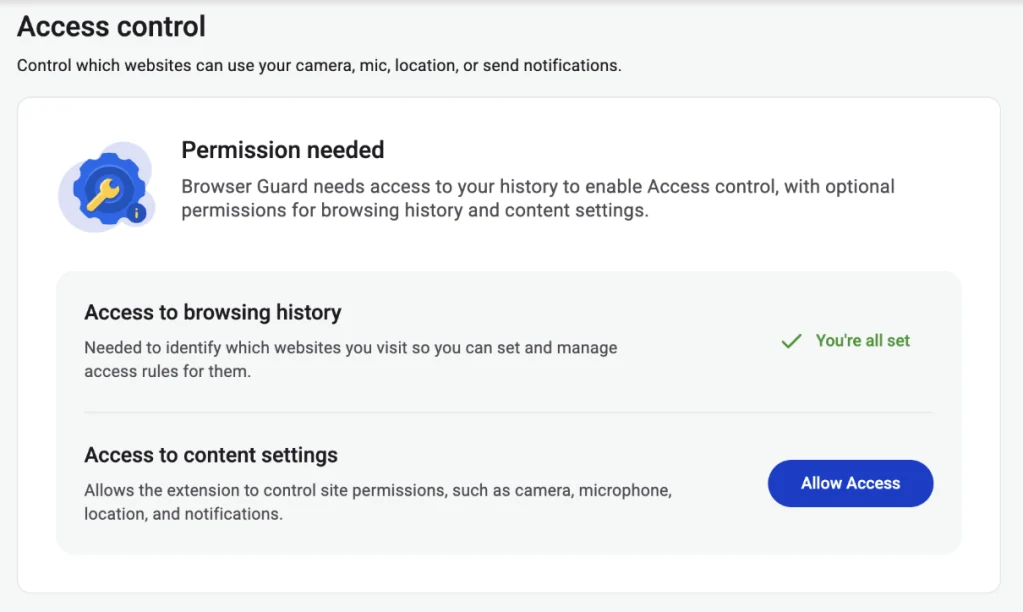
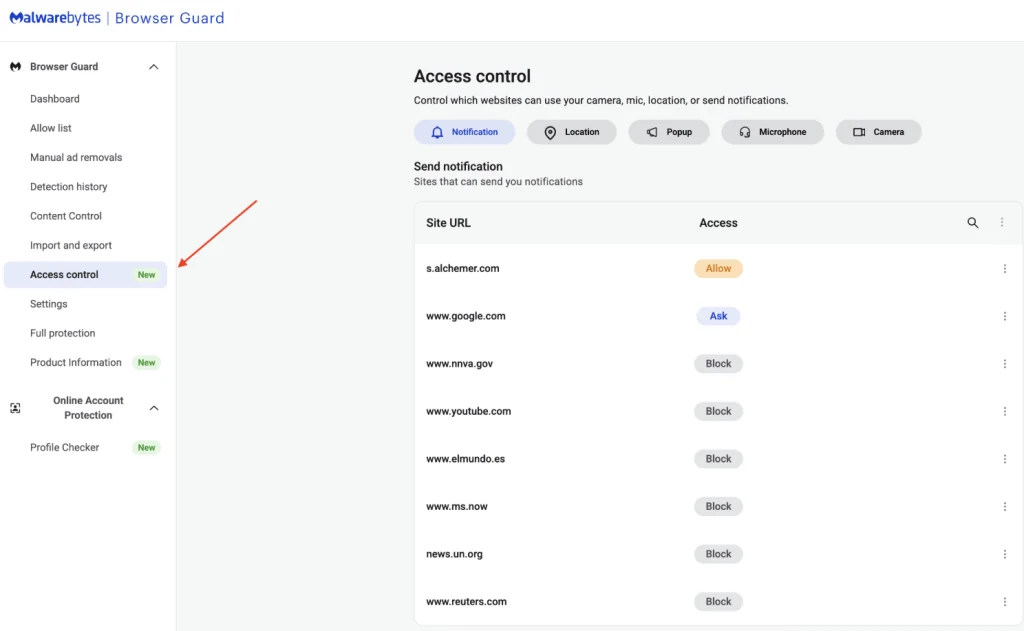
The panel improves visibility for someone who already wants the paid Malwarebytes app. It isn't a reason to pretend browsers lacked permission controls before 2026. Chrome and Edge can manage those categories directly; Browser Guard adds a consolidated workflow and security guidance around them.
Allow-list one protection, not the entire internet
When a trusted site breaks, the safest first move is to identify the responsible category. The current Allow list guide lets Chrome, Edge and Firefox users add a URL or IP and choose which protections to turn off. Safari provides a similar per-site selection in its own interface.
If a news site's video player fails, start with Ads/Trackers. If a legitimate download is blocked, preserve the warning long enough to verify the domain, file signature and vendor rather than immediately excluding Malware. A false positive can be reported and a narrow temporary exception is easier to reverse than disabling all protection globally.
Only allow a site you can authenticate. A phishing page that imitates a bank may beg for an exception, and that's exactly when the warning matters most. Type the known domain yourself, inspect the certificate and contact the organization through an independent channel before overriding a credential or payment warning.
After the task is complete, revisit the Allow list. Exceptions become invisible technical debt: a once-trusted subdomain can be repurposed, and a troubleshooting rule can outlive the bug. Delete entries that are no longer necessary and retest after extension updates.
Browser Guard with uBlock Origin: choose roles before stacking
Browser Guard can coexist with uBlock Origin, uBlock Origin Lite, AdGuard or a browser's built-in blocker. Coexistence doesn't guarantee a cleaner setup. Two extensions may block the same request, inject different page rules or disagree about an allow-list, leaving the user unable to tell which one broke the site.
Malwarebytes explicitly warns that another ad blocker can interfere with Browser Guard's Allow list. That warning is more useful than community claims that one product “scores 100” on a synthetic ad-block page. A test page measures its chosen patterns; it doesn't establish long-term scam detection, compatibility or privacy.
One sensible configuration is a dedicated content blocker for ads and trackers, with Browser Guard's Ads/Trackers toggle off and its Scam and Malware layers on. Another is Browser Guard alone for a simpler household setup. Don't run two full ad layers by habit and then broadly allow-list a broken site in both.
Our best browser security tools guide separates content blocking, password management, built-in safe-browsing services and scam reputation. Browser Guard is strongest as one component in that stack, not as a claim that every other browser control is redundant.
YouTube problems are current, but the fix should stay narrow
Several June 2026 community posts reported that YouTube's home-page recommendations appeared briefly and then vanished while Browser Guard was active. In the thread titled “Malwarebytes Browser Guard”, other users said the feed returned after disabling Ads/Trackers. Malwarebytes support asked for the browser, extension version, frequency and other enabled extensions.
A separate YouTube troubleshooting thread points to the same category. An April report about videos not playing received a reply from a Browser Guard engineer recommending a YouTube allow-list entry and clearing YouTube's cache if the problem remained. These are real reports, but they don't prove every browser or user is affected.
Use a reversible sequence. Confirm Browser Guard is current, reload the page without cache, and test a clean private or secondary browser profile with only Browser Guard enabled. Turn off Ads/Trackers for YouTube, not Malware and Scams. If the page works, check the other content blocker before making a permanent exception.
If the failure persists with only Browser Guard active, download debug logs from Support and send the browser, operating system, extension version and exact page behavior to Malwarebytes. Don't post logs publicly before checking them for URLs or other personal context. A reproducible report is more useful than a one-star review that names no version.
Does Browser Guard make browsing faster?
Malwarebytes claims pages can load up to four times faster because ads and unwanted requests are removed. That's a vendor maximum, not our measured result. We found no current reproducible independent benchmark for version 3.3.1 that justified repeating “4x” as a general outcome.
The underlying mechanism is plausible: a page that avoids large ad scripts, auctions and trackers downloads and executes less work. A sparse documentation page may show almost no difference, while an ad-heavy publication can feel substantially lighter. Network speed, CPU, browser cache, page design and other extensions all change the result.
The extension itself also uses memory and CPU to match rules, inspect page behavior and update state. Recent Firefox Add-ons feedback includes one user who linked media-heavy pages and rapid YouTube scrubbing to lost connectivity until the extension was disabled; Malwarebytes asked for a support case. That's a compatibility signal, not a population-wide resource benchmark.
Measure on the device that matters. Use the browser's extension task manager or performance tools, compare the same sites in a clean profile, and watch page correctness as well as milliseconds. An extension that saves 200 ms but empties the YouTube feed has failed the practical test.
Browser Guard versus paid Malwarebytes Web Protection
Browser Guard and Web Protection overlap at malicious websites, but they operate at different layers. Browser Guard lives inside the supported browser and can manipulate page content, ads, trackers and scam behavior. Malwarebytes Web Protection is a paid real-time module in the desktop security product and can block malicious network destinations beyond one extension context.
Using both can produce duplicate blocked-site warnings unless the products coordinate through their native connection. That doesn't automatically mean one should be removed. Browser Guard can add page-level scam and content controls, while Web Protection covers a broader device role. The current Malwarebytes setup guide explains the main app modules and provider checks.
When a known-safe site is blocked, identify which layer generated the warning before adding an exclusion. A Browser Guard allow-list entry may not change the desktop Web Protection decision, and an antivirus exclusion may be unnecessarily broad for an ad-filter issue. The dedicated website-blocking guide will own the full diagnostic path.
Who should use Malwarebytes Browser Guard
Use it for scam-prone browsing. Someone who helps relatives, responds to search ads, follows links from email or regularly encounters fake support pop-ups gains a second reputation and behavior layer. The extension's browser-locker and phishing focus is more relevant here than a generic block-count badge.
Use it as a free complement to existing antivirus. Microsoft Defender or another maintained product can remain the device-level real-time layer while Browser Guard handles page content. Our Malwarebytes versus Microsoft Defender comparison explains the wider protection roles.
Use it when you value simple per-site controls. Browser Guard alone is easier to explain than a stack of five privacy extensions. Keep the safety toggles on, choose whether Ads/Trackers adds value, and document the small number of trusted exceptions.
Use Access Control only when the subscription already makes sense. A Windows household buying Malwarebytes for real-time security may appreciate one view of camera, microphone and notification permissions. The feature is convenience inside a paid package, not the economic reason to buy the package.
Who should skip it or change the default setup
Skip it if strict domain telemetry is unacceptable and you don't want to rely on an opt-out. Malwarebytes publishes a reasonably clear data map, but the default still includes limited domain, block and browsing statistics. A narrower open-source content blocker plus built-in browser reputation may better match that threat model.
Turn off its ad layer if another blocker already owns that job. Duplicate filter engines can create more breakage than protection. Keep Browser Guard's malware and scam layers only if they add a distinct reason to stay installed.
Skip Safari if feature parity is essential. The Mac App Store build was materially behind the version-three browser releases at our July check. Safari remains officially supported, but its interface, release track and features should be judged as a separate product branch.
Skip it as a substitute for antivirus or a VPN. A browser extension can't scan every downloaded file after it leaves the browser, watch unrelated applications or encrypt network traffic. The best antivirus for scam protection guide covers broader products when browser-only protection is too narrow.
Alternatives depend on the job you want done
For ads and trackers, a dedicated blocker such as uBlock Origin on Firefox or uBlock Origin Lite on Chrome may offer a more focused content-filtering setup. Browser and extension-store policies change, so verify the current official project and supported build rather than downloading a similarly named clone.
For basic malicious-site warnings, Chrome Safe Browsing, Microsoft Defender SmartScreen and Firefox's built-in protections already provide a baseline. Browser Guard can add a vendor reputation layer and scam heuristics, but a careful user may prefer fewer extensions and rely on the browser plus real-time antivirus.
For credential theft, a password manager that refuses to autofill on the wrong domain can be more decisive than another red warning page. For network privacy, use a real VPN. For suspicious messages or screenshots, Malwarebytes Scam Guard is a separate analysis tool rather than a Browser Guard setting.
The right answer is usually a small set of distinct controls: browser reputation, one content blocker, a password manager and one real-time antivirus. Add Browser Guard when its scam layer fills a gap, not because a long extension toolbar looks safer.
Install, update and remove Browser Guard safely
Start from the official Malwarebytes product page or the browser's verified store. Check the publisher name, extension ID where available, user count and requested permissions. Don't install a “Browser Guard Pro,” cracked build or repackaged download from a software portal; extensions update inside the browser and don't need a third-party installer.
After installation, pin the icon long enough to review the current-site controls. Open Settings, confirm Malware and Scams are on, decide whether Ads/Trackers should be active, and visit Support to make the telemetry choice. Then check whether the extension is allowed in private windows, if those sessions need coverage.
Review new permissions after major updates instead of accepting them from muscle memory. Version 3 introduced controls that legitimately require wider access, but an unexpected publisher or unrelated permission should stop the process. The current disabled-extension guidance says a rejected new permission can leave Browser Guard disabled until the permission is accepted and the browser restarts.
Removal belongs to the browser's Extensions or Add-ons manager. Safari's build is also a macOS application, so remove that app if the goal is a complete uninstall. Browser Guard removal doesn't cancel billing, remove Malwarebytes Security or delete a separate Privacy VPN app. Use the Malwarebytes pricing and renewal guide for the account side.
Our final verdict is deliberately narrow: Browser Guard is a good free extra layer for people who understand what it can see and what it can't protect. Its 2026 engineering work and transparent settings are positives. The paid-feature boundary, telemetry defaults and compatibility burden keep it from being an automatic install on every browser.
Malwarebytes Browser Guard FAQ
Is Malwarebytes Browser Guard safe to use?
The extension is published by Malwarebytes in the official Chrome, Edge, Firefox and Apple stores, and its broad permissions correspond to browser-level blocking, download checks and optional site-permission management. Safe doesn't mean private by default or immune to bugs. The June 2026 policy discloses limited detection, domain, configuration, approximate-location and browsing statistics, and provides an opt-out in the Browser Guard Support page.
Is Malwarebytes Browser Guard really free?
Its core malware, scam, phishing, PUP, ad and tracker protections are free. Access Control is a separate subscriber feature: the current Help Center says it requires an active Malwarebytes subscription, the Malwarebytes Windows app, and Chrome or Edge. Don't buy a subscription merely to obtain the basic extension.
Does Browser Guard replace Malwarebytes Premium or antivirus?
No. Browser Guard filters activity inside supported web browsers. It doesn't scan every file on the device, monitor all processes, remove an established infection or protect traffic in unsupported applications. Keep Microsoft Defender, Malwarebytes Premium or another maintained real-time antivirus active.
Does Malwarebytes Browser Guard collect browsing history?
The Chrome store uses the broad category Web history. Malwarebytes' June 16 policy says Browser Guard collects excluded domains, blocked-page URLs and counts, system details, IP-derived approximate location, and anonymized or aggregated domain names, page categories and visit frequency, while saying it doesn't retain full browsing histories. You can disable those listed collections from Support by unticking the anonymous detection and device data option.
Can I use Browser Guard with uBlock Origin?
You can, but two blockers can duplicate work and make failures harder to diagnose. Malwarebytes explicitly warns that additional ad blockers may interfere with its Allow list. A sensible arrangement is to decide which extension owns ads and trackers, then keep Browser Guard mainly for scams and malicious destinations if that's the extra layer you want.
Why does Browser Guard break YouTube or hide the home feed?
Several June 2026 Malwarebytes community reports described an empty YouTube home feed that returned when Ads/Trackers was disabled or allow-listed. That's directional evidence, not a universal defect. Update the extension, test in a clean browser profile, disable only Ads/Trackers for YouTube, clear the site cache, and check other blockers before disabling malware or scam protection.
Does Browser Guard work in private or incognito windows?
The current Browser Guard settings article says its global protection settings don't apply to private or incognito windows. Browsers also control whether an extension may run there. Verify the extension's private-window permission in the browser itself rather than assuming the normal-window badge proves private-session coverage.
Is Browser Guard better in Firefox than Chrome?
It's different, not universally better. Chrome and Edge require Manifest V3, which restricts some extension request logic. Malwarebytes says Firefox retains the more flexible Manifest V2 blocking path, while the Chromium build uses static rules plus new pattern and behavior techniques. Browser choice should also consider compatibility, built-in protections and your other extensions.
How do I remove Browser Guard completely?
Remove the extension from the browser's extension or add-on manager, and remove the separate Safari app from macOS if that's the version installed. Uninstalling Browser Guard doesn't cancel a Malwarebytes subscription and doesn't remove the main Malwarebytes security app. Check each item separately.