
Scanguard Charge or Overcharge: Identify and Fix It
A surprising amount is not enough to diagnose the problem. Match the posted transaction to its billing owner, invoice and service state before choosing a correction, refund or fraud route.

Five-minute answer: Check whether the line is pending or posted, copy the descriptor exactly, and identify whether Scanguard, Apple, Google or PayPal owns it. Compare the amount/date against receipts, Scanguard billing history and every service or add-on. Direct charges not visible in an account belong in Scanguard’s secure Transaction Search. For card lookup, the current tool may ask for the first six digits, last four digits and expiry—never the full card number, CVV or PIN. A normal renewal, accidental add-on, duplicate and genuinely unauthorized payment require different claims.
Classify the charge before you cancel, refund or dispute it
Work from a copy of the statement rather than editing or cropping the only evidence. If the payment provider exposes merchant location, card-present/card-not-present status or wallet token information, save that detail too. Do not post it publicly. The aim is a private case file that lets Scanguard, a store or the issuer identify one transaction without seeing the rest of your finances.
Start with facts that will not change while you investigate: screenshot the line, note whether it is pending or posted, copy the descriptor, amount, currency and date, and save its transaction or reference ID. Then open the receipt and account independently. A remembered price or app icon is not enough because Scanguard can have a core service, separately renewing add-ons and a regular renewal price that differs sharply from the first term.
Put the event into one working category: expected renewal, higher renewal after a promotion, newly activated add-on, retried payment, app-store or PayPal transaction, paid-but-service-missing, duplicate/wrong amount, or unauthorized. This is a hypothesis, not a verdict. The category tells you what evidence would confirm it and prevents a recognized renewal from being falsely reported as card theft—or real fraud from waiting in an ordinary support queue.
| What you see | First evidence to check | Likely next route |
|---|---|---|
| Higher amount near renewal | Original offer, renewal amount, add-ons | Portal and invoice reconciliation |
| Second charge near an activation | Second invoice and service state | Add-on/upgrade review |
| Later date after a failed payment | Retry notices and posted IDs | Adjusted-renewal review |
| No matching account or receipt | Descriptor, billing owner, Transaction Search | Merchant/store identification |
| Two posted IDs for one service | Both settlement records and invoice | Duplicate correction |
| No relationship to the purchase | Household/account check and fraud signs | Immediate payment-provider security route |
Do not uninstall the antivirus to solve a statement problem. Uninstallation changes a device, not a subscription or transaction. Do not pay a second time simply because the entitlement appears missing. Preserve the first payment and identify it before creating another charge. If the purchase itself is now in question, keep billing evidence separate from the protection and value findings in our full Scanguard review.
Pending is not the same as posted—and two lines are not always two charges
A pending card line can be an authorization that later disappears or becomes one settled transaction. A posted line is a completed ledger event. The bank or wallet owns that distinction, so check its transaction detail or authenticated support. Capture the pending record, but do not describe it as a duplicate until two settled references exist for the same obligation.
There is no universal Scanguard authorization-hold duration published in the current direct help material. Do not borrow timing from another processor. Google, for example, says its pending authorizations can remain for 1–14 business days depending on the bank, but that applies to Google Payments—not automatically to direct Scanguard card processing. Ask the actual billing owner what each line represents.
Also distinguish a reversal from a refund. An authorization that drops away never completed; a refund is a credit after a settled payment. The evidence packet should record the status change and final transaction ID. That small discipline prevents duplicate refund requests and makes a genuine double settlement much easier to prove.
Read the descriptor exactly and identify who owns the payment
The statement may not use the marketing name you remember. Scanguard’s current-site unrecognized-charge material names `scanguard.com` and `antivirushelper.com` as descriptors that can be connected with its billing, while current legal documents identify the Total Security group. Treat those names as leads, not automatic validation. The authenticated portal or Transaction Search must still match the specific amount and date.
An Apple-owned line belongs in Apple purchase history; a Google Play transaction normally begins with `GOOGLE*` plus an app, developer or content label; PayPal Activity shows the merchant and automatic-payment agreement. If a supposed Google charge does not use Google’s published format, Google says it did not come from Google Play. Do not send a direct Scanguard lookup the wrong transaction simply because the underlying app was Scanguard.
| Statement/account clue | Billing owner to check | Primary record |
|---|---|---|
| Scanguard / antivirushelper / Total Security context | Scanguard direct | Portal billing history or Transaction Search |
| Apple billing descriptor | Apple | Apple purchase history and subscriptions |
| GOOGLE* app/developer/content | Google Play | Google order history |
| PayPal transaction | PayPal plus merchant | Activity and automatic payment |
| No recognized format | Payment provider | Authenticated transaction detail/fraud channel |
Check household purchases without pressuring anyone to share passwords. A family member may have used the payment method or a different store account. If account misuse is suspected, change the relevant password and purchase-verification settings after preserving the evidence.
Reconcile statement, billing owner, invoice and service state
Dates can legitimately differ by a day because authorization, merchant processing, time zones and statement posting are separate events. Use a narrow date range and compare reference IDs instead of rejecting a match solely because the receipt says Monday and the statement says Tuesday. Amount and currency still need to reconcile, and two completed IDs remain two events that require explanation.
A reliable diagnosis needs four records to agree. The statement proves what the payment provider posted. The billing owner proves which platform processed it. The invoice identifies the plan or add-on. The portal or store shows the service state, renewal date and entitlement. Any mismatch is the issue support must explain.

Use Scanguard’s current subscription-details guide to locate service name, renewal date and status. Compare all invoices, not only the newest one, and note whether the amount includes tax or currency conversion. A bank can add an international-transaction fee that is not part of the merchant invoice; the issuer must identify that separately.
The reconciliation result should be one sentence: “This posted payment matches the annual core renewal,” “This is the immediate VPN add-on activation,” “This payment has an invoice but no entitlement,” or “No Scanguard/store record matches this transaction.” A precise sentence produces a precise case.
A much higher renewal can be expected under the contract—and still need checking
Scanguard’s promotional-pricing explanation says an introductory discount generally applies only to the first billing period. The service then renews at the regular rate disclosed during checkout and in the order confirmation, and the upcoming amount can be reviewed in the Online Portal. A large jump from a low first-term offer is therefore not automatically a duplicate or unauthorized charge.
Compare the saved checkout, order confirmation, portal amount and final invoice. Check whether the renewal is monthly, quarterly, biannual or annual, and whether currency or tax changed. If the disclosed renewal amount matches, the question becomes whether you want cancellation or an eligible refund. Our Scanguard pricing and renewal guide explains the commercial structure; the cancellation and refund guide owns the next actions.
If the amount does not match the disclosure or invoice, say exactly how: wrong currency, extra service, incorrect quantity, duplicate transaction or different amount. “Too expensive” and “billed more than the agreed invoice” are different claims. Preserve both the expected and posted evidence.
Add-ons can charge immediately, create a second invoice and renew separately
Scanguard’s current overcharge page says an add-on is charged immediately when activated. It also says a second invoice may show the original plan charge and the extra upgrade payment. The current Billing Help Centre says Safe Browsing/VPN, Unlimited Devices and other services can sit under the main account while retaining separate billing and renewal controls.
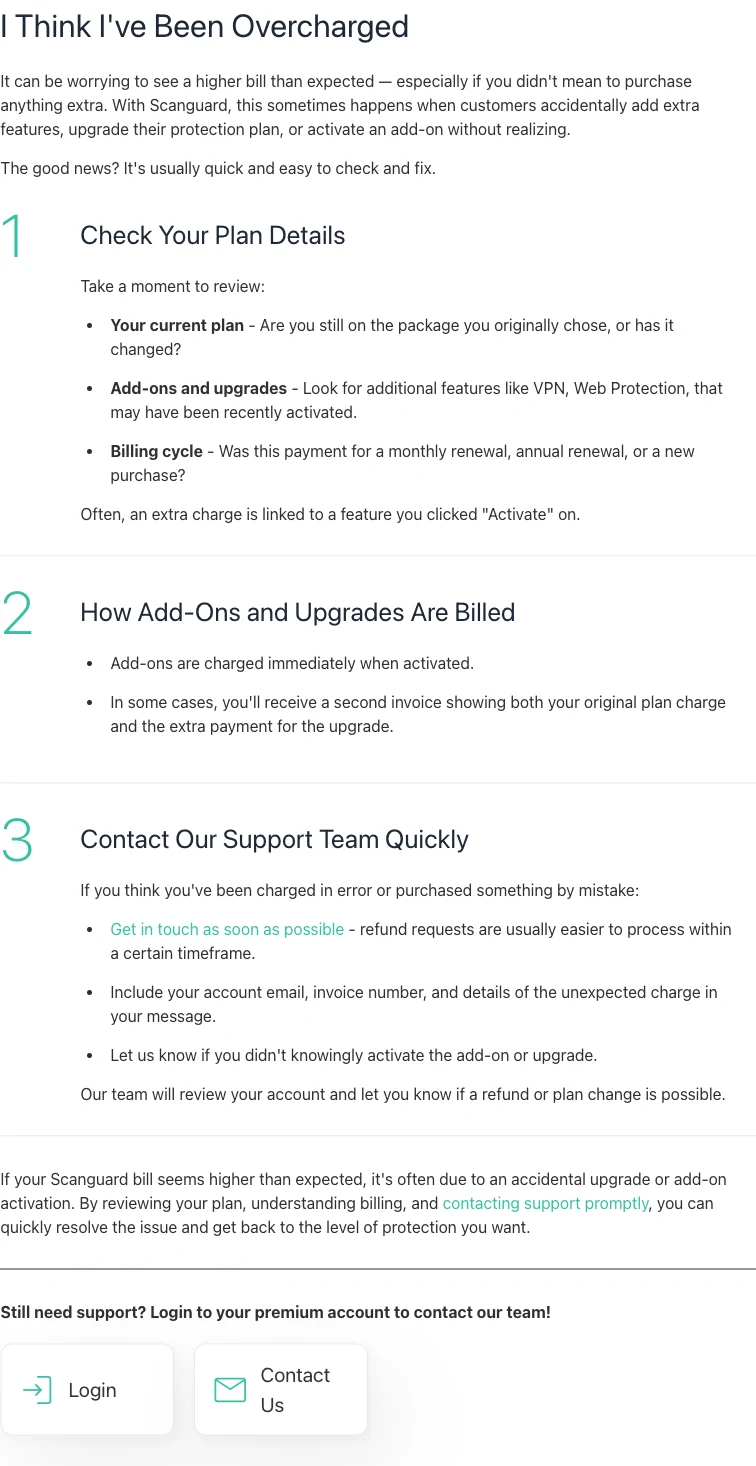
Look for an activation timestamp, feature entitlement and second invoice. A clicked “Activate” control may have created a purchase rather than merely enabling an included feature. If the add-on was accidental, contact official support promptly with the account email, invoice number and exact unexpected service, ask whether an eligible reversal or plan change is possible, and verify that its future renewal is also handled.
Do not assume canceling the core antivirus cancels every add-on. Make a service inventory and record the state of each line. A later small charge can be a surviving add-on even after the core plan stopped renewing.
A failed-payment retry can move the date; a replaced card may still work
Scanguard’s current terms say that if a renewal payment fails, it may adjust the renewal date to the date on which payment succeeds, with the new term beginning on that successful date. The failed-payment guide describes a grace period and automated retries. That can explain a posted charge appearing later than the original renewal date.
Compare failure emails, pending authorizations, successful transaction ID and service-term dates. One failed or reversed attempt plus one settled renewal is not a duplicate. Two settled IDs for the same service and term need a duplicate investigation. Do not let “retry” become a blanket explanation without ledger evidence.
The terms also say the company may use Visa Account Updater and Mastercard Automatic Billing Updater to refresh credentials if a card is lost, reissued or expires. Replacing a card or waiting for expiration is not a cancellation method. Use the subscription controls and save the confirmation. This detail also explains why a legitimate recurring charge can reach a newly issued card without the customer manually re-entering it.
Use Scanguard’s Transaction Search without exposing full payment data
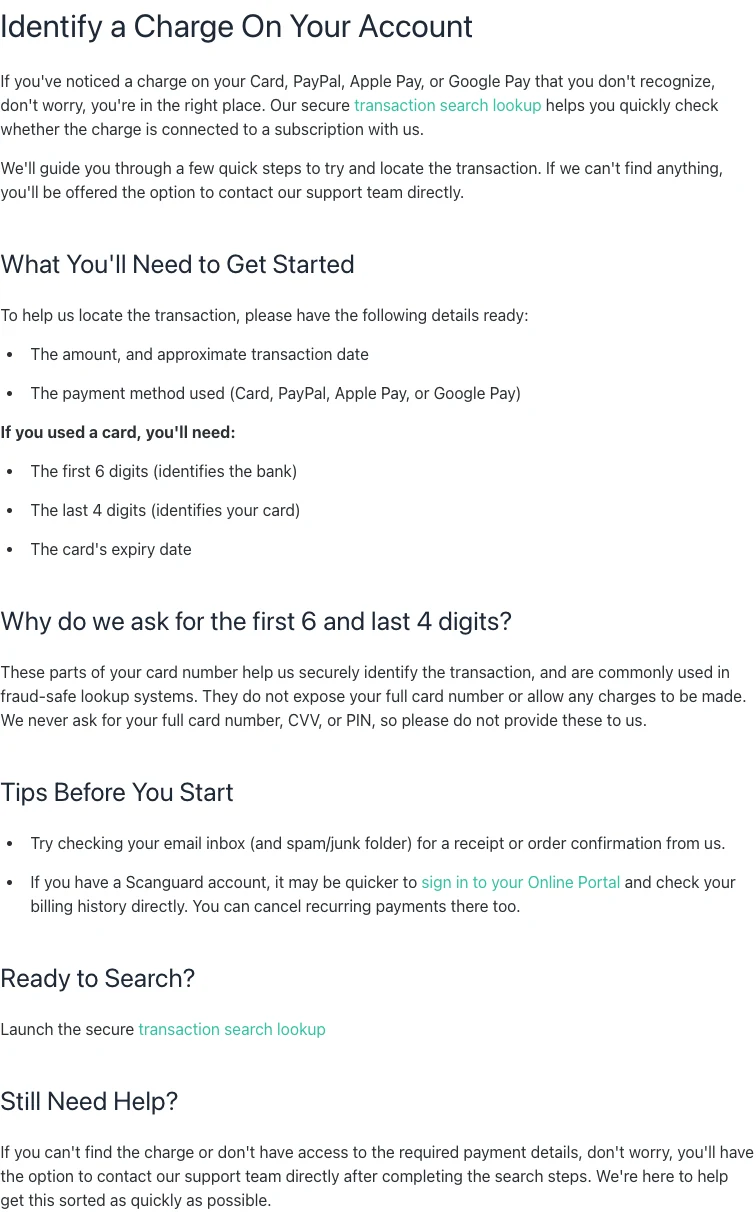
If the direct charge is not visible in the account or the account email is unknown, use the current Scanguard Transaction Search guide. It asks for the amount, approximate date and payment method. For cards, the official page says the lookup may request the first six digits, last four digits and expiry date.
| Lookup detail | Official direct-search boundary |
|---|---|
| Amount and approximate date | Prepare both |
| Payment method | Card, PayPal, Apple Pay or Google Pay |
| Card fragments | First 6, last 4 and expiry when requested |
| Full card number, CVV or PIN | Never provide |
Enter limited card fragments only inside the verified official route. Never email or chat a full card number, CVV, PIN, password or one-time code. Do not use a phone number copied from a search ad, forum or old support page. If the search cannot locate the transaction, continue through the current official support option and record the case number.
Before searching, check receipts and spam, portal billing history and other owned email accounts. The current billing contact page also provides account recovery and subscription-finding routes. Do not create another paid account to gain access.
Paid but service missing: do not pay again until the first charge is traced
Check the product and platform before assuming the account is empty. A receipt for a web-protection add-on will not necessarily create the same entitlement as the desktop antivirus, and an Apple or Google purchase may be attached to the store identity rather than the email used on Scanguard’s website. Write down both identities so support can test the mapping instead of guessing.
A payment with no active entitlement can result from the wrong account, delayed account matching, app-store ownership, failed activation or duplicate account. Save the invoice, posted bank/PayPal record and the screen showing the missing service. Check every email/store account you control and confirm that the invoice service is supported on the device.
Use the Transaction Search and ask support to map the posted transaction ID to an account and service. State that the payment is posted but the entitlement is missing; do not merely say “Scanguard does not work.” Keep the case number and written answer. A February 2026 public Trustpilot report describes an invoice and bank payment that was not recognized as active service, followed by another purchase. That is a useful warning about the failure mode, not proof of a universal problem.
Paying again may create a second entitlement, second account or duplicate without repairing the first record. If support proposes another payment, ask what will happen to the posted transaction and require a written resolution. Technical activation belongs after billing ownership is established.
Duplicate or wrong amount: prove the mismatch in one page
A one-page case should lead with the requested resolution: identify both transactions, restore the paid service, correct the amount or return the duplicate. Attach copies rather than original records. A chronological list is easier to audit than a long emotional narrative, and it reduces the chance that support treats an entitlement problem as a cancellation request.
For a duplicate, collect both posted transaction IDs, dates and amounts, the single invoice/service term they appear to cover, and any authorization reversals. For a wrong amount, show the invoice total and posted amount in the same currency, then separate issuer fees or currency conversion. Mask unrelated activity and full account numbers.
Send official support a compact table and ask it to identify each settlement. If one is a duplicate, request merchant correction and written refund confirmation. If the amount reflects a separately invoiced add-on, move that line into the add-on/refund path instead of continuing to call it a duplicate. Accurate classification makes a later issuer dispute stronger.
Keep monitoring until the credit posts. A merchant saying “refunded” is not the same as a settled statement credit. Record approval, processor reference and posting date. If the published processing window passes, ask the merchant and provider to trace the same reference rather than opening conflicting cases.
Apple, Google and PayPal charges use their own histories and security routes
Apple’s purchase-history guide, published June 30, 2026, lets users search by amount and warns that multiple purchases or subscriptions can be grouped in one bill. Check family purchases and the owning Apple Account. If the item is recognized, cancellation and refund are separate Apple actions; if account misuse is suspected, change the Apple Account password and follow Apple’s unrecognized-charge route.
Google Play’s order history appears in Play and payments.google.com. Its unrecognized-charge guidance publishes `GOOGLE*` descriptor formats and a dedicated fraud report. Current Google policy accepts reports for fraudulent card/debit/PayPal Play transactions within 120 days and carrier billing within 60 days; these are store fraud-reporting limits, not Scanguard refund promises.
In PayPal, check Activity and the merchant’s automatic-payment agreement. PayPal explains that a subscription is an automatic payment that can prioritize a particular funding method. Its official fraud guidance routes unauthorized activity through the Resolution Center and advises securing a compromised account. Verify that the event was not an automatic payment or household purchase before labeling it unauthorized.
Choose merchant correction, eligible refund or payment-provider dispute
Keep the renewal-control problem separate from the historical payment. A refund for one transaction does not necessarily disable the next renewal, and cancellation does not necessarily resolve a duplicate already posted. Close both loops: the ledger must show the agreed correction, and every unwanted service must show the intended future state.
Merchant correction fits a duplicate, wrong amount, missing entitlement or identifiable account mismatch. An eligible refund fits a recognized purchase, renewal or accidental add-on handled under the current plan/store policy. A fraud or issuer dispute fits an unauthorized transaction or unresolved billing error. These routes can interact, but do not open contradictory claims that describe the same payment as both recognized and stolen.
| Claim | Evidence packet | Route |
|---|---|---|
| Wrong or duplicate posted amount | Invoice plus transaction IDs and statement | Merchant correction, then provider if unresolved |
| Recognized renewal/add-on, money back requested | Plan, date, invoice, service and cancellation state | Eligible merchant/store refund |
| Paid but no entitlement | Posted payment plus missing service and case | Merchant/account correction |
| Genuinely unauthorized | Unknown transaction plus account-security facts | Immediate provider/store fraud route |
Rules vary by country and payment type. In the United States, the CFPB’s current credit-card billing-error guide says to call promptly and send a written notice within 60 days after the statement with the error to preserve federal rights. The FTC explains the same credit-card process. Debit cards, PayPal, stores and non-U.S. law differ, so use the provider’s current instructions and do not let a merchant conversation consume a deadline.
Keep copies, dates and names. Pay undisputed amounts according to issuer guidance and do not assume a provisional credit is final. The finished case should have an identified service, a corrected/refunded/disputed transaction and a verified future renewal state.
Scanguard charge and billing FAQ
These answers classify the payment first; eligibility, consumer rights and processing rules can vary by billing owner, country and transaction facts.
What is a Scanguard charge on my bank statement?
It may be a direct Scanguard subscription or add-on, a regular renewal after an introductory term, a retried payment, or a transaction owned by Apple, Google or PayPal. Match the exact descriptor, posted date and amount against portal billing history, receipts and every service line before deciding which explanation fits.
What is an antivirushelper.com charge?
Scanguard’s current-site legacy unrecognized-charge page names scanguard.com and antivirushelper.com as possible descriptors connected with its billing. Use the current secure Scanguard Transaction Search or authenticated portal to verify a specific transaction; a descriptor alone is not proof that your charge is valid or invalid.
Why did Scanguard charge more at renewal?
Scanguard says introductory pricing generally applies only to the first billing period and the subscription then renews at the regular rate shown at checkout or in the order confirmation. Compare that evidence, currency, tax and each add-on before classifying the amount as an overcharge.
Can Scanguard charge an add-on separately?
Yes. Current billing guidance says add-ons can renew separately, and the overcharge page says an add-on is charged immediately when activated. A second invoice may contain the original plan charge and the extra upgrade payment, so inspect each service rather than reconciling only the core antivirus.
What details does Scanguard need to find a charge?
The current Transaction Search asks for the amount, approximate date and payment method. For a card, it may ask for the first six digits, last four digits and expiry date. Scanguard explicitly says it never asks for the full card number, CVV or PIN.
Why was my replacement or expired card still charged?
Scanguard’s current terms say it may use Visa Account Updater and Mastercard Automatic Billing Updater to refresh credentials for a lost, reissued or expired card. Replacing a card is therefore not a reliable way to cancel; verify every subscription’s renewal state directly.
Why did the Scanguard renewal happen on a different date?
The current terms say a failed renewal may be retried and the renewal date adjusted to the date the payment succeeds. Compare failed-payment notices, pending authorizations and final posted transaction IDs. Two visible lines are not necessarily two settled charges.
What if I paid Scanguard but the service is missing?
Do not pay again until the first transaction is traced. Save the invoice and posted payment, check the correct account and service, run the official Transaction Search and get a case number. A second payment can create a duplicate charge or second account without restoring the original entitlement.
Should I contact Scanguard or my bank first?
For a recognized renewal, add-on, duplicate or wrong amount, identify the transaction and request merchant correction or an eligible refund promptly while preserving issuer deadlines. For a genuinely unauthorized transaction or compromised payment account, contact the payment provider’s fraud channel immediately and secure the account; do not delay for routine support.
How do I dispute a Scanguard charge?
Use the authenticated card issuer, PayPal, Apple or Google route that owns the payment and describe the facts accurately: unauthorized, duplicate, wrong amount, missing credit or another billing error. Rules vary by country and payment type. U.S. credit-card guidance from the CFPB and FTC says prompt notice and a written billing-error notice within 60 days can be important.
Bottom line: the strongest case starts with a matched ledger
Copy the posted transaction, identify its billing owner and match it to an invoice and service state. That sequence explains most surprising Scanguard amounts: regular renewal after promotion, immediate add-on, separate service, payment retry or store/wallet billing. It also exposes the cases that need correction: missing entitlement, duplicate settlement, wrong amount or no authorized relationship.
Use the remedy that fits the evidence and keep sensitive credentials out of the case. Merchant correction, eligible refund and fraud dispute are different claims. Once the payment is resolved, verify every service’s future renewal state so the same confusion does not return next term.