
ESET Password Manager Is Ending: Move Your Vault Without Exposing It
ESET stopped selling Password Manager in 2025 and says every remaining vault will stop working—and its data will be deleted—after October 18, 2027. The deadline is generous; an unencrypted CSV sitting in Downloads isn't.

Quick answer: Don't wait for October 2027. Choose a replacement password manager, create its account with a new unique master password and strong recovery method, then export ESET Password Manager. Keep an encrypted JSON backup, but expect many replacement services to require a CSV or a converted import. CSV is plaintext: work on a trusted local device, import immediately, verify a sample plus every passkey, one-time-code seed, card, identity and secure note manually, then securely remove all CSV copies and empty cloud/trash locations. Keep ESET available for a short overlap, but finish before your subscription access plus any grace period ends.
Need a different ESET task? The complete ESET guide hub routes review, plans, setup, banking, troubleshooting, firewall and HTTPS, Android, VPN, password migration, billing and removal without mixing their steps.
The dates that matter: sales ended in 2025, service ends in 2027
ESET’s official Password Manager end-of-life notice sets three separate boundaries. New sales ended October 21, 2025. Existing users retain access only while an eligible subscription remains active, followed by a 14-day grace period intended for export. The final End of Life date is October 18, 2027; after that, ESET says the app stops and all stored data is deleted.
There's no replacement password-manager app from ESET. Premium and Ultimate buyers should therefore stop treating the vault as a durable benefit of the suite. The antivirus subscription can continue protecting devices, and current Premium now includes VPN, but those changes don't preserve passwords after the stated deadline.
The correct response is an orderly migration, not panic. Move while extensions still open on familiar devices and support channels still recognize the product. Leave enough overlap to find an old secure note or login that an importer missed, but give that overlap an end date.
Inventory the vault before making any export
A successful “237 items imported” message proves only that 237 records were accepted. It doesn't show whether the old vault contained 260 records, whether credit cards became notes, whether duplicate logins were merged, or whether one-time-password seeds and passkeys were omitted.
Record counts by type before export: logins, identities, payment cards, secure notes and any other categories visible in ESET. List family or shared items separately. Search for blank titles, duplicate domains and unusually long notes, because those are common import failures. Don't put actual passwords into the inventory; counts and item names are enough.
Build a separate high-risk checklist: primary email, ESET HOME, banking, tax, cloud storage, domain registrar, mobile carrier, Apple/Google/Microsoft account, authenticator account and the new password manager itself. These are the accounts to verify manually even when the bulk import looks perfect.
Passkeys, TOTP authenticator seeds, recovery codes, file attachments and custom fields deserve their own rows. Portable CSV formats were designed around text fields, not every modern credential. The safest assumption is that a specialized item will require verification or re-enrollment.
Choose the replacement by recovery model, not by an affiliate ranking
A replacement needs clients for every operating system and browser you use, a credible security design, clear export capability, strong two-factor authentication, a recovery model you understand and the right sharing controls. The cheapest first year is secondary; switching vaults is disruptive enough that you should choose a service you can leave cleanly later.
| Need | Shortlist | Question to answer before import |
|---|---|---|
| Strong free cross-platform baseline | Bitwarden | Are you comfortable mapping ESET’s unsupported CSV format? |
| Polished family and recovery workflow | 1Password | Does its generic CSV mapping preserve the item types you use? |
| Privacy suite integration | Proton Pass | Which sharing, alias and recovery features require a paid tier? |
| Local vault ownership | KeePass / KeePassXC ecosystem | Can you securely manage sync, backups and mobile clients yourself? |
| Platform-native simplicity | Apple Passwords or Google Password Manager | Will every family device and browser remain inside that ecosystem? |
A July 2026 r/ESET replacement discussion mentions Bitwarden, 1Password, Proton Pass, KeePass, Enpass, RoboForm and others. This is useful evidence of what existing ESET users are trying, not proof that one service is safest. Community advice must never substitute for the replacement vendor’s own import and recovery documentation.
Create the new account before exporting. Use a brand-new, unique master password that isn't present in ESET, enable the strongest supported MFA, save recovery material offline and test account recovery without destroying the live vault. Don't store the only copy of the new recovery code inside the new manager.
Export two different things: an encrypted backup and a temporary migration file
ESET’s official version 3 export guide opens the browser extension, selects Menu → Settings, scrolls to Data and chooses Export data. It offers a password-protected JSON database backup and CSV.
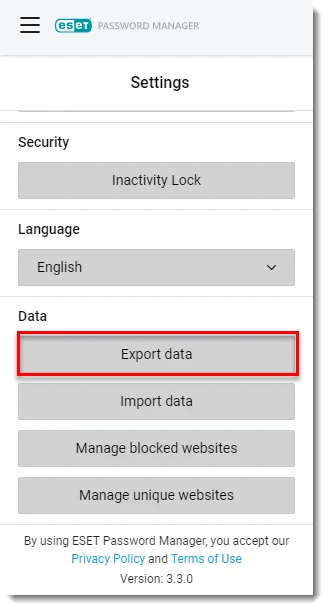
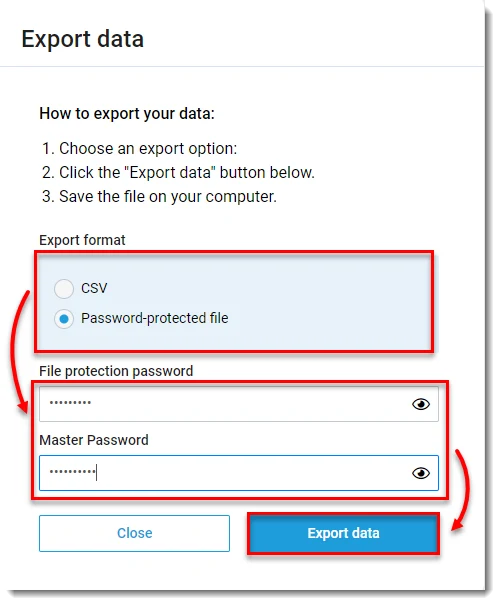
The password-protected JSON is the better archival backup. Give it a new high-entropy protection password stored separately. Don't assume another manager can import that ESET-specific encrypted file directly; its purpose is recovery and preservation.
CSV is the practical bridge for many replacements, but it contains readable secrets. Close screen sharing, pause cloud-folder sync, export to a local folder you control and don't open it in an online spreadsheet. If your office device is monitored, shared or backed up by policy, use an authorized migration path instead of creating a private plaintext vault on it.
Never email the file, upload it to a conversion website or paste rows into a public support thread. If you need column help, create a synthetic CSV with fake example values and identical headers. A helper needs the structure, not your credentials.
Import: use a direct importer when available, map CSV only when necessary
Start with the replacement vendor’s current documentation. Bitwarden’s import guide accepts many named formats and explains how to condition an unsupported CSV into its supported structure. At our check, ESET wasn't a named direct source, so the safe path is a local mapping—not choosing a random format and hoping every column lands correctly.
For Bitwarden CSV, typical login rows need a type, name, login URI, username and password, with optional folder, notes, fields and TOTP columns. ESET’s export can also contain identities, cards and notes with different fields. Split the work by item type and preserve a copy of the original encrypted backup before deleting columns from any temporary migration copy.
1Password supports generic CSV import through its web account and column mapping. That can reduce manual editing, but a mapped column still doesn't guarantee semantic equivalence. Inspect the preview, send one small batch first, and confirm a card, note and login before importing the remainder.
If a provider has added a direct ESET importer by the time you migrate, use its documented version and supported item list. Importers change. The Bitwarden community’s ESET mapping discussion can be helpful, but it may target a different ESET CSV header or replacement release. Use fake sample values when asking questions, preserve the encrypted source and test with copies.
Verification: prove access before deleting anything
Compare total records and counts by type. Investigate every difference rather than assuming it's a harmless duplicate. Search the replacement for the high-risk checklist created earlier and open each item. Verify the username, URL, note, custom fields and attachments; don't reveal the password unless the field itself is in doubt.
Test logins on the genuine site reached through a saved bookmark or manually typed domain. Confirm autofill refuses look-alike domains. Change the password of one low-risk test account and make sure the new vault captures the update across desktop and mobile.
Passkeys may remain bound to a platform or old manager. Open each important account’s security settings, verify where its passkeys live and create a new passkey in the replacement where supported before removing the old one. Do the same for TOTP: keep one active authenticated session, enroll the new seed, confirm two consecutive codes and save fresh recovery codes.
Shared family credentials need a second person to test access from their own account. Moving an item into your private vault isn't a successful migration if the family member who pays the bill can no longer see it. Review ownership and emergency-access roles rather than recreating one shared master password.
Keep ESET available read-only during a defined overlap. Don't keep editing both systems; decide which vault is authoritative from the import moment. If a forgotten item appears in ESET, move it deliberately and record the count change.
Remove plaintext CSV without destroying the verified backup
After verification, close applications that opened the CSV. Delete the working file, converted copies and test subsets from Downloads, Desktop, document folders and recent-file lists. Empty the operating-system trash and inspect cloud-sync trash or version history if the file ever entered a synced folder.
Delete spreadsheet autosave and exported email attachments if you ignored the safer workflow. Full forensic erasure on SSDs is complicated by wear leveling; preventing unnecessary copies and using full-disk encryption from the start is more dependable than repeatedly overwriting one file after the fact.
Retain only the password-protected JSON backup if you need an archival rollback, and store its password separately. Label the file with the export date and ESET version, not with a name such as all-passwords-plaintext. Test that the backup can at least be opened with its password before moving it offline.
Once the overlap ends, sign out old browser extensions, remove them, revoke unused devices and close the ESET Password Manager vault according to the current account controls. The antivirus can remain installed; the complete ESET uninstall guide is only for people removing the security product itself.
Family migration: the owner shouldn't become everyone’s single point of failure
Inventory who owns the ESET subscription, who can currently see shared credentials and whose email controls recovery. Create individual replacement accounts instead of sharing one master password. Put household credentials in a family/shared collection and keep private banking, health and work records private.
Invite one member, move a small set, and confirm create/read/edit permissions before bulk transfer. Decide who can recover whom, who can export the shared vault and what happens if the family organizer loses access. Write that plan on paper without writing the master password itself.
Children and less technical relatives need a short handoff: how to recognize the correct extension, unlock it, report a phishing prompt and reach recovery help. Removing ESET’s extension before the replacement is pinned and working can lead them back to reused passwords or browser-only storage.
If the family is also reconsidering the antivirus bundle because Password Manager disappeared, compare current ESET plan features and ESET alternatives separately. Don't rush a security-suite migration and a credential-vault migration on the same day.
A migration timeline that leaves room to recover mistakes
| Time | Action | Exit test |
|---|---|---|
| Day 0 | Inventory, choose replacement, secure recovery | New vault can be recovered from a second device |
| Day 1 | Create encrypted backup and temporary CSV; import | Counts and sample item types match |
| Days 2–7 | Verify priority accounts, passkeys, TOTP and sharing | Daily devices autofill correctly without ESET edits |
| Day 7 | Delete every plaintext export | Only encrypted archival copy remains |
| Days 8–30 | Read-only overlap | No missing items discovered for two weeks |
| Day 30 | Sign out, revoke and remove old extensions | Family recovery drill succeeds |
If the current ESET subscription expires sooner, compress the schedule but don't skip verification. The ESET cancellation guide explains that disabling auto-renewal normally leaves protection through the paid term; check the Password Manager eligibility and 14-day export grace rather than assuming indefinite access.
For the wider product decision, see the full ESET review, current pricing and renewal page, ESET VPN review and ESET vs Bitdefender. Password Manager’s shutdown is a real bundle loss, but it doesn't by itself measure the antivirus engine.
Bottom line: migrate now, keep an encrypted source, treat CSV as exposed secret material, and verify modern credentials manually. The deadline gives you time to do this without improvising; use it.
ESET Password Manager shutdown and migration FAQ
When is ESET Password Manager shutting down?
ESET lists October 18, 2027 as the End of Life date. After that date the app stops working and all data is deleted. Access can also end earlier when an eligible subscription expires, subject to the stated grace period.
Can I still buy ESET Password Manager?
No. ESET stopped new sales on October 21, 2025 and says there will be no replacement password-manager application from ESET.
Which ESET export format should I choose?
Use ESET’s password-protected JSON as an encrypted backup. For migration, many services accept CSV or a mapped CSV, but ESET warns that CSV is unencrypted. Create it only when needed, import immediately and remove every copy afterward.
Can Bitwarden import ESET Password Manager directly?
Bitwarden’s current importer doesn't list a one-click ESET format. Its official guidance supports conditioning an unsupported CSV into a Bitwarden CSV. Community mappings can help, but inspect the columns yourself and never upload a real vault to a stranger.
Can 1Password import the ESET CSV?
1Password supports importing generic CSV files through 1Password.com, with column mapping. Verify which ESET item types survive and recreate unsupported passkeys, one-time codes, identities, cards or notes manually.
Will passkeys and two-factor codes migrate automatically?
Don't assume so. Export/import support varies by item type and provider. Inventory passkeys, TOTP seeds, recovery codes and hardware keys separately, then re-enroll or verify each account before deleting the old vault.
When should I delete the ESET vault and export?
Delete plaintext CSV copies as soon as the imported vault and an encrypted backup are verified. Keep the old ESET vault only for a short, defined overlap; don't rely on it near the shutdown deadline.
Does cancelling ESET immediately delete Password Manager?
Subscription access and service end-of-life are separate. ESET’s EOL notice says access is retained until the current eligible subscription expires plus a 14-day export grace period, while the service itself ends no later than October 18, 2027.