
How to Uninstall Avast Completely Without Leaving Windows Unprotected
Use the normal uninstaller first, Avast Clear only when it fails, and verify the antivirus handoff after restart. Billing, Photo Vault data and separate Avast apps need their own checks.

Quick path: cancel renewal separately if needed, export Photo Vault data, then open Windows Settings → Apps → Installed apps → Avast One → Uninstall. Approve the Avast setup window, choose the modules or everything, restart, and verify Microsoft Defender in Windows Security. If normal removal fails, download the official avastclear.exe, let it reboot into Safe Mode, choose Remove only, finish and restart. Don't begin with manual folder deletion or a third-party cleaner.
Need a different Avast task? The complete Avast guide hub routes review, plans, Free versus Premium, setup, troubleshooting, privacy, features, billing and removal without mixing their steps.
Uninstall, cancel and disable aren't interchangeable
| Action | Use it for | What remains | Main risk |
|---|---|---|---|
| Uninstall | Remove apps and security drivers | Subscription can still renew | Protection gap if no provider activates |
| Cancel renewal | Stop a future merchant charge | App and paid access through current term | Assuming the software was removed |
| Temporarily disable | Short, controlled troubleshooting test | App, services and billing | Leaving shields off indefinitely |
Uninstalling Avast doesn't cancel the contract. If the goal is to stop payment, complete the Avast cancellation and refund steps through the correct merchant and save confirmation; Avast's own cancellation FAQ makes the same separation. If the goal is a ten-minute compatibility test, use the temporary-disable guide and restore protection immediately.
This page covers actual removal. A successful uninstall ends Avast's protection on that device; it doesn't guarantee that Microsoft Defender or a replacement is active until you verify the provider. It also doesn't remove every separately installed Avast browser, VPN or maintenance app unless those modules are selected.
Before removal: preserve data and prepare a safe handoff
- Export Photo Vault files. Do this before deleting the Android or iOS app; the iPhone loss is irreversible according to Avast.
- Record the subscription. Save product, merchant, account, order ID, renewal state and next-payment date.
- Save justified exclusions. Keep a text record only if the replacement truly needs them; don't copy broad old exclusions automatically.
- Prepare Windows recovery. Know the account password, not only the PIN, and save the BitLocker/device-encryption recovery key before Safe Mode.
- Download the replacement if needed. Keep its installer ready, but don't run two full real-time suites together.
- Close sensitive work. Save documents and allow time for a mandatory restart.
The password and recovery-key step matters because Safe Mode can change the sign-in options available, and an encrypted device can request recovery after boot changes. Avast Clear normally orchestrates the reboot itself; preparation is still safer than discovering a missing credential on the recovery screen.
Don't export an Avast password vault because the old Avast Passwords product is retired; confirm which current password manager actually holds the data. Our Avast password-manager status guide covers that distinction. A browser bookmark export is also separate from uninstalling Avast Secure Browser.
Uninstall Avast One normally on Windows 11 or 10
- Cancel renewal separately if required. Use the controlling merchant to stop future billing because uninstalling the application doesn't alter the subscription.
- Export Avast-stored data and recovery information. Move Photo Vault files, record needed settings, save the Windows sign-in password and device-encryption recovery key.
- Prepare the replacement protection. Download the chosen replacement or plan to use Microsoft Defender, but don't activate a second real-time suite before Avast is removed.
- Run the normal Avast One uninstaller. Open Windows Installed apps, select Avast One, approve UAC, choose Uninstall and continue past the retention prompt.
- Select apps or remove everything. Choose the exact Avast One modules to remove, confirm the selection and preserve any app that's intentionally staying.
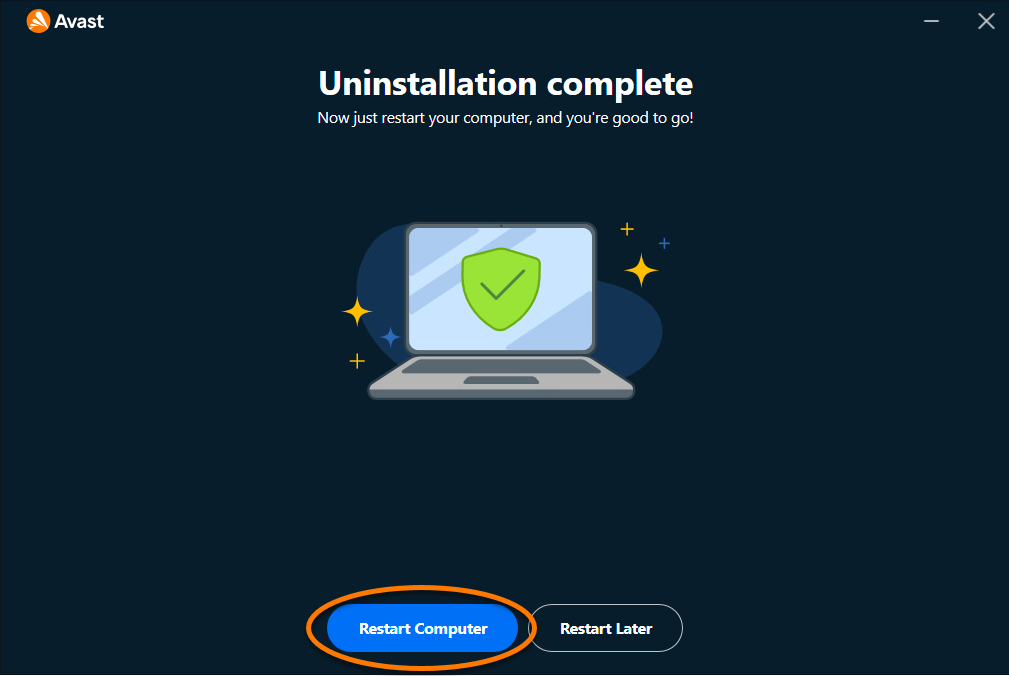
- Restart Windows. Use Restart computer when removal completes so security drivers and provider registration can finish changing.
- Use Avast Clear only if normal removal fails. Download official
avastclear.exe, run as administrator, reboot into Safe Mode, choose Remove only, confirm and restart. - Verify active protection and remaining software. Check Windows Security, firewall, Installed apps, browser extensions, startup items and each separate Avast subscription.
On Windows 11, right-click Start or open Settings, choose Apps → Installed apps, find Avast One, open its menu and choose Uninstall. On Windows 10 the label may be Apps & features. Approve User Account Control only when the publisher and requested action match Avast's uninstaller.
The uninstaller can offer a limited mode, repair or reasons to stay. Choose Skip and uninstall when removal is the decided outcome, then continue to the module selection. Don't end the process in Task Manager because a retention screen is annoying; interrupted security-driver removal is harder to diagnose than completing the official path.
The current Avast One uninstaller can remove selected modules
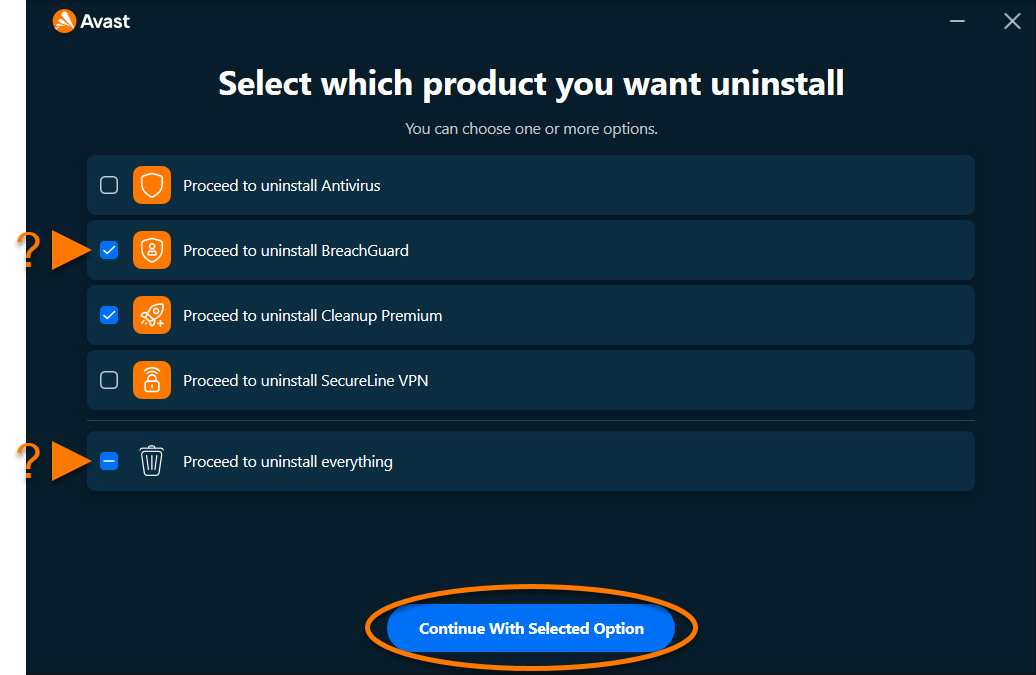
The new Windows flow can show Antivirus, BreachGuard, Cleanup Premium, SecureLine VPN and an “everything” option. Select Antivirus if another primary provider will take over while a separate Avast app remains intentionally. Choose everything when the goal is a clean departure from the hub.
Partial removal needs two extra checks. First, verify which remaining app still starts with Windows and owns network or browser extensions. Second, inspect billing for every module. Removing Premium Security while leaving SecureLine VPN doesn't imply their subscriptions were combined or cancelled.
Avast's current Avast One removal guide is the controlling reference for available choices. Builds and platforms can differ, so follow the labels on the signed uninstaller rather than forcing a screenshot's exact set of apps onto another version.
Use Avast Clear only after normal uninstall fails
Avast recommends its official Uninstall Tool when Start/Apps removal fails or the message “setup is already running” prevents progress. Download avastclear.exe from the Avast Uninstall Tool guide, verify the source and publisher, then run it as administrator.
- Choose the tool's Reboot option and allow Windows to restart in Safe Mode.
- When Avast Clear opens, use Remove only for a clean uninstall; Remove & Reinstall is a different repair outcome.
- Confirm the detected Avast product and removal action.
- Wait for completion without manually deleting folders or drivers.
- Choose Restart computer and return to normal Windows.
Safe Mode loads fewer third-party drivers, which lets the vendor tool remove components that are locked during a normal session. It isn't a separate operating system installed by Avast. Avast's Safe Mode instructions use Windows recovery and Startup Settings. If the PC repeatedly boots to Safe Mode, don't edit random registry or boot values from a forum; use Windows recovery guidance or Avast Support with the exact screen and tool version.
A community thread from 2026 shows why the fallback needs caution: one user couldn't use the expected credential in Safe Mode and interpreted the process as a new operating system. The useful lesson is credential and recovery preparation, not that the official tool is malicious. Don't replace it immediately with a third-party uninstaller that can't understand current Avast security drivers.
Restart, then verify Microsoft Defender and firewall
Microsoft documents that Defender can re-enable automatically after a non-Microsoft antivirus is uninstalled, expires or stops providing real-time protection. On a normal Windows 10 or 11 home PC, open Windows Security → Virus & threat protection after restart and confirm that Microsoft Defender Antivirus shows active real-time protection or that the intended replacement is registered.
Open Firewall & network protection and confirm the active network profile is protected. Antivirus and firewall are separate provider roles: removing Avast's antivirus or firewall controls shouldn't leave the Windows firewall disabled. Run updates, then perform a Quick scan after definitions are current.
If no antivirus is active, don't browse for another remover. Restart once more, install Windows updates and check Installed apps for remaining third-party security software. A managed work PC can have policies that control Defender; contact the administrator instead of changing policy or registry values. Microsoft's antivirus FAQ provides the consumer handoff behavior.
If Avast appears to return, identify the exact app and installer source
An orange icon after removal may be Secure Browser, Cleanup, SecureLine VPN, BreachGuard or a leftover shortcut rather than the antivirus reinstalling itself. Right-click the process or shortcut and inspect its path and publisher. Check Installed apps, Task Manager Startup apps and browser extensions, then remove the identified product through its own official uninstaller.
If Avast One itself reappears, review recent installers. Bundled software can offer Avast or Secure Browser, and an OEM or management tool can redeploy approved apps. Don't delete folders while that source remains; the package will return. Remove or change the controlling installer, scheduled deployment or bundle selection.
Run Windows Security and an on-demand scan if the supposed “Avast” has an unknown publisher or path. Malware can imitate a familiar security name. Don't download a random “Avast remover” from a phone-number page or PDF attachment—the current search results contain deceptive support documents hosted on unrelated domains. Official Avast Support and Microsoft are the safe starting points.
Use the Avast One Uninstaller on Mac, not Trash
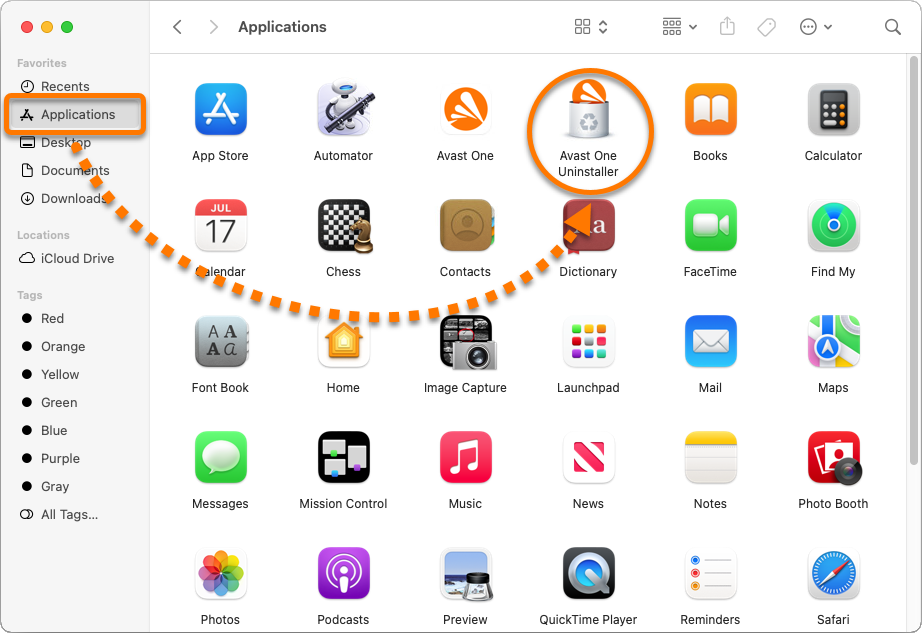
In Finder, open Applications and launch Avast One Uninstaller. Choose Continue, enter the password used to start the Mac when the helper requests it, allow the removal to finish and choose Finish. The helper removes security extensions and supporting components that a simple drag-to-Trash action can leave behind.
After removal, restart if prompted, then open System Settings → Network and Privacy & Security. Confirm that obsolete Avast network filters, extensions or Full Disk Access entries are gone or inactive, and test the browser, mail and required VPN. Don't remove unrelated management or corporate security profiles.
Subscription cancellation remains separate on Mac as well. A direct Avast plan, App Store purchase or reseller order follows its merchant. Preserve the account and receipt before removal if a refund or device-seat transfer is still needed.
Export Photo Vault before removing Avast on Android or iPhone
Avast says Android Photo Vault files become inaccessible after uninstall. They may be recoverable by reinstalling Avast One on the same device and configuring the vault with the same email and PIN, but that isn't a backup strategy. Export every file and open the exported copies before deleting the app.
On iPhone, Avast is stricter: Photo Vault content is deleted with the app and can't be restored. Export first. The legacy Avast One and Mobile Security apps are also being removed from the stores during the 2026 transition, so uninstalling a legacy build can make that exact app impossible to reinstall.
Android removal is available through Google Play or Settings → Apps → Avast One → Uninstall. On iPhone, touch and hold the icon, choose Remove App and Delete App. Store subscription cancellation is a separate action under Google Play or Apple subscriptions. The official cross-platform uninstall guide documents the Photo Vault consequence.
Reinstall for a damaged app; replace for a bad fit
Choose reinstall when Avast was working until an update, provider registration or component corruption failed and the product still fits. Use Remove & Reinstall in the official tool or complete removal, then follow our safe Avast installation guide. Re-create only necessary exclusions and verify the account before adding other modules.
Choose a replacement when prompts, trust, performance or missing features make Avast the wrong daily tool. Microsoft Defender is the no-install default on Windows; Bitdefender, ESET and other suites solve different needs. Compare reasons rather than star totals in our Avast alternatives guide, read the current Defender review, and use the complete Avast review to decide whether the underlying issue justifies leaving.
If the product remains a fit but the paid extras do not, a clean reinstall can return to the $0 core. The Avast Free versus Premium comparison identifies which controls disappear before you change the entitlement.
If the decision follows performance trouble, capture evidence before removal so the cause isn't lost. A process name, task, timing and before/after measurement can distinguish a corrupt Avast component from disk, browser or driver problems. The next Avast troubleshooting guide will handle high CPU, memory and web slowdowns without turning permanent removal into the first diagnostic step.
Verify a clean removal without deleting random files or registry keys
A clean result is defined by behavior, not by finding zero filenames containing “Avast.” After restart, Avast One should be absent from Installed apps, its antivirus shouldn't appear as the active security provider, and its tray icon and protection services shouldn't return. Windows Security should identify Microsoft Defender or the chosen replacement as active, and normal web, file and network activity should work.
Check the remaining Avast products by name. Secure Browser, SecureLine VPN, Cleanup, BreachGuard and Driver Updater can be independent applications. Leaving one intentionally doesn't mean the antivirus failed to uninstall. If none is wanted, remove each through its own Installed apps entry or current Avast One module-selection flow, then restart once after the final security component.
Review browser extensions and default-browser settings separately. Removing antivirus doesn't automatically erase a browser profile, bookmarks or every extension. If Avast Secure Browser remains, decide whether to export data and uninstall it through its own signed remover. Don't delete a browser profile until the export opens successfully elsewhere.
A leftover empty folder, cached installer or log isn't automatically an active security driver. Avoid registry cleaners and broad searches followed by Delete. They can remove shared Gen Digital components, another product's data or evidence needed for support. If Avast still appears in Windows Security after the official tool and restart, capture the provider name and version, run the current tool once more only as Avast directs, and contact Support rather than improvising driver removal.
Avast uninstall FAQ
How do I completely uninstall Avast from Windows 11?
Cancel billing separately if needed, export any Avast-stored data, then use Settings → Apps → Installed apps → Avast One → Uninstall. Approve UAC, choose the apps or everything, confirm removal and restart. If normal uninstall fails, use the official Avast Clear tool in Safe Mode.
Does uninstalling Avast cancel my subscription?
No. Uninstalling changes software on one device and doesn't stop billing. Cancel through the merchant that sold the plan—Avast, Google Play, Apple or another reseller—and save confirmation before or after removing the app.
What is Avast Clear?
Avast Clear is Avast's official Windows removal utility, downloaded as avastclear.exe. Avast recommends it when normal uninstall fails or setup reports that another setup is running. It removes Avast files while Windows runs in Safe Mode and then requires a restart.
Is Avast Clear safe to use?
The genuine Avast Clear downloaded from Avast Support is the vendor's official cleanup tool. Verify the source and publisher, prepare the Windows sign-in password and device-encryption recovery key, and use it only after normal uninstall fails. Don't use similarly named files from download portals.
Will Microsoft Defender turn on after Avast is removed?
On a normal Windows 10 or 11 home PC, Microsoft says Defender can re-enable automatically when the non-Microsoft antivirus is uninstalled or stops protecting. Restart and verify Windows Security → Virus & threat protection and Firewall; managed business policies can behave differently.
Why does Avast appear again after I uninstall it?
First verify whether it's Avast One, Secure Browser, Cleanup, VPN or another separate app. Check Installed apps, startup items and recent installer history. Another software bundle or a retained Avast app can explain the icon. Don't delete folders manually; remove each identified program through its official route.
Can I uninstall only one app from Avast One?
The current Windows Avast One uninstaller can present checkboxes for Antivirus, BreachGuard, Cleanup Premium, SecureLine VPN or everything. Availability can vary by build and platform. Preserve the primary antivirus until another provider is ready, then verify the remaining modules and subscriptions.
How do I uninstall Avast on a Mac?
Open Finder → Applications → Avast One Uninstaller, choose Continue, enter the Mac password for the helper, allow the removal to finish and click Finish. Don't only drag the Avast One app to Trash, because security extensions and support components need the dedicated uninstaller.
Will uninstalling Avast delete Photo Vault pictures?
Export them first. Avast says Android vault items become inaccessible and may be recoverable only by reinstalling on the same device with the same email and PIN. On iPhone, Photo Vault content is deleted with the app and can't be restored. Legacy mobile Avast One may no longer be reinstallable.
Clean removal ends with a verified replacement, not an empty Avast folder
Use Apps and Avast's signed uninstaller first. Select the intended modules, complete the restart and reserve Avast Clear for a failed normal removal. Manual folder deletion and generic cleanup tools are poor opening moves for software that installs security drivers.
Before calling the job complete, verify billing separately, confirm Photo Vault data is safe, check that no unwanted Avast module remains and open Windows Security. The goal is one active primary antivirus and a protected firewall—not merely the absence of an orange icon.