
Scanguard VPN Review 2026: Is Safe Browsing Worth It?
Safe Browsing is a convenient VPN add-on inside Scanguard. The harder question is whether its public privacy proof and value match a €99 standalone renewal.

Our verdict: Safe Browsing is a real, usable add-on for an existing Scanguard customer who wants one interface on Windows, macOS or Android. It is harder to recommend at the current €99/year European matrix rate because that is a separate renewal and we found no Safe Browsing-specific logging table, public independent no-logs audit or reproducible current benchmark. Test the exact build, location, kill-switch behavior and streaming service before the refund deadline.
Scanguard VPN verdict at a glance
Safe Browsing passes the first test: it is a VPN, not merely a browser proxy or WebShield label. The current app instructions route device traffic through a chosen country or region, and the support center has separate connection, benefits and troubleshooting pages. Existing Scanguard users get a simpler workflow than installing an unrelated privacy app.
It loses ground on value and verification. Scanguard’s January 2026 European matrix lists the VPN as a €99 annual service outside the core antivirus fee. At that price, it competes with standalone services that publish detailed logging definitions, repeated infrastructure audits, full location inventories and much broader device support. Scanguard’s current public material does not meet that disclosure level.
| Area | What we verified | Decision impact |
|---|---|---|
| Product | Full-device add-on in Scanguard | Convenient for existing users |
| Platforms | Windows, macOS, Android paths | Narrower than major standalone VPNs |
| Network | Marketing says 100+ servers | No full current location list |
| Privacy | General group privacy policy | No VPN-specific logging table found |
| Independent proof | No public scoped audit found | Weak fit for privacy-first buyers |
| Price | €99/year European matrix reference | Direct standalone-VPN competition |
The review score should not be inferred from antivirus detection. A strong malware engine does not validate VPN logging, tunnel code or exit-server operation, and a good VPN result would not validate antivirus protection. They share an interface and account but answer different security questions. We therefore keep lab-test evidence on the main product review and judge this add-on on network and privacy evidence.
Our recommendation is conditional rather than neutral. Keep it when integration matters and it passes your real use test. Compare elsewhere when privacy audit history, WireGuard-class modern protocols, routers/Linux/TVs, transparent server infrastructure or consistent streaming is the reason you are paying.
What Safe Browsing does—and what a VPN cannot do
Scanguard describes Safe Browsing as an add-on that creates an encrypted connection to a separate network over the internet. In practical terms, the local network and ordinary internet provider see a connection to the VPN service instead of the final browsing destinations, while websites see the VPN exit IP rather than the household public IP. That is useful on public Wi-Fi and for changing apparent region.
The current marketing page goes much further, calling the user anonymous, impossible to track or hack and the connection unhackable. Those are not defensible literal guarantees. Logged-in accounts, cookies, browser fingerprinting and payment identities can still identify a user. A malicious download, phishing form or compromised endpoint remains dangerous before or after the tunnel.
A VPN also changes whom you trust. It reduces what the local network and ISP can see about destinations, but the VPN operator becomes an important party in the path. That makes provider ownership, logging rules, audits and jurisdiction essential parts of a review—not footnotes after a speed chart.
Safe Browsing is a separate subscription with its own renewal
The live European subscription matrix checked August 5 lists Safe Browsing VPN at €99 annually. That is a dated reference, not a universal Offer: currency, tax and campaign can differ. The controlling evidence is the VPN line in the buyer’s checkout, invoice and Online Portal. Seeing VPN inside the same Scanguard window does not mean the antivirus fee includes it.
Scanguard’s current terms and billing structure say add-ons can be managed and renewed separately. The current refund rules give add-on services 14 days from purchase or renewal, while annual core plans may have a different window. Turning off auto-renewal and requesting a refund are separate actions. Our Scanguard pricing guide maps the full subscription stack, and the cancellation/refund guide owns the action sequence.
| Evidence to save | Question it answers |
|---|---|
| Checkout and invoice | What was charged now? |
| Portal service row | Is VPN active as a separate line? |
| Next payment amount/date | What will renew? |
| Refund deadline | How long is the real-use test? |
| Cancellation confirmation | Is future renewal actually off? |
At €99, convenience must replace something valuable. Paying the same amount for a narrow add-on and a mature standalone service is not equivalent if the latter brings more audited privacy evidence, devices and advanced controls.
Current documentation clearly supports Windows, macOS and Android
The current operational help gives three connection workflows: Windows, macOS and Android. The Windows app uses a Fingerprint icon and VPN panel; macOS exposes VPN directly; Android has a region selector in the Scanguard app. Scanguard says a purchase can take up to 20 minutes to unlock in the application.
One benefits page contains a malformed “macOS -iOS” line, while the current how-to has no iOS tab. We would not buy for an iPhone based on that fragment. Verify the current App Store listing and account entitlement first. We also found no current public connection path for Linux, routers, ChromeOS, smart TVs, Apple TV or browser-only VPN use.
“Multi-device” is therefore a licensing and supported-app question, not proof of every platform. Check how many concurrent or licensed devices the VPN service line permits in the actual account, especially when the antivirus and VPN are separate subscriptions.
The connection workflow is simple, but verify the tunnel yourself
On Windows, Scanguard’s current instructions say to open the app, click the Fingerprint icon, select VPN, choose a country and connect. On macOS, open VPN, choose a region and click the red power icon. Scanguard tells users to close affected applications and browsers before connecting and reopen them afterward.
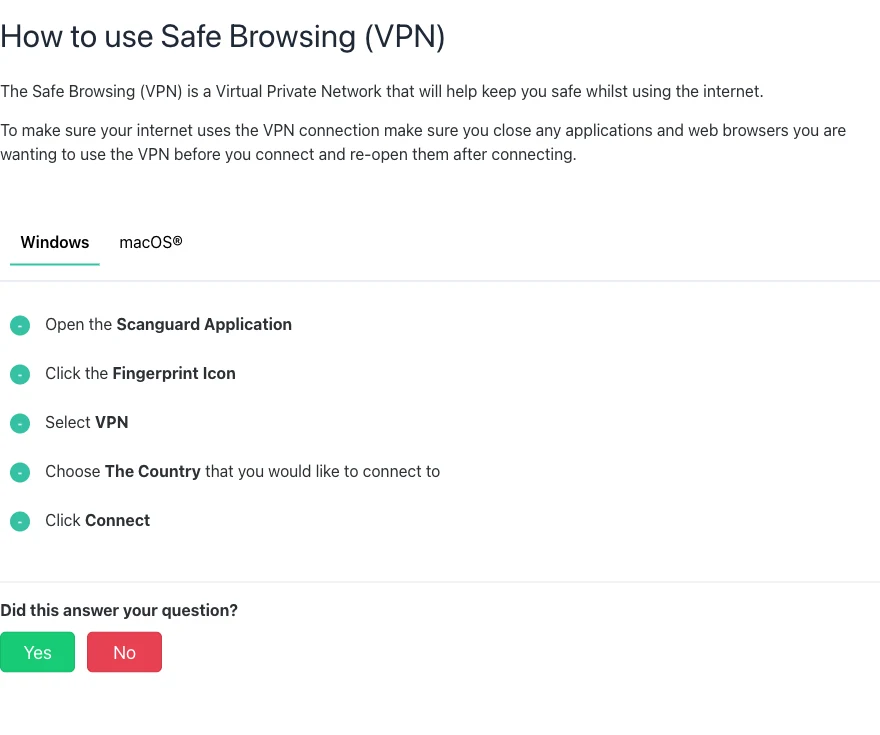
After connection, check the public IP and DNS result with a reputable test, then interrupt the tunnel to observe the kill-switch behavior. Repeat after sleep/wake and network changes. These checks answer whether the current build protects the traffic pattern you care about; a green Connected label alone cannot.
“100+ servers” is documented; the location inventory is not
The marketing page says 100+ servers and displays 57 North America, 20 Europe, 17 Asia, 9 Africa, 13 South America and 7 Oceania. Those displayed counts total 123, but they are not 123 countries. Scanguard does not publish a complete current city/country inventory on that page or label physical versus virtual locations.
A fleet count says little about load, capacity or distance. One crowded nearby server can perform worse than a larger remote location. For travel or streaming, verify the exact country you need inside the app before buying. For privacy, check where the exit is legally and physically operated rather than assuming the flag proves physical location.
The lack of a public live inventory makes change tracking difficult. We will not preserve a static list inferred from screenshots and call it current. The in-app selector is the best source for availability on the day of use.
Protocols and kill switch: reported features, incomplete current specification
The official Windows troubleshooting page says users can change the VPN protocol to “the other option available,” confirming at least two choices but not naming them. Current indexed reviews from TechRadar and SafetyDetectives report IKEv2 and OpenVPN plus a kill switch. Treat those as observed configurations, not an eternal spec.
We found no current official disclosure for WireGuard, split tunneling, multi-hop, obfuscation, dedicated IP, port forwarding, custom DNS or RAM-only servers. A missing help article does not prove a feature can never exist, but it means a buyer should not pay on that assumption.

Open the current app and record the available protocol and kill-switch controls. Then test, because a toggle can behave differently during Wi-Fi loss, sleep, server change and app crash.
The privacy policy is broad, current and not VPN-specific enough
The policy effective November 28, 2025 identifies Total Security Limited, Total Security US LLC and affiliates, part of Point Wild, formerly Pango. It covers websites, hosted services, desktop software and mobile apps—not only the VPN. Our Scanguard legitimacy analysis separates that verified corporate identity from product-specific privacy claims.
It says the group can collect account and payment information plus browser type, IP address, pages visited and other activities on the Services, device type and timestamps. Uses include service delivery, account administration, payments, usage analysis, improvement, marketing, security and legal compliance. Disclosures can involve service and advertising providers, authorities and corporate transactions under stated conditions.
That language needs careful reading. “Pages visited on the Services” can refer to service/website interactions; it is not direct proof that Safe Browsing records destination websites inside the tunnel. But the policy also does not supply the VPN-specific definitions needed to rule that out. The honest conclusion is unresolved detail, not guilt or exoneration.
We found no public independent no-logs audit scoped to Safe Browsing
A privacy-first VPN should answer whether it stores source IP, assigned IP, connection time, session duration, bandwidth, DNS requests, destinations or traffic contents, and for how long. Scanguard’s checked public material does not provide that table. We also found no public independent no-logs, app-security or server-infrastructure report scoped to Safe Browsing.
The policy says UK/EEA users directing traffic through servers in non-adequate countries consent to that transfer. That is useful legal disclosure, but it is not an operational no-logs audit. A corporate group’s certification or framework also does not automatically validate the VPN servers.
| Privacy evidence | Public status found | Why it matters |
|---|---|---|
| VPN-specific logging table | Not found | Defines retained connection/activity data |
| Independent no-logs audit | Not found | Tests policy against operations |
| App/source audit | Not found | Tests client security |
| Full server inventory | Not found | Shows location and infrastructure scope |
| General privacy policy | Published/current | Explains group-wide collection and rights |
For casual public-Wi-Fi use, that gap may be acceptable after testing. For journalism, activism, sensitive research or a strict privacy threat model, choose a provider with published, current, scoped evidence.
Speed evidence is mixed, dated and not reproducible enough
We did not have an authenticated current Safe Browsing session for this build, so there are no invented Mbps, latency or leak results here. TechRadar’s April 2025 review called speeds below premium-provider standards but acceptable for streaming and torrenting. SafetyDetectives reports good local and distant performance in its own tests. Both criticize the price relative to standalone VPNs.
The disagreement is normal: VPN speed depends on baseline connection, distance, protocol, congestion, device and test time. Neither result guarantees a 2026 server. A useful trial records baseline download/upload/ping, then repeats three runs on a nearby and required distant location at comparable times.
Run leak checks before opening sensitive accounts and repeat after changing servers. Record the VPN-assigned address, DNS resolver and whether IPv6 or WebRTC exposes an unexpected route. A single clean screenshot is not an audit, but a leak in the user’s actual build is an immediate reason to stop and troubleshoot before normal use.
Do not optimize only for a peak download number. Video calls and gaming care about latency and jitter; uploads matter for backups; reliability matters more than a single fast run. If the provider cannot maintain the needed task across several sessions, integration has not saved anything.
Streaming can work, but unblocking and torrenting are not permanent promises
SafetyDetectives reports Netflix, Amazon Prime and Disney+ working in its testing, while TechRadar describes acceptable streaming. Those are useful observations, not a current entitlement. Platforms continuously block exit IPs, change catalogs and enforce household or travel rules. Test the exact platform and region you pay for.
Both reviews report torrenting only on non-US servers. The current official help set checked does not publish a detailed P2P location policy. Confirm the labels and current terms before use, respect copyright and local law, and test the kill switch if exposure during interruption matters.
A VPN changes network location; it does not create a right to content or bypass every block. Employer and school networks can also prohibit VPN connections. Do not describe ordinary geo-switching as guaranteed access.
Public Wi-Fi is a sensible use case, but HTTPS still matters
Safe Browsing encrypts traffic between the device and VPN endpoint, reducing local-network visibility and protecting against some hostile-network observation. Modern HTTPS already encrypts content to websites; the VPN adds a network tunnel and hides destination details from the local path, subject to DNS and leak behavior.
It does not validate a phishing site, remove malware, secure a compromised browser or stop a logged-in service from recognizing the account. Keep the operating system, browser and antivirus current, and confirm HTTPS before entering credentials. Our Scanguard review evaluates the separate malware and WebShield layers.
Marketing language that says the ISP cannot monitor or throttle at all is too broad. The ISP can see the VPN connection and its volume/timing, and congestion or general throttling can still affect it. The tunnel mainly hides destinations and content not otherwise visible.
When Safe Browsing will not connect, isolate protocol, server and network
Start with the official sequence: connect the VPN, then reopen the browser or application that should use it. Try another location. On Windows, change to the other protocol available in Settings. Check whether another VPN, proxy, network extension or managed policy is actually active; do not assume a privacy-focused browser automatically installs a conflicting driver.
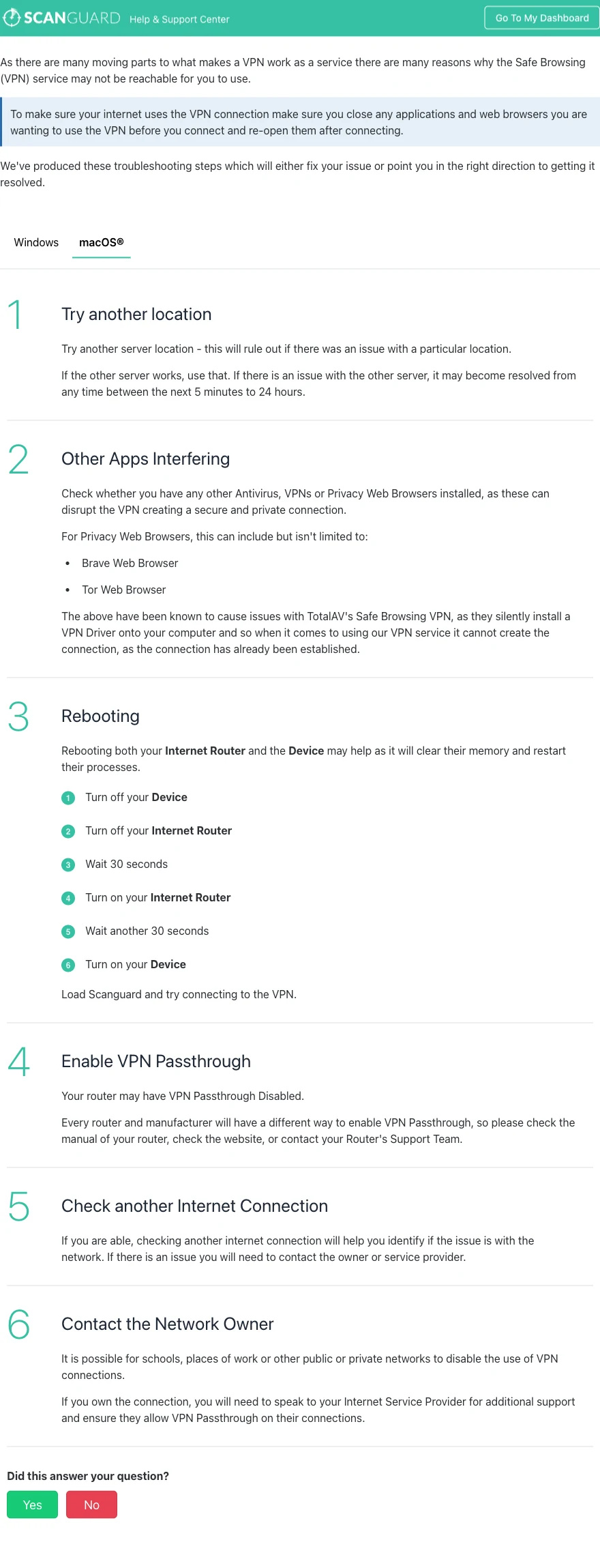
The current troubleshooting page also recommends restarting device/router, trying another connection and asking the network owner whether VPNs are blocked. Its location-outage estimate ranges from five minutes to 24 hours; switching locations is the immediate workaround, not waiting blindly.
Preserve the error, app version, OS version, protocol, location and network tested. That packet lets support distinguish entitlement, server, client and policy failures without asking for passwords or remote access.
If email stops, check authenticated SMTP rather than disabling security
Scanguard says a small set of users cannot send mail because the VPN blocks outbound port 25 to reduce abuse and server blacklisting. Its email guide suggests authenticated SMTP on port 465 or 587.
Use only the mail provider’s current hostname, port, TLS mode and authentication requirements. Do not simply change a number while leaving encryption off, and never send a password to VPN support. Scanguard explicitly says its POP/SMTP workflow does not apply to Microsoft Exchange.
First test webmail and another network. If receiving works but sending fails only through one VPN location, save the SMTP error and location. That separates provider policy from a broken mailbox credential or general client problem.
Scanguard VPN versus a standalone VPN
Scanguard wins on interface consolidation. A current customer can activate a country without learning a new app, and support lives under one account. For a light public-Wi-Fi and occasional region-switching need, that convenience is real.
A mature standalone service typically competes with more platforms, current protocols, streaming engineering, router/TV apps, public audits and explicit privacy disclosures. Some also publish open-source clients, transparency reports, RAM-only designs or repeated no-logs assessments. Scanguard’s checked public package does not show those differentiators.
| Buyer priority | Scanguard advantage | Standalone advantage |
|---|---|---|
| One security interface | Strong | Extra app/account |
| Public audit proof | No scoped audit found | Available from leading providers |
| Platform breadth | Three clear paths | Often routers, Linux, TVs and more |
| Advanced controls | Public spec is basic | Usually broader and documented |
| Price competition | €99 matrix reference | Many direct alternatives |
Compare continuing price, not a one-click activation. A standalone service that costs the same and replaces more use cases can be less work over the full renewal term.
Who should buy Safe Browsing—and who should skip it
Consider it if you already use Scanguard on a documented platform, want one interface, need ordinary public-Wi-Fi protection and can validate performance during the refund window. Confirm that the VPN has its own renewal line and that the current kill-switch behavior meets the risk.
Compare first if streaming, P2P, travel or multiple platforms are central. Check the required locations and services rather than buying the “100+” headline. Price a standalone VPN at the same renewal horizon.
Skip it for a strict privacy-first requirement until the provider publishes enough scoped evidence for your threat model. A general policy and encrypted-tunnel claim are not the same as a detailed no-logs definition plus independent operational audit.
If the VPN appeared as a charge you did not expect, use the Scanguard charge investigation before disputing it. Separate add-on activation, renewal, duplicate and unauthorized payment are different claims.
Scanguard Safe Browsing VPN FAQ
These answers distinguish current official disclosure from third-party observations and features that must be verified in the installed build.
Is Scanguard Safe Browsing a real VPN?
Yes. It is a full-device VPN add-on inside Scanguard for the platforms covered by its current operational documentation. It creates an encrypted tunnel and lets the user choose a country or region. That does not make every marketing promise literal or establish a verified no-logs policy.
Is Scanguard VPN included with Premium antivirus?
Do not assume so. The January 5, 2026 European pricing matrix lists Safe Browsing VPN as a separate annual service at €99, and Scanguard says add-ons can renew independently. Check the exact service, amount and renewal switch in your own checkout and portal.
Which devices support Scanguard VPN?
Current how-to documentation gives connection paths for Windows, macOS and Android. One benefits page contains a malformed macOS/iOS line, while the live how-to has no iOS tab. Verify the current app-store listing and account entitlement before buying for an iPhone or another unlisted platform.
How many servers does Scanguard VPN have?
The current marketing page says 100+ servers and displays regional instance counts, but it does not publish a complete current city/country list or label physical and virtual locations. Treat 100+ as a marketing fleet count, not a promise of 100 countries.
Does Scanguard VPN have a kill switch?
Current third-party reviews from TechRadar and SafetyDetectives report a kill switch, but the current public Scanguard help pages checked do not provide a detailed kill-switch specification. Verify that the control exists in your current build and test what happens during an interrupted tunnel before relying on it.
Does Scanguard VPN keep logs?
The current general privacy policy describes broad account, device, IP and service-interaction collection, but it does not provide a Safe Browsing-specific table for browsing destinations, DNS, source IP, assigned IP, timestamps or session retention. We found no public independent no-logs audit scoped to this VPN, so it should not be called verified no-logs.
Is Scanguard VPN good for Netflix and streaming?
Current indexed reviews report successful streaming in their own tests, but streaming access is an unstable property controlled by each platform and exit IP. Test the exact service and location you need during the refund window. Do not buy on a universal unblocking promise.
Can Scanguard VPN be used for torrenting?
TechRadar and SafetyDetectives report torrenting support on non-US servers in their testing. The current official help set checked does not publish a detailed P2P policy. Verify the current terms, app labels and local law, and do not assume every location permits the same traffic.
Why will Scanguard VPN not connect?
Reconnect after closing affected apps, try another location and, on Windows, switch to the other available protocol. Check for an actual competing VPN, proxy, network extension or managed policy, then restart the device/router and test another network. A school or workplace may intentionally block VPN traffic.
Why does email stop working with Scanguard VPN?
Scanguard says some users are affected because outbound port 25 is blocked. Use only the mail provider’s documented authenticated SMTP settings, commonly TLS on 465 or 587, and do not disable encryption. Scanguard’s published POP/SMTP steps do not apply to Microsoft Exchange.
Bottom line: convenient tunnel, incomplete public proof
Scanguard Safe Browsing is a genuine integrated VPN for Windows, macOS and Android, with a simple location selector and enough current support documentation to operate and troubleshoot it. It can be a reasonable convenience purchase for an existing Scanguard household.
At the €99 annual European reference rate, convenience is not enough by itself. The public package lacks the VPN-specific logging table, scoped audit, full location inventory and current reproducible performance record we expect at standalone-VPN pricing. Test the tunnel, kill switch, leaks, required location and streaming service; verify the separate renewal; then keep it only if those results justify the disclosure gap.