
Scanguard WebShield Review: Fix Blocks Without Turning Off the Wrong Protection
The red block page is clear, but Scanguard's browser story is not. We traced the real allow-list path, Android shutoffs and an old Chrome extension package so you can tell a useful warning from a compatibility failure.

Quick answer: Use Back to Safety first and record the exact hostname. Confirm that the page really belongs to Scanguard rather than Chrome, Edge, Safari, a VPN, DNS filter or fake browser notification. If the domain is independently verified, use one-time access before a permanent allow entry and report the false positive. On Android, restore the verified WebShield Accessibility service and background permission. On current Chrome, Scanguard Safe Site 1.39.0.0 is still delivered as Manifest V2, which Chrome 139+ cannot run; reinstalling it is not a repair.
Scanguard WebShield review at a glance
Scanguard's genuine block page gets the first decision right: it puts a bright Back To Safety button ahead of Learn More. The vendor also documents one-time access, a persistent Allow List and a website false-positive route. Those are sensible controls when the classification is accurate and still recoverable when it is not.
The weaker part is everything around that page. Scanguard does not publish a current independent phishing-detection result for WebShield, its dedicated “Using WebShield” help article is empty, and the browser-extension package we retrieved is still Manifest V2. That package cannot run in Chrome 139 or later, even though the public feature page still claims Chrome compatibility.
Safety is the obvious default, with a separate risk path.
One-time access and a current report form both exist.
The delivered 1.39.0.0 package remains Manifest V2.
No reproducible 2026 Scanguard WebShield lab result was found.
Our verdict is therefore narrower than “excellent” or “useless.” Keep the protection layer where it actually works, keep browser-native warnings on, and treat Scanguard's Chrome extension claim as outdated until a supported package replaces the one we inspected. The broader Scanguard review covers the antivirus suite, lab evidence, price and trust questions beyond browser protection.
WebShield, Safe Site and browser protection are related—not identical
Scanguard's public feature page calls the browser component Safe Site Web Extension. It says the extension checks an extensive database of dangerous URLs and redirects users away from potentially dangerous or fraudulent destinations. Elsewhere, the help center and mobile app use WebShield for the underlying web-reputation protection.
Do not fold every browser feature into that name. Scanguard also promotes a separate Clean & Speed Up extension for cached data, clutter and sleeping tabs, while ad blocking may be a separate paid component. A site block, a missing ad, an unloaded video and an idle tab can therefore have different owners even when the same vendor sold the tools.
The product surface matters because settings do not automatically cross between them. An allow entry in the Scanguard desktop app will not fix a Chrome-native unsafe-site warning. A browser extension permission will not restore Android Accessibility. A VPN or filtered DNS resolver can block a hostname before WebShield sees the request at all.
Identify who blocked the page before changing settings
Start with the visible page, not the product you suspect. Record the complete address-bar hostname, the wording, colors, logo, button labels and timestamp. Then open the relevant app or browser settings directly—never through a phone number, download button or “repair” link inside an unexpected warning.
| Visible state | Likely owner | First evidence | Do not |
|---|---|---|---|
| Red page with Back To Safety and Learn More | Scanguard WebShield | Exact URL and Scanguard app state | Click through immediately |
| Deceptive site / dangerous download interstitial | Chrome, Edge, Safari or Firefox | Browser help link and warning URL | Turn off native Safe Browsing |
| Server not found or DNS error | DNS, VPN, network or site outage | Same hostname on another clean network | Add an antivirus allow entry |
| Certificate or privacy error | Browser TLS validation, clock or interception | Exact certificate error code | Install a random root certificate |
| Notification says “Scanguard found viruses” | Possibly browser notification abuse | Browser notification permissions | Call the number or install its tool |
| Extension disabled as unsupported | Browser compatibility policy | Extension details and manifest support | Repeat the same reinstall |

A simple ownership check prevents the most damaging shortcut: disabling Scanguard because a browser warning remains, then disabling the browser because a DNS filter still blocks the page. Change one identified layer at a time and leave the unrelated layers protecting you.
What is actually verified on each platform in August 2026
Scanguard's marketing lists Chrome, Firefox, Edge and Safari, while its mobile materials describe dangerous-site protection on Android and iPhone. That list is a claim, not proof that every current store package is maintained or uses the same control path. We separated what we could verify from what remains uncertain.
| Surface | Verified current evidence | Practical conclusion |
|---|---|---|
| Scanguard block page | Current Help Center image and override instructions | Usable Back to Safety, one-time and Allow List flow |
| Chrome Safe Site | Update service delivers 1.39.0.0, Manifest V2 | Unsupported in Chrome 139+ |
| Microsoft Edge | Vendor claim; Microsoft MV2 stop date still TBD | Inspect the actual extension and policy; do not infer Chrome behavior |
| Firefox / Safari desktop | Vendor claim, no clear current Scanguard store listing found | Install only through the signed app or verified store publisher |
| Android | Current Scanguard help documents Accessibility and battery behavior | Permission/background state can turn protection off |
| iPhone / iPad | The current Scanguard App Store listing claims cross-browser dangerous-site blocking | App claim does not validate the old desktop extension |
This is deliberately not a compatibility badge wall. A reader needs to know whether the exact component on the exact browser can load today. If the vendor dashboard links to a newer extension than the public listing we inspected, verify its publisher, extension ID, manifest generation and update date before installing it.
How effective is Scanguard WebShield?
The honest answer is that public evidence supports the feature's purpose, but not a precise current detection rate. Scanguard says it blocks malware-hosting, phishing, spoofed, scam and other dangerous websites. Several commercial review sites report that WebShield stopped many of their chosen test pages, yet their samples, browser settings and replay method are not published like a reproducible lab report.
We found no 2026 AV-TEST, AV-Comparatives or AMTSO-tracked result that isolates Scanguard WebShield. The July 2026 cross-platform scam and phishing evaluation listed Bitdefender, F-Secure, Gen Digital, Malwarebytes, McAfee and Trend Micro—not Scanguard. That absence does not prove poor protection; it means “best-in-class” and exact catch-rate claims would be unsupported.
Built-in browser reputation remains another layer. A commercial review can credit Scanguard for a block that the browser would also have made unless the methodology disables native protection. Keep Chrome Safe Browsing, Microsoft Defender SmartScreen, Safari fraudulent-site warnings or Firefox protections active. Layered protection is useful precisely because no single blacklist catches every newly created domain.
Use the official block page as a meaningful warning, not as an oracle. A recently compromised legitimate site can deserve a block, while a brand-new phishing domain can exist before every reputation system classifies it. The safe reader decision is still domain verification and minimal exposure.
Read the genuine Scanguard block page
Scanguard's current website-block explanation shows a red page with the Scanguard name, the blocked URL, a green Back To Safety button and a secondary Learn More control. It also offers an opt-in checkbox to send block details. Those details are more specific than a generic notification saying “threats found.”
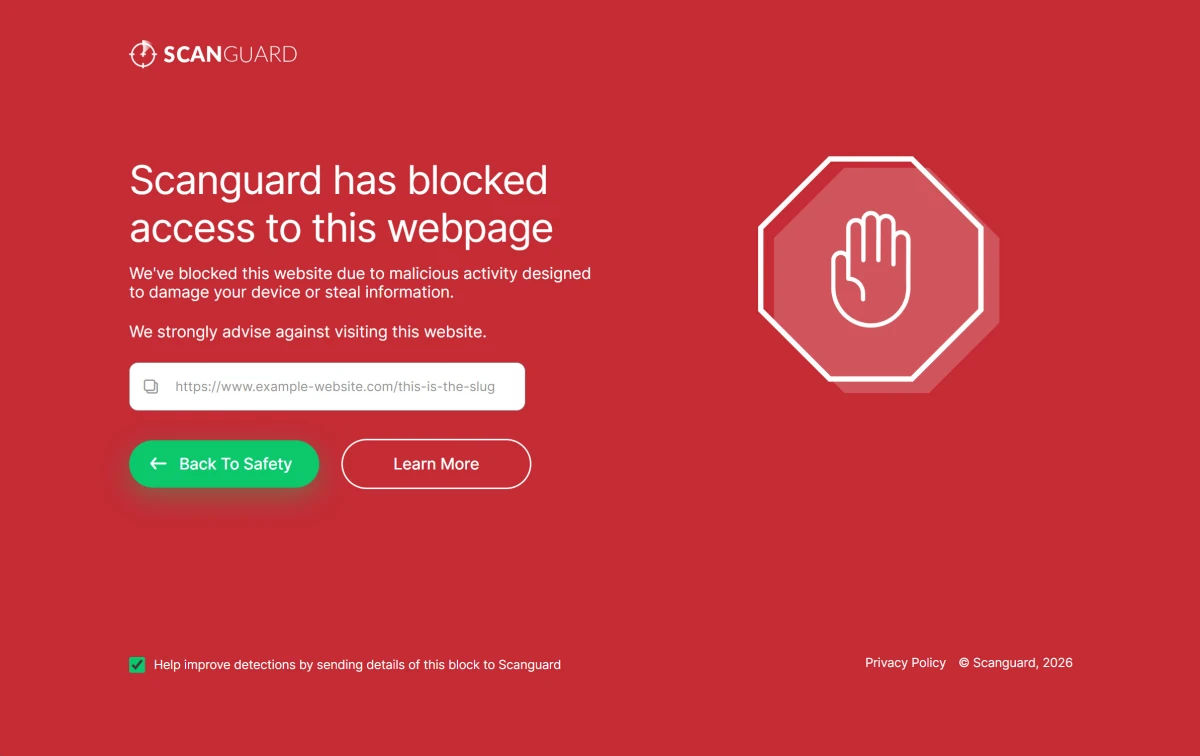
A genuine-looking page can still be copied by a scam website, so check the address bar and how you arrived. The vendor page should interrupt navigation to a destination; it should not demand payment, a phone call, remote access or a new cleaner download. If the warning is a browser notification sitting over an otherwise loaded page, inspect browser notification permissions instead of treating it as proof that the signed Scanguard app raised the alert.
The checkbox also deserves a privacy pause. A detection report may include the destination and technical context. That can improve classification, but avoid reproducing URLs that contain password-reset tokens, private document IDs or other secrets. Submit the stable hostname or sanitized URL through the verified form when the sensitive path is irrelevant.
Verify the exact hostname, not the logo on the page
Leave the blocked page and reach the organization through a route you already trust: a saved bookmark, an app, a bill, a known phone number or a search result that you inspect carefully. Compare the registrable domain character by character. `accounts.example.com` belongs to `example.com`; `example.security-check.com` belongs to `security-check.com`, no matter which logo it displays.
Ask why you were redirected. Short links, ad networks, compromised WordPress plugins and mistyped domains can send a click through a dangerous host before the expected page. A final destination that looks legitimate does not make every intermediate redirect safe. Preserve the original message or link without opening it again, and check whether the sender expected to contact you.
HTTPS is not a safety verdict. The padlock means the browser negotiated encryption and a certificate for the domain it reached; phishing sites can obtain valid certificates too. Conversely, a certificate error is not the same as a WebShield reputation block. Record the browser's exact code because clock drift, captive portals, enterprise inspection and server misconfiguration have different owners.
If the site handles banking, identity, email recovery or work credentials, do not use a one-time override merely to “see whether it works.” Use the official app or contact the organization. The cost of waiting is lower than typing credentials into a destination that earned a security warning.
Use one-time access before a permanent allow entry
Scanguard documents two choices after verification. Learn More can reveal “I understand the risks, visit the webpage anyway” for one-time access. The persistent path is the settings cog, Allow List, Add an item, then the website address. The first route limits exposure; the second changes future decisions.
| Choice | Use only when | Risk | Close the loop |
|---|---|---|---|
| Back To Safety | Domain is unfamiliar, unnecessary or still uncertain | Lowest | Verify through a separate route |
| One-time access | Exact host is verified and the task cannot wait | Limited session exposure | Do not enter secrets; report the block |
| Exact-host allow entry | Stable trusted service repeatedly needs access | Future warnings are suppressed for that entry | Review, remove and retest later |
| Broad domain or global disable | Almost never for consumer troubleshooting | Large silent protection gap | Do not use as a convenience fix |
Enter the narrowest exact hostname the interface accepts. Do not whitelist a top-level domain, wildcard, redirect service or content-delivery network merely because one embedded resource failed. A checkout page might load scripts from several domains; allowing all of them without ownership evidence can turn a small false positive into a broad bypass.
Write down what you added and why. Remove temporary entries after the task, restart the browser and confirm the warning path returns. An exception that remains forever because nobody remembers it is a protection failure by configuration, even if the original site was safe.
Report the classification instead of living with the exception
Scanguard's current submission page separates Website blocked by mistake from malicious websites and file detections. Use the website false-positive route for a trusted domain that the web layer blocks. The official sample guide confirms that URLs can be submitted for review.
Provide the exact URL, date and time, Scanguard version, browser and the wording of the block. Explain how ownership was verified and whether the site behaves normally through an official app or another controlled network. Do not attach credentials, session cookies, private query tokens or a screenshot that exposes personal account data.
A report improves the chance that the classification is corrected for everyone. After a controlled retest, remove temporary entries and report the false positive instead of preserving an undocumented bypass. If the vendor confirms the block, remove the exception and treat the original message or redirect as potentially compromised.
Why Scanguard Safe Site fails in current Chrome
This is the largest 2026 gap. Google's extension update service still delivered the Scanguard Safe Site listing with ID piihgeabdpmcpjacnoacminmodaekejp as version 1.39.0.0 when checked on August 5. We parsed the CRX package in memory without installing or executing it. Its manifest declares manifest_version: 2.
Google's current Manifest V2 support timeline says Chrome 138 disabled Manifest V2 for ordinary users and Chrome 139+ cannot run those extensions. Google schedules the remaining Manifest V2 store items for removal on August 31, 2026. A listing can therefore still appear shortly before removal while the extension is already unusable in a current Chrome build.
That explains symptoms such as “unsupported,” a greyed-out toggle or an extension that never begins filtering. Clearing cookies, resetting DNS, reinstalling Scanguard or weakening Safe Browsing cannot migrate the code to Manifest V3. Google's extension-management guidance recommends removing an unsupported extension or choosing a supported alternative.
Do not sideload the old CRX or hold Chrome on an obsolete build. Keeping a web-filter extension is not worth freezing browser security updates. Leave Chrome's native protection on, use Scanguard's supported app-level protection where available and ask authenticated support for a Manifest V3 replacement or current official route.
This package evidence does not prove that Safe Site is malicious or that Scanguard will never update it. It proves the version and manifest generation delivered on the check date. If a new package appears, judge that new ID/version on its own evidence rather than repeating our August snapshot forever.
Edge, Firefox and Safari need their own compatibility check
Do not copy the Chrome conclusion directly to Microsoft Edge. Microsoft's current Manifest V3 timeline still labels the general Edge stop-running date for Manifest V2 as TBD, and an enterprise policy can control availability. Open edge://extensions, inspect the actual source and version, and involve the administrator if controls are managed.
Scanguard's feature page also claims Firefox and Safari, but our current searches did not surface a clear, current Scanguard Safe Site listing in Mozilla Add-ons or a separate desktop Safari listing. Search absence is not proof that no supported route exists. It means you should follow the signed Scanguard app or authenticated dashboard to the store, then confirm the publisher, update date and permissions instead of using a third-party extension download site.
If one browser works and another does not, compare extension presence, enabled state, site access, private-mode permission and native warning behavior. Mozilla's Troubleshoot Mode temporarily disables extensions and can prove an add-on conflict. It is a diagnostic session, not a recommendation to browse unprotected permanently.
Broad browser permissions are powerful but not proof of spyware
The Scanguard 1.39.0.0 manifest requests cookies, content settings, storage, browsing data, notifications, active-tab, web-request and navigation capabilities. Its content scripts can match all URLs. A web-reputation and blocking extension needs visibility into destinations and enough control to interrupt navigation, so broad access is compatible with the advertised function.
Compatible does not mean trivial. An extension that can inspect or modify web traffic sits close to searches, logins and private pages. Install only from the verified vendor/store route, keep the browser updated and remove components you no longer use. Review whether site access can be limited without breaking the protection you actually want.
The Chrome package also contains shared TotalAV, Scanguard and PCProtect service-domain references. That fits the known sibling-product platform, but it reinforces the need to judge publisher identity and privacy disclosures rather than the icon alone. We did not execute or traffic-test the extension, so we will not claim what data its backend retained.
Never approve a new extension because a pop-up says Scanguard requires it. Open the signed app or type the verified dashboard address yourself. A fake extension can copy the name while using a different ID and publisher.
Test phishing protection without visiting a real phishing site
Use the AMTSO Phishing Page Feature Settings Check. AMTSO says the page contains no malicious content and is intentionally classified by industry agreement so users can verify whether an anti-phishing layer is configured and working. This is safer than choosing a URL from a live phishing feed.
Run the test with the normal browser protections and Scanguard state you actually use. Record which layer raises the warning, the exact wording, browser/version and time. Do not disable Chrome Safe Browsing or SmartScreen just to force Scanguard to receive sole credit; the consumer question is whether the whole device remains protected.
If the harmless page loads, do not immediately declare WebShield broken. AMTSO notes that a product may not support that particular feature check, or the feature may be disabled or misconfigured. Compare the current extension/app state, update status and platform support, then send the reproducible result to Scanguard support.
Do not enter credentials, browse live phishing domains or download real malware. The separate Scanguard scans and quarantine guide explains safe detection evidence and why public upload services can expose sensitive files.
When Android WebShield turns itself off
Scanguard's current Android auto-disable guide says aggressive battery saving can close the background app and that WebShield relies on an Accessibility service. The generic recovery is to find the verified WebShield service under Android Accessibility, restore permission, allow necessary background operation and enable WebShield again in the app.
Phone makers move those controls. Scanguard lists different Asus, Huawei, Nokia, OnePlus, Oppo, Samsung, Sony and Xiaomi routes and warns that steps vary by model. Do not disable every battery optimization globally or follow an old menu screenshot more literally than the current device. Search Settings for the installed app, Accessibility and battery/background usage, then change only the Scanguard-related control.
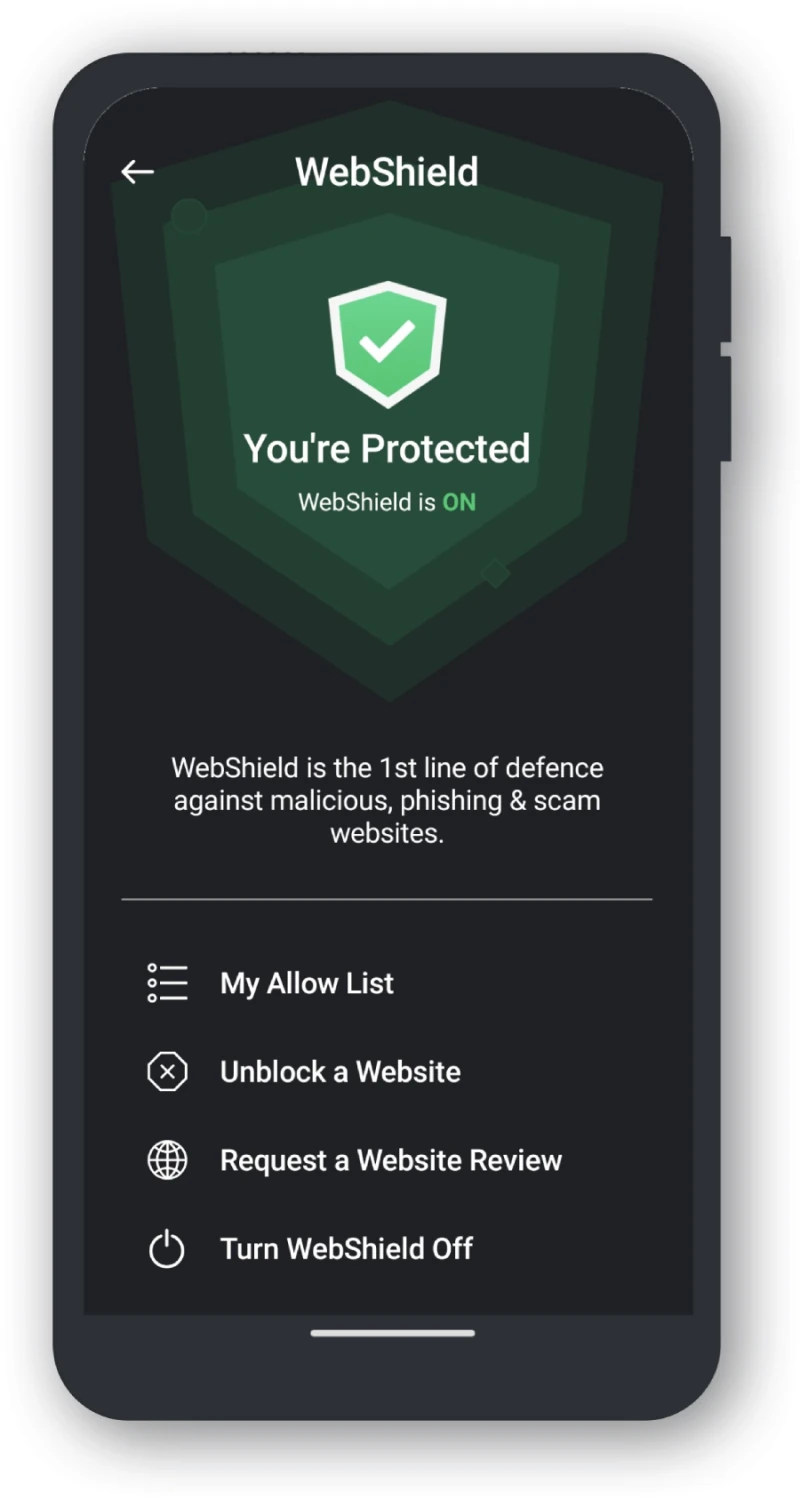
The branding mismatch is real: the Scanguard-hosted article and screenshots repeatedly say TotalAV. That appears consistent with shared vendor technology, but it is not permission to enable any service with a familiar word. Open the Scanguard app you installed from its verified store/dashboard and let that signed app lead you to the exact Accessibility entry.
After restoring the state, restart the phone and check again after the screen has been off long enough to trigger battery management. Use the harmless AMTSO test if the product supports it. If Accessibility drops repeatedly, capture the phone model, Android build, Scanguard version, battery setting and timestamp for support rather than granting broader unrelated permissions.
When WebShield breaks login, checkout, video or page layout
A broken site is not automatically a reputation block. A filtering extension can stop a script, tracker, notification or third-party frame without showing the full red Scanguard page. Login loops often involve cookies or identity-provider domains; checkout and video pages commonly depend on several third parties. Another blocker may own the failure.
Reproduce once in a private window using no secrets, then compare one supported browser with the normal profile. Record the console-visible message only if you know how to redact tokens. Disable one nonessential extension at a time, beginning with duplicate ad/tracker blockers, and re-enable it immediately after the test. Mozilla Troubleshoot Mode offers a controlled all-extension comparison on Firefox.
If the full Scanguard block page names a third-party hostname, verify that hostname's relationship to the service before allowing it. Do not whitelist every domain listed by developer tools. A compromised advertising or tag-management host can be precisely the reason a normally trusted site triggered protection.
VPN and DNS filters can make the failure cross browsers. Check the separate Scanguard VPN guide for connection ownership and avoid stacking a VPN, secure DNS, router filter and several browser blockers without documenting which one should make the decision.
Separate WebShield blocks from browser warnings and fake alerts
A Chrome or Edge deceptive-site interstitial normally belongs to the browser's reputation service, not Scanguard. A certificate privacy error belongs to TLS validation. A “server IP address could not be found” message belongs to name resolution or connectivity. Changing Scanguard's Allow List cannot reliably repair those states.
Fake antivirus notifications are different again. Websites can obtain browser notification permission and send alarming messages after the page is closed. Open the browser's notification settings directly, remove the unfamiliar site and close the tab. Do not click the notification, call its number, pay for cleanup or install the offered extension.
That topic has its own upcoming Scanguard scam spoke because it includes impersonation emails and support fraud. Until then, the safe rule is simple: a genuine security product warning maps to a signed installed app, verified publisher and current account state. An ad or notification on an unrelated domain does not gain legitimacy by using the Scanguard name.
If a suspicious redirect downloaded a file, do not open it to find out what it is. Preserve the download path, run the normal supported scan and follow quarantine evidence. Real-Time Protection is a separate layer; use our Scanguard real-time protection repair if the file/provider state is red as well.
Managed browsers and devices belong to the administrator
A work or school browser may force-install, block or restrict extensions and website access. Edge and Chrome display management language when policies control those settings. A greyed-out toggle is evidence of policy, not an invitation to edit registry keys, remove profiles or sideload an old package.
Give the administrator the exact URL, warning, browser/version, extension ID/version and time. They can compare policy, secure web gateway, DNS and endpoint logs. Bypassing those controls can violate policy and hide an actual incident from the people responsible for it.
On a personal device that unexpectedly says it is managed, inspect the named organization and installed profiles through the operating system's supported settings. Do not run a random “remove management” script. Preserve screenshots and use verified platform or vendor support if ownership is unclear.
Give support evidence that can reproduce the problem
“WebShield is broken” is difficult to act on. A compact evidence packet separates a false positive, compatibility cutoff, Android permission loss and network block without exposing browsing secrets. Send it only through the authenticated Scanguard dashboard or verified help domain.
| Evidence | Useful detail | Why it matters |
|---|---|---|
| Visible owner | Full warning text and button labels | Separates Scanguard from browser/DNS/fake alert |
| Exact destination | Hostname and sanitized path | Supports classification review without tokens |
| Platform | OS, browser, version and managed state | Exposes Manifest/policy compatibility |
| Component | App or extension ID and version | Identifies the code actually running |
| Android state | Accessibility and battery/background status | Shows why protection stopped |
| Controlled result | AMTSO outcome and warning owner | Provides a harmless reproducible check |
| Changes tried | One change, time and result | Prevents destructive repeated advice |
For wider application failures, preserve logs through the workflow in our Scanguard high-CPU and not-working guide. Do not upload raw browser profiles, cookies or private session URLs. The goal is reproducibility, not a complete copy of your browsing history.
Scanguard WebShield FAQ
What is Scanguard WebShield?
Scanguard uses WebShield for web-reputation protection that can stop known malicious, phishing, scam and other dangerous destinations before the page loads. The vendor also uses the Safe Site name for a browser extension, while Android relies on an Accessibility service. Identify the exact surface that produced the warning before changing settings.
Is Scanguard Safe Site supported in current Chrome?
The package delivered by Google's update service on August 5, 2026 was Scanguard Safe Site 1.39.0.0 using Manifest V2. Google says Chrome 139 and later cannot run Manifest V2 extensions, so repeated reinstalls will not make that package work in a current Chrome build. Keep Chrome's native protection enabled and ask Scanguard for a current supported route.
Does a Scanguard block mean a website is definitely malicious?
No. Treat the block as a serious warning, not a final verdict. The site may be dangerous, compromised, reached through a hidden redirect or classified conservatively. Use Back to Safety, record the exact hostname and verify the owner and reputation independently before considering any override.
How do I unblock a website in Scanguard?
After independent verification, the official block page offers Learn More and a one-time risk override. Scanguard also documents Settings, Allow List and Add an item for persistent access. Prefer one-time access, use the narrowest exact hostname, remove temporary entries afterward and submit a website-blocked-by-mistake report.
Where is the Scanguard allow list?
Scanguard's current block documentation places the persistent website control under the settings cog, Allow List, then Add an item. Interface labels can vary by version. If the warning belongs to a browser, VPN, DNS filter or managed policy rather than Scanguard, changing this list will not fix it.
How do I report a Scanguard false-positive website?
Use Scanguard's verified submit-file page and choose Website blocked by mistake. Send the exact URL, explain why the domain is trusted and include the warning/time without exposing credentials. Keep any exception narrow and temporary while the vendor reviews the classification.
Why does Scanguard WebShield keep turning off on Android?
Scanguard's help center says battery optimization can stop the background app and that WebShield depends on an Accessibility service. Verify the signed installed app, restore the exact WebShield Accessibility permission, allow necessary background operation and enable WebShield again. Menu names vary by phone maker and Android version.
Why does the Scanguard Android guide say TotalAV WebShield?
The current Scanguard-hosted article and its screenshots use TotalAV labels, which appears to reflect shared vendor technology and documentation. That mismatch is not proof that every similarly named service is safe. Confirm the installed app, publisher and the permission prompt that originated from your verified Scanguard installation.
How can I test WebShield without visiting a real phishing site?
Use AMTSO's harmless Phishing Page Feature Settings Check. It contains no malicious content and is intentionally classified for security-product testing. A miss can mean the product does not support that specific check or the protection is disabled or misconfigured, so record the result rather than browsing live phishing feeds.
Should I disable WebShield when a login or checkout breaks?
Do not disable it globally. Reproduce the problem in one controlled browser, identify whether Scanguard, another extension, a VPN, DNS filter or the browser itself owns the failure, and change one layer at a time. If a verified site requires an exception, prefer one-time access and remove the exception after the task.
Bottom line: keep the warning, fix the ownership and compatibility
Scanguard's real block page is useful: Back To Safety is prominent, one-time access is separate and a false-positive route exists. Keep that protection where the supported component actually runs. Verify the exact hostname before any override, prefer a one-time decision and remove persistent exceptions that no longer have a documented reason.
The current Chrome story is the decisive limitation. Safe Site 1.39.0.0 is still Manifest V2, while Chrome 139+ cannot run it. Do not weaken Chrome, sideload the package or freeze browser updates to preserve an obsolete extension. Keep native browser security on and ask Scanguard for a supported replacement.
On Android, confirm the signed app, Accessibility service and background state, while treating the TotalAV-labelled Scanguard documentation as a warning to verify identity carefully. Across every platform, the winning sequence is the same: identify the owner, preserve the evidence, make one narrow reversible change, retest safely and report the classification instead of normalizing a permanent protection gap.