
Avast Privacy Settings: What to Turn Off—and What Protection Still Needs
Separate Community IQ, app analytics, offers and notifications from service data required by File, Web, Email and scam-protection features.
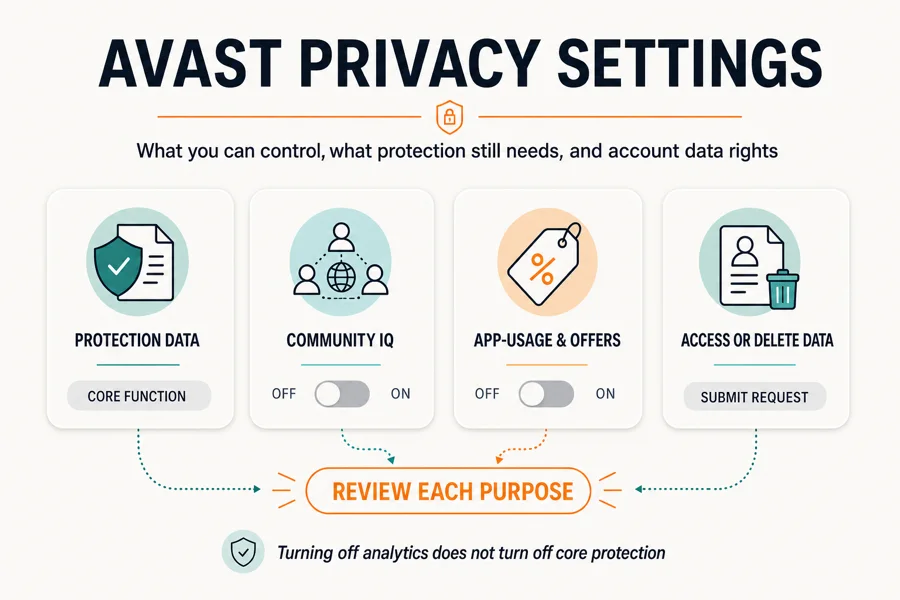
Balanced recommendation: keep Community IQ on if you accept sending suspicious samples to improve shared detection; turn off app-usage analytics, personalized discounts and third-party/cross-product offer sharing where those controls appear. Keep security alerts, and use Silent mode only when you intentionally want fewer pop-ups. Then review enabled features such as Email Guard, Web Guard, Scam Assistant, SecureLine and the browser extension—their service data is governed by the current product notice, not erased by an analytics switch.
Need a different Avast task? The complete Avast guide hub routes review, plans, Free versus Premium, setup, troubleshooting, privacy, features, billing and removal without mixing their steps.
Quick Avast privacy settings matrix
| Control | What it changes | Balanced choice | What it doesn't do |
|---|---|---|---|
| Community IQ | Suspicious sample or threat-data contribution | On if contribution is acceptable | It isn't an offers switch |
| App-usage analytics | Product-improvement and third-party analysis | Off for less optional sharing | Doesn't disable File or Web shields |
| Personalized discounts | Uses person, device and usage data to tailor discounts | Off unless wanted | Doesn't cancel renewal |
| Product / third-party offers | Controls available marketing-sharing choices | Off unless wanted | May be unavailable in free builds |
| Silent mode | Changes pop-up treatment | Use selectively | Is not consent withdrawal |
| Feature off | Stops that feature's active service | Only if feature isn't needed | May reduce protection or functionality |
| Access / deletion request | Exercises account-level data rights | Use official form | Is not uninstall or cancellation |
The word “privacy” appears in several places inside Avast, but the switches do different jobs. A notification control changes what interrupts you. An offers control changes marketing use. Community IQ concerns suspicious samples. A feature toggle changes actual protection. An account-rights request operates outside the app. Treating all five as “turn everything off” produces either false confidence or weaker security.
Avast's live privacy-settings guide is the controlling click path. Its current tabs cover New Avast One, Old Avast One, Free/Premium, Mac, Android, iOS and companion products. The labels below are current on July 29, 2026, but phased interfaces make product identification the first step.
First identify New Avast One, Old Avast One or Free/Premium
Open the product's About screen and record the name and version. New Avast One has a side menu with Settings and a General card that opens deeper controls. Old Avast One uses Account → Settings and a Privacy policy tab. Avast Free Antivirus and Premium Security use the older hamburger Menu → Settings → General → Personal Privacy route.
This isn't cosmetic. The free editions can hide controls that paid editions expose, and Avast's support page says some offer sharing is enabled by default and doesn't appear in Free Antivirus or Old Avast One Essential. A missing switch isn't proof that the behavior is off. It means the current product/tier doesn't offer that control in the documented interface.
Take a screenshot before changing anything. A major application update, repair or migration to New Avast One can alter menus or reset preferences. A dated baseline lets you check what actually changed instead of relying on memory.
Set privacy controls in New Avast One on Windows
- Identify the exact Avast product and version. Open About and note whether the device runs New Avast One, Old Avast One, Avast Free Antivirus, Premium Security, Security for Mac or a mobile app.
- Record the current choices. Capture the Personal Privacy and Notifications screens so an update or repair can't silently erase your baseline.
- Open Personal Privacy. In New Avast One use Settings, General, Open, Personal Privacy; in Free or Premium use Menu, Settings, General, Personal Privacy.
- Decide on Community IQ separately. Choose whether to share suspicious samples for collective detection rather than treating it as an advertising or generic analytics switch.
- Turn off optional analytics and personalization. Disable app-usage analysis, personalized discounts and available product or third-party offer sharing that you don't accept.
- Keep notification and data controls separate. Configure security alerts, Silent mode and offers independently so quieter pop-ups don't create a hidden protection or consent assumption.
- Review feature-specific permissions and products. Check Email Guard, Web Guard, Scam Assistant, VPN, browser extension, Secure Browser and mobile apps according to the features actually enabled.
- Verify and exercise account rights if needed. Restart, confirm the settings persist, then use Avast's official access or deletion request process for account-level data rights.
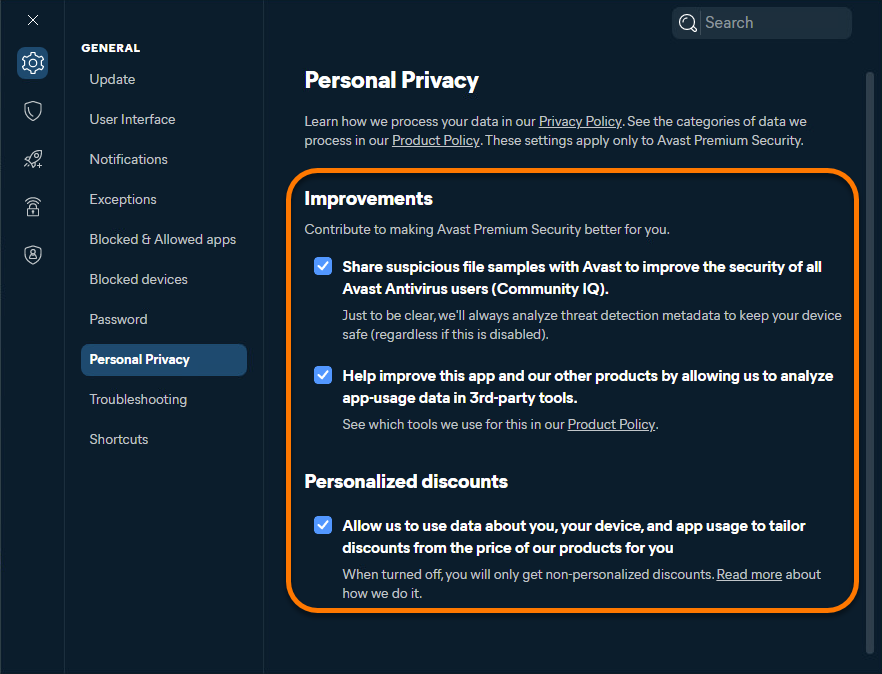
Hover over the side menu, choose Settings, select Open in General and open Personal Privacy. Review each box by its full wording. In the current New Avast One support flow, the categories include Community IQ, third-party analysis of app-usage data and personalized discounts based on information about the person, device and app usage.
Unticking analytics or discount personalization shouldn't switch off antivirus shields. Confirm protection on the main status screen after the change anyway. If the controls won't save, update and restart, then follow the Avast repair and troubleshooting guide rather than repeatedly toggling them.
Community IQ is a security contribution, not generic telemetry
Avast describes Community IQ as sharing suspicious file samples or threat data to improve security for antivirus users. Keeping it on helps the vendor analyze emerging detections and false positives. Turning it off is a defensible privacy choice for someone who doesn't want suspicious samples contributed, but that choice can reduce the data you contribute to the shared detection system.
Don't overstate either side. Community IQ off doesn't make Avast local-only, because enabled shields still need service data. Community IQ on doesn't mean every file is uploaded; the setting is framed around suspicious samples. The live Product Privacy Notice governs the exact service data, purposes and retention rather than a forum description of “cloud protection.”
Our balanced preset keeps Community IQ on and turns product analytics and personalization off. The maximum-privacy preset turns it off as well. Whichever choice you make, document it; after a clean reinstall, check that the installer didn't return to a default you no longer want.
Turn off app analytics, personalized discounts and offers separately
The app-usage setting allows Avast to analyze usage data in third-party tools for product development. The current desktop product notice identifies Google Analytics as the third-party analytics tool for Antivirus for Desktop. If you don't want optional product-improvement analysis, turn this control off. Don't claim that doing so erases prior records; use a formal data request for account-level access or deletion questions.
Personalized discounts are another purpose. New Avast One describes using data about you, the device and app usage to tailor discounts. Turn it off if a standard product experience matters more than targeted pricing messages. It doesn't change the price already agreed, cancel a subscription or prevent a non-personalized renewal notice.
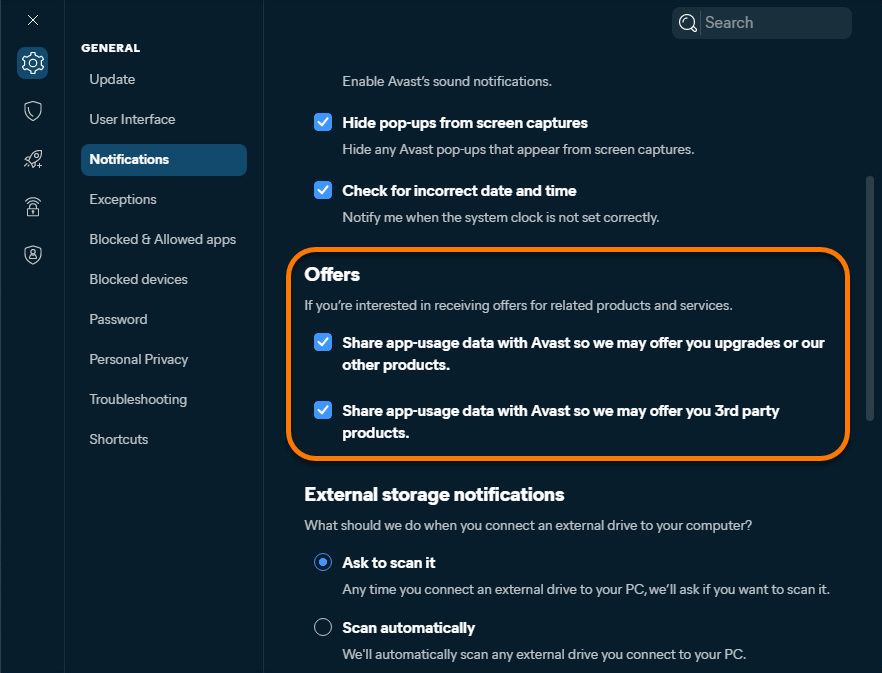
Product and third-party offers can have their own sharing controls under Notifications. Disable the available boxes if you don't want those recommendations. Avast's current pop-up and offers instructions say offers can't be disabled in the free version of Avast Antivirus, and some free-product offer choices are enabled but not visible. That limitation is part of the product trade-off, not a hidden button this guide can invent. The Free versus Premium comparison explains the wider tier trade-off.
Silent mode changes interruptions, not data-sharing consent
New Avast One offers a pop-up treatment setting called Silent mode. It can suppress pop-ups, alerts or messages, which is useful during presentations, games or focused work. It doesn't withdraw Community IQ, analytics or marketing consent. Conversely, turning off offer sharing doesn't guarantee a completely silent product because security alerts and service messages have different purposes.
Keep meaningful malware and shield warnings visible unless a controlled full-screen mode has a clear reason to silence them temporarily. For games, the documented Do Not Disturb mode can suppress notifications for selected full-screen apps. Review its options: it can affect Avast alerts, other-app notifications, scheduled scans and Windows Update behavior during those sessions.
If the complaint is repeated marketing prompts, change offers and personalized discounts first. If the complaint is interruption during one app, use Do Not Disturb. If the complaint is data processing, read the purpose and use privacy controls or account rights. One setting can't solve all three.
Privacy switches off doesn't mean Avast processes no data
Avast's Product Privacy Notice, updated July 10, 2026, lists service and device data for Antivirus for Desktop. Current examples include IP address, suspicious samples/files, detection metadata, malicious URLs and referrers, product events, internal device identifiers, device and compatibility information, other security software, applications, browsers and network information. Account and billing data apply when an account or purchase is involved. The broader General Privacy Policy explains controller, legal basis and rights that span products.
Why can this remain after analytics is off? File reputation needs a sample or identifier; Web protection needs to assess a URL; Windows Security registration needs to know about another provider; updates need product/version state. Optional product-improvement analytics and data required to deliver an enabled feature are different purposes. The policy's retention table also varies by field and feature.
| Example | Current stated purpose | Best user control |
|---|---|---|
| Suspicious sample / detection metadata | Protection, analysis and blocking | Community IQ plus feature choice |
| Malicious URL / referrer | Web threat detection | Web feature scope; avoid broad exclusions |
| Product events and settings | Functionality, messaging, improvement | Analytics/offer switches where exposed |
| Device and other security software | Compatibility and provider behavior | Product choice; review live notice |
| Email or scam submission | Feature operation and detection | Feature permission and submission choice |
| Account / billing | Subscription and account service | Merchant, account and DSR actions |
This table is a map, not a substitute for the policy. Read the row for the exact platform and feature because Android, iOS, Avast One and companion apps have different fields and retention. A feature that handles messages, email, browsing or a VPN has a different privacy surface from a local file scan.
Review Web Guard, Email Guard, Scam Assistant and Sensitive Data Shield
Web Guard checks network activity and URLs. Turning off generic analytics doesn't prevent an enabled web-protection feature from processing the information needed to decide whether a destination is malicious. Don't disable HTTPS scanning merely for privacy theater; it's a security control with a real protection trade-off. Use the controlled test in our Web Guard troubleshooting section only for a reproducible compatibility problem.
Email Guard is cloud-based in the current notice and can download messages, metadata and attachments briefly to scan them. Avast says suspected malicious messages can be stored for analysis unless the user opts out, with feature-specific retention and de-identification terms in the live table. Review whether the email account is connected, what permissions it has and whether the feature's benefit matches that processing.
Scam Protection and Scam Assistant process what the user submits or what a supported scam-checking feature needs. Never paste a password, recovery phrase, full card number or unnecessary personal record into an assistant. Redact first. Sensitive Data Shield scans for files containing sensitive information and controls application access; Avast says that protection check doesn't store the file content in the cited desktop row, but the feature still needs local file access.
Hack Alerts monitors account email addresses for breach exposure with SpyCloud. If you don't want that third-party relationship, disable the feature rather than assuming the global app-usage toggle controls it. Every integration should be reviewed at the feature permission level.
SecureLine VPN, the browser extension and Secure Browser are separate products
Avast SecureLine VPN has its own Personal Privacy and notification controls. Turning off antivirus analytics doesn't automatically change VPN telemetry, connection settings or marketing. Open SecureLine's settings and review “Help improve SecureLine VPN,” status notifications and product offers for the installed platform. A VPN also changes who can see network destinations; it doesn't make an Avast account anonymous.
The Avast Online Security & Privacy extension has its own usage-data switch. Browser extensions can see the pages and page content needed for their declared functions, so review browser permissions and remove the extension from profiles where it isn't used. The current extension FAQ says anonymous usage sharing is enabled by default; use the extension's gear/settings control to opt out.
Avast Secure Browser is Chromium-based and stores normal browser data locally in its profile. Its own privacy, site notification, cookies, search and sync choices are separate. Our Avast Secure Browser review explains the product boundaries. Removing antivirus doesn't automatically erase the browser profile, and deleting the browser without export can lose bookmarks or saved data.
Cleanup, AntiTrack, Driver Updater and BreachGuard also have independent settings and policies. A bundle name such as Avast One or Ultimate doesn't create one universal privacy toggle. Inventory the installed apps in Windows Settings and review only the modules you actually use.
Mac, Android and iPhone use different labels and permissions
On Mac, Avast Security uses Preferences → Privacy while Avast One's old and new paths differ. The current support page includes separate Mac tabs; don't use the Windows screenshots above as visual instructions. Review Full Disk Access, system/network extensions and browser permissions in macOS System Settings as well as the in-app switches.
On Android, current Avast One documentation can expose Community IQ, app-usage data, third-party analytics and offers under Profile/Account settings. Android's OS-level permissions—notifications, accessibility, VPN, photos, files and background operation—control capabilities the in-app analytics switch doesn't. Keep only permissions required by enabled features.
On iPhone, network protection can use a local VPN configuration and Photo Vault data can be lost when the app is deleted. Export vault items before uninstalling, as detailed in the complete Avast uninstall guide. App Store subscription cancellation remains separate from deleting the app or Avast account.
What the Jumpshot history and 2024 FTC order mean now
The history is material. The U.S. Federal Trade Commission alleged that from 2014 through January 2020 Avast collected detailed browsing information through products and extensions, transferred it to Jumpshot and sold data that could be re-identifiable, while making privacy claims. Avast says Jumpshot ceased operations in January 2020.
In June 2024 the FTC finalized its Avast order. It required $16.5 million in redress, deletion of transferred browsing data and derived products or algorithms, affirmative express consent before covered sale/licensing of browsing data for advertising, consumer notification and a comprehensive privacy program.
Two conclusions are unsupported. “Avast currently sells everyone's browsing history” treats 2014–2020 conduct as a live fact. “The case is over, so privacy is guaranteed” ignores the seriousness of the findings and the continuing need to inspect policy and controls. The defensible view is to weigh the history, the binding order, the July 2026 notice and your own risk tolerance together. Our dated Avast and Jumpshot explainer preserves the longer historical record without projecting it onto current behavior.
Community discussion still reflects that trust gap. Some users recommend turning off every switch; others keep Community IQ for detections. We use those comments as evidence of the decision people face, not as proof about present data flows. The primary record is the FTC order and current policy.
Request a copy or deletion of Avast account data
Use Avast's official Data Subject Rights and Privacy Requests guide. For access, follow its “Provide a Copy of My Data” form. For erasure, use the new account portal's My account → Privacy options → Delete My Data flow or the linked deletion form. The portal can request a one-time passcode sent to the registered email.
Avast says an account with an active subscription can't complete deletion until active subscriptions are cancelled and disabled. Cancel renewal through the merchant first, save confirmation, then submit deletion. The current Avast Account FAQ links the access/deletion route; our Avast cancellation guide separates direct Avast, Google Play, Apple and reseller paths.
Deleting the account doesn't substitute for uninstalling local apps, and uninstalling doesn't erase the account or cancel billing. Preserve invoices, refund evidence and exported browser/Photo Vault data before deletion. Use a password manager to remove saved Avast credentials only after the request and any refund are complete.
Choose one of three privacy presets
Balanced protection: keep Community IQ, turn off app-usage analytics, personalized discounts and available third-party/product offers, and keep security alerts. Review Email Guard, Scam Assistant and breach monitoring individually. This is our default recommendation.
Maximum optional-data reduction: turn off Community IQ as well as analytics and personalization, remove unused companion apps/extensions, disconnect features whose processing you don't accept, and submit an access request to understand account data. Accept that a disabled feature or sample contribution can reduce that function or your contribution to collective detection.
Lowest interruption: keep the chosen privacy settings, switch marketing controls off, and use Silent or Do Not Disturb mode only for selected periods/apps. Preserve visible critical warnings at other times. Quiet is an interface preference, not a privacy state.
If none of these resolves the trust issue, compare the current Avast alternatives and our full Avast review. Evaluate policies and default behavior, not only malware scores. A simpler product can be a better fit if you'll actually understand and maintain it. If the sticking point is paid scope rather than privacy, the Avast plans and renewal guide maps which subscription you're actually managing.
Verify the choices after restart, update or repair
Restart Windows, reopen Personal Privacy and Notifications, and compare them with the baseline screenshot. Confirm File and Web protection still report active. Open Installed apps and browser extensions to make sure no separate Avast module was missed. Repeat this check after a major Avast One migration or repair because interface changes and resets are plausible.
Read the live policy when adding a new feature. Deepfake Guard, Scam Assistant, Email Guard and Privacy Control don't share identical data. The current Avast Privacy Control product is also region-specific: Avast says it's available in the United States on Windows, while BreachGuard fills that role in other regions. “Privacy included” isn't enough detail for consent.
Set a calendar reminder to review the product notice and settings twice a year. Record the date and version, not just a screenshot with no context. If a previously available opt-out disappears, ask Avast Support which product/tier now controls the purpose before assuming it's still off.
Avast privacy settings FAQ
What Avast privacy settings should I turn off?
For a balanced setup, turn off app-usage analytics, personalized discounts and third-party or cross-product offer sharing where those controls appear. Keep security alerts. Community IQ is a separate choice: leaving it on contributes suspicious samples to shared detections; turning it off reduces that voluntary sharing but doesn't stop all service data required by enabled protection.
Should I disable Avast Community IQ?
Disable it if minimizing suspicious-sample contribution matters more to you than helping Avast improve shared detection. Keep it on if you accept that contribution for collective threat intelligence. It isn't the same as app-usage analytics or advertising offers, and either choice still leaves service processing required for enabled protection features.
Does turning off Avast analytics disable antivirus protection?
No. The documented app-usage and third-party analytics switches control product-improvement sharing, not the core on/off state of File, Web or other shields. However, enabled security features still process the data their function needs under the current Product Privacy Notice.
Can I disable all Avast ads and upgrade offers?
Paid versions expose more offer controls. Avast says some free-version offers can't be disabled and some sharing switches don't appear because they're enabled by default. Turn off available offer and personalized-discount controls, use notification treatment appropriately, and don't mistake Silent mode for a data-sharing control.
What data does Avast process when privacy switches are off?
The current desktop notice lists feature and service data such as detection metadata, suspicious samples, malicious URLs and referrers, IP address, product events, device identifiers, compatibility data and installed security software. Exact data and retention depend on the product, platform and enabled feature.
Does Avast still sell browsing data?
The FTC's case concerned conduct from 2014 through January 2020 involving Jumpshot. A 2024 final order prohibits Avast from selling or licensing browsing data for advertising under the covered terms and imposes deletion, consent, notification and privacy-program requirements. That history matters, but it isn't evidence that the same sale is occurring now.
How do I request a copy of my Avast data?
Use Avast's official Data Subject Rights and Privacy Requests page and choose the form to provide a copy of your data. Keep the confirmation and verify the identity-request channel is on Avast Support or its linked privacy portal, not a third-party support page.
Does deleting my Avast account cancel my subscription?
No. Cancellation, account deletion and app removal are separate. Avast says an account with an active subscription can't complete deletion until active subscriptions are cancelled and disabled. Cancel through the controlling merchant, save proof, then submit the deletion request.
Why do my Avast privacy settings look different?
Avast is operating new and old Avast One interfaces alongside Free Antivirus and Premium Security, and Mac/mobile labels differ. Identify the product and version first. Follow the current support tab matching that product rather than forcing a Windows screenshot or an old Avast One menu onto your build.
Privacy control starts by naming the purpose correctly
Community IQ, analytics, discounts, offers and notifications aren't one switch. Decide each purpose, then inspect the enabled features and companion apps whose service data is defined in the live policy. Turning off optional analytics is useful; presenting it as “Avast processes nothing” would be false.
The Jumpshot record deserves weight, and the current FTC order deserves precision. Use the settings you're actually given, verify them after updates, exercise access or deletion rights through the official portal, and switch products if the remaining processing or history exceeds your risk tolerance.