
Avira Phantom VPN Review 2026: Convenient, but Too Basic for Some
Phantom VPN is easy to add to an Avira household and its free tier is useful for a short public-Wi-Fi session. The harder question is whether a Windows-only paid kill switch, legacy protocol mix and unaudited privacy claims justify a standalone subscription.

Quick answer: Avira Phantom VPN is a reasonable convenience VPN for an existing Prime household or for a short free public-Wi-Fi session. Free provides 500 MB per month, or 1 GB after account registration; Pro removes the cap and adds the Windows kill switch and paid support. The current product page claims 1,400 servers in 36 countries and unlimited devices. The trade-offs are substantial: no public independent no-logs audit surfaced in our July 2026 research, Avira's detailed privacy notice says it processes IP and device or installation identifiers for delivery and abuse prevention, the documented protocol mix lacks WireGuard, and current third-party speed and streaming results vary sharply. Privacy-critical, Linux, router, advanced-routing and dependable streaming users should compare a specialist VPN.
Avira Phantom VPN verdict at a glance
Phantom VPN makes the most sense as an included convenience. Someone already paying for Avira Prime can protect ordinary browsing on hotel or airport Wi-Fi without adding another account. The app covers Windows, macOS, Android and iOS, Avira advertises unlimited devices, and the current server claim—1,400 servers in 36 countries—is broad enough for nearby connections in many common travel regions.
The free tier is useful but tiny. Five hundred megabytes can protect account access, email and a short work session; a registered account receives 1 GB according to Avira Support. It isn't a practical streaming or always-on allowance. Pro removes that cap and adds paid support plus a kill switch on Windows, but it doesn't suddenly become a feature-rich specialist VPN.
We wouldn't choose it for a high-risk privacy requirement. Avira clearly says it doesn't collect browsing destinations, but its detailed privacy notice still lists IP address, device and installation identifiers, aggregate bandwidth, licence and abuse-prevention data as processed. We found no current public third-party audit that proves the no-browsing-logs implementation. The documented apps also use OpenVPN or IPsec rather than publishing a WireGuard path, and the paid kill switch isn't presented as a cross-platform control.
The broad Avira review judges the antivirus and corporate bundle. This page owns only the VPN decision. If the real choice is whether the bundle justifies paying at all, start with Avira Free versus Prime.
Avira Phantom VPN Free vs Pro: the practical differences
| Capability | Phantom VPN Free | Phantom VPN Pro | Why it matters |
|---|---|---|---|
| Monthly data | 500 MB; 1 GB after email registration | Unlimited | Free is for short sessions, not always-on use |
| Encryption and tunnel | Included | Included | The data cap, not a weak cipher, is Free’s main limit |
| Virtual IP and DNS protection | Included | Included | Core privacy job exists in both |
| Locations | Current app determines selection | Access to available location list | Verify a required city in the live client |
| Kill switch | Not included | Advertised on Windows | Protects against a connection-drop handoff |
| Support | Knowledge base and community | Paid customer support | Useful when account or connection repair needs a person |
| Devices | Avira advertises unlimited devices | Avira advertises unlimited devices | Platform gaps still apply to each device |
The official Free-limit article is more specific than the product card: 500 MB becomes 1 GB after registration with an email address. Avira’s current Phantom VPN product page lists data encryption, virtual IP, DNS leak prevention and unlimited-device use around the free offer. Registration buys more traffic, but it also replaces anonymous use with an account relationship.
The cap should decide the job. One gigabyte can cover a substantial amount of text browsing and messaging, but video, large downloads, cloud sync and operating-system updates can consume it quickly. Free is a good emergency tunnel. It's a poor substitute for a permanent VPN just because the Connect button works.
Phantom VPN doesn't log websites—but “no logs” needs precision
Avira’s clearest promise is useful: its current VPN tracking explanation says it doesn't track visited websites, the virtual locations used, the user’s real IP address or an action such as a specific download. It says the service does track whether the account is free or paid and how much data is consumed, while optional diagnostic collection can be disabled. That's a meaningful no-browsing-history claim.
The detailed Avira product privacy notice adds context that the short support answer omits. For Phantom VPN it lists device name and type, device ID, install identifier and date, aggregate bandwidth, licence identifier, error or debug data and IP address among automatically processed fields. It also lists IP, licence and device identifiers plus abuse frequency when suspicious behavior is detected or blocked. Avira says these fields support server selection, product delivery, development, network protection and terms enforcement.
Those statements can coexist: processing an IP temporarily to select a nearby server or prevent abuse isn't the same as storing a history that maps a customer to visited sites. It still means “we know nothing” is too broad. The privacy-sensitive question is retention, access and implementation. We didn't find a current public independent no-logs audit that verifies those systems. Current specialist reviews from SafetyDetectives and VPNMentor independently flag that audit gap.
Germany’s legal jurisdiction is less decisive than the data actually retained, but it isn't irrelevant. Avira says authorities can request data and that the company complies with applicable law, while its policy is to avoid retaining browsing-purpose information. The absence of destination logs is positive; independent verification and clearer retention details would make the claim stronger.
Avira’s withdrawal from India is also informative. The current Prime installation page says Phantom VPN is unavailable for use within India because local rules require logging and saving user data. A subscriber can use it while outside India. Don't buy it for an India-based connection expecting a workaround.
AES-256 is sound; the documented protocol selection is narrow
Avira’s official encryption article specifies AES-256. The cipher choice isn't the weak point here. A VPN secures the segment between the device and VPN server; the destination connection should still use HTTPS. Avira’s own support material warns that an unencrypted HTTP destination can expose data after traffic exits the tunnel.
The current ports and protocol article is unusually concrete. Windows desktop, Mac desktop and Android versions use OpenVPN over TCP port 443. iOS, the Mac App Store build and Microsoft Store build use IPsec with UDP 4500 and ESP/UDP 500; backend API communication uses TCP 443.
That mix is established and can traverse many ordinary networks, but Avira’s current public documentation doesn't describe WireGuard, custom obfuscation, multihop or a user-selectable protocol portfolio. A 2026 Security.org review also found no split tunneling or multihop. People who need to keep local printers outside the tunnel, route only one application, resist VPN blocking or optimise modern mobile handoffs shouldn't assume those controls exist.
“Bank-grade encryption” is marketing shorthand, not a complete security evaluation. App update practices, kill-switch behavior, DNS routing, server operations and privacy controls matter too. Phantom VPN covers the basic encrypted-tunnel job; it offers fewer knobs and fewer published assurances than a specialist product built around VPN transparency.
The kill switch is useful—and too platform-limited
A kill switch blocks ordinary internet traffic when the VPN disconnects unexpectedly. Without it, the device can silently return to the ISP path while a browser, sync client or download continues. Avira advertises that fail-safe for Phantom VPN Pro on Windows. It's absent from Free, and the current official product pages don't make an equivalent cross-platform promise.
That limitation changes the recommendation. A Windows Prime user can enable the control and test it. A Mac, Android or iPhone user shouldn't infer protection from the Windows feature table. Open the exact current app and look for a documented kill-switch control; if it isn't there, assume reconnection can expose the normal route.
Current independent tests provide useful but narrow evidence. All About Cookies’ Q1 2026 Windows test reported that the Pro kill switch, DNS leak test and WebRTC leak test passed. That proves behavior in their test environment, not every platform, network transition or future build. After enabling the kill switch, test a deliberate server change and a brief network handoff with no sensitive work running.
DNS leak prevention and IPv4/IPv6 support appear in Avira’s current feature list. Still check the public IP and DNS resolver before and after connecting. If they don't match the selected route, stop using the tunnel until the cause is understood. A shield icon can't overrule observed traffic.
Current speed results disagree, so test your route before paying
Every VPN adds encryption and a longer route. The important metric isn't one worldwide percentage but the result from the user’s device, ISP and nearest useful location at the relevant time. Avira’s speed troubleshooting article names server distance, Wi-Fi congestion, router limitations, existing device load and ISP routing as variables.
The independent 2026 numbers are strikingly inconsistent. All About Cookies measured a roughly 78–82% download reduction across its US, Canada, Europe and Australia routes from one Windows 11 test location in Q1 2026. VPNMentor’s current review reported about a 45% drop on shorter routes and 67% on distant routes, while SafetyDetectives describes much smaller losses in its environment. These aren't three truths about a fixed product; they're evidence that route and method dominate the result.
Use a repeatable local worksheet: run three baseline tests, connect to the nearest relevant server, run three more, then test the actual task. Record median download, upload, latency and connection time. Repeat at the time of day that matters. A video call cares about latency and stability; cloud backup cares about upload; a streaming session cares about sustained throughput and the service’s VPN-blocking behavior.
Don't interpret a faster VPN result as free bandwidth. Sometimes a VPN changes poor ISP routing or avoids a throttled path, but the encrypted tunnel doesn't improve the underlying line. If the nearest server loses most of the baseline repeatedly, try one adjacent location, reboot the network equipment and compare without other heavy traffic before blaming or excusing the product.
Server coverage is respectable, while streaming remains unpredictable
Avira’s current product page claims 1,400 servers in 36 countries. Its separate virtual-location list names two Australian cities, two UK cities and 12 US cities alongside country-level entries in Europe, Asia and the Americas. The support and marketing lists don't perfectly mirror one another, which is a reason to confirm a required city inside the current app before purchase.
The footprint is adequate for common US and European travel. It's less convincing for someone who needs broad African, Middle Eastern, South Asian or specialised city coverage. Avira says P2P file sharing is supported, but it doesn't present a deep catalogue of dedicated P2P, streaming, static-IP or multihop servers. Legal use and the destination service’s terms remain the user’s responsibility.
Streaming evidence changes quickly because services block shared VPN addresses. All About Cookies accessed Netflix in the US, Canada, UK and Australia in its Q1 2026 test. VPNMentor reached several Netflix libraries and other services but reported long starts, buffering and failures with Hulu, BBC iPlayer and Disney+. Security.org also described mixed results. No honest review should turn one successful evening into “unblocks everything.”
Buy a VPN for privacy and network requirements first. If one streaming library is essential, test it during the applicable refund window and keep a second decision criterion: does the service still perform acceptably when that library blocks its current addresses? Phantom VPN’s smaller feature set gives it fewer specialised routes to fall back on.
Unlimited devices don't mean unlimited platform capability
Phantom VPN has native consumer apps for Windows, macOS, Android and iOS. Avira advertises simultaneous use across unlimited devices, which is generous for a large household. The platform implementation differs: protocol channel, kill-switch availability and app-store billing aren't identical.
There's no official Linux client in the current product family, and current independent reviews report no router, smart-TV or game-console installation route. Without router support or Smart DNS, “unlimited devices” covers supported apps rather than every connected screen in a home. A household that needs an Apple TV, Android TV, console or whole-router tunnel should compare that requirement before counting seats.
Prime users may need to install Phantom VPN separately on mobile and sign into the same Avira account. The Avira installation and setup guide explains the entitlement route without assuming that installing the antivirus automatically configures every companion product. The forthcoming Avira Android review keeps mobile malware, permission and VPN jobs separate.
On shared devices, test reconnection and startup behavior for each user profile. A tunnel that worked under the account that installed it may not protect another user automatically. Save the product version and platform when contacting support; “Phantom VPN is broken” isn't enough to distinguish OpenVPN desktop from an IPsec store build.
Standalone Pro is expensive unless Prime already earns its keep
In the official English store rendered for our July 29 snapshot, standalone Phantom VPN Pro showed $12 per month, $88 per year and a $7 per month mobile plan via in-app purchase. Prices are dynamic by country, tax, platform and promotion, so the checkout and receipt control the transaction. The annual plan displayed a 60-day money-back guarantee; Avira’s terms on the same page specify 14 days for an initial monthly purchase and 60 days for annual payments.
That's a high standalone price for a VPN without a public no-logs audit, WireGuard documentation, Linux/router coverage, broad cross-platform kill switch, split tunneling or multihop. It may still be rational when unlimited devices and simple Avira account management are the top requirements. Most buyers should compare current audited specialist VPNs at the same annual spend.
Prime changes the equation because unlimited Phantom VPN is one line in a five- or 25-device security bundle. Don't assign the VPN the full standalone price if you'd never purchase it alone. Start with the actual Prime renewal, subtract only the antivirus, updater, password or support services that replace real alternatives, then ask whether the remaining bundle cost is a fair VPN price. Our Avira pricing guide keeps first-term and renewal figures dated.
Standalone and Prime subscriptions can renew automatically. Avira says annual charges may be taken up to 35 days before renewal and monthly charges up to five days before renewal. Test early, preserve the receipt and use the Avira cancellation and refund route before the relevant deadline if the required platform, server or application doesn't work.
Use Phantom VPN on public Wi-Fi without creating false confidence
Install the official app, update it, select a nearby location and confirm the public IP changes. On Windows Pro, enable the kill switch and test a controlled server change. Configure auto-connect for genuinely untrusted networks, not every local network indiscriminately; printers, casting and local file sharing can behave differently through a tunnel.
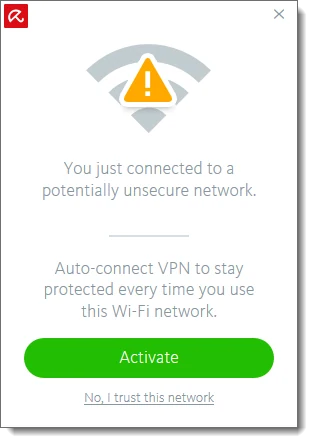
A VPN doesn't make an evil download safe, remove browser phishing, add multifactor authentication or guarantee that the destination is legitimate. It moves trust from the local network and ISP toward the VPN provider and the destination connection. Keep HTTPS, operating-system updates, firewall, browser protections and account MFA enabled.
After connecting, test the actual work: email, video call, cloud storage, bank or company application. Avira acknowledges that Office, OneDrive and Adobe Cloud can encounter connection issues with an active VPN. Don't add a broad network bypass from a random tutorial. Disconnect for a low-risk task only when the consequence is understood, or choose a VPN with supported split tunneling when that control is a recurring requirement.
Connection failures need evidence, not repeated reinstall loops
When Phantom VPN won't connect, record the platform, app source, version, selected location, network type, exact error and whether another location works. Avira’s “cannot connect to server” article says the message commonly comes from the OpenVPN client, recommends trying another country and treats reinstall as a last resort. That order preserves more evidence than uninstalling immediately.
Check captive-portal sign-in first on hotel and airport networks. Then test another location, a different trusted network and the same service without VPN. Corporate firewalls can block OpenVPN or IPsec ports. A problem limited to one app may be routing or policy rather than a failed tunnel; a problem on every network and location points back toward the client, account or service.
Current community signals are sparse and shouldn't be inflated. Avira’s Phantom VPN community index shows a March 2026 slow-speed topic and recurring questions about activation, iPhone behavior and kill-switch visibility. One unanswered complaint can't establish prevalence. It does help identify language the product must explain more clearly: exact platform, connection mode and whether the protection survives a drop.
If the VPN repeatedly breaks normal work, the answer isn't to disable antivirus or web protection globally. Preserve the timing and isolate the component. Our Avira product troubleshooting guide handles app and resource faults, while the web protection guide handles a site block that only looks like a VPN problem.
Who should choose Avira Phantom VPN?
Choose it as a Prime inclusion when the household already values Avira’s antivirus and support, uses supported platforms, and wants a simple tunnel for travel or public Wi-Fi. The marginal bundle cost can be reasonable even when the standalone VPN isn't.
Use Free for a short emergency session when 500 MB—or 1 GB after registration—is enough. Check the data counter before beginning a large update or call. Free isn't a realistic always-on privacy plan.
Consider standalone Pro only after the required locations, speed, Windows kill switch and apps pass testing during the refund period. Unlimited devices can justify the price for a large supported-device household, but count actual devices rather than theoretical installations.
Choose a specialist VPN instead for an audited no-logs claim, Linux or router support, a cross-platform kill switch, WireGuard, split tunneling, multihop, obfuscation, broad streaming coverage or advanced server choice. The planned Avira alternatives guide will separate “replace the VPN” from “replace the whole security suite.”
Our final judgment is deliberately narrower than a star score: Phantom VPN is convenient, its core encryption is credible and the Windows paid fail-safe has current positive test evidence. Its transparency and feature ceiling keep it out of the strongest privacy or power-user recommendation.
Avira Phantom VPN FAQ
Is Avira Phantom VPN safe to use?
It uses AES-256 encryption, documents OpenVPN or IPsec depending on the app channel, and current independent reviewers reported successful leak and Windows kill-switch tests. Safety still depends on platform and purpose: the kill switch is advertised for Pro on Windows, and Avira's no-browsing-logs claim hasn't been verified by a current public independent audit we could find.
How much data does Avira Phantom VPN Free include?
Avira's current support article allows 500 MB per month without registration and 1 GB per month after registering with an email address. The public product cards sometimes show only 500 MB, so the support article and the live counter in the app are the best checks for the account state.
Does Avira Phantom VPN keep logs?
Avira says it doesn't collect visited websites, services used, real IP history or virtual locations used. Its detailed product privacy notice nevertheless lists IP address, device and installation identifiers, bandwidth totals, licence information, error data and anti-abuse information among data it may process. That isn't the same as browsing-history logging, but it deserves more precise language than a blanket no-logs label.
Does Avira Phantom VPN have a kill switch?
Avira advertises the fail-safe kill switch for Phantom VPN Pro on Windows. Free doesn't include it, and current official product material doesn't promise the same control across macOS, Android and iOS. Verify the exact app before using Phantom VPN for a task where one unprotected reconnection would matter.
How many servers and devices does Phantom VPN support?
Avira's July 2026 product page claims 1,400 servers in 36 countries and use on unlimited devices. The separate support location list has multiple cities in Australia, the UK and US but doesn't perfectly mirror the marketing list, so check the live app for a required city before paying.
Is Avira Phantom VPN good for streaming?
Current 2026 tests are mixed. One Q1 test accessed four Netflix regions without buffering, while another reached several services but reported long starts and failures with Hulu, BBC iPlayer and Disney+. Streaming platforms continually block VPN addresses, so treat access as a changeable result rather than a subscription guarantee.
Does Avira Phantom VPN work in India?
No, not while you're in India. Avira says the service is unavailable there because regulations require VPN providers to log and retain user data. An active subscription can still be used when the subscriber travels outside India.
Is Phantom VPN included with Avira Prime?
Yes. Prime includes the unlimited Phantom VPN entitlement for the devices covered by the Prime plan, although the mobile VPN app can require a separate installation and account sign-in. Compare the whole Prime renewal with the standalone VPN price and value only the services you'll actually use.