
Avira Not Working or Using High CPU? Diagnose It Safely
Don't start by killing a protected service or excluding half the disk. Identify what Avira is doing, separate temporary scan load from a persistent fault, then repair the smallest broken layer and verify protection.

Quick answer: Open Task Manager with Ctrl+Shift+Esc, sort Processes by CPU, Memory and Disk, and record the exact Avira-related name, percentage, duration and whether a scan, update, download or file copy is active. Restart once, install current Windows updates, and check that only one permanent real-time antivirus is registered. If Avira won't open or shows “Something isn't working as expected,” run the current official installer and choose Repair/Update; Avira says repair resets app settings. For persistent idle CPU, a stuck update, 500/503 or disabled protection, verify the provider in Windows Security, repair Avira, and reinstall only if the fault remains. Don't end protected services, disable protection permanently or add broad exclusions as first fixes.
Choose the symptom before choosing a fix
“Avira is slow” can describe an intentional full scan, a product update, a damaged service, a second antivirus conflict, memory pressure or an unrelated Windows process. Those states shouldn't get the same fix. A five-minute observation is safer than ending services until the fan stops.
| Symptom | First evidence to collect | First safe action |
|---|---|---|
| Avira won't open | Tray icon, Start result, exact message, Windows Security provider | Restart, check conflicts, repair |
| High CPU | Exact process, percentage, duration, active scan/update/file task | Measure through the task, then restart if persistent |
| High RAM | Working set trend, system memory pressure, paging and responsiveness | Close duplicate security tools and observe after reboot |
| High disk/network | File operation, update, VPN, download or Software Updater activity | Let the known task finish or pause the user task |
| Protection off | Avira control plus Windows Security provider and status | Remove conflict, update, repair |
| Scan or update stuck | Current file/path, count, time, error and connection state | Restart, narrow the task, repair if it repeats |
Don't mix this page with a website-specific block. If Avira opens and system load is normal but one site, certificate or download is blocked, use the planned Avira web protection and blocked-sites guide. If the goal is already to leave, the complete Avira uninstall guide is the shorter route.
Measure the exact process, resource and duration
Press Ctrl+Shift+Esc to open Task Manager. On Processes, click CPU, Memory, Disk or Network to sort by the resource that's actually saturated. Record the full display name, percentage or amount, the time, and whether Avira is scanning, updating, downloading through Phantom VPN, checking a network drive or watching a large file operation.
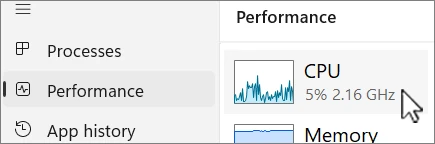
Microsoft describes Task Manager as the built-in view of application and background-process resource use. One instant isn't a baseline. Watch for five minutes at idle and again during the action that causes trouble; a graph that falls when a known scan ends is different from the same process holding a core indefinitely.
CPU percentages depend on logical processor count. A process near 12.5% on an eight-logical-processor system can represent roughly one fully occupied logical processor, while the same number means something else on another machine. Microsoft's current CPU view guide shows where Task Manager lists cores and logical processors.
Don't identify a process only from a forum name. Avira product generations have used labels such as Avira.ServiceHost and Endpoint Protection Service, but an old executable name isn't proof of a current component. Use Task Manager's actual publisher and file location, and scan a suspicious look-alike rather than assuming every process containing “security” belongs to Avira.
Restart and complete one clean update cycle
Save work and restart Windows once. A shutdown with Fast Startup isn't always equivalent to a full restart for loaded services, so choose Restart explicitly. After sign-in, let Windows settle for several minutes before opening Task Manager and declaring the same CPU fault.
Install current Windows 11 cumulative updates and restart when required. Then open Avira and allow its product and protection updates to complete on a stable connection. Don't launch a full scan, game, archive extraction and software update simultaneously while trying to establish a baseline.
If Avira Free updates slowly, Avira's update-connection article says free update servers can occasionally be overloaded and advises trying later. That explanation applies to a delayed update connection, not automatically to persistent idle CPU or broken real-time protection. Record the error and timestamp so a service-side delay isn't confused with a local installation fault.
Windows 10 ordinary support ended October 14, 2025. A current Avira install can't replace missing operating-system security fixes, and unsupported-system behavior shouldn't be normalized with exclusions or service hacks. Move the device to a supported Windows release before spending hours tuning a security product around an obsolete base.
If Avira won't open, repair the application layer
Try the Avira tray icon and the Start-menu entry once. If neither opens, check Task Manager for a running installer or a second security suite, then inspect Windows Security to see which provider Windows trusts. Don't repeatedly double-click the icon while the installer is busy; that creates more windows without restoring the service behind them.
Avira's installed-but-will-not-open article names competing antivirus software and remnants of an earlier installation as possible causes. Keep one permanent real-time suite. An on-demand scanner can coexist when its real-time modules are off, but the product's actual mode—not its marketing category—decides whether it conflicts.
For the message “Something isn't working as expected. Avira has been notified”, Avira's current official fix is repair, followed by uninstall and reinstall if repair fails. The Settings route may say Uninstall first because it opens the Avira installer; choose Repair inside that vendor installer rather than confirming removal by reflex.
Don't download a DLL, “Avira fix tool” or support utility from a forum attachment. A security product repair runs with powerful permissions. Use the live Avira downloads page or the installer tied to My Avira, verify the publisher prompt, and reject support phone numbers embedded in spam PDFs or unrelated community posts.
When real-time protection is off, verify both Avira and Windows
Open Avira, choose Security and Protection options, and inspect Real-time protection. Avira's configuration article describes this component as the continuous scanner for files that are used, copied or accessed. Interface wording and feature availability can differ by plan, so the live product is the control.
Then open Windows Security and inspect Virus & threat protection. If Windows names another registered antivirus, decide which permanent suite should remain and uninstall the other one cleanly. If Windows names no healthy provider, treat the device as temporarily under-protected: stay away from unknown downloads, update or repair Avira, and verify again after reboot.
A tray icon can lag behind the provider state, and a green Windows tile doesn't prove every paid Avira module is active. Compare the two views. If Avira says protection is off while Windows still names Avira as the active provider, repair the installation rather than cycling the switch indefinitely.
Avira offers an official EICAR test procedure, but use it only after the interface and provider are healthy and only from the official EICAR route Avira links. A harmless test pattern can verify a specific detection path; it doesn't prove the whole PC is malware-free.
Persistent high CPU at idle is different from scan load
Avira says an on-demand system scan runs in the foreground and can make the computer less responsive, especially on a large disk. That's expected work. A process that remains high for ten or fifteen minutes after the scan, update, download and file copy have ended deserves repair rather than a permanent workaround.
A current January 2026 community report about Endpoint Protection Service describes a machine reaching very high CPU while the user was unsure whether Avira and Defender were both operating. It's one failure report, not a prevalence estimate. It reinforces why provider state and a second real-time product should be checked before blaming hardware.
An older Avira community thread about persistent Avira.ServiceHost CPU includes users who resolved the fault through repair or reinstall. We don't repeat the thread's service-stop command: ending protection on every boot hides the symptom, weakens coverage and doesn't repair the cause. Old process naming also may not match a 2026 installation.
Current independent context is mixed enough to reject easy slogans. In AV-TEST's May–June 2026 Windows 11 test, Avira Internet Security 1.1 scored 6/6 for protection, 4.5/6 for performance and 6/6 for usability. That performance score supports taking impact seriously, but a lab average under default settings can't tell whether your one PC has a damaged update, conflicting filter driver or intentional scan.
High RAM allocation becomes a fault when pressure and growth persist
Task Manager's Memory column shows a process working set, not a verdict. Antivirus software keeps signatures, code and recently used data in memory, while Windows reclaims cache when other applications need it. A larger stable allocation on a machine with abundant available memory can be less harmful than constant disk paging on a low-memory PC.
Watch the Avira-related total for ten minutes at idle, then repeat the same ordinary workload. Treat steady unbounded growth, heavy paging, freezes, low available memory or repeated application closures as evidence. Record companion processes such as System Speedup, Software Updater, Secure Browser and Phantom VPN rather than attributing their combined total to the antivirus engine alone.
A June 2026 r/antivirus thread came from a user running Avira and Malwarebytes together while both consumed CPU and memory. The post doesn't prove either product is generally heavy. It demonstrates a common diagnostic mistake: adding another active security layer to compensate for mistrust, then measuring the cost of both as if it were one product.
Close ordinary duplicate tools, restart and measure again. If memory grows in a clean state, repair Avira and retest before reinstalling. Don't use System Speedup's memory cleanup as proof of a fixed leak; forcing cached pages out can make the number look smaller while increasing later disk work.
High disk or network use usually needs workload attribution
Sort Task Manager by Disk and Network and note what is happening outside Avira. Downloading a game, unpacking a backup, compiling code or synchronizing a cloud drive presents thousands of new or changed files to real-time protection. Avira may appear busy because another application is generating the work.
Pause the user workload rather than disabling protection, then watch whether Avira settles. If Phantom VPN is active, compare network behavior with the VPN disconnected only on a trusted connection and only long enough to isolate the route. The Phantom VPN review covers VPN-specific speed and connection troubleshooting separately.
Review Software Updater and System Speedup tasks. A scheduled outdated-software scan, driver check or cleanup can use disk independently of the antivirus engine. The System Speedup review explains which cleanup actions are useful and which shouldn't be automated merely to quiet a performance graph.
If disk stays at 100% while transfer rates are tiny, also check drive health, free space and Windows Update. Don't conclude that Avira caused a failing drive because its scanner is the process touching files when errors surface. Preserve disk-health warnings and backups before repeating full scans on questionable hardware.
A stuck scan needs a progress test, not a broad exclusion
Record the scan type, elapsed time, scanned-item count and current path. Large nested archives, virtual-machine images, source trees with many small files and slow external or network drives can hold the display on one area while work continues. Listen less to the percentage and watch whether counts, file names, disk activity or the current path still change.
If there's no progress for a reasonable period, cancel through Avira when the control responds, restart and run a quick scan. Then use a custom scan to isolate the suspected top-level folder. This converts “the full scan freezes” into a reproducible path that support can investigate without creating an exclusion across the entire user profile or drive.
Avira distinguishes real-time protection from the manual System Scanner. A manual full scan can make the PC less responsive; real-time protection should continue as the background layer. Schedule deep scans for idle time, keep the device powered, and avoid running two full antivirus scans simultaneously.
If the scan always stops on a trusted large archive or development tree, collect the path and file type before considering a narrow exception. Verify the source, hash or signature where possible and prefer a folder that can be rebuilt from trusted inputs. Never exclude Downloads, the whole home directory, a browser profile or an executable process simply because scanning it's inconvenient.
For a stuck update or error 500/503, repair before changing the firewall
Verify ordinary browsing, DNS and system time on a trusted connection, then retry the Avira update once. A captive portal, broken proxy, VPN route or clock error can block certificate-backed services. Don't turn off Windows Firewall or real-time protection across the whole machine to “see if the internet works.”
Avira describes 500/503 as a generic condition that can mean a corrupted file or a temporarily unavailable web server. Its sequence is repair installation, then verify the internet connection, then contact support for a paid product if the message persists. Save the exact error, time, connection and screenshot because an intermittent service error may be gone before support reads the case.
If the account or paid entitlement also disappears, check the purchase account and current operating-system support before changing TLS or .NET settings from an old article. The Avira plans and renewal guide separates an expired or mismatched entitlement from a broken protection engine. Reinstalling can't reactivate a subscription held by a different account.
One permanent real-time antivirus should own the provider role
Open Windows Security, Virus & threat protection, and inspect Manage providers when available. Keep Avira or the other permanent suite, not both. Microsoft Defender normally yields when a compatible third-party provider is active; installing another suite because Avira looks slow can create filter conflicts without adding proportional protection.
Malwarebytes or another scanner can be used on demand if its real-time modules are disabled and the vendor supports that mode. Check actual settings rather than assuming “anti-malware” means passive. Web filters, behavior monitoring and ransomware protection can still overlap even when two dashboards use different product labels.
Uninstall the unwanted suite through its official process, restart and verify Windows Security before testing Avira again. If an older antivirus left remnants, use that vendor's supported removal tool or instructions. Don't delete drivers or service keys by name; damaged provider registration is harder to repair than a visible application conflict.
Change performance settings only when the workload proves the need
Avira's real-time protection documentation says monitoring network drives can use additional resources and suggests unchecking that setting when the system is slow. If your version exposes it and the load occurs specifically while using a trusted NAS or mapped drive, test the option with a documented before-and-after workload. Understand that remote files may then rely on protection at the server or when copied locally.
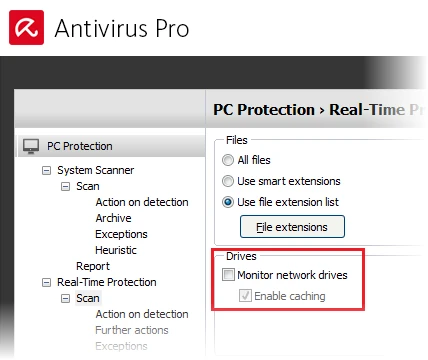
Don't weaken heuristic, archive or web protection globally to gain an attractive idle number. A setting that saves time by scanning less can also detect less. Prefer scheduling a full scan, narrowing a custom scan or changing the generating workload before reducing a protection layer.
Exceptions are a last-mile compatibility control, not a general speed button. Use the smallest verified file, folder or process and record why it exists, who approved it and when it should be reviewed. The separate web-protection guide will cover false-positive and website-specific allowlisting without turning this performance page into an exclusion catalogue.
Use a clean boot only to isolate a repeatable conflict
If Avira works after repair but fails when ordinary background software loads, Microsoft's clean-boot procedure can isolate the conflicting startup app or non-Microsoft service. Take screenshots of the original state, hide Microsoft services before disabling anything, and restore normal startup when the test is finished.
A clean boot is diagnostic, not the final operating mode. If Avira works there, re-enable items in groups until the fault returns and identify the owner. If it still fails in a clean boot, the evidence points back toward Avira, Windows or the installation rather than an ordinary startup application.
Don't perform a clean boot casually on an employer-managed or remotely administered computer. Network, encryption, backup and monitoring agents can be policy-controlled. Give the administrator the measured process, timestamps and Avira error instead of disabling managed services.
Repair Avira when the same fault returns after restart
Download the latest installer from the official Avira downloads page or the matching My Avira subscription. Run it, choose Repair/Update or open the Avira installer from Installed apps and choose Repair, confirm the required components and restart. Avira's repair article explicitly says the process resets application settings to defaults.
Before repair, record any narrow trusted exclusions, custom scan schedule and network-drive choice. After repair, don't blindly recreate all old settings; one of them may have contributed to the fault. Restore only what has a clear current reason.
Measure the same idle window and triggering workload again. A repair is successful when the application opens, the intended protection is active, updates complete and the abnormal resource pattern doesn't return. A lower number immediately after restart isn't enough if the problem usually starts after an hour or a scheduled scan.
Use a clean reinstall when repair can't restore a stable provider
Preserve subscription evidence, use the Password Manager guide to export vault data if needed, and record quarantine decisions. If leaving rather than reinstalling, resolve renewal through the Avira cancellation guide. Then follow the complete uninstall guide, restart and verify Microsoft Defender becomes healthy before installing Avira again; that intermediate check separates an Avira fault from a wider Windows Security problem.
Install from the official current package using the Avira setup guide. Add companion products only when needed. A minimal reinstall of the security component is a better test than immediately restoring VPN, System Speedup, Software Updater, Secure Browser and every extension.
If the same process returns to persistent idle load on a clean supported system with no second provider, preserve screenshots, timestamps, Windows build, Avira version and the reproduction steps. Paid users can use official Avira email support. Don't run a chain of registry cleaners or forced uninstallers between the reproducible fault and the support case.
If malware may be disabling Avira, change the incident path
Warning signs include security controls closing immediately, updates being redirected, unknown administrator changes, several security tools failing, or suspicious high CPU continuing under unrelated process names. Disconnect unneeded network access and use a clean device for important password changes. Don't add exclusions or restore quarantined files to make the warning disappear.
If Avira can update and scan, run a quick scan and then the appropriate deeper scan while preserving detections. If the installed product can't be trusted, use the Avira Rescue System guide from boot media prepared on a clean computer. Offline scanning is a different job from repairing a normal high-CPU installation.
A clean scan is evidence from one engine at one time, not proof of absence. If financial, work or identity data may have been exposed, preserve logs and consider professional incident response or a clean rebuild. Performance troubleshooting shouldn't become a reason to keep using a possibly compromised system.
Verify the fix, then decide whether Avira still fits
After the final restart, open Avira and confirm protection is active, updates are current and a quick scan completes. Open Windows Security and verify the expected provider is healthy. Then reproduce the original workload and observe Task Manager for the same period used in the baseline.
Write down the result: process, idle CPU range, peak and duration, memory trend, disk/network pattern, and whether the application stayed responsive. This makes a future recurrence diagnosable. It also prevents a one-second peak from being mistaken for the original persistent fault.
If update, conflict removal, repair and one clean reinstall don't produce a stable system, removal is a reasonable engineering decision. Use the Avira alternatives guide, Windows 11 antivirus comparison and free antivirus guide to choose by measured need rather than forum hostility. The full Avira review provides the broader protection and value context.
The Avira hub keeps pricing, setup, feature reviews, Rescue System, removal and web-blocking help as separate jobs. On this page, success means the original failure is reproducibly gone, one healthy provider remains, and no permanent security exception was added merely to quiet the computer.
Avira troubleshooting FAQ
Why is Avira using so much CPU?
A temporary rise can be normal during a full scan, product update, large download, archive extraction or first access to many files. Persistent high CPU while the PC is idle is different. Record the exact process and duration, restart, check for a second real-time antivirus, update Windows and Avira, then use Avira's repair installation if the idle load returns.
Can I end Avira or Endpoint Protection Service in Task Manager?
Don't use End task as the first fix. Protected services may deny the action, restart automatically or leave Windows unsure which antivirus is active. Measure the process, let an intentional scan finish, restart normally and repair the installation. If the provider remains unhealthy, reinstall or contact official Avira Support.
How do I fix Avira when it won't open?
Restart once and confirm another antivirus isn't competing with it. Download the latest official Avira installer, choose Repair or Repair/Update, confirm the required components and restart. Avira says repair resets application settings to defaults, so review exclusions and protection settings afterward. Reinstall only if repair fails.
Why does Avira say real-time protection is off?
The component may be disabled, damaged, blocked by another security suite or no longer the registered provider. Check Avira's Protection options and Windows Security rather than relying only on the tray icon. Don't run two permanent real-time suites. Repair Avira if its provider state and controls disagree, then verify again after reboot.
Is high Avira RAM usage a problem?
Not by itself. Security software can keep signatures and recently scanned data in memory, and Windows can reclaim cached memory. Treat it as a fault when memory pressure, paging, freezes or steady growth continue at idle. Compare Avira's working set over time, close duplicate security tools and repair the product if the trend persists.
What should I do if an Avira scan is stuck?
Give a full scan time to process large archives and many small files, then note whether the file count or current path still changes. If there's no progress, restart and run a smaller custom scan to isolate the folder. Don't exclude a broad folder merely to finish. Repair Avira or use Rescue System when malware or a damaged installation is plausible.
How do I fix Avira error 500 or 503?
Avira describes 500/503 as a generic error that can involve a corrupted file or temporarily unavailable server. Its official sequence is to repair the Avira installation, then verify the internet connection. If the error persists, preserve the time and screenshot and use official paid-product support instead of a phone number from a search result.
Should I uninstall Avira if repair doesn't fix the performance problem?
Yes, when the measured idle fault returns after update, conflict removal, repair and a clean reboot. Preserve billing proof and password data, follow a clean uninstall, verify Microsoft Defender becomes active, and then reinstall Avira once or choose a replacement. Repeated forced cleanup tools aren't a durable repair.