
Avira Password Manager Review 2026: Good Free Basics, Serious Gaps
Avira gives registered users unlimited passwords, devices and sync without charging. That's unusually generous. The harder part is accepting thin recovery, plain-text CSV exports, no publicly documented passkey support and a less transparent security posture than the strongest dedicated managers.

Quick answer: Avira Password Manager is a credible no-cost choice for one person: registered Free includes unlimited passwords, devices and sync, plus autofill, a generator, notes, cards and mobile TOTP codes. Avira documents AES-256 and client-side encryption, and its 2022 autofill flaw was fixed in extension version 2.18.5. The limits are recovery, plain-text CSV export, no current public passkey claim, thin sharing and no public independent audit we could verify. Existing Free users can stay with disciplined backups; a new high-value vault deserves comparison with dedicated alternatives before paying for Pro.
Avira Password Manager verdict at a glance
The free version is the best part of this product. Once registered, it stores an unlimited number of passwords and notes, synchronizes them across an unlimited set of supported devices, saves and fills logins, generates new passwords, keeps cards and notes, and offers a mobile authenticator. There's no one-device trap hiding behind the Free badge. Someone already using Avira on Windows and Android can create a useful cross-device vault without buying Prime.
The security design sounds reasonable, but the evidence ceiling is low. Avira says data is encrypted on the user’s device, protected with AES-256 and unreadable to Avira because the company doesn't know the master password. Its privacy notice calls the transport end-to-end encrypted. We didn't find a current public third-party audit, a complete protocol whitepaper, published client source code or current passkey documentation. With a password manager, “AES-256” is the beginning of a trust review, not the end.
Recovery and portability are the deal-breakers for some households. Forget the master password without an already unlocked biometric mobile session and the practical path is a vault-erasing reset. Export exists, but it's an unencrypted CSV; attachments must be handled separately in Avira’s documented sync-repair process. The product also lacks publicly documented emergency access, family sharing, encrypted export and passkey handling.
Our verdict isn't that Avira is unsafe. It's that a simple, generous free tier is competing in a 2026 category where dedicated managers now publish stronger recovery, portability, passkey and audit stories. Existing Free users can stay if the workflow is reliable and backups are disciplined. New users with financial, work or family credentials should compare the current best password managers before building a long-lived vault. The broader Avira antivirus review remains the place to judge the malware suite rather than this companion product.
Avira Password Manager Free vs Pro: what payment actually changes
| Capability | Registered Free | Pro | Editorial reading |
|---|---|---|---|
| Passwords and notes | Unlimited | Unlimited | Core vault isn't paywalled |
| Devices and sync | Unlimited supported devices | Unlimited supported devices | Free has genuine cross-device value |
| Autofill and autosave | Included | Included | Browser extension or mobile autofill still required |
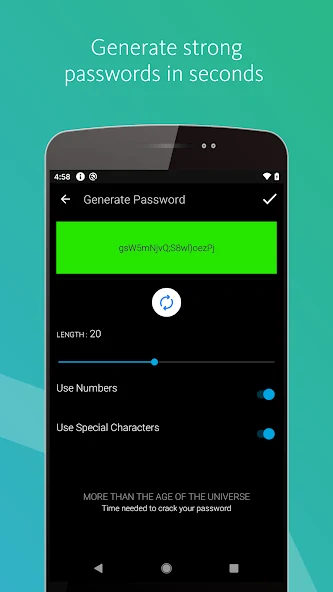
| Password generator | Included | Included | Useful, although less configurable than leading rivals |
| Cards and secure notes | Included | Included | Avira documents these as basic functions |
| Mobile TOTP authenticator | Included in current mobile listings | Included | Generates codes for other sites; it isn't passkey support |
| Security Status | Not included | Breach, unsafe-site, weak and reused-password checks | The main functional reason to pay |
| Human support | Knowledge base and community | Email and telephone support | May matter during an account or sync incident |
The official version comparison draws three boundaries that reviews often blur. An unregistered browser extension stores data only on the device and warns that uninstalling it can destroy that local data. A registered free account adds cloud backup, all-device access, automatic sync and unlimited passwords and notes. Pro adds Security Status checks and direct support.
That makes Pro a narrow upgrade. Its account-breach, unsafe-site, weak-password and reused-password checks are useful, but comparable health functions are free or bundled elsewhere. Paying doesn't unlock a different encryption engine, a family plan, passkeys, emergency access or an encrypted backup format. The Avira Free versus Prime guide handles the larger suite question; this page asks whether the password tool alone earns money.
File attachments are less clear. The current Google Play “What’s new” text says the mobile app can attach images, PDFs, documents, videos and other files to passwords, notes or wallet items. Avira’s current public Free-versus-Pro table doesn't state the entitlement boundary, while older independent reviews disagree. Treat attachments as a live-account check rather than a purchase promise, especially because Avira’s own synchronization repair guide says attachments aren't included in the CSV export.
AES-256 and client-side encryption are positive; transparency is the gap
Avira’s security explanation says every password and data item is encrypted on the user side before being sent to Avira’s servers. The master password never leaves the user side and is unknown to Avira. A separate master-password article explains that the master password encrypts the key used to encrypt and decrypt vault items; the encrypted key is what Avira stores.
The current product page names AES-256 for passwords, cards and notes. That's a well-established cipher. What the public material doesn't provide is equally important: key-derivation parameters, a detailed threat model, audit scope, audit date, remediation report, or enough published client code for outsiders to verify the whole implementation. We found no current public independent security audit after checking Avira’s product, support, privacy and security pages on July 29, 2026.
This is a transparency judgment, not a claim that the cryptography is broken. A sound cipher can still be undermined by autofill logic, recovery design, malicious browser extensions, an infected endpoint or an implementation error. NIST’s current password guidance recommends password managers but stresses protecting the manager itself with MFA because its login guards every stored account.
For a personal vault containing ordinary shopping, media and forum accounts, Avira’s design may be an acceptable improvement over reused passwords. For business administration, cryptocurrency, legal records or family recovery, we would prefer a manager with recent independent audits, a published architecture, phishing-resistant vault authentication and a tested succession path. “Owned by a security company” doesn't replace those controls.
The master password is recoverable only in one narrow situation
Avira can't retrieve the existing master password. Its setup guide tells users to create a unique master password and warns that forgetting it prevents Avira from recovering the vault. The current product FAQ adds one escape hatch: if a mobile app is still logged in and fingerprint, Touch ID or Face ID unlock remains active, the user can open Settings and change the master password without losing the data.
If that mobile path is unavailable, the reset link creates a new Password Manager state and erases the existing vault. Resetting the separate My Avira account password doesn't decrypt the password vault. This distinction appears repeatedly in app-store complaints: people remember one Avira credential, forget the other and assume vendor support can join them. Zero-knowledge design deliberately prevents that rescue.
The right response is preparation, not a weaker master password. Use a long, unique passphrase that isn't stored only inside the vault it unlocks. Keep a sealed offline recovery note in a physically controlled place, document which Avira account owns the vault, enable available account two-step verification, and maintain a tested export in encrypted storage. NIST’s digital-identity FAQ likewise advises a long passphrase for a password manager’s master secret.
Biometrics are a convenience unlock backed by the device, not a reason to forget the passphrase. A phone can be lost, reset, damaged or signed out. Before replacing a phone, verify the master password on the web dashboard, confirm another trusted device syncs, export the vault and separately save any attachments that matter. That five-minute drill is cheaper than discovering the recovery boundary after the old device is wiped.
Autofill is simple, but the browser extension remains a privileged component
Desktop use is browser-based: the web dashboard manages the vault and an extension handles save prompts, password generation and login filling. Avira currently links extensions for Chrome, Firefox, Edge and Opera. Android and iOS use their operating systems’ autofill frameworks. There's no conventional Windows or macOS desktop vault application documented on the current product page.
Avira’s approach is easy to understand. Add or import a login, allow the extension to save new credentials, and select the Avira icon when a matching form appears. The current Chrome Web Store listing says the extension recognizes new passwords and asks to save them. Independent reviewers from EXPERTE and SafetyDetectives describe generally straightforward desktop use, while both also identify a thinner feature set than leading dedicated managers.
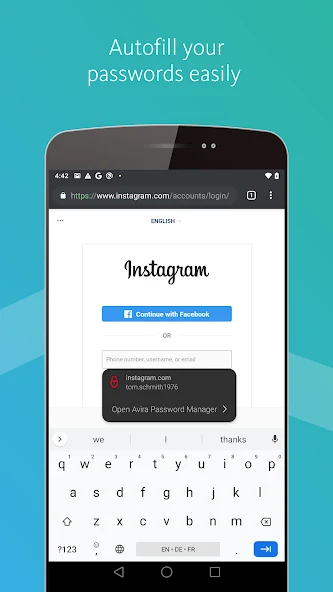
Disable the browser’s built-in save prompts after Avira is working, or the same credentials may end up in two stores with conflicting updates. Test a normal login, a two-page login and a subdomain. For banking, email and admin portals, prefer an explicit click to fill rather than automatic page-load filling when the setting is available. A password manager helps resist phishing only when it binds a login to the correct domain and the user still reads that domain.
The extension can read and write highly sensitive page fields by design. Keep the browser and extension current, remove unnecessary extensions, and lock the vault after a short idle period. An antivirus scan doesn't make a compromised browser profile safe. The Avira installation guide covers the suite and account setup; it shouldn't be mistaken for a complete vault migration plan.
The mobile authenticator is useful, but it solves a different 2FA job
Avira uses “two-factor authentication” for two distinct features. First, account two-step verification adds a phone or email code to an Avira login according to the current product page. Second, the Android and iOS apps include an authenticator that stores secrets and generates time-based codes for third-party services such as email or social accounts. One protects access to Avira; the other helps protect accounts stored inside Avira.
The mobile authenticator is a meaningful free feature. Scan a service’s QR code, save its recovery codes somewhere controlled and confirm a generated code before signing out of the old authenticator. Avira’s Google Play listing, updated March 27, 2026, still advertises the integrated authenticator, while its App Store description says codes can be accessed from the mobile app and notifications.
Convenience has a concentration cost. If a site’s password and TOTP seed sit in the same unlocked vault, an attacker who takes over that vault may obtain both. The target site still sees two factors during normal login, but the user’s recovery design now has one major failure domain. For primary email, banking, the Avira account and the vault’s own recovery chain, consider a separate authenticator or hardware security key.
CISA advises moving toward phishing-resistant MFA where possible. TOTP codes can still be typed into a convincing phishing page; FIDO passkeys and security keys bind authentication to the legitimate service. Avira’s integrated authenticator is better than password-only protection for many accounts, but it shouldn't be described as equivalent to a passkey.
Passkey support isn't publicly confirmed in Avira’s current product
Passkeys are no longer an optional footnote in a 2026 password-manager review. The FIDO Alliance defines them as cryptographic credentials designed to resist phishing and eliminate shared password secrets. A manager that stores and syncs passkeys can let users adopt passwordless sign-in without locking every credential to one phone or browser ecosystem.
We searched Avira’s current product page, support index, version comparison, Chrome Web Store listing, Google Play listing and Apple App Store description for passkey storage, creation, use and migration. None published a passkey claim. Search results and community comments occasionally assert that Avira “supports passkeys,” but we couldn't tie that claim to current official instructions or a reproducible current workflow.
Our wording is therefore unverified, not impossible. Product experiments and staged app features can exist before documentation. A buyer who requires passkeys should create a disposable test account on a passkey-enabled service, confirm that Avira is offered as the credential provider on every required platform, test sign-in from a second device and verify the migration or export path. If any step fails, choose a manager with explicit passkey documentation.
Other advanced gaps are clearer. Avira doesn't currently advertise secure family sharing, one-time item sharing, emergency access, travel mode, multiple vaults, business administration, encrypted exports or a digital-legacy workflow. The current Kaspersky Password Manager review, Trend Micro Password Manager review and Avast password migration guide show why “included with antivirus” can mean very different things over a product’s lifetime.
CSV import and export work, but the file is a temporary security incident
Avira’s official import and export guide uses the web dashboard. Export creates a CSV file. Import accepts CSV, lets the user map columns and then choose which passwords to add. Avira explicitly warns that the exported data is unencrypted.
An unencrypted CSV can expose usernames, passwords, URLs and notes to anyone or anything that can read the file. It may be indexed by desktop search, copied into cloud backup, retained in a browser download history, scanned by another app or left in Trash. Export only on a trusted, malware-free device; verify the file; move it immediately into an encrypted container or encrypted offline drive; import it; then remove every stray plain-text copy and empty the relevant trash only after confirming the encrypted backup works.
Don't delete the old manager immediately after import. Compare the total item count, sample several long passwords and special characters, verify URLs, notes and cards, and test at least five real logins. CSV can't preserve every provider-specific field, attachment, passkey, password history or sharing relationship. Avira’s sync-reset procedure specifically says attachments must be downloaded manually because they aren't included automatically.
A backup isn't proven by the presence of a file. Open the encrypted copy on a second trusted device without depending on the live Avira account, confirm it contains the expected rows and record the backup date. Repeat after major vault changes. This is especially important because the documented forgotten-master-password reset destroys existing vault data.
The mobile app is current; browser-extension maintenance is uneven
Avira supports a web dashboard, browser extensions and Android and iOS apps. Windows and macOS users work primarily through the browser; Linux isn't listed as a supported desktop app platform. Safari is inconsistent across Avira’s materials: an App Store package named Avira PWM for Safari exists, but the main product page currently promotes Chrome, Firefox, Edge and Opera. Mac users should verify the exact Safari extension’s availability and update record before migrating.
The current store records don't move in lockstep. Google Play shows an update on March 27, 2026. The Chrome Web Store lists version 2.21.0.5015, updated March 12, 2025. Mozilla’s version history lists Firefox version 2.19.13.44521, released July 12, 2023. An older public release date doesn't prove abandonment, but it's a legitimate maintenance question for a privileged extension.
Store ratings are user-experience signals, not cryptographic evidence. Chrome currently displays 3.7/5 from 560 ratings; Google Play displays 3.9/5 and more than 11,000 reviews in the regional listing we checked. Recent Google Play comments include both smooth everyday use and reports of apparent vault loss that returned after reinstall, plus confusion between the My Avira password and master password. These reports help identify failure language but can't establish incident prevalence.
Before committing, install only from Avira’s official links, record the extension version, confirm automatic updates and test sync in both directions. Add one disposable login on desktop, confirm it appears on mobile, edit it on mobile and confirm the desktop changes. If the account can't complete that simple round trip reliably, don't add high-value credentials. The ESET Password Manager migration guide is a useful reminder that product continuity and export discipline matter even when the vault works today.
Zero-knowledge vault contents don't mean zero account metadata
Avira’s product privacy notice says Password Manager encrypts passwords immediately after entry and that Avira can't access the data because of the master password. It also says data is transmitted from devices to servers with end-to-end encryption. Those are the statements that matter for vault secrecy.
The same notice lists categories the product can process, including usernames, passwords, phone numbers, addresses, payment-card information, additional emails, dates of birth and free-form notes, with retention language attached to the account state. This table describes data categories inside a password manager and operational processing; it shouldn't be paraphrased as Avira staff reading every vault. It does show why a vault can contain far more than passwords and why deletion and export need deliberate handling.
Avira stores registered vaults in its cloud so they can be backed up and synchronized. Users who require self-hosting, a local-only vault, an independently selectable sync provider or an offline desktop database should choose another model. The unregistered extension is local, but Avira warns that removing it loses the data; that isn't a resilient local-vault strategy.
Separate product ownership from encryption. Avira is part of Gen Digital, the group behind Norton, Avast and AVG. That corporate relationship can affect account infrastructure and commercial packaging, but it doesn't prove shared vault contents or identical password products. Our Avira pricing and renewal guide explains the subscription relationship, while the Phantom VPN review evaluates a different privacy service with different collected fields.
The 2022 autofill vulnerability was serious—and fixed
A credible review shouldn't hide Avira’s known browser-extension flaw or present a patched 2022 issue as a current zero-day. NVD’s CVE-2022-28795 record describes a crafted web page that could trigger the extension to autofill a password, allowing JavaScript on the page to read it. NVD scores the issue 6.5 Medium and says user interaction with the attack page was required.
Stiftung Warentest reported that its phishing imitations caused affected Avira browser plug-ins to fill credentials even when the fake URLs differed substantially from the legitimate services. The organisation notified Avira, which fixed the problem across Chrome, Edge, Opera, Firefox and Safari. The NVD record states that extension version 2.18.5 contains the fix.
Current listed Chrome and Firefox versions are newer than 2.18.5, so an up-to-date installation is past that vulnerable version. We found no evidence in the advisory that the mobile apps were affected, and Stiftung Warentest reported that the flaw was limited to browser plug-ins. It also said Avira found no indication of exploitation, while correctly noting that absence of evidence can't prove it never happened.
The practical lesson remains relevant: keep extensions updated and consider click-to-fill for sensitive accounts. Never sideload an old package because a browser store is unavailable. If an installed extension shows 2.18.4 or older, stop using it, update from the official channel and change credentials that may have been exposed on suspicious pages. This historical incident is evidence that autofill behavior matters at least as much as cipher branding.
Pro is hard to justify alone; Internet Security or Prime can change the math
Avira’s direct store renders Password Manager Pro prices dynamically by country, tax and promotion, so there's no honest single global price to freeze in this review. As channel examples checked in July 2026, Apple’s German listing shows €2.49 monthly and €24.99 yearly, while the UK listing shows £1.99 monthly and £21.99 yearly. App-store prices, direct-store prices and bundle renewals are separate transactions.
Standalone Pro mainly buys Security Status and support. That's weak value beside dedicated managers that include breach checks, passkeys, encrypted exports, sharing, emergency access and published audits. It becomes more rational when already included with Avira Internet Security or Prime and the customer genuinely values the rest of the bundle. The password manager shouldn't be assigned a fictional standalone saving if it would never have been purchased alone.
Compare the actual renewal, not the first-term badge. Our July snapshot found Internet Security only modestly above Antivirus Pro and including the premium password manager, while Prime adds Phantom VPN and optimisation tools at a much higher renewal. The Free-versus-Prime decision and current pricing page keep those commercial questions separate from vault security.
Because Free already handles the core job, our default advice is simple: stay Free unless Security Status or paid support solves a named need. If a more capable dedicated manager costs a similar amount, pay for the product that better protects and exports the vault rather than for brand convenience.
Who should choose Avira Password Manager?
Choose registered Free when one person wants simple password generation, autofill and cross-device sync across supported browsers, Android and iOS. It's especially reasonable for an existing Avira household that will maintain an encrypted offline export and doesn't need passkeys, sharing or emergency access.
Keep it if it already works reliably and switching would create more risk than value. Confirm the current extension version, test a backup, document recovery and move high-value accounts to phishing-resistant MFA. Don't migrate solely because another product has a longer feature list.
Choose Pro only for a precise reason: the breach, unsafe-site, weak-password and reused-password checks or direct support are worth the channel price, or Pro is already included in a security bundle you'd buy anyway. The Security Status panel isn't a substitute for passkeys, external MFA or backup.
Choose a dedicated alternative for passkeys, encrypted exports, secure sharing, family recovery, emergency access, Linux or desktop apps, self-hosted or selectable sync, business administration, independent audits or a published security architecture. A future Avira alternatives guide will separate replacing this one component from replacing the whole antivirus suite.
Avira Password Manager earns credit for making the basic good habit—unique passwords everywhere—free across devices. It loses ground when the vault becomes an identity system rather than a convenience tool. Our final verdict is therefore conditional: a useful free starter and an acceptable existing vault, but not the strongest place to begin a long-term, high-value password and passkey strategy in 2026.
Avira Password Manager FAQ
Is Avira Password Manager safe?
Avira says vault data is encrypted on the device with AES-256 before reaching its servers, and the master password isn't known to Avira. A 2022 browser-extension autofill flaw was fixed in version 2.18.5. The remaining trust limitation is transparency: we couldn't find a current public independent audit or detailed cryptographic whitepaper covering the whole service.
Is Avira Password Manager really free on unlimited devices?
Yes, for a registered account. Avira’s current support page says registered users can save as many passwords and notes as needed and synchronize changes across PCs, phones and tablets. The unregistered extension is different: it stores data only on that device and can lose it when the extension is removed.
What does Avira Password Manager Pro add?
Pro adds Security Status checks for breached accounts, unsafe websites, weak passwords and reused passwords, plus email and telephone support. Core storage, sync, autofill, the generator, cards and notes are available without Pro, making the paid upgrade difficult to justify by itself for many people.
Can Avira recover a forgotten master password?
Avira can't retrieve or reset the existing master password. If a mobile app is still unlocked with fingerprint, Touch ID or Face ID, Avira says you may be able to change it without losing data. Otherwise, resetting the Password Manager account erases the vault. Keep a tested export and an offline recovery note before that situation occurs.
Does Avira Password Manager support passkeys?
We found no passkey storage, creation or cross-device passkey claim in Avira’s current product page, support section, Chrome listing, Google Play listing or App Store description checked on July 29, 2026. That isn't proof that every build lacks an experimental feature, but buyers who require passkeys should treat support as unverified until the exact app can create, use and migrate a test passkey.
Does Avira Password Manager generate two-factor authentication codes?
Yes. The Android and iOS listings describe an integrated mobile authenticator that generates TOTP-style codes for third-party accounts. This is separate from two-step verification used to protect the Avira account. Keeping a site password and its TOTP seed in one vault is convenient but concentrates both factors, so critical accounts may warrant a separate authenticator or security key.
Can I import or export Avira passwords?
Yes, through the web dashboard using CSV. Avira explicitly warns that the exported CSV is unencrypted. Attachments aren't included automatically in the documented sync-reset export workflow. Verify the download, move it into encrypted storage, import it only on a trusted device and securely remove stray plain-text copies.
Is Avira Password Manager better than a browser password manager?
It can be better for a mixed-device household because it synchronizes across supported browsers, Android and iOS instead of tying the vault to one browser ecosystem. That advantage doesn't automatically make it the best dedicated manager: current leaders offer passkeys, encrypted exports, stronger sharing and recovery choices, broader platform support and published audits.