
How to Download, Install and Set Up Avira Safely
The installer is the easy part. A clean Avira setup means choosing the right entitlement, removing a conflicting resident antivirus, granting only explained permissions, then proving that updates, scans and operating-system registration actually work.

Quick answer: Download Avira Free from avira.com or install a paid product from the Subscriptions area of the correct My Avira account. Before setup, update the operating system and remove another resident third-party antivirus. On Windows, let Avira register with Windows Security instead of disabling Microsoft Defender manually. On Mac, approve Avira’s Endpoint Security extension and Full Disk Access entries. Finish by checking the product and licence, running Smart Scan, reviewing rather than blindly fixing its categories, and confirming that the device remains protected after a restart.
Prepare the computer before installing Avira
Start with the operating system, because “the installer runs” and “the computer is supported securely” aren't the same result. Avira’s current consumer product requirements list Windows 11 and 10 on x86/x64 and supported Snapdragon X ARM hardware, a 1 GHz processor, 2 GB RAM and 1.8 GB of free disk space. Windows in S Mode is excluded. Prime and Internet Security for Mac require a current macOS release or one of the previous two, an Intel or Apple Silicon M1–M4 Mac, 2 GB RAM, 300 MB of free space and an internet connection.
Those vendor requirements also list Windows 7, 8 and 8.1, but that shouldn't be read as a security recommendation. The operating-system vendor no longer supplies ordinary security support for those consumer releases. Windows 10 reached the same milestone on October 14, 2025. Microsoft’s consumer ESU program can deliver critical and important updates to eligible Windows 10 22H2 devices through October 13, 2026, but it's a transition measure. Avira can't patch an unsupported Windows kernel.
Install pending system updates, restart and confirm that you can approve administrator changes. Save irreplaceable files somewhere separate from the computer; a restore point can help reverse a driver or settings problem, but it isn't a backup. On a work-managed device, stop and ask the administrator. An antivirus installer changes low-level file and network behavior and may violate the company’s endpoint policy even when the product itself is legitimate.
Remove a different resident third-party antivirus through its own normal uninstaller, then restart. Microsoft’s consumer antivirus guidance warns that two antimalware products running together can cause problems. Don't uninstall Microsoft Defender or use a registry script to disable it. Windows handles the active-provider handoff when Avira registers correctly.
Finally, decide which Avira product belongs on this machine. Free Security is a finished no-cost choice for core antivirus; Antivirus Pro and Internet Security add paid protection layers; Prime bundles VPN, password and optimization products. Our Avira Free versus Prime comparison separates real benefits from dashboard upsells, while the pricing and renewal guide records the commercial terms. Make that decision before a setup prompt turns into an accidental bundle purchase.
Use the correct Avira download route for Free or paid
For Free Security, start at Avira’s own Free Security page. Avira’s official Free installation instructions route the download to the computer’s Downloads folder, then tell the user to open that installer and follow the screen. The support article is intentionally short; the important trust check is that the request began on an Avira-owned HTTPS page and the operating system identifies the expected signed publisher before you approve it.
A paid purchase has a better route than searching for the product name. Sign in to the My Avira account associated with the order, open the profile and Subscriptions, find the active product and choose Install. Avira’s account installation guide says this download links the installed product to the account. If the licence is missing, first check the receipt’s email address rather than buying again or pasting a key into a third-party page.
Prime follows the same entitlement-first logic. The current Prime setup guide begins with the Avira account and its Install Prime action. Companion mobile applications and Phantom VPN can be separate installs. Only add them when you intend to configure them; a VPN, password manager and optimizer don't make the antivirus engine stronger merely because their icons appear beside it.
Avoid download portals, “offline installer” archives, key sellers and remote-support numbers copied from ads or forum replies. Security software is unusually attractive bait because the victim expects to grant administrator access. If the source, publisher or account is wrong, cancel. A clean official download takes less time than proving what an unknown installer changed.
Install Avira on Windows and let Windows manage the handoff
Open the official installer from Downloads and approve User Account Control only when the source and publisher are expected. Follow the current on-screen agreement and installation choices, reading the entire window before continuing. Labels and bundled offers can change, so a guide shouldn't pretend that one old screenshot is a permanent map. Decline a browser, VPN or maintenance component if it wasn't part of the planned setup.
Let the process complete and restart when Avira or Windows asks. Security-provider registration and filter drivers can require that restart before the final status is meaningful. If a purchase page opens, don't assume the free antivirus failed. Return to Avira, check the account and product state, and distinguish an offer from an error.
Windows Security remains useful after a third-party product is installed. Microsoft’s current Windows Security overview states that Microsoft Defender Antivirus turns off automatically when another antivirus app is installed and active, then turns back on if that app is removed. This is the desired coordination. Don't force both real-time engines on to make two dashboards green.
After setup, open Windows Security and inspect Virus & threat protection or its provider-management link. Avira should appear as the active antivirus without a red status warning, while the Windows firewall or the intended firewall remains active. If two third-party providers appear, or Windows reports no active provider, preserve a screenshot and move to diagnosis rather than switching protection controls at random.
Install Avira on Mac and complete both permission stages
Open the package downloaded from Avira, double-click Avira Security Installer, approve the signed app and accept the licence only after confirming the source. Avira’s current Mac installation guide says another security application shouldn't be installed at the same time. macOS then asks for the system permissions Avira needs to inspect files.
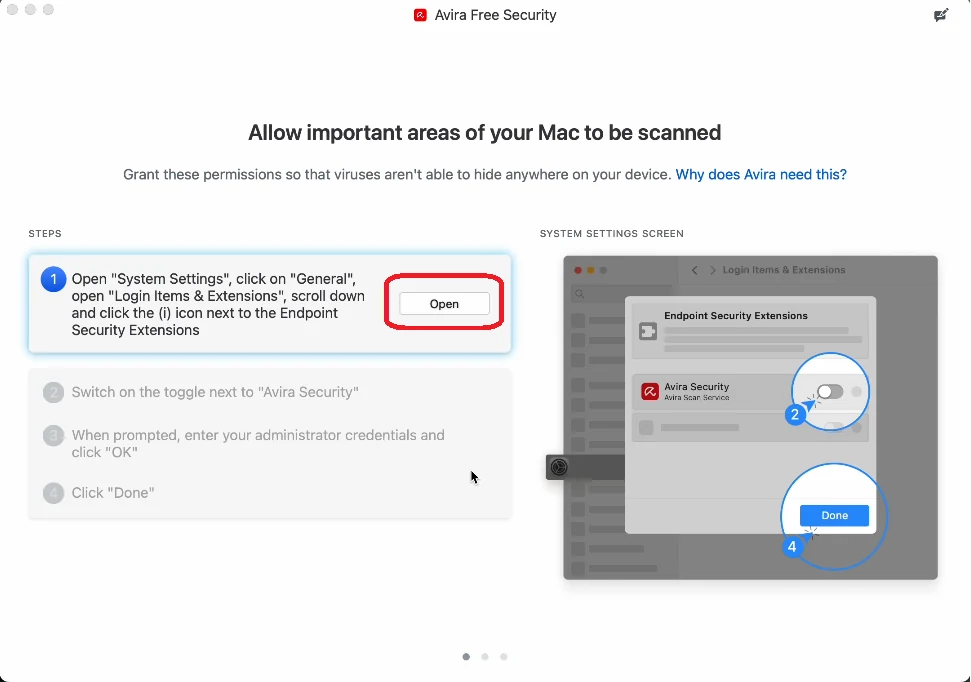
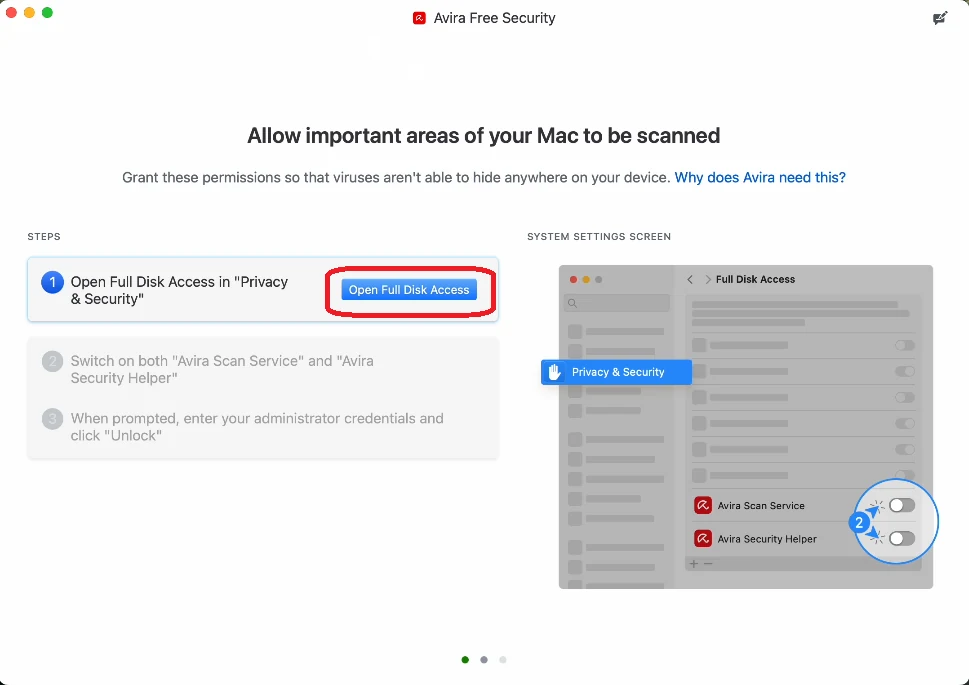
The extension approval and Full Disk Access are separate. Enabling one doesn't silently grant the other. Under Privacy & Security → Full Disk Access, Avira currently tells the user to allow Avira Scan Service and Avira Security Helper. These are powerful permissions, but they're also the documented components. Don't grant the same access to an unrelated similarly named app.
Don't disable Gatekeeper globally or paste a quarantine-removal command from a comment. If the signed package is blocked, verify the current macOS support range, the package source and the narrowly offered approval in Privacy & Security. A machine outside the current and previous two macOS versions needs an operating-system plan, not a command that suppresses the warning.
Sign in and verify the product, licence and device
Free Security doesn't require a paid activation code. A paid product should recognise the entitlement when installed from the correct My Avira account. Once the app opens, confirm the signed-in email, product name and paid or free status. If Prime was purchased, verify whether this computer consumes one of the intended five or 25 device seats instead of assuming that a successful login proved the right subscription is active.
Avira’s reinstallation guidance says an account-installed product connects and signs in automatically. When a licence doesn't appear under Subscriptions, its documented fallback begins in Devices, selects the operating system under Protect more devices and downloads the product there. Before doing that, compare the account email with the order receipt; duplicate accounts are a common commercial problem, not a reason to purchase a second licence.
Activation and billing are separate states. A computer can show Prime while automatic renewal remains scheduled with Avira, Apple, Google or another merchant. It can also show Free after a paid licence was assigned to another account. Use the subscription account to verify entitlement and the merchant record to verify renewal. The separate Avira cancellation and refund guide handles that job without mixing it into device setup.
On a shared computer, remember that an installed paid product can provide a route into the connected account. Avira documents a Restrict access control in the account’s device details. Use it when other people can open the app but shouldn't see subscriptions, personal information or the rest of the device inventory.
Check version information, then run the first Smart Scan
A new installation should update automatically, but “automatic” isn't evidence that it happened. Avira’s Free installation article points to the question-mark menu and About Avira Antivirus for product version and virus-definition information. Record those values and the time if anything later fails. Don't borrow a version number from this article: the live app is the authority for the installed build.
Run Smart Scan once after the initial update and restart. Avira’s current Smart Scan description says it checks viruses, outdated applications, network threats, privacy issues and performance issues. Those categories don't carry equal risk. A malware detection needs the file, path and action; a cleanup count may simply advertise a paid convenience.
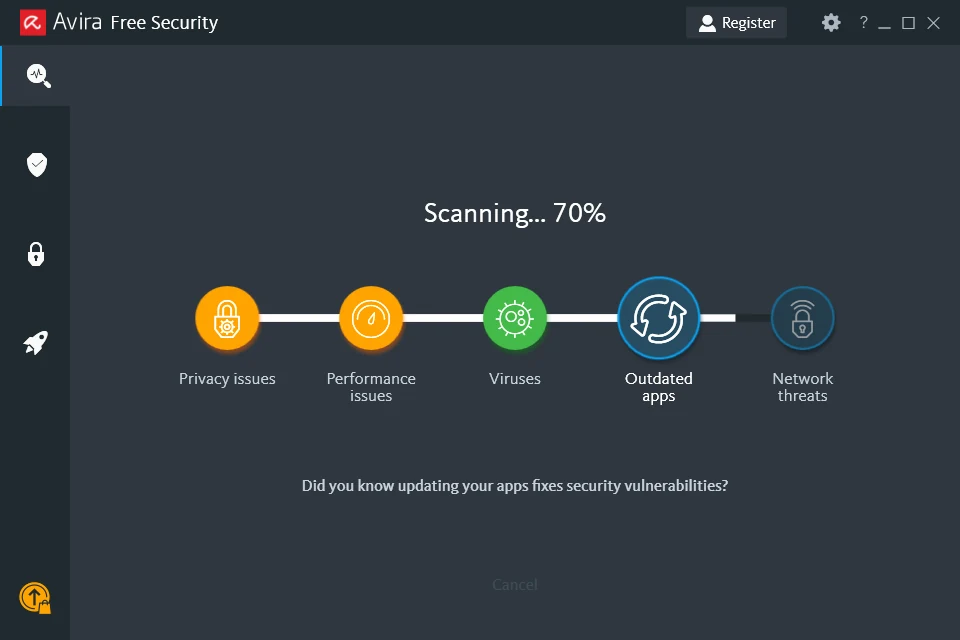
Open the result details before choosing Fix issues. Quarantine an uncertain malicious file rather than deleting it irreversibly, then investigate a suspected false positive. For privacy, outdated-app and performance results, identify the named setting or program and decide whether the proposed change is wanted. Free Security may find items whose one-click repair is paid; that doesn't mean the antivirus installation is incomplete.
Smart Scan is a broad first pass, not the final answer to a known infection. If the computer behaved suspiciously before installation, use a targeted or full system scan and preserve findings. A persistent or unbootable infection belongs in the Avira Rescue System workflow, where offline scanning and recovery boundaries can be explained safely.
Prove that Avira is protecting the device after restart
A successful installation has more evidence than a desktop icon. Avira opens without an account or service error; its protection state is healthy; version and definition information are current; a scan starts and records a result; the intended product and device entitlement are visible; and ordinary applications still work. Restart once, then check the same controls again. A pending driver or registration change can make the first green screen temporary.
On Windows, confirm that Windows Security recognises Avira as the active antivirus and doesn't report that protection is missing. Defender’s active real-time role should normally step back automatically, but Windows Security, firewall, SmartScreen and other operating-system protections still matter. Installing Avira isn't permission to turn off every Microsoft security control.
On Mac, confirm that Avira no longer requests the Endpoint Security extension or Full Disk Access and that both documented components remain enabled. Run a scan of a harmless chosen folder so that permission failure appears now, not during a later incident. Then test the browser, VPN if intentionally installed, file downloads and any work application that reads large or unusual file trees.
Keep a small setup record: official download route, account email, product name, device name, installation date and the post-restart status. Store recovery codes and passwords in a proper password manager, not in that note. This record makes a future reinstall, licence transfer or support case much faster.
Review the settings that change day-to-day safety
Keep real-time protection and automatic updates enabled. Don't add exclusions “for performance” before a reproducible conflict exists. If a legitimate file or site triggers a warning, preserve the exact detection name and object, verify it independently and use the narrowest temporary change. The Avira web-protection guide keeps website reputation, HTTPS inspection and browser-extension faults out of this installation page.
Choose notification behavior deliberately. Avira’s current in-product messaging article says Free can show promotional slide-up messages that can't be disabled, while paid Pro notification settings offer a Limited mode that preserves threat alerts and suppresses popup offers. That's a real product distinction. Don't silence all operating-system notifications and accidentally hide security events to solve an advertising complaint.
Review optional components one by one. Browser Safety, Secure Browser, Safe Shopping, Phantom VPN, Password Manager and System Speedup solve different jobs and collect different permissions. Our forthcoming Avira browser tools review, Phantom VPN review, Password Manager review and System Speedup review keep those decisions from becoming one unexamined “install all” click.
Schedule deeper scanning when the computer is normally on but not doing latency-sensitive work. Test a printer, video call, development tool, game and network share before declaring setup complete. A configuration is good when it protects the actual workflow and its alerts are understandable to the person using it.
Fix an Avira install that fails, won't start or won't open
Identify the stage first: download never completes, the downloaded installer doesn't start, setup displays an error, the app installs but doesn't open, activation is missing, or the operating system doesn't recognise the provider. Those are different failures. Preserve the exact message, time, operating-system version and screenshot before a reinstall erases useful context.
For a general setup error, Avira’s installation failure checklist starts with administrator rights, an internet connection, current system updates, sufficient memory and disk, then checks another antivirus and remnants of a prior Avira installation. Restart, meet those requirements and download a fresh official installer. Don't jump from the first error to mass deletion.
If the download finishes but nothing launches, Avira’s silent-installer article identifies an existing older installation as a common cause. If setup finishes but the app appears absent, check the system tray and Start menu before deciding it failed. The official installed-but-will-not-open guidance again points to competing security software and remnants.
Community troubleshooting illustrates why the final provider check matters. A 2025 r/techsupport report described Windows Security still showing an Avira provider that the user couldn't find in Installed apps. One report can't prove a general Avira defect, and replies recommending blind registry deletion aren't a safe repair method. It does reveal a useful failure state: app presence, Windows provider registration and current definitions can disagree.
Use normal repair or uninstall before a cleanup path, restart, then verify whether Microsoft Defender returns as the active provider before reinstalling Avira. The dedicated Avira troubleshooting guide handles services, updates and resource use; the complete removal guide handles remnants without turning every setup problem into a registry experiment.
Avoid setup shortcuts that remove protection or evidence
Don't install a cracked licence, repacked bundle or executable sent by an unsolicited “support agent.” Don't disable User Account Control, Gatekeeper, Windows Security, the firewall or browser protection globally to make setup finish. If one control blocks a genuine signed installer, prove the source and use the narrow documented approval, then restore the normal state.
Don't force Microsoft Defender and Avira to act as two primary real-time products. Don't leave another third-party antivirus half-uninstalled. Don't exclude the Windows, Users, Downloads or browser-profile trees. Broad exclusions and competing filters can make a dashboard look quieter while the computer becomes harder to diagnose and less protected.
Don't click Fix all merely because Smart Scan displays a large number. Review whether the item is malware, an outdated application, a network configuration, a privacy setting or ordinary temporary data. Registry cleaning and storage cleanup aren't proof of malware protection, and a paid fix prompt isn't evidence that Free Security failed to install.
Finally, don't confuse removing the app with ending a subscription. Uninstalling Avira doesn't cancel merchant billing, and cancelling renewal doesn't remove Avira from the computer. Keep those workflows separate so that the device never loses protection by accident.
Know when installation ends and another Avira job begins
This guide is complete when the correct Avira entitlement is installed, updated, scanned and recognised by the operating system without breaking normal work. It doesn't attempt to solve every future symptom in one page. That separation protects search intent and helps the reader follow the shortest safe route.
If Avira later consumes sustained CPU, memory or disk, records failed updates or refuses to open, move to the product-health troubleshooting route. If one website fails, use the web protection route. If the machine is badly infected or can't boot normally, use the Rescue System route. If the decision is to leave Avira, compare replacement options by use case before uninstalling so another active provider is ready.
The broad Avira review remains the place for the commercial verdict, lab evidence and platform judgment. This page owns only clean deployment and proof of the initial state—exactly one job inside the larger brand cluster.
Avira installation and setup FAQ
Where should I download Avira?
Download Free Security from avira.com. For Antivirus Pro, Internet Security or Prime, sign in to the My Avira account connected to the purchase, open Subscriptions and use Install for the active product. Avoid download mirrors, cracked licences and unsolicited support links.
Can I install Avira alongside Microsoft Defender?
Yes, but not as two manually forced primary scanners. Microsoft says Defender Antivirus turns off automatically when a compatible third-party antivirus is installed and active, while Windows Security remains the status dashboard. Let Avira register normally and verify the provider after installation.
Can I install Avira with another third-party antivirus?
Remove the other resident antivirus first unless both vendors document a supported coexistence mode. Avira and Microsoft both warn that overlapping antimalware products can cause installation failures, slowdowns, instability and conflicting status.
Does Avira work on Windows 10 in 2026?
Avira still lists Windows 10 in its system requirements, but Microsoft's ordinary Windows 10 support ended October 14, 2025. A consumer Windows 10 22H2 computer needs eligible ESU coverage through October 13, 2026 while it transitions to Windows 11 or another supported system. Antivirus doesn't replace operating-system security updates.
Does Avira support Windows 11 on ARM?
Avira's current requirements list Windows 11 on Snapdragon X Plus and Elite ARM devices, with mixed-reality and IoT editions excluded. Windows 11 or 10 in S Mode isn't supported. Recheck the live requirements before installing on a different ARM platform.
Why does Avira install but not open?
First check the system tray and Start menu, then restart. Avira identifies another antivirus, remains of an older security product and an incomplete prior Avira installation as common causes. Record the exact symptom and use repair or supported removal before deleting folders or registry entries.
What permissions does Avira need on a Mac?
Current macOS setup requires the Avira Endpoint Security extension plus Full Disk Access for Avira Scan Service and Avira Security Helper. On macOS 15 and later, the extension control is under General, Login Items & Extensions; Full Disk Access remains under Privacy & Security.
What should I do immediately after Avira installs?
Verify the account and product, check version and definition information, run Smart Scan, inspect every result category, confirm the active Windows antivirus provider or the required Mac permissions, test normal browsing and key applications, then restart and recheck the same status.