
How to Cancel Avira and Request the Right Refund
Stopping renewal, reversing a payment, uninstalling the app and deleting an account are four different actions. The receipt decides which company controls the first two—and which refund rules actually apply.

Quick answer: Find the receipt before cancelling. A direct Avira order is managed in My Avira under Subscriptions, Show Renewal Settings and Cancel Subscription Renewal; cancel before the billing date, which can be up to 35 days before an annual renewal or 5 days before a monthly renewal. Apple, Google Play, Microsoft Store and retailers control their own orders. Cancellation doesn't refund the last charge. Avira's current direct-purchase terms allow a full refund within 60 days for annual payments and within 14 days for an initial monthly purchase or first monthly post-trial charge; later monthly renewals are normally excluded. Save the confirmation, then submit the separate refund request with the order reference.
Decide which of four separate results you need
Stopping renewal prevents a future recurring payment. Cancelling a contract and requesting a refund asks the seller to reverse an eligible charge. Uninstalling removes software from one device. Deleting an account changes access to account data. A person leaving Avira may need all four, but one action doesn't safely imply the others.
The distinction matters when time is short. If the next billing date is tomorrow, stop renewal and save confirmation before spending an hour comparing replacement antivirus. If a charge already posted, cancel future renewal and submit the refund as separate tasks. If the message is only an email with no matching bank transaction, verify it before clicking because antivirus refund scams deliberately create panic.
Don't start by deleting Avira from Windows. Avira's own in-app purchase guide says uninstalling doesn't cancel a subscription. A payment agreement can be held by Avira, Apple, Google, Microsoft or a retailer without any dependence on whether the app remains installed.
The Avira pricing and renewal guide documents plan and billing mechanics before purchase. This page begins when the user wants the commercial relationship changed and needs evidence that the change actually happened.
Find the merchant before following cancellation steps
Open the order confirmation or renewal email and identify the seller, order reference, purchase email, product, billing cycle, charge date and payment method. Then compare the card or PayPal descriptor and the subscription lists in every plausible account. The device running Avira isn't necessarily the account that paid for it.
| Receipt or charge source | Where renewal is controlled | Where refund begins |
|---|---|---|
| Avira online shop | My Avira → Subscriptions → Renewal Settings | Official Avira billing support |
| Apple App Store | Apple Account subscriptions | Apple Report a Problem |
| Google Play | Google Play subscriptions under the purchasing Google Account | Google Play first; developer after the store's initial window |
| Microsoft Store | Microsoft account Services & subscriptions | Microsoft Store eligibility and support |
| Retailer, telecom or reseller | Seller's portal or support | Seller's refund policy |
| Prepaid activation code | May have no recurring agreement | Retailer if return rights exist |
Avira says automatically renewing subscriptions from its own system are offered through its online shop. A retailer purchase doesn't use Avira auto-renewal when Avira has no payment details. An in-app purchase is controlled only through the relevant store. These rules explain why a “Cancel Subscription Renewal” button can be absent even while the Avira app says Premium.
Search all likely email accounts for “Avira,” the product name, “receipt,” “order,” “renewal,” Apple, Google Play and Microsoft. A Prime bundle, separate Phantom VPN Pro, Password Manager Pro or System Speedup Pro can be distinct charges. Don't assume cancelling Prime also cancelled an older standalone order. Our Phantom VPN, Password Manager and System Speedup reviews explain which companion products can exist separately.
Avira's 14- and 60-day refund windows aren't interchangeable
| Direct Avira payment | Standard full-refund window | After that window |
|---|---|---|
| Initial annual, two-year or three-year purchase | 60 days from payment | Check current policy and local rights; don't assume a refund |
| Annual renewal | 60 days from the renewal charge | Some prorated eligibility exists; scope depends on policy and location |
| First annual charge after a free trial | 60 days from charge | Check current policy and local rights |
| Initial one-month subscription | 14 days from purchase | No standard refund promised |
| First monthly paid period after a free trial | 14 days from charge | Later monthly renewals excluded |
| Subsequent monthly renewal | No standard refund | Ask support about error, duplicate or legal rights |
These windows come from Avira's current subscription FAQ and Terms of Sale. They apply to direct Avira transactions under the stated policy, not automatically to Apple, Google, Microsoft or a retailer. The live merchant result and applicable consumer law control the final decision.
Don't wait because the policy appears generous. Submit the request as soon as the charge is identified and preserve the timestamp. If a support exchange crosses the deadline, the first clear cancellation or refund request may become important evidence. State the product, order reference, charge date, amount and requested remedy without writing a long accusation.
Cancellation alone isn't a refund request. Avira can mark a subscription non-renewing while leaving the last payment untouched. Conversely, a refund can remove or shorten the paid entitlement, so prepare the device's protection before assuming the paid features continue.
Cancel a direct Avira subscription before the billing date
Sign in to the My Avira account attached to the purchase. Open the profile menu and choose Subscriptions. Select Show Renewal Settings, then Cancel Subscription Renewal and confirm. Avira's current automatic-renewal instructions use exactly that route.
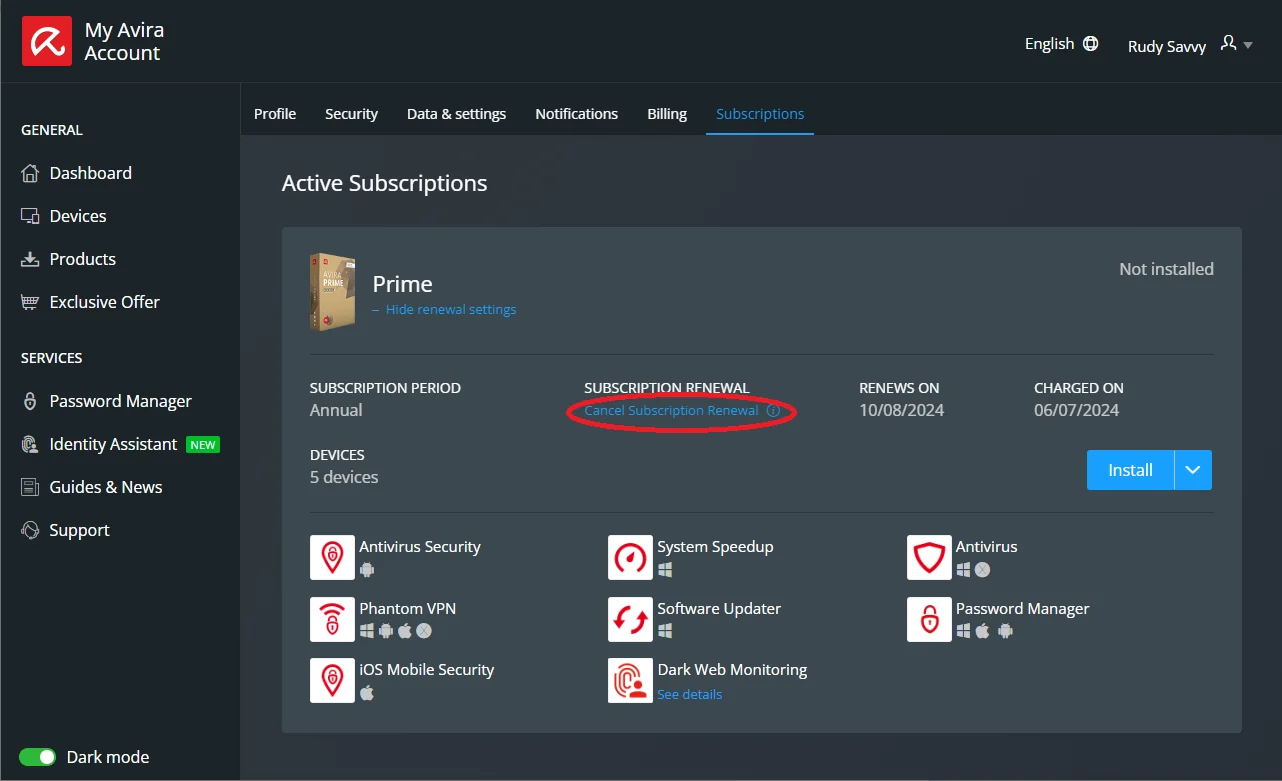
Use the billing date, not only the renewal date. Avira says annual subscriptions can be billed up to 35 days before the next term and monthly subscriptions up to 5 days before. Annual users should receive a renewal-price email beforehand. The Terms say to cancel no later than the day before the date you're due to be charged.
That timing creates a common trap: an account can say “Renews on August 10” but “Charged on July 6.” Cancelling on August 1 is after the commercial event even though the new coverage period hasn't begun. Record both dates. A recent charge may still qualify for a refund, but the workflow has moved from prevention to cancellation plus refund.
Avira says a cancellation can take a few hours to take effect. Don't schedule it for the last minute. Return later, reload the account and confirm the renewal control remains off. A button click without a final state or email isn't enough evidence when a charge is disputed months later.
Preserve proof before closing the account page
Capture the product name, subscription period, device count, order reference, seller, renewal state, charged-on date, renews-on or paid-through date and the time cancellation was submitted. Save the confirmation email as a file or PDF and take a screenshot that includes the final non-renewing status without exposing the full card number.
Create a small record for each Avira product. A user may have Prime plus a separate VPN or optimization subscription purchased at another time. Review every entry rather than treating the word “Avira” as one contract. If one product still shows a future billing date, it needs its own cancellation.
Don't delete the My Avira account yet. That can remove the easiest view of receipts and support cases while an Apple, Google, Microsoft or retailer agreement continues elsewhere. Account deletion is a later privacy decision after the commercial state is resolved and evidence has been exported.
If the account still shows renewal active after several hours, repeat the official flow once, capture the result and contact support. Avoid frantic repeated clicks that toggle the control back on. Read the final wording: “Activate Subscription Renewal” normally indicates renewal is currently off; “Cancel Subscription Renewal” indicates it's still on.
Request a direct Avira refund as a separate support action
For an eligible order from the Avira online shop, go through Avira's official refund instructions. Open Avira Support, reach Contact Avira, sign in, choose Email, select Billing, purchases & licenses, then choose I want to cancel my contract and get a refund. Include the reference number from the purchase or renewal confirmation.
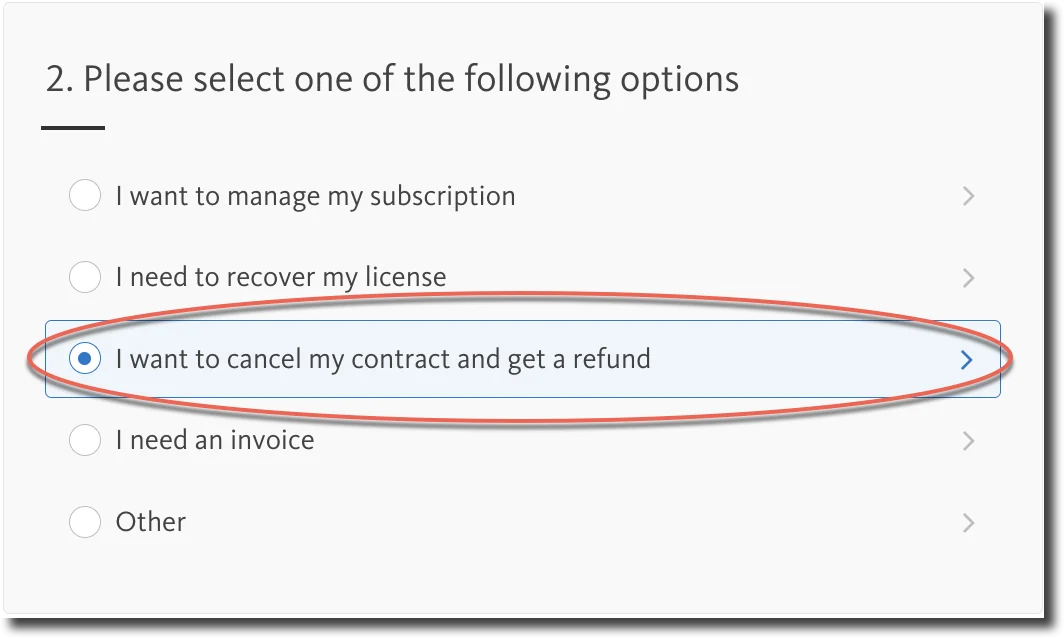
A compact request is easier to process: “Please cancel contract and refund order [reference], product [name], charged [date] for [amount/currency]. The payment is within the [14/60]-day policy. Renewal has also been disabled. Please confirm the refund method and entitlement end date.” Attach only the proof needed and redact unrelated transactions.
Avira's Terms say eligible refunds are returned using the same payment method unless both sides agree otherwise. The actual posting time depends on the payment provider. Keep the approval email until the credit appears on the statement. If a case says “cancelled” but never explicitly says “refund approved,” ask for the refund status rather than assuming.
Don't open a bank chargeback and a merchant refund simultaneously without understanding the consequences. A duplicate dispute can complicate reconciliation. A chargeback is appropriate when a genuine unauthorized charge or unresolved merchant dispute reaches that stage, not as the first click for an ordinary eligible return.
Apple, Google Play and Microsoft Store own their subscriptions
Apple App Store
Open Apple Account subscription settings, select Avira and cancel the subscription. Apple's official cancellation guide covers iPhone, iPad, web and other devices. If there's no Cancel button and the page shows an expiration message, the recurring subscription may already be cancelled. Verify the Apple Account named on the receipt.
For a refund, use Apple's Report a Problem instructions: sign in at reportaproblem.apple.com, choose Request a refund, give the reason, select the Avira purchase and submit. Apple says an update normally arrives within 24 to 48 hours, while eligibility varies by country or region. Cancelling and requesting the refund remain separate actions.
Google Play
Use the Google Account that owns the order. In Google Play, open Payments & subscriptions, then Subscriptions, choose Avira and cancel. Google's subscription guide says uninstalling doesn't cancel and access normally continues for the already paid time.
Google's current app and subscription refund policy says a request within 48 hours may qualify depending on the purchase details; after 48 hours, contact the developer for troubleshooting and refund options. Use Google's official refund workflow rather than a form linked by an unknown article.
Microsoft Store
Use the purchasing Microsoft account and its Services & subscriptions page. Microsoft's subscription cancellation guide routes users through Manage and Cancel. Refund eligibility depends on the offer, timing and country; cancelling recurring billing alone doesn't promise a refund.
If Microsoft grants a refund, its refund-status guide says to check Order history. No refund entry can mean the cancellation was outside eligibility. Don't ask Avira to override a store decision it doesn't control.
A retailer or prepaid code follows the seller's contract
Avira's refund article explicitly says a retailer purchase must be returned through the retailer. That includes electronics shops, marketplaces, telecom bundles and other resellers that took the payment. Use the seller on the receipt, not whichever logo appears most prominently in the application.
A prepaid activation code may expire without recurring billing. Confirm whether the retailer stored a payment method or created a membership; don't manufacture a cancellation task where no mandate exists. If a reseller sold automatic renewal, ask for the final non-renewing status in writing and keep the store's order number.
Retailer windows can be shorter than Avira's direct guarantee or exclude opened digital codes except where law says otherwise. Don't cite Avira's 60 days as a promise from another merchant. If the product was misrepresented or the code never worked, describe that specific problem and preserve activation errors.
Cancel a trial before it converts into a paid subscription
Avira says trials require a payment method and can initiate a monthly or annual charge when the trial ends. For a direct trial, inspect the My Avira subscription and billing date. For Apple or Google Play, cancel in the store before the trial period ends. Removing the app, signing out or declining notifications doesn't end the store agreement.
Take a screenshot of the trial's final day and the cancellation confirmation. Time-zone boundaries can matter when a trial says it ends on a date without a local time. Cancel at least a full day early rather than testing the boundary. If the trial already converted, apply the payment's actual billing cycle and merchant refund rules.
Avira's current FAQ gives the first annual post-trial payment a 60-day full-refund window and the first monthly paid period after a trial 14 days. Later monthly renewals are excluded from the standard refund. This is another reason to preserve the first paid receipt rather than describing every charge as “trial.”
If Avira already charged you, record facts before escalating
Capture the statement date, amount, currency, descriptor, seller, order reference, cancellation timestamp and any renewal notice. Compare the account's charged-on date with the later subscription renewal date. An early charge can be permitted under disclosed terms while still qualifying for the 60-day annual refund route.
If the payment is eligible, send the refund request immediately and keep the case number. If you cancelled before the displayed billing date but were charged anyway, attach the confirmation and state both timestamps. Ask Avira or the merchant to explain whether the charge was initiated before the control changed; don't rely on a screenshot that omits the date.
If support offers a retention discount, extra months or a partial refund, decide against the original objective. Accepting a new offer can change the contract and close the full-refund path. Ask whether renewal stays disabled and whether accepting the offer waives the pending request before agreeing.
One current r/antivirus post from March 2026 describes a user unable to load the Avira account or receive the verification SMS needed for support. It demonstrates a real failure mode, not proof that account access generally fails. The response is to preserve payment evidence and use the merchant's official route, not to repeat the post's accusatory title as fact.
When the subscription is missing or the account won't open
Confirm the email used at checkout, including PayPal or an app-store relay address. Search receipts for the order reference and inspect Apple, Google Play and Microsoft subscriptions. An Avira account can show the installed product while a different merchant owns the payment, or show nothing because another email was used.
Use official account recovery from my.avira.com and check spam filtering for verification messages. Try a current browser without an aggressive blocker, a trusted network and a second device, then document the failure. Don't disable security across the whole computer merely to load a billing page.
Paid users can reach official support from Avira's support site; the current contact guide describes signing in and using Email support. If sign-in itself is the failure, use the store or retailer when it owns the purchase, preserve the receipt and use Avira's published legal/contact channels rather than a phone number scraped from search.
Don't create a new paid subscription to regain access. It can produce a second contract and obscure the original order. Likewise, don't delete the email account attached to the purchase until the refund and final entitlement are settled.
Partial annual refunds after 60 days need a location check
Avira's subscription FAQ says annual renewals requested after 60 days can receive a prorated refund of remaining time beginning the month after the request. Its official email-refund article is narrower: it explicitly mentions partial refunds after the 60-day period for customers in the UK, Netherlands and Germany. We won't turn those two wordings into a worldwide guarantee.
If an annual renewal is older than 60 days, submit the request with country, order and remaining term and ask Avira to apply the current policy. Customers elsewhere may have contractual or statutory rights, but eligibility must be determined by the merchant and jurisdiction. The live Cancellation and Refund Policy is the controlling consumer document to recheck at the time of the request.
Avira's Terms also include a 14-day withdrawal section for the EEA, Switzerland and UK, with exceptions around immediate digital performance. That legal right and Avira's commercial money-back guarantee aren't identical. We aren't providing a jurisdiction-specific legal conclusion; preserve the order and seek local consumer help when a material dispute remains.
Fake renewal invoices turn a refund request into remote-access fraud
The FTC's current tech-support scam guidance describes fake subscription-renewal messages that claim a large charge and demand an immediate phone call. The caller asks for remote access or bank details, fakes an excessive refund and pressures the victim to return money through gift cards, wire transfer, cryptocurrency or a payment app.
Check the bank or card account directly. If there's no matching transaction, the invoice isn't a billing problem to “cancel”; it's phishing. Don't call its number, reply, open the attachment or install a remote-control tool. Reach Avira by typing the official domain or using the saved account bookmark.
No legitimate refund requires you to move money to protect it, buy gift cards or share a banking one-time code. Search results can contain spam PDFs with phone numbers repeated dozens of times. Repetition isn't verification. This guide deliberately doesn't republish a support number because the official web route is less likely to be hijacked or become stale.
If someone already controlled the computer, disconnect it, remove the remote tool, change financial and email credentials from a clean device and contact the bank. Then run a trusted scan or rebuild based on exposure. The planned Avira troubleshooting guide is for product failures, not recovery from an attacker watching online banking.
Cancel billing before uninstalling or deleting the account
After renewal is off, a direct paid subscription normally remains usable through the already paid term and then turns into Avira Free. An approved refund can shorten that access. Record the entitlement date before removing software so the security plan is deliberate rather than accidental.
If the goal is complete removal, follow the planned Avira uninstall guide after commercial evidence is safe. Normal operating-system removal comes first; cleanup tools are for failed uninstall. Neither method changes a store or retailer billing mandate.
Account deletion belongs last. Export invoices, cancellation confirmation, refund case, licence information and any password-manager data first. The Password Manager review explains why vault export and recovery deserve their own check. Deleting a login before the money returns makes support harder without guaranteeing better privacy.
Choose protection for the day paid Avira ends
If Avira Free still meets the need, allow the direct paid entitlement to expire and verify the application transitions to Free without a new charge. The Avira Free versus Prime guide shows which paid features disappear. Keep the operating system and real-time provider healthy throughout the change.
If leaving Avira, pick and download the replacement from its official site before uninstalling, but don't run two permanent third-party real-time suites together. The Avira alternatives guide matches reasons for leaving to replacements; the free antivirus comparison and Windows 11 antivirus guide cover broader options.
The main Avira review judges protection and bundle value, while the Avira hub keeps billing, setup, rescue, troubleshooting and removal in separate guides. Cancellation is successful when the correct merchant shows no future charge, the refund has a traceable status and the device still has a known protection plan.
Avira cancellation and refund FAQ
How do I cancel an Avira subscription bought directly from Avira?
Sign in to the My Avira account tied to the order, open the profile menu and Subscriptions, choose Show Renewal Settings, select Cancel Subscription Renewal and confirm. Save the final status and email. Avira says the change can take a few hours, so cancel before the billing date rather than waiting for the subscription anniversary.
How early can Avira charge for renewal?
Avira says annual renewal payments may be billed up to 35 days before the new term and monthly renewals up to 5 days before. Annual customers should receive an email showing the renewal price beforehand. Use the Charged on or billing date in the account, not only the later Renews on date.
Does cancelling Avira automatically give me a refund?
No. Cancelling renewal stops the next recurring payment but normally leaves paid features active through the current term. A refund is a separate request to the merchant that processed the charge. Preserve cancellation proof and submit the refund request immediately when eligible.
What is Avira's refund window in 2026?
For direct Avira purchases, the current standard terms give annual initial payments, annual renewals and annual post-trial charges a 60-day full-refund window. Initial monthly payments and the first paid monthly period after a trial have 14 days; later monthly renewals are normally not refundable. Stores, retailers and local consumer law can produce different results.
How do I cancel Avira bought through Apple or Google Play?
Use the Apple Account or Google Account that owns the receipt. Avira says in-app subscriptions can be changed only in the relevant store and uninstalling the app doesn't cancel them. Request any refund through that store's process; don't apply Avira's direct-shop guarantee automatically.
Will Avira stop working as soon as I cancel renewal?
Normally no. Avira says a direct paid subscription continues until the end of the already paid term, then stops renewing and turns into a free subscription. A granted refund can end paid entitlement sooner. Record the paid-through date and prepare a replacement before uninstalling if you don't want Avira Free.
What if I can't sign in to Avira to cancel?
First use the purchase email and official account recovery, then check whether the order belongs to Apple, Google Play, Microsoft or a retailer. Keep the receipt, order reference, charge and failed-login evidence. Use Avira's official support route or the merchant instead of a phone number from a search result. Don't delete the account while billing remains unresolved.
Does uninstalling Avira or deleting the account stop billing?
No safe assumption supports that. Avira explicitly says uninstalling an in-app purchase doesn't cancel it, and billing agreements can exist with stores or retailers outside the Avira account. Cancel with the merchant, save proof and verify the non-renewing state before removing software or requesting account deletion.