
Avira Blocking a Website? Diagnose the Layer Before You Bypass It
A red Avira block, a broken checkout and a certificate error can look like the same dead page. They come from different layers, and only one of them may justify a narrow exception.

Quick answer: Save the exact URL, hostname, full Avira message and time before changing anything. If the warning names malware, phishing, fraud or an unsafe download, stop and submit the URL for review instead of bypassing it. If Avira Antivirus Web Protection issued the block, update Avira and use its exact-domain list only after independent verification. If Browser Safety or Avira Secure Browser is responsible, separate Web Shield from Privacy Guard, cookies and JavaScript. A certificate, DNS, VPN or proxy error without an Avira alert is a different problem. Never leave all Web Protection disabled, and never submit a private signed URL or session token to a public scanner.
Name the layer that blocked the site
Start with the message on screen, not with a search result that happens to mention Avira. The same computer can have Avira Antivirus, the Avira Browser Safety extension and Avira Secure Browser installed at once. Each has its own web controls, while Chrome, Edge, Firefox, a VPN, a router filter and the website itself can fail independently.
| What you see | Likely layer | First safe action | Don't do |
|---|---|---|---|
| Avira page names malware, phishing, fraud or a blocked URL | Web Protection, Browser Safety or Secure Browser Web Shield | Stop, save the URL and report if suspected false | Don't click through or whitelist by familiarity |
| Page loads but sign-in, video, checkout or layout breaks | Privacy Guard, tracker blocking, cookies, JavaScript or another extension | Test one per-site content control | Don't disable system antivirus |
| Certificate, DNS or connection error with no Avira alert | Browser, clock, site, VPN, proxy, DNS or network | Preserve the exact browser code | Don't call it an Avira false positive yet |
| Only a file download is blocked | Web Shield, Browser Safety, browser download reputation or antivirus file detection | Verify the file and source separately | Don't trust the file because the landing page is clean |
Avira's current blocked-website article says Web Protection classifies dangerous content as phishing, malware, spam or fraud. Its controls include a domain list, threat categories and a full Web Protection switch, but those controls don't carry the same risk. The exact-domain route is narrower than turning off a category, and both are narrower than disabling the module.
This page owns website access and false positives. If Avira itself won't open, protection is off or the service is using persistent CPU, use the general Avira troubleshooting guide. The Secure Browser and Browser Safety review covers whether either browsing product is worth using rather than how to recover one blocked page.
Stop when the warning names malware, phishing, fraud or an unsafe download
A site can be familiar and still be compromised today. Its home page may be clean while an advertising script, CDN host, redirect or download endpoint is malicious. A valid padlock proves encryption to a named server; it doesn't prove the page, account or file is harmless.
Don't enter a password, payment card, seed phrase or recovery code while a named detection is unresolved. Don't restore or run a download merely because the vendor's home page looks legitimate. Capture the evidence, close the blocked tab and use a known bookmark or independently verified contact channel if the organization needs to be alerted.
A second vendor can disagree without either result proving the case. A current 2026 community report about one AI site showed Avira Browser Safety and another product producing a block while a separate reputation lookup looked clean. That single report isn't evidence that Avira is broadly wrong; it shows why the user's exact alert, time and redirect matter more than a generic verdict.
If the warning arrived after a suspicious message, sponsored search result, QR code or mistyped domain, use the scam-protection guide before considering any exception. A false-positive workflow exists for a site you have reason to trust, not for overriding the pause that protected you from an unfamiliar destination.
Preserve the exact URL, hostname, redirect and alert
Take a screenshot that includes the address bar, Avira message, detection name and time. Copy the URL into a plain local note without opening it again. If the address contains a password-reset token, signed download, private document identifier or session data, redact those values before sharing the screenshot and don't submit the live link to a public scanner.
Read the hostname from right to left. In account.example.com.attacker.test, the registrable destination isn't example.com. Unicode lookalikes, extra hyphens, misspelled brands and unexpected country-code domains deserve the same suspicion as a dramatic red warning.
Record whether the page redirected before the block and whether an embedded resource failed. A checkout on a trusted store can break because a payment, identity or fraud-prevention subdomain was blocked. Excluding the store's entire domain does nothing for the external host and sacrifices inspection where it wasn't needed.
Note the browser, profile and installed web-filter extensions. A clean result in another browser is useful isolation evidence, but it isn't proof of a false positive because the second browser can use a different DNS mode, extension set, cookies, profile and cached redirect. Preserve those differences instead of flattening them into “works in Edge.”
Update Avira, the browser and the extension before retesting
Open Avira and complete its product and protection updates on a trusted connection. Restart the browser after updating Chrome, Edge, Firefox or Opera. Then check that Browser Safety, if installed, came from the official store listing and is current rather than a similarly named extension.
Avira defines a false positive as a harmless file or URL incorrectly identified as malicious and tells users to check again with current detection data before submitting it. That order matters. A classification already corrected in a new update shouldn't create a permanent local exception.
The current Chrome Web Store listing for Avira Browser Safety identifies Avira/Gen Digital as the developer and uses extension ID flliilndjeohchalpbbcdekjklbdgfkk. Don't install an extension from an advertisement or a download mirror to repair the existing one. Store identity isn't proof that every future update is flawless, but it's the minimum provenance check.
Retest the exact public URL once after updating. Don't repeatedly refresh a suspected phishing page, follow new redirects or authenticate to “see whether it is fixed.” If the block remains, move to the control that actually produced it.
Avira Antivirus Web Protection is a paid, system-level control
Avira's current Web Protection support page says the integrated function is available in paid Avira Security editions. If Avira Free doesn't show this tile, don't spend an hour following screenshots from Prime. Free users may be seeing the separate Browser Safety extension, Secure Browser Web Shield or the browser's own warning instead.
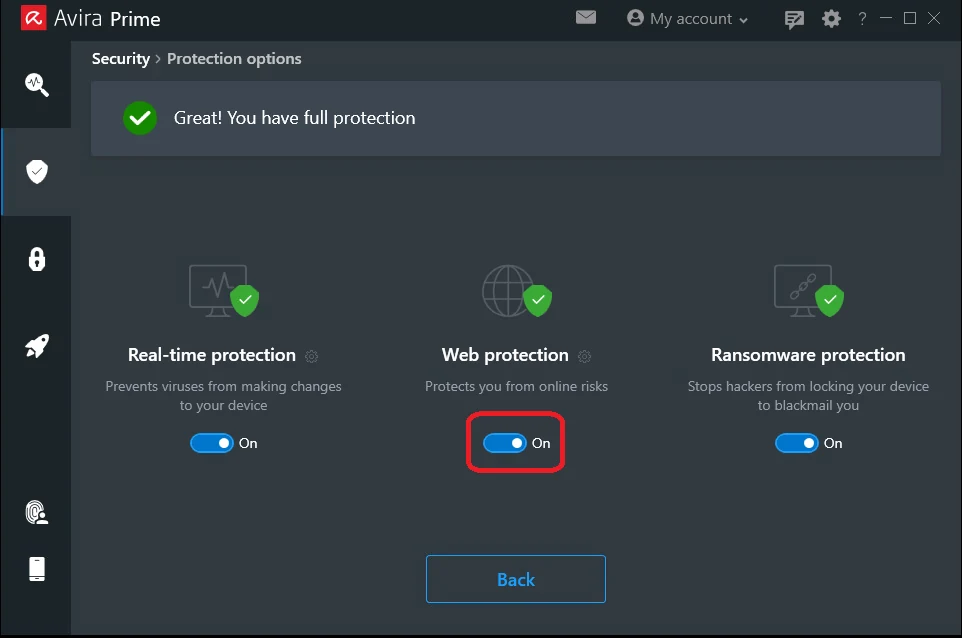
When the paid app names the block, open Security and Protection options and inspect Web protection. A brief off/on test can prove whether that module causes a no-alert connection failure, but Avira warns that disabling it stops website scanning and dangerous-download reporting and blocking through Web Protection. Set a timer, avoid sensitive browsing and restore the switch immediately after the one comparison.
Don't disable the entire Privacy & Riskware category to admit one site. Category switches can affect phishing, fraudulent software, double-extension files and other unrelated decisions. The official page documents them, but a documented control can still be the wrong scope for a consumer troubleshooting task.
If the app controls disagree, updates fail or the module won't stay enabled, this has crossed into product repair. Use the measured ladder in the Avira repair section rather than adding URLs until the dashboard looks quiet. A broken provider can't be repaired with a website exception.
Avira Browser Safety affects only browsers where the extension is installed
Avira describes Browser Safety as an extension that blocks malicious sites, phishing, spam, trackers and potentially unwanted downloads. That scope explains a common pattern: the page fails in Chrome with the extension but opens in a clean Firefox profile. The result points to the extension layer, not automatically to a bad system-level Avira installation.
Create a temporary browser profile with no synced extensions, then install only the current official Browser Safety extension and reproduce the public page. If the named malicious-site warning appears again, preserve and report it. If the page only breaks when several privacy and ad-blocking extensions are active together, re-enable one at a time and identify the conflict instead of blaming whichever icon you noticed first.
A historical Avira community thread about Browser Safety page breakage asks for an exclusion after pages failed to load correctly. It isn't current prevalence evidence and doesn't establish a supported allowlist in every build. It's useful only because it separates “page content is broken” from “Avira displayed a malicious-URL verdict.”
If the extension itself is corrupted, remove it through the browser and reinstall from the official store. Avira's extension-removal guide covers Chrome and Firefox. Don't remove the entire antivirus because one browser add-on failed, and don't leave a managed work browser without its required extension.
In Avira Secure Browser, Web Shield and Privacy Guard solve different problems
Avira Secure Browser includes Web Shield for malicious sites, phishing and risky downloads. It also includes Privacy Guard for ads, trackers and fingerprinting. Turning off Privacy Guard can repair a broken page without accepting a malicious-site decision, while turning off Web Shield removes a security layer that was designed to stop the destination.
Avira's current Secure Browser FAQ calls Balanced Blocking the recommended Privacy Guard level. It warns that Strict Blocking can cause websites not to load properly or become completely inaccessible. If checkout, video, social login or a remembered-device feature breaks, lower the site from Strict or switch Privacy Guard off for that one trusted site before touching Web Shield.
Browser fingerprinting protection can also interfere with a bank's remembered-device logic because financial sites use fingerprinting for fraud controls. That doesn't mean fingerprinting protection is bad or the bank is safe by default. It means the user should change the smallest per-site privacy control, authenticate from the known domain and restore the stricter setting when the workflow no longer needs it.
Secure Browser is a separate browser with its own history, extensions and settings. The full Avira Secure Browser review explains where it adds value and where an ordinary updated browser may be simpler. Installing it solely to test an Avira block creates a new profile and a new filtering stack, so it doesn't reproduce the original browser.
Fix cookies, JavaScript and blocked page elements without weakening Web Shield
If the page opens but a feature is missing, inspect the failure before calling the whole domain blocked. Try a private window in the same browser, then a clean profile. A private window changes cookies and some extension behavior but doesn't remove every enterprise policy, DNS filter or antivirus layer.
Secure Browser allows individual sites to use cookies and JavaScript through Privacy and Security, Site settings. Avira's FAQ documents an exact-site entry and the broader [*.]example.com pattern. Start with the exact host required by the workflow; a wildcard admits every subdomain, including forgotten marketing, staging or user-content hosts.
Turn off Privacy Guard for the one trusted site when its tracker or ad filtering breaks the page, then reload. Don't disable Web Shield, system Web Protection, real-time antivirus and the browser's built-in safe-browsing feature together. Multiple simultaneous changes can make the page work while destroying the evidence of which layer caused it.
If sign-in works only when all cookies are accepted, review the site's own privacy behavior before preserving that exception. A functioning page isn't automatically a reasonable data trade. The browser-security tools guide covers the broader balance between anti-phishing, tracking controls and site compatibility.
Verify a suspected false positive without treating one scanner as proof
Check the exact public URL in the official Google Safe Browsing site-status tool. For a second view, a VirusTotal URL analysis can show how several engines classify a submitted address. Neither result reproduces your authenticated session, browser extensions, geographic redirect or the exact content served at the earlier time.
Don't submit an intranet page, signed cloud-storage link, customer portal, password reset, private document or any URL carrying a token. Public analysis services can retain and share submitted indicators with security researchers and vendors. For a private business resource, use the organization's security team and a vendor support case with appropriately redacted evidence.
Compare the domain registration and ownership only through trusted records, and check whether the organization acknowledges a compromise or outage through a separately reached status page. A social post from an account reached through the blocked link isn't independent confirmation. If the page downloads software, verify the publisher signature and hash from a known vendor channel as a separate decision.
Another browser opening the page and five engines saying “clean” increase the case for review but don't authorize a bypass. The right conclusion is “classification may be wrong; submit the exact URL and wait when possible.” The current Avira review covers aggregate protection and false-alarm evidence, but no lab score settles one live URL.
Submit the exact public URL to Avira before creating a permanent exception
Use Avira's live URL analysis submission page. Submit the exact affected public URL rather than only the homepage, select the appropriate suspected false-positive context, and include the detection name, time and a concise explanation of why the destination is believed legitimate. Don't include credentials, tokens or customer data.
Wait for updated classification when access isn't urgent. Update Avira before each controlled retest so a corrected reputation result can reach the product. A vendor-side correction is better than a local exception because it restores inspection for the user and helps everyone else who encounters the same URL.
If the destination is needed for work, ask the system owner for an alternate verified route while the case is open. A company can provide a clean file through its authenticated portal, a new hostname or an incident update without asking every employee to weaken their antivirus. Managed computers should route the evidence through IT rather than changing a policy-controlled allowlist.
Keep the report ID, submitted URL and date. If the classification remains after the site owner confirms remediation, reply with the new evidence instead of submitting slightly different URLs until one passes. Repeated submissions can't substitute for proving the compromised redirect or file has been removed.
A website exception doesn't make a blocked download safe
Avira's Web Protection article says a trusted-domain exception skips scanning for the specified website but malicious downloads can still be blocked and reported. That separation is useful. The domain can be operationally trusted while a new installer, ad-delivered executable or compromised file remains dangerous.
Avira Secure Browser labels downloads as not verified, malicious, unwanted, uncommon or insecure depending on the state. Its FAQ allows the user to keep an unverified item but says a dangerous file is blocked. Preserve the file name, source URL, expected publisher and any signature information before choosing an action.
Don't upload confidential binaries to a public multi-engine service. For public software, compare the hash and digital signature with the publisher's authenticated release page. If the file is a business build, send the sample through the organization's approved security channel and Avira's private support route.
If a download detection persists after the site URL is reclassified, treat it as a separate false-positive case. The Avira Rescue System guide is for scanning a possibly compromised computer, not for forcing a disputed installer to run. A clean offline scan of the PC also doesn't validate the downloaded file.
Certificate, DNS, clock, VPN and proxy errors aren't automatically Avira blocks
If Chrome shows NET::ERR_CERT_DATE_INVALID, ERR_CERT_AUTHORITY_INVALID or another named connection code without an Avira notification, preserve that code. Google's current Chrome error guide says inaccurate device time can cause certificate errors and recommends against installing a certificate yourself. Mozilla's current Firefox connection guide likewise treats a failed certificate check, a network interceptor and a site-side problem as separate possibilities.
Use Microsoft's Windows time and time-zone settings to restore automatic time and the correct zone. Update Windows and the browser through their signed channels. Don't download a root certificate from the failing site or a forum to make the warning disappear.
Disconnect Phantom VPN briefly on a trusted network and retry the same public page, then reconnect. A changed result can come from route, DNS, location, captive portal or site VPN policy rather than Avira URL reputation. The Phantom VPN guide owns persistent VPN routing and connection failures.
Check an enterprise proxy, parental control, router security service and browser secure-DNS setting. Test another network only when policy permits, and change one layer at a time. A certificate replaced by a corporate inspection proxy is an administrator issue; bypassing it with a consumer exception can violate policy and expose credentials.
Add the narrowest trusted Web Protection exception only when access can't wait
Use an exception only after the exact destination is independently trusted, the reason for the block is understood, the Avira report is filed and the operational need outweighs reduced inspection. Prefer a temporary alternate route while review is pending. If an exception is unavoidable, document the owner, reason, date and removal condition before adding it.
On an Avira edition that exposes the control, open the Avira tray icon, Settings, Security, Protection options and Web protection. Under Domain list, open the list, enter the exact required website and choose Add as trusted, then apply the change. Interface wording can move, so follow the live labels rather than forcing an old registry or file path.
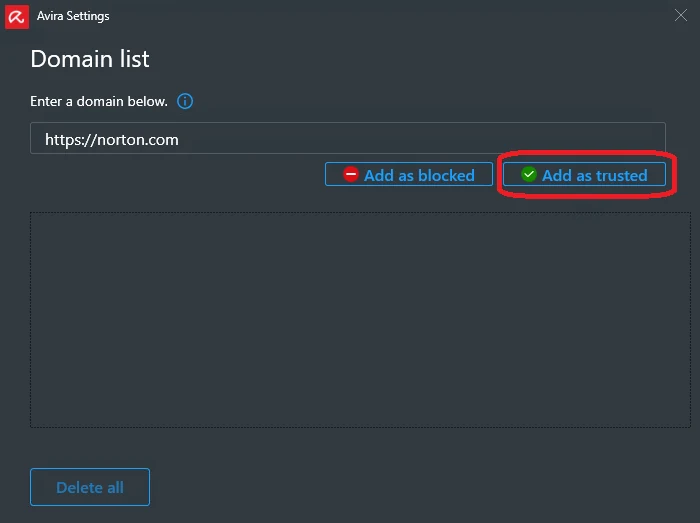
Use the most specific hostname or URL the current interface accepts. Don't exempt the browser executable, all HTTPS traffic, the Downloads folder or a wildcard covering unrelated subdomains. If the alert names an external host, excluding the visible parent site is both ineffective and needlessly broad.
Avira says only the specified website is skipped by the Web Protection scan and malicious downloads remain subject to detection. That's narrower than disabling Web Protection, but it's still reduced coverage. Don't describe the control to a family member or employee as harmless; explain what inspection is being skipped and when it will be removed.
Review every temporary exception and per-site privacy change
Keep a short exception register with the exact destination, product layer, reason, report ID and review date. Recheck after an Avira definition update, browser update or site-owner remediation. Remove the entry, restore normal inspection and repeat the original workflow without credentials first.
Review Secure Browser Privacy Guard exceptions, cookie allowances and JavaScript permissions separately from the Avira Antivirus Domain list. They grant different capabilities and live in different products. Deleting one doesn't restore the others.
A domain can change owner, hosting or behavior. An exception created for a temporary vendor portal can outlive the project and silently trust a recycled hostname. Treat web exceptions like firewall rules: each needs a current owner and a specific reason, not a memory that “the page once broke.”
If an exception is still required after the vendor classifies the URL as safe, repair or reinstall the responsible layer. A permanent bypass shouldn't be the price of using a current clean public site. The Avira setup guide provides the clean installation baseline for retesting.
If you own the blocked website, investigate before requesting reclassification
Check the exact blocked URL, redirect chain, DNS, TLS certificate and every third-party script, iframe, advertisement, API and download loaded by the page. A clean homepage doesn't clear a compromised asset host. Review server and CDN logs around the first reported time and look for unauthorized files, redirects and injected JavaScript.
Rotate exposed credentials and remove the compromise before asking for a clean verdict. Preserve hashes, timestamps and remediation notes. Submit the exact URL through Avira's analysis form with the detection and evidence; a statement that the brand is legitimate doesn't show that the current server response is clean.
Don't publish support instructions telling visitors to turn off Web Protection, disable Browser Safety or install a custom certificate. That transfers the site's risk into each user's device. Offer a known clean status page or alternate delivery channel while the classification and remediation are reviewed.
If the site depends on tracking scripts that Privacy Guard blocks, distinguish compatibility from security reputation in your support response. Explain the required function and exact host rather than demanding all ad blocking be disabled. Users can then make a narrow privacy choice without bypassing Web Shield.
Repair or reinstall only when the same layer fails across trusted sites
If Web Protection blocks many unrelated known-good sites, its controls won't stay enabled or the app can't update, use Avira's repair path. The current repair walkthrough discloses that settings reset to defaults. Record the exception list first, then restore only entries that still have a verified need.
If Browser Safety alone breaks pages in a clean profile, remove and reinstall the official extension. If Secure Browser crashes or its built-in features remain damaged, Avira's FAQ recommends restart and then reinstall; preserve bookmarks and passwords first. The complete Avira uninstall guide is for the whole product and shouldn't be the first move for one add-on.
Use official Avira Support for a paid product when the URL report, update and repair don't settle the case. Include exact URLs or redacted private equivalents, screenshots, browser and extension versions, Avira version, detection data, timestamps and the one-layer tests. Don't call a phone number copied from a search-result PDF.
If repeated false positives and site breakage remain incompatible with the user's work after one clean repair, replacing the product is reasonable. The Avira alternatives guide, Windows 11 antivirus guide and free antivirus comparison separate that buying decision from today's blocked page.
Restore every protection layer and verify the exact page path
Turn Web Protection, Browser Safety and Secure Browser Web Shield back on. Return Privacy Guard to the intended level, then reapply only the one documented per-site privacy change that remains necessary. Close and reopen the browser so a stale blocked page or extension state doesn't become the test result.
Retest the exact public URL, its expected redirect and the required page function without entering sensitive data first. If a download is part of the workflow, verify it separately through its signature, hash and Avira result. Confirm there are no broad domain, browser, file or threat-category exclusions left behind.
Success means the intended page works, the responsible layer is identified, the false-positive report or repair is documented and unrelated web protection remains active. Write down the final Avira and extension versions and remove temporary exceptions after the vendor correction arrives. A page that works only because every shield is off isn't fixed.
The planned Avira hub will connect this URL to pricing, setup, feature reviews, Rescue System, troubleshooting, removal and alternatives without forcing them into one article. The main Avira review remains the product verdict; this spoke exists to solve one user job completely and safely.
Avira website blocking and Web Protection FAQ
Why is Avira blocking a website?
Avira may classify the exact URL, a redirect, an embedded host or a download as malware, phishing, spam or fraud. A different possibility is page breakage caused by Browser Safety tracking controls or Secure Browser Privacy Guard. Save the full alert and hostname first, because a named security detection and a missing page element aren't the same problem.
How do I know whether an Avira website warning is a false positive?
You can't prove it from familiarity, another browser or one clean scanner. Update Avira, verify the exact hostname and redirect, compare Google Safe Browsing and a multi-engine URL report when the URL is public, and submit the detection to Avira. Don't enter credentials or run a download while review is pending.
How do I allow a trusted website in Avira Web Protection?
On a paid Avira edition that exposes Web Protection, open Security, Protection options, Web protection and its Domain list, then add the smallest exact destination as trusted. Interface wording can move by version. Avira says the named website will be skipped by the Web Protection scan, while malicious downloads can still be detected and blocked.
Why do I not see Web Protection in Avira Free?
Avira's current support page says the integrated Web Protection function is available in paid Avira Security editions. Free users may instead have the separate Browser Safety extension or use Avira Secure Browser. Identify the installed component rather than following a paid-product menu path that doesn't exist.
Can Avira Browser Safety break a page without calling it malware?
Yes. Browser extensions can block trackers, ads, redirects or scripts that a page depends on. Test the same public page in a clean browser profile with only the official extension, and disable Browser Safety only long enough to prove causality. Update or reinstall the official extension instead of leaving the browser unprotected.
What is the difference between Secure Browser Web Shield and Privacy Guard?
Web Shield blocks malicious websites, phishing and risky downloads. Privacy Guard blocks ads, trackers and fingerprinting; Avira warns that Strict mode can make pages partly or completely inaccessible. Lower or disable Privacy Guard for one trusted site before touching Web Shield when the page loads but sign-in, video or checkout is broken.
Should I turn off Avira Web Protection permanently?
No. Avira states that disabling Web Protection stops website scanning and also stops dangerous-download reporting and blocking through that component. A brief test can identify the layer, but the durable fix is an update, false-positive review, repair or the narrowest documented exception.
What should a website owner send Avira for reclassification?
Send the exact affected URL, detection wording, first-seen time, redirect chain, clean-up evidence and a plain explanation of what the page does. Audit third-party scripts, downloads and hosting before calling the block false. Don't instruct visitors to disable antivirus while the site is under review.