
How to Cancel an AVG Subscription and Request a Refund
Cancelling renewal, requesting a refund and uninstalling AVG are three separate actions. Start by identifying who billed you, because AVG, Google, Apple and resellers each control their own subscription.

Quick answer: First identify the merchant on the receipt or subscription list. For a direct AVG purchase, sign in to the matching AVG Account, open My Subscriptions, choose Unsubscribe or Cancel renewal, select “No thanks, unsubscribe me from future renewals,” and save the expiring status. Eligible direct, in-app desktop and Google Play consumer purchases can generally be requested for refund within 30 days; Apple and resellers use their own process. Uninstalling AVG doesn't cancel billing.
Need a different AVG task? The complete AVG guide hub routes review, plans, setup, troubleshooting, Web Shield, privacy, browser, VPN, Android, utilities, billing and removal without mixing their steps.
Know which result you want before pressing a button
Cancel renewal stops a future recurring charge. Request a refund asks the merchant to reverse an eligible payment. Uninstall removes an app from one device. A person can need one, two or all three, but none automatically performs the others.
Write down the product name, order ID, purchase email, merchant, charge date, next-payment date and current subscription status. AVG Internet Security, Secure VPN, TuneUp, AntiTrack, Driver Updater and Secure Browser PRO can exist as separate orders even when one dashboard displays them together. A single cancellation doesn't necessarily cover the rest.
AVG’s current cancellation FAQ says annual subscriptions can have a billing date up to 35 days before the next period begins. That makes “cancel before expiry” unsafe. Use the Next payment date shown by the actual merchant as the deadline.
If protection is still needed, choose a replacement before uninstalling. The AVG alternatives guide sorts options by the reason for leaving, while the Free versus Internet Security guide explains how to keep AVG without a paid renewal.
Find the merchant that owns the subscription
Start with the order email. A direct AVG receipt usually points to an AVG Account and contains an order ID. A Google Play or Apple receipt names the store. A retailer can use its own portal, renewal policy and support team. The card or PayPal descriptor helps when the email is missing.
Check every likely subscription list: the AVG Account under the email used at checkout, Google Play Payments & subscriptions, Apple subscriptions and the retailer account. If an AVG order is missing, try another email address connected to the purchase. Don't create a new paid order merely to make a subscription appear.
The merchant controls cancellation and refund. AVG can't directly cancel an Apple billing agreement, and deleting an AVG Account doesn't guarantee that an external store subscription stops. This ownership rule explains most cases where a user can't find the button described in another guide.
Cancel a subscription purchased directly from AVG
Sign in at AVG using the email attached to the order. Open My Subscriptions and select the relevant product. AVG’s current account management guide shows the Next payment date beside the subscription. Record it before changing anything.
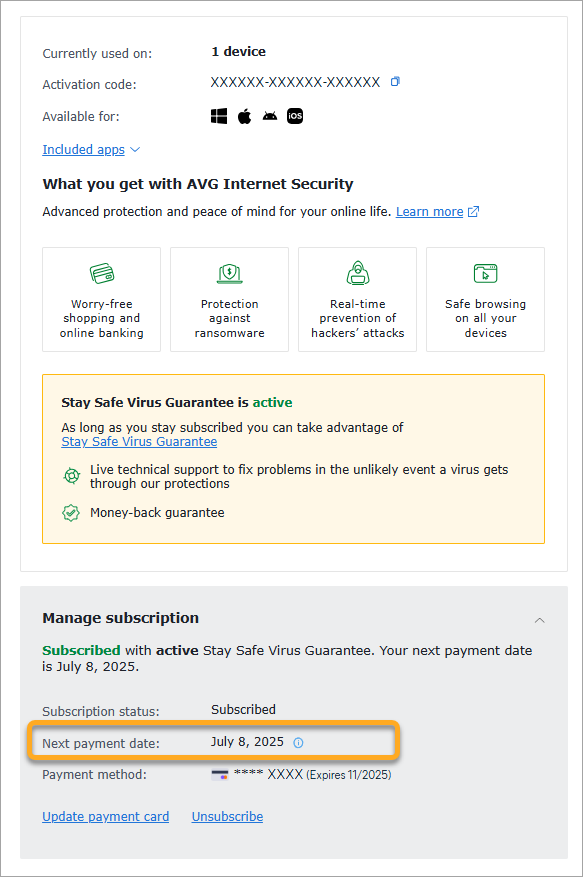
Choose Unsubscribe or Cancel renewal. Continue through the retention screen, select “No thanks, unsubscribe me from future renewals,” then choose Confirm & Finish. Don't close the tab after the first “Continue” button; that can be only an intermediate step.
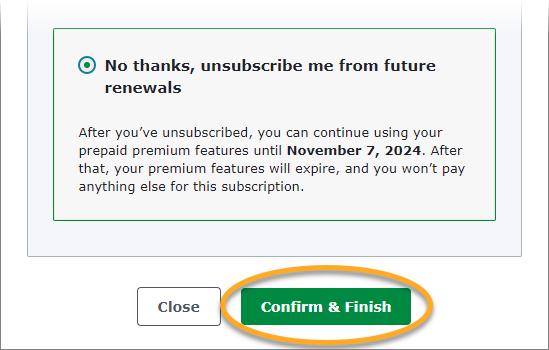
The final subscription should show an expiry or equivalent non-renewing state. Paid features normally continue until that date. Save a screenshot and the confirmation email. If the button is missing, confirm the merchant and contact AVG through the official support site rather than a phone number copied from search results.
Cancel Google Play or Apple subscriptions in the store account
For Google Play, open the Google account used for purchase, then Payments & subscriptions and Subscriptions. Select the AVG product and cancel. Google’s official subscription cancellation help explains that uninstalling an app doesn't cancel its subscription. Confirm the end date after cancellation.
For Apple, open Settings on the iPhone or iPad, tap the Apple Account name, choose Subscriptions, select AVG and cancel. Apple’s official subscription guide also covers web and other devices. If no cancel button or expiration message appears, the subscription may already be cancelled or belong to another Apple Account.
Store family sharing can confuse ownership. The person using AVG may not be the account that bought it. Use the receipt’s account and order history instead of guessing from the device. Take a screenshot of the final store status; an AVG app screen isn't proof that the store mandate changed.
A retailer or reseller can have a completely different route
Retail boxes, electronics stores, telecom bundles and third-party online retailers can supply an activation entitlement without giving AVG control of the payment agreement. Contact the seller named on the receipt and use its portal or cancellation terms.
Don't give remote access to a caller who claims to “cancel AVG from the registry.” Billing doesn't live in Windows registry keys. A legitimate reseller should be able to identify the order, merchant and policy without asking you to install remote-control software or buy gift cards.
When the entitlement is prepaid and non-renewing, there may be nothing to cancel. Confirm the absence of a recurring payment method and the end date. Removing an activation from one PC merely frees or disables a seat; it doesn't prove whether the commercial contract renews.
AVG’s 30-day guarantee has a route and scope
AVG’s current refund guide says eligible consumer subscriptions can receive a full refund when requested within 30 days of purchase. It covers purchases through the official AVG website, an offer inside another AVG product on Windows or Mac, and Google Play. It normally excludes retail/reseller orders from AVG’s direct guarantee, while Apple controls App Store refunds.
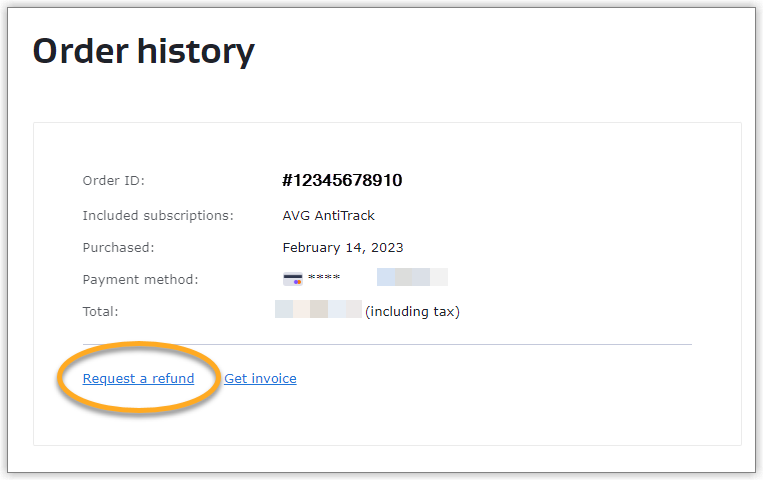
For an eligible direct order, sign in to the AVG Account, open Order history and choose Request a refund beside the order. The option appears only when AVG marks the order eligible. Continue to the official support conversation and keep the case number.
For Google Play, AVG’s policy says eligible purchases can use its process, but the transaction still belongs to the Google account. For Apple, use Apple’s official Report a Problem refund route. For a reseller, ask that merchant. Don't submit the same refund as a chargeback simultaneously unless the merchant or payment provider tells you to; conflicting disputes can slow resolution.
If AVG already renewed, record facts before arguing the case
Capture the charge date, amount, currency, card descriptor, order ID and the account’s next-payment or renewal state. Compare the charge with the reminder email and the renewal disclosure saved at purchase. A higher renewal than the introductory year is common; our AVG pricing guide documents the checked $59.88 first-year and $99.99/$149.99 renewal pattern.
If the payment is within the applicable refund window, request the refund immediately through the correct merchant. AVG says processed card, debit-card and PayPal refunds can take up to seven business days; other methods can take up to 14. Keep the approval message until the credit appears.
If the charge was unauthorized rather than simply forgotten, state that clearly. Secure the associated AVG and email accounts, change reused passwords, enable MFA where available and contact the payment provider through the number printed on the card or its verified app. An unauthorized transaction is an account-security event, not only a cancellation problem.
Verify the final state of every AVG product
Return to each subscription list after completing the flow. Direct AVG products should show the final date or expiring state. Google and Apple should show cancellation or expiration. Review Secure VPN, TuneUp, AntiTrack, Driver Updater and any mobile subscription individually; they may renew on different days.
Search the email account for order confirmations from AVG and the stores, then compare them with recent statements. A product can be activated under one email and billed under another. Keep a small table of merchant, product, next payment and status until every entry is explained.
Don't delete the AVG Account until billing and refunds are resolved. Account deletion can remove the convenient order view while an external merchant still holds the payment agreement. Preserve invoices and case numbers for tax, warranty or dispute needs.
Billing queries attract fake AVG support pages
Search results can contain pages and forum profiles repeating toll-free numbers with “AVG refund” or “AVG renewal” in the title. A phone number appearing many times isn't validation. Begin at avg.com/support, Google, Apple or the retailer printed on the receipt.
Never pay a cancellation fee by gift card, cryptocurrency or bank transfer. Don't install remote-access software merely to stop a subscription. A legitimate agent may need the order ID and account email, but shouldn't need your full card PIN, email password or one-time banking code.
If a caller already accessed the computer, disconnect it from the network, remove the remote-control tool, change credentials from a clean device, review payment activity and run a trusted scan. The AVG troubleshooting guide isn't a substitute for incident response when an attacker obtained access.
Cancel first, then decide whether to uninstall or stay free
After cancellation, Internet Security normally keeps paid features until the end date. You can leave it installed, return to AVG Free when the entitlement expires, or switch to another antivirus. Don't create a protection gap by removing AVG before the replacement is ready.
If you want AVG gone, use normal Windows or macOS uninstall first. AVG’s official cleanup tool is a fallback when normal removal fails; it isn't a billing control. Follow the complete AVG uninstall guide, restart and confirm that Microsoft Defender or the intended replacement becomes active.
If you're keeping Free, use the official free-activation path instead of buying again. Review notification and offer controls in the planned AVG pop-up and privacy guide. The goal is a known commercial state and a protected device, not simply an empty desktop icon.
AVG cancellation and refund FAQ
How do I cancel an AVG subscription?
Find the merchant first. For a direct AVG purchase, sign in to the AVG Account tied to the order, open My Subscriptions, choose Unsubscribe or Cancel renewal, continue, select No thanks, unsubscribe me from future renewals, and confirm. Google Play, Apple and resellers use their own subscription controls.
How early should I cancel AVG?
AVG says one-, two- and three-year subscriptions can have a billing date up to 35 days before the next subscription period. Cancel before the Next payment date shown in the account, not merely before the anniversary on an old receipt.
Will AVG stop working immediately after I cancel?
Normally no. Cancelling renewal prevents the next charge while paid features continue until the end of the current subscription period. The account should show an expiring state or equivalent final date.
Does cancelling AVG automatically refund the last charge?
No. A refund is a separate request. AVG's 30-day guarantee generally covers eligible consumer purchases through its website, an AVG Windows or Mac offer, or Google Play. Apple App Store and third-party retailer purchases follow the seller's policy.
How long does an AVG refund take?
AVG says processed refunds to a credit or debit card or PayPal can take up to seven business days. Other payment methods can take up to 14 business days. Merchant and bank processing can affect when the credit appears.
Does uninstalling AVG cancel my subscription?
No. Uninstalling removes an application from a device but doesn't alter the billing contract. Cancel with the merchant and save confirmation before or after removing the software.
Why can I not see my AVG subscription in the account?
The order may use another email address, belong to Google Play or Apple, or have been purchased from a reseller. Check the receipt, card descriptor and every likely store subscription list before creating a duplicate order or calling an unverified support number.
Can I cancel one AVG product without cancelling the others?
Yes. Internet Security, Secure VPN, TuneUp, AntiTrack, Driver Updater and other AVG products can have separate subscriptions. AVG says direct renewals must be cancelled individually. Review each product and next-payment date.