
How to Stop AVG Popups and Review Its Privacy Settings Without Going Blind
The goal isn't zero messages. It's to keep real threat alerts visible, mute commercial noise where AVG allows it, and make deliberate choices about file samples, app analytics and personalized offers.

Quick answer: Open AVG, Menu, Settings, General and Notifications. Silent mode hides all AVG popups, alerts and messages, so use it only if you accept that tradeoff; Do Not Disturb is the better fit for selected full-screen apps. Under Offers, untick product and third-party offer data options where they appear, but AVG says offers can't be fully disabled in AntiVirus Free. Under General and Personal Privacy, separately review Community IQ file samples, third-party app-usage analytics and personalized discounts. These switches don't stop security data processing required to operate the antivirus.
Need a different AVG task? The complete AVG guide hub routes review, plans, setup, troubleshooting, Web Shield, privacy, browser, VPN, Android, utilities, billing and removal without mixing their steps.
Classify the message before trying to silence AVG
Capture the sender, title and exact wording. AVG can display malware detections, blocked URLs, disabled-shield warnings, update failures, licence messages, performance recommendations and offers for other products. Windows and browsers can also display notifications that merely use AVG’s name or imitate a security alert.
| Message type | Evidence to look for | Best response | Mute? |
|---|---|---|---|
| Threat detection | Named file, URL, process, detection and action | Open details, quarantine/review, update | Keep visible |
| Protection status | Shield off, update failed, restart required | Restore or troubleshoot the named component | Keep visible |
| Maintenance recommendation | Junk, startup, driver or privacy category | Evaluate the task before buying a utility | Usually non-critical |
| AVG product offer | Upgrade, discount, VPN, TuneUp or third-party pitch | Review offer controls; decline if unwanted | Reduce where available |
| Browser-site notification | Browser icon and a website origin | Remove the site's notification permission | Control in browser |
A notification that says “your protection expired” may describe a paid feature while AVG Free remains available. The AVG pricing and renewal guide separates account state from installed protection. Don't enter payment details through a browser notification or call a phone number printed inside it.
If the message identifies a blocked website, use the Web Shield guide. If AVG itself won't open or a shield can't start, use the general troubleshooting guide.
Silent mode stops more than commercial popups
AVG’s current popup guide directs Windows users to Menu, Settings, General and Notifications. Under Pop-up notifications treatment, Silent mode prevents popups, alerts and messages.
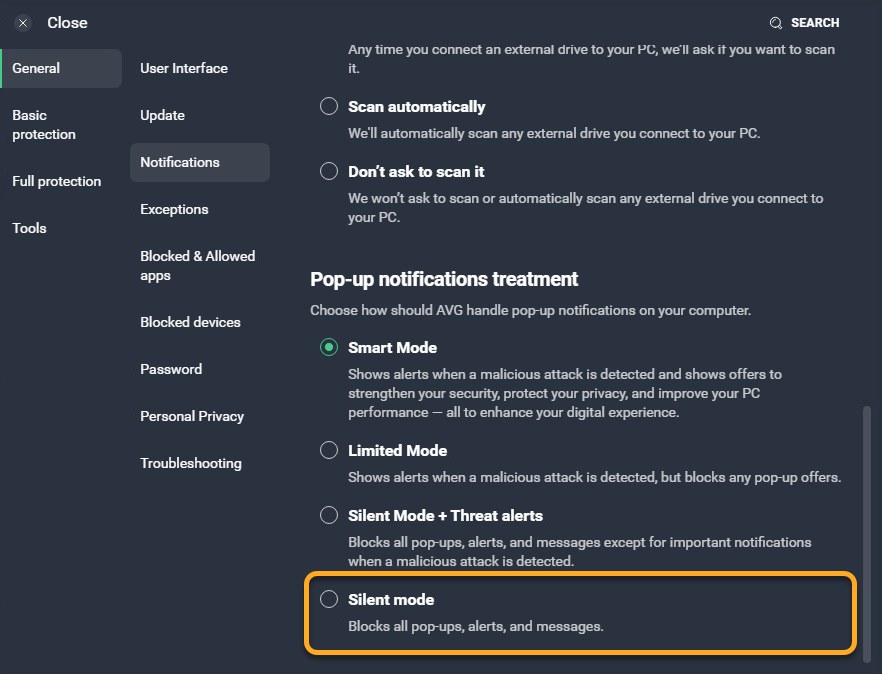
That breadth is the tradeoff. Silent mode can reduce interruptions but can also hide an update failure, disabled shield or detection that needs attention. If you enable it, open AVG periodically, review status and scan history, and keep Windows Security status monitoring active. A quiet screen isn't evidence that the product is healthy.
For most people, leave normal security alerts enabled and reduce offers separately. This preserves the reason the antivirus is installed while removing part of the commercial noise.
Do Not Disturb is safer for games and full-screen work
AVG’s Do Not Disturb guide says the feature activates when a listed application runs full screen. It can silence Windows, AVG and third-party notifications, pause Windows Updates and prioritize the app depending on the selected options.
Open AVG and Do Not Disturb Mode, add the game, presentation or full-screen application, and review its options. Allow communications, accessibility or monitoring apps that must still notify. Don't add an ordinary browser merely because commercial popups appear; a browser often runs full screen while handling important authentication or download alerts.
Do Not Disturb is available in Free and Internet Security. It doesn't solve idle desktop offers or browser-site notifications. It solves interruption during a defined full-screen session, which is a narrower and more reversible job than permanent Silent mode.
Turn off AVG and third-party offer data where the controls appear
In General and Notifications, find Offers. AVG documents two choices: share app-usage data so AVG may offer upgrades or other AVG products, and share app-usage data so it may offer third-party products. Untick the choices you don't want.
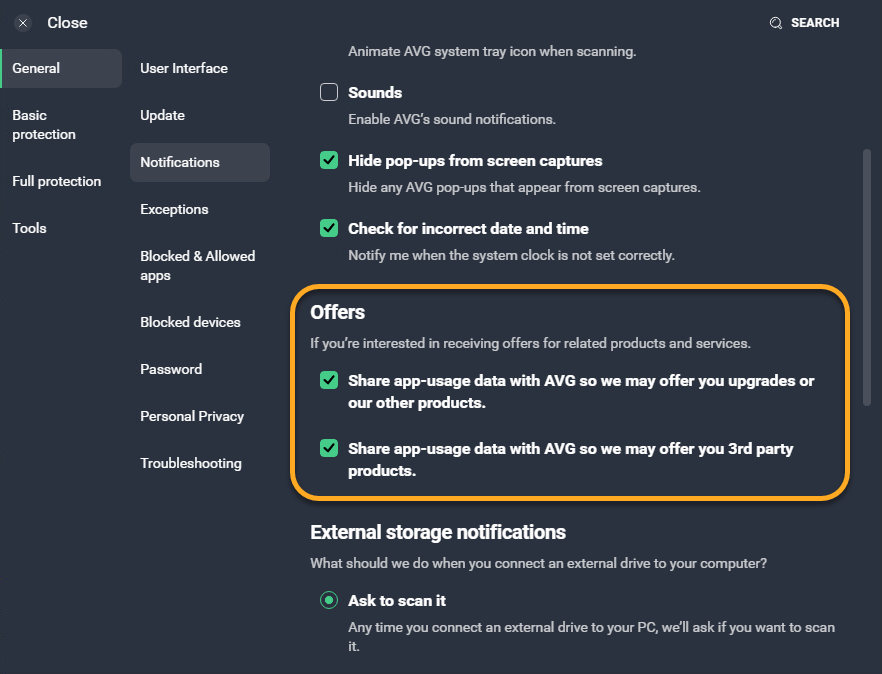
AVG’s privacy guide states that offers can't be disabled in AVG AntiVirus Free. It also says the AVG-product offer option is enabled by default and doesn't appear in Free. That limitation is part of the $0 product’s usability cost. Don't spend hours looking for a switch the vendor says is absent.
Other AVG applications have their own settings. TuneUp, Driver Updater, Secure Browser and Secure VPN can each generate notifications or offers. Identify the icon and product name before changing antivirus controls. The existing TuneUp review and Driver Updater review cover their separate value decisions.
Review Community IQ, app analytics and personalized discounts separately
Open Menu, Settings, General and Personal Privacy. AVG’s current privacy-settings guide presents three distinct choices: suspicious file samples for Community IQ, app-usage analysis in third-party tools, and use of data about the user, device and app usage for personalized discounts.
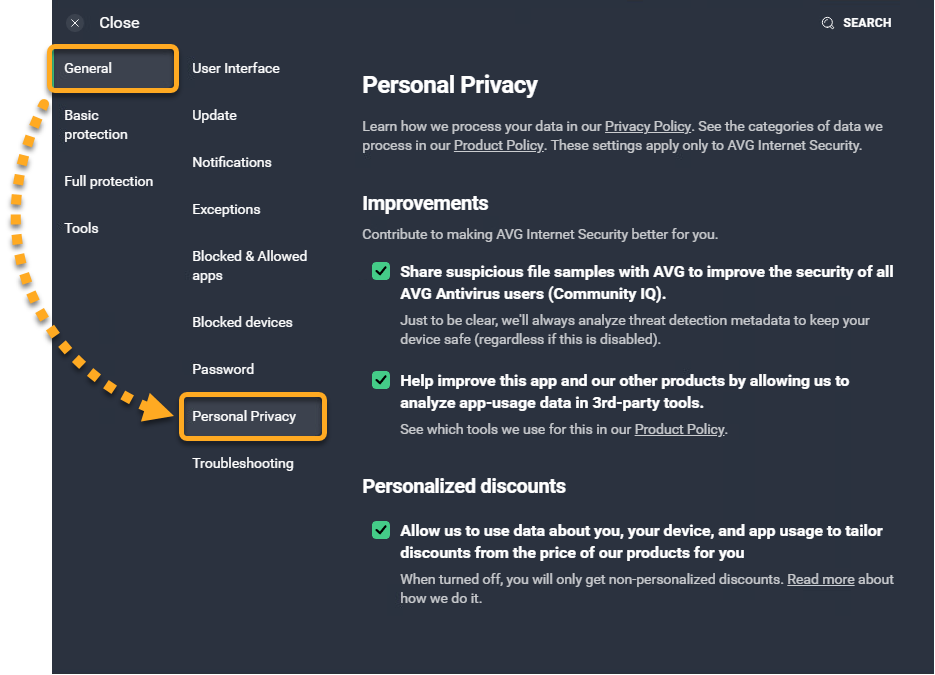
Community IQ can improve detection by sharing suspicious samples. A sample isn't the same category as aggregate usage statistics; it can contain content and context. A home user may accept that tradeoff, while a business handling confidential client material may need policy approval or a managed product.
Third-party app-usage analytics supports product development. Personalized discounts uses data about the user, device and usage to tailor offers. Neither is required to interpret a malware alert in the moment. Choose deliberately rather than treating every box as one “privacy mode.”
Opting out of optional settings doesn't make the antivirus data-free
Security software must process files, URLs, processes, detections, device state, updates and licence information to work. Gen Digital’s privacy center, updated March 6, 2026, describes security data including samples, detection details, URLs, texts and files used for malware and scam protection, plus events such as activations, crashes, scans and errors.
AVG’s product policy, updated May 20, 2026, documents product-specific processing. Read the entry for the exact app and platform; Cleaner, Secure Browser, VPN and Antivirus don't perform the same job or collect the same operational data.
“Anonymous” or “unidentifiable statistical” data is the vendor’s description of a category, not a promise that the application communicates nothing. The useful privacy decision separates processing needed for protection and support from optional product improvement, third-party analytics and personalized offers.
The current AVG review covers parent-company and trust context. This page doesn't claim that turning three switches off neutralizes every historical or current privacy concern; it shows the controls AVG exposes today.
Free and paid AVG have different commercial controls, not different rights to basic privacy
AVG Free funds part of its experience through product promotion, and AVG explicitly says its offers can't be disabled completely. Internet Security exposes more offer choices, but payment doesn't remove every licence, update, security or product-status message.
Don't upgrade solely to hide a popup unless the renewal cost is worth that usability change. On the US store checked July 23, Internet Security for 10 devices showed $59.88 for the first year and $99.99 at renewal. The Free versus Internet Security comparison maps the security features that should drive the purchase.
A user who wants quiet $0 protection may prefer Microsoft Defender. A user who needs AVG’s paid remote-access, webcam or sensitive-file controls may accept the renewal and still turn off optional offer data. Privacy and value are separate axes.
Why AVG messages can remain after you change the settings
The message may come from Windows Security, a browser website, Secure Browser, TuneUp, Driver Updater, Secure VPN, Cleaner or another account on the machine. Capture the icon and open the notification details rather than changing every AVG product.
Critical alerts can remain by design. A disabled shield, failed update, expiring paid feature or malware detection shouldn't be silently converted into a marketing preference. Review the exact label and product state.
Free-product offers can remain because AVG says the disabling control is unavailable. If that's unacceptable, switching is a more honest fix than permanently hiding all alerts. Don't use unofficial registry tweaks or modified installers; they can break updates and make later troubleshooting impossible.
A balanced AVG notification and privacy setup
Keep normal threat and status alerts visible. Use Do Not Disturb for known full-screen games and presentations, with exceptions for communications that matter. Avoid global Silent mode unless you'll proactively check AVG status.
Untick AVG and third-party offer data choices where available. Review Community IQ based on the sensitivity of files handled on the device. Opt out of third-party usage analytics and personalized discounts when those purposes don't provide value to you.
After changing settings, restart AVG or Windows only if prompted. Trigger no fake malware test. Instead, verify that the home status is healthy, definitions are current and a normal Smart Scan can complete. Revisit settings after a major app update because labels and defaults can change.
Switch when the remaining commercial noise is itself a risk
If upgrade prompts repeatedly frighten a relative, lead to accidental purchases or make real detections harder to recognize, the interface has become a security usability problem. AVG can have strong lab protection and still be the wrong product for that person.
Use the AVG alternatives guide to compare quieter built-in protection, stronger bundles or different privacy preferences. Cancel billing separately, then follow the complete AVG uninstall guide and verify the replacement before normal browsing.
Don't install two resident antivirus products as a compromise. One clearly configured primary provider with understandable alerts is safer than two overlapping dashboards whose warnings no one trusts.
AVG popups and privacy settings FAQ
How do I stop AVG popups?
Open AVG, Menu, Settings, General and Notifications. Silent mode suppresses AVG popups, alerts and messages. Because that includes useful security alerts, many users should instead turn off offer-related data choices and use Do Not Disturb for selected full-screen apps.
Can I disable AVG Free upgrade offers completely?
AVG's current privacy guide says offers can't be disabled in AVG AntiVirus Free, and the product-offer option is enabled by default and doesn't appear there. You can still review available privacy controls and decide whether the remaining commercial noise makes another free antivirus a better fit.
What is the difference between Silent mode and Do Not Disturb?
Silent mode changes AVG's general popup treatment and can hide all alerts and messages. Do Not Disturb activates for listed applications running full screen and can silence AVG, Windows and third-party notifications during that session while allowing exceptions.
Should I turn off AVG threat notifications?
Usually no. A named malicious file, URL, disabled shield or failed update can require action. Reduce offers separately. If you use Silent mode, check AVG's status and history proactively and understand that a critical alert may not interrupt you.
What is AVG Community IQ?
In AVG's Personal Privacy settings, Community IQ controls sharing suspicious file samples to improve protection for AVG users. A suspicious sample can contain more context than anonymous usage statistics, so organizations with confidential files should align the setting with policy.
What data can AVG still process if I opt out?
Opting out of optional analytics and personalization doesn't stop data required to provide security, licensing, updates or support. Gen Digital's privacy center describes security data such as samples, detection details, URLs, texts and files used for malware and scam protection, plus events and licence identifiers.
Why do I still see AVG messages after changing settings?
The message may be a Windows notification, browser-site notification, another AVG product, a critical status alert or an offer that Free doesn't expose for disabling. Capture the sender and wording before changing more controls.
Does paying for AVG remove all popups?
Paid AVG exposes more offer controls, but important security, update, licence and product-status messages can remain. The useful goal isn't absolute silence; it's a configuration where real protection events are understandable and commercial messages are minimized.