
How to Cancel Malwarebytes and Request a Refund in 2026
The cancel button stops a later payment. A refund reverses an eligible charge. The receipt—not the device running Malwarebytes—tells you where each request belongs.

Quick answer: First identify the billing owner on the receipt: Malwarebytes Online Store, Google Play, Apple or another seller. Turn off renewal with that seller and save the confirmation. If money has already been taken, request the refund separately. Malwarebytes' current EULA says a new Malwarebytes for Home subscription bought directly may be eligible within 60 days of purchase; the company guarantee doesn't cover renewals or Personal Data Remover, and third-party stores apply their own policies. Don't call a “Malwarebytes refund number” found in search—Malwarebytes says it has no inbound support phone number.
The safe five-minute answer
Open the receipt or store order first. If it names Malwarebytes Online Store, use the Malwarebytes account tied to that purchase. If it names Google Play or Apple, use the corresponding store account. A card descriptor such as CBI, 2CO or cleverbridge.net can help locate an order, but the receipt and purchase history are stronger evidence than a label on a statement.
Turn off auto-renewal with the billing owner, finish every confirmation screen and save the final status plus email. That prevents a later term; it doesn't automatically return a posted payment. If a charge has already happened, open a separate refund request with the same billing owner and preserve its case or order number.
The transaction type sets expectations. Malwarebytes' current consumer EULA says a new Malwarebytes for Home subscription bought directly may be eligible for cancellation and refund within 60 days of purchase. It separately excludes renewals and Personal Data Remover from that company guarantee. Apple, Google and other sellers use their own decision process.
Use only official sites that you navigate to yourself. Malwarebytes' July 2026 support contact page says there's no inbound support phone number. That single fact matters because search results for cancellation currently contain fake numbers, copied invoices and unrelated PDF uploads designed to catch a worried customer.
Identify who billed the subscription before canceling anything
The device running Malwarebytes doesn't prove who owns the payment. A Windows laptop can use a subscription purchased on Malwarebytes.com, while an iPhone can share a direct family plan. Conversely, an Android installation may be attached to a Google Play order that never appears as a direct Online Store subscription. Start with transaction evidence, not the operating system.
Record the purchase email, order ID, charge date, amount, plan name and billing descriptor. Sign in to the likely Malwarebytes account and use its current purchase-history and invoice route. For a mobile purchase, check every Apple ID or Google account used on the device, including a family member's account.
| What the receipt says | Where to stop renewal | Who decides a refund | Evidence to save |
|---|---|---|---|
| Malwarebytes Online Store | Malwarebytes Account billing page | Malwarebytes Support under its terms | Order ID, account status, confirmation email |
| Google Play | Google Play Subscriptions in the paying Google account | Google Play or the developer under Google policy | GPA order ID, store status, refund case |
| Apple App Store | Apple Account → Subscriptions | Apple through Report a Problem | Apple receipt, expiry status, request status |
| Retailer, reseller or other seller | The seller named on the receipt | That seller under its terms | Receipt, seller account, written response |
If no record matches, don't guess. Search inboxes for the exact amount and date, inspect family purchase history and ask official Malwarebytes Support to identify the order without sending full card details. An unrecognized charge investigation is safer when it begins with a precise transaction rather than “cancel everything on this computer.”
Cancellation, refund, uninstall and account deletion are four actions
Cancellation changes a recurring billing instruction. A refund asks the seller to reverse an eligible completed payment. Uninstall removes an application from one device. Account deletion removes profile data under a separate process. Doing one doesn't reliably perform the others.
This distinction explains many “I canceled but was charged” reports. A person may have deactivated a device, dismissed a trial screen or removed the app while the store subscription kept renewing. Another person may have turned off renewal after the new term was charged, correctly stopping the following year but leaving the posted renewal untouched.
| Action | What it changes | What still needs separate verification |
|---|---|---|
| Turn off auto-renewal | Future automatic billing | Refund, paid expiry date and every other subscription |
| Request a refund | An eligible posted transaction | Renewal state and continued entitlement |
| Deactivate or uninstall | One device's installation or license assignment | Merchant billing and account status |
| Delete account | Profile and account data workflow | Active subscription cancellation before deletion |
Write down the outcome you actually need. Most readers need two results: no future renewal and an answer about one named payment. People leaving the product also need a third result later—another active security provider before Malwarebytes expires.
Cancel a direct Malwarebytes Online Store subscription
Malwarebytes' current auto-renewal instructions say Online Store subscriptions have renewal enabled by default. For a direct Windows or Mac subscription, use the Malwarebytes account payment page, choose Turn auto-renewal off in the pop-up, select a cancellation reason and send it. The company says a confirmation email follows.
Don't leave after clicking the first retention or reason screen. Return to the subscription card and look for an expiration date or an option to resume renewal. Save that state and the email. If the account still shows a next billing date, the process isn't proven complete, even if a marketing page thanked you for feedback.
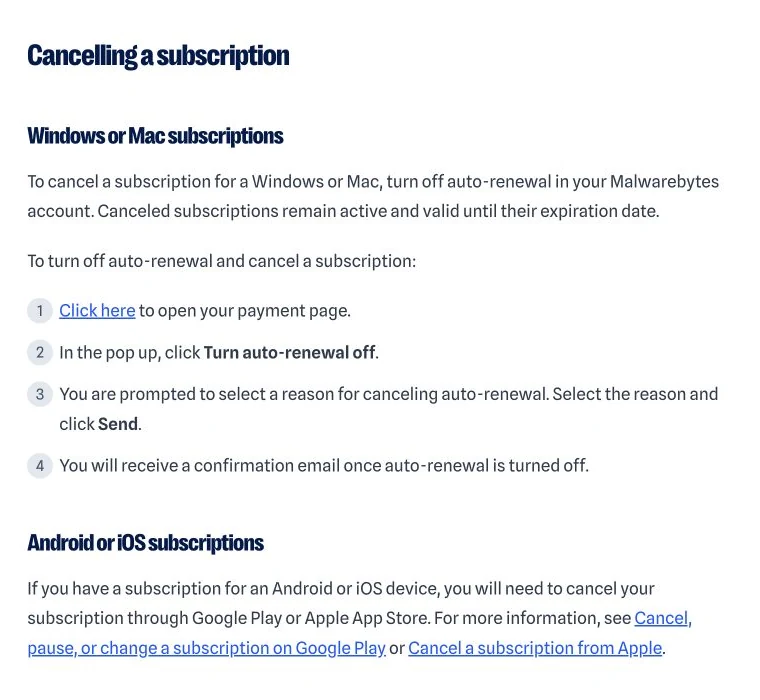
Malwarebytes says a canceled subscription remains active and valid until its expiration date. That's useful: you can keep receiving protection while comparing replacements. Our Malwarebytes pricing and renewal guide explains the plan and renewal amount you should expect; this page owns the actual cancellation and refund route.
If the direct payment link opens the wrong account or no subscription appears, stop. Check the purchase email and order number rather than creating another account. A second account can make an already confusing subscription harder to locate.
Cancel Malwarebytes billed by Google Play
Use the Google account that made the purchase. Google's current subscription management guide routes the user through Google Play subscriptions, where Malwarebytes can be selected and canceled. Google explicitly says uninstalling an app doesn't cancel its subscription.
After cancellation, access normally continues to the end of the paid period. Save the Google Play status and the GPA order ID from the receipt. If Malwarebytes is missing, switch Google accounts and check purchase history; the account currently signed into the app may not be the buyer.
A Google family group can add another wrinkle. The person using Malwarebytes may not be the person who authorized the store purchase. Don't submit a fraud report until the family organizer and other likely buyers have checked their receipts, because Google separates an unknown malicious charge from a purchase made accidentally by someone you know.
Cancel every relevant store subscription. A direct Malwarebytes plan and a Google Play plan can coexist, particularly after someone bought protection on a second device. One canceled line item doesn't stop a different billing owner.
Cancel Malwarebytes billed by Apple
Follow Apple's current subscription cancellation route: open Settings, select the Apple Account, choose Subscriptions, select Malwarebytes and cancel. The same route is available from Apple's other supported devices and account interfaces when the purchase belongs to that Apple ID.
Apple says that if there's no Cancel button or the page shows an expiration message in red, the subscription may already be canceled. Capture that expiry state. If Malwarebytes is absent, search email for the Apple receipt and check another Apple Account or family purchaser instead of assuming the direct Malwarebytes account controls it.
For a free or discounted trial, Apple advises canceling at least 24 hours before the trial ends. That buffer is more useful than trying to act at the final minute across time zones. The store confirmation, not deletion of the iOS app or configuration profile, proves the renewal instruction changed.
Apple billing can continue even if the protected device changes. A person who upgraded an iPhone, removed Malwarebytes or switched to a direct family plan should still review the original Apple subscription list.
Retailer, reseller and bundled purchases follow the receipt
Malwarebytes' personal refund policy tells customers who bought through Apple, Google Play or another reseller to contact that third party. A boxed license, marketplace order, internet-provider bundle or employer benefit can therefore have different cancellation and refund rules from Malwarebytes' direct Online Store.
Use the seller's official order history or support portal. Keep the receipt, redemption code, order email and any renewal disclosure. Don't ask a card issuer to reverse a charge merely because the license is activated in Malwarebytes; the merchant of record may be another company with a valid cancellation path.
Some one-time keys don't renew. Confirm whether the transaction is actually a subscription before searching for a cancel button. Conversely, a retailer may have sold a recurring plan that remains active after the code is redeemed, so “I only entered it once” isn't proof that billing is one-time.
If Malwarebytes Support can't alter a third-party transaction, that isn't necessarily a refusal to help. The seller controls the payment. Ask Malwarebytes to confirm product status while the merchant handles billing.
The direct 60-day guarantee has a narrow transaction boundary
Malwarebytes markets a 60-day money-back guarantee on eligible annual consumer plans. The governing detail appears in the current EULA: a customer who buys a new Malwarebytes for Home subscription directly from Malwarebytes may be eligible to cancel and request a refund within 60 days of purchase. “May be eligible” is the accurate phrasing; this page can't approve an individual transaction.
The purchase date—not the installation date or the day you noticed the charge—starts that period. Submit the request promptly through official Support and include the order ID. If the product was bought from a third party, the EULA warns that the seller may not provide the same 60-day period.
| Transaction | Malwarebytes 60-day position | Practical action |
|---|---|---|
| New Malwarebytes for Home subscription bought directly | May be eligible within 60 days of purchase | Contact official Malwarebytes Support with order evidence |
| Automatic or manual renewal | Company guarantee doesn't apply | Request prompt review without promising approval |
| Personal Data Remover | Company guarantee doesn't apply | Check service terms and ask Support about the transaction |
| Apple, Google or another seller | Third-party policy controls | Use the seller's refund channel and order ID |
Don't stretch this rule to identity services, business products or every add-on carrying the Malwarebytes name. The Free versus Premium comparison covers consumer product differences, while the ThreatDown business review explains why business contracts live in another purchasing context.
A renewal isn't a new purchase under the guarantee
The EULA explicitly says the 60-day guarantee doesn't apply to renewals. Turning auto-renewal off after a charge still matters because it stops a later term, but it doesn't transform the posted renewal into an automatically eligible new purchase. Submit a support request promptly, describe the timing and ask for a written decision.
Annual direct subscribers should receive a reminder about 30 days before renewal with the amount. Malwarebytes' current renewal-email verification page says some notices may also arrive 15 or 7 days before expiry and may be sent by Cleverbridge or 2Checkout. Missing or overlooked email can support a clear timeline, but it doesn't by itself guarantee a reversal.
If support approves a renewal refund, recheck entitlement. A refund can shorten the newly extended period or change the account status. Keep current protection running until the account shows the remaining valid end date and a replacement is ready.
Community posts about unexpected renewals are useful warnings, not refund statistics. The recurring lesson is to preserve the charge, account state and cancellation confirmation so support can evaluate one identifiable transaction.
Personal Data Remover is excluded from the company guarantee
The EULA separately excludes Malwarebytes Personal Data Remover from the 60-day guarantee. That service submits removal requests to data brokers and has an ongoing workflow different from device antivirus. Don't cite the antivirus guarantee as proof that a PDR payment must be returned.
Check the exact service name on the receipt, turn off its renewal through the billing owner and ask Support about the specific transaction. The Personal Data Remover review explains what happens to broker requests and monitoring; this guide covers only billing and refund routing.
If Personal Data Remover came inside an identity plan, identify whether the invoice is one bundled subscription or separate line items. Canceling one service card may not end another. Ask support to list every active entitlement and next billing date in writing.
Keep copies of removal reports you need before service access ends, without storing more personal data than necessary. Billing cancellation and privacy-request status are related operationally but aren't the same action.
Request a Google Play refund through the Google order
Google's current refund request guide sends eligible users through the Google Play workflow. Its broader refund policy says a request made within 48 hours may be eligible depending on the purchase details; after 48 hours, the user generally contacts the developer, subject to policy and local law.
Provide the GPA order ID, date, amount, Google account and concise reason. Google says decisions commonly take one to four days, though the payment method can take longer to display an approved return. Monitor the official request status rather than resubmitting several cases for the same order.
If the charge is truly unauthorized and nobody you know made it, Google's published route allows reporting certain unrecognized charges within 120 days. A child, partner or friend who used the account accidentally belongs in the ordinary refund path, not an unauthorized-transaction report.
Cancel the subscription even while the refund is pending. A refund request shouldn't be treated as proof that future renewal has been disabled.
Request an Apple refund at Report a Problem
Apple's current refund instructions direct the buyer to reportaproblem.apple.com, where Request a refund can be selected and the Malwarebytes transaction chosen. Apple says an update is usually available within 24 to 48 hours, while eligibility varies by country, region and applicable consumer law.
Use the Apple Account that appears on the receipt. If the transaction can't be selected, check whether it's pending, belongs to another family member, was already refunded or came from a different merchant. Keep Apple's request status and the original receipt.
Canceling and refunding remain separate. Cancel in Subscriptions to stop the next billing event, then use Report a Problem for the posted payment. A refund decision doesn't prove every related Apple subscription is off.
Don't send an Apple password, verification code or full card number to anyone claiming to “expedite” the request. The official account page contains the transaction Apple needs.
Send Malwarebytes Support enough evidence, not your secrets
Use the official Help Center chatbot and ask it to create a support ticket for billing or refund review. Malwarebytes' subscription and payment support page includes renewal status, refunds, recurring payments and unrecognized charges within Support's scope.
A useful first message contains the purchase email, order ID, product name, transaction date, amount, billing source, auto-renewal state and desired outcome. Attach a cropped screenshot that shows the merchant, date and amount, but cover unrelated transactions and most card digits. State whether this is a new purchase, renewal, duplicate charge or Personal Data Remover payment.
| Evidence | Why it helps | What to redact or never send |
|---|---|---|
| Order ID and receipt | Identifies seller, date and product | Passwords, verification codes and unrelated purchases |
| Subscription status and expiry | Proves renewal state | Other account identifiers not needed for the case |
| Cropped statement line | Shows amount and descriptor | Full card number and complete statement history |
| Cancellation confirmation | Documents when renewal was disabled | Private email headers unless requested securely |
| Refund case and decision | Creates an escalation trail | One-time codes or remote-access credentials |
Don't open several tickets for one order unless the first channel is genuinely inaccessible. A clean chronology is easier for a human reviewer to follow than five partial messages with different dates.
Ask for a human review when an automated answer misses the facts
The Help Center chatbot is the front door, not necessarily the final decision-maker. Malwarebytes' current account help-page guide says the assistant can create a ticket, arrange a callback or connect a live agent when available. Ask for a human billing review if the first answer classifies the wrong transaction or ignores supplied evidence.
Keep the request narrow: “Please review order X, charged on Y, because it was a new direct purchase within the stated period” is stronger than a long complaint that mixes multiple products. If it was a renewal, acknowledge the exclusion and ask whether an exception is available rather than claiming the new-purchase guarantee.
Save the final written result. A promised callback should originate from the case you created; it doesn't turn a random incoming caller into official support. Ask the agent to place material decisions in the ticket.
If the route breaks, return to the Help Center home page rather than searching for a telephone number. A July 2026 support response on the company's public community channel pointed users back to this official ticket path.
Cancel a Malwarebytes trial with the billing owner
Some trials require payment information and can convert to a paid term. Malwarebytes says direct trials follow the same account auto-renewal process; Google Play and Apple trials must be managed in their stores. A trial that didn't require payment information shouldn't charge at its end under the current help article.
Act before the deadline and save the status. Apple recommends at least a 24-hour buffer for free or discounted trials. Google displays the next billing date in its subscription record. Don't rely on disabling premium features inside the app, deactivating a device or merely seeing the word “Free.”
If a trial charge posts, capture the store receipt and timeline before changing accounts or uninstalling. Request review through the charging seller and separately cancel the subscription so another term can't follow.
Community reports sometimes use “deactivated” to mean several different actions. The useful proof is the billing subscription's cancellation state and confirmation, not the user's memory of a toggle.
Save proof and verify cancellation in a fresh session
A good cancellation record shows the product, account, billing owner, date, status and paid expiry. Save the confirmation email as a PDF or screenshot and capture the subscription card after renewal is off. Avoid including complete payment credentials in the same folder.
Sign out, reopen the official account or store and check again. Direct Malwarebytes should show an expiration date rather than an upcoming automatic payment. Google or Apple should show canceled status or an expiry message. A retention email alone is weaker evidence than the actual billing record.
Set two reminders: one shortly before the end date to confirm replacement protection, and one after it to check the statement. This prevents the common mistake of canceling correctly, forgetting the date, then running without active protection.
If support later changes the subscription while processing a refund, capture the new state again. The most recent written record should match the amount returned and the entitlement remaining.
CBI, 2CO and cleverbridge.net are clues, not proof
Malwarebytes' current billing-descriptor reference lists variants including AVNGATE*MALWAREBYTES, 2CO.com*Malwarebytes, 2CO.COM*MALWAREBYTES, CBI*MALWAREBYTES, HSA*MALWAREBYTES, CBA*MALWAREBYTES and cleverbridge.net. Payment processors can therefore appear on the statement instead of the product name.
| Statement clue | Possible meaning | Verification action |
|---|---|---|
| CBI or cleverbridge.net | Cleverbridge-processed Malwarebytes order | Match amount and date to receipt and purchase history |
| 2CO or 2Checkout with Malwarebytes | 2Checkout-processed order | Search order email and confirm account entitlement |
| AVNGATE, HSA or CBA with Malwarebytes | Published payment descriptor variant | Ask official Support to identify the order |
| No matching receipt or account | Unknown or possibly unauthorized charge | Check family buyers, then escalate through official channels |
A known descriptor doesn't prove that you authorized the transaction, and an unfamiliar one doesn't prove fraud. Verify the order, buyer and account first. If a family member made the purchase, use cancellation and refund review; if nobody authorized it, follow the merchant and bank's fraud process.
Never post a full statement publicly to ask whether a descriptor is real. A cropped line with the amount, date and descriptor is enough for an official private case.
Fake renewal invoices target people searching for urgent refunds
Malwarebytes warned in June 2026 that fake renewal invoices were again impersonating the company. The current renewal-scam advisory describes phone-number lures that create urgency, then try to obtain remote access, credentials or unusual payments.
Don't call a number printed in an unsolicited invoice. Don't install remote-control software, share a one-time code, let a caller “reverse” a bank transaction or send gift cards, cryptocurrency or cash. Open Malwarebytes Account, Apple, Google Play or the bank through a saved app or address you type yourself.
A renewal email can legitimately come from Cleverbridge or 2Checkout, according to Malwarebytes, but a sender name isn't enough. The company says a legitimate renewal message won't ask for a password, PIN, verification code, Social Security number or credit-card information. Check the subscription record independently.
If you already granted remote access, disconnect the device from the network, remove the remote tool, change passwords from a clean device and contact financial institutions using the numbers printed on your cards or official apps. Our scam-protection hub covers the wider recovery sequence.
Malwarebytes has no inbound support phone number
This is the simplest safety rule on the page. Malwarebytes says its support team doesn't have an inbound telephone number. Official support starts with the Help Center chatbot; a callback can be arranged from a verified case, but there's no public “refund hotline” for you to dial.
Current cancellation SERPs contain spam pages and PDFs uploaded to unrelated domains that publish invented numbers and inaccurate refund rules. A school, government or coding-platform domain in the URL doesn't make an uploaded file official. Ignore the number and navigate to Malwarebytes directly.
If a callback was arranged, keep the ticket open in front of you and ask the caller to reference the case without demanding secrets. End the call if they ask for remote access or payment to release a refund. Continue in writing through the official ticket.
The same principle applies to social media. A public reply can point to support, but account details belong only in the verified private channel, not a comment thread or unsolicited direct message.
Find duplicate plans, accounts and store subscriptions
A person can have a direct Premium plan, an old Google Play subscription and a newer family bundle at the same time. Malwarebytes may also show separate cards for antivirus, Privacy VPN, identity services or Personal Data Remover. Canceling the obvious card doesn't prove the others have no renewal date.
Make a small inventory: billing owner, purchase email, order ID, product, covered devices, next billing date and renewal status. Check direct account purchase history, Google accounts, Apple Accounts and family buyers. The Privacy VPN review and Identity Theft Protection review explain product boundaries that can otherwise look like one subscription.
If two plans overlap, ask Support whether they can be consolidated or whether one must be canceled and allowed to expire. Don't assume a plan upgrade automatically closes the previous order. Preserve written confirmation for every changed line.
Verify charges by transaction, not by device count. Deactivating an old laptop may free a seat while every billing instruction remains untouched.
Uninstalling, deactivating and deleting the account don't cancel billing
Malwarebytes' current account-deletion instructions warn users to turn off auto-renewal first. Deleting an account with an active recurring subscription can leave billing unresolved and make the evidence harder to retrieve.
Device deactivation only removes an assignment. The current mobile account guide also distinguishes profile or device actions from store subscription management. Removing an iOS profile isn't an Apple cancellation.
Uninstall only after renewal status and any refund case are documented. Our forthcoming complete-uninstall spoke will own every Windows and Mac removal step; mixing those steps here would blur search intent and encourage readers to treat software removal as billing cancellation.
If you need to reinstall while a case is open, keep the order ID and license details. A device change shouldn't erase the billing trail.
What remains active after auto-renewal is turned off
For a direct canceled subscription, Malwarebytes says the plan remains active and valid until the expiration date. Protection, updates and included features should continue during that paid term. The account may offer a Resume Subscription action; don't click it unless you intend to restore recurring billing.
Google Play subscriptions generally preserve access through the paid period after cancellation, and Apple displays the expiry state. A refund can change this. Check entitlement after the decision rather than assuming the original date still applies.
Identity monitoring, broker removal and VPN access can have separate end-of-service effects. Export or record information you legitimately need before the plan ends, but don't retain sensitive reports without a reason. Product-specific pages in the Malwarebytes review cluster explain those consequences.
If protection disappears immediately after cancellation without a refund, verify that the device is signed into the right account and that the license wasn't separately deactivated. Use official Support if the paid expiry and product status disagree.
If the refund is denied or the charge still posts
Read the decision against the exact transaction. A denial can be correct because the payment was a renewal, Personal Data Remover or a third-party purchase outside Malwarebytes' guarantee. It can also result from an unmatched order or wrong account. Ask the reviewer to name the governing seller and policy.
If material evidence was missed, reply once with the order ID, receipt, dates and cancellation proof and request human review. Don't rewrite the case as fraud unless the charge was genuinely unauthorized. Keep the conversation factual and focused on one transaction.
If a charge posts after you have dated confirmation that renewal was off before the billing deadline, send both records to the merchant. Ask whether the charge was pending before cancellation, belonged to another subscription or was processed by another account.
Keep monitoring the statement. An approved refund can take additional banking time, and a temporary card credit can later be adjusted. Save the approval reference until the final amount is settled.
Use a card dispute as escalation, not as the cancel button
Contact the merchant first when the charge is recognizable and the official route works. A card dispute doesn't necessarily cancel a subscription, and replacing a card doesn't reliably stop every recurring merchant token. The billing instruction can remain active while the financial investigation proceeds.
Escalation is reasonable when a transaction is genuinely unauthorized, the merchant can't identify it, or a documented cancellation is ignored after reasonable support attempts. Give the bank the receipt search, merchant correspondence, cancellation proof and dates. Describe the transaction accurately instead of selecting a fraud category merely because it's faster.
Ask the bank what happens to provisional credit and recurring payments. Preserve case numbers from both sides. If the disputed plan is still protecting devices, expect entitlement to change and prepare a replacement before access ends.
Consumer rights vary by jurisdiction and payment method. This guide explains the operational record to build; it isn't legal advice or a promise about a bank's decision.
Avoid a security gap when the paid term ends
Canceling renewal doesn't require uninstalling immediately. Keep Malwarebytes updated through the paid expiry while you choose and test a replacement. On Windows, verify that Microsoft Defender or the new antivirus becomes the registered active provider after Malwarebytes is removed.
Use the best antivirus by use case directory for a broad shortlist, then compare Bitdefender vs Malwarebytes, Malwarebytes vs Norton and Malwarebytes vs Avast for specific trade-offs. Replacement selection has a different search intent from refund recovery, so it belongs outside this guide.
Before expiry, record the new product's account owner, renewal date and cancellation route. The cleanest way to avoid repeating this problem is to keep a small subscription inventory from day one.
Billing is finished when every relevant merchant shows no future charge and any refund has settled. Migration is finished when each device has one current, working protection stack. Verify both.
Malwarebytes cancellation and refund FAQ
How do I cancel Malwarebytes auto-renewal?
For a direct Windows or Mac subscription, sign in to the Malwarebytes account that owns the purchase, open the payment or subscription page, turn auto-renewal off, complete the reason prompt and save the confirmation email. Google Play and Apple subscriptions must be canceled in the store account that paid.
Does canceling Malwarebytes give me a refund?
No. Cancellation stops a future renewal but normally leaves the current paid term active. A refund is a separate request to the billing seller. Eligibility depends on the transaction, seller, date, region and governing policy.
Does Malwarebytes have a 60-day money-back guarantee?
The current Malwarebytes EULA says a new Malwarebytes for Home subscription bought directly from Malwarebytes may be eligible for cancellation and refund within 60 days of purchase. It excludes renewals and Personal Data Remover, while third-party sellers may use different terms.
Can I get a refund for a Malwarebytes renewal?
The company 60-day guarantee doesn't apply to renewals. You can still contact official Malwarebytes Support promptly, explain the transaction and request review, but don't present approval as guaranteed. App-store and reseller charges follow the billing seller's policy and applicable law.
Does uninstalling Malwarebytes cancel the subscription?
No. Uninstalling removes software from one device. It doesn't change the recurring payment held by Malwarebytes, Apple, Google or another seller. Deactivating a device and deleting the Malwarebytes account also don't substitute for turning off renewal.
How do I cancel Malwarebytes bought through Google Play?
Use the Google account that made the purchase, open Google Play subscriptions, select Malwarebytes and cancel. Google says uninstalling the app doesn't cancel billing and access normally continues through the paid term.
How do I cancel Malwarebytes bought through Apple?
On an Apple device, open Settings, select the Apple Account, choose Subscriptions, select Malwarebytes and cancel. If there's no Cancel button and the page shows an expiry message, Apple says the subscription may already be canceled. Refund requests use reportaproblem.apple.com.
What is CBI Malwarebytes or 2CO Malwarebytes on my statement?
Those can be legitimate descriptors used by Malwarebytes payment partners, as can cleverbridge.net and related variants. A matching descriptor is only a clue. Verify the amount against the receipt and Malwarebytes purchase history before treating the charge as authorized or disputing it.
What is the official Malwarebytes support phone number?
Malwarebytes says its support team has no inbound phone number. Start at the official Help Center chatbot, which can create a ticket, connect a live agent when available or arrange a callback. Never call a number from an unsolicited renewal invoice or a search-result spam page.
Will Malwarebytes keep working after I turn off auto-renewal?
For a canceled direct subscription, Malwarebytes says protection remains active and valid until the expiration date. Keep it updated until a replacement is active. A refund for the current purchase can change entitlement, so verify the account after any refund decision.