
Malwarebytes Personal Data Remover Review 2026: Verify the Deletions
The service can save hours of repetitive opt-out work. Its current coverage claims disagree, and a green dashboard label still deserves an external check.

Quick answer: Malwarebytes Personal Data Remover is a sensible convenience purchase for a US customer who wants broker scanning, recurring removal requests and progress tracking in the same account as Malwarebytes security tools. The visible standalone price was $99.99 per year on July 30, but official pages disagreed on whether coverage was 100+ or 175+ broker databases. Malwarebytes also says some removals need user action, brokers may take up to 45 days, scans run every two months and profiles can reappear. Buy it for saved time, not for a promise to erase the internet, and independently recheck the listings that matter most.
Quick verdict: pay for saved time, then verify the work
Malwarebytes Personal Data Remover solves a real, tedious problem. It searches people-search and data-broker sites for profiles that resemble you, submits removal requests where a third party is allowed to act, explains the requests you must finish yourself and keeps checking for new listings. A current Malwarebytes customer gets the convenience of handling the work in MyAccount rather than learning dozens of opt-out systems.
The purchase case is strongest for one US adult who already trusts Malwarebytes, has several names or addresses to check and will actually review the dashboard. The standalone price displayed on July 30 was $99.99 for a year. Ultimate was only $20 more at its displayed promotional price and bundled device security, VPN and identity protection, so a standalone buyer has to compare the final cart rather than assume the smaller package is automatically better value.
Our reservation is evidence, not ideology. The canonical product page promised deep scans across 100+ broker databases, while another live Malwarebytes page and the company's own 2026 comparison said 175+. Malwarebytes also warns that matches can be wrong, some removals require the user, a broker may take 45 days and deleted data can come back. Those are manageable limitations when the reader knows about them; they're a bad basis for an “erase me everywhere” promise.
We reviewed the current public product, account, removal, privacy and cancellation documentation and compared it with government guidance, category research and findable community reports. We didn't enroll a fabricated identity or expose an editor's private address just to produce a dashboard screenshot. As a result, we can judge the contract, workflow and verification standard, but we don't claim a Malwarebytes-specific success percentage or a measured removal speed.
What Malwarebytes Personal Data Remover actually does
The service acts as a privacy assistant for covered data brokers and people-search sites. After the subscriber supplies identifying details, Malwarebytes searches for likely profiles, presents the findings in the account and sends opt-out or deletion requests on the person's behalf. The current official product page describes automatic and guided removals plus continued monitoring, reports and confirmations.
That job is narrower than “remove my personal information from the internet.” A data broker assembles records from public files, commercial sources, apps, loyalty programs, public social profiles and other companies. A removal request asks one covered holder to delete or suppress a matched profile under its process and applicable law. It can't retrieve copies already downloaded by a customer, erase a government record or repair a breached account.
The practical value is scale. Manually finding opt-out pages, confirming email links, completing identity checks and repeating the process can consume many evenings. Malwarebytes automates a portion of that repetitive work and keeps one progress ledger. The buyer is paying mainly for time and maintenance, not an exclusive legal right that could never be exercised without the subscription.
This page owns the data-removal decision. Our main Malwarebytes review covers antivirus performance and lab evidence, while the plans and renewal guide explains the wider subscription ladder. Readers comparing the brand with the rest of the market can use the current antivirus review directory. Keeping those intents separate lets this review inspect the broker workflow without turning one page into an unreadable product manual.
What the service doesn't remove
Malwarebytes doesn't promise to remove every search result, news article, court record, social post, breach dump, forum message or old account. Its product FAQ says there's no way to erase all online data because new brokers emerge and existing ones collect information again. A truthful removal service reduces exposure at reachable sources; it doesn't make a person disappear from the public record.
Search engines are another boundary. Removing a source page can eventually clear its search snippet, but the search index and the underlying website are different systems. An urgent intimate-image, doxxing or safety case may require direct contact with the host, search engine, platform, law enforcement or a specialist. Waiting for an ordinary broker scan is the wrong response to an immediate threat.
The service also can't guarantee that a record was never copied. A people-search customer may have downloaded a report before the opt-out, a marketing list may have been resold, or a criminal may be using breached data that no public page exposes. Data removal lowers the ease of discovery and repeated resale; it doesn't rotate a Social Security number or recall every duplicate.
Keep account security, credit freezes, direct financial alerts and scam defenses active. Broker removal can shrink an attacker's research surface, but it doesn't block malware, phishing or a bank-account takeover. Those jobs belong to separate controls covered in our Browser Guard review, Scam Guard review, scam-protection shortlist and identity-protection guide.
Price, Ultimate bundle and a refund-page contradiction
On July 30, the canonical US product page displayed Personal Data Remover at $99.99 per year, billed annually, for one adult. The same page displayed Ultimate at $119.99 per year against a struck-through $239.99 reference amount and listed one adult plus one device. These are dated first-term observations, not a promise about the next visitor, renewal or multi-person configuration.
The $20 gap makes the cart unusually important. Ultimate adds antivirus, Browser Guard, VPN, identity and dark-web monitoring, three-bureau reporting and a published $2 million identity-theft insurance headline. If the buyer wants those tools and the offer survives checkout, standalone PDR is difficult to justify. If the buyer already has security and identity services, the bundle creates duplicate costs and a larger renewal question.
The product page also contains a contradiction worth saving. It says the standalone service isn't included in the 60-day money-back guarantee “since we offer monthly pricing,” yet the visible offer was annual. A December 2025 support article similarly describes monthly renewal. We wouldn't infer a refund right or monthly option from that stale sentence; the checkout and order-specific terms must decide.
| July 30 page snapshot | Displayed scope | What needs verification |
|---|---|---|
| Personal Data Remover — $99.99/year | One adult, broker scans, automatic/guided removals and monitoring | Renewal price, covered list, refund rule and whether monthly billing exists |
| Ultimate — $119.99/year promotional | One adult, one device, PDR, security, VPN and identity services | Future renewal, bureau coverage, insurance policy and duplicate tools |
| Free scan — $0 | Exposure report and DIY guidance | Accuracy of matches and difference from paid results |
Save the full cart, not merely the price tile. The useful record shows term length, amount due, auto-renewal setting, next billing date, people covered, feature list and refund wording. Our dedicated Malwarebytes pricing guide explains how to preserve that evidence before payment, and the verified Malwarebytes setup guide keeps the device part of an Ultimate purchase on the official path.
Does it cover 100+ or 175+ brokers? Malwarebytes currently says both
The canonical product page said “100+ data brokers' databases” when checked. An active Malwarebytes product-page variant with the same prices said 175+. The company's own 2026 data-removal comparison also claimed 175+ broker databases and hundreds of sites.
Those numbers may describe different releases, scan layers, experiments or definitions, but the public pages don't explain the difference. “Database,” “site,” “broker,” “people-search property” and “profile” aren't interchangeable units. One broker can operate several brands, and one brand can expose multiple profiles for the same person. A larger marketing count doesn't automatically mean broader useful coverage.
The better buyer question is whether the service covers the sites exposing your current phone, home address, relatives and age. Run the free scan, search your own name with previous cities, and note priority sources before purchase. Ask support for the present covered list and whether custom requests outside it are accepted. We found no public promise of unlimited custom removals.
This inconsistency costs Malwarebytes editorial points because coverage is the product's core specification. We don't solve it by quietly choosing 175+. The article will be updated if the canonical page and support documentation converge on a stable list.
Free scan versus paid service: discovery isn't removal
The free Personal Data Remover scan is a useful first test. Malwarebytes says it searches hundreds of sites, returns likely profiles quickly and gives DIY instructions for handling them. That lets a reader see whether the service identifies meaningful records before paying, although the result still needs inspection for namesakes and stale addresses.
The paid scan runs inside MyAccount and does more work while it searches. According to the current scan documentation, it starts removal requests and takes longer for results to update. Malwarebytes explicitly warns that the free and paid totals can differ and suggests checking the paid account again after 24 hours.
A lower paid total isn't automatically worse, and a higher total isn't automatically better. Matching criteria, source availability and duplicate grouping can change between scan paths. Review the actual source names and exposed fields rather than treating the profile count as a score.
The free scan is also different from the free Digital Footprint Scan. One searches broker and people-search exposure for potential removal. The other centers on data connected to an email across breaches, dark-web sources and online accounts. Malwarebytes places both in the same identity area, which makes the distinction easy to miss.
Activation and the personal information needed to find you
Personal Data Remover needs enough information to distinguish you from people with similar names. The activation guide asks the subscriber to sign into MyAccount, select the Personal Data Remover card and supply first and last name, age, state and city. Previous names, states and cities can be added to improve matching.
That creates an unavoidable privacy tradeoff. A service can't search for an old address it has never been told about, but every extra identifier broadens the profile held by the removal provider. Add information deliberately, through a known Malwarebytes account session, and avoid enrollment links from unsolicited email or search advertising.
The email associated with the Malwarebytes account remains tied to the profile and is changed through account settings rather than the PDR editor. A December support page says age and additional locations can be updated from the Personal Data Remover page. Review those fields after a move or legal name change because stale inputs can miss new listings or surface the wrong person.
We didn't submit fabricated details to create a “hands-on” dashboard. Fake inputs can't establish coverage or removal quality and can contaminate a real site's opt-out process. Our test standard begins with public documentation and would require a consenting, controlled identity plus external follow-up before publishing a measured success rate.
The current dashboard lives in MyAccount, not a separate remover app
A Help Center page dated June 30, 2026 directs customers to sign into Malwarebytes and choose Personal Data Remover in the sidebar. The page can add previous names and addresses, show scan findings, surface action items, track requests and notify the customer when new profiles are found.
Malwarebytes for Windows may display a Personal Data Remover tile in its Identity Protection area, but the management surface is still the web account. That matters for troubleshooting: reinstalling the antivirus app is unlikely to fix a broker that hasn't answered a deletion request. Account, profile and removal status should be checked before changing device software.
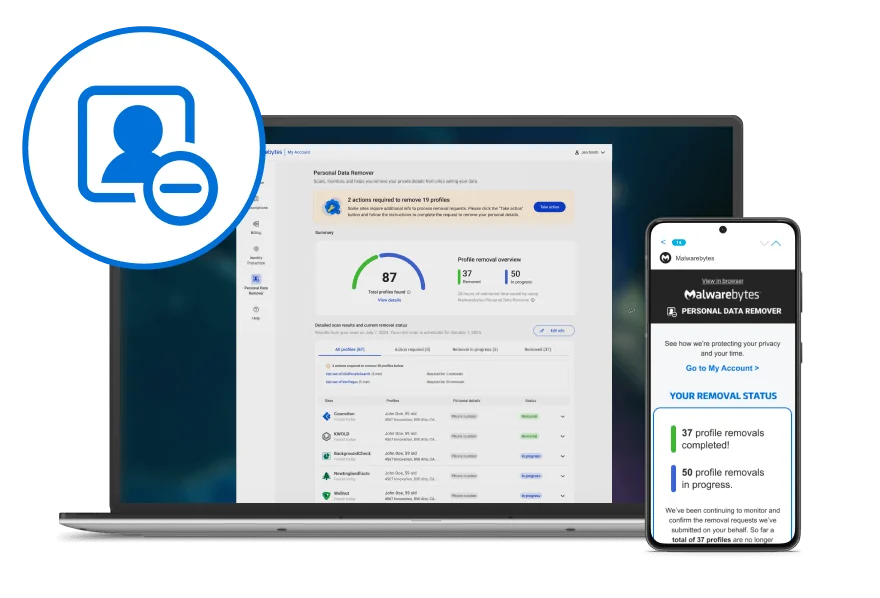
The dashboard is valuable as a work queue, not as the final source of truth. It tells you what Malwarebytes believes it found and what state its request workflow has reached. The underlying broker page determines whether a public profile is actually absent at the time you check.
Exposed, In Progress, Action required and Removed mean different things
The official status guide defines Exposed as an openly available profile that hasn't been removed. In Progress means a removal request was submitted and is still being processed. Action required means Malwarebytes can't complete the request for the user. Removed means the service believes the profile was successfully removed.
None of those labels is a risk rating. An Exposed listing may contain only an old city, or it may publish a current phone and address. An In Progress record may disappear tomorrow or remain visible for weeks. Prioritize by the sensitivity and accuracy of the exposed fields rather than the color of the badge.
| Dashboard status | What Malwarebytes says it means | What the reader should do |
|---|---|---|
| Exposed | Profile is available and not removed | Confirm it's yours, record the URL and prioritize current sensitive data |
| In Progress | A request is being processed | Wait up to 45 days while preserving the original listing and request date |
| Action required | The broker needs the subscriber to act | Follow the broker instructions, minimize identity documents and save confirmation |
| Removed | Malwarebytes recorded a successful removal | Check the source while logged out and repeat the check later |
A 2025 r/privacy commenter reported finding a listing still visible two days after Malwarebytes marked it Removed. That's one anecdote, not a service-wide failure rate. It's enough to justify the same external verification we would apply to every removal provider.
Automatic and guided removals: a subscription doesn't eliminate every form
Malwarebytes can submit many requests as an authorized third party, but some brokers refuse third-party completion or require direct identity verification. The April 2026 action guide sends those records to the Action required column and supplies the broker's process.
The user may need to open an opt-out page, confirm a profile, respond to email or provide identifying evidence. Malwarebytes lets the user mark the task done or report that the opt-out couldn't be completed. In some cases one broker request can cover several profiles, but the article doesn't promise that for every site.
Provide the minimum evidence the broker accepts. If an ID image is required, follow the site's instructions and redact nonessential fields where permitted. Never upload identity documents through an unexpected message. Save the request URL, date, confirmation number and a screenshot that doesn't expose the document itself.
This guided layer is still useful because the hard part is often finding the current procedure and remembering to return. It isn't full automation, and a comparison table that gives Malwarebytes an unqualified “automatic removal” checkmark hides work the buyer may care about.
Paid scans run every two months, and brokers may take up to 45 days
Malwarebytes says Personal Data Remover scans broker sites every two months. The company frames that interval as a way to avoid repetitive checks and show meaningful privacy changes. It also says a broker may take up to 45 days to remove a profile after the request reaches it, although some finish sooner.
This isn't an instant-cleanup product. A first-day screenshot can show discovery and submitted requests, but it can't demonstrate durable removal. A serious review needs to preserve the initial listings, wait through the broker window and check again after the next scan cycle.
The two clocks overlap. A listing could disappear within the first 45 days and reappear before the next scheduled scan, or it could remain In Progress until the first cycle is nearly finished. Customers facing an active harassment or doxxing risk shouldn't wait passively for the normal cadence; they should use direct urgent channels and safety support.
Our buyer protocol uses day 45 for the first external audit and day 90 for persistence. That isn't an official Malwarebytes guarantee. It's a practical editorial schedule derived from the published broker window and bi-monthly rescanning interval.
How to verify a “Removed” result without creating new exposure
Start with the exact source and profile URL recorded before removal. Open it in a private browser window while signed out, then search the source by name, age and city only as needed. Don't pay a people-search site or provide extra identifiers merely to confirm that a free public listing disappeared.
Check whether the URL is gone, the public preview is suppressed or only some fields changed. A search-engine snippet can lag behind the source, so open the result carefully and distinguish cached text from a live broker profile. Record the date and outcome without saving more personal information than the audit requires.
Repeat the check around day 90 and after a move, phone change or public-record event. If the profile returns, compare it with the old version and let Malwarebytes resubmit or use the direct opt-out. The product's value lies partly in this recurrence handling, but the subscriber still needs a short list of high-risk sources to watch.
A green Removed total is therefore a starting point for validation, not a reason to stop thinking. This standard may feel demanding, but it protects both sides: the user catches visible failures, and Malwarebytes isn't blamed for a stale search snippet or another person's matching profile.
Incorrect matches are expected when names and locations overlap
Malwarebytes says its scan searches for profiles close enough to the information supplied and can't confirm that every result is 100 percent yours. Someone with the same name, age range or former city can appear in the report. The current incorrect-profile guide provides a “Not you?” control for removing the match from the working view.
That disclosure is important. A higher number of findings can reflect broad matching rather than better discovery, while a narrow matcher can miss an alias or old address. Broker count and profile count are weak quality metrics without a verified precision and coverage study.
Review each high-risk result before requesting action. Removing a namesake from your dashboard shouldn't be described as deleting the other person's data from the broker. Malwarebytes' support language says the profile is marked Removed and moved to the Removed tab, which can make the workflow label easy to misread.
Add previous names and locations when they genuinely belong to you, then revisit false matches. A careful profile improves the chance of finding your records and reduces wasted attention, but there's no public evidence that it eliminates every collision.
Data can reappear after removal, which is why the subscription recurs
Broker deletion isn't permanent control over every upstream source. A later public record, address update, loyalty file, app feed or purchased dataset can recreate a profile. Malwarebytes says people appear on the same sites two or three times per year on average, while acknowledging that this figure comes from historical internal data.
That vendor statistic shouldn't be treated as a universal scientific rate. It does describe the business reason for recurring scans: a one-time cleanup decays as new data enters the ecosystem. The service can detect and resubmit at covered sources while the subscription remains active.
Cancellation therefore changes more than the billing relationship. The management guide says active scanning stops when the subscription ends. Requests already sent may continue, even though In Progress profiles can appear as Exposed after cancellation.
Export or record priority statuses before the term ends and schedule your own follow-up. If you move to another service, compare source-level results rather than assuming the new provider's total should match Malwarebytes. Different networks and matching rules will produce different counts.
Can it reduce spam, stalking and identity-theft risk?
Removing a current phone, home address, relatives and age from public people-search pages can make casual targeting harder. It can reduce the number of legitimate data sellers that keep redistributing those details. That's useful risk reduction for ordinary privacy, harassment concerns and highly personalized scam research.
It can't stop every spam call or text. In an April 2026 r/Malwarebytes response, the official support account said removal may reduce future sharing but won't immediately or completely stop spam, especially when a phone number already circulates in leaked lists. Keep carrier and device filters active.
The same distinction applies to stalking. Lower public visibility can help, but an abuser may know the address, access a shared account, use a relative or obtain records elsewhere. Anyone facing a credible threat needs a broader safety plan rather than a 45-day broker queue.
Identity theft is broader still. Removing broker profiles doesn't freeze credit, invalidate an exposed SSN or monitor bank transactions. The service complements preventive account controls and the recovery protections examined in our Malwarebytes Identity Theft Protection review.
The privacy tradeoff: finding your data requires giving Malwarebytes data
A removal provider needs names, age and address history to match broker records and prove authority. That concentrates the exact details a privacy-conscious customer wants to reduce elsewhere. The right question isn't whether the service collects personal information—it must—but which fields it needs, who receives them, how long they remain and how deletion rights work.
Malwarebytes' privacy policy was updated June 16, 2026. It says the company doesn't sell user data, describes contact, account, product and usage information, and explains service-provider and legal sharing. The product page also cites NIST CSF 2.0, NIST 800-53 and ISO 27001:2022 compliance claims.
Those statements are useful but don't answer every product-specific question. The general public policy doesn't publish one obvious retention period for each PDR profile field or a complete map of every broker request. A standards reference isn't an independent audit report for the removal workflow.
Enter only accurate data needed for matching, enable strong MyAccount authentication and use Malwarebytes' privacy-rights route if you later want access, correction or deletion. Before uploading an identity document to a broker's manual process, evaluate that broker's own handling separately; Malwarebytes can't turn a third-party form into its own privacy boundary.
Personal Data Remover is currently US-only
The current product page says Personal Data Remover is available only in the United States. Translated marketing pages may still be reachable from other countries, and Malwarebytes sells security products internationally, but neither fact expands PDR eligibility. Non-US readers shouldn't buy a bundle assuming the removal component will activate.
Broker ecosystems and privacy rights differ by country. A service optimized for US people-search sites may miss local directories and commercial registries, while a GDPR-based provider may be able to send requests across more European jurisdictions. Compare local coverage, language and legal representation rather than translating a US broker count.
Malwarebytes points non-US users to its free Digital Footprint Scan. That can identify known breach and exposure signals tied to an email, but it isn't a substitute for recurring broker removal. The distinction belongs in the plan comparison before payment.
US-only also affects families abroad and people moving between countries. Ask whether an existing subscription continues after a permanent move and whether old US addresses remain scanned. Public product copy didn't give us a safe universal answer.
Personal Data Remover versus the Digital Footprint Scan
The Digital Footprint Scan looks for exposed accounts, passwords and identifiers associated with an email across known breaches, dark-web sources and online data. It helps a reader understand what may have leaked and which account or credential needs attention. Malwarebytes currently offers it as a free account tool.
Personal Data Remover focuses on people-search and broker profiles built around identity details such as names, addresses and phone numbers. Its paid job is to submit and track opt-outs, while the free PDR scan supplies a report and DIY guidance. A breach record and a broker listing can contain similar fields but require different responses.
If the Digital Footprint Scan finds an exposed password, change it at the affected account and revoke sessions; broker removal can't repair the credential. If PDR finds a public current address, use the removal workflow; changing a password won't delete the listing. Identity monitoring may continue watching for misuse after either exposure.
Malwarebytes' own product FAQ makes this separation explicit, which is more helpful than a single “privacy tools included” checkmark. The buyer should run the free tools first, classify each finding and pay only for the recurring job that remains.
Personal Data Remover versus Identity Theft Protection
Personal Data Remover tries to reduce public and broker exposure before it's repeatedly sold or discovered. Identity Theft Protection watches for exposure and suspicious use, may include credit monitoring, supplies recovery help and attaches conditional insurance to eligible plans. One reduces accessible records; the other detects and responds to misuse. A Privacy VPN subscription changes network exposure in transit but doesn't perform either identity job.
Neither replaces the other. A broker opt-out doesn't monitor three credit files, and an identity alert doesn't automatically delete a people-search profile. Ultimate bundles them because the jobs complement each other, not because they're identical product names.
The current $119.99 Ultimate promotion can make the combined plan look obvious beside $99.99 standalone PDR. Read the full terms before jumping. Identity features vary by plan and location, insurance contains sublimits, and the first-year discount can hide a larger renewal. Our identity-protection review decodes those conditions separately.
Readers who only want less public exposure should compare specialist removers and California's free system. Readers responding to an active identity incident should contact institutions, freeze credit where appropriate and use recovery resources immediately rather than waiting for broker removal.
Malwarebytes versus Incogni, Optery, DeleteMe and Aura
Malwarebytes competes on account convenience and a relatively low displayed standalone annual price. Its public weakness is coverage clarity: current pages disagree, and we found no obvious promise of unlimited custom removals outside the network. A buyer with a few specific dangerous listings may care more about custom escalation and screenshot evidence than the headline database count.
Current specialist roundups describe Incogni as strong in broad recurring legal requests and an upper tier with custom removals. Optery emphasizes exposure reports, screenshots and several automation tiers. DeleteMe combines automation with human-reviewed reports and multi-person plans, while Aura sells broker removal inside a larger identity and security bundle. Features and prices change, so treat those as categories to verify, not permanent scores.
TechRadar's July 2026 data-removal roundup is useful for current plan shape. Malwarebytes' own comparison is useful for learning how it frames competitors, but it ranks itself first and can't serve as independent evidence. Check each vendor's primary broker list, custom-request policy, family scope and renewal.
| Buyer priority | Malwarebytes position | Alternative to inspect |
|---|---|---|
| Existing Malwarebytes account and low friction | Strong fit inside MyAccount and Ultimate | Keep Malwarebytes on shortlist |
| Published broad recurring requests | 100+/175+ inconsistency needs clarification | Compare Incogni's current covered network |
| Listing screenshots and granular proof | Dashboard reports status; public proof depth is unclear | Compare Optery's current reporting tier |
| Human-reviewed reports or multiple people | Standalone page covers one adult | Compare DeleteMe's current household plans |
| Identity recovery plus broker removal | Ultimate bundles both | Compare Aura and Norton/LifeLock terms |
| Free California-wide statutory request | Paid convenience layer | Submit DROP first or alongside it |
The right comparison asks whether the service finds your priority sites, proves progress, handles recurrence and protects the people you need at the renewal price. One year of a cheaper service with poor source fit isn't better value than a more expensive service that handles the actual exposure.
California DROP and direct opt-outs are serious free alternatives
California's official Delete Request and Opt-out Platform, or DROP, opened a free route for residents to send one request to more than 600 registered data brokers. The state's July 10 explanation says submitted information is hashed for matching and a DROP ID lets the consumer track status.
The timing matters on this July 30 review. Data brokers must begin retrieving requests on August 1, 2026 and process matching non-exempt data on a rolling 45-day basis, subject to statutory exceptions. Requests were open before the duty date, but it would be false to imply that every broker had already completed deletion.
DROP isn't a universal internet eraser. It covers registered brokers subject to California law, not every breach database, social network, search result, public record or unregistered actor. Matching depends on the information supplied, and legal exceptions remain. Still, a free request to 600+ brokers changes the value calculation for eligible Californians.
The FTC's people-search guidance explains direct opt-outs for everyone. Manual work costs time but gives the user source-level control. A 2024 Consumer Reports study of seven other services found its manual group performed better on the tested sites, although that study didn't include Malwarebytes and shouldn't be misquoted as a Malwarebytes score.
Who should buy Malwarebytes Personal Data Remover
Buy it if repeated opt-outs are the task you'll otherwise abandon. The service's clearest benefit is reducing administrative work across many sites and returning every two months. Someone with several old addresses, aliases or a public-facing job may value the recurring queue more than a one-time cleanup.
Buy it if you already use Malwarebytes and want one account. The account integration is simple, and Ultimate may be stronger first-year value than standalone PDR when security, VPN and identity protection replace separate subscriptions. Read our Malwarebytes Free versus Premium comparison and browser-security tools guide before counting bundled rows as savings.
Buy it after the free scan finds meaningful priority records. A list with a current phone, address or relatives is a better reason than a large total of stale or incorrect profiles. Save those priority URLs so the paid service can be audited.
Buy it when guided manual work is acceptable. Some records will require the subscriber. If the buyer expects zero forms and zero follow-up, the product documentation already shows that expectation is wrong.
Who should skip it
Skip it outside the US. The product is currently US-only, and a translated page or international antivirus license doesn't change that. Choose a remover with explicit local coverage and rights handling.
Skip it when the priority site isn't confirmed. The 100+/175+ conflict makes a general count insufficient. If a dangerous current listing sits outside the network and Malwarebytes offers no custom request for it, a specialist or direct opt-out is the better tool.
Skip it if you need independently measured performance today. We found credible category research but no current independent Malwarebytes-specific removal rate. A buyer who requires screenshot proof, custom escalation and a public methodology should compare specialist reporting before paying.
Skip standalone PDR when Ultimate replaces tools for only $20 more—or when it duplicates all of them. Both situations make the $99.99 tile a poor default. Compare the first term and renewal with the subscriptions you'll actually cancel.
A 45/90-day buyer test is more useful than a same-day verdict
Before activation, save a short list of priority broker names, public profile URLs and exposed field categories. Don't create a giant archive of your own sensitive data. Record enough to recognize whether the source disappears, changes or belongs to someone else.
During the first day, check whether the paid account identifies those sources and correctly classifies your profiles. Separate false matches, complete urgent Action required tasks and record when each request enters In Progress. Recheck after 24 hours because Malwarebytes says paid results can take time to update.
Around day 45, open the priority sources while signed out and compare them with the dashboard. Around day 90, repeat the check to catch fast reappearance and the effect of the next scan cycle. If a record remains, preserve the request evidence and ask support whether the site is covered, delayed or manual.
| Checkpoint | Account check | External check | Decision |
|---|---|---|---|
| Before purchase | Run free scan and save checkout terms | Record priority source URLs | Buy only if coverage and value fit |
| Day 1–2 | Review matches and action items | Confirm important profiles are yours | Correct inputs and finish manual tasks |
| Day 45 | Review In Progress and Removed | Check source pages while signed out | Escalate unexplained visible records |
| Day 90 | Review new scan and reappearances | Repeat priority-source check | Keep, switch or manage manually |
| Before renewal | Export useful status evidence | Compare source-level results and competitors | Renew for saved time, not sunk cost |
Our final verdict is conditional but favorable. Malwarebytes offers a practical US privacy-maintenance service at a competitive visible price, and it's unusually candid about manual tasks, wrong matches and reappearance. The coverage inconsistency and lack of independent product-specific outcomes prevent a stronger recommendation. Verify the sources that matter, use California DROP where eligible and renew only if the saved time is visible in your own audit.
Malwarebytes Personal Data Remover FAQ
Is Malwarebytes Personal Data Remover worth it?
It can be worth $99.99 per year for a US customer who values recurring broker scans and automated opt-out requests more than the time needed for manual removal. It's less compelling when you need the broadest published coverage, custom removals outside a fixed network, family pricing, or independent proof for every completed request. Use the free scan first and manually verify priority sites before paying.
How many data brokers does Malwarebytes Personal Data Remover cover?
The current official pages don't give one consistent number. On July 30, 2026, the canonical product page said 100+ data-broker databases, while an active product-page variant and Malwarebytes' own 2026 comparison said 175+. Ask support or inspect the current checkout for the covered list rather than treating the larger marketing number as settled.
How long does Malwarebytes take to remove personal data?
Malwarebytes says a broker may take up to 45 days to remove a profile after a request is submitted. Some requests finish sooner, some require the subscriber to act, and a profile can reappear later. Check priority listings outside the Malwarebytes dashboard around day 45 and again around day 90.
Is the Malwarebytes personal data scan free?
The initial scan is free and can show likely broker profiles plus DIY removal guidance. The paid service searches through the Malwarebytes account, starts removal requests, tracks progress and repeats scans. Free and paid results may differ, so don't assume the free total will remain identical after activation.
Does Malwarebytes remove every profile automatically?
No. Malwarebytes says some data brokers don't allow a third party to complete the request. Those records receive an Action required status and the dashboard supplies instructions for the subscriber to finish the opt-out. A paid subscription therefore reduces manual work but doesn't eliminate it.
Is Malwarebytes Personal Data Remover available outside the US?
No, the current product page says Personal Data Remover is US-only. Malwarebytes offers a Digital Footprint Scan in other regions, but that exposure scan isn't the same as automated broker removal. Non-US readers should compare services built for their local privacy law and broker ecosystem.
Will Personal Data Remover stop spam calls and texts?
It may reduce future exposure of a phone number on covered broker and people-search sites, but it can't recall lists that already contain the number or stop every caller. Malwarebytes support gave the same qualified answer in April 2026. Keep device spam filtering, carrier controls and blocking or reporting active.
What happens if I cancel Personal Data Remover?
Disabling auto-renewal stops future active scanning after the subscription ends. Malwarebytes says removal requests already submitted may continue to process, although In Progress profiles can appear as Exposed after cancellation. Save a report before the term ends and manually recheck the important sites.
Is California DROP a free alternative to Malwarebytes?
For eligible California residents, DROP is a major free option. A single state-run request can reach more than 600 registered data brokers, with mandatory broker processing beginning August 1, 2026 and rolling 45-day duties subject to legal exceptions. It doesn't replace every people-search, breach, search-engine or custom removal task, so the two approaches can complement each other.