
Malwarebytes Scam Guard Review 2026: A Useful Pause, Not Proof
Scam Guard can give a useful second opinion on a strange text, email, screenshot, URL or phone number. The hard part is knowing what its AI answer can't prove.

Quick answer: Malwarebytes Scam Guard is worth using as a free, on-demand second opinion when a text, email, phone number, URL or screenshot feels wrong. It's available inside current Malwarebytes consumer apps on Windows, Mac, iPhone, iPad and Android; Malwarebytes also offers related access through ChatGPT and a Claude connector. It doesn't automatically block every scam, replace antivirus or prove a message is safe. Redact personal data, submit the suspicious content without opening its link, and verify any financial or account request through the organization's official app, website or phone number.
Quick verdict: a useful pause before a risky action
Malwarebytes Scam Guard gets the most important part right: it gives a person somewhere to pause before clicking, paying or replying. You can paste suspicious text, enter a phone number or URL, or attach a cropped screenshot, then ask why the item looks risky. For a relative who would otherwise guess from spelling and logos, that structured second opinion can be genuinely useful.
We recommend the tool with two firm conditions. First, treat the answer as a lead, not a certificate of safety. Second, remove personal information before submitting anything. Scam Guard combines AI analysis with Malwarebytes threat intelligence, but we found no published independent standalone accuracy score that would justify “trust the green verdict” or any similar promise.
The value proposition is better than several current marketing pages make it sound. Malwarebytes' dated feature matrix lists Scam Guard as free on Windows, Mac, iPhone, iPad and Android. You don't need to buy an antivirus plan merely to ask the assistant about a suspicious message, although surrounding real-time, VPN and identity features can require a paid plan. Our Malwarebytes Free versus Premium guide owns that broader boundary.
Scam Guard is also not a silent protection layer. You normally bring the suspicious content to it. A browser extension can stop a known malicious page, an antivirus can block a payload, and a bank can confirm whether a transaction alert is real. Scam Guard sits before those actions and helps you ask better questions.
Our bottom line is simple: use it when uncertainty might otherwise become a click. If the matter involves money, credentials, account recovery, a supposed family emergency or law enforcement, verify through a second channel even when the tool says the item appears legitimate.
What Malwarebytes Scam Guard actually is
Scam Guard is an AI-assisted chat feature backed by Malwarebytes' threat-intelligence data. The current Scam Guard product page says it accepts text, email content, websites, ads, messages, URLs, phone numbers and images or screenshots. It returns a risk assessment, explains suspicious signals and suggests safer next steps.
“Real-time” in the marketing copy can be misleading if read as continuous inbox protection. The response arrives quickly after you ask, but Scam Guard doesn't watch every app and conversation by default. It's better described as an on-demand checker inside the Malwarebytes app, with related Malwarebytes integrations available in ChatGPT and Claude.
That scope is intentionally different from the full security suite. Our current Malwarebytes review evaluates malware protection, scans, lab results, platform differences and the rest of the product. This page judges only the scam-assistant decision: when it helps, what it sees and how far to trust it.
The assistant can explain social-engineering patterns that a conventional file scanner never sees. Urgency, secrecy, payment through gift cards, an unusual sender country, a newly registered lookalike domain and a request to move a conversation off-platform are all contextual signals. None is proof alone, but several together can turn a vague bad feeling into a concrete reason to stop.
Is Scam Guard free? The official pages disagree at first glance
Malwarebytes' product page currently says Scam Guard is available in Premium Security, while the same page calls it a free scam detector. The February desktop announcement also calls it free, and the original June 2025 mobile launch covered both free and paid users. A reader shouldn't have to decode three different calls to action to answer a basic price question.
The strongest current source is the official Free versus Paid feature matrix updated July 28, 2026. It places Scam Guard on the free side for Windows, Mac, iOS, iPadOS and Android. That dated feature table controls our answer because it's newer and more specific than a generic Premium banner.
Free doesn't mean every protection surrounding Scam Guard is free. Windows and Mac real-time antivirus, Android real-time and ransomware protection, iPhone web and call protection, VPN access and identity services have their own plan rules. The Malwarebytes pricing and renewal guide separates those subscriptions without pretending the chat feature alone justifies an upgrade.
If an app presents a trial screen before the free feature, don't assume a charge is required. Confirm the installed app is current, look for the free path and check the platform-specific matrix. Subscription screens and store flows change faster than editorial screenshots, so the final control is what the current app offers on that device before payment authorization.
Where Scam Guard works in July 2026
The in-app feature is available across Malwarebytes consumer apps for Windows, macOS, iPhone, iPad and Android. The current desktop Scam Guard instructions name Windows 10 or later and macOS, while the mobile instructions cover iOS, iPadOS and Android.
The feature arrived in stages. Malwarebytes launched the mobile version in June 2025, expanded Windows availability later in 2025 and announced Windows and Mac desktop coverage in February 2026. An older review that still calls it mobile-only is now stale.
| Access path | What it checks | Account or plan | Important limit |
|---|---|---|---|
| Malwarebytes for Windows | Text, email, popup, domain, URL, screenshot | Scam Guard listed as free | On-demand; Windows 10+ |
| Malwarebytes for Mac | Text, email, popup, domain, URL, screenshot | Scam Guard listed as free | On-demand; app UI may differ from Windows |
| iPhone and iPad app | Message, email, URL, number and screenshot context | Scam Guard listed as free | No traditional whole-device malware scan on iOS |
| Android app | Message, email, URL, number and screenshot context | Scam Guard listed as free | Separate paid layers handle real-time malware protection |
| ChatGPT integration | Message, URL, domain, phone number and screenshot | No Malwarebytes account required per current help | ChatGPT platform rules apply separately |
| Claude connector | URL, domain, phone, email, WHOIS and reports | Free connector; no Malwarebytes account | Claude platform rules apply separately |
Availability doesn't guarantee identical controls on every platform. Mobile operating systems expose different filtering and notification capabilities, and the AI connectors live inside another company's product. Follow the instructions for the access path you're actually using instead of transferring a Windows screenshot to an iPhone or a Claude privacy statement to the Malwarebytes app.
What Scam Guard can check—and what gives the best answer
The assistant works best when it receives enough context to explain the request without receiving everything. A sender number plus the exact demand is more useful than “Is this bad?” A cropped screenshot showing the claimed organization, urgency, payment method and suspicious domain is more useful than a full phone screen containing unrelated chats and notifications.
Malwarebytes names phishing, romance, financial, shipping, job, text and robocall scams among the covered categories. That list is plausible because these attacks share observable patterns, but category support isn't a guarantee that every new campaign is already known. A convincing business-email compromise may use a real account, perfect grammar and a familiar invoice format.
For a URL, don't open the destination just to obtain more evidence. Copy the visible address without visiting it, or type the domain from a screenshot. For a phone call, note the number, claimed organization, request and any callback instructions. Audio tone alone is a weak signal, especially now that voice cloning can imitate a familiar person.
A screenshot can be the safest input because it freezes the content without making the link active. The tradeoff is privacy: screenshots often include account names, balance amounts, contact photos, one-time codes and notification previews. The best submission is a small, readable crop that contains the scam mechanics and little else.
A safe Scam Guard workflow that never opens the suspicious link
Start outside the suspicious content. Open the known Malwarebytes app from the device's app launcher, not from a link in the message. Choose Scam Guard, describe what arrived and attach a redacted screenshot or paste only the relevant text. On desktop, the current help page places the feature under Scam Guard with an “Ask me anything” field; mobile labels it AI Scam Guard under Security.
Ask a narrow question: “What signals make this risky, and how can I verify the claimed sender without using its link or phone number?” That wording encourages an explanation and an independent route. A bare “safe or scam?” invites an overconfident binary answer and gives you less to inspect.
Read the reasoning before the label. A domain mismatch, unusual country code, artificial deadline and request for cryptocurrency are testable observations. “This feels suspicious” isn't. If the assistant mentions a fact such as domain age or an official policy, verify it through a primary source rather than letting one generated paragraph carry the whole decision.
Finish through a separate channel. Type the organization's known domain, open its official app, use a phone number printed on a card or statement, or contact the person through a saved number. Don't reply “Is this really you?” inside the compromised conversation, because the scammer or stolen account will answer yes.
Redact before you upload: the screenshot is often more sensitive than the scam
Crop first, then obscure anything that isn't needed for analysis. Passwords, recovery phrases, one-time codes, full account and card numbers, government IDs, home addresses, health information, children's details and private conversation history should stay out. A scam checker never needs a seed phrase or the code that approves a transfer.
Don't rely on drawing a translucent line over text if the editing tool can be reversed or the characters remain visible. Use the phone's solid markup tool, crop the area away, or replace the sensitive region with an opaque block in a flattened image. Re-open the saved file and zoom in before attaching it.
Preserve the pieces that matter: sender address or number, visible domain, claimed organization, demand, deadline and payment method. If a message contains a tracking or account URL, remove personalized query parameters when possible and submit the base domain separately. Those parameters can contain identifiers that connect the report to you.
Redaction also improves the answer. Unrelated notifications and long conversation history can distract an AI system from the suspicious pattern. A focused crop reduces both privacy exposure and analytical noise without hiding the evidence that matters.
A Scam Guard verdict is evidence, not proof of safety
A high-risk answer can be useful even when Malwarebytes has never seen the exact sender. Social-engineering patterns generalize: a demand for secrecy, an irreversible payment and a mismatched domain remain suspicious across campaigns. The assistant's explanation can help a user recognize those patterns the next time.
A low-risk answer is harder. The absence of known indicators doesn't prove a new domain, compromised email account or carefully tailored request is legitimate. Attackers deliberately borrow real logos, real employee names and real conversation context. A newly created scam may not yet appear in any reputation database.
AI adds another uncertainty layer. A conversational system can misunderstand a cropped image, infer a sender country incorrectly, invent a policy or sound confident while missing the decisive clue. Threat intelligence can correct known-domain questions, but it doesn't make every natural-language explanation deterministic.
Use the verdict to choose the next verification step, not to authorize the transaction. Money, credentials, remote access, private keys, account recovery and emergency claims deserve an independent channel every time. That rule protects you from both a missed scam and a false alarm.
Independent evidence: useful hands-on proof, no standalone score
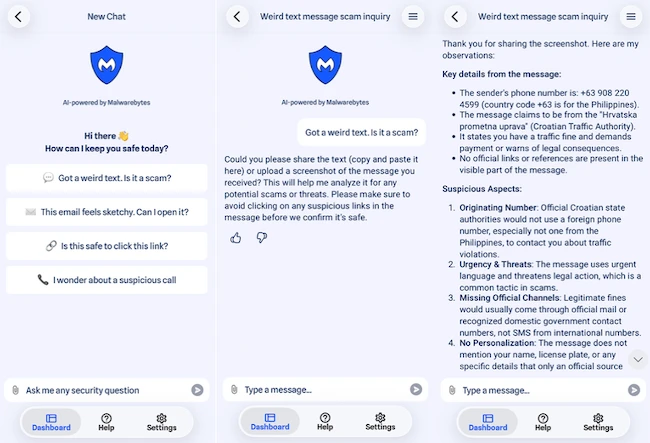
The best current independent example we found is Help Net Security's July 2026 iPhone product showcase. A writer uploaded a screenshot of a phishing SMS impersonating a Croatian traffic authority. Scam Guard identified the foreign sender number, urgency, missing official channel and lack of personalization, then recommended independent verification.
That example establishes that the feature can parse a real screenshot and return concrete reasoning. It doesn't establish sensitivity, specificity, false-positive rate or performance against deepfakes, account takeover and multilingual conversations. One correct answer is a demonstration, not an accuracy benchmark.
AMTSO's Artifact Security Scam and Phishing Evaluation listing names Malwarebytes among six vendors and links a public test plan. The plan includes deepfake impersonation, job and investment fraud, tech-support scams, romance and pig-butchering attacks, fake shops, ClickFix, FileFix and FakeCaptcha scenarios.
At our July 29 check, Artifact Security's published reports page didn't show the Scam and Phishing result report. We therefore treat the AMTSO page as evidence that a structured evaluation is planned or in progress, not as evidence that Malwarebytes passed or achieved a specific score. We'll update the review when a final report and per-product results are public.
What “15% of interactions prevented high-risk fraud” really tells us
A February 2026 Malwarebytes press release says 15% of Scam Guard interactions prevented users from losing more than $1,000 or incurring severe personal risk. That's a striking vendor claim, but it isn't a detection rate.
The public release doesn't give enough detail about the interaction count, sampling, languages, how “prevented” was verified, how potential loss was estimated or how many safe items were classified as dangerous. Without those denominators and error rates, the number can't tell us how often Scam Guard is right.
The claim does suggest something about the use case. People bring the tool consequential situations rather than only obvious spam, and a clear warning may interrupt a costly decision. That supports the pause-before-action design, but it remains vendor-reported outcome data rather than independent protection evidence.
We don't place that figure in Review schema, a score badge or a comparison table. Structured data should describe the page and product, not convert a press headline into an editor rating. The same rule applies to broader Malwarebytes app-store stars: they cover an ecosystem, not this feature's accuracy.
Privacy: local 30-day history doesn't answer every processing question
The product FAQ says Scam Guard queries are stored locally for 30 days for convenience. It also uses the phrase “strict zero-logging policy,” then says reported scams are registered in the Malwarebytes database. Those sentences aren't mutually exclusive if local chat history, ordinary processing and deliberately reported indicators are treated as different data flows, but the page doesn't map those flows precisely.
Malwarebytes' general privacy policy updated June 16, 2026 didn't contain a dedicated Scam Guard section when we checked. We couldn't verify a current independent privacy audit covering the in-app assistant's prompts, screenshots, retention and model-processing path. That gap is why our verdict is privacy-aware rather than “zero data leaves your phone.”
An AI service must transmit enough information somewhere for analysis unless it runs entirely on-device, and Malwarebytes doesn't present Scam Guard as a fully offline local model. The local-history statement should therefore be read narrowly: it describes where the convenient 30-day conversation history is kept, not a complete technical architecture or universal deletion guarantee.
Act as though submitted content may be processed outside the device, even when the visible history is local. Send the smallest useful excerpt, avoid secrets and check the privacy rules of ChatGPT or Claude when using those access paths. A vendor's connector policy can't override the surrounding platform's account and workspace settings.
Reporting a suspicious item is a separate, optional step
The current desktop and mobile help articles say Scam Guard may ask whether you want to submit a suspicious phone number, email address or message to Malwarebytes' threat-intelligence team. The user confirms before that further analysis and database addition. Asking the assistant and reporting the indicator are therefore related but distinct actions.
Read the prompt before accepting. A phone number or malicious domain may be useful threat intelligence, while a full private conversation may contain far more than the indicator. If the app lets you report a narrow item, choose the number, address or domain instead of unnecessary personal context.
Reporting isn't the same as notifying a bank, marketplace, carrier or law-enforcement agency. Malwarebytes can enrich its detection database, but it can't reverse a transfer, freeze a card, restore an account or preserve every item of legal evidence. Use the affected platform's official reporting path as well.
If you aren't comfortable contributing the item, decline and continue with independent verification. A free security feature shouldn't turn uncertainty into pressure to share. The tool can still help explain risk without every user becoming a threat-intelligence source.
Malwarebytes in ChatGPT: convenient, but a separate data context
Malwarebytes launched its ChatGPT integration in February 2026. It can assess text messages, emails, direct messages, links, domains and phone numbers, look up domain-registration context and let users report suspicious content. The launch announcement described availability to ChatGPT Free, Plus, Team and Enterprise users where apps are available.
The current Malwarebytes in ChatGPT help page, updated July 16, says no Malwarebytes account or subscription is required. It instructs users to connect the Malwarebytes integration and address it with @Malwarebytes, then attach a screenshot or submit a number or link.
This is related to Scam Guard but shouldn't be described as the same app screen. ChatGPT owns the conversation shell, account and workspace; Malwarebytes supplies security capabilities and threat intelligence through the integration. Enterprise retention, administrator controls and regional availability can differ from a personal free account.
Use the same redaction rule. A screenshot uploaded through ChatGPT is entering ChatGPT's environment as well as the connected security workflow. Check the active account, avoid confidential employer or client data without authorization, and don't assume that “no Malwarebytes account” means “no account-level record anywhere.”
The Claude connector is free and useful, but not a privacy shortcut
Malwarebytes announced a Claude connector in April 2026. The connector can check links, phone numbers and email addresses, retrieve domain-registration context, inspect several indicators in one conversation and report suspicious content. Malwarebytes says it's free and doesn't require a Malwarebytes account.
The connector-specific privacy statement is more concrete than the general product FAQ. Malwarebytes says only items deliberately shared for checking are sent to its threat-intelligence systems, and that conversation messages and personal information aren't stored by Malwarebytes. If the user reports an item, Malwarebytes says the indicator and threat type are included, not the conversation content.
Those commitments apply to the Malwarebytes connector's handling, not to every part of Claude. Anthropic's account, conversation, workspace and retention controls remain separate. A company employee should confirm whether external connectors are approved before sending customer tickets, invoices or internal messages through them.
The connector is attractive when the suspicious material is already being discussed in Claude, but convenience can encourage oversharing. Extract the indicator first, remove unrelated content and ask for a threat-intelligence check. The safest connector request is still the smallest one that can answer the question.
Scam Guard versus Browser Guard: ask versus block
Scam Guard waits for the user to submit a questionable item. Browser Guard is a browser extension that can evaluate and block supported web activity while pages load. A person can therefore use Browser Guard to stop a known phishing destination and Scam Guard to understand a suspicious message that arrived before any page was opened.
The difference matters in an emergency. Pasting a domain into Scam Guard doesn't protect every browser tab, and installing Browser Guard doesn't analyze a romance conversation or phone script. Our Malwarebytes Browser Guard review covers its permissions, telemetry, free protection layers and compatibility issues.
Neither product should be used as an excuse to click. If Scam Guard says a link looks suspicious, there's no need to see whether Browser Guard catches it. If Browser Guard blocks a page, don't paste sensitive form contents into another tool to ask why. Preserve the domain and warning category, then verify the sender independently.
For a broader mix of browser reputation, content blocking and password-manager defenses, see our browser security tools guide. Scam prevention is strongest when each layer has a distinct job and the user knows which warning came from which product.
Scam Guard versus antivirus, VPN and identity protection
Antivirus watches files, processes and device behavior; Scam Guard reasons about content the user shares. A fake investment message can be dangerous without containing malware, while a malicious attachment can execute even when its email prose looks ordinary. The tools overlap at risk, not at mechanism.
A VPN encrypts network traffic and changes the visible IP address. It can't decide that a remote-access caller is lying, and Scam Guard can't encrypt public Wi-Fi. Our Malwarebytes Privacy VPN review keeps that purchase decision separate.
Identity monitoring and personal-data removal operate after or around exposure. They may alert a user to leaked data, credit activity or broker listings, but they don't authenticate today's text message. Scam Guard can help before disclosure, while recovery services matter after an account, identity or payment has been compromised.
A reasonable Windows setup might combine Microsoft Defender, optional Browser Guard and free Scam Guard without buying a duplicate real-time antivirus. Our Malwarebytes versus Microsoft Defender comparison explains when the paid device layer adds something and when an on-demand scanner is enough.
What to do after “high risk,” “uncertain” or “appears safe”
High risk: stop the interaction. Don't use the supplied link, callback number, QR code or payment instructions. Contact the claimed sender through a known channel, block and report the source, and preserve a minimal screenshot if a bank or platform may need evidence.
Uncertain: ask which missing facts would change the assessment. Check the base domain, sender address, known account notifications and official policy without opening the submitted destination. An uncertain answer isn't a reason to “try the link carefully”; it's a reason to move the verification outside the message.
Appears safe: keep the same independent check when the request has consequences. A genuine-looking password reset, invoice change or family emergency still deserves verification through the official account or saved contact. The cost of one extra check is small compared with a false negative.
If credentials were entered or money was sent, the classification stage is over. Change the password from a clean device, revoke sessions, contact the bank or payment provider, preserve transaction details and follow the service's official recovery process. A retrospective AI explanation can't freeze funds or remove an attacker from the account.
Where Scam Guard helps most—and where it can fail
Shipping and toll texts: these are good candidates because the assistant can compare the visible sender, urgency, odd domain and payment demand. The Help Net Security example shows this pattern clearly. Verification should still happen through the courier or authority's typed website, never through the message.
Romance and investment scams: the assistant can identify isolation, secrecy, rapid emotional escalation, guaranteed returns and unusual payment methods across a conversation excerpt. It can't determine whether a person is real from one photo or promise that a long-running relationship is legitimate. Reverse-image checks, video verification and refusal to send money remain essential.
Deepfake emergency calls: a transcript can reveal the demand, but text analysis can't authenticate a voice or live video. Use a family codeword and call the person back on a saved number. Our deepfake scam guide explains the separate verification and recovery steps.
Business email compromise: a real employee mailbox can send the fraudulent request, so sender reputation and perfect grammar may look normal. Any change to bank details, payroll, gift-card purchase or urgent wire instructions needs a known approval channel. This is a process-control problem as much as an AI-classification problem.
Tech-support popups and ClickFix pages: Scam Guard can explain why a phone number, urgent warning or copy-and-paste command is dangerous. Browser Guard and antivirus are more useful for blocking the site or payload. Never run a command merely to give the assistant more diagnostic evidence.
Community feedback exposes the biggest usability problem
The original Malwarebytes Reddit launch thread contains both interest and a fair criticism: a person most vulnerable to a scam may not open a separate app, start a chat, crop a screenshot and ask for analysis. Several commenters wanted tighter operating-system or messaging integration.
That friction is real. Scam Guard works only if the pause happens before the click, and every extra step competes with urgency, fear and convenience. A household setup should therefore practice the workflow once with a harmless example, pin the app and agree that money or account requests always trigger a second-person check.
Another community discussion about AI in Malwarebytes shows skepticism about adding generative features to a security product. A Malwarebytes product lead replied that Scam Guard combines AI with several detection technologies rather than relying on a generic chatbot alone. That explanation is useful, but it's still a vendor statement inside a community thread.
We use these posts as directional evidence, not as a vote count or product test. They explain why the feature may be valuable and why it may be ignored. The editorial answer is to make the workflow simpler and the trust boundary clearer, not to fabricate enthusiastic user testimonials.
Who should use Malwarebytes Scam Guard
Use it if suspicious messages regularly create uncertainty. Delivery notices, bank alerts, marketplace buyers, unfamiliar invoices and family-emergency claims benefit from a structured explanation before action. The tool is especially useful when the alternative is guessing from grammar or a logo.
Use it as a teaching tool for a household. Ask the assistant to name the signals and verification steps rather than only giving a label. Over time, the user learns to notice mismatched domains, artificial deadlines, irreversible payments and attempts to move the conversation.
Use it when free, layered protection is the goal. Scam Guard can sit beside a maintained real-time antivirus and browser protection without forcing a paid upgrade. Our best antivirus for scam protection guide compares broader products when automatic web, email and identity layers are needed.
Use it when shame would otherwise prevent asking for help. Scam victims are often told the warning was obvious, which makes people hide uncertainty. A private first check can create the pause needed to contact a real person, bank or organization before the damage occurs.
Who shouldn't rely on Scam Guard alone
Don't rely on it alone for high-value decisions. Wire transfers, crypto, gift cards, payroll changes, tax notices, account recovery and remote-access requests require an independent human or official channel. The assistant can prioritize risk, but it can't authenticate the other party.
Avoid submitting regulated or confidential material without approval. Lawyers, clinicians, financial professionals, support teams and company employees may have duties that prohibit sending client or internal data to an external AI or connector. Redaction may not be enough when the surrounding matter is confidential.
Skip it if the privacy ambiguity is outside your threat model. The local-history claim and optional reporting controls are helpful, but the app's full AI-processing path isn't documented with the precision we would want for secrets. A manual domain check and direct call may be safer than uploading the message.
Don't use it as malware cleanup. A suspicious attachment, installed remote-access tool or executed command needs device scanning and incident response. The Malwarebytes installation and setup guide covers the actual scanner and real-time modules.
Alternatives and complementary checks
The best alternative is often the claimed organization's official channel. Open the bank or courier app yourself, type the domain, use a card or statement phone number, and look for the same alert after signing in. This bypasses both the suspicious message and the AI system's uncertainty.
For domains, browser reputation services, WHOIS context and a password manager that refuses to autofill on the wrong site provide independent signals. Domain age alone isn't proof, and a compromised old domain can still be malicious. Combine registration context with the exact request and official-channel verification.
For messages, the platform's spam reporting and carrier controls can reduce repeat contact. For browser pages, Browser Guard, Microsoft SmartScreen, Google Safe Browsing and other maintained protections can block known destinations. For device compromise, use an antivirus scan and change credentials from a clean device.
A trusted person remains a powerful second check. Read the request aloud, explain how the sender wants to be paid and ask what would happen if you wait ten minutes. Scammers manufacture urgency because scrutiny breaks the script; Scam Guard is useful when it creates that scrutiny rather than replacing it.
Our final verdict stays deliberately modest. Malwarebytes Scam Guard is one of the more practical free AI security features because it meets a real moment of uncertainty and can explain the warning signs. Its value ends where proof begins: redact, ask, inspect the reasoning, and then verify outside the conversation.
Malwarebytes Scam Guard FAQ
Is Malwarebytes Scam Guard free in 2026?
Yes. Malwarebytes' feature matrix updated July 28, 2026 lists Scam Guard on the free side for Windows, Mac, iPhone, iPad and Android. Some product-page copy still places it inside Premium Security, so check the dated matrix and the actual app before paying merely to unlock this feature.
Does Scam Guard automatically block scam texts and emails?
No. Scam Guard is primarily an on-demand assistant: you open it and share a suspicious item for analysis. Other Malwarebytes components can filter web pages, calls or SMS on supported platforms, but the chat verdict itself isn't an automatic universal inbox blocker.
How accurate is Malwarebytes Scam Guard?
No current independent standalone accuracy percentage was available when we checked. AMTSO lists Malwarebytes in an Artifact Security scam-and-phishing evaluation plan, but the tester had not published product results on its reports page. Treat every answer as one signal and verify important requests independently.
Is it safe to upload a screenshot to Scam Guard?
It can be useful, but crop and redact first. Remove passwords, one-time codes, account numbers, addresses, IDs, medical details, private conversation context and unrelated notifications. A screenshot can contain far more personal data than the scam signal you want checked.
Does Malwarebytes store Scam Guard conversations?
The current product FAQ says queries are stored locally for 30 days for convenience and that reported scams are registered in Malwarebytes' database. That wording doesn't fully document every processing or retention step for ordinary AI analysis, so don't read it as a promise that uploaded content never leaves the device.
Can I use Malwarebytes Scam Guard in ChatGPT?
Malwarebytes offers a related ChatGPT integration that checks messages, links, domains, phone numbers and screenshots through Malwarebytes threat intelligence. The current help page says no Malwarebytes account or subscription is required. ChatGPT's own account, workspace and data controls still apply separately.
Is the Claude connector the same as the Malwarebytes app?
No. It exposes Malwarebytes threat-intelligence checks inside Claude, but it's a separate access path with its own setup and connector-specific privacy statement. Don't assume an app setting, conversation history rule or subscription feature automatically transfers to Claude.
Does Scam Guard replace antivirus or Browser Guard?
No. Scam Guard analyzes content you deliberately submit. Antivirus monitors files and processes, while Browser Guard can filter supported browser activity before or as a page loads. A useful security setup can include all three because they solve different problems.
What should I do if Scam Guard says a message is a scam?
Don't click, reply, call the supplied number or pay. Preserve only the evidence you need, contact the claimed organization through its official app, typed website or a number from a statement, then block and report the sender through the relevant platform. If money or credentials were already shared, contact the bank or account provider immediately.